Welcome Guest ( Log In | Register )

Bump Topic Topic Closed RSS Feed
132 Pages « < 94 95 96 97 98 > » Bottom

Outline · [ Standard ] · Linear+

 Samsung Galaxy 5 v4(GT-i5503), A Galaxy series budget model!

views
     
azli_9w2zz
post Jun 21 2011, 10:49 AM

New Member
*
Newbie
2 posts

Joined: Jul 2008


QUOTE(azli_9w2zz @ Jun 20 2011, 08:45 AM)
Buy this from From SengQ. mean it Ori from samsung.
Firmware version : 2.1-update1
Baseband version : I5503DXJG5
Kernel version : 2.6.29-perf root@SE-S604 #1

Have i do an Update? How?

tq..
*
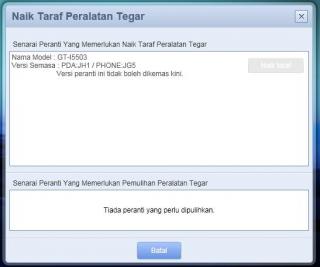
i have try to update but cannot at all..
any help? how to make my phone to FROYO?
Attached Image
Im new with this. hope someone can help me... icon_question.gif

popeye77
post Jun 21 2011, 10:56 AM

New Member
*
Junior Member
7 posts

Joined: Dec 2010
QUOTE(azli_9w2zz @ Jun 21 2011, 10:49 AM)
i have try to update but cannot at all..
any help? how to make my phone to FROYO?
Attached Image
Im new with this. hope someone can help me...  icon_question.gif
*
ur kies not updated...plz go to samsung web site and download new kies..then all should be orait....
zam_changloon
post Jun 21 2011, 11:00 AM

Getting Started
**
Junior Member
71 posts

Joined: Feb 2009


QUOTE(azli_9w2zz @ Jun 21 2011, 10:49 AM)
i have try to update but cannot at all..
any help? how to make my phone to FROYO?
Attached Image
Im new with this. hope someone can help me...  icon_question.gif
*
please check your kies version. Is it up todate? ver. 2.0.0.11044_11

If not please update your kies to current version through "help"

curiouso9
post Jun 21 2011, 11:12 AM

Getting Started
**
Junior Member
252 posts

Joined: Jun 2010
Never get through this.. but the title Naik Taraf Peralatan Tegar seem funny. hehe, same like Google Translate, once i pick bunch of text the translate it to malay just for testing, 1 of text included was "Gorilla Glass", Then google translate it to "Gorilla bersembunyi di sebalik kaca" WTF.
~ it happen when you translate gorilla glass with other certain sentence. hahaha
lunae
post Jun 21 2011, 01:34 PM

New Member
*
Junior Member
8 posts

Joined: Aug 2005


i've upgraded the firmware using Kies.
schmuck i was, i forgot to restore my phone sad.gif

the problem now is, it kept saying
"Sorry!
The process com.android.phone has stopped unexpectedly. Please try again"

Ive turn off/on several times, connect to Kies still no response. How do i make this ok again...? pls help! tq..
aeroz_corp
post Jun 21 2011, 01:44 PM

Getting Started
**
Junior Member
50 posts

Joined: Mar 2011


QUOTE(lunae @ Jun 21 2011, 01:34 PM)
i've upgraded the firmware using Kies.
schmuck i was, i forgot to restore my phone sad.gif

the problem now is, it kept saying
"Sorry!
The process com.android.phone has stopped unexpectedly. Please try again"

Ive turn off/on several times, connect to Kies still no response. How do i make this ok again...? pls help! tq..
*
after upgrade...had u hard reset?
if not...try hard reset 1st... many ppl had this problem after update.. after do hard reset the problem gone...=)
lopiumy
post Jun 21 2011, 01:49 PM

Getting Started
**
Junior Member
164 posts

Joined: Feb 2006
From: Melaka


QUOTE(aeroz_corp @ Jun 21 2011, 01:44 PM)
after upgrade...had u hard reset?
if not...try hard reset 1st... many ppl had this problem after update.. after do hard reset the problem gone...=)
*
for hard reset just dial *2767*3855# then ok, but must remember to backup coz hard reset will erase all thing at phone.
lunae
post Jun 21 2011, 01:55 PM

New Member
*
Junior Member
8 posts

Joined: Aug 2005


QUOTE(aeroz_corp @ Jun 21 2011, 01:44 PM)
after upgrade...had u hard reset?
if not...try hard reset 1st... many ppl had this problem after update.. after do hard reset the problem gone...=)
*
thank you! it worked~~
now gonna hafta install everything back huahua.. :|
jomonseb
post Jun 22 2011, 02:20 AM

New Member
*
Newbie
0 posts

Joined: Jun 2011
USSD codes not working on my samsung GT I5503, 2.1 Eclair
In Indian network, like, when i dial *123# , a msg box appeares "MMI Complete", *123# is for balance enquiry, so can't check my prepaid balance.
Pls help... icon_question.gif
azli_9w2zz
post Jun 22 2011, 04:34 AM

New Member
*
Newbie
2 posts

Joined: Jul 2008


QUOTE(zam_changloon @ Jun 21 2011, 11:00 AM)
please check your kies version. Is it up todate? ver. 2.0.0.11044_11

If not please update your kies to current version through "help"
*
ya lor.. belum update lah.. tongue.gif ok will update now and will give feedback after this..

tq.. rclxm9.gif

Just i have install latest KIES. But wheb in upgrade progress suddently this error appears.
What the actually problem?

Attached Image

This post has been edited by azli_9w2zz: Jun 22 2011, 09:06 AM
zam_changloon
post Jun 22 2011, 12:59 PM

Getting Started
**
Junior Member
71 posts

Joined: Feb 2009


QUOTE(azli_9w2zz @ Jun 22 2011, 04:34 AM)

Just i have install latest KIES. But wheb in upgrade progress suddently this error appears.
What the actually problem?

Attached Image
*
Aiyaaa... i don't know lorrr.. never faced problem like u... Instead of flashing using kies, u also can upgrade through ODIN

Preparation
1) Backup everything you needed (using titanium backup also can but need to root 1st. HOW to root? install universal androot from market also can. Refer to 1st page for details)
2) Download Malaysian Official Froyo --> http://www.mediafire.com/?si659w0w9d9pt40
3) Download Odin v4.28 and Ops file -> http://www.mediafire.com/?a54dbk53vhpkjto
4) Reset your phone first to prevent problem use the following code *#*#7780#*#*

Flashing
1) Extract the downloaded files (most easier open new folder at desktop) password is “malaysia” without the quotes
2) Run ODIN Downloader
-Select OPS tab: EUROPA_I5508_v1.0.ops
-Check One Package, Auto Reboot and Protect Ops
-Select .tar file from where you have extracted the Official Froyo file
3) Turn off your phone and remove the battery for 5 seconds
4) Hold Volume Down Button + Center Home Button + Power Button (End Call button). You should be in download mode now
5) Connect your phone to the pc using the USB cable.
6) If the data line is successful, com port shows yellow in Odin
7) Click start, this process should takes about 5 minutes, your phone will reboot to FroYo itself. Don’t panic and keep praying…
8) If nothing happen, your phone should be able to reboot in FroYo and Odin will said flashing had PASS
9) Hard reset again after flashing by dialing *2767*3855#


p/s PLEASE CORRECT me if instructions above is wrong.. I just modify from 1st page..
dododol
post Jun 22 2011, 04:33 PM

New Member
*
Junior Member
46 posts

Joined: Jun 2007
hi...very satisfied with new c7....only the radio didnt have malysia frequency..but nevermind lah...

check wif quadrant...my device place at 2nd ...is it true or what?

where i can find screen shot app?

or it already have built in screen capture???user posted image

This post has been edited by dododol: Jun 22 2011, 05:48 PM
azli_9w2zz
post Jun 23 2011, 03:51 AM

New Member
*
Newbie
2 posts

Joined: Jul 2008


thanks for ur help and reply...

will updAte back after this..


Added on June 23, 2011, 5:11 am
QUOTE(zam_changloon @ Jun 22 2011, 12:59 PM)
Aiyaaa... i don't know lorrr.. never faced problem like u... Instead of flashing using kies, u also can upgrade through ODIN

Preparation
1) Backup everything you needed (using titanium backup also can but need to root 1st. HOW to root? install universal androot from market also can. Refer to 1st page for details)
2) Download Malaysian Official Froyo --> http://www.mediafire.com/?si659w0w9d9pt40
3) Download Odin v4.28 and Ops file -> http://www.mediafire.com/?a54dbk53vhpkjto
4) Reset your phone first to prevent problem use the following code *#*#7780#*#*

Flashing
1) Extract the downloaded files (most easier open new folder at desktop) password is “malaysia” without the quotes
2) Run ODIN Downloader
-Select OPS tab: EUROPA_I5508_v1.0.ops
-Check One Package, Auto Reboot and Protect Ops
-Select .tar file from where you have extracted the Official Froyo file
3) Turn off your phone and remove the battery for 5 seconds
4) Hold Volume Down Button + Center Home Button + Power Button (End Call button). You should be in download mode now
5) Connect your phone to the pc using the USB cable.
6) If the data line is successful, com port shows yellow in Odin
7) Click start, this process should takes about 5 minutes, your phone will reboot to FroYo itself. Don’t panic and keep praying…
8) If nothing happen, your phone should be able to reboot in FroYo and Odin will said flashing had PASS
9) Hard reset again after flashing by dialing *2767*3855#
p/s PLEASE CORRECT me if instructions above is wrong.. I just modify from 1st page..

*
I have just now do as above.

all ok but suddently my phone keep vibrate once then vibrate twice repeatly then on my screen apper dialog
" ! Sorry! The process com.android.phone has stopped unexpectedly. Please try again. "
has any one have this problem before.

i have turn my phone to FLIGHT MODE then i do the hard reset.

taada... problem solve.. smile.gif

This post has been edited by azli_9w2zz: Jun 23 2011, 05:31 AM
bestsane
post Jun 23 2011, 08:50 AM

Getting Started
**
Junior Member
55 posts

Joined: Jul 2010
So what does the new firmware upgrade from Kies do and are for?
alexysc
post Jun 23 2011, 01:37 PM

Getting Started
**
Junior Member
60 posts

Joined: Jan 2011
QUOTE(bestsane @ Jun 23 2011, 08:50 AM)
So what does the new firmware upgrade from Kies do and are for?
*
Check out the definition of "upgrade" in dictionary and you'll get something like these :

1) Raise (something) to a higher standard, in particular improve (equipment or machinery) by adding or replacing components.

2) An improved or more modern version of something, esp. a piece of computing equipment

3) software that provides better performance than an earlier version did

4) The term upgrade refers to the replacement of a product with a newer version of the same product. It is most often used in computing and consumer electronics, generally meaning a replacement of hardware, software or firmware with a newer or better version.

Hopes the above answer your question.

This post has been edited by alexysc: Jun 23 2011, 01:38 PM
bestsane
post Jun 23 2011, 03:53 PM

Getting Started
**
Junior Member
55 posts

Joined: Jul 2010
QUOTE(alexysc @ Jun 23 2011, 01:37 PM)
Check out the definition of "upgrade" in dictionary and you'll get something like these :

1) Raise (something) to a higher standard, in particular improve (equipment or machinery) by adding or replacing components.

2) An improved or more modern version of something, esp. a piece of computing equipment

3) software that provides better performance than an earlier version did

4) The term upgrade refers to the replacement of a product with a newer version of the same product. It is most often used in computing and consumer electronics, generally meaning a replacement of hardware, software or firmware with a newer or better version.

Hopes the above answer your question.
*
I think even my small daughter knows that definition. In this age, if someone asks you that kind of question, your reply should be some kind of a "what's the difference between the old version and the new version" answer. Not to be rude, but if you answer something like what you just answered, people will laugh their anus off.

So someone who really knows the answer, please help me and the rest who want to know. Thank you.
apiy
post Jun 24 2011, 07:31 AM

New Member
*
Junior Member
15 posts

Joined: Feb 2007
From: MeLaKa laaa


every time I turn on the WiFi connector I get an alert that says "SDCard full flag is set, please delete some files or resume download manually....helpppppppp
bestsane
post Jun 24 2011, 09:10 AM

Getting Started
**
Junior Member
55 posts

Joined: Jul 2010
Hi folks,

Every time I want to upgrade to the latest firmware, I get stuck at 0% for about 5-10 minutes and I get this message:

"Failed to run firmware upgrade. Unknown error occurred".

or sometimes at night I get stuck at a percentage and get this message (something like this):

"Operation timed out"


Please help me. I don't wanna get left behind!


cubex
post Jun 24 2011, 10:34 AM

tolong jangan main main...yaranaika?
*****
Senior Member
839 posts

Joined: Jan 2003
From: KK City


Stupid Kies update -.- .... my handphone nonstop showing Force Close
but lucky got Odin ... now ok already
first was Chinese version and touchscreen cant work
Used Odin again and tried I5500 and yay it worked...Spanish FroYo! changed english and using it now biggrin.gif

dododol
post Jun 24 2011, 02:52 PM

New Member
*
Junior Member
46 posts

Joined: Jun 2007
I've install dropcap2 n screen shot me..but the pictures taken is "belang-belang merah ". Someone can help me?


132 Pages « < 94 95 96 97 98 > » Top
Topic ClosedOptions
 

Change to:
| Lo-Fi Version
0.0240sec    0.71    6 queries    GZIP Disabled
Time is now: 4th December 2025 - 08:19 PM