

 ..bad luck eh?
Linux/BSD/FOSS General Chat & FAQ, Post whatever questions you have....
Linux/BSD/FOSS General Chat & FAQ, Post whatever questions you have....
|
|
 Jan 1 2011, 11:53 PM Jan 1 2011, 11:53 PM
|
 
Senior Member
6,381 posts Joined: Jun 2005 From: meow meow 
|
|
|
|
|
|
|
Jan 2 2011, 12:42 AM
|

Senior Member
2,789 posts Joined: Jul 2010 From: Silicon Valley 
|
QUOTE(GameSky @ Jan 1 2011, 11:53 PM) Plik plak poooof  (Some burnt smell coming out from the lappy) "OH MY GOSH !!! MY LAPPIE JUZ OVER VOLTAGE !!!"  Might be an internal hardware short circuit i guess |
|
|
Jan 2 2011, 05:28 AM
|

Senior Member
1,748 posts Joined: Mar 2010
|
QUOTE(cocooh @ Jan 1 2011, 11:23 PM) O.O ive succeeded for not booting into Windows for 3 week++ Pfft.... I've not booted into windows for 7 or 8 years. I have XP running in virtualbox on my workstation, though. Only use it once a month so that I can run my monitor calibration hardware drivers. |
|
|
Jan 2 2011, 04:25 PM
|

Validating
1,822 posts Joined: Jul 2010 From: Yesterday, 01:25 AM
|
hi, wanna ask something here.. now i'm using swiftfox and i want ro remove firefox. but when i want ro remove it via synaptic, it prompt for installing iceweasel. so my question is, how do i remove firefox without automatically installing iceweasel? now already got three browser.. firefox, swiftfox and epiphany.. just wanna remove firefox to spare some space, but it prompt to install iceweasel instead
 nevermind, solved already.. had to use "apt-get --purge remove firefox iceweasel". only then will it remove firefox without automatically install iceweasel  This post has been edited by axxer: Jan 2 2011, 04:39 PM |
|
|
Jan 2 2011, 08:00 PM
|
|
Senior Member
2,789 posts Joined: Jul 2010 From: Silicon Valley
|
Sharing Time
 Pastie - Clipboard manager (Very useful ) Pastie is a small clipboard manager that uses an indicator-applet to display and give access to your clipboard history. It boasts a modest set of configurable preferences including history size, options to set keyboard shortcuts and minor interface tweaks to the applet itself . Download It has its own PPA CODE sudo add-apt-repository ppa:hel-sheep/pastie sudo apt-get update && sudo apt-get install pastie Mono icons are included in Faenza if im not mistaken , to download the mono icons , you can get it from here : Deviantart - Pastie Mono Icon Download, extract and pop your required icon in Instructions are provided in the icon set  PS: Using it rite now |
|
|
Jan 2 2011, 09:28 PM
|

Senior Member
2,930 posts Joined: Jan 2007 From: Kolej Universiti Agrosains Malaysia, Melaka 
|
ahh what a day! I spent most of the hours configuring openSUSE. oh man, grub error, fstab config etc etc... going to sleep earlier tonite.
|
|
|
|
|
|
Jan 3 2011, 03:31 AM
|
|
Validating
1,822 posts Joined: Jul 2010 From: Yesterday, 01:25 AM
|
LMDE 201101 32bit re-spin released, and officially announced
http://blog.linuxmint.com/?p=1614 The new ISO comes with an up-to-date live kernel which addresses the following issues: * “Black screen of death”, live session hanging with a black screen. * Installer hanging while configuring Grub. This post has been edited by axxer: Jan 3 2011, 03:33 AM |
|
|
Jan 3 2011, 04:05 AM
|
|
Senior Member
2,789 posts Joined: Jul 2010 From: Silicon Valley
|
Wing Panel ppa released
 » Click to show Spoiler - click again to hide... « Looks good but , whats the difference with the gnome panel  Might wanna try on a live CD Might wanna try on a live CD CODE sudo add-apt-repository ppa:ripps818/ppa && sudo apt-get update sudo apt-get install wingpanel |
|
|
Jan 3 2011, 01:39 PM
|

Senior Member
1,439 posts Joined: Aug 2010
|
QUOTE(-Hzu- @ Jan 1 2011, 02:29 PM) Can you take a screenshot of that? sorry for late reply,this is my screenshot :when installing (using live DVD)..dont hv dual boot option.. 
all partition missing...  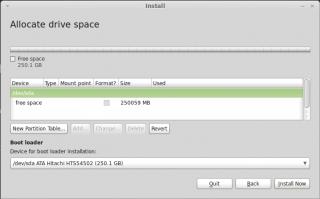
trying to check at gparted,but nothing too...  
help me,i dont want to delete all my partition....i use all my 200gb... but,when boot into windows,all partition appear...  This post has been edited by wanfaris: Jan 3 2011, 01:40 PM |
|
|
Jan 3 2011, 04:33 PM
|

Senior Member
6,612 posts Joined: Jan 2003 From: Tomorrow
|
QUOTE(axxer @ Jan 3 2011, 03:31 AM) LMDE 201101 32bit re-spin released, and officially announced dled. installed, stucked @ configuring bootloader http://blog.linuxmint.com/?p=1614 The new ISO comes with an up-to-date live kernel which addresses the following issues: * “Black screen of death”, live session hanging with a black screen. * Installer hanging while configuring Grub. |
|
|
Jan 3 2011, 04:48 PM
|
|
Senior Member
2,789 posts Joined: Jul 2010 From: Silicon Valley
|
QUOTE(Acid_RuleZz @ Jan 3 2011, 04:33 PM) dled. installed, stucked @ configuring bootloader Looks like the new one is bugged with some probs |
|
|
Jan 3 2011, 05:07 PM
|
|
Validating
1,822 posts Joined: Jul 2010 From: Yesterday, 01:25 AM
|
yes, me too had problem when installing earlier 201009 release.. its stuck at copying file or configuring grub, cant really remember
but at last it works after 2-3 times trying. cant remember what i did to overcome that problem tho This post has been edited by axxer: Jan 3 2011, 05:37 PM |
|
|
Jan 3 2011, 05:27 PM
|
|
Senior Member
2,789 posts Joined: Jul 2010 From: Silicon Valley
|
2 or 3 times |
|
|
|
|
|
Jan 3 2011, 05:36 PM
|
|
Senior Member
2,930 posts Joined: Jan 2007 From: Kolej Universiti Agrosains Malaysia, Melaka
|
I have spent my times with LMDE, not really a user friendly when come into defining the partition especially dual boot with other OS within the same HD. The most annoyed is font in firefox, tried all the suggestions and scripts but only working for some and not to the other areas. Even with best the fonts but with the 22" lcd screen I am using now, the incorrect rendering fonts still haunting me. It maybe good for a smaller 14" laptop screen. I am going back to Julia.
|
|
|
Jan 3 2011, 05:36 PM
|
|
Validating
1,822 posts Joined: Jul 2010 From: Yesterday, 01:25 AM
|
QUOTE(cocooh @ Jan 3 2011, 05:27 PM) 2 or 3 times |
|
|
Jan 3 2011, 05:40 PM
|
|
Senior Member
2,789 posts Joined: Jul 2010 From: Silicon Valley
|
Hmm , im thinkin bout triple boot
but thats too much , might install julia on my 2nd lappie instead |
|
|
Jan 3 2011, 05:56 PM
|
|
Senior Member
2,930 posts Joined: Jan 2007 From: Kolej Universiti Agrosains Malaysia, Melaka
|
I want to boot into LMDE from openSUSE's grub but for the unknown reason I am not able to do it after few weeks using it. Here is my post at the opensuse forum http://forums.opensuse.org/english/get-hel...-boot-lmde.html
Don't want to use LMDE GRUB as openSUSE's one is much faster and neat looking too. --sigh-- |
|
|
Jan 3 2011, 05:59 PM
|
|
Senior Member
2,789 posts Joined: Jul 2010 From: Silicon Valley
|
I wonder how does opensuse bootloader looks like
|
|
|
Jan 3 2011, 06:09 PM
|
|
Senior Member
2,930 posts Joined: Jan 2007 From: Kolej Universiti Agrosains Malaysia, Melaka
|
QUOTE(cocooh @ Jan 3 2011, 05:59 PM) I wonder how does opensuse bootloader looks like all gui, with no text... but if you want to look like a hacker  you can always enable the text mode to appear by removing any vga=0x317 word at kernel parameter. In December every year, the GRUB will change itself into pic of penguins with santa claus hat playing with the snow all over the screen. Now January, no longer santa penguin. you can always enable the text mode to appear by removing any vga=0x317 word at kernel parameter. In December every year, the GRUB will change itself into pic of penguins with santa claus hat playing with the snow all over the screen. Now January, no longer santa penguin. |
|
|
Jan 3 2011, 06:15 PM
|
|
Senior Member
2,789 posts Joined: Jul 2010 From: Silicon Valley
|
QUOTE(powerwoot @ Jan 3 2011, 06:09 PM) all gui, with no text... but if you want to look like a hacker Thats special you can always enable the text mode to appear by removing any vga=0x317 word at kernel parameter. In December every year, the GRUB will change itself into pic of penguins with santa claus hat playing with the snow all over the screen. Now January, no longer santa penguin. Might wanna try opensuse this year ~ the iso are abit --- fluctuated large file |
| Change to: |  0.0236sec 0.0236sec
 0.79 0.79
 6 queries 6 queries
 GZIP Disabled GZIP Disabled
Time is now: 18th December 2025 - 11:37 AM |
 Quote
Quote
