Outline ·
[ Standard ] ·
Linear+
Linux/BSD/FOSS General Chat & FAQ, Post whatever questions you have....
|
powerwoot
|
 May 26 2011, 07:52 AM May 26 2011, 07:52 AM
|

|
QUOTE(Acid_RuleZz @ May 26 2011, 03:18 AM) Anyone can guide me, what i need to do to install the AMD Proprietary driver? Seem that my Radeon card is not working with the radeon open source driver. It always hang everytime i try to switch to discrete.  Long time story, running fglrx in linux is pita... that was few years ago when I am using an ATI card for my GC. I don't know if fglrx now is far improved from my hell experienced with it. But still, read some comments that installing Radeon driver is no better, some complaining desktop effect so laggy, 3D is good but video playback is jerky... well only Radeon users in linux can tell better. For me, nvidia ftw! not really I am a fan to green, but nvidia simplifies the driver for linux users. I am using every latest nvidia driver released by them. |
|
|
|
|
|
scorps
|
May 26 2011, 08:02 AM
|
|
|
QUOTE(powerwoot @ May 26 2011, 08:52 AM) For me, nvidia ftw! not really I am a fan to green, but nvidia simplifies the driver for linux users. I am using every latest nvidia driver released by them. which version? 270.41.19 ? i also try to use this version,but end up with my Cpu high usage problem when watching movie, |
|
|
|
|
|
FlameReaper
|
May 26 2011, 01:45 PM
|
|
|
QUOTE(Acid_RuleZz @ May 26 2011, 02:18 AM) Anyone can guide me, what i need to do to install the AMD Proprietary driver? Seem that my Radeon card is not working with the radeon open source driver. It always hang everytime i try to switch to discrete. Go to the AMD graphics card website and get the latest from there. As of 11.4, problems with kernel versions 2.6.38++ has been fixed. Oh, the latest is now 11.5! Whoa, I wonder whether I'll want to upgrade or not... Get it here: http://support.amd.com/us/gpudownload/linu...deon_linux.aspx |
|
|
|
|
|
fJok3R
|
May 26 2011, 02:08 PM
|
|
|
QUOTE(Acid_RuleZz @ May 26 2011, 03:18 AM) Anyone can guide me, what i need to do to install the AMD Proprietary driver? Seem that my Radeon card is not working with the radeon open source driver. It always hang everytime i try to switch to discrete. may i know how u switch to discrete graphic in linux? |
|
|
|
|
|
Acid_RuleZz
|
May 26 2011, 04:10 PM
|
|
|
QUOTE(FlameReaper @ May 26 2011, 01:45 PM) Go to the AMD graphics card website and get the latest from there. As of 11.4, problems with kernel versions 2.6.38++ has been fixed. Oh, the latest is now 11.5! Whoa, I wonder whether I'll want to upgrade or not... Get it here: http://support.amd.com/us/gpudownload/linu...deon_linux.aspxI already downloaded 11.5 but i get errors when i try to build package for Debian. I managed to directly install without building package for specific distro but after rebooting there is no fglrx module. I already removed opensource radeon tho..  Should i try older driver instead? But i'm using kernel 2.6.39. QUOTE(fJok3R @ May 26 2011, 02:08 PM) may i know how u switch to discrete graphic in linux? I'm using the kernel switcheroo function. You can refer to this site. http://asusm51ta-with-linux.blogspot.com/just execute the switch script if u too lazy to use terminal. 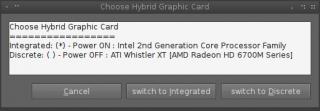
Added on May 26, 2011, 4:25 pmseems like the page for 11.4 is missing. i tried 11.3 but it failed.  This post has been edited by Acid_RuleZz: May 26 2011, 04:25 PM This post has been edited by Acid_RuleZz: May 26 2011, 04:25 PM |
|
|
|
|
|
FlameReaper
|
May 26 2011, 04:26 PM
|
|
|
QUOTE(Acid_RuleZz @ May 26 2011, 03:10 PM) I already downloaded 11.5 but i get errors when i try to build package for Debian. I managed to directly install without building package for specific distro but after rebooting there is no fglrx module. I already removed opensource radeon tho..
Whoa. Did you try checking the DKMS module trees? CODE sudo dkms install -m fglrx -v <module version> Although in some cases DKMS might tell you to do this: CODE sudo dkms build -m fglrx -v <module version> before proceeding with "dkms install". Also please remember to do CODE sudo aticonfig --initial after installation of the driver. This post has been edited by FlameReaper: May 26 2011, 04:27 PM |
|
|
|
|
|
Acid_RuleZz
|
May 26 2011, 06:37 PM
|
|
|
i ran CODE sudo aticonfig --initial and i get no supported adapters detected. but CODE lspci | grep VGA shows CODE 00:02.0 VGA compatible controller: Intel Corporation 2nd Generation Core Processor Family Integrated Graphics Controller (rev 09)
01:00.0 VGA compatible controller: ATI Technologies Inc Whistler XT [AMD Radeon HD 6700M Series] |
|
|
|
|
|
powerwoot
|
May 26 2011, 06:54 PM
|
|
|
QUOTE(scorps @ May 26 2011, 08:02 AM) which version? 270.41.19 ? i also try to use this version,but end up with my Cpu high usage problem when watching movie, Yes I am CODE OpenGL vendor string: NVIDIA Corporation
OpenGL renderer string: GeForce GTX 560 Ti/PCI/SSE2
OpenGL version string: 4.1.0 NVIDIA 270.41.19
But so far no CPU spikes, everything just perfect.  |
|
|
|
|
|
FlameReaper
|
May 26 2011, 08:10 PM
|
|
|
QUOTE(Acid_RuleZz @ May 26 2011, 05:37 PM) i ran CODE sudo aticonfig --initial and i get no supported adapters detected. but CODE lspci | grep VGA shows CODE 00:02.0 VGA compatible controller: Intel Corporation 2nd Generation Core Processor Family Integrated Graphics Controller (rev 09)
01:00.0 VGA compatible controller: ATI Technologies Inc Whistler XT [AMD Radeon HD 6700M Series] Did you try installing with the ATI card on? I have no experience with laptops that can switch between integrated and discrete GPUs, but just in case if you hadn't tried that yet. This post has been edited by FlameReaper: May 26 2011, 08:10 PM |
|
|
|
|
|
TSG-17
|
May 26 2011, 08:42 PM
|
|
|
QUOTE(FlameReaper @ May 26 2011, 12:28 AM) Which process you're referring to? XOrg? To me it's pretty normal, nothing too hurting, especially since you're watching a video. XOrg really does use that amount of proc power, as how on average, not watching video, XOrg idles for me around 40~50%. You either phrased it wrong, or I've misunderstood something. Are you saying X-server uses 40~50% CPU when your comp is idle (as in, doing nothing). Most X related processes take up very little CPU (1.0 - 3.0% in htop on this 7 yr old Pentium Dual Core I'm typing on .... even less on my newer hardware) .... you sure it's X that you're monitoring or some KDE or Compiz process? cos that much load while idle is totally not normal for anything usr/bin/X -related, unless there's some leak or scheduling problem .
Added on May 26, 2011, 8:45 pmQUOTE(Acid_RuleZz @ May 26 2011, 03:18 AM) Anyone can guide me, what i need to do to install the AMD Proprietary driver? Seem that my Radeon card is not working with the radeon open source driver. It always hang everytime i try to switch to discrete. Sorry man, but I have almost zero experience with ATI or switchable graphics on Linux. This post has been edited by G-17: May 26 2011, 08:45 PM |
|
|
|
|
|
FlameReaper
|
May 26 2011, 09:42 PM
|
|
|
QUOTE(G-17 @ May 26 2011, 07:42 PM) You either phrased it wrong, or I've misunderstood something. Are you saying X-server uses 40~50% CPU when your comp is idle (as in, doing nothing). Most X related processes take up very little CPU (1.0 - 3.0% in htop on this 7 yr old Pentium Dual Core I'm typing on .... even less on my newer hardware) .... you sure it's X that you're monitoring or some KDE or Compiz process? cos that much load while idle is totally not normal for anything usr/bin/X -related, unless there's some leak or scheduling problem .
Added on May 26, 2011, 8:45 pmSorry man, but I have almost zero experience with ATI or switchable graphics on Linux. I guess not. Well, I was looking at GNOME's System Monitor launched using gksudo, and that's what I'm seeing now... ... On top, though, I'm getting around 19% and I'm on KDE, have Firefox and Chrome open each with a dozen tabs or so in them, Audacious, SMPlayer with a 720p video on, XChat on the second desktop, a Twitter client running and pretty much that's that. |
|
|
|
|
|
Acid_RuleZz
|
May 26 2011, 10:01 PM
|
|
|
After googling around i found found out that alot of guys unable to use vgaswitcheroo with fglrx driver. I've reinstall the radeon driver, altho its not really working but at least i can switch it off completely to save battery power. The HD3000 still kick ass yo.
Added on May 26, 2011, 10:14 pmwhile fiddling to enable the switching, i ter-delete dbus in init.d folder... almost shiat brix my system.  This post has been edited by Acid_RuleZz: May 26 2011, 10:14 PM This post has been edited by Acid_RuleZz: May 26 2011, 10:14 PM |
|
|
|
|
|
farkinid
|
Jun 2 2011, 12:01 PM
|
|
|
Ladies and gentlemen, Please allow me to introduce the latest and greatest distribution of Linux-dom. Without further fanfare, I give you BIEBIANView spoiler at your own risk. I will not be responsible for all or any consequences (direct or indirect) of viewing. » Click to show Spoiler - click again to hide... « edit : Added new screenshotThis post has been edited by farkinid: Jun 2 2011, 12:10 PM |
|
|
|
|
|
seatux
|
Jun 2 2011, 06:10 PM
|
Getting Started

|
At least Bieber Linux is more well made than the dark purple monstrosity that is Hannah Montana linux (wtf with the american state name anyway)
|
|
|
|
|
|
Patent
|
Jun 2 2011, 06:26 PM
|
|
|
Hi guys, I just installed lubuntu on my netbook.
I tried to increase the resolution using xrandr with the command
xrandr --fb 1280x720 --output LVDS1 --scale 1.25x1.2.
The problem is, the change is not persistent after the computer reboot.
How do I make it persistent ? I can't find xorg.conf or ~/.xprofile folder either.
This post has been edited by Patent: Jun 2 2011, 06:27 PM
|
|
|
|
|
|
farkinid
|
Jun 2 2011, 06:31 PM
|
|
|
QUOTE(Patent @ Jun 2 2011, 06:26 PM) Hi guys, I just installed lubuntu on my netbook. I tried to increase the resolution using xrandr with the command xrandr --fb 1280x720 --output LVDS1 --scale 1.25x1.2. The problem is, the change is not persistent after the computer reboot. How do I make it persistent ? I can't find xorg.conf or ~/.xprofile folder either. You have to make an xorg.conf. If its ATI card, there is a command to generate your xorg.conf based on your current settings. Then you modify that file and its done. Alternatively, you can use your catalyst or your nvidia control panel (just like windows) to make the changes. If you are on an intel graphics chip, I'm not sure how to help you. No experience there. Sorry |
|
|
|
|
|
Patent
|
Jun 2 2011, 06:43 PM
|
|
|
QUOTE(farkinid @ Jun 2 2011, 06:31 PM) You have to make an xorg.conf. If its ATI card, there is a command to generate your xorg.conf based on your current settings. Then you modify that file and its done. Alternatively, you can use your catalyst or your nvidia control panel (just like windows) to make the changes. If you are on an intel graphics chip, I'm not sure how to help you. No experience there. Sorry I'm using intel. =/ |
|
|
|
|
|
seatux
|
Jun 2 2011, 06:49 PM
|
Getting Started
|
Patent: Which Intel graphics chip? Quite a number of Intel adapters have problems running in Ubuntu and most other distros. https://wiki.ubuntu.com/X/ConfigRemember to try to google first, especially in Ubuntu's pretty good wiki system. |
|
|
|
|
|
TSG-17
|
Jun 2 2011, 08:26 PM
|
|
|
QUOTE(farkinid @ Jun 2 2011, 12:01 PM) Ladies and gentlemen, Please allow me to introduce the latest and greatest distribution of Linux-dom. Without further fanfare, I give you BIEBIANView spoiler at your own risk. I will not be responsible for all or any consequences (direct or indirect) of viewing. » Click to show Spoiler - click again to hide... « edit : Added new screenshotInteresting, but I'll stick to LesBian, thank you very much.  |
|
|
|
|
|
seatux
|
Jun 2 2011, 08:48 PM
|
Getting Started
|
Where's that copy of Gaybuntu with wallpapers from Cho aniki?
Then again is hard to associate things to Fedora.
Anyhow here a try for Fedora,
Furrdora - Linux for furries
Fu-dora - Emo troll OS?
|
|
|
|
|



 Quote
Quote





 0.0160sec
 0.45
0.45
 6 queries
 GZIP Disabled