Outline ·
[ Standard ] ·
Linear+
Unifi Official TM UniFi High Speed Broadbrand Thread V8, save RM200 from 15 January-15 February !
|
palmjack
|
 Jan 11 2011, 07:14 AM Jan 11 2011, 07:14 AM
|
Getting Started


|
I just wanna say thanks once again to klseet for the TP-Link modem tip. Wifi signal is stronger and now more stable with iOS devices. It is a better featured router than the dr615 and for its price (under rm100) one can't complain. Iptv works flawlessly so far with the beta firmware.
One thing is the wifi setting for me is best with manual channel at 6, auto channel width, bgb. Some other combinations didn't work too well.
|
|
|
|
|
|
charymsylyn
|
Jan 11 2011, 07:39 AM
|
|
|
QUOTE(HankyPanky @ Jan 10 2011, 11:29 PM) WTF? Really? Personal cannot get BIZ5 ? Walau eh... discrimination .... I called today to ask if I "upgrade" from Streamyx Combo package will I get the RM120 advance payment where they charge in the first month phone bill back, they say need to check and call me back, and never does... zzz : ( Advance payment is just that, not your deposit. For both Unifi and Streamyx, if you keep up with your bills, you are always paying for one month of service ahead. You will get the balance back upon cancellation of your account outside contract period minus any outstanding. |
|
|
|
|
|
DarkTenno
|
Jan 11 2011, 08:50 AM
|
|
|
QUOTE(wengjoe @ Jan 10 2011, 06:30 AM) problem seem to have improve a lot after i change the security from WPA to WEP. i use to use WEP back in streamyx with the linksys router, no problem at all. the router doesn't drop my iphone connection anymore. but still need to test via skype for let say more then an hour only can determine is the issue really solve once and for all. bare in mind if you use WEP restrict MAC address or you might end up seeing someone like me poking around your network  seriously dont use WEP unless you have some kind of 2nd layer restriction, WEP can be easily cracked under 5 min  btw the free installation fee waived is no longer available anymore? do I have to paid upfront or it will deducted to my 1st bill? |
|
|
|
|
|
MX510
|
Jan 11 2011, 09:50 AM
|
|
|
QUOTE(ghost705 @ Jan 11 2011, 05:27 AM) Most of BIZ Package for home are registered via phone call on last year and doesn't need any company registration number,stamp and etc .Apply Unifi via phone call only take 1 week to process order while apply at TMpoint have to take around 3-4 week to process.  By the way i'm not sure if they edit their term's on this year (2011)  Yeah i register my Biz5 via phone :-) |
|
|
|
|
|
HankyPanky
|
Jan 11 2011, 09:55 AM
|
New Member
|
QUOTE(DarkTenno @ Jan 11 2011, 08:50 AM) btw the free installation fee waived is no longer available anymore? do I have to paid upfront or it will deducted to my 1st bill? it will be charge to your first bill... RM200 for installation ... : ( By the way guys, for those who has their Unifi installed, does the installation include drill hole on the wall if needed? I'm asking just in case they want to charge for hole drilling also. |
|
|
|
|
|
teelim
|
Jan 11 2011, 10:56 AM
|
|
|
QUOTE(ghost705 @ Jan 11 2011, 05:27 AM) Most of BIZ Package for home are registered via phone call on last year and doesn't need any company registration number,stamp and etc .Apply Unifi via phone call only take 1 week to process order while apply at TMpoint have to take around 3-4 week to process. By the way i'm not sure if they edit their term's on this year (2011) I see. Thanks for your reply.  |
|
|
|
|
|
SUSGreenSamurai
|
Jan 11 2011, 11:41 AM
|
|
|
QUOTE(cannavaro @ Jan 11 2011, 05:03 AM) I've been using it since day one. Encountered a problem only once, when my payment wasn't reflected on the site and my bill, despite already being charged by the bank. . It took a simple phone call to rectify the problem. Thanks for the reply bro |
|
|
|
|
|
rattan
|
Jan 11 2011, 04:46 PM
|
Droid

|
Im currently testing time 25MB connection at UOA Jalan Pinang. Not bad at all. Results as below :  This post has been edited by rattan: Jan 12 2011, 01:58 AM This post has been edited by rattan: Jan 12 2011, 01:58 AM |
|
|
|
|
|
ReaperX
|
Jan 11 2011, 05:43 PM
|
|
|
i've registered couple of months back and just recently my area has coverage. Thus, the installation date is in 2 weeks time. One thing i'm wondering is whether can I unregister the current one (which is before installation) and go for the 1 month fee waiver online registration. Possible?
|
|
|
|
|
|
brianiac
|
Jan 11 2011, 06:29 PM
|
New Member
|
I have a question about using the DR615 as a VLAN bridge - as described Rizvanrp in his UNIFI website.
If I set it up and connect to my 1043ND router as described, does it mean that the DR615 is bridging at 100Mbps?
You see the reason I am got the 1043ND is also because of its Gigabit Lan ports. So with DR 615 I am limited to the speed provided by DR615 port which is 10/100Mbps right?
Hmm in which case if I want a Gigabit Lan throughout my house (wired) then I will also want a Mikrotik RB250GS so my VLAN bridge is capable of 1G lan connections with Cat6 cables
Added on January 11, 2011, 6:37 pmAlso with the setup I mentioned earlier, is the USB port in the DR615 still enabled?
And does it mean that I will enable my DHCP on my own router ie 1043ND
Thank you very much for answering my questions
Added on January 11, 2011, 6:42 pmwill the gigabit port actually make any difference at all in my internet access experience?
Added on January 11, 2011, 6:42 pmI guess I am just trying to figure out if it is worth it to get the Mikrotik switch
This post has been edited by brianiac: Jan 11 2011, 06:42 PM
|
|
|
|
|
|
DarkTenno
|
Jan 11 2011, 06:49 PM
|
|
|
QUOTE(brianiac @ Jan 11 2011, 06:29 PM) I have a question about using the DR615 as a VLAN bridge - as described Rizvanrp in his UNIFI website.
If I set it up and connect to my 1043ND router as described, does it mean that the DR615 is bridging at 100Mbps?
You see the reason I am got the 1043ND is also because of its Gigabit Lan ports. So with DR 615 I am limited to the speed provided by DR615 port which is 10/100Mbps right?
Hmm in which case if I want a Gigabit Lan throughout my house (wired) then I will also want a Mikrotik RB250GS so my VLAN bridge is capable of 1G lan connections with Cat6 cables I dont have unifi yet but yeah DIR615 vlan bridge will be 100mbps, but it only bettween your DIR615 to 1043ND you LAN can utilize the gigabit port on your 1043ND |
|
|
|
|
|
brianiac
|
 Jan 11 2011, 07:03 PM Jan 11 2011, 07:03 PM
|
New Member
|
QUOTE(DarkTenno @ Jan 11 2011, 06:49 PM) I dont have unifi yet but yeah DIR615 vlan bridge will be 100mbps, but it only bettween your DIR615 to 1043ND you LAN can utilize the gigabit port on your 1043ND yes but the 1043ND also has a 10/100/1000 Wan Port that would be connected to the DR615 10/100 Lan port --- so my question is really if both ports were gigabit ports would my internet access be faster? Of course theoretically I guess it would be sufficient since my internet access for Unifi at maximum can only go up to 20MBps |
|
|
|
|
|
silver311
|
Jan 11 2011, 08:02 PM
|
Getting Started
|
Hmm.. is there a way for us to check our total bandwith used? That way, i can try to maintain the amount i downloaded.
|
|
|
|
|
|
YouDontKnowMyName
|
Jan 11 2011, 08:02 PM
|
|
|
getting unifi installed in my home tomorrow. really excited  |
|
|
|
|
|
cannavaro
|
Jan 11 2011, 08:26 PM
|
|
|
QUOTE(silver311 @ Jan 11 2011, 08:02 PM) Hmm.. is there a way for us to check our total bandwith used? That way, i can try to maintain the amount i downloaded. Use a software called DU Meter. |
|
|
|
|
|
SUSbc_low
|
Jan 11 2011, 09:07 PM
|
New Member
|
anyone facing unifi downtime in kepong area??
|
|
|
|
|
|
MX510
|
Jan 11 2011, 10:12 PM
|
|
|
Received my first UniFi biz5 package got 6% tax already http://plixi.com/p/69269950 |
|
|
|
|
|
IwanAGP
|
Jan 11 2011, 10:27 PM
|
|
|
QUOTE(MX510 @ Jan 11 2011, 10:12 PM) Received my first UniFi biz5 package got 6% tax already http://plixi.com/p/69269950They charge for usage one is it? And... Why is it 290? |
|
|
|
|
|
nooboy
|
Jan 11 2011, 10:30 PM
|
|
|
hey, i got confius wit unifi bills
ok, install on 7nov
then December received bills wit RM3xx amount
so suppose its include 2month ( 1month is advanced rite?)
why i still kena bills for december?
total RM5xx like that?
|
|
|
|
|
|
MX510
|
Jan 11 2011, 10:35 PM
|
|
|
QUOTE(IwanAGP @ Jan 11 2011, 10:27 PM) They charge for usage one is it? And... Why is it 290? I think it's pro rate billing 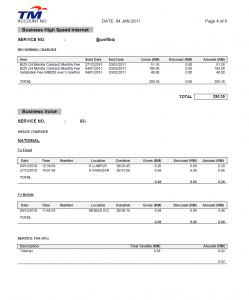
|
|
|
|
|



 Quote
Quote








 0.0304sec
 0.12
0.12
 6 queries
 GZIP Disabled