

QUOTE(Irhe21 @ Jan 23 2011, 01:53 PM)

how to do? where to go?? i dunno..feels so bad not knowing bout all this...

Samsung Galaxy Tab, review
|
|
 Jan 23 2011, 02:10 PM Jan 23 2011, 02:10 PM
|
 
Senior Member
4,282 posts Joined: Apr 2008 
|
QUOTE(Irhe21 @ Jan 23 2011, 01:53 PM) how to do? where to go?? i dunno..feels so bad not knowing bout all this... |
|
|
|
|
|
Jan 23 2011, 02:21 PM
|

Junior Member
51 posts Joined: Aug 2010 
|
|
|
|
Jan 23 2011, 05:34 PM
|

Senior Member
5,040 posts Joined: Nov 2005 
|
QUOTE(phantomash @ Jan 22 2011, 08:09 PM) what kind of apps are you looking for? my leave devil alone is not running full screen..help?if you are looking for games, check out.. Dungeon Defenders (rpg + tower defense + good grapchis) Totemo (puzzle game + good graphics) Evac (pacman like gameplay) Buka Barr (diner dash with twist added) Mini Squadron Rope Cut (cut the rope on iphone) Leave Devil Alone (plant vs zombie gameplay) Lets Golf 2 Spectral Souls (strategy rpg) Zenonia 1&2 (classic rpg) Game Dev Story X Construction Asphalt 5 (racing) Raging Thunder 2 (racing) Pool Break Pro (pool game) PSX4Droid (playstation emulator) Gameboid (gba emulator) IF u guys think u need some screen protector to protect ur gorilla glass.... think again. * my heart aches while watching this video.. |
|
|
Jan 23 2011, 05:41 PM
|
 
Elite
27,801 posts Joined: Jun 2007 From: Johor
|
Rayzrblade: did you use spareparts to choose compatible mode, reboot and unselect it reboot again to have fullscreen
|
|
|
Jan 23 2011, 07:53 PM
|

Senior Member
2,804 posts Joined: Jan 2003
|
QUOTE(rayzrblade @ Jan 23 2011, 05:34 PM) my leave devil alone is not running full screen..help? I cannot run the apps at all. A pop up says device not compatible.IF u guys think u need some screen protector to protect ur gorilla glass.... think again. * my heart aches while watching this video.. |
|
|
Jan 23 2011, 09:04 PM
|

Junior Member
224 posts Joined: Sep 2010 From: Shah Alam 
|
anyone try to install papago M5 in SGT? It's always popup and say "unable support resolution: 480x720". Anyone know to to fix this?
|
|
|
|
|
|
Jan 23 2011, 09:09 PM
|
|
Junior Member
51 posts Joined: Aug 2010
|
QUOTE(sphiroth @ Jan 23 2011, 07:53 PM) I cannot run the apps at all. A pop up says device not compatible. Hahaha..my friend always cover his face when see this clip..haha |
|
|
Jan 23 2011, 09:30 PM
|

Senior Member
3,786 posts Joined: Aug 2005
|
Me too also heart a bit pain
|
|
|
Jan 23 2011, 10:36 PM
|
|
Elite
27,801 posts Joined: Jun 2007 From: Johor
|
QUOTE(klwong99 @ Jan 23 2011, 09:04 PM) anyone try to install papago M5 in SGT? It's always popup and say "unable support resolution: 480x720". Anyone know to to fix this? Are you referring to X5 ?? . .You have to manually rename all 480X720 folders to 600x1024. Connect your Tab to computer. Search for all folders with name " 480x720" - then rename each of it. There should be a few of such folders. Or you can edit the folder names using any file explorer example Astro File Manager After that, locate SPARE PARTS in TAB menu ( if you don't have this, download it ; it is a free app from Market ) and enable full screen compatibility. Launch Spareparts - untick and tick compatibity mode - RESET. Launch spare parts again - untick compatibilty mode. RESET. You should have full screen However you will find the menu floating slightly up from the bottom : 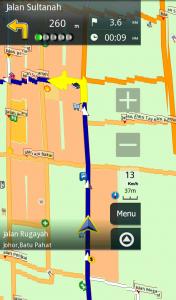
This post has been edited by benny888: Jan 23 2011, 10:42 PM |
|
|
Jan 23 2011, 10:45 PM
|

Senior Member
4,709 posts Joined: Jan 2003
|
benny, i read tat the spare parts app will make some other app cant be open. is tat true??
|
|
|
Jan 23 2011, 10:55 PM
|
|
Senior Member
2,804 posts Joined: Jan 2003
|
QUOTE(benny888 @ Jan 23 2011, 10:36 PM) Are you referring to X5 ?? . . I didn't use spare part and the maps is still in fullscreen just like your picture.You have to manually rename all 480X720 folders to 600x1024. Connect your Tab to computer. Search for all folders with name " 480x720" - then rename each of it. There should be a few of such folders. Or you can edit the folder names using any file explorer example Astro File Manager After that, locate SPARE PARTS in TAB menu ( if you don't have this, download it ; it is a free app from Market ) and enable full screen compatibility. Launch Spareparts - untick and tick compatibity mode - RESET. Launch spare parts again - untick compatibilty mode. RESET. You should have full screen However you will find the menu floating slightly up from the bottom :
QUOTE(Hico @ Jan 23 2011, 10:45 PM) benny, i read tat the spare parts app will make some other app cant be open. is tat true?? From my experience, apps still can be open but will not work properly. |
|
|
Jan 23 2011, 11:04 PM
|
|
Senior Member
4,709 posts Joined: Jan 2003
|
QUOTE(sphiroth @ Jan 23 2011, 10:55 PM) I didn't use spare part and the maps is still in fullscreen just like your picture. may i know which app u used is not working properly after using 'spart part'? not working properly in term of wat? From my experience, apps still can be open but will not work properly.  |
|
|
Jan 23 2011, 11:07 PM
|
|
Junior Member
224 posts Joined: Sep 2010 From: Shah Alam
|
QUOTE(benny888 @ Jan 23 2011, 10:36 PM) Are you referring to X5 ?? . . Yup, sorry is X5.You have to manually rename all 480X720 folders to 600x1024. Connect your Tab to computer. Search for all folders with name " 480x720" - then rename each of it. There should be a few of such folders. Or you can edit the folder names using any file explorer example Astro File Manager After that, locate SPARE PARTS in TAB menu ( if you don't have this, download it ; it is a free app from Market ) and enable full screen compatibility. Launch Spareparts - untick and tick compatibity mode - RESET. Launch spare parts again - untick compatibilty mode. RESET. You should have full screen However you will find the menu floating slightly up from the bottom :
That's not any " 480x720" folder found in my SGT. But magically it's really WORKS after installed the SPARE PARTS and followed instruction as shown. Really THANKS A LOT!  May i know after i reset the 'compatibity' mode, any effect on my GST display while watching movie or run other apps? |
|
|
|
|
|
Jan 24 2011, 12:53 AM
|
|
Elite
27,801 posts Joined: Jun 2007 From: Johor
|
Spare parts setting , the last is unselect mode. So should not affect movies. As for apps , NOT all apps can utilise this tweak ; so far all my apps are full screen . I understand certain games apps ( those very old ones ) are usually affected and if incompatible will only display in half screen mode. Not aware of any apps that will not work
Actually I find Sygic AURA is a better navigation alternative for the TAB. It works on both landscape and portrait mode. The GPS lockup is immediate unlike Papago X5 takes about 5 to 10 secs, sometimes more. You will notice because the screen is forced to display full screen, Papgo X% resolution is very much poorer. AURA graphics and resolution is fantastic. Papago X5 is also very much less user friendly in searching of addresses/POI. The main disadvantage of Sygic Aura is their maps are not so frequently updated unlike X5 which can use Malfree Maps ( updated monthly) I bought AURA last month when it was on limited 2 week offer for Euro30 , now is back to Euro39.99 I bought Papago X5 for RM 99 at PC Fair last year , now is retailing at RM 146 Some shots of AURA on the TAB: 


This post has been edited by benny888: Jan 24 2011, 01:03 AM |
|
|
Jan 24 2011, 01:58 AM
|
|
Senior Member
5,040 posts Joined: Nov 2005
|
QUOTE(benny888 @ Jan 23 2011, 05:41 PM) Rayzrblade: did you use spareparts to choose compatible mode, reboot and unselect it reboot again to have fullscreen yes use spare parts..did the reboot process. but the leave devil alone turn out distorted totally. not showing even in smaller screen or what..whole screen just mess up with music.. QUOTE(Hico @ Jan 23 2011, 10:45 PM) benny, i read tat the spare parts app will make some other app cant be open. is tat true?? |
|
|
Jan 24 2011, 02:06 AM
|
|
Elite
27,801 posts Joined: Jun 2007 From: Johor
|
QUOTE(rayzrblade @ Jan 24 2011, 01:58 AM) yes use spare parts.. Is this a game. Give me the full name - I will test it. Possibly cannot work full screendid the reboot process. but the leave devil alone turn out distorted totally. not showing even in smaller screen or what..whole screen just mess up with music.. |
|
|
Jan 24 2011, 02:17 AM
|
|
Junior Member
81 posts Joined: Nov 2010
|
Here is the step to access various countries Samsung Apps. I have tried it a few times and manage to access UK, US and Hong Kong...
Below steps are easier if using ADB command from PC but nowadays I'm lazy turning on the PC so this work fine for me. Here are the things needed in your SGT in order to follow thru these instructions (ONLY FOR ROOTED PHONE) 1. ConnectBot (ssh/console shell command). 2. Busybox Installer. Install this App from Market and after installed look for BusyBox Installer in Apps drawer. Run it and Click on "Install". 3. MarketAccess. Please google this and install the APK. Here are the instructions. 1. Run ConnectBot. 2. At bottom left corner, click on the dropdown selector and select "local" 3. At bottom text box put in "root" and click enter/done in your virtual keyboard. 4. You are now in system console. Type "su" + enter. 5. Type "cd /system/csc" + enter. 6. Type mount -o remount,rw -t rfs /dev/block/st19 /system press enter. 7. Type <--- this step is where you select country code, this example uses US echo "XEE" > sales_code.dat press enter. 8. Type mount -o remount,ro -t rfs /dev/block/st19 /system press enter. 9. Type "exit" 2 times to quit the console and exit to main app. 10. Run MarketAccess and choose T-Mobile. 12. Clear SamsungApp cache data by System Setting->Application->Manage Application->All->Samsung App / Market and select Clear Data 13. Run SamsungApp. There you will see the various app cater for US by Samsung. Remember Malaysia region is "XME" and you may need to change this back to update via Kies (Not confirm yet, better be safe). For step (8) is crucial, since it is system dir we need to modify and lock it back. For your info, (6) is make it read/write and step (8) to make it read-only. For UK, I use "XEU" and using MCC/MNC code of Vodafone (23415) for MarketAccess custom code. For HK, I use "TGY" and using CSL HK (45400) Here are the CSC codes for various country (courtesy of xda developer) OPS - Australia (YES OPTUS) VAU - Australia (Vodafone) BRANDED XSA - Australia (Telstra, YES OPTUS, Vodafone AU, Virgin Mobile, 3, Crazy Johns) SEB - Baltic (LMT GSM, LV TELE2, LV BITE, LT Omnitel, LT Bite, LT TELE2, EE EMT, EE ELISA, EE TELE2) ETR - Bangladesh TML - Bangladesh (TML and ETR seem equal, same version, same network operators) PRO - Belgium VVT - Bulgaria (vivacom) MTL - Bulgaria (MTEL) BMC - Canada (Bell) BWA - Canada (SaskTel) XEZ - Czech Republic VIP - Croatia (HR VIP) SFR - France (F SFR, SFR RU) BRANDED XEF - France DBT - Germany CYO - Greece (MTN, CYTAVODA) EUR - Greece (WIND GR, vodafone GR, COSMOTE) INS - India (CSCEdition > ED006) INU - India (CSCEdition > ED009 | I think INU is an updated version of INS, as they seem to have the same network operators) MET - Ireland (Meteor) ITV - Italy XME - Malaysia NPL - Nepal XEE - Nordic (Denmark, Finland, Iceland, Norway, Sweden) XEO - Poland (Plus, Era, Heyah, Orange, Play) TPH - Portugal CNX - Romania (Vodafone RO) COA - Romania (Cosmote) ORO - Romania (RO Orange) HAT - Romania (RO Orange, Vodafone RO, Cosmote) SER - Russia (MTS, Beeline, Megafon, TELE2) TOP - Serbia XSP - Singapore XSO - Singapore (Singtel) MOT - Slovenia (Mobitel) SIM - Slovenia (Si.mobil) XEC - Spain (Movistar) BRANDED FOP - Spain (Movistar, Vodafone ES, Orange, Yoigo, Mobil R, EUSKALTEL, TeleCable, Blau, Simyo) SLK - Sri Lanka AUT - Switzerland (Sunrise, Swisscom, Orange CH) MOZ - Switzerland (Sunrise, Swisscom, Orange CH) CPW - United Kingdom & Ireland DBT - Germany For MCC/MNC telco code, please use this table to input into MarketAccess custom menu. http://www.m-99.co.uk/Mobile_Phone_Unlocki...work_codes.html. Currently I'm searching for CSC code of Taiwan/China, if anyone know please share  This post has been edited by adamking: Jan 24 2011, 02:18 AM |
|
|
Jan 24 2011, 02:18 AM
|

Senior Member
1,982 posts Joined: Jul 2007
|
guys , i notice that my sgt keep force close while browsing ?
|
|
|
Jan 24 2011, 02:25 AM
|

Senior Member
1,138 posts Joined: Sep 2005
|
@Adamking
Nice info, but what are the various app differences? |
|
|
Jan 24 2011, 02:48 AM
|
|
Junior Member
81 posts Joined: Nov 2010
|
QUOTE(naTTan @ Jan 24 2011, 02:25 AM) @Adamking The obvious is the paid apps. Example Newsweek is free in UK Samsung Apps. Asphalt HD available in UK Samsung Apps.Nice info, but what are the various app differences? As for HK, you will find Magazine and Ebooks on Chinese for free. Check it out... |
| Change to: |  0.0216sec 0.0216sec
 0.42 0.42
 6 queries 6 queries
 GZIP Disabled GZIP Disabled
Time is now: 4th December 2025 - 09:43 PM |
 Quote
Quote

