Welcome Guest ( Log In | Register )

113 Pages « < 65 66 67 68 69 > » Bottom

Outline · [ Standard ] · Linear+

 Intel® Core™2 Duo/Quad Overhauled Rev. 4, The journey continues...

views
     
evoangel
post Jan 7 2009, 11:39 PM

Casual
***
Junior Member
440 posts

Joined: Jan 2007
From: Kepong/PJ


some question here.. i bought my new parts.. E7300 stock cool+ Gigabyte GA EP43-DS3L.. 2GB kingston Ram 800mhz.. 9600GT Zotac..CM460 watt power supply..

my problem is y whenever i do system stressing my pc will freeze there? prime95 super hang.. IBT sometimes can and sometimes cant.. shud i dun care bout this?? hmm.. or is this kind of test is only suitable for OC machines?? =.= then maybe im a noob.. i never OC my machine.. =.=
clawhammer
post Jan 8 2009, 10:01 AM

///M
Group Icon
VIP
8,788 posts

Joined: Jan 2003
From: Kuala Lumpur


QUOTE(evoangel @ Jan 7 2009, 11:39 PM)
some question here.. i bought my new parts.. E7300 stock cool+ Gigabyte GA EP43-DS3L.. 2GB kingston Ram 800mhz.. 9600GT Zotac..CM460 watt power supply..

my problem is y whenever i do system stressing my pc will freeze there? prime95 super hang.. IBT sometimes can and sometimes cant.. shud i dun care bout this?? hmm.. or is this kind of test is only suitable for OC machines?? =.= then maybe im a noob.. i never OC my machine.. =.=
*
How much did you overclock and what kind of voltage did you set? Is it too hot? You can use Prime or Orthos, they work fine.
evoangel
post Jan 8 2009, 09:34 PM

Casual
***
Junior Member
440 posts

Joined: Jan 2007
From: Kepong/PJ


nope.. i never OC.. running on stock hsf.. Prime fail like hell.. the moment it start it freezes... sighs..
tkh_1001
post Jan 8 2009, 09:45 PM

Look at all my stars!!
*******
Senior Member
2,547 posts

Joined: Oct 2007


QUOTE(evoangel @ Jan 8 2009, 09:34 PM)
nope.. i never OC.. running on stock hsf.. Prime fail like hell.. the moment it start it freezes... sighs..
*
adding vcore shud help... if it doesnt, then add a lil bit more vdimm
clawhammer
post Jan 8 2009, 11:06 PM

///M
Group Icon
VIP
8,788 posts

Joined: Jan 2003
From: Kuala Lumpur


QUOTE(tkh_1001 @ Jan 8 2009, 09:45 PM)
adding vcore shud help... if it doesnt, then add a lil bit more vdimm
*
Why add voltage to stock clock speed? Isn't it something to worry about if it isn't stable at all with stock settings? smile.gif
ham_revilo
post Jan 8 2009, 11:53 PM

I
*******
Senior Member
6,583 posts

Joined: Feb 2008


sign of a dying proc?

how about your temp?
tkh_1001
post Jan 9 2009, 12:49 AM

Look at all my stars!!
*******
Senior Member
2,547 posts

Joined: Oct 2007


QUOTE(clawhammer @ Jan 8 2009, 11:06 PM)
Why add voltage to stock clock speed? Isn't it something to worry about if it isn't stable at all with stock settings? smile.gif
*
oppss....my bad my bad...i didnt saw it was stock settings
andrekua
post Jan 10 2009, 02:41 PM

NO!!! IT'S HIM!!!
*******
Senior Member
3,887 posts

Joined: Jun 2008


Check your heatsink. See if you got it seated properly. Pushpin design really is a nightmare.
evoangel
post Jan 10 2009, 08:56 PM

Casual
***
Junior Member
440 posts

Joined: Jan 2007
From: Kepong/PJ


at last.. send it back all the way to cycom.. sighs.. =( the main suspect is still the mobo..
Denwcp
post Jan 15 2009, 06:32 PM

Getting Started
**
Junior Member
159 posts

Joined: Feb 2008
Im trying to overclock my QX6800 with my new set of desktop components as shown below :

PROC: INTEL QX6800 @2.93Ghz SLACP
MOBO : Biostar TP43-HP
PSU: Gigabyte SuperB 720W
HDD: Seagate 500GB 32MB
RAM: 2 x corsair XMS2 DDR2 800Mhz

im totally new in overclocking, it will be glad if someone can guide me a bit or tell me where to start as i intended to take my QX6800 to 3.2-3.5 Ghz without any risky adjustment (if possible blush.gif ) cause i heard that rising the CPU voltage will somehow shortened the life span of the Processor itself.

i've went through some of the article from " Fundamentals of Overclocking, NEWBIES PLS READ THIS BEFORE POSTING " but most of the URL aren't valid anymore so i have no idea where should i start from.

i knew a little bit of how FSB and multiplier works from here URL :Q8200 vs Q6600 if going ....
but still sweat.gif , i have no idea what value of FSB and multiplier should i use to get to 3.2-3.5Ghz for this QX6800

Any pro mind to guide me a bit in this matter coz i really want to get myself into OC'ing and hope that i can be one of those OC Pros out there one day thumbup.gif

To make things easier for the pros to review on QX6800, here are some of the features :
user posted image

Processor name : Intel Core 2 Extreme QX6800
Form factor : LGA775
Manufacturing process :65nm
Physical cores : 4
Inst. per clock* : 4
Pipeline stages : 14
Clock speed : 2.93GHz
FSB : 266MHz (1066MHz QDR)
HyperThreading : No
Memory support : DDR2, 800MHz, DC
L1 cache total : 128KiB data + 128KiB code
L2 cache total : 8MiB
ISA : x86, x86-64, SSE-SSE3
TDP : 130W
Transistors : 582m
Operating voltage : 1.2-1.3625V

tkh_1001
post Jan 15 2009, 06:50 PM

Look at all my stars!!
*******
Senior Member
2,547 posts

Joined: Oct 2007


refer to the links in this thread.... it is the basic

http://forum.lowyat.net/topic/906883
Denwcp
post Jan 15 2009, 07:19 PM

Getting Started
**
Junior Member
159 posts

Joined: Feb 2008
QUOTE(tkh_1001 @ Jan 15 2009, 06:50 PM)
refer to the links in this thread.... it is the basic

http://forum.lowyat.net/topic/906883
*
thanks notworthy.gif
ericmaxman
post Jan 15 2009, 09:29 PM

-
*******
Senior Member
7,951 posts

Joined: Sep 2005
QUOTE(fesick @ Jan 1 2009, 07:54 PM)
is this eric? the system will restart when SP2004 starts < restart properly or dead restart(meant it suddenly blackout then restart system)?
more vcore perhaps
*
It restarts.. no blackout.. now stable at 285x11. vcore 1.392v.
hengmy
post Jan 17 2009, 01:24 AM

Regular
******
Senior Member
1,991 posts

Joined: Jan 2007
From: Seri Kembangan


QUOTE(Denwcp @ Jan 15 2009, 06:32 PM)
Im trying to overclock my QX6800 with my new set of desktop components as shown below :

PROC: INTEL QX6800 @2.93Ghz SLACP
MOBO : Biostar TP43-HP
PSU: Gigabyte SuperB 720W
HDD: Seagate 500GB 32MB
RAM: 2 x corsair XMS2 DDR2 800Mhz

im totally new in overclocking, it will be glad if someone can guide me a bit or tell me where to start as i intended to take my QX6800 to 3.2-3.5 Ghz without any risky adjustment (if possible blush.gif ) cause i heard that rising the CPU voltage will somehow shortened the life span of the Processor itself.

i've went through some of the article from " Fundamentals of Overclocking, NEWBIES PLS READ THIS BEFORE POSTING " but most of the URL aren't valid anymore so i have no idea where should i start from.

i knew a little bit of how FSB and multiplier works from here URL :Q8200 vs Q6600 if going ....
but still sweat.gif , i have no idea what value of FSB and multiplier should i use to get to 3.2-3.5Ghz for this QX6800

Any pro mind to guide me a bit in this matter coz i really want to get myself into OC'ing and hope that i can be one of those OC Pros out there one day thumbup.gif

To make things easier for the pros to review on QX6800, here are some of the features :
user posted image

Processor name : Intel Core 2 Extreme QX6800
Form factor : LGA775
Manufacturing process :65nm
Physical cores : 4
Inst. per clock* : 4
Pipeline stages : 14
Clock speed : 2.93GHz
FSB : 266MHz (1066MHz QDR)
HyperThreading : No
Memory support : DDR2, 800MHz, DC
L1 cache total : 128KiB data + 128KiB code
L2 cache total : 8MiB
ISA : x86, x86-64, SSE-SSE3
TDP : 130W
Transistors : 582m
Operating voltage : 1.2-1.3625V
*
since it is extreme, just increase the multiplier thumbup.gif
loonaltezza
post Jan 17 2009, 04:59 AM

New Member
*
Junior Member
40 posts

Joined: Dec 2006


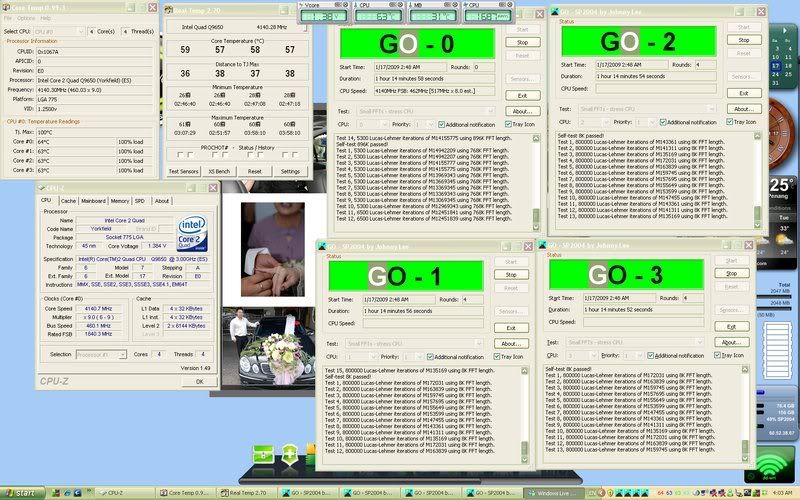
user posted image

my q9650 hehe ....

This post has been edited by loonaltezza: Jan 17 2009, 04:59 AM
hengmy
post Jan 17 2009, 01:20 PM

Regular
******
Senior Member
1,991 posts

Joined: Jan 2007
From: Seri Kembangan


@loonaltezza
nice temp there, sunbeam CCF?
loonaltezza
post Jan 17 2009, 03:36 PM

New Member
*
Junior Member
40 posts

Joined: Dec 2006


QUOTE(hengmy @ Jan 17 2009, 01:20 PM)
@loonaltezza
nice temp there, sunbeam CCF?
*
yup !! very good cooler !! rclxms.gif rclxms.gif
hengmy
post Jan 17 2009, 05:42 PM

Regular
******
Senior Member
1,991 posts

Joined: Jan 2007
From: Seri Kembangan


QUOTE(loonaltezza @ Jan 17 2009, 03:36 PM)
yup !! very good cooler !!  rclxms.gif  rclxms.gif
*
yea thumbup.gif , with aircon and closed case?
loonaltezza
post Jan 18 2009, 12:27 AM

New Member
*
Junior Member
40 posts

Joined: Dec 2006


QUOTE(hengmy @ Jan 17 2009, 05:42 PM)
yea thumbup.gif , with aircon and closed case?
*
yup close case .. cm690 cooler master rclxms.gif rclxms.gif
general_odin
post Jan 22 2009, 08:26 AM

no work, no money
*****
Senior Member
904 posts

Joined: Nov 2006
From: Selangor & Malacca, Malaysia


is this a good result ??
Attached Image

113 Pages « < 65 66 67 68 69 > » Top
 

Change to:
| Lo-Fi Version
0.0205sec    0.54    6 queries    GZIP Disabled
Time is now: 21st December 2025 - 12:42 PM