Welcome Guest ( Log In | Register )

Bump Topic Topic Closed RSS Feed
119 Pages « < 44 45 46 47 48 > » Bottom

Outline · [ Standard ] · Linear+

 The Solid State Storage Thread

views
     
Hawaiiii
post Apr 4 2011, 11:04 PM

On my way
****
Senior Member
687 posts

Joined: Jan 2008
From: Kuala Lumpur, Malaysia


QUOTE(thankyou @ Apr 3 2011, 02:09 PM)
Hawaiiii... I have buyer complains about the converter too....

I've currently bulk purchased a branded converter just to make sure there's no complains for my future customers...

Should have extra units... if you are interested.. you can let me know..
*
now my bios finally detected the SSD, but after login windows, it doesnt show up at the disk management, whats wrong???
everling
post Apr 4 2011, 11:11 PM

Look at all my stars!!
*******
Senior Member
3,591 posts

Joined: Feb 2008
QUOTE(Sky.Live @ Apr 4 2011, 09:16 PM)
Can you expalin about NAND chips?
*
I'm not sure what exactly you'd like me to explain about.

QUOTE
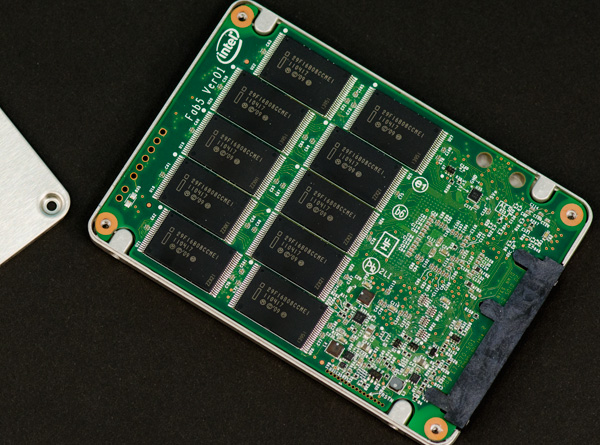
Intel sent a 300GB version of the 320 for us to take a look at. Internally the drive has 20 physical NAND devices. Each NAND device is 16GB in size and features two 64Gbit 25nm 2-bit MLC NAND die. That works out to be 320GB of NAND for a drive whose rated capacity is 300GB.

user posted image
The ten big black chips pictured here are the 16GB NAND chips.

And of course, Anand had to point out that they are 16GB chips and not 16GiB chips. 64Gbit = 64,000,000,000 bits = 8,000,000,000 bytes = 8GB. And there are two NAND dies per chip, so each chip is 16GB = 16,000,000,000 bytes.

So, I'm back to square one on understanding what is the spare area of the 80GB, 128GB and 160GB SSDs, all multiples of 16GB (or 8GB if we're going by the 3Xnm Flash), because they don't have enough spare area to be used as spare areas.
owikh84
post Apr 4 2011, 11:17 PM

i7 Clan
Group Icon
Elite
8,711 posts

Joined: Nov 2007
From: Butterworth, PG / Machang, Kelantan


QUOTE(Hawaiiii @ Apr 4 2011, 11:04 PM)
now my bios finally detected the SSD, but after login windows, it doesnt show up at the disk management, whats wrong???
*
Tried these?
unplug and replug the SSD
Device Manager > scan for new hardware
Disk Mgt > rescan disk

Hawaiiii
post Apr 4 2011, 11:53 PM

On my way
****
Senior Member
687 posts

Joined: Jan 2008
From: Kuala Lumpur, Malaysia


QUOTE(owikh84 @ Apr 4 2011, 11:17 PM)
Tried these?
unplug and replug the SSD
Device Manager > scan for new hardware
Disk Mgt > rescan disk
*
Still doesnt work T T, think have to send back for checking...
owikh84
post Apr 4 2011, 11:56 PM

i7 Clan
Group Icon
Elite
8,711 posts

Joined: Nov 2007
From: Butterworth, PG / Machang, Kelantan


QUOTE(Hawaiiii @ Apr 4 2011, 11:53 PM)
Still doesnt work T T, think have to send back for checking...
*
then nothing can be done d btw bro which type of adapter r u using?
Hawaiiii
post Apr 5 2011, 12:27 AM

On my way
****
Senior Member
687 posts

Joined: Jan 2008
From: Kuala Lumpur, Malaysia


QUOTE(owikh84 @ Apr 4 2011, 11:56 PM)
then nothing can be done d btw bro which type of adapter r u using?
*
microsata adapter, 1 is chap ayam and another is Stableau, both also not really working, seem like the SSD faulty, i will just send back for replacement.
owikh84
post Apr 5 2011, 06:41 AM

i7 Clan
Group Icon
Elite
8,711 posts

Joined: Nov 2007
From: Butterworth, PG / Machang, Kelantan


QUOTE(Hawaiiii @ Apr 5 2011, 12:27 AM)
microsata adapter, 1 is chap ayam and another is Stableau, both also not really working, seem like the SSD faulty, i will just send back for replacement.
*
sorry to hear that bro, but Stableau hmm i tot it will detect the SSD nicely.
but i'm still thinking that the SSD is still working perfectly if correct adapter is used.
mine is brandless but working excellently, physically it looked exactly like this:
user posted image
but has a white bar code sticker pasted on the adapter. It has been serving me since 4 months+ for main OS.
Hawaiiii
post Apr 5 2011, 12:13 PM

On my way
****
Senior Member
687 posts

Joined: Jan 2008
From: Kuala Lumpur, Malaysia


QUOTE(owikh84 @ Apr 5 2011, 06:41 AM)
sorry to hear that bro, but Stableau hmm i tot it will detect the SSD nicely.
but i'm still thinking that the SSD is still working perfectly if correct adapter is used.
mine is brandless but working excellently, physically it looked exactly like this:
user posted image
but has a white bar code sticker pasted on the adapter. It has been serving me since 4 months+ for main OS.
*
Yes i got exactly the same adapter that u have, just waiting for another replacement. If still cannot work then i will get the x25 version instead smile.gif
Racerx
post Apr 5 2011, 12:16 PM

Tell Your World
*******
Senior Member
8,461 posts

Joined: Mar 2007
From: Kota Bharu,Kelantan


QUOTE(Hawaiiii @ Apr 5 2011, 11:13 AM)
Yes i got exactly the same adapter that u have, just waiting for another replacement. If still cannot work then i will get the x25 version instead smile.gif
*
I use that adapter too,works fine.Did you try changing the SSD instead?
Hawaiiii
post Apr 5 2011, 12:36 PM

On my way
****
Senior Member
687 posts

Joined: Jan 2008
From: Kuala Lumpur, Malaysia


QUOTE(Racerx @ Apr 5 2011, 12:16 PM)
I use that adapter too,works fine.Did you try changing the SSD instead?
*
yes, im now waiting for replacement. hope it works.
nurainnur
post Apr 5 2011, 11:54 PM

New Member
*
Newbie
1 posts

Joined: Mar 2011


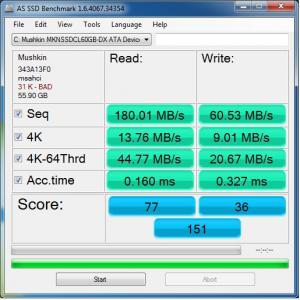
Attached Image

Recently buy Mushkin Callisto Deluxe 60G, this is what i get from benchmarking. Is it normal? I was thinking that it's wasn't. rclxub.gif

This post has been edited by nurainnur: Apr 5 2011, 11:54 PM
Jet23sky
post Apr 5 2011, 11:58 PM

Love is Peace~~~~~
******
Senior Member
1,339 posts

Joined: Jan 2003
I realize that even you dont want to install game in SSD, yet it will still force you to. I have 60GB SSD drives, but spend like 8gb on games. Why? Cause those DLCs, facepack etc are force to install in my documents. sad.gif
chenhui87
post Apr 6 2011, 07:01 PM

♥Jigeumeun So Nyuh Shi Dae♥
*******
Senior Member
2,150 posts

Joined: Apr 2009
From: 首尔


QUOTE(Jet23sky @ Apr 5 2011, 11:58 PM)
I realize that even you dont want to install game in SSD, yet it will still force you to. I have 60GB SSD drives, but spend like 8gb on games. Why? Cause those DLCs, facepack etc are force to install in my documents. sad.gif
*
y u dun wan to install game in SSD?if will load faster than HDD~~i spend my 60GB SSD with game and OS~~load relli fast on crysis2
OC4/3
post Apr 6 2011, 08:32 PM

.
Group Icon
Elite
4,746 posts

Joined: Dec 2007
From: Speed rule


QUOTE(Jet23sky @ Apr 5 2011, 11:58 PM)
I realize that even you dont want to install game in SSD, yet it will still force you to. I have 60GB SSD drives, but spend like 8gb on games. Why? Cause those DLCs, facepack etc are force to install in my documents. sad.gif
*
Why would you not install game on SSD?laugh.gif
The whole point of buying SSD is to install game/application to let it load in lightning pace in the first place biggrin.gif
60GB shall be good enough for basic application + 2 games or so
everling
post Apr 6 2011, 09:38 PM

Look at all my stars!!
*******
Senior Member
3,591 posts

Joined: Feb 2008
Larger capacity is far more important than performance. brows.gif
Jet23sky
post Apr 6 2011, 10:18 PM

Love is Peace~~~~~
******
Senior Member
1,339 posts

Joined: Jan 2003
QUOTE(everling @ Apr 6 2011, 09:38 PM)
Larger capacity is far more important than performance. brows.gif
*
Thats true.. And just by putting those facepack and installing Adobe Ultimate edition, already spent so much space. sad.gif

O guys, I dont know u all know about AHCI , I heard that if your SSD does not run under AHCI, the ssd speed will decrease like normal hdd. So have to enable AHCI.... At first I thought my SSD got problem. And I google it. Enable the AHCI. From 50second boot up to 19 second boot up! I cant even able to see the window 7 logo coming out XD
owikh84
post Apr 6 2011, 10:29 PM

i7 Clan
Group Icon
Elite
8,711 posts

Joined: Nov 2007
From: Butterworth, PG / Machang, Kelantan


QUOTE(Jet23sky @ Apr 6 2011, 10:18 PM)
Thats true.. And just by putting those facepack and installing Adobe Ultimate edition, already spent so much space. sad.gif

O guys, I dont know u all know about AHCI , I heard that if your SSD does not run under AHCI, the ssd speed will decrease like normal hdd. So have to enable AHCI.... At first I thought my SSD got problem. And I google it. Enable the AHCI. From 50second boot up to 19 second boot up! I cant even able to see the window 7 logo coming out XD
*
thumbup.gif
Use AHCI to enable TRIM support.

IDE vs AHCI

IDE mode :
read seq. : 255,1
write seq : 91.61
read 512k : 169.3
write 512k : 91.11
read 4k : 23.80
write 4k : 64.17

AHCI mode :
read seq. : 268,8 (+ 5.37%)
write seq : 90,43 (-1.29%)
read 512k : 205,2 (+21,20% !!!)
write 512k : 90,82 (-0.32%)
read 4k : 24.02 (+ 0.92%)
write 4k : 66.41 (+ 3.49%)


Jet23sky
post Apr 6 2011, 10:38 PM

Love is Peace~~~~~
******
Senior Member
1,339 posts

Joined: Jan 2003
QUOTE(owikh84 @ Apr 6 2011, 10:29 PM)
thumbup.gif
Use AHCI to enable TRIM support.

IDE vs AHCI

IDE mode :
read seq. : 255,1
write seq : 91.61
read 512k : 169.3
write 512k : 91.11
read 4k : 23.80
write 4k : 64.17

AHCI mode :
read seq. : 268,8  (+ 5.37%)
write seq : 90,43 (-1.29%)
read 512k : 205,2 (+21,20% !!!)
write 512k : 90,82 (-0.32%)
read 4k : 24.02 (+ 0.92%)
write 4k : 66.41 (+ 3.49%)
*
My IDE mode result is even worse than you.... During IDE mode, the AS SSD mark only score 100. After turn on AHCI mode, it rose up to 300, its 3 times faster =___=
chenhui87
post Apr 7 2011, 12:22 AM

♥Jigeumeun So Nyuh Shi Dae♥
*******
Senior Member
2,150 posts

Joined: Apr 2009
From: 首尔


i fail to enable AHCI, dunno y??nid to reformat SSD into AHCI mode?
Jet23sky
post Apr 7 2011, 08:24 AM

Love is Peace~~~~~
******
Senior Member
1,339 posts

Joined: Jan 2003
QUOTE(chenhui87 @ Apr 7 2011, 12:22 AM)
i fail to enable AHCI, dunno y??nid to reformat SSD into AHCI mode?
*
You need to enable AHCI under the windows registry first. Then you can only enable AHCI under the bios. If bios does not have AHCI, then you might to either update your bios or install Intel Matrix Storage or AHCI driver downloaded from your respective motherboard brand website. tongue.gif


Added on April 7, 2011, 9:01 am
QUOTE(OC4/3 @ Apr 6 2011, 08:32 PM)
Why would you not install game on SSD?laugh.gif
The whole point of buying SSD is to install game/application to let it load in lightning pace in the first place biggrin.gif
60GB shall be good enough for basic application + 2 games or so
*
It seems like my application is not basic after all XD

This post has been edited by Jet23sky: Apr 7 2011, 09:01 AM

119 Pages « < 44 45 46 47 48 > » Top
Topic ClosedOptions
 

Change to:
| Lo-Fi Version
0.0259sec    0.10    6 queries    GZIP Disabled
Time is now: 6th December 2025 - 05:00 PM