Outline ·
[ Standard ] ·
Linear+
Home Networking N Router By Asus RTN-66U / Asus RTN-16 / RT-N56U, Asus RT-N Series Supported Unifi
|
acbc
|
 Dec 29 2014, 02:56 PM Dec 29 2014, 02:56 PM
|

|
ASUSmy too complicated. Mine also trial by error and worked perfectly for months now. 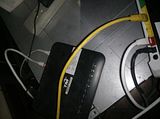 1. LAN2 port on TM-Huawei modem (white cable w/ red jack) to WAN port of Technicolor and set DMZ on it. 2. LAN2 port on Technicolor (yellow cable) to WAN port of Asus RT-N66U and set profile as Maxis Fibre and fill in username and password. 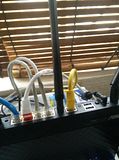 1. Another view from Asus router. Notice yellow cable from LAN2 port on Technicolor to WAN port on Asus? |
|
|
|
|
|
lau6311
|
Dec 29 2014, 03:19 PM
|
New Member

|
QUOTE(acbc @ Dec 29 2014, 03:56 PM) ASUSmy too complicated. Mine also trial by error and worked perfectly for months now. 1. LAN2 port on TM-Huawei modem (white cable w/ red jack) to WAN port of Technicolor and set DMZ on it. 2. LAN2 port on Technicolor (yellow cable) to WAN port of Asus RT-N66U and set profile as Maxis Fibre and fill in username and password. 1. Another view from Asus router. Notice yellow cable from LAN2 port on Technicolor to WAN port on Asus? I will try your setup, simple and not tedious. The bottom line is to have better & more appropriate working devices. If ASUSmy can provide additional comments for clarification and clarity, it would be productive and other Asus router new users would benefit as well. Perhaps there is no single one way to only work. Hoping so! |
|
|
|
|
|
sHawTY
|
Dec 29 2014, 08:16 PM
|
|
|
QUOTE(maxguy @ Dec 29 2014, 01:55 PM) AsusWRT-Merlin 376.49 STABLE Update 4
unifi ipv6 not working There are 3 ways to report bugs within AsusWRT-Merlin firmwares. 1. You can email him at merlin@lostrealm.ca 2. You can contact him by twitter: https://twitter.com/RMerlinDev3. You can post the issue you're facing direclty on his thread in SmallNetBuilder Forums: http://forums.smallnetbuilder.com/showthread.php?t=21483He's active mostly in the SmallNetBuilder forum. I'm trying to get him here in our forum. Maybe I should create a support thread for AsusWRT-Merlin first then maybe he'll come. Here's hoping.  |
|
|
|
|
|
sHawTY
|
Dec 29 2014, 08:24 PM
|
|
|
QUOTE(maxguy @ Dec 29 2014, 01:55 PM) AsusWRT-Merlin 376.49 STABLE Update 4
unifi ipv6 not working Scratch my previous post. Just found out that IPV6 is not working for me either for both RT-N16 & RT-AC68U. Will report this issue after thorough research that this issue is not caused by TM themselves.  |
|
|
|
|
|
maxguy
|
Dec 31 2014, 01:37 PM
|
|
|
asus official firmware release 3.0.0.4.376_3715 is working fine with unifi ipv6
|
|
|
|
|
|
RedDevil32
|
Jan 1 2015, 08:41 PM
|
New Member
|
I using unifi with Asus n12hp, still can't setup the unifi. This model not support unifi?
|
|
|
|
|
|
AVFAN
|
Jan 1 2015, 09:08 PM
|
|
|
QUOTE(RedDevil32 @ Jan 1 2015, 08:41 PM) I using unifi with Asus n12hp, still can't setup the unifi. This model not support unifi? wrong thread. pls read this, post #82. piece of cake! https://forum.lowyat.net/topic/2764213/+80 |
|
|
|
|
|
Eng_Tat
|
Jan 1 2015, 10:56 PM
|
|
|
dear all, any possibilities to connect two router to the unifi termination unit? I have the rt n56u n rt n14uhp. rt n56u does not really have the range like the n14uhp. also once I set the router to with ddns my speed kinda drop or becomes slower. so is it possible to run two router simultaneously> thanks
|
|
|
|
|
|
acbc
|
Jan 1 2015, 11:01 PM
|
|
|
QUOTE(Eng_Tat @ Jan 1 2015, 10:56 PM) dear all, any possibilities to connect two router to the unifi termination unit? I have the rt n56u n rt n14uhp. rt n56u does not really have the range like the n14uhp. also once I set the router to with ddns my speed kinda drop or becomes slower. so is it possible to run two router simultaneously> thanks Yes and no. Only 1 router will do all the routing / firewall work and another will be just the wireless AP. I'm using both RT-N66U as primary and Apple Airport Express as secondary. The secondary only act as AP. If u have both Unifi and Maxis like my office on a single BTU, can use a software router called Connectify to bind both connection together. I'm testing this now. So far, very promising since both Unifi and Maxis are 10Mbps each. |
|
|
|
|
|
Eng_Tat
|
Jan 1 2015, 11:11 PM
|
|
|
ic, previously I am using rt10u as a repeater/ap for boosting the signal of rt n56u, but now its intermittent drop line in internet where the rt10 is doing the coverage. so I bought rt n14uhp to increase signal directly, but I would still like to used the n56u. nw I am just using the rt14 and it looks faster as well, rather than some lags in the other end at rt10 devices. also does adding the ddns function in the router make them slower/line slower? QUOTE(acbc @ Jan 1 2015, 11:01 PM) Yes and no. Only 1 router will do all the routing / firewall work and another will be just the wireless AP. I'm using both RT-N66U as primary and Apple Airport Express as secondary. The secondary only act as AP. If u have both Unifi and Maxis like my office on a single BTU, can use a software router called Connectify to bind both connection together. I'm testing this now. So far, very promising since both Unifi and Maxis are 10Mbps each. |
|
|
|
|
|
acbc
|
Jan 1 2015, 11:30 PM
|
|
|
For DDNS, u better use a network cable instead of wireless. Previously, I had my laptop connected to wireless as a public file server but connection is unstable. Now OK because connected using wired.
|
|
|
|
|
|
Eng_Tat
|
Jan 1 2015, 11:34 PM
|
|
|
the ddns is set in the router themselves. currently the rtn14 is not set, only rtn56 is set, this is why I am asking can we used two router connected to the btu.  QUOTE(acbc @ Jan 1 2015, 11:30 PM) For DDNS, u better use a network cable instead of wireless. Previously, I had my laptop connected to wireless as a public file server but connection is unstable. Now OK because connected using wired. |
|
|
|
|
|
lucklyghost
|
Jan 2 2015, 06:16 PM
|
|
|
Dear All Sifu,
I;m planning to change unifi router to Asus N66U, i notice there is few people mention about N66U is not so stable however i saw the advertisement mention N66U is the best Wireless router 2014.
MY requirement is such as
-DDNS ( i notice Asus got FREE DDNS which is good for me, because for Free account DyDns require reconfigure every 30 days) so better got Asus FREE DDNS.
-VPN Feature
-Gigabit Port
-All in One (Modem + Router + Wireless) - (do i still require Unifi Router?)
-Guest Login
-Netflow (i notice the standard firmware like not able to support Netflow )
-SNMP (For monitoring )
Lastly, anyone flash to DD-WRT firmware ? not sure worth it or not
This post has been edited by lucklyghost: Jan 4 2015, 08:32 PM
|
|
|
|
|
|
djhenry91
|
Jan 2 2015, 08:50 PM
|
|
|
All in One?
nope..unless is streamyx
|
|
|
|
|
|
sHawTY
|
Jan 9 2015, 10:10 PM
|
|
|
AsusWRT-Merlin 376.49 STABLE Update 5 has been released. Changelog: CODE 376.49_5 (9-Jan-2015)
- FIXED: Vulnerability in infosvr (CVE-2014-9583) (Asus bug)
- FIXED: Additional security issue in infosvr (incorrect memcpy()
call) (Asus bug) |
|
|
|
|
|
blacktubi
|
Jan 11 2015, 07:19 PM
|
-

|
New firmware for ASUS RT-AC68U released (3.0.0.4.378.3813)
New features
1. Added AiProtection with triple-strength total network security, plus robust parental controls and privacy protection
2. Added Adaptive QoS. Applications and tasks can be prioritized easily using drag-and-drop presets for gaming, media streaming, VoIP, web browsing and file transfers.
However, IPV6 is broken from my side.
|
|
|
|
|
ASUSmy
|
Jan 12 2015, 11:54 AM
|
|
|
QUOTE(blacktubi @ Jan 11 2015, 07:19 PM) New firmware for ASUS RT-AC68U released (3.0.0.4.378.3813) New features 1. Added AiProtection with triple-strength total network security, plus robust parental controls and privacy protection 2. Added Adaptive QoS. Applications and tasks can be prioritized easily using drag-and-drop presets for gaming, media streaming, VoIP, web browsing and file transfers. However, IPV6 is broken from my side. Hi blacktubi, May I ask, have you tried to do a factory reset after the firmware update? It was require for this firmware as it added new features in this firmware. Thank you |
|
|
|
|
|
InSplre
|
Jan 12 2015, 12:52 PM
|
|
|
QUOTE(blacktubi @ Jan 11 2015, 07:19 PM) New firmware for ASUS RT-AC68U released (3.0.0.4.378.3813) New features 1. Added AiProtection with triple-strength total network security, plus robust parental controls and privacy protection 2. Added Adaptive QoS. Applications and tasks can be prioritized easily using drag-and-drop presets for gaming, media streaming, VoIP, web browsing and file transfers. However, IPV6 is broken from my side. Me 2, IPv6 broken. Did a factory reset before and after upgrade. Jan 10 19:20:20 odhcp6c[674]: Server returned IA_PD status 2 (NoAddrsAvail) |
|
|
|
|
|
blacktubi
|
Jan 12 2015, 01:47 PM
|
-
|
QUOTE(ASUSmy @ Jan 12 2015, 11:54 AM) Hi blacktubi, May I ask, have you tried to do a factory reset after the firmware update? It was require for this firmware as it added new features in this firmware. Thank you Yes, it is broken. Please feedback to your HQ. |
|
|
|
|
|
ASUSmy
|
Jan 12 2015, 02:15 PM
|
|
|
QUOTE(blacktubi @ Jan 12 2015, 01:47 PM) Yes, it is broken. Please feedback to your HQ. Hi blacktubi, I have feedback to the our RD already, will let you all know the update ASAP. Thank you |
|
|
|
|



 Quote
Quote








 0.0288sec
 0.51
0.51
 6 queries
 GZIP Disabled