Welcome Guest ( Log In | Register )

Outline · [ Standard ] · Linear+

 WTS Astro bYond HDMI signal extension kit, HDMI extender with IR relay for 2nd TV

views
     
TSctrlaltdel88
post Jul 14 2010, 01:45 PM, updated 11y ago

New Member
*
Junior Member
24 posts

Joined: Jul 2010
Have you wondered if your Astro bYond's HDMI output could be split and extended to another HDTV in another room?

Instead of paying for two bYond decoders every month, or simply putting up with a standard RF or SD AV link, you can maximize the value of your Astro bYond monthly subscription by extending it to another room!

Not only are you able to view the EXACT same HD picture in your second HDTV, but you will also be able to fully control your Astro bYond decoder using its remote control in the second room!

Maximize the usability of your other HDMI devices (PS3, Blu-Ray or HD Media Players, etc.) beyond your first HDTV by connecting them to remote HDTVs in other rooms. No need to own multiple devices in multiple locations that do the same thing.


Our prices are genuinely lower as compared to any existing solution using standard long length HDMI cables (most only up to 15m, with unpredictable performance) and we will tailor a system that works flawlessly for your home with minimal fuss. If you need installations for multiple HDTVs or are renovating your home and would like to have it future-proofed to be HD-ready, just drop us a line.

Alternatively, should you choose to have your own setup installed yourself, we provide an installer's kit which contains the following:

Attached Image
1 pair Exatrex Electronics HDMI+IR Dual UTP Extender
1 pair IR Receiver and Transmitter
1 unit 5VDC 1.0A Power Adapter (EU)

Attached Image
1 unit Exatrex Electronics 1x2 Active Splitter/Amplifier
1 unit 5VDC 1.0A Power Adapter (EU)

Attached Image
3 units Exatrex Electronics 1.0m SlimLine High Speed HDMI Cable with Ethernet (1.4a)
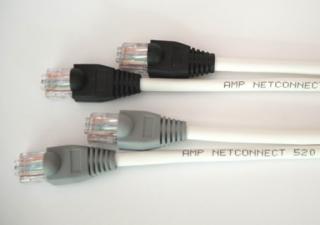
Attached Image
2 units AMP NetConnect 520 Cat5e UTP cable with AMP RJ45 Termination (20m or 30m)

Our best-selling installer’s kit has been thoroughly revised to include higher-end equipment which support the very latest in HDMI technologies and standards and provide an even wider range of compatibility with the latest HDTVs, all still at a very competitive price. The HDMI port has undergone many updates since the kit was first introduced, allowing for greater convenience and presenting even more advanced features.

The kit is now packaged with our very latest and highest-end HDMI splitter, which are similar to those we supply to high-end AV stores and similar in specifications to the rest of the industrial-grade AV switching equipment we carry. This powered splitter comes with an active amplification circuit to provide an even cleaner and stronger signal output, along with a wider range of compatibility supporting the latest features such as ARC, 3D, 12-bit Deep Colour and Dolby TrueHD/DTS-HD audio. These features are set to trickle down to even the most basic of HDTVs in the near future.

The kit is also now supplied with our best HDMI cables as well. Each kit will come with 3 units of Exatrex Electronics’ 1.0m SlimLine High Speed HDMI cables with Ethernet. These cables have a very slim and thin profile, allowing for easier concealability and flexibility. Of course, in line with the rest of the equipment supplied in the kit, they are all HDMI 1.4a certified to support the latest features and also have Ethernet over HDMI links. Visit hdmi.org: Finding the right HDMI cable for more information on HDMI cable standards.

Finally, the kit now comes with a longer, extended 1-year warranty on all equipment (excluding cables and power adapters). As before, our 14-day money-back guarantee still stands, to ensure that you are purchasing something that not only works, but also works perfectly with the rest of your equipment. The price has been revised to the following to reflect the upgraded equipment, but rest assured that we have tried our very best to maintain our competitive pricing, and still provide the best technical support we can.

20m kit: RM590
30m kit: RM620


Attached Image

This kit has everything you need to split and extend your HDMI signal over 20m/30m of Cat5e cables which are smaller, more cost effective and can be field-terminated. Rest assured that all our products have been tested with Astro bYond decoders (both standard and PVR decoders) and are guaranteed to be fully compatible with your decoders.

We have been in the business of supplying AV signal switching and distribution equipment to Astro installers, system integrators, AV consultants and various commercial establishments since 2009. As pioneers in the industry since HD transmissions were made available locally, we pride ourselves not only in our experience and deep technical know-how, but also in our relentless dedication to customer satisfaction. Unlike other uninformed vendors who carry non-branded generic products, we stand behind our products' quality and our reputation to provide the best in equipment and service.

We invest heavily in our equipment and also the products that we use to test these equipment, to ensure that our customers experience a truly hassle-free, plug-and-play installation process. Each product we carry is thoroughly tested not only with each other, but with most HDTVs, AVRs, BluRay Disc and Media Players from major manufacturers. Even so, our 14-day money-back guarantee ensures that in the unlikely event that you encounter compatibility issues you will not be stuck with a purchase you cannot use.

Thanks for your time and we hope to hear from you!

Kindly note the following:
- This is not a sales thread, but an avenue for general questions and comments related to the kit only. Please PM directly or email sales@tytrex.com for more specific questions or to place an order or for a customized setup.
- Prices stated above are firm and are only applicable for equipment purchased in a kit. For pricing on individual equipment, please enquire.
- We would like to kindly remind potential customers that we highly recommend using the cables we supply. Use of inferior quality or under-spec cables will affect signal stablity and image quality.
- We stock additional original Astro b.yond remotes as well, kindly PM for price. They come with a lifetime warranty directly from Astro, are programmable to operate your HDTV as well and are vastly superior to imitation ones in terms of quality and durability.
- For further enquiries or for purchase without a LYN account, please email us at sales@tytrex.com and quote promotional code: LYNFOR
.

This post has been edited by ctrlaltdel88: Aug 9 2012, 04:25 PM


Attached thumbnail(s)
Attached Image
isma45
post Jul 14 2010, 02:03 PM

- rocking the highway -
****
Senior Member
582 posts

Joined: Jun 2009
put picture or graphic or any video 2 support ur points pls..
MyDevil
post Jul 14 2010, 03:01 PM

Look at all my stars!!
*******
Senior Member
7,480 posts

Joined: Jun 2005
From: Moscow 21.05.2008


The products are connected with 1 or 2 Cat5e cables?
TSctrlaltdel88
post Jul 14 2010, 03:03 PM

New Member
*
Junior Member
24 posts

Joined: Jul 2010
QUOTE(MyDevil @ Jul 14 2010, 03:01 PM)
The products are connected with 1 or 2 Cat5e cables?
*
2 Cat5e cables are required, and are provided.

Thanks and regards.
ICDeadPeople
post Jul 14 2010, 04:00 PM

Enthusiast
*****
Senior Member
783 posts

Joined: Jan 2007
From: Definitely not U.S and A!!!


So, what is the price (i know you said you cannot advertise it freely)?
For me, beside the picture quality, the price can be a deal breaker.
MyDevil
post Jul 14 2010, 04:27 PM

Look at all my stars!!
*******
Senior Member
7,480 posts

Joined: Jun 2005
From: Moscow 21.05.2008


Yeah. Why not put in the garage sales?
As for the cat5e cables, can it be excluded from the package?
TSctrlaltdel88
post Jul 14 2010, 04:45 PM

New Member
*
Junior Member
24 posts

Joined: Jul 2010
QUOTE(ICDeadPeople @ Jul 14 2010, 04:00 PM)
So, what is the price (i know you said you cannot advertise it freely)?
For me, beside the picture quality, the price can be a deal breaker.
*
I understand that most HDMI products out there are extremely costly, I trust that you will deem our prices to be fair for home users. I will PM you the price but for others, kindly PM me for prices.


Added on July 14, 2010, 4:51 pm
QUOTE(MyDevil @ Jul 14 2010, 04:27 PM)
Yeah. Why not put in the garage sales?
As for the cat5e cables, can it be excluded from the package?
*
I will put a similar post in the relevant forum topics soon, thanks for the suggestion.

As for the Cat5e cables, I will be happy to exclude them and will deduct from the price accordingly. However, do note that based on our tests with several other Cat5e cables of other brands and quality, we have found that the ones we supply with the kit offer the most reliable and hassle-free installation. The reason we are bundling the Cat5e cables together is because we do not want our customers to encounter any problems when installing and we have good faith that these cables bundled will offer a truly convenient plug and play solution.

Thanks and regards.

This post has been edited by ctrlaltdel88: Jul 14 2010, 04:51 PM
Boy96
post Jul 14 2010, 05:42 PM

That's a tripod.
*******
Senior Member
3,848 posts

Joined: Dec 2009
From: Ampang


Price? my tv with byond downstairs.. need to hook with TV in the bedroom upstairs.. can?
eMKs
post Jul 14 2010, 06:07 PM

On my way
****
Senior Member
647 posts

Joined: Jan 2010
From: Klang
Can it work with HomePlug?
TSctrlaltdel88
post Jul 14 2010, 06:43 PM

New Member
*
Junior Member
24 posts

Joined: Jul 2010
QUOTE(eMKs @ Jul 14 2010, 06:07 PM)
Can it work with HomePlug?
*
Sorry, these will not work with Aztech HomePlug devices as the medium that ethernet over power uses is way too low in bandwidth to carry an uncompressed HD signal.

Thanks and regards.
peter32
post Jul 14 2010, 06:59 PM

心旷神怡
******
Senior Member
1,162 posts

Joined: Sep 2008
From: PJ


Hi there, I am interested in your product. I am just using the old Astro. Pls advice the price you are offering. Thanks.
kkm
post Jul 15 2010, 12:02 AM

Regular
******
Senior Member
1,258 posts

Joined: Jan 2003
QUOTE(peter32 @ Jul 14 2010, 06:59 PM)
Hi there, I am interested in your product.  I am just using the old Astro. Pls advice the price you are offering. Thanks.
*
The old (standard) Astro does not have hdmi out...
ah_chak
post Jul 15 2010, 08:30 AM

Vroom..
*******
Senior Member
2,341 posts

Joined: Jan 2003
From: Miri


PM me the price too.. thanks.. i don't need the ethernet cable as i have laid a cable from my byond box to my room upstairs and converted using RCA.. i can just crimp an RJ45 to both end.. settle..
anfieldude
post Jul 15 2010, 10:03 AM

Look at all my stars!!
*******
Senior Member
3,858 posts

Joined: Jan 2008
QUOTE(ah_chak @ Jul 15 2010, 08:30 AM)
PM me the price too.. thanks.. i don't need the ethernet cable as i have laid a cable from my byond box to my room upstairs and converted using RCA.. i can just crimp an RJ45 to both end.. settle..
*
For HDMI over Cat5e u require 2 cables one to transmit and one receive, do u have 2 cables going to and from ur source?
amirt1
post Jul 15 2010, 06:55 PM

New Member
*
Junior Member
41 posts

Joined: May 2010


What is the Maximum Distance you can go up to ? ( Becoz my bedroom is upstairs )
How about the Remote control ? ( Must i bring it up to my bedroom )
How many extensions can it go up to
TSctrlaltdel88
post Jul 15 2010, 11:52 PM

New Member
*
Junior Member
24 posts

Joined: Jul 2010
QUOTE(amirt1 @ Jul 15 2010, 06:55 PM)
What is the Maximum Distance you can go up to ? ( Becoz my bedroom is upstairs )
How about the Remote control ? ( Must i bring it up to my bedroom )
How many extensions can it go up to
*
The maximum distance achievable with the cables supplied with the kit is 30m. The remote controller can be brought up to your remote TV, or if you would like the added convenience we are able to source original byond remotes for you as well.

The number of extensions capable with this kit is only one, but if you require extensions to more points, we can put together a package that will meet your budget and requirements. Do let us know if you require something more elaborate.
Hudd
post Jul 16 2010, 11:36 AM

Getting Started
**
Junior Member
196 posts

Joined: Jul 2010


Interested with this..kindly pm me the price..
helob
post Jul 16 2010, 02:46 PM

Getting Started
**
Junior Member
265 posts

Joined: Jan 2003
Pls PM price.
TQ
DeZeque
post Jul 16 2010, 07:13 PM

Getting Started
**
Junior Member
218 posts

Joined: Jan 2003
PM me the price as well... with and without the Cat5e..

Thanks...
Maniac
post Jul 17 2010, 01:14 PM

That Tech Guy Who Use Nikon For Video
Group Icon
VIP
5,938 posts

Joined: Jan 2003
From: Now In The City of Merlion


Same as this one?

http://www.moresales.com.my/catalog/entry/upirvcjd.shtml
mys_terious
post Jul 17 2010, 05:02 PM

Enthusiast
*****
Senior Member
882 posts

Joined: Jul 2007
QUOTE(Maniac @ Jul 17 2010, 01:14 PM)
bro i think the product u posted is a hdmi entender only while the our friend is selling a hdmi splitter+extender+ir remote extender
rayfoo
post Jul 18 2010, 10:51 AM

Look at all my stars!!
*******
Senior Member
2,562 posts

Joined: Jan 2003


bro I Pm u already, no reply yet
TSctrlaltdel88
post Jul 19 2010, 01:50 AM

New Member
*
Junior Member
24 posts

Joined: Jul 2010
QUOTE(Maniac @ Jul 17 2010, 01:14 PM)
Yes, almost similar but our extenders come with a built-in IR remote relay as well. Kindly note that the kit includes not only the extenders, but also a 1x2 HDMI splitter with power supply, 3x HDMI cables and 2x 30m of Cat5e cables. Basically everything you need to get true, uncompressed HD signals on 2 HDTVs with full remote function.

Most importantly, this selected combination of products is a result of our extensive testing with our Malaysian b.yond decoders and we offer a money-back guarantee if it doesn't work with your Astro b.yond or byond PVR decoders.


Added on July 19, 2010, 1:57 am
QUOTE(rayfoo @ Jul 18 2010, 10:51 AM)
bro I Pm  u already, no reply yet
*
Thanks to everyone for your interest, your support is greatly valued, and to our customers, we trust that you are enjoying your purchases.

We apologize if we have not replied your PMs promptly, as we have been swamped with so many messages in such a short time. We guarantee to have each PM replied, in the soonest possible time.

Thanks and regards.

This post has been edited by ctrlaltdel88: Jul 19 2010, 01:57 AM
Kabadi84
post Jul 19 2010, 04:50 AM

weeeeeee..................
******
Senior Member
1,012 posts

Joined: Feb 2005
From: Denai Alam , Shah Alam


pm me a price also ..i want one downstair one upstair so that both can enjoy hd
Dickong
post Jul 19 2010, 07:12 AM

Regular
******
Senior Member
1,689 posts

Joined: Jan 2003
Pm me the price. tq
rayfoo
post Jul 19 2010, 10:57 AM

Look at all my stars!!
*******
Senior Member
2,562 posts

Joined: Jan 2003


warranty 1 year?
paklee
post Jul 19 2010, 11:51 AM

Getting Started
**
Junior Member
201 posts

Joined: Nov 2007


pm me the price bro...
TSctrlaltdel88
post Jul 19 2010, 12:36 PM

New Member
*
Junior Member
24 posts

Joined: Jul 2010
QUOTE(rayfoo @ Jul 19 2010, 10:57 AM)
warranty 1 year?
*
The kit comes with a 6-month direct exchange warranty.

Thanks and regards.
xsi
post Jul 19 2010, 04:38 PM

Getting Started
**
Junior Member
186 posts

Joined: Jan 2005
pm me the price...tq
ozone9
post Jul 19 2010, 11:56 PM

Getting Started
**
Junior Member
230 posts

Joined: Jul 2008
QUOTE(ctrlaltdel88 @ Jul 14 2010, 01:45 PM)
Have you wondered if your Astro bYond's HDMI output could be split and extended to another HDTV in another room?

Instead of paying for two bYond decoders, or simply putting up with a standard RF or SD AV link, you can maximize the value of your Astro bYond monthly subscription by extending it to another room!

Not only are you able to view the EXACT same HD picture in your second HDTV, but you will also be able to fully control your Astro bYond decoder using its remote control in the second room!

Our prices are genuinely lower as compared to any existing solution using standard long length HDMI cables (most only up to 15m, with unpredictable performance) and we will tailor a system that works flawlessly for your home with minimal fuss. If you need installations for more HDTVs or are renovating your home and would like to have it future-proofed to be HD-ready, just drop us a line.

Alternatively, should you choose to have your own setup installed yourself, we provide an installer's kit which contains the following:

1 pair Exatrex Electronics HDMI+IR UTP extender with IR in and out receiver and transmitter
1 unit Exatrex Electronics 1x2 HDMI splitter with 5VDC electronic power adapter
3 units 1.0m HDMI patch cables
2 units of 30m AMP NetConnect Cat5e (white) cables with RJ45 termination (pre-crimped)
1 Instruction Manual (Mostly plug and play, no-fuss installation)

This kit has everything you need to split and extend your HDMI signal over 30m of Cat5e cables which are smaller and more cost effective. Rest assured that all our products have been tested with Astro bYond decoders (both standard and PVR decoders) and are guaranteed to be fully compatible with your decoders. In fact, I am personally using this and will be willing to give a demonstration if you are not convinced of the HD signal being put through.

I represent a company that supplies, distributes and installs a range of products and systems that allows for cost effective HDMI signal distribution. Our products and services have been employed by several high-profile commercial establishments, enabling their customers to enjoy the spectacular quality of HD broadcasts and maximize their
investment in the HDTVs they own.

Kindly quote.
Thanks

This is our first attempt at tapping into the residential market to gauge response and demand. Since we also supply to a good number of stockists, and due to the exclusive nature of the products and services we provide, we regret to inform you that we are unable to advertise prices freely for everyone to read. However, do not hesitate to send us a message for a obligation-free quotation or even for further details.

Thanks for your time and I hope to hear from you!
*
FallenOut
post Jul 20 2010, 04:14 AM

#eieiru
*******
Senior Member
6,077 posts

Joined: Mar 2010
From: Anywhere But Here


can pm me the price
diamaidah
post Jul 20 2010, 06:57 AM

New Member
*
Junior Member
28 posts

Joined: May 2010


pls pm me the price also
miqie
post Jul 21 2010, 05:00 PM

New Member
*
Junior Member
38 posts

Joined: Jun 2010
I have received your PM on costing. How do we transact it? COD? PJ area?
aariz
post Jul 21 2010, 05:36 PM

New Member
*
Junior Member
38 posts

Joined: Feb 2010
bro.. pm me your price.. byond downstairs.. another hdtv upstairs.. tq


Added on July 21, 2010, 5:37 pmone more thing.. include installation..?

This post has been edited by aariz: Jul 21 2010, 05:37 PM
deanja92
post Jul 21 2010, 08:07 PM

New Member
*
Junior Member
27 posts

Joined: Sep 2006
PM me ur price pls, tq.
TSctrlaltdel88
post Jul 21 2010, 09:47 PM

New Member
*
Junior Member
24 posts

Joined: Jul 2010
QUOTE(miqie @ Jul 21 2010, 05:00 PM)
I have received your PM on costing. How do we transact it? COD? PJ area?
*
Sure, COD in PJ area is alright with me.
yeefung
post Jul 21 2010, 11:34 PM

Getting Started
**
Junior Member
107 posts

Joined: Nov 2004


PM me the best price please...Thanks.
Kabadi84
post Jul 22 2010, 10:03 AM

weeeeeee..................
******
Senior Member
1,012 posts

Joined: Feb 2005
From: Denai Alam , Shah Alam


Is it easy to install ? Got some nice manual to follow
TSctrlaltdel88
post Jul 22 2010, 11:58 AM

New Member
*
Junior Member
24 posts

Joined: Jul 2010
QUOTE(Kabadi84 @ Jul 22 2010, 10:03 AM)
Is it easy to install ? Got some nice manual to follow
*
We will provide instructions for connectivity, but usually there is no need to even read the instructions as all the components corresponding ports are labelled. It is simply plugging in the right cables in the ports and no damage will be done if any of the cables are inserted wrongly.

The 'installation' is more on the routing of the cables within your home. If you can handle that on your own, then this kit is for you. If you need someone to do it for you, we have installers who are able to install the cables for you as well.
klseet
post Jul 22 2010, 12:14 PM

Getting Started
**
Junior Member
130 posts

Joined: Mar 2008
Hi ctrlaltdel88,

Would you mind to show more pictures, detail spec & installation example of the product?

May I know how's your product quality & spec compared to the following example?
http://www.avextender.com/style/content/CN...16107&id=203764
http://www.avextender.com/style/content/CN...16107&id=220424

Hope to hear more information from you ! smile.gif

jeisern
post Jul 23 2010, 01:08 AM

On my way
****
Senior Member
589 posts

Joined: Sep 2005
From: Taman Klang Utama


pls pm me price as well
TSctrlaltdel88
post Jul 23 2010, 02:36 AM

New Member
*
Junior Member
24 posts

Joined: Jul 2010
QUOTE(klseet @ Jul 22 2010, 12:14 PM)
Hi ctrlaltdel88,

Would you mind to show more pictures, detail spec & installation example of the product?

May I know how's your product quality & spec compared to the following example?
http://www.avextender.com/style/content/CN...16107&id=203764
http://www.avextender.com/style/content/CN...16107&id=220424

Hope to hear more information from you !  smile.gif
*
Thanks for your enquiry. This is going to be a long explanation, but good to know if you are interested.

The two products you are quoting are almost similar, but more suited to commercial applications (eg. information display, advertisement screens, etc.).

The HDMI extender does the same job, but as it uses a single Cat6 cable, the HDMI signal may be compressed before it is transmitted through the cable. This may seem like a more convenient solution but one should bear in mind that our extenders do not compress the HDMI signal and more importantly, adds an IR relay for control of your decoder on the extended end.

The other extender seems to be tailored for PCs, and requires an existing Ethernet network to be present. I highly doubt it will be able to reliably transmit full HD through even a gigabit ethernet network (full HD requires bandwidth of at least 4Gbps) and it almost definitely is a compressed signal.

Compressed signals (used in single Cat cable extenders and wireless HDMI solutions) not only lose some minor detail in sharpness, but colour depth is significantly reduced and is more prone to signal drops due to the high compression used. Other disadvantages include some loss in digital audio functionality, reduced CEC (device intercontrol) compatibility and significantly higher signal latency.

Also, based on our experience with video distribution equipment, commercial application devices come with commercial prices and is almost always out of reach for the home user.

As to the quality of our products, we guarantee each kit we sell to be compatible with your Astro b.yond decoder and if you are not satisfied with your purchase, we will honour a full refund of your payment. Kindly note that we strongly advise our customers to use the Cat5e cables we supply as they have been proven to work reliably with our devices.

Regarding the connection diagram, we will post one up soon to illustrate how the devices in the kit are connected to each other.

I hope this has answered your questions and if you have any further enquiries, do not hesitate to ask.

Thanks and regards.
miqie
post Jul 23 2010, 11:13 AM

New Member
*
Junior Member
38 posts

Joined: Jun 2010
Hi ctrlaltdel88,

Instead of PMing each customer of the price, why not just publish it?
klseet
post Jul 23 2010, 11:29 AM

Getting Started
**
Junior Member
130 posts

Joined: Mar 2008
QUOTE(ctrlaltdel88 @ Jul 23 2010, 02:36 AM)
Thanks for your enquiry. This is going to be a long explanation...
Thanks for the explanation!

I saw you stated the package comes with 2x30M Cat5e cable, so do you or we need to get our contractor to lay this 2 cables from downstairs to upstairs?

Also looking forward to more detail photos, spec and installation requirement, thanks in advance! smile.gif

QUOTE(miqie @ Jul 23 2010, 11:13 AM)
Hi ctrlaltdel88,

Instead of PMing each customer of the price, why not just publish it?
*
I agreed, more transparent mah... biggrin.gif
Joche
post Jul 23 2010, 01:51 PM

New Member
*
Newbie
2 posts

Joined: Jul 2010
QUOTE(ozone9 @ Jul 19 2010, 11:56 PM)
*
PM the price, any picture to view? Where can i c a real set/demo that connecting to Astro beyond n connecting to 2 TV with same HD quality?


Added on July 23, 2010, 4:07 pm
QUOTE(miqie @ Jul 21 2010, 05:00 PM)
I have received your PM on costing. How do we transact it? COD? PJ area?
*
How much is it?

This post has been edited by Joche: Jul 23 2010, 04:07 PM
TSctrlaltdel88
post Jul 26 2010, 07:10 PM

New Member
*
Junior Member
24 posts

Joined: Jul 2010
QUOTE(miqie @ Jul 23 2010, 11:13 AM)
Hi ctrlaltdel88,

Instead of PMing each customer of the  price, why not just publish it?
*
Prices have been published, as requested by customers.


Added on July 26, 2010, 7:13 pm
QUOTE(klseet @ Jul 23 2010, 11:29 AM)
Thanks for the explanation!

I saw you stated the package comes with 2x30M Cat5e cable, so do you or we need to get our contractor to lay this 2 cables from downstairs to upstairs?

Also looking forward to more detail photos, spec and installation requirement, thanks in advance!  smile.gif
I agreed, more transparent mah...  biggrin.gif
*
We have installers who will do the cable routing for you, or you may engage your own contractor to perform the work. Kindly PM for a quote, detailing your requirements.

Thanks for your suggestion, we highly value transparency and thus the prices have been posted. The connection diagram is posted for your reference as well.

This post has been edited by ctrlaltdel88: Aug 24 2010, 09:32 AM
klseet
post Jul 26 2010, 08:15 PM

Getting Started
**
Junior Member
130 posts

Joined: Mar 2008
QUOTE(ctrlaltdel88 @ Jul 26 2010, 07:10 PM)
Prices have been published, as requested by customers.

We have installers who will do the cable routing for you, or you may engage your own contractor to perform the work. Kindly PM for a quote, detailing your requirements.

Thanks for your suggestion, we highly value transparency and thus the prices have been posted. The connection diagram is posted for your reference as well.
*
UGPM ! icon_rolleyes.gif
muthukm
post Jul 30 2010, 12:05 PM

New Member
*
Newbie
1 posts

Joined: Jul 2010
PLEASE PM. CONTACT DETAILS.INTERESTED IN PURCHASING IT
gahkin
post Jul 31 2010, 12:01 AM

Enthusiast
*****
Senior Member
735 posts

Joined: Jan 2003
From: Selayang , Kepong


bro if i wan get the additonal astro b.yond remote u selling how much ?
Kabadi84
post Jul 31 2010, 12:04 PM

weeeeeee..................
******
Senior Member
1,012 posts

Joined: Feb 2005
From: Denai Alam , Shah Alam


Anybody using this now a simple comment will be nice ?
gahkin
post Aug 10 2010, 06:55 PM

Enthusiast
*****
Senior Member
735 posts

Joined: Jan 2003
From: Selayang , Kepong


bro i wan to ask now my new home now was exist the cable with revolution.

now my setup was :

ground floor - main point - astro byond - HDMI directly connect to Plasma LCDTV.
- previous cable was S-video but now was DIY to component cable but result very suck and was using component port as composite now.
second floor - 2 lcd tv was connect composite from byond ( 1 room can use remote downstair main b.yond )
third floor - 3 lcd tv was connect by composite from byond


so, i wan to ask bro why previous cable is RGB6 ( svideo ) port but byond dont hv come with s-video then we was DIY to component but the result come out really disappointment the screen look dark and deep red. not natual the color. why this problem accour ??

and again, bro u got any idea with hdmi extender u provide can directly using hdmi output to all my house LCDtv ?
we just want get better picture quality only..

u got any idea will do ?? biggrin.gif

Jack28HT
post Aug 24 2010, 12:43 PM

Getting Started
**
Junior Member
150 posts

Joined: Apr 2007


QUOTE(Kabadi84 @ Jul 31 2010, 12:04 PM)
Anybody using this now a simple comment will be nice ?
*
I got the device last week and tested it with the Cat5e cables provided in the package and it worked right out of the box. rclxms.gif

However I wanted to use my existing concealed LAN cables during renovation 5 years back because my wife does not allow to lay exposed cables around the house. The problem challenge is that the LAN cables were installed to reach different locations and no direct path from the living room to the AV room upstair. So I got to make a few interconnects and after some hardwork in connecting those LAN cables different locations, I finally got it to work last night !!

Here are my comments :

1. The device is surprisingly small and light, and it doesn't required external power supply. I actually had doubt when I first saw it and was told no need power supply.

2. The biggest attraction to me is the build-in remote IR extender into the device itself!

3. The device is really simple to use and works well. However so far I have only tested for Byond video signal of 720p and 1080i. I have also not tested the HDMI audio because I don't have a HDMI AVR.

4. Excellent support from the TS and he allowed me to have the options of returning the cables if my existing cables can work.

5. All in all, together with the cost and the support, I am very happy with it and highly recommend it if you need to have a HDMI extension especially when IR extender is needed as well! thumbup.gif

/Jack
aariz
post Aug 25 2010, 12:35 PM

New Member
*
Junior Member
38 posts

Joined: Feb 2010
hmm.. interesting..

so what is yout comment on the HD video signal.. is there any different in terms of PQ on both tv..?
Jack28HT
post Aug 25 2010, 04:20 PM

Getting Started
**
Junior Member
150 posts

Joined: Apr 2007


QUOTE(aariz @ Aug 25 2010, 12:35 PM)
hmm.. interesting..

so what is yout comment on the HD video signal.. is there any different in terms of PQ on both tv..?
*
Unfortunately I can't comment much on it because my living room is still having a plain o Wega CRT TV. Actually I do see the black level is a bit too grey on my HD projector upstairs. Not sure if it's due to the B.yond signal, or the projector's age (more than 2000 lamp hrs). I really do not have a reference to compare to at this moment because my B.yond was just installed last weekend and I don't have any HD display connected directly it to see the actual B.yond PQ quality. I wish I could bring the B.yond decoder upstair or the projector downstair but I can't. But I thnk I will try to bring down either the PS3 or TViX to play through the HDMI extender to compare, maybe during this long weekend and provide further comment after that.
Dexsam
post Aug 27 2010, 07:25 AM

Getting Started
**
Junior Member
88 posts

Joined: Sep 2008


QUOTE(Jack28HT @ Aug 24 2010, 12:43 PM)
I got the device last week and tested it with the Cat5e cables provided in the package and it worked right out of the box.  rclxms.gif

However I wanted to use my existing concealed LAN cables during renovation 5 years back because my wife does not allow to lay exposed cables around the house. The problem challenge is that the LAN cables were installed to reach different locations and no direct path from the living room to the AV room upstair. So I got to make a few interconnects and after some hardwork in connecting those LAN cables different locations, I finally got it to work last night !!

Here are my comments :

1. The device is surprisingly small and light, and it doesn't required external power supply. I actually had doubt when I first saw it and was told no need power supply.


/Jack
*
I thought the HDMI extender need a 5V supply which is provided in the form of 5V power adapter. Which means it require a power point(or two)to work. Can the TS clarify whether the 5V power supply is needed at the source end or the receiving end or both units? Thanks.

What if I need to split into 2 more displays? Meaning from the Beyond unit (one display nearest Beyond) to 2 more displays upstairs?
Yogi BoY
post Aug 27 2010, 07:57 AM

Getting Started
**
Junior Member
69 posts

Joined: Aug 2008
From: Selayang , Selangor , Malaysia


price please ..
eMKs
post Aug 27 2010, 09:01 AM

On my way
****
Senior Member
647 posts

Joined: Jan 2010
From: Klang
From the picture TS posted, I assume that only HDMI splitter need 5V power supply. The extender will get power from HDMI. If you read from HDMI spec, it stated that:
QUOTE
Some active devices, such as actively powered HDMI cables or in-line signal extender boxes, will by default attempt to power their electronics by taking power from the 5V line (+5V power) available on the HDMI connector. The HDMI specification requires all source devices to provide at least 55mA (milliamps) on the 5V line for the purpose of reading the EDID of a display. While 55mA is not enough current to operate most HDMI accessory devices (which typically require about 100 to 150mA), most source devices on the market today provide significantly more current on the 5V line than the HDMI specification requires. As a result, the vast majority of accessory devices can operate when interfaced with a source device that provides more than the required current (i.e. over 100-150mA) on the 5V line. However, manufacturers should provide a provision for their powered HDMI accessory devices to obtain external power, and consumers are encouraged to look for this external power provision when purchasing such products.

So I assume HDMI splitter will provide enough power to the extender transmitter.
But at the receiver end is still puzzled me. It's whether HDMI port at TV provide enough current or they send the power through Cat5.
If you want to extend more than 2 display, you need to get 1 to 3 HDMI splitter or even 1-4. That's mean another set of extender & extra money lorr tongue.gif
iProzac
post Sep 2 2010, 06:01 PM

New Member
*
Newbie
3 posts

Joined: Aug 2009
Hi,

Okay, here's my current home set up:

1. Living room with Astro bYond connected to an LCD TV
2. Upstairs AV room with a CRT tv WITHOUT HDMI input.
3. I already have internal S-Video wiring connecting my living room to the upstairs AV room. Previously used for normal ASTRO extender before i upgraded to b.yond.

So my question is:
Is there any way i can extend my current Astro bYond to my upstairs CRT tv using S-Video instead of your Cat5E? I don't mind if there's no HD in the upstairs room, as long as the quality is like normal Astro is sufficient.

Thanks!
blastique
post Sep 8 2010, 02:03 PM

New Member
*
Junior Member
8 posts

Joined: Jan 2008
From: Kuala Lumpur / Perth


Hi there. Does this price include installation? I'm an interested buyer.
frankteh
post Sep 9 2010, 02:12 PM

New Member
*
Junior Member
15 posts

Joined: May 2008
Pls pm me price with and without cables.

Q. My house has concealed LAN cables, can that work?
badtekad
post Sep 12 2010, 02:01 AM

New Member
*
Newbie
1 posts

Joined: Sep 2010
Please pm me the price without cable. thanks
TSctrlaltdel88
post Sep 20 2010, 02:21 PM

New Member
*
Junior Member
24 posts

Joined: Jul 2010
QUOTE(Jack28HT @ Aug 25 2010, 04:20 PM)
Unfortunately I can't comment much on it because my living room is still having a plain o Wega CRT TV. Actually I do see the black level is a bit too grey on my HD projector upstairs. Not sure if it's due to the B.yond signal, or the projector's age (more than 2000 lamp hrs).  I really do not have a reference to compare to at this moment because my B.yond was just installed last weekend and I don't have any HD display connected directly it to see the actual B.yond PQ quality. I wish I could bring the B.yond decoder upstair or  the projector downstair but I can't. But I thnk I will try to bring down either the PS3 or TViX to play through the HDMI extender to compare, maybe during this long weekend and provide further comment after that.
*
Thanks for taking the time to post a review, we greatly appreciate your effort!

To address your (and other's) concerns of the picture quality, our extenders carry an uncompressed HD video feed. This means that it is digitally similar to the feed that is fed out of your Astro b.yond decoder, or in layman's terms, it is the exact picture (with similar colour depth, resolution, refresh rate) as what your would see in a direct connection.

On top of this, our extenders also carry the full Dolby Digital 5.1 (available on some HD channels) to the remote end as well.

Of course, in the interest of our customers who have their reservations, our money-back guarantee still stands. No questions asked.


Added on September 20, 2010, 2:33 pm
QUOTE(eMKs @ Aug 27 2010, 09:01 AM)
From the picture TS posted, I assume that only HDMI splitter need 5V power supply. The extender will get power from HDMI. If you read from HDMI spec, it stated that:

So I assume HDMI splitter will provide enough power to the extender transmitter.
But at the receiver end is still puzzled me. It's whether HDMI port at TV provide enough current or they send the power through Cat5.
If you want to extend more than 2 display, you need to get 1 to 3 HDMI splitter or even 1-4. That's mean another set of extender & extra money lorr  tongue.gif
*
Thanks for the contribution, perhaps you would like to join our team? http://s.lowyat.net/style_images/1/folder_...icons/icon6.gif

The HDMI splitter we supply comes with a power adapter and supplies 500mA of current to EACH port. Most HDTVs also supply 500mA on each HDMI port and considering that the extender only requires 80mA of current at peak loads, power is not an issue at neither the remote or source sides. The provision of connecting a power adapter is present on the remote side, but is only required if connecting more than 1 extended lines together.

If you require extensions to more than 1 HDTV, we also stock 1x4 and 1x8 HDMI splitters. All of our splitters are actively powered, HDCP and HDMI compliant, and most importantly, have been rigorously tested and are guaranteed to work perfectly with our extenders and our local Astro b.yond decoders. Feel free to drop us a PM should you need more extensions than the standard kit can offer and we will work out a solution for you.

This post has been edited by ctrlaltdel88: Sep 20 2010, 02:33 PM
Jack28HT
post Sep 20 2010, 05:55 PM

Getting Started
**
Junior Member
150 posts

Joined: Apr 2007


ctrlaltdel88,

I encountered display at remote side becomes pink'ish color at times, which I think it usually happened when some electrical stuff got swithed on or off like lights, fan, or even air-cond auto control. I could recover the color back to normal by unplugging the RJ45 plug either at the DDC or TMDS and plugging it back again (does this reset or resync the HDMI signal?) Any idea what is the issue? Some electrical glitch causing the problem?

Thanks.

Jack.

TSctrlaltdel88
post Sep 20 2010, 07:57 PM

New Member
*
Junior Member
24 posts

Joined: Jul 2010
Hi Jack,

I suspect that the cables that you have routed are picking up a lot of interference from somewhere in your house. This could be due to a multitude of factors, including poor crimping or cable quality, your conduit that may be passing through a high interference location somewhere in your wall, or maybe the fact that you have actually connected two Cat cables together using the female-female adapter. You could try switching the TMDS and DDC cables, to see which offers better performance. Reestablishing the HDMI connection forces the HDCP handshake to renegotiate, restoring the signal back to normal.

For our other customers, we would like to stress that it is very crucial to use good quality cables. The best solution would be to obtain the cables from us, as they have been tested and are guaranteed to work perfectly. Beware of imitation AMP cables as well, especially if they have been obtained for too low a price.

Thanks and regards
blastique
post Sep 27 2010, 09:35 PM

New Member
*
Junior Member
8 posts

Joined: Jan 2008
From: Kuala Lumpur / Perth


Hi there,

Still awaiting your follow-up reply via PM. Could you kindly get back to me asap please.

Cheers.

-Reuben

QUOTE(ctrlaltdel88 @ Sep 20 2010, 07:57 PM)
Hi Jack,

I suspect that the cables that you have routed are picking up a lot of interference from somewhere in your house. This could be due to a multitude of factors, including poor crimping or cable quality, your conduit that may be passing through a high interference location somewhere in your wall, or maybe the fact that you have actually connected two Cat cables together using the female-female adapter. You could try switching the TMDS and DDC cables, to see which offers better performance. Reestablishing the HDMI connection forces the HDCP handshake to renegotiate, restoring the signal back to normal.

For our other customers, we would like to stress that it is very crucial to use good quality cables. The best solution would be to obtain the cables from us, as they have been tested and are guaranteed to work perfectly. Beware of imitation AMP cables as well, especially if they have been obtained for too low a price.

Thanks and regards
*
rayfoo
post Oct 4 2010, 09:18 PM

Look at all my stars!!
*******
Senior Member
2,562 posts

Joined: Jan 2003


just got the kit from the TS, installed and straight can use already,for that price i think it's a good deal smile.gif
keehiang
post Oct 5 2010, 02:56 PM

New Member
*
Newbie
2 posts

Joined: Oct 2006
Hi ctrlaltdel88

How much is the device without the Cat5E cable? How much is the remote control for Astro Beyond PVR?

KH
C-Fu
post Oct 5 2010, 05:54 PM

Ninja-Fu
******
Senior Member
1,051 posts

Joined: Apr 2005
From: Brisbane, QLD, Ostolia


my friend has this, connected from the HD signal on her parent's bedroom upstairs to the living room tv.

but quality is very very poor. around SD quality or slightly lower. maybe there are inteferences where the cables are routed i guess, or my best guess would be the cat5e cable isnt properly shielded (or stranded instead of solid cable) for these kind of applications... but really didn't those guys who pasang the thing test it out before or right after installation?

This post has been edited by C-Fu: Oct 5 2010, 06:06 PM
TSctrlaltdel88
post Oct 5 2010, 06:41 PM

New Member
*
Junior Member
24 posts

Joined: Jul 2010
QUOTE(C-Fu @ Oct 5 2010, 05:54 PM)
my friend has this, connected from the HD signal on her parent's bedroom upstairs to the living room tv.

but quality is very very poor. around SD quality or slightly lower. maybe there are inteferences where the cables are routed i guess, or my best guess would be the cat5e cable isnt properly shielded (or stranded instead of solid cable) for these kind of applications... but really didn't those guys who pasang the thing test it out before or right after installation?
*
I'm sorry, but I believe that what your friend has installed are not any of our products. Would appreciate if you could clearly state what brand of equipment he/she uses. Basically it is very hard to get poor picture quality from a digital signal (HDMI), even if you're watching SD channels. Also, there is no such thing as poor picture when it comes to digital, it's only either you get a picture or you don't.

As stated in the original post, the product delivers an uncompressed HDMI feed to all devices, with full 5.1 digital audio. It is and exact replication of the HD signal as you would observe using a direct HDMI connection. There is absolutely no degradation of picture quality no matter how long the cables are.

We value our customer's satisfaction and rely on them to provide feedback on our products to their friends. Although your post is somewhat unfounded, I believe that our customers are perfectly happy with their picture quality. Also, as a reminder to our future customers, our promise of our money back guarantee still stands. So far, we have not encountered any returns but we will honour a full refund if you are not happy with the results.

This post has been edited by ctrlaltdel88: Oct 5 2010, 06:46 PM
mirakim
post Oct 6 2010, 05:23 PM

New Member
*
Junior Member
45 posts

Joined: Apr 2008


met seller friend to COD around TTDI area.. nice n easy.. just connect everything..WaLLAAHH.. the picture CANTIK on both TVs! except sakit mata watching all the cables.. thanks seller.. smile.gif
johnleeisme2004
post Oct 6 2010, 09:39 PM

Getting Started
**
Junior Member
86 posts

Joined: Oct 2007
I met TS to COD last month in Bangsar. Yes, nice and easy...His products work just as described. Good and solid quality unlike some cheaplak China brands. rclxms.gif
opjust
post Oct 7 2010, 07:44 PM

Enthusiast
*****
Senior Member
721 posts

Joined: Sep 2009


hw much this product?
josuah
post Oct 15 2010, 06:27 PM

New Member
*
Newbie
4 posts

Joined: Sep 2010


Ugpm smile.gif

diamaidah
post Oct 16 2010, 07:03 AM

New Member
*
Junior Member
28 posts

Joined: May 2010


1x4 splitter and split to 3 HDTV(2 using the extender) working successfully.Good customer support and the price is very reasonable.Recommended to everyone.
yogibear
post Oct 29 2010, 11:14 AM

New Member
*
Junior Member
29 posts

Joined: Jan 2003
Hi,

Can u PM me the price for this complete installation?
TQ.
keehiang
post Nov 10 2010, 03:49 PM

New Member
*
Newbie
2 posts

Joined: Oct 2006
Receive my order in Penang. Easy to setup with my existing concealed Cat 5E UTPs laid 5 years ago. The quality is 100 times better than converting the AV signal to RF and use the TV tuner to receive the channel.
shamx
post Nov 12 2010, 11:38 AM

New Member
*
Newbie
1 posts

Joined: Nov 2009


Got mine COD last night (ordered in the afternoon) - bought the 30m kit & a b.yond remote.

Immediately connected and laid the cables (decoder is at groundfloor livingroom - to xtend to 1st floor masterbedroom)- took about 15 minutes to get the cables connected and the picture and sound out to my 1st floor master bedroom tv. Took sometime to get the placement of the remote receiver at b.yond decoder (the receiver) properly placed => total setting up + tidying up time taken ~ 1hr.

My evaluation:

1. seller - nice person, punctual, explained the product and guided the set up clearly - transaction was fast and smooth.
2. hardware & cables - high quality.
3. picture & sound - as good as the living room tv - very impressed.
4. remote - work very well (no problem)


Highly recommended.


izz70
post Nov 19 2010, 06:55 PM

Getting Started
**
Junior Member
226 posts

Joined: Sep 2007
pm me the price please. Thanks
arg
post Nov 21 2010, 11:29 PM

New Member
*
Newbie
1 posts

Joined: Nov 2010
Please pm me price and contact please.
Solidices
post Dec 2 2010, 01:44 AM

New Member
*
Newbie
1 posts

Joined: Dec 2010
I'm interested. Please do PM me the price and contact. Thanks.
dennispss
post Dec 6 2010, 10:24 AM

New Member
*
Junior Member
31 posts

Joined: Nov 2009
Hi, I`m interested. Kindly PM me the prices. Tks. drool.gif
sshahar9
post Dec 8 2010, 02:53 AM

New Member
*
Junior Member
38 posts

Joined: Mar 2008


will this also work if sourced from ps3 or bluray player? meaning the other room also get hd from ps3 or bd player?
pls pm price with n without installation. tq

TSctrlaltdel88
post Dec 9 2010, 01:04 AM

New Member
*
Junior Member
24 posts

Joined: Jul 2010
Yes, any device that has a HDMI output port will work with any of our devices. We thoroughly test each and every item we stock to be compatible with HDMI 1.3 and most importantly, HDCP 1.2 to ensure complete compatibility with almost all devices.

I currently use this system in conjunction with a HDMI switch, whose input can be selected using an IR remote. Sometimes I will bring my PS3 or XBox 360 controller to my other room and am able to choose which device to show on my remote TV using the IR remote and also use my game console's controllers wirelessly (Bluetooth has exceptional operational range) from the other room. This would mean that you only have to buy one Blu-Ray player, to serve however many TVs you need.

QUOTE(sshahar9 @ Dec 8 2010, 02:53 AM)
will this also work if sourced from ps3 or bluray player? meaning the other room also get hd from ps3 or bd player?
pls pm price with n without installation. tq
*
sshahar9
post Dec 9 2010, 03:02 AM

New Member
*
Junior Member
38 posts

Joined: Mar 2008


that is AWESUM...
nice.. can play ps3 from my room then, no need to stay in living room. nice... am seriously considering..
any know problems so far?
how bout warranty issues etc?
SUSchokia
post Dec 9 2010, 10:17 AM

Chartered Member
*******
Senior Member
3,617 posts

Joined: Oct 2010
Dear TS, do you plan for the future product to completely eliminate the Cat5e cables, since the concept of this extender is like connecting uncompressed media from one computer to the other via network and the HDMI cable only delivering those content to AVR/HDTV.

If that is the case, it can also use wifi right? Since not every home owner wants the re-conceal the whole house for this new network cables especially after they've spent so much concealing all visible cable during the first renovation.


sshahar9
post Dec 14 2010, 08:32 PM

New Member
*
Junior Member
38 posts

Joined: Mar 2008


hi bro, am interested, pls pm me best price.
do you do cod? whereabouts if possible i need you to teach me how it works and what goes where so i can teach my installer also.

Thanks
silbii
post Dec 15 2010, 12:07 AM

Enthusiast
*****
Senior Member
963 posts

Joined: Sep 2005


pm best price bro...

what about digital audio? can this extend the Dolby Digital signal from the Astro Beyond coaxial output too? Or i must rely solely on HDMI for both audio and video...and get an HDMI receiver to transmit digital audio

thx
TSctrlaltdel88
post Dec 15 2010, 02:05 PM

New Member
*
Junior Member
24 posts

Joined: Jul 2010
Regarding your question, the extender carries the same digital audio signal as present at the source through the HDMI connection. This means that you will need a HDMI receiver to decode the Dolby Digital signal at the remote end.

To clarify things for you, the coaxial digital audio output signal is also included in the HDMI connection. This means that a single HDMI connection has HD video and digital audio signals coupled into a single cable.

QUOTE(silbii @ Dec 15 2010, 12:07 AM)
pm best price bro...

what about digital audio? can this extend the Dolby Digital signal from the Astro Beyond coaxial output too? Or i must rely solely on HDMI for both audio and video...and get an HDMI receiver to transmit digital audio

thx
*

Added on December 15, 2010, 2:25 pmThanks for your interest and your question.

Unfortunately, the concepts behind HDMI and Ethernet are very different from each other. The reason why some people may think that they are related is because of the Cat5e cables that are usually used in Ethernet connections. These extenders do not operate on the TCP/IP protocol, which means that they are not compatible with Ethernet/computer networks. This is why the Cat5e cables from the extenders cannot be plugged into an Ethernet switch or router.

Wireless LAN also operates on the TCP/IP protocol, thus you cannot just plug the extenders into a WiFi router and have a wireless solution. Wireless HDMI is still quite far off from becoming a mainstream means of transmitting HD video, due to the bandwidth and medium stability a HD feed requires. Although wireless HD devices exist, the costs associated with them are too high for most households.

Currently, Cat5e extenders offer the best value and performance for household use. As more and more devices adopt HDMI ports, you can be sure that HDMI is here to stay.

QUOTE(chokia @ Dec 9 2010, 10:17 AM)
Dear TS, do you plan for the future product to completely eliminate the Cat5e cables, since the concept of this extender is like connecting uncompressed media from one computer to the other via network and the HDMI cable only delivering those content to AVR/HDTV.

If that is the case, it can also use wifi right? Since not every home owner wants the re-conceal the whole house for this new network cables especially after they've spent so much concealing all visible cable during the first renovation.
*
This post has been edited by ctrlaltdel88: Dec 15 2010, 02:25 PM
earthling1984
post Dec 24 2010, 10:10 PM

Getting Started
**
Junior Member
178 posts

Joined: Dec 2010
So it has been a while since u guys used it...How's the feedback? Is it difficult to install? Worth the money? I'm really interested as i just got a full hdtv...Merry Xmas and happy New year!
hariznasir
post Dec 24 2010, 11:11 PM

New Member
*
Junior Member
27 posts

Joined: Dec 2010
pm the price ! thumbup.gif

This post has been edited by hariznasir: Dec 24 2010, 11:12 PM
sws
post Dec 26 2010, 02:07 AM

Getting Started
**
Junior Member
120 posts

Joined: Mar 2009
Does having a av booster give the same effect? asked an astro contractor and he recommended me to get av booster instead of hdmi. Hmm..
TSctrlaltdel88
post Dec 27 2010, 12:31 PM

New Member
*
Junior Member
24 posts

Joined: Jul 2010
The difference between a HDMI connection and an AV connection is huge. If you already have a HDMI connection to a HDTV, then you will be able to see the vast improvement in picture quality yourself.

This kit allows you to experience the exact same picture quality as on your first HDTV, at a remote location up to 30m away. On top of that, there is a IR relay function as well which allows full IR remote control at the remote location.

Composite and component AV are on their way out as digital technology starts to take over. More and more devices are adopting HDMI ports, and if you have a HDTV, it should be connected using HDMI instead of anything else. The performance difference is well worth the effort and costs involved, if you'd ask me.

QUOTE(sws @ Dec 26 2010, 02:07 AM)
Does having a av booster give the same effect? asked an astro contractor and he recommended me to get av booster instead of hdmi. Hmm..
*
kkm
post Dec 27 2010, 05:49 PM

Regular
******
Senior Member
1,258 posts

Joined: Jan 2003
QUOTE(ctrlaltdel88 @ Dec 27 2010, 12:31 PM)
The difference between a HDMI connection and an AV connection is huge. If you already have a HDMI connection to a HDTV, then you will be able to see the vast improvement in picture quality yourself.

This kit allows you to experience the exact same picture quality as on your first HDTV, at a remote location up to 30m away. On top of that, there is a IR relay function as well which allows full IR remote control at the remote location.

Composite and component AV are on their way out as digital technology starts to take over. More and more devices are adopting HDMI ports, and if you have a HDTV, it should be connected using HDMI instead of anything else. The performance difference is well worth the effort and costs involved, if you'd ask me.
*
Yes, he's right.

First, I was using a wireless AV extender, then a AV to RF converter, to send the signal from my BYond downstairs to my bedroom upstairs. Both down and up stairs are using LCD TVs. As he says, the picture upstairs, being basically a composite signal, was nowhere as good as downstairs. Even when the BYond was on a HD channel (where the composite AV is a bit better in quality), I still got a not so good letterbox picture upstairs.

After I installed this set, I got proper HD pictures upstairs and down, so no complaints at all. And Mr Pit and Joshua provide fantastic customer support, you won't regret getting it!
psyeo
post Dec 28 2010, 02:51 PM

Look at all my stars!!
*******
Senior Member
2,605 posts

Joined: Jan 2003
Anyone tried Giraffe Wave WHDI? I wonder how much it cost, and where to buy it..
http://pcom.cc/giraffe/default.asp?recordid=555
kitman
post Dec 28 2010, 05:05 PM

Look at all my stars!!
*******
Senior Member
2,691 posts

Joined: Jan 2003
From: PJ


hello guys - just some feedback.

i got the hdmi extenders from seller quite sometime back when my house was under renov and i needed to lay the cable. i only manage to test the system last weekend using media player (acryan) as source and connected my lcd monitor (hdmi) at the other end. tested some full hd videos and am mighty happy with the results. pix quality is excellent. audio is good from what i observe with the monitor speaker - will need to test later with proper speaker setup and the remote works flawlessly. you can use this extender for whatever hdmi source.

my astro byond should come in 1-2 weeks but i'm sure it will be just as good. connection and setup is simple (except the cable laying biggrin.gif ) and the device is small enough to hide.

my dealing with seller - very happy and satisfied - excellent service.

edit: just to add - the cable i set up was 100ft between source and 2nd display

This post has been edited by kitman: Dec 28 2010, 05:07 PM
giggs_509
post Dec 28 2010, 07:59 PM

Regular
******
Senior Member
1,475 posts

Joined: Nov 2005


Need to hack the wall to conceal the cables? Now have a plasma downstairs with astro byond n planning to have another hdtv in my bedroom. Plis advise on the installation. Thx
sshahar9
post Dec 30 2010, 11:14 AM

New Member
*
Junior Member
38 posts

Joined: Mar 2008


bought at first the 30m package from seller, i bought wrong size too long.
so i troubled seller again to exchange to 20m length cables and susahkan seller to cod again through bad jam and taking up more of his time. got the rm30 difference back also and seller very friendly throughout although i trouble the seller too much.

Thanks very much for the fantastic service. i will refer again if my parents want to install in their house.

and also, of course item works brilliantly from either my ps3 or astro beyond.

Cheers
TSctrlaltdel88
post Dec 30 2010, 12:00 PM

New Member
*
Junior Member
24 posts

Joined: Jul 2010
We have been testing several wireless HDMI products, one looking exactly like the one you mentioned in Giraffe's website but with another brand. So far, the prices have been prohibitively expensive (around RM1.5k, without splitter and cables) and the worst part is the picture quality that is very poor. There is significant compression that can be seen, the refresh rate also drops drastically and some of them are not stable.

This is because Wireless HDMI is not an easy thing to do, especially at further distances between the transmitter/receiver. We would certainly like to offer this to our customers right now but we feel that many would be disappointed by the picture quality. Unless the customer is willing to accept these deficiencies of wireless HDMI, we would rather not have an unhappy customer. For now, Cat5e HDMI extensions are the most cost effective solution and will continue to be the best choice for people who are willing to do some rerouting of the cables.

QUOTE(psyeo @ Dec 28 2010, 02:51 PM)
Anyone tried Giraffe Wave WHDI? I wonder how much it cost, and where to buy it..
http://pcom.cc/giraffe/default.asp?recordid=555
*

Added on December 30, 2010, 12:07 pmThe cables that we provide are white in colour, and have a diameter of around 4mm each. Hacking of the walls is entirely up to you, as some customers do not mind using cable housings, or clipping it to the corners of the wall or ceiling. Having a plaster ceiling also helps, as this allows you to run the cables across rooms without them being seen. Each customer's house is different, and thus it is difficult for us to offer any further advice without seeing the premises. The best person for the job would typically be your existing contractor/wireman/linesman/electrician. They would be familiar with your house and where the voids are, and usually have experience doing this kind of work.

QUOTE(giggs_509 @ Dec 28 2010, 07:59 PM)
Need to hack the wall to conceal the cables? Now have a plasma downstairs with astro byond n planning to have another hdtv in my bedroom. Plis advise on the installation. Thx
*
This post has been edited by ctrlaltdel88: Dec 30 2010, 12:12 PM
giggs_509
post Dec 31 2010, 06:47 PM

Regular
******
Senior Member
1,475 posts

Joined: Nov 2005


QUOTE(ctrlaltdel88 @ Dec 30 2010, 12:00 PM)
We have been testing several wireless HDMI products, one looking exactly like the one you mentioned in Giraffe's website but with another brand. So far, the prices have been prohibitively expensive (around RM1.5k, without splitter and cables) and the worst part is the picture quality that is very poor. There is significant compression that can be seen, the refresh rate also drops drastically and some of them are not stable.

This is because Wireless HDMI is not an easy thing to do, especially at further distances between the transmitter/receiver. We would certainly like to offer this to our customers right now but we feel that many would be disappointed by the picture quality. Unless the customer is willing to accept these deficiencies of wireless HDMI, we would rather not have an unhappy customer. For now, Cat5e HDMI extensions are the most cost effective solution and will continue to be the best choice for people who are willing to do some rerouting of the cables.

Added on December 30, 2010, 12:07 pmThe cables that we provide are white in colour, and have a diameter of around 4mm each. Hacking of the walls is entirely up to you, as some customers do not mind using cable housings, or clipping it to the corners of the wall or ceiling. Having a plaster ceiling also helps, as this allows you to run the cables across rooms without them being seen. Each customer's house is different, and thus it is difficult for us to offer any further advice without seeing the premises. The best person for the job would typically be your existing contractor/wireman/linesman/electrician. They would be familiar with your house and where the voids are, and usually have experience doing this kind of work.
*


But if already got plaster ceiling how? Need to hack?
calvzyong
post Jan 3 2011, 03:37 PM

New Member
*
Newbie
1 posts

Joined: Jun 2007
Hi,

Please PM me. I am interested and would like to find out how to pay. I will need them as soon as possible in order for my contractor to work on it tomorrow.
Biskut coklat
post Jan 3 2011, 11:29 PM

Getting Started
**
Junior Member
104 posts

Joined: Mar 2010
from the tread above, the seller seems to be very2 knowledgeable of the products. pls pm me the best price. thanks biggrin.gif
earthling1984
post Jan 4 2011, 06:49 PM

Getting Started
**
Junior Member
178 posts

Joined: Dec 2010
OK got the stuff today. Seems like it's working but am waiting for my astro beyond to start working as it has just been installed today. Paid the guy rm100 for workmanship to lay the wires from bedroom thru ceiling and connect downstairs...

Is it expensive?
kitman
post Jan 4 2011, 09:29 PM

Look at all my stars!!
*******
Senior Member
2,691 posts

Joined: Jan 2003
From: PJ


Price same as mine. But I pulled a LAN cable together as well. Was thinking what tge heck since already pulling might as well incl the LAN.
earthling1984
post Jan 5 2011, 02:04 PM

Getting Started
**
Junior Member
178 posts

Joined: Dec 2010
QUOTE(kitman @ Jan 4 2011, 09:29 PM)
Price same as mine. But I pulled a LAN cable together as well. Was thinking what tge heck since already pulling might as well incl the LAN.
*
Oh ok...standard price i guess. The LAN is for?


Added on January 5, 2011, 2:13 pmOk, the astro b.yond is on! The kit seems to work and both tv are receiving the HD channels with both able to use the remote control...

Satisfied with the result but would be happier if the price is more affordable. Still would recommend it to you guys for it's so far the best thing to get if you want to watch on 2 tvs...

Final cost of upgrading from normal astro to astro beyond with both tvs able to watch = RM 700 and RM 20 extra every month...

Not too sure if it's worth the price...=P

Now, any suggestions to better utilise my new full hdtv?

PS3, bluray player or wd mediaplayer? Which is better? Only got budget for one...

This post has been edited by earthling1984: Jan 5 2011, 02:13 PM
wild_explorer
post Jan 5 2011, 06:01 PM

New Member
*
Newbie
1 posts

Joined: Jul 2008


I am interested...could you pm me as i have cables already put in between my two lcd tvs....i need quotation for just the hdmi extender without the cat5e cables but help to set it up and just install it. Thanks
makrospec2010
post Jan 6 2011, 10:15 AM

New Member
*
Junior Member
16 posts

Joined: Nov 2010
Hi,

I guess this HDMI extender will work with unifi IPTV HDMI output but I'm not sure if the remote will also work with the IPTV setupbox. Can the seller provide further info on this.

Cheers
TSctrlaltdel88
post Jan 6 2011, 01:03 PM

New Member
*
Junior Member
24 posts

Joined: Jul 2010
The IR relay for the extenders have been tested and verified to be fully operational with TM's IPTV set-top box. No problems with all button functionality, as with Astro byond's remotes (both standard and PVR decoders). HDMI feed from TM's IPTV set-top box was also fully transported using the extenders as well, with no problems.

QUOTE(makrospec2010 @ Jan 6 2011, 10:15 AM)
Hi,

I guess this HDMI extender will work with unifi IPTV HDMI output but I'm not sure if the remote will also work with the IPTV setupbox. Can the seller provide further info on this.

Cheers
*
mrahman
post Jan 7 2011, 11:45 PM

New Member
*
Newbie
1 posts

Joined: Jan 2011
I am interested in the product. Please PM me the price with and w/out installation. How fast is delivery?

chronozome
post Jan 10 2011, 04:39 PM

New Member
*
Junior Member
21 posts

Joined: Mar 2008
Hi, would like to know if there's a wireless solution that you might be carrying?
If so, how much?

I have found some wireless HDMI transmitters, but they cost at least USD270, without shipping.

Your product is attractive, but I am sick and tired with cables running throughout the place.

Please advise. Thank you in advance.
Laimin
post Jan 30 2011, 07:24 PM

New Member
*
Newbie
1 posts

Joined: Jan 2011
QUOTE(sws @ Dec 26 2010, 02:07 AM)
Does having a av booster give the same effect? asked an astro contractor and he recommended me to get av booster instead of hdmi. Hmm..
*
How much it ccsts, inclusive of installation


Added on January 30, 2011, 7:28 pm
QUOTE(ctrlaltdel88 @ Jul 14 2010, 01:45 PM)
Have you wondered if your Astro bYond's HDMI output could be split and extended to another HDTV in another room?

Instead of paying for two bYond decoders, or simply putting up with a standard RF or SD AV link, you can maximize the value of your Astro bYond monthly subscription by extending it to another room!

Not only are you able to view the EXACT same HD picture in your second HDTV, but you will also be able to fully control your Astro bYond decoder using its remote control in the second room!

Our prices are genuinely lower as compared to any existing solution using standard long length HDMI cables (most only up to 15m, with unpredictable performance) and we will tailor a system that works flawlessly for your home with minimal fuss. If you need installations for more HDTVs or are renovating your home and would like to have it future-proofed to be HD-ready, just drop us a line.

Alternatively, should you choose to have your own setup installed yourself, we provide an installer's kit which contains the following:

1 pair Exatrex Electronics HDMI+IR UTP extender with IR in and out receiver and transmitter
1 unit Exatrex Electronics 1x2 HDMI splitter with 5VDC electronic power adapter
3 units 1.0m HDMI patch cables
2 units of 30m AMP NetConnect Cat5e (white) cables with RJ45 termination (pre-crimped)
1 Instruction Manual (Mostly plug and play, no-fuss installation)

This kit has everything you need to split and extend your HDMI signal over 30m of Cat5e cables which are smaller and more cost effective. Rest assured that all our products have been tested with Astro bYond decoders (both standard and PVR decoders) and are guaranteed to be fully compatible with your decoders. In fact, I am personally using this and will be willing to give a demonstration if you are not convinced of the HD signal being put through.

I represent a company that supplies, distributes and installs a range of products and systems that allows for cost effective HDMI signal distribution. Our products and services have been employed by several high-profile commercstablishments, enabling their customers to enjoy the spectacular quality of HD broadcasts and maximize their investment in the HDTVs they own.

This is our first attempt at tapping into the residential market to gauge response and demand. Since we also supply to a good number of stockists, and due to the exclusive nature of the products and services we provide, we regret to inform you that we are unable to advertise prices freely for everyone to read. However, do not hesitate to send us a message for a obligation-free quotation or even for further details.

Thanks for your time and I hope to hear from you!

Updates:
- Price for the kit above (30m) is RM550 and is firm. This is the same price quoted to all of our customers.
- Cat5e cables can be sold in 20m and 30m lengths. For a kit with 20m cables, the price is RM520.
- We would like to kindly remind potential customers that we highly recommend using the cables we supply. Use of inferior quality or under-spec cables will affect signal stablity and image quality.
- We sell additional original Astro b.yond remotes as well, kindly PM for price.

*

Added on January 30, 2011, 7:29 pm
QUOTE(ctrlaltdel88 @ Jul 14 2010, 01:45 PM)
Have you wondered if your Astro bYond's HDMI output could be split and extended to another HDTV in another room?

Instead of paying for two bYond decoders, or simply putting up with a standard RF or SD AV link, you can maximize the value of your Astro bYond monthly subscription by extending it to another room!

Not only are you able to view the EXACT same HD picture in your second HDTV, but you will also be able to fully control your Astro bYond decoder using its remote control in the second room!

Our prices are genuinely lower as compared to any existing solution using standard long length HDMI cables (most only up to 15m, with unpredictable performance) and we will tailor a system that works flawlessly for your home with minimal fuss. If you need installations for more HDTVs or are renovating your home and would like to have it future-proofed to be HD-ready, just drop us a line.

Alternatively, should you choose to have your own setup installed yourself, we provide an installer's kit which contains the following:

1 pair Exatrex Electronics HDMI+IR UTP extender with IR in and out receiver and transmitter
1 unit Exatrex Electronics 1x2 HDMI splitter with 5VDC electronic power adapter
3 units 1.0m HDMI patch cables
2 units of 30m AMP NetConnect Cat5e (white) cables with RJ45 termination (pre-crimped)
1 Instruction Manual (Mostly plug and play, no-fuss installation)

This kit has everything you need to split and extend your HDMI signal over 30m of Cat5e cables which are smaller and more cost effective. Rest assured that all our products have been tested with Astro bYond decoders (both standard and PVR decoders) and are guaranteed to be fully compatible with your decoders. In fact, I am personally using this and will be willing to give a demonstration if you are not convinced of the HD signal being put through.

I represent a company that supplies, distributes and installs a range of products and systems that allows for ceffective HDMI signal distribution. Our products and services have been employed by several high-profile commercial establishments, enabling their customers to enjoy the spectacular quality of HD broadcasts and maximize their investment in the HDTVs they own.

This is our first attempt at tapping into the residential market to gauge response and demand. Since we also supply to a good number of stockists, and due to the exclusive nature of the products and services we provide, we regret to inform you that we are unable to advertise prices freely for everyone to read. However, do not hesitate to send us a message for a obligation-free quotation or even for further details.

Thanks for your time and I hope to hear from you!

Updates:
- Price for the kit above (30m) is RM550 and is firm. This is the same price quoted to all of our customers.
- Cat5e cables can be sold in 20m and 30m lengths. For a kit with 20m cables, the price is RM520.
- We would like to kindly remind potential customers that we highly recommend using the cables we supply. Use of inferior quality or under-spec cables will affect signal stablity and image quality.
- We sell additional original Astro b.yond remotes as well, kindly PM for price.

*

Added on January 30, 2011, 7:32 pmI am interested , what is the price that include installation ?

This post has been edited by Laimin: Jan 30 2011, 07:32 PM
freedom2912
post Jan 30 2011, 07:47 PM

Cool Like Fire
*****
Senior Member
802 posts

Joined: Mar 2009
From: Amsterdam
does it really works?


actuary
post Feb 27 2011, 09:40 AM

New Member
*
Junior Member
7 posts

Joined: Aug 2006
i'm interested pls pm me urgently tks

podrunner
post Feb 27 2011, 11:01 AM

Look at all my stars!!
*******
Senior Member
2,214 posts

Joined: Feb 2009
Anyone doing this in Kuching? Please PM me
jojo104
post Mar 2 2011, 01:26 PM

New Member
*
Junior Member
18 posts

Joined: Mar 2010
I am keen on the 20m version of this product. Already PM you a few days ago but so far no reply.
idoblu
post Mar 9 2011, 05:11 PM

stars for sale
********
All Stars
11,308 posts

Joined: Feb 2008
any wireless solution? cause my byond decoder is in my masterroom and i want to connect to another tv in my living room which is 2 floors down. I dont want to run any cables
Lepaipon
post Mar 16 2011, 05:07 PM

New Member
*
Newbie
1 posts

Joined: Dec 2007
Interested with the product. PM me..
JayC75
post Mar 26 2011, 09:43 AM

Here We Go
******
Senior Member
1,404 posts

Joined: Jul 2006
From: Puchong


this is not a wireless solution unfortunately...
ajis325i
post Apr 17 2011, 11:58 PM

New Member
*
Newbie
1 posts

Joined: Apr 2011
pls pm me the $ and contact #. tq
isma45
post Apr 18 2011, 12:22 AM

- rocking the highway -
****
Senior Member
582 posts

Joined: Jun 2009
any testimonial?
MK84
post Apr 18 2011, 05:34 PM

Walking Plague
******
Senior Member
1,477 posts

Joined: Jan 2003
Interesting product, much cheaper than my implementation. laugh.gif

If I understand the description correctly, the IR TX/RX only acts as a relay, correct? It will relay any IR signal?
TSctrlaltdel88
post Apr 20 2011, 06:56 PM

New Member
*
Junior Member
24 posts

Joined: Jul 2010
The IR relay for this extender extends almost all IR command signals and has been tested and verified to work with Astro byond (normal and PVR), TM's IPTV set top box, and many other media players. They also work with the HDMI switches we carry, enabling remote control of the source input device, thus allowing you to use your all your HDMI devices in other rooms.

QUOTE(MK84 @ Apr 18 2011, 05:34 PM)
Interesting product, much cheaper than my implementation. laugh.gif

If I understand the description correctly, the IR TX/RX only acts as a relay, correct? It will relay any IR signal?
*
Hearm
post Apr 26 2011, 01:37 PM

Getting Started
**
Junior Member
53 posts

Joined: Apr 2008


PM Best pRICE
sshahar9
post Apr 28 2011, 07:26 PM

New Member
*
Junior Member
38 posts

Joined: Mar 2008


seller is very punctual, trustworthy and reliable.
two thumbs up thumbup.gif
rayfoo
post Apr 28 2011, 07:30 PM

Look at all my stars!!
*******
Senior Member
2,562 posts

Joined: Jan 2003


been using this few months ( half year already ? cant recall heh) , good reliable product
muthujay
post May 3 2011, 12:30 PM

New Member
*
Newbie
1 posts

Joined: May 2011
QUOTE(ctrlaltdel88 @ Jul 14 2010, 01:45 PM)
Have you wondered if your Astro bYond's HDMI output could be split and extended to another HDTV in another room?

Instead of paying for two bYond decoders, or simply putting up with a standard RF or SD AV link, you can maximize the value of your Astro bYond monthly subscription by extending it to another room!

Not only are you able to view the EXACT same HD picture in your second HDTV, but you will also be able to fully control your Astro bYond decoder using its remote control in the second room!

Our prices are genuinely lower as compared to any existing solution using standard long length HDMI cables (most only up to 15m, with unpredictable performance) and we will tailor a system that works flawlessly for your home with minimal fuss. If you need installations for more HDTVs or are renovating your home and would like to have it future-proofed to be HD-ready, just drop us a line.

Alternatively, should you choose to have your own setup installed yourself, we provide an installer's kit which contains the following:

1 pair Exatrex Electronics HDMI+IR UTP extender with IR in and out receiver and transmitter
1 unit Exatrex Electronics 1x2 HDMI splitter with 5VDC electronic power adapter
3 units 1.0m HDMI patch cables
2 units of 30m AMP NetConnect Cat5e (white) cables with RJ45 termination (pre-crimped)
1 Instruction Manual (Mostly plug and play, no-fuss installation)

This kit has everything you need to split and extend your HDMI signal over 30m of Cat5e cables which are smaller and more cost effective. Rest assured that all our products have been tested with Astro bYond decoders (both standard and PVR decoders) and are guaranteed to be fully compatible with your decoders. In fact, I am personally using this and will be willing to give a demonstration if you are not convinced of the HD signal being put through.

I represent a company that supplies, distributes and installs a range of products and systems that allows for cost effective HDMI signal distribution. Our products and services have been employed by several high-profile commercial establishments, enabling their customers to enjoy the spectacular quality of HD broadcasts and maximize their investment in the HDTVs they own.

This is our first attempt at tapping into the residential market to gauge response and demand. Since we also supply to a good number of stockists, and due to the exclusive nature of the products and services we provide, we regret to inform you that we are unable to advertise prices freely for everyone to read. However, do not hesitate to send us a message for a obligation-free quotation or even for further details.

Thanks for your time and I hope to hear from you!

Updates:
- Price for the kit above (30m) is RM550 and is firm. This is the same price quoted to all of our customers.
- Cat5e cables can be sold in 20m and 30m lengths. For a kit with 20m cables, the price is RM520.
- We would like to kindly remind potential customers that we highly recommend using the cables we supply. Use of inferior quality or under-spec cables will affect signal stablity and image quality.
- We sell additional original Astro b.yond remotes as well, kindly PM for price.

*

Added on May 3, 2011, 12:34 pmhai
im intrested with your hdmi spliter and extended kit,if you can let me know the details how to
buy this kit from you?
thanks
muthu


QUOTE(ctrlaltdel88 @ Jul 14 2010, 01:45 PM)
Have you wondered if your Astro bYond's HDMI output could be split and extended to another HDTV in another room?

Instead of paying for two bYond decoders, or simply putting up with a standard RF or SD AV link, you can maximize the value of your Astro bYond monthly subscription by extending it to another room!

Not only are you able to view the EXACT same HD picture in your second HDTV, but you will also be able to fully control your Astro bYond decoder using its remote control in the second room!

Our prices are genuinely lower as compared to any existing solution using standard long length HDMI cables (most only up to 15m, with unpredictable performance) and we will tailor a system that works flawlessly for your home with minimal fuss. If you need installations for more HDTVs or are renovating your home and would like to have it future-proofed to be HD-ready, just drop us a line.

Alternatively, should you choose to have your own setup installed yourself, we provide an installer's kit which contains the following:

1 pair Exatrex Electronics HDMI+IR UTP extender with IR in and out receiver and transmitter
1 unit Exatrex Electronics 1x2 HDMI splitter with 5VDC electronic power adapter
3 units 1.0m HDMI patch cables
2 units of 30m AMP NetConnect Cat5e (white) cables with RJ45 termination (pre-crimped)
1 Instruction Manual (Mostly plug and play, no-fuss installation)

This kit has everything you need to split and extend your HDMI signal over 30m of Cat5e cables which are smaller and more cost effective. Rest assured that all our products have been tested with Astro bYond decoders (both standard and PVR decoders) and are guaranteed to be fully compatible with your decoders. In fact, I am personally using this and will be willing to give a demonstration if you are not convinced of the HD signal being put through.

I represent a company that supplies, distributes and installs a range of products and systems that allows for cost effective HDMI signal distribution. Our products and services have been employed by several high-profile commercial establishments, enabling their customers to enjoy the spectacular quality of HD broadcasts and maximize their investment in the HDTVs they own.

This is our first attempt at tapping into the residential market to gauge response and demand. Since we also supply to a good number of stockists, and due to the exclusive nature of the products and services we provide, we regret to inform you that we are unable to advertise prices freely for everyone to read. However, do not hesitate to send us a message for a obligation-free quotation or even for further details.

Thanks for your time and I hope to hear from you!

Updates:
- Price for the kit above (30m) is RM550 and is firm. This is the same price quoted to all of our customers.
- Cat5e cables can be sold in 20m and 30m lengths. For a kit with 20m cables, the price is RM520.
- We would like to kindly remind potential customers that we highly recommend using the cables we supply. Use of inferior quality or under-spec cables will affect signal stablity and image quality.
- We sell additional original Astro b.yond remotes as well, kindly PM for price.

*
This post has been edited by muthujay: May 3 2011, 12:34 PM
sulimc
post May 3 2011, 09:29 PM

New Member
*
Junior Member
21 posts

Joined: Dec 2009


Hi,

Just completed installation of this product. Wiring was done by a friend who is in IT cabling business.

ctrlaltdel88 is friendly and goes the extra mile to explain how everything works. He even dropped by my place when some incompatibility between my TV and the HDMI splitter prevented display both upstairs and downstairs. We had to change the splitter, but everything works as advertised. The picture upstairs is HD (although my 6 year old TV there can only do HD ready). Remote control extender works well too.

The best thing is that I am now free of the WiFi and bluetooth interference that used to plague my wireless AV transmitter (composite video only, not HD).

I highly recommend this product and seller and would buy from him again if he has other products that will meet my needs.

Cheers!

This post has been edited by sulimc: May 25 2011, 11:40 AM
kelvyn
post May 26 2011, 11:54 AM

Look at all my stars!!
*******
Senior Member
3,173 posts

Joined: May 2007
there are wireless solution to these...

check out the sales thread in lowyat forum..
axenophage
post Jun 8 2011, 06:04 PM

Getting Started
**
Junior Member
140 posts

Joined: Dec 2004


Bro,I'm interested in yr product.is the package self DIY or yr men install?how much for yr installation.plz PM me details.thx
vtwl1979
post Jun 17 2011, 12:26 PM

New Member
*
Newbie
3 posts

Joined: Dec 2010


hi, pls pm me the extension package price for 1 TV downstairs living hall, 1 TV second floor and 1 TV 3rd floor.
I think would need hdmi splitter 1x3(if have) or 1x4, 2 sets of transmitter and receiver and 2 pairs of CAT5e (1 pair 20m and 1 pair 30m) andHDMI cables x5.
Am i right?


Added on June 17, 2011, 12:29 pmanother request, could you also pm me the price for the same setup but in wireless solution?
THanks!

This post has been edited by vtwl1979: Jun 17 2011, 12:29 PM
eclipse-space
post Jun 24 2011, 04:35 AM

Getting Started
**
Junior Member
174 posts

Joined: Feb 2010
Pm me price thx
mpyw
post Jun 24 2011, 08:54 AM

Look at all my stars!!
*******
Senior Member
3,603 posts

Joined: Feb 2007


you have anything that work with a single Cat5 cabling?
My cabling now all conceal liao, adding another one will be disaster.
G K Lai
post Jun 24 2011, 09:04 AM

Enthusiast
*****
Senior Member
839 posts

Joined: Aug 2009


EDIT:
I'm sorry, posted to the wrong thread...! blush.gif


This post has been edited by G K Lai: Jun 24 2011, 09:10 AM
wsc
post Jun 24 2011, 05:51 PM

New Member
*
Junior Member
8 posts

Joined: Mar 2005
Hi can u PM me the price exclude network cable . thanks
thonysky
post Jun 27 2011, 11:29 AM

Getting Started
**
Junior Member
50 posts

Joined: Dec 2007
pm u!! notworthy.gif
smileguy
post Jun 30 2011, 12:08 PM

Look at all my stars!!
*******
Senior Member
3,147 posts

Joined: Dec 2009
Bro, need some explaination ! Say my hall Tv is connected to HTS while the room is just a normal Tv and say I adjust the volume of the room tv does the TV volume connectd to HTS increase too ? Can the 2 TVs in your connection work independantly or are they linked cos of HDMI connection. I tried a normal 1X2 splitter but the moment room tv volume is increased the hall tv connected to HTS follows cos no switch to disable it,so hall tv has to be offed first ! pls explain and confirm for me !
xsi
post Jul 2 2011, 07:31 PM

Getting Started
**
Junior Member
186 posts

Joined: Jan 2005
U got PM

wingsiu
post Jul 4 2011, 11:24 PM

New Member
*
Newbie
1 posts

Joined: Dec 2009
Please PM me price with options of 2 & 4way HDMI spliter
junfei176
post Jul 6 2011, 11:55 AM

New Member
*
Newbie
2 posts

Joined: Oct 2006


pls pm me n the price pls cheers JEFF
column3
post Jul 13 2011, 12:35 PM

New Member
*
Junior Member
8 posts

Joined: Jan 2010
PM Best pRICE...Interest to buy it from you...
VeeJay
post Jul 13 2011, 01:03 PM

Look at all my stars!!
*******
Senior Member
3,845 posts

Joined: Aug 2005


folks, we shouldnt be doing this here, this is not a sales thread sad.gif
heartache
post Jul 22 2011, 02:21 PM

New Member
*
Junior Member
48 posts

Joined: Nov 2006
bro, pls pm the best price for installation and w/o installation.
one tv upstairs and another one living room. preferably wire running thru ceiling.

if i have AC Ryan media player in my living room, possible to use this kit to enable my TV upstairs able to watch HD movies?
savages
post Jul 24 2011, 12:45 AM

New Member
*
Newbie
3 posts

Joined: Sep 2006


Very interested in the product. Please pm best price. Thank you.
winyap991
post Jul 24 2011, 09:05 PM

Getting Started
**
Junior Member
243 posts

Joined: Feb 2011
Very interested in the product. Please pm best price. Thank you.

QUOTE(ctrlaltdel88 @ Jul 14 2010, 01:45 PM)
Have you wondered if your Astro bYond's HDMI output could be split and extended to another HDTV in another room?

Instead of paying for two bYond decoders, or simply putting up with a standard RF or SD AV link, you can maximize the value of your Astro bYond monthly subscription by extending it to another room!

Not only are you able to view the EXACT same HD picture in your second HDTV, but you will also be able to fully control your Astro bYond decoder using its remote control in the second room!

Our prices are genuinely lower as compared to any existing solution using standard long length HDMI cables (most only up to 15m, with unpredictable performance) and we will tailor a system that works flawlessly for your home with minimal fuss. If you need installations for more HDTVs or are renovating your home and would like to have it future-proofed to be HD-ready, just drop us a line.

Alternatively, should you choose to have your own setup installed yourself, we provide an installer's kit which contains the following:

1 pair Exatrex Electronics HDMI+IR UTP extender with IR in and out receiver and transmitter
1 unit Exatrex Electronics 1x2 HDMI splitter with 5VDC electronic power adapter
3 units 1.0m HDMI patch cables
2 units of 30m AMP NetConnect Cat5e (white) cables with RJ45 termination (pre-crimped)
1 Instruction Manual (Mostly plug and play, no-fuss installation)

This kit has everything you need to split and extend your HDMI signal over 30m of Cat5e cables which are smaller and more cost effective. Rest assured that all our products have been tested with Astro bYond decoders (both standard and PVR decoders) and are guaranteed to be fully compatible with your decoders. In fact, I am personally using this and will be willing to give a demonstration if you are not convinced of the HD signal being put through.

I represent a company that supplies, distributes and installs a range of products and systems that allows for cost effective HDMI signal distribution. Our products and services have been employed by several high-profile commercial establishments, enabling their customers to enjoy the spectacular quality of HD broadcasts and maximize their investment in the HDTVs they own.

This is our first attempt at tapping into the residential market to gauge response and demand. Since we also supply to a good number of stockists, and due to the exclusive nature of the products and services we provide, we regret to inform you that we are unable to advertise prices freely for everyone to read. However, do not hesitate to send us a message for a obligation-free quotation or even for further details.

Thanks for your time and I hope to hear from you!

Updates:
- Price for the kit above (30m) is RM550 and is firm. This is the same price quoted to all of our customers.
- Cat5e cables can be sold in 20m and 30m lengths. For a kit with 20m cables, the price is RM520.
- We would like to kindly remind potential customers that we highly recommend using the cables we supply. Use of inferior quality or under-spec cables will affect signal stablity and image quality.
- We sell additional original Astro b.yond remotes as well, kindly PM for price.

*
cosmicmeadow
post Aug 5 2011, 01:39 AM

Getting Started
**
Junior Member
223 posts

Joined: Jan 2008
Can use flat cat5e/cat6 cables? If yes, what is max length?
alexscorpion
post Aug 6 2011, 07:34 PM

New Member
*
Newbie
1 posts

Joined: Aug 2011


if i need buy this product how to contact you do you have handphone nombor pls pm the best price.
gktieo
post Aug 11 2011, 05:49 PM

New Member
*
Newbie
1 posts

Joined: Aug 2011
bro. contact no...pls

nazlan
post Aug 25 2011, 04:58 PM

New Member
*
Newbie
2 posts

Joined: Aug 2009


What if I have a second plasma TV (with HDMI) downstairs and another Rear Projection TV on the same 1st floor but without HDMI (connected thru either S-Video or RF plug) that needs extended to the decoder? Can the TV without HDMI port be connected to the B.yond decoder as well?
karyeowl
post Aug 27 2011, 12:49 PM

Casual
***
Junior Member
309 posts

Joined: Nov 2004


Good product. Very easy to plug and play, if you have pre-wired the cat5e cables correctly.

I have bought 1 x 4 HDMI splitter for Astro Byond, and 3 extenders from Yit. All are running at Full HD (720p) - unfortunately same channel.

Wish for Byond multiplexer, so that we can watch different channel on single decoder. smile.gif

fongwan
post Aug 31 2011, 09:36 AM

Getting Started
**
Junior Member
139 posts

Joined: Jan 2003
From: Sunway
Dear All,

Can i said that with this kit installed. I am able to watch astro program on my other tv upstair? But what ever downstairs viewing with be the same showing on the upstairs room?
glenns
post Sep 1 2011, 03:12 AM

New Member
*
Junior Member
41 posts

Joined: Dec 2007
pls pm me the best price + installer to run the wiring (from 1st flr to 2nd flr) Thank you.
nyunyu
post Sep 3 2011, 01:40 AM

His Royal Highness
******
Senior Member
1,393 posts

Joined: Aug 2006
From: Sungai Petani


Any ongoing promotion? Saw the price is no longer RM550 like before.
TSctrlaltdel88
post Sep 6 2011, 07:07 PM

New Member
*
Junior Member
24 posts

Joined: Jul 2010
The kit has been updated to include higher-end equipment and cables, as well as an extended warranty from 6 months to a 1 year warranty. The price has been revised to RM590 for the 20m kit and RM620 for the 30m kit (firm) to reflect the new packaged equipment and cables.

QUOTE(nyunyu @ Sep 3 2011, 01:40 AM)
Any ongoing promotion? Saw the price is no longer RM550 like before.
*
Pok Leh
post Sep 12 2011, 12:30 PM

Getting Started
**
Junior Member
263 posts

Joined: Sep 2010
boss..PM me the best price if I were to bought 2 unit..1 for Astro Beyond and 1 for Unifi Iptv..

thanks boss..
vtwl1979
post Sep 13 2011, 04:21 PM

New Member
*
Newbie
3 posts

Joined: Dec 2010


pm me the best price with remote commander.
epull
post Sep 22 2011, 12:52 PM

New Member
*
Newbie
1 posts

Joined: May 2006
Hi,

I got 1 astro byond and 1 TM IPTV in the living room connected to a LED TV. I need to extend both to my LED TV in the master bedroom. Do I need 2 of this kit?

Do this kit works well with WD Livewire (or similar products)?
harin
post Sep 30 2011, 11:21 AM

New Member
*
Newbie
3 posts

Joined: Jan 2009
Hi Bro,

Interested in your product. but can you PM me best price without UTP cables and 1x3 splitter/amplifier instead?

Tqvm
savages
post Oct 11 2011, 04:36 PM

New Member
*
Newbie
3 posts

Joined: Sep 2006


Dear Interested Buyer,

I recommend this to all those interested in this product.

Transaction Place: Yit was kind enough to COD at my hotel @ Crowne Mutiara during my holidays in KL.

Total spend: RM620 (HDMI Package) + RM100 (for cat5e conduit) + additional astro remote control=RM750.00++ spend shocking.gif (worth it)

IR was not working, courier back to Yit and he test and replace the IR for me.

It is working fine now. My dad can control the astro beyond decorder from my second living room.

Hopefully, this product can last long as it is still a very new product.

Inside the box, there was no instruction manual, please consider putting one in for customer's convenient.

Lastly, thanks for Yit's good service and highly recommended to anyone interested. thumbup.gif

Best Regard,
Brandon Ho (Kuching)

This post has been edited by savages: Oct 14 2011, 11:38 AM
karyeowl
post Oct 17 2011, 12:02 PM

Casual
***
Junior Member
309 posts

Joined: Nov 2004


Hi guys

My HDMI splitter unit (1x4) had a problem, Yit and his friend came to my house to troubleshoot over the weekend.

Good seller with good after sales services.

Now enjoying HD from Astro Byond for all TVs in the house smile.gif

xsi
post Oct 17 2011, 06:35 PM

Getting Started
**
Junior Member
186 posts

Joined: Jan 2005
Sir,
Bought a set from u. my hdmi splitter died after 1-2mths. Not the model u are offering now. Any suggestion? Want to help? smile.gif
wong01
post Oct 19 2011, 07:02 PM

New Member
*
Junior Member
7 posts

Joined: May 2011
Got a set today and installed within 1 hour. Yit really is a very affable person who is approachable at all times . Great guy.

Verdict: Highly recommended . Remote TV quality as good as the main TV. Price is very competitive.

One point in my case (it may be peculiar to my installation). When the power adaptor for the remote is switched on, both the main tv and remote tv screens go blank. I then disconnected the remote power adaptor and the video on both tvs returned to normal.
vickno
post Nov 7 2011, 06:36 AM

Getting Started
**
Junior Member
68 posts

Joined: Oct 2011


Hi bro, I've PM you.

thanks
hellmazta
post Nov 14 2011, 08:39 PM

New Member
*
Junior Member
29 posts

Joined: Oct 2011


bro, i want to extend my byond to top floor. The top floor has two TV's one in a room, another in the top hall. so basically three tvs, which are

1. Main hall(ground floor) - astro byond decoder is here
2. top floor (master bedroom) -nt full hd tv, only 720p.
3. top floor hall-full hd.

we would want to operate the remote from top floor as well.

What you suggest? i saw the item you're trading, so, is it possible that you could quote me a price for my current setup? including installation and an original byond remote. PM me soon..if possible today, i would like to talk to you.
mechgizmo
post Nov 17 2011, 12:00 PM

New Member
*
Newbie
2 posts

Joined: Nov 2011
Interested in 30m installer kit. Kindly PM me the price pls. cheers!
zarif5191
post Nov 23 2011, 09:18 AM

New Member
*
Junior Member
6 posts

Joined: Dec 2008


Interested in 20m installer kit. Kindly PM me the latest price and easiest configuration pls. thanks
kinglife
post Dec 7 2011, 11:44 AM

New Member
*
Newbie
2 posts

Joined: Nov 2009


PMed you
powez
post Jan 8 2012, 10:32 PM

New Member
*
Newbie
1 posts

Joined: Jan 2005
Would like to know the maximum length can go up to ??? What's the cost for everything without the 2 cat5e cables ?
kairimchi
post Jan 16 2012, 03:16 PM

New Member
*
Junior Member
9 posts

Joined: Nov 2011
Can PM best price pls. Thank you smile.gif
mlheng
post Jan 21 2012, 09:27 AM

New Member
*
Newbie
0 posts

Joined: Jan 2012
PM me the price please

mikec
post Jan 25 2012, 04:47 PM

New Member
*
Junior Member
4 posts

Joined: Jan 2012


Interested in 30m installer kit. Kindly PM me the price pls. TQ
Kabadi84
post Jan 26 2012, 02:45 AM

weeeeeee..................
******
Senior Member
1,012 posts

Joined: Feb 2005
From: Denai Alam , Shah Alam


if including installation how much??
TSctrlaltdel88
post Jan 26 2012, 03:14 PM

New Member
*
Junior Member
24 posts

Joined: Jul 2010
We do not handle installations for residential premises, but have a panel of contractors who have experience with installing these cables and setting up the equipment. If needed, we will be happy to provide you a contractor's contact upon request.

On average, they charge between RM100-200 for a typical installation with minor drilling, but the figure may vary depending on the size of premises and complexity of installation.

QUOTE(Kabadi84 @ Jan 26 2012, 02:45 AM)
if including installation how much??
*
Nitrous
post Jan 31 2012, 11:31 AM

Getting Started
**
Junior Member
212 posts

Joined: Jan 2003
Hi, does it work with only 1 CAT6 cable? I have laid the CAT6 cable from the Living room to my master bedroom, but only one though (the rest routes through my router).
Thanks...
max_adavadi
post Jan 31 2012, 09:05 PM

New Member
*
Newbie
2 posts

Joined: Jan 2012


Interested in 30m installer kit. include installation.Kindly PM me the price pls. TQ

This post has been edited by max_adavadi: Jan 31 2012, 09:06 PM
kokjin
post Feb 15 2012, 08:39 AM

New Member
*
Newbie
0 posts

Joined: Feb 2012
whereabouts in ss15 can i have a product preview?
TSctrlaltdel88
post Feb 15 2012, 11:08 AM

New Member
*
Junior Member
24 posts

Joined: Jul 2010
You are most welcome to pay us a visit at our office/showroom in Solaris Dutamas, Desa Seri Hartamas. We are open Mon-Fri, 10am-8pm.

With two identical HDTVs setup side by side, you will be able to observe the difference in picture quality for different methods of connectivity yourself and also speak to us about your requirements or any questions you may have.

For a location map, kindly refer to the following link:
Tytrex.com: Contact Us
Kindly note that consultations are by appointment only, so do send us an email or call us and one of our representatives will get back to you to schedule a time and place at your convenience.

QUOTE(kokjin @ Feb 15 2012, 08:39 AM)
whereabouts in ss15 can i have a product preview?
*
kokjin
post Feb 15 2012, 11:33 AM

New Member
*
Newbie
0 posts

Joined: Feb 2012
QUOTE(ctrlaltdel88 @ Feb 15 2012, 11:08 AM)
You are most welcome to pay us a visit at our office/showroom in Solaris Dutamas, Desa Seri Hartamas. We are open Mon-Fri, 10am-8pm.

With two identical HDTVs setup side by side, you will be able to observe the difference in picture quality for different methods of connectivity yourself and also speak to us about your requirements or any questions you may have.

For a location map, kindly refer to the following link:
Tytrex.com: Contact Us
Kindly note that consultations are by appointment only, so do send us an email or call us and one of our representatives will get back to you to schedule a time and place at your convenience.

*
as u mentioned earlier, the cat5e cables has to be connected directly with the extenders. cant go through data routers?
TSctrlaltdel88
post Feb 15 2012, 11:53 AM

New Member
*
Junior Member
24 posts

Joined: Jul 2010
These Extenders do not operate on the TCP/IP standard, and cannot be plugged into any TCP/IP Ethernet devices. The Extenders only use the same medium of connection (UTP Cabling) for cost efficacy and require a direct, point-to-point link between the two Extender Units. The use of wall jack terminations, patch panels or RJ45 couplers are not recommended.

QUOTE(kokjin @ Feb 15 2012, 11:33 AM)
as u mentioned earlier, the cat5e cables has to be connected directly with the extenders. cant go through data routers?
*
yk3320
post Feb 16 2012, 03:40 PM

New Member
*
Junior Member
7 posts

Joined: Nov 2010


Hi ctrlaltdel88,

I'm kind of interested with your product after reading all good comments here.

Can you PM me the whole configuration (your wiring style) and prices if I wanted to extend this HDMI signal to another two rooms upstair in my house?
Total one TV in living room and 3 TVs in each rooms upstair.

20m is enough between living room and upstair room while 10-15m each for room to room upstair, depend where is the splitter position.

Hope you can advise more.
Thanks.
Notoriez
post Feb 22 2012, 05:13 AM

I am Notty and Notorious !!!
*******
Senior Member
2,499 posts

Joined: Apr 2005
From: Tyneside


Can this device used if B.yond decoder is on the ground floor and shared to another HDTV on 2nd floor?
TSctrlaltdel88
post Feb 23 2012, 04:52 PM

New Member
*
Junior Member
24 posts

Joined: Jul 2010
QUOTE(Notoriez @ Feb 22 2012, 05:13 AM)
Can this device used if B.yond decoder is on the ground floor and shared to another HDTV on 2nd floor?
*
Yes, this kit is bundled exactly for that purpose and comes with everything you need to achieve a HD extension to another room. All UTP cables and HDMI cables are included, with the only optional equipment being an additional remote controller for the decoder.
ttleng
post Mar 12 2012, 11:20 AM

Getting Started
**
Junior Member
89 posts

Joined: Mar 2012
Hi bro,
I wander i got astro beyond on main living hall and i got another media box at upstair living hall.
If i can wan both media box n Astro beyond to be control and access by both ground floor n 1st floor TV.
What suggestion can you propose?
If i conceal my UTP cat6 cable in wall, how many UTP cable need to be conceal?
TSctrlaltdel88
post Mar 12 2012, 04:43 PM

New Member
*
Junior Member
24 posts

Joined: Jul 2010
QUOTE(ttleng @ Mar 12 2012, 11:20 AM)
Hi bro,
I wander i got astro beyond on main living hall and i got another media box at upstair living hall.
If i can wan both media box n Astro beyond to be control and access by both ground floor n 1st floor TV.
What suggestion can you propose?
If i conceal my UTP cat6 cable in wall, how many UTP cable need to be conceal?
*
You will essentially need two of the kits, with a total of 2 pairs (4 cables) of Cat5e cables routed between the rooms. Where you intend to place the source devices (Decoder, Media Player, etc.) is entirely up to you, but it may be more sensible to place the source devices where your AVR is so you can also output the sound to both HDTV through the HDMI cable and AVR through Coax or Optical cables. Either way, you will be able to experience the exact same picture quality, with full control of your source devices from either room with 2 of these kits. Switching between them will only involve switching inputs on the respective HDTVs.
ttleng
post Mar 13 2012, 08:13 AM

Getting Started
**
Junior Member
89 posts

Joined: Mar 2012
QUOTE(ctrlaltdel88 @ Mar 12 2012, 04:43 PM)
You will essentially need two of the kits, with a total of 2 pairs (4 cables) of Cat5e cables routed between the rooms. Where you intend to place the source devices (Decoder, Media Player, etc.) is entirely up to you, but it may be more sensible to place the source devices where your AVR is so you can also output the sound to both HDTV through the HDMI cable and AVR through Coax or Optical cables. Either way, you will be able to experience the exact same picture quality, with full control of your source devices from either room with 2 of these kits. Switching between them will only involve switching inputs on the respective HDTVs.
*
ic, so what is cost will you offer me?
patrickyeo21
post Mar 16 2012, 10:03 PM

Believe in yourself ~
******
Senior Member
1,335 posts

Joined: Jan 2003
From: Malacca / PJ


really nice stuff, but price ehem ...
TSctrlaltdel88
post Mar 16 2012, 10:04 PM

New Member
*
Junior Member
24 posts

Joined: Jul 2010
QUOTE(ttleng @ Mar 13 2012, 08:13 AM)
ic, so what is cost will you offer me?
*
The kit's promotional price is firm, regardless of the order quantity. The kit is currently priced at RM590 for the 20m kit and RM620 for the 30m kit.
Reyz
post Mar 16 2012, 10:31 PM

Casual
***
Junior Member
321 posts

Joined: Aug 2008
boss.my new house now in reno process which i will make one AV room.i want to share my astro beyond with my HDTV at living room.my question:

1: do i need to conceal cat5e cable when i proceed with my av room reno?
2: do i need to buy another beyond decoder?
3: i got the media player for my AV room with hdmi port is it the hdmi cable need to connect with media player 1st before HDTV?

sorry for noobies question :-)


Added on April 8, 2012, 10:45 pmseller senyapp already...no more bussiness ka boss?

This post has been edited by Reyz: Apr 8 2012, 10:45 PM
TSctrlaltdel88
post Apr 9 2012, 06:08 PM

New Member
*
Junior Member
24 posts

Joined: Jul 2010
QUOTE(Reyz @ Mar 16 2012, 10:31 PM)
boss.my new house now in reno process which i will make one AV room.i want to share my astro beyond with my HDTV at living room.my question:

1: do i need to conceal cat5e cable when i proceed with my av room reno?
2: do i need to buy another beyond decoder?
3: i got the media player for my AV room with hdmi port is it the hdmi cable need to connect with media player 1st before HDTV?

sorry for noobies question :-)


Added on April 8, 2012, 10:45 pmseller senyapp already...no more bussiness ka boss?
*
If you are renovating or building your new house, it would be the best time to have all the UTP cabling concealed according to your current and future needs. Kindly allocate for one pair (two cables) from the source device's (decoder, media player, etc.) location to each extended display you would like to have connected.

One of the leading reasons why our customers employ our solutions is for sharing their Astro/HyppTV subscription with the entire premise, while still being able to experience content in HD. Instead of having multiple decoders and paying for multiple monthly subscriptions that you may not make full use of, you can share one decoder's output with several other rooms. Thus, you do not need to purchase another decoder, but you may be interested in purchasing additional remote controllers for the other rooms.

The equipment is compatible with virtually any device that has a HDMI port. If you intend to use the system with more than one device very often, we cater for more complex systems that employ the use of HDMI matrices and IR relay management switches. These will allow each room to independently select between the different source devices you have and have full IR control of the device being used.

We extend our invitation to all prospective house owners who are building or renovating their premise to give us a call or pay us a visit. See how our systems can prepare your premises to accommodate the latest in HD video systems for now and the future. Our consultations are obligation-free and we are always happy to assist if you have any questions.
kenling
post Apr 10 2012, 01:43 AM

Casual
***
Junior Member
481 posts

Joined: Jan 2003
From: Cheras
Hi Boss, I've bought a few wireless extenders only to be sorely disappointed with the picture and audio quality. I'd like to consider a wired extension like what you are offering here but my problem is this: my upstairs TV is in the middle of the room (like a partition). Any ideas how to implement your system in this situation?
johnnywynne
post Apr 17 2012, 09:39 PM

Getting Started
**
Junior Member
70 posts

Joined: Jul 2009
HI Mate,

I am also extremely interested in this. I live in a 3 storey link house (Gf, 1F, 2f). I have an Astro box on the first floor and a TV in the bedroom on the 2nd floor.
My issue is not the kit and cost (cool with it). I understand all that but issue is that the house is already fully renovated and lived in for 5 years. I need someone to give me a quote and explain how they can run mostly concealed cables for me.

Can you assist with a contact to come out and give me a quote?

Thanks
Jon
chunfei
post Apr 23 2012, 05:27 PM

New Member
*
Junior Member
36 posts

Joined: Aug 2006
From: Kepong


interested, can pm me the details.. thks

spidey
post Apr 23 2012, 11:58 PM

New Member
*
Junior Member
14 posts

Joined: Oct 2005
pm me your best price without the cat5e cables. thanks
sinivy
post May 7 2012, 11:34 AM

New Member
*
Junior Member
5 posts

Joined: Feb 2008
Just wanted to share my experience. I had the cat 5e cables from ctrlaltdel88 during my house renovation to be lay and concealed. After which out of convenience when I was shopping in MV, I bought the Sarowin HDMI extender. Disappointingly it doesn't work no matter what I tried. I sort for help from ctrlaltdel88, he gave me valuable advise, offer me 14 days refundable period. And when I get the HDMI extender, it worked instantly. The good part is it's compatible with Sarowin splitter and wsitch, which really help to cut my losses. My advise to everyone is, try to get the cable + solution from ctrlaltdel88, to avoid the same drama and headache I've went through. Cheers.

This post has been edited by sinivy: May 7 2012, 11:35 AM
tailesley
post May 27 2012, 11:07 AM

Getting Started
**
Junior Member
96 posts

Joined: Jan 2003


very interested.. can Om me the bext price for 20M.. does it include installation? thank you.
ginola73
post May 28 2012, 11:50 AM

New Member
*
Newbie
0 posts

Joined: May 2012


Hi, do you have update on this.. your AD was in 2010 so by now you may have improvement on the equipment, probably wireless..

Im interested in getting on, could you update me on this equipment in terms of its price and hardware improvement.


Question:

Can the primary and remotely tv be watching different channel at the same time?

Im from Brunei.. Do you do delivery to Brunei and how do i make payment?

thanks

Gnol
skn2u
post Jun 4 2012, 11:26 PM

Getting Started
**
Junior Member
91 posts

Joined: Jul 2009


pm me the splitter price. only want the splitter

0129324236
ttleng
post Jun 5 2012, 07:06 AM

Getting Started
**
Junior Member
89 posts

Joined: Mar 2012
pm me price for 20m n 30m set without UTP cable
colossians
post Jun 12 2012, 09:16 PM

New Member
*
Junior Member
37 posts

Joined: Dec 2009
Just to add ... I got the set with 30m cables from ctrlaltdel88 about 1 - 2 months back. Took awhile to lay the cable myself because mine's an old house so I had to lay the cables in casing rather than conceal them from the back room where my byond decoder is to the living room (cable trunking length about 26 m). Works very nice with no loss of quality. The romote extender also works.

Just a small note for those who is new to terminating the cables. I borrowed a crimper and got some generic RJ45 connectors. Turned out to be a mess and wasted several connectors and still ended up with the signal was all scrambled because I didn't know how to terminate the 8 wires correctly to the connector.

So I took to the internet to learn more and then got some better AMP connectors (RM1.20 a piece), a wire stripper (this is cool, only RM4.50 a piece user posted image and a cable tester (you can get this for RM30 - 45 a set).

The AMP connectors made it easy to push the wires in easily and the wiring turns out to be straight-through connection. The cable tester will confirm when all the lights flicker in sequence from both ends. Since a newbie like me wired up all 26 m of the cables first before terminating them (not so smart move), the tester has a detachable unit which let me test both ends even if it was 26m apart, how nice rclxms.gif . Anyway, got all that DIYed and now me and family can watch byond from either one of the rooms , hah !

The tester
user posted image

Straight through wiring arrangement
user posted image
wliat
post Aug 8 2012, 06:35 PM

Getting Started
**
Junior Member
137 posts

Joined: Jan 2003
Regarding on your diagram, The connection between the hdmi extender can we use power plugs? Don't want to have non-concealed cat cables runnin thru my living room into the bedroom. Thanks.
lex
post Aug 8 2012, 07:43 PM

Old Am I?
Group Icon
VIP
18,182 posts

Joined: Jan 2005
From: Dagobah
user posted image
pmcollector
post Sep 29 2012, 07:00 PM

New Member
*
Junior Member
7 posts

Joined: Jul 2011
Interested in the 20m kit for 2 HDTV + astro remote. Pls pm price and dealing method.
BTW my current connection go through AV receiver, will there be any problem?
Thanks.
wenhui100
post Oct 2 2012, 11:48 PM

Getting Started
**
Junior Member
272 posts

Joined: Feb 2005


Interested in 30m installer kit. Kindly PM me the best price pls. TQ ...I already have cat6 installed all over the house luckily


Added on October 2, 2012, 11:58 pm
QUOTE(wenhui100 @ Oct 2 2012, 11:48 PM)
Interested in 30m installer kit. Kindly PM me the best price pls. TQ ...I already have cat6 installed all over the house luckily
*
can I have your handphone number as well thx


Added on October 3, 2012, 12:03 am
QUOTE(wenhui100 @ Oct 2 2012, 11:48 PM)
Interested in 30m installer kit. Kindly PM me the best price pls. TQ ...I already have cat6 installed all over the house luckily


Added on October 2, 2012, 11:58 pm
can I have your handphone number as well thx
*
oh shoot ... for this device to work you need TWO cat6 wires concealed ahrrr????


Added on October 3, 2012, 12:36 am
QUOTE(wenhui100 @ Oct 2 2012, 11:48 PM)
Interested in 30m installer kit. Kindly PM me the best price pls. TQ ...I already have cat6 installed all over the house luckily


Added on October 2, 2012, 11:58 pm
can I have your handphone number as well thx


Added on October 3, 2012, 12:03 am
oh shoot ... for this device to work you need TWO cat6 wires concealed ahrrr????
*
does this support 3d?

This post has been edited by wenhui100: Oct 3 2012, 12:36 AM
senoqc
post Nov 7 2012, 11:02 PM

Casual
***
Junior Member
371 posts

Joined: Jul 2010


Pm me price for 30m kit for 2 HDTV. Including installation. I am no good in DIY.
krayden
post Nov 14 2012, 02:20 PM

On my way
****
Junior Member
578 posts

Joined: Jun 2006


Interested in a 20m package. Please pm me your shop location. would prefer a simple demo if possible. Thanks.
CuriOu5
post Nov 27 2012, 03:04 PM

Casual
***
Junior Member
380 posts

Joined: Apr 2007
From: Malaysia
Does it has RCA or RF connectors output to non HDMI TVs.
TSctrlaltdel88
post Nov 27 2012, 03:14 PM

New Member
*
Junior Member
24 posts

Joined: Jul 2010
Sorry, this is an all-digital solution which is not compatible with analog TVs which do not have HDMI ports. Bear in mind that your Decoder or Set-top Box may have analog AV outputs that output simultaneously alongside the HDMI output. These can be used for the analog TV in your case.

QUOTE(CuriOu5 @ Nov 27 2012, 03:04 PM)
Does it has RCA or RF connectors output to non HDMI TVs.
*
CuriOu5
post Dec 1 2012, 09:43 PM

Casual
***
Junior Member
380 posts

Joined: Apr 2007
From: Malaysia
QUOTE(ctrlaltdel88 @ Nov 27 2012, 04:14 PM)
Sorry, this is an all-digital solution which is not compatible with analog TVs which do not have HDMI ports. Bear in mind that your Decoder or Set-top Box may have analog AV outputs that output simultaneously alongside the HDMI output. These can be used for the analog TV in your case.
*
Shame can't use it for the second tv upstairs. Decoder connected to the LED TV downstairs

ftollen
post Jan 6 2013, 11:50 PM

New Member
*
Junior Member
9 posts

Joined: Jan 2011


really interested with this thing.
want to install it at my home.
i need 2 complete sets of it.
how to make an appointment with u?'
can you come to my home and check the best setup for this extension?
serious buyre here.
please PM me.
Janick1437
post Jan 7 2013, 12:59 AM

New Member
*
Junior Member
38 posts

Joined: Mar 2009
Interested in a 20m package. Please pm me
mierul89
post Jan 11 2013, 01:22 PM

New Member
*
Junior Member
7 posts

Joined: Jun 2012
hi..i'm interested in buying 20m package..is product still available???..can u pm me...tq...
AmD_2224
post Jan 11 2013, 09:26 PM

New Member
*
Junior Member
8 posts

Joined: Dec 2008
can be used at astro iptv or not?...
TSctrlaltdel88
post Jan 14 2013, 03:43 PM

New Member
*
Junior Member
24 posts

Joined: Jul 2010
Yes, guaranteed compatibility with all Astro b.Yond decoders.

QUOTE(AmD_2224 @ Jan 11 2013, 09:26 PM)
can be used at astro iptv or not?...
*
martinhasslefree
post Jan 27 2013, 04:36 PM

New Member
*
Newbie
0 posts

Joined: Jan 2013
QUOTE(ctrlaltdel88 @ Jul 14 2010, 01:45 PM)
[size=5][b]Have you wondered if your Astro bYond's HDMI output could be split and extended to another HDTV in another room?


Hi. I've sent you an email with some more details - please could you PM me regarding a visit or a solution to my requirements.

Thanks.
Martin
senoqc
post Jan 31 2013, 06:03 PM

Casual
***
Junior Member
371 posts

Joined: Jul 2010


Receive the package long time ago. Just got the opportunity today to install it. Just one question on the second tv, why sometimes the signal for the second tv sometime got interrupted, as for my case, it does happen every 2-3 minutes. Really annoying. What else I need to do? I enclose the picture of my second tv.

This post has been edited by senoqc: Jan 31 2013, 06:07 PM


Attached thumbnail(s)
Attached Image
RickOoi
post Mar 12 2013, 10:17 PM

Casual
***
Junior Member
403 posts

Joined: Jun 2008
From: Kuala Lumpur


Please pm me the price also. Tq.
hwl97
post Apr 16 2013, 12:42 PM

New Member
*
Junior Member
41 posts

Joined: Dec 2005


QUOTE(colossians @ Jun 12 2012, 09:16 PM)
Just to add ... I got the set with 30m cables from ctrlaltdel88 about 1 - 2 months back. Took awhile to lay the cable myself because mine's an old house so I had to lay the cables in casing rather than conceal them from the back room where my byond decoder is to the living room (cable trunking length about 26 m). Works very nice with no loss of quality. The romote extender also works.

Just a small note for those who is new to terminating the cables. I borrowed a crimper and got some generic RJ45 connectors. Turned out to be a mess and wasted several connectors and still ended up with the signal was all scrambled because I didn't know how to terminate the 8 wires correctly to the connector.

So I took to the internet to learn more and then got some better AMP connectors (RM1.20 a piece), a wire stripper (this is cool, only RM4.50 a piece user posted image and a cable tester (you can get this for RM30 - 45 a set).

The AMP connectors made it easy to push the wires in easily and the wiring turns out to be straight-through connection. The cable tester will confirm when all the lights flicker in sequence from both ends. Since a newbie like me wired up all 26 m of the cables first before terminating them (not so smart move), the tester has a detachable  unit which let me test both ends even if it was 26m apart, how nice  rclxms.gif .  Anyway, got all that DIYed and now me and family can watch byond from either one of the rooms , hah !

The tester
user posted image

Straight through wiring arrangement
user posted image
*
I have to agree, the quality of the RJ45 connectors make a huge difference. I used generic rj45 connectors at first and it was scrambled and video was not consistent. Then I changed it to gold plated rj45 connectors and it worked.
3536837
post Jul 24 2013, 01:21 AM

Regular
******
Senior Member
1,602 posts

Joined: Aug 2005


pm me the best price without the cable cat5 + hdmi cable

what is the maximum length for the cat5 cable it can support ?...
why need 2 cat5 cable ?....
1 for download/upload that hdmi signal and another is for download/upload that IR signal ?...
peter32
post Sep 3 2013, 12:26 PM

心旷神怡
******
Senior Member
1,162 posts

Joined: Sep 2008
From: PJ


Has anyone try to connect the cat5e thru a switch ? Does that work this way ?
locozz03
post Dec 23 2013, 01:28 AM

Getting Started
**
Junior Member
208 posts

Joined: Nov 2007
Hi TS, does your IR extender work with Astro Byond PVR DMT4 box? I have Belkin Screencast AV4 WHDI, and it works great at transmitting HD audio/video over wireless, but I can't get the IR extender to work with Byond PVR DMT4. I've tested my IR extender/blaster and it is functioning fine with other devices (Blu-Ray, HTIB, TV to name a few). So I'm checking if it is common for the IR extender to not compatible with Byond PVR box, particularly DMT4 (Pace) box.
enqvistlim
post Jan 1 2014, 05:11 PM

Regular
******
Senior Member
1,101 posts

Joined: Jan 2003
may i know how many cable in RJ45 being use? the reason i ask is because i have 1 UTP cable to each room only. if only 4 cable use then i can work the magic.
danielwan
post Feb 15 2014, 04:50 PM

Casual
***
Junior Member
365 posts

Joined: Oct 2006
From: Sri Damansara


can pm me the price for everything including installation?
hirlo
post Jul 1 2014, 03:49 PM

New Member
*
Newbie
0 posts

Joined: Jul 2014
Can PM me also the price for everything; including installation. Tq
bluer_z
post Jul 5 2014, 01:28 PM

New Member
*
Junior Member
16 posts

Joined: Aug 2006


Can PM me also the price for everything; including installation - 2 strorey house located at shah alam. Tq
ha12am
post Jul 26 2014, 11:09 PM

New Member
*
Junior Member
11 posts

Joined: Sep 2012
pls PM me the price for everything including installation. (2 storey house located at setiawangsa, Kuala Lumpur)
davidlim_iphone
post Aug 14 2014, 11:51 AM

New Member
*
Junior Member
43 posts

Joined: Feb 2014


Hi... are you still selling this HDMI extender with IR relay
PaulW
post Oct 22 2014, 09:59 AM

New Member
*
Newbie
0 posts

Joined: Nov 2013
Hi. Pls pm me the price for connecting 1 PVR decoder located at Ground Floor to 2 TVs located at 1st floor. My contractor already done concealed Cat 5 cable between decoder and TVs
alhs76
post Feb 20 2015, 11:29 PM

Casual
***
Junior Member
480 posts

Joined: Dec 2009


Hello,

Please PM price. Thanks.
jeff_kwek
post Apr 17 2015, 02:56 PM

New Member
*
Junior Member
8 posts

Joined: May 2008
Will you do the installation with conceal cable?
Can PM me also the price for 30m kit including installation. Tq
vincentlhk
post Dec 12 2015, 09:58 AM

Getting Started
**
Junior Member
144 posts

Joined: Jun 2014
QUOTE(ctrlaltdel88 @ Jan 26 2012, 03:14 PM)
We do not handle installations for residential premises, but have a panel of contractors who have experience with installing these cables and setting up the equipment. If needed, we will be happy to provide you a contractor's contact upon request.

On average, they charge between RM100-200 for a typical installation with minor drilling, but the figure may vary depending on the size of premises and complexity of installation.
*
Hi my Astro beyond decoder is located at ground floor living room and we wanted to link the Astro to 1st floor master room. Pls pm me the price + installation.
ihelmi
post May 8 2016, 04:55 PM

New Member
*
Junior Member
9 posts

Joined: Jul 2011
Hi. PM latest price for the 30m kits and price if I only want to purchase extender and splitter unit
MCH3300
post May 26 2016, 02:43 PM

New Member
*
Newbie
0 posts

Joined: May 2016


Hi. Pls pm me the price including installation services for connecting 1 PVR decoder located at Living Hall to 1 TV located at Master Bedroom which is about 50ft. Serious buyer. Thanks.

This post has been edited by MCH3300: May 26 2016, 03:07 PM
nathanraja45
post Jun 14 2016, 07:20 PM

New Member
*
Junior Member
48 posts

Joined: Aug 2006
Hi, pm me best price for 30 meter extension including the package above... thank you...
halcyon27
post Feb 24 2019, 08:02 PM

Look at all my stars!!
*******
Senior Member
2,140 posts

Joined: Nov 2010


Hi is the product 4K supportable if and when 4K decoders are launched?


Change to:
| Lo-Fi Version
0.1263sec    0.33    6 queries    GZIP Disabled
Time is now: 5th December 2025 - 07:30 PM