
Welcome Guest ( Log In | Register )

Outline · [ Standard ] · Linear+

 WTS Astro bYond HDMI signal extension kit, HDMI extender with IR relay for 2nd TV

views
     
TSctrlaltdel88
post Jul 14 2010, 01:45 PM, updated 11y ago

New Member
*
Junior Member
24 posts

Joined: Jul 2010
Have you wondered if your Astro bYond's HDMI output could be split and extended to another HDTV in another room?

Instead of paying for two bYond decoders every month, or simply putting up with a standard RF or SD AV link, you can maximize the value of your Astro bYond monthly subscription by extending it to another room!

Not only are you able to view the EXACT same HD picture in your second HDTV, but you will also be able to fully control your Astro bYond decoder using its remote control in the second room!

Maximize the usability of your other HDMI devices (PS3, Blu-Ray or HD Media Players, etc.) beyond your first HDTV by connecting them to remote HDTVs in other rooms. No need to own multiple devices in multiple locations that do the same thing.


Our prices are genuinely lower as compared to any existing solution using standard long length HDMI cables (most only up to 15m, with unpredictable performance) and we will tailor a system that works flawlessly for your home with minimal fuss. If you need installations for multiple HDTVs or are renovating your home and would like to have it future-proofed to be HD-ready, just drop us a line.

Alternatively, should you choose to have your own setup installed yourself, we provide an installer's kit which contains the following:

Attached Image
1 pair Exatrex Electronics HDMI+IR Dual UTP Extender
1 pair IR Receiver and Transmitter
1 unit 5VDC 1.0A Power Adapter (EU)

Attached Image
1 unit Exatrex Electronics 1x2 Active Splitter/Amplifier
1 unit 5VDC 1.0A Power Adapter (EU)

Attached Image
3 units Exatrex Electronics 1.0m SlimLine High Speed HDMI Cable with Ethernet (1.4a)
Attached Image
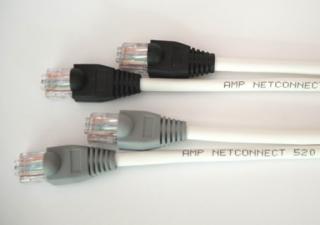
2 units AMP NetConnect 520 Cat5e UTP cable with AMP RJ45 Termination (20m or 30m)

Our best-selling installer’s kit has been thoroughly revised to include higher-end equipment which support the very latest in HDMI technologies and standards and provide an even wider range of compatibility with the latest HDTVs, all still at a very competitive price. The HDMI port has undergone many updates since the kit was first introduced, allowing for greater convenience and presenting even more advanced features.

The kit is now packaged with our very latest and highest-end HDMI splitter, which are similar to those we supply to high-end AV stores and similar in specifications to the rest of the industrial-grade AV switching equipment we carry. This powered splitter comes with an active amplification circuit to provide an even cleaner and stronger signal output, along with a wider range of compatibility supporting the latest features such as ARC, 3D, 12-bit Deep Colour and Dolby TrueHD/DTS-HD audio. These features are set to trickle down to even the most basic of HDTVs in the near future.

The kit is also now supplied with our best HDMI cables as well. Each kit will come with 3 units of Exatrex Electronics’ 1.0m SlimLine High Speed HDMI cables with Ethernet. These cables have a very slim and thin profile, allowing for easier concealability and flexibility. Of course, in line with the rest of the equipment supplied in the kit, they are all HDMI 1.4a certified to support the latest features and also have Ethernet over HDMI links. Visit hdmi.org: Finding the right HDMI cable for more information on HDMI cable standards.

Finally, the kit now comes with a longer, extended 1-year warranty on all equipment (excluding cables and power adapters). As before, our 14-day money-back guarantee still stands, to ensure that you are purchasing something that not only works, but also works perfectly with the rest of your equipment. The price has been revised to the following to reflect the upgraded equipment, but rest assured that we have tried our very best to maintain our competitive pricing, and still provide the best technical support we can.

20m kit: RM590
30m kit: RM620


Attached Image

This kit has everything you need to split and extend your HDMI signal over 20m/30m of Cat5e cables which are smaller, more cost effective and can be field-terminated. Rest assured that all our products have been tested with Astro bYond decoders (both standard and PVR decoders) and are guaranteed to be fully compatible with your decoders.

We have been in the business of supplying AV signal switching and distribution equipment to Astro installers, system integrators, AV consultants and various commercial establishments since 2009. As pioneers in the industry since HD transmissions were made available locally, we pride ourselves not only in our experience and deep technical know-how, but also in our relentless dedication to customer satisfaction. Unlike other uninformed vendors who carry non-branded generic products, we stand behind our products' quality and our reputation to provide the best in equipment and service.

We invest heavily in our equipment and also the products that we use to test these equipment, to ensure that our customers experience a truly hassle-free, plug-and-play installation process. Each product we carry is thoroughly tested not only with each other, but with most HDTVs, AVRs, BluRay Disc and Media Players from major manufacturers. Even so, our 14-day money-back guarantee ensures that in the unlikely event that you encounter compatibility issues you will not be stuck with a purchase you cannot use.

Thanks for your time and we hope to hear from you!

Kindly note the following:
- This is not a sales thread, but an avenue for general questions and comments related to the kit only. Please PM directly or email sales@tytrex.com for more specific questions or to place an order or for a customized setup.
- Prices stated above are firm and are only applicable for equipment purchased in a kit. For pricing on individual equipment, please enquire.
- We would like to kindly remind potential customers that we highly recommend using the cables we supply. Use of inferior quality or under-spec cables will affect signal stablity and image quality.
- We stock additional original Astro b.yond remotes as well, kindly PM for price. They come with a lifetime warranty directly from Astro, are programmable to operate your HDTV as well and are vastly superior to imitation ones in terms of quality and durability.
- For further enquiries or for purchase without a LYN account, please email us at sales@tytrex.com and quote promotional code: LYNFOR
.

This post has been edited by ctrlaltdel88: Aug 9 2012, 04:25 PM


Attached thumbnail(s)
Attached Image
TSctrlaltdel88
post Jul 14 2010, 03:03 PM

New Member
*
Junior Member
24 posts

Joined: Jul 2010
QUOTE(MyDevil @ Jul 14 2010, 03:01 PM)
The products are connected with 1 or 2 Cat5e cables?
*
2 Cat5e cables are required, and are provided.

Thanks and regards.
TSctrlaltdel88
post Jul 14 2010, 04:45 PM

New Member
*
Junior Member
24 posts

Joined: Jul 2010
QUOTE(ICDeadPeople @ Jul 14 2010, 04:00 PM)
So, what is the price (i know you said you cannot advertise it freely)?
For me, beside the picture quality, the price can be a deal breaker.
*
I understand that most HDMI products out there are extremely costly, I trust that you will deem our prices to be fair for home users. I will PM you the price but for others, kindly PM me for prices.


Added on July 14, 2010, 4:51 pm
QUOTE(MyDevil @ Jul 14 2010, 04:27 PM)
Yeah. Why not put in the garage sales?
As for the cat5e cables, can it be excluded from the package?
*
I will put a similar post in the relevant forum topics soon, thanks for the suggestion.

As for the Cat5e cables, I will be happy to exclude them and will deduct from the price accordingly. However, do note that based on our tests with several other Cat5e cables of other brands and quality, we have found that the ones we supply with the kit offer the most reliable and hassle-free installation. The reason we are bundling the Cat5e cables together is because we do not want our customers to encounter any problems when installing and we have good faith that these cables bundled will offer a truly convenient plug and play solution.

Thanks and regards.

This post has been edited by ctrlaltdel88: Jul 14 2010, 04:51 PM
TSctrlaltdel88
post Jul 14 2010, 06:43 PM

New Member
*
Junior Member
24 posts

Joined: Jul 2010
QUOTE(eMKs @ Jul 14 2010, 06:07 PM)
Can it work with HomePlug?
*
Sorry, these will not work with Aztech HomePlug devices as the medium that ethernet over power uses is way too low in bandwidth to carry an uncompressed HD signal.

Thanks and regards.
TSctrlaltdel88
post Jul 15 2010, 11:52 PM

New Member
*
Junior Member
24 posts

Joined: Jul 2010
QUOTE(amirt1 @ Jul 15 2010, 06:55 PM)
What is the Maximum Distance you can go up to ? ( Becoz my bedroom is upstairs )
How about the Remote control ? ( Must i bring it up to my bedroom )
How many extensions can it go up to
*
The maximum distance achievable with the cables supplied with the kit is 30m. The remote controller can be brought up to your remote TV, or if you would like the added convenience we are able to source original byond remotes for you as well.

The number of extensions capable with this kit is only one, but if you require extensions to more points, we can put together a package that will meet your budget and requirements. Do let us know if you require something more elaborate.
TSctrlaltdel88
post Jul 19 2010, 01:50 AM

New Member
*
Junior Member
24 posts

Joined: Jul 2010
QUOTE(Maniac @ Jul 17 2010, 01:14 PM)
Yes, almost similar but our extenders come with a built-in IR remote relay as well. Kindly note that the kit includes not only the extenders, but also a 1x2 HDMI splitter with power supply, 3x HDMI cables and 2x 30m of Cat5e cables. Basically everything you need to get true, uncompressed HD signals on 2 HDTVs with full remote function.

Most importantly, this selected combination of products is a result of our extensive testing with our Malaysian b.yond decoders and we offer a money-back guarantee if it doesn't work with your Astro b.yond or byond PVR decoders.


Added on July 19, 2010, 1:57 am
QUOTE(rayfoo @ Jul 18 2010, 10:51 AM)
bro I Pm  u already, no reply yet
*
Thanks to everyone for your interest, your support is greatly valued, and to our customers, we trust that you are enjoying your purchases.

We apologize if we have not replied your PMs promptly, as we have been swamped with so many messages in such a short time. We guarantee to have each PM replied, in the soonest possible time.

Thanks and regards.

This post has been edited by ctrlaltdel88: Jul 19 2010, 01:57 AM
TSctrlaltdel88
post Jul 19 2010, 12:36 PM

New Member
*
Junior Member
24 posts

Joined: Jul 2010
QUOTE(rayfoo @ Jul 19 2010, 10:57 AM)
warranty 1 year?
*
The kit comes with a 6-month direct exchange warranty.

Thanks and regards.
TSctrlaltdel88
post Jul 21 2010, 09:47 PM

New Member
*
Junior Member
24 posts

Joined: Jul 2010
QUOTE(miqie @ Jul 21 2010, 05:00 PM)
I have received your PM on costing. How do we transact it? COD? PJ area?
*
Sure, COD in PJ area is alright with me.
TSctrlaltdel88
post Jul 22 2010, 11:58 AM

New Member
*
Junior Member
24 posts

Joined: Jul 2010
QUOTE(Kabadi84 @ Jul 22 2010, 10:03 AM)
Is it easy to install ? Got some nice manual to follow
*
We will provide instructions for connectivity, but usually there is no need to even read the instructions as all the components corresponding ports are labelled. It is simply plugging in the right cables in the ports and no damage will be done if any of the cables are inserted wrongly.

The 'installation' is more on the routing of the cables within your home. If you can handle that on your own, then this kit is for you. If you need someone to do it for you, we have installers who are able to install the cables for you as well.
TSctrlaltdel88
post Jul 23 2010, 02:36 AM

New Member
*
Junior Member
24 posts

Joined: Jul 2010
QUOTE(klseet @ Jul 22 2010, 12:14 PM)
Hi ctrlaltdel88,

Would you mind to show more pictures, detail spec & installation example of the product?

May I know how's your product quality & spec compared to the following example?
http://www.avextender.com/style/content/CN...16107&id=203764
http://www.avextender.com/style/content/CN...16107&id=220424

Hope to hear more information from you !  smile.gif
*
Thanks for your enquiry. This is going to be a long explanation, but good to know if you are interested.

The two products you are quoting are almost similar, but more suited to commercial applications (eg. information display, advertisement screens, etc.).

The HDMI extender does the same job, but as it uses a single Cat6 cable, the HDMI signal may be compressed before it is transmitted through the cable. This may seem like a more convenient solution but one should bear in mind that our extenders do not compress the HDMI signal and more importantly, adds an IR relay for control of your decoder on the extended end.

The other extender seems to be tailored for PCs, and requires an existing Ethernet network to be present. I highly doubt it will be able to reliably transmit full HD through even a gigabit ethernet network (full HD requires bandwidth of at least 4Gbps) and it almost definitely is a compressed signal.

Compressed signals (used in single Cat cable extenders and wireless HDMI solutions) not only lose some minor detail in sharpness, but colour depth is significantly reduced and is more prone to signal drops due to the high compression used. Other disadvantages include some loss in digital audio functionality, reduced CEC (device intercontrol) compatibility and significantly higher signal latency.

Also, based on our experience with video distribution equipment, commercial application devices come with commercial prices and is almost always out of reach for the home user.

As to the quality of our products, we guarantee each kit we sell to be compatible with your Astro b.yond decoder and if you are not satisfied with your purchase, we will honour a full refund of your payment. Kindly note that we strongly advise our customers to use the Cat5e cables we supply as they have been proven to work reliably with our devices.

Regarding the connection diagram, we will post one up soon to illustrate how the devices in the kit are connected to each other.

I hope this has answered your questions and if you have any further enquiries, do not hesitate to ask.

Thanks and regards.
TSctrlaltdel88
post Jul 26 2010, 07:10 PM

New Member
*
Junior Member
24 posts

Joined: Jul 2010
QUOTE(miqie @ Jul 23 2010, 11:13 AM)
Hi ctrlaltdel88,

Instead of PMing each customer of the  price, why not just publish it?
*
Prices have been published, as requested by customers.


Added on July 26, 2010, 7:13 pm
QUOTE(klseet @ Jul 23 2010, 11:29 AM)
Thanks for the explanation!

I saw you stated the package comes with 2x30M Cat5e cable, so do you or we need to get our contractor to lay this 2 cables from downstairs to upstairs?

Also looking forward to more detail photos, spec and installation requirement, thanks in advance!  smile.gif
I agreed, more transparent mah...  biggrin.gif
*
We have installers who will do the cable routing for you, or you may engage your own contractor to perform the work. Kindly PM for a quote, detailing your requirements.

Thanks for your suggestion, we highly value transparency and thus the prices have been posted. The connection diagram is posted for your reference as well.

This post has been edited by ctrlaltdel88: Aug 24 2010, 09:32 AM
TSctrlaltdel88
post Sep 20 2010, 02:21 PM

New Member
*
Junior Member
24 posts

Joined: Jul 2010
QUOTE(Jack28HT @ Aug 25 2010, 04:20 PM)
Unfortunately I can't comment much on it because my living room is still having a plain o Wega CRT TV. Actually I do see the black level is a bit too grey on my HD projector upstairs. Not sure if it's due to the B.yond signal, or the projector's age (more than 2000 lamp hrs).  I really do not have a reference to compare to at this moment because my B.yond was just installed last weekend and I don't have any HD display connected directly it to see the actual B.yond PQ quality. I wish I could bring the B.yond decoder upstair or  the projector downstair but I can't. But I thnk I will try to bring down either the PS3 or TViX to play through the HDMI extender to compare, maybe during this long weekend and provide further comment after that.
*
Thanks for taking the time to post a review, we greatly appreciate your effort!

To address your (and other's) concerns of the picture quality, our extenders carry an uncompressed HD video feed. This means that it is digitally similar to the feed that is fed out of your Astro b.yond decoder, or in layman's terms, it is the exact picture (with similar colour depth, resolution, refresh rate) as what your would see in a direct connection.

On top of this, our extenders also carry the full Dolby Digital 5.1 (available on some HD channels) to the remote end as well.

Of course, in the interest of our customers who have their reservations, our money-back guarantee still stands. No questions asked.


Added on September 20, 2010, 2:33 pm
QUOTE(eMKs @ Aug 27 2010, 09:01 AM)
From the picture TS posted, I assume that only HDMI splitter need 5V power supply. The extender will get power from HDMI. If you read from HDMI spec, it stated that:

So I assume HDMI splitter will provide enough power to the extender transmitter.
But at the receiver end is still puzzled me. It's whether HDMI port at TV provide enough current or they send the power through Cat5.
If you want to extend more than 2 display, you need to get 1 to 3 HDMI splitter or even 1-4. That's mean another set of extender & extra money lorr  tongue.gif
*
Thanks for the contribution, perhaps you would like to join our team? http://s.lowyat.net/style_images/1/folder_...icons/icon6.gif

The HDMI splitter we supply comes with a power adapter and supplies 500mA of current to EACH port. Most HDTVs also supply 500mA on each HDMI port and considering that the extender only requires 80mA of current at peak loads, power is not an issue at neither the remote or source sides. The provision of connecting a power adapter is present on the remote side, but is only required if connecting more than 1 extended lines together.

If you require extensions to more than 1 HDTV, we also stock 1x4 and 1x8 HDMI splitters. All of our splitters are actively powered, HDCP and HDMI compliant, and most importantly, have been rigorously tested and are guaranteed to work perfectly with our extenders and our local Astro b.yond decoders. Feel free to drop us a PM should you need more extensions than the standard kit can offer and we will work out a solution for you.

This post has been edited by ctrlaltdel88: Sep 20 2010, 02:33 PM
TSctrlaltdel88
post Sep 20 2010, 07:57 PM

New Member
*
Junior Member
24 posts

Joined: Jul 2010
Hi Jack,

I suspect that the cables that you have routed are picking up a lot of interference from somewhere in your house. This could be due to a multitude of factors, including poor crimping or cable quality, your conduit that may be passing through a high interference location somewhere in your wall, or maybe the fact that you have actually connected two Cat cables together using the female-female adapter. You could try switching the TMDS and DDC cables, to see which offers better performance. Reestablishing the HDMI connection forces the HDCP handshake to renegotiate, restoring the signal back to normal.

For our other customers, we would like to stress that it is very crucial to use good quality cables. The best solution would be to obtain the cables from us, as they have been tested and are guaranteed to work perfectly. Beware of imitation AMP cables as well, especially if they have been obtained for too low a price.

Thanks and regards
TSctrlaltdel88
post Oct 5 2010, 06:41 PM

New Member
*
Junior Member
24 posts

Joined: Jul 2010
QUOTE(C-Fu @ Oct 5 2010, 05:54 PM)
my friend has this, connected from the HD signal on her parent's bedroom upstairs to the living room tv.

but quality is very very poor. around SD quality or slightly lower. maybe there are inteferences where the cables are routed i guess, or my best guess would be the cat5e cable isnt properly shielded (or stranded instead of solid cable) for these kind of applications... but really didn't those guys who pasang the thing test it out before or right after installation?
*
I'm sorry, but I believe that what your friend has installed are not any of our products. Would appreciate if you could clearly state what brand of equipment he/she uses. Basically it is very hard to get poor picture quality from a digital signal (HDMI), even if you're watching SD channels. Also, there is no such thing as poor picture when it comes to digital, it's only either you get a picture or you don't.

As stated in the original post, the product delivers an uncompressed HDMI feed to all devices, with full 5.1 digital audio. It is and exact replication of the HD signal as you would observe using a direct HDMI connection. There is absolutely no degradation of picture quality no matter how long the cables are.

We value our customer's satisfaction and rely on them to provide feedback on our products to their friends. Although your post is somewhat unfounded, I believe that our customers are perfectly happy with their picture quality. Also, as a reminder to our future customers, our promise of our money back guarantee still stands. So far, we have not encountered any returns but we will honour a full refund if you are not happy with the results.

This post has been edited by ctrlaltdel88: Oct 5 2010, 06:46 PM
TSctrlaltdel88
post Dec 9 2010, 01:04 AM

New Member
*
Junior Member
24 posts

Joined: Jul 2010
Yes, any device that has a HDMI output port will work with any of our devices. We thoroughly test each and every item we stock to be compatible with HDMI 1.3 and most importantly, HDCP 1.2 to ensure complete compatibility with almost all devices.

I currently use this system in conjunction with a HDMI switch, whose input can be selected using an IR remote. Sometimes I will bring my PS3 or XBox 360 controller to my other room and am able to choose which device to show on my remote TV using the IR remote and also use my game console's controllers wirelessly (Bluetooth has exceptional operational range) from the other room. This would mean that you only have to buy one Blu-Ray player, to serve however many TVs you need.

QUOTE(sshahar9 @ Dec 8 2010, 02:53 AM)
will this also work if sourced from ps3 or bluray player? meaning the other room also get hd from ps3 or bd player?
pls pm price with n without installation. tq
*
TSctrlaltdel88
post Dec 15 2010, 02:05 PM

New Member
*
Junior Member
24 posts

Joined: Jul 2010
Regarding your question, the extender carries the same digital audio signal as present at the source through the HDMI connection. This means that you will need a HDMI receiver to decode the Dolby Digital signal at the remote end.

To clarify things for you, the coaxial digital audio output signal is also included in the HDMI connection. This means that a single HDMI connection has HD video and digital audio signals coupled into a single cable.

QUOTE(silbii @ Dec 15 2010, 12:07 AM)
pm best price bro...

what about digital audio? can this extend the Dolby Digital signal from the Astro Beyond coaxial output too? Or i must rely solely on HDMI for both audio and video...and get an HDMI receiver to transmit digital audio

thx
*

Added on December 15, 2010, 2:25 pmThanks for your interest and your question.

Unfortunately, the concepts behind HDMI and Ethernet are very different from each other. The reason why some people may think that they are related is because of the Cat5e cables that are usually used in Ethernet connections. These extenders do not operate on the TCP/IP protocol, which means that they are not compatible with Ethernet/computer networks. This is why the Cat5e cables from the extenders cannot be plugged into an Ethernet switch or router.

Wireless LAN also operates on the TCP/IP protocol, thus you cannot just plug the extenders into a WiFi router and have a wireless solution. Wireless HDMI is still quite far off from becoming a mainstream means of transmitting HD video, due to the bandwidth and medium stability a HD feed requires. Although wireless HD devices exist, the costs associated with them are too high for most households.

Currently, Cat5e extenders offer the best value and performance for household use. As more and more devices adopt HDMI ports, you can be sure that HDMI is here to stay.

QUOTE(chokia @ Dec 9 2010, 10:17 AM)
Dear TS, do you plan for the future product to completely eliminate the Cat5e cables, since the concept of this extender is like connecting uncompressed media from one computer to the other via network and the HDMI cable only delivering those content to AVR/HDTV.

If that is the case, it can also use wifi right? Since not every home owner wants the re-conceal the whole house for this new network cables especially after they've spent so much concealing all visible cable during the first renovation.
*
This post has been edited by ctrlaltdel88: Dec 15 2010, 02:25 PM
TSctrlaltdel88
post Dec 27 2010, 12:31 PM

New Member
*
Junior Member
24 posts

Joined: Jul 2010
The difference between a HDMI connection and an AV connection is huge. If you already have a HDMI connection to a HDTV, then you will be able to see the vast improvement in picture quality yourself.

This kit allows you to experience the exact same picture quality as on your first HDTV, at a remote location up to 30m away. On top of that, there is a IR relay function as well which allows full IR remote control at the remote location.

Composite and component AV are on their way out as digital technology starts to take over. More and more devices are adopting HDMI ports, and if you have a HDTV, it should be connected using HDMI instead of anything else. The performance difference is well worth the effort and costs involved, if you'd ask me.

QUOTE(sws @ Dec 26 2010, 02:07 AM)
Does having a av booster give the same effect? asked an astro contractor and he recommended me to get av booster instead of hdmi. Hmm..
*
TSctrlaltdel88
post Dec 30 2010, 12:00 PM

New Member
*
Junior Member
24 posts

Joined: Jul 2010
We have been testing several wireless HDMI products, one looking exactly like the one you mentioned in Giraffe's website but with another brand. So far, the prices have been prohibitively expensive (around RM1.5k, without splitter and cables) and the worst part is the picture quality that is very poor. There is significant compression that can be seen, the refresh rate also drops drastically and some of them are not stable.

This is because Wireless HDMI is not an easy thing to do, especially at further distances between the transmitter/receiver. We would certainly like to offer this to our customers right now but we feel that many would be disappointed by the picture quality. Unless the customer is willing to accept these deficiencies of wireless HDMI, we would rather not have an unhappy customer. For now, Cat5e HDMI extensions are the most cost effective solution and will continue to be the best choice for people who are willing to do some rerouting of the cables.

QUOTE(psyeo @ Dec 28 2010, 02:51 PM)
Anyone tried Giraffe Wave WHDI? I wonder how much it cost, and where to buy it..
http://pcom.cc/giraffe/default.asp?recordid=555
*

Added on December 30, 2010, 12:07 pmThe cables that we provide are white in colour, and have a diameter of around 4mm each. Hacking of the walls is entirely up to you, as some customers do not mind using cable housings, or clipping it to the corners of the wall or ceiling. Having a plaster ceiling also helps, as this allows you to run the cables across rooms without them being seen. Each customer's house is different, and thus it is difficult for us to offer any further advice without seeing the premises. The best person for the job would typically be your existing contractor/wireman/linesman/electrician. They would be familiar with your house and where the voids are, and usually have experience doing this kind of work.

QUOTE(giggs_509 @ Dec 28 2010, 07:59 PM)
Need to hack the wall to conceal the cables? Now have a plasma downstairs with astro byond n planning to have another hdtv in my bedroom. Plis advise on the installation. Thx
*
This post has been edited by ctrlaltdel88: Dec 30 2010, 12:12 PM
TSctrlaltdel88
post Jan 6 2011, 01:03 PM

New Member
*
Junior Member
24 posts

Joined: Jul 2010
The IR relay for the extenders have been tested and verified to be fully operational with TM's IPTV set-top box. No problems with all button functionality, as with Astro byond's remotes (both standard and PVR decoders). HDMI feed from TM's IPTV set-top box was also fully transported using the extenders as well, with no problems.

QUOTE(makrospec2010 @ Jan 6 2011, 10:15 AM)
Hi,

I guess this HDMI extender will work with unifi IPTV HDMI output but I'm not sure if the remote will also work with the IPTV setupbox. Can the seller provide further info on this.

Cheers
*
TSctrlaltdel88
post Apr 20 2011, 06:56 PM

New Member
*
Junior Member
24 posts

Joined: Jul 2010
The IR relay for this extender extends almost all IR command signals and has been tested and verified to work with Astro byond (normal and PVR), TM's IPTV set top box, and many other media players. They also work with the HDMI switches we carry, enabling remote control of the source input device, thus allowing you to use your all your HDMI devices in other rooms.

QUOTE(MK84 @ Apr 18 2011, 05:34 PM)
Interesting product, much cheaper than my implementation. laugh.gif

If I understand the description correctly, the IR TX/RX only acts as a relay, correct? It will relay any IR signal?
*

2 Pages  1 2 >Top
 

Change to:
| Lo-Fi Version
0.0322sec    0.60    7 queries    GZIP Disabled
Time is now: 1st December 2025 - 11:18 AM