

My 4 Mbps still work great at the moment
Streamyx The Official Streamyx 4Mbps Users Club V3, Streamyx 4 Mbps Discussion Thread Q&A
Streamyx The Official Streamyx 4Mbps Users Club V3, Streamyx 4 Mbps Discussion Thread Q&A
|
|
 Mar 19 2011, 04:22 PM Mar 19 2011, 04:22 PM
|
 
Senior Member
4,038 posts Joined: Aug 2005 From: Earth   
|
My 4 Mbps still work great at the moment
|
|
|
|
|
|
Mar 19 2011, 04:37 PM
|

Senior Member
1,027 posts Joined: May 2008
|
 FINALLY... |
|
|
Mar 19 2011, 04:40 PM
|
|
Senior Member
4,038 posts Joined: Aug 2005 From: Earth
|
QUOTE(sg999 @ Mar 19 2011, 04:37 PM) FINALLY...  |
|
|
Mar 19 2011, 06:40 PM
|

Junior Member
75 posts Joined: Dec 2006
|
WTF 175.145 from 4095kbps auto drop to 2531kbps
|
|
|
Mar 19 2011, 08:00 PM
|
|
Senior Member
1,027 posts Joined: May 2008
|
QUOTE(MX510 @ Mar 19 2011, 05:40 PM) Glad u got ur speed back to normal :-) I was trolling regarding international connectivity issue previous is modem problemnow using DLINK  |
|
|
Mar 19 2011, 08:32 PM
|

Senior Member
1,548 posts Joined: Oct 2006 From: ugly kingdom
|
QUOTE(baby2000 @ Mar 19 2011, 06:40 PM) WTF 175.145 from 4095kbps auto drop to 2531kbps Same IP range like you, but seems normal from my side...2 days without restarting my router...   This post has been edited by AjkR06: Mar 19 2011, 08:34 PM |
|
|
|
|
|
Mar 19 2011, 09:56 PM
|
|
Senior Member
4,038 posts Joined: Aug 2005 From: Earth
|
QUOTE(sg999 @ Mar 19 2011, 08:00 PM) previous is modem problem I guess ur modem is fakap not @TMCOrp fault hehehenow using DLINK |
|
|
Mar 20 2011, 12:48 AM
|

Junior Member
5 posts Joined: Nov 2007 
|
Upgraded mine from 1mbps to 4mbps on last Tuesday, the lady at the counter told me that it would takes about 1 week to get upgraded and for the whole week I won't be any internet at all. Shocking! but still said yes
 2 days later the technician came and then opened the port. Asked me to monitor the router and let him know when the port showed as 4096. I forgot to tell him that the port was configured to 4096 already so a day later (today) I told him and he told me that the line will be activated and also will try to set the cap to 5120 instead because I did request for it So now, still waiting for my line to be fully activated so I could experience the 4mbps. Hopefully it will be activated today (In kedah, gov work on Sunday ) |
|
|
Mar 20 2011, 03:23 AM
|

Senior Member
839 posts Joined: Aug 2009
|
QUOTE(cheekeez @ Mar 20 2011, 12:48 AM) Upgraded mine from 1mbps to 4mbps on last Tuesday, the lady at the counter told me that it would takes about 1 week to get upgraded and for the whole week I won't be any internet at all. Shocking! but still said yes Hi cheekeez,2 days later the technician came and then opened the port. Asked me to monitor the router and let him know when the port showed as 4096. I forgot to tell him that the port was configured to 4096 already so a day later (today) I told him and he told me that the line will be activated and also will try to set the cap to 5120 instead because I did request for it So now, still waiting for my line to be fully activated so I could experience the 4mbps. Hopefully it will be activated today (In kedah, gov work on Sunday )Please allow me to ask a few questions as I also interested in upgrading to 4MB package. If the "port" was not 4096, can they just change or upgrade the port to support 4MB? My router stated 1536, and I heard line attenuation to high will make 4MB package impossible. My current Downstream Line Attenuation is 54 db, and my DSL Modulation Mode is G.dmt but not ADLS2+, by the way. How and where did you request to cap your speed at 5120? Thanks! |
|
|
Mar 20 2011, 05:10 AM
|
|
Senior Member
1,027 posts Joined: May 2008
|
QUOTE(MX510 @ Mar 19 2011, 10:56 PM) I guess ur modem is fakap not @TMCOrp fault hehehe the tech agreed that inncome w3400V wireless part got problem for 4MB user  Added on March 20, 2011, 5:13 am   This post has been edited by sg999: Mar 20 2011, 05:13 AM |
|
|
Mar 20 2011, 07:35 AM
|

Junior Member
6 posts Joined: Feb 2010
|
my seeems looud aand cleeaar
 |
|
|
Mar 20 2011, 11:56 PM
|

Senior Member
1,393 posts Joined: Aug 2006 From: Sungai Petani
|
QUOTE(cheekeez @ Mar 20 2011, 12:48 AM) Upgraded mine from 1mbps to 4mbps on last Tuesday, the lady at the counter told me that it would takes about 1 week to get upgraded and for the whole week I won't be any internet at all. Shocking! but still said yes Sorry...sorry...this is actually my post but accidently was logged with my wife's account.2 days later the technician came and then opened the port. Asked me to monitor the router and let him know when the port showed as 4096. I forgot to tell him that the port was configured to 4096 already so a day later (today) I told him and he told me that the line will be activated and also will try to set the cap to 5120 instead because I did request for it So now, still waiting for my line to be fully activated so I could experience the 4mbps. Hopefully it will be activated today (In kedah, gov work on Sunday )So, back to 4mbps upgrade. I am still waiting for the line to be activated. For now I'm still using 1mbps speed even my port is already configured for 4mbps however, the speed has been slow, a lot slower than what it used to be. The tech promised me that he will activate the line as soon as possible and will try to adjust the cap at 5120 if that is possible/supported in my area. But now, I saw my upload stream speed capped at 509 and not 512. Is this normal?  Added on March 20, 2011, 11:59 pm QUOTE(G K Lai @ Mar 20 2011, 03:23 AM) Hi cheekeez, The tech told me he need to test the line first if it supported 4mbps. If not then he will not upgrade my line.Please allow me to ask a few questions as I also interested in upgrading to 4MB package. If the "port" was not 4096, can they just change or upgrade the port to support 4MB? My router stated 1536, and I heard line attenuation to high will make 4MB package impossible. My current Downstream Line Attenuation is 54 db, and my DSL Modulation Mode is G.dmt but not ADLS2+, by the way. How and where did you request to cap your speed at 5120? Thanks! Not sure about attenuation. Better to ask someone pro If your line supported 4mbps, the tech will come and change your modulation to ADSL2+ as that is needed for 4mbps. I asked my tech to try increase the cap This post has been edited by nyunyu: Mar 20 2011, 11:59 PM |
|
|
Mar 21 2011, 09:56 PM
|
|
Senior Member
839 posts Joined: Aug 2009
|
QUOTE(nyunyu @ Mar 20 2011, 11:56 PM) Added on March 20, 2011, 11:59 pm The tech told me he need to test the line first if it supported 4mbps. If not then he will not upgrade my line. Not sure about attenuation. Better to ask someone pro If your line supported 4mbps, the tech will come and change your modulation to ADSL2+ as that is needed for 4mbps. I asked my tech to try increase the cap  Look like I need to take a day off and make an appointment with the TM tech guy then let him come to my house to test the line? I would be much easier if they can test my line from the riser as I'm staying in a condo and nobody at home during office hours...  I called 100 not long ago and they cannot give me the answer, I have to go to TM Point to request for a test if my line is supported. Thank you again nyunyu~  |
|
|
|
|
|
Mar 22 2011, 12:51 PM
|

Senior Member
1,028 posts Joined: Dec 2006
|
hello... just recently upgrade to 4mb... after upgrade,still using my old billion modem but that time the connection not stable... call tm n they said billion modem cant support 4mb,advice use the innacomm 3400V... now using it,the connection more stable but cant find a way to port forward it... planning to get a modem since i oledi have a router... got any recommedation for a cheap modem that can support 4mb?
|
|
|
Mar 22 2011, 07:54 PM
|

Senior Member
557 posts Joined: Jul 2006 From: PhotoJournalist 
|
wallaaa.. my streamyx stable at 4mb.. since upgrade , after 2 days down.. cant access internet.. today only able to access. my speed drop to 2mb only.. in the modem setup also showing 2mb.. what the heck they a doing.... report just now.. to tmnet.. they will response within 24hrs.. im getting the person incharge and report number.. pls return 4mb to meee.... im paying for 4mb ok.. not 2mb.. !!
Added on March 22, 2011, 8:12 pm QUOTE(BugFace @ Mar 14 2011, 12:31 AM) Well TM is crap on me, last week I lost my 5120 cap to 2046 that I forced to spend time chase them to get back now, my range issues with dead ip is still around but less chance getting those few dead ips. Issue now is I seems to be switched from my ranges again... same thing happen to me !! have you make a complain and getting back your 4mb?My range b4 12am was 218.111 218.208 and 175.145, now its no longer the case. Added on March 22, 2011, 8:17 pm QUOTE(BugFace @ Mar 10 2011, 12:38 PM) Not sure if anyone in Penang facing any issues these few days but... some time yesterday my modem lost sync for a short while and my cap of 5120 was drop to 2046, I didn't realized until I noticed my downloads are very slow yesterday night. im not the only one getting this problem.. the time you report the problem.. how long they resolve until get back your cab at 5120?When I found out I quickly contact 100, got a noticed by automated machine stating there are some issues at various locations in Penang but not my place. After quick chat with level 1, I got pass on to a very polite, understanding & efficient level 2 lady who quickly within 10 mins got them to configure me to 4092 after which when she called me I told her I previously was on 5120 she got them to reconfigure again... This time my DSL light connection was drop and never came back and within 5 mins she called which I told her not yet since DSL light was off. I waited over an hour the light was still off. I called 100 again, this time I was passed to an older level 2 lady, who kept saying my port wasn't able to support 5mb cap *cough*bullshit*cough*. She kept asking to do testing even when I said my DSL Light was OFF! We talked for a while I was very discouraged by her, as she kept on and on about 4mb means 4mb etc nonsense lots of BS from her. I told her I never achieve proper speed when cap 4mb previously, I even had to talk about MCMC and not getting 80% bla bla bla, finally I got her to get the initial level 2 lady who was in charge of my cased to call me back. The earlier level 2 lady called me back within 5mins and apologize about forgetting to call me, as I said previously very polite. I got her to check further into my issue. Again I stressed about 5120 cap to her. Within 5-10mins she called me again and what you know I checked my modem is correctly capped back at 5120. Very efficient and polite lady, too bad I never got her name. I am surprise that all this was done very fast for TM , considering usually it takes them days or even weeks to get them to fix any issues. This post has been edited by shogun_125: Mar 22 2011, 08:17 PM |
|
|
Mar 22 2011, 10:02 PM
|
|
Newbie
1 posts Joined: Apr 2009
|
Hi, First time posting as I need help. On the 18 Mar I went to TM Point to upgrade my 1Mbps to 4Mbps and the TM appointed contractor came on the 19 Mar to test the line, install the new DLink Modem/router and capped the Downstream Line Rate to 5119 Kbps. He told me to wait approx 48 hours for TM to activate. Yesterday 21Mar, I was still getting 1Mbps, so I call 100 and he told me my 4Mbps is already activated and my a/c has already been changed from RM110 (1Mbps) to RM140 (4Mbps) on 19/3/2011. But I told him that I was getting only 1Mbps. So he transfer me to another person (Tech) and after checking she confirmed that my 4Mbps is already activated and said that I should talk to the TM appointed contractor because it is his responsibility. I called and talked to him. He said that he will look into it
but nothing happened. So at night I called 100 again and another woman said the fault is at the TM box (kotak) on the road, not their end and not my house and it's the contractor responsibility. Then I called the contractor and again he said he will look into it. Until this afternoon still nothing happen, so I called him again. He was angry and said he will do it. But until now (night), nothing and I am still getting 1Mbps and pay for 4Mbps (4 days already). TM is not taking responsibility and the contractor is not doing anything. Maybe waiting for his 14 days warranty to expire. So please, can anybody help and give me some advices.Thank you. |
|
|
Mar 22 2011, 10:07 PM
|
|
Senior Member
557 posts Joined: Jul 2006 From: PhotoJournalist
|
QUOTE(jchantw @ Mar 22 2011, 10:02 PM) Hi, First time posting as I need help. On the 18 Mar I went to TM Point to upgrade my 1Mbps to 4Mbps and the TM appointed contractor came on the 19 Mar to test the line, install the new DLink Modem/router and capped the Downstream Line Rate to 5119 Kbps. He told me to wait approx 48 hours for TM to activate. Yesterday 21Mar, I was still getting 1Mbps, so I call 100 and he told me my 4Mbps is already activated and my a/c has already been changed from RM110 (1Mbps) to RM140 (4Mbps) on 19/3/2011. But I told him that I was getting only 1Mbps. So he transfer me to another person (Tech) and after checking she confirmed that my 4Mbps is already activated and said that I should talk to the TM appointed contractor because it is his responsibility. I called and talked to him. He said that he will look into it check your modem, make sure it was setup to 4096, if ok then ask them to reset your password but nothing happened. So at night I called 100 again and another woman said the fault is at the TM box (kotak) on the road, not their end and not my house and it's the contractor responsibility. Then I called the contractor and again he said he will look into it. Until this afternoon still nothing happen, so I called him again. He was angry and said he will do it. But until now (night), nothing and I am still getting 1Mbps and pay for 4Mbps (4 days already). TM is not taking responsibility and the contractor is not doing anything. Maybe waiting for his 14 days warranty to expire. So please, can anybody help and give me some advices.Thank you. This post has been edited by shogun_125: Mar 22 2011, 10:09 PM |
|
|
Mar 22 2011, 11:11 PM
|
|
Newbie
1 posts Joined: Apr 2009
|
QUOTE(shogun_125 @ Mar 22 2011, 10:07 PM) check your modem, make sure it was setup to 4096, if ok then ask them to reset your password I am sorry. Where in the modem do I check? And what is 4096?Thanks for your reply. |
|
|
Mar 22 2011, 11:17 PM
|
|
Senior Member
557 posts Joined: Jul 2006 From: PhotoJournalist
|
QUOTE(jchantw @ Mar 22 2011, 11:11 PM) I am sorry. Where in the modem do I check? And what is 4096? bro, you scrol up the page.. someone already share...Thanks for your reply. access you modem by typing 192.168.1.1 - then see the setup |
|
|
Mar 23 2011, 12:15 AM
|
|
Newbie
1 posts Joined: Apr 2009
|
QUOTE(shogun_125 @ Mar 22 2011, 11:17 PM) bro, you scrol up the page.. someone already share... I am sorry.I don't see any 4096 inside 192.168.1.1access you modem by typing 192.168.1.1 - then see the setup Attached thumbnail(s) 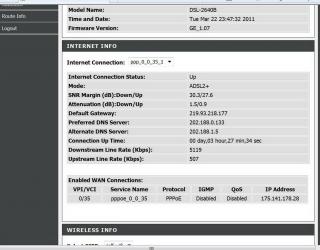
|
|
Topic ClosedOptions
|
| Change to: |  0.0654sec 0.0654sec
 0.15 0.15
 6 queries 6 queries
 GZIP Disabled GZIP Disabled
Time is now: 7th December 2025 - 07:26 AM |
 Quote
Quote