Welcome Guest ( Log In | Register )

Bump Topic Topic Closed RSS Feed
128 Pages « < 110 111 112 113 114 > » Bottom

Outline · [ Standard ] · Linear+

 Alienware Mothership v5, Once you'd enter, you'll never leave...

views
     
budblely
post Aug 31 2010, 03:07 PM

Getting Started
**
Junior Member
134 posts

Joined: Nov 2008
From: www.khengyu.com


QUOTE(Exarkun @ Aug 31 2010, 11:48 AM)
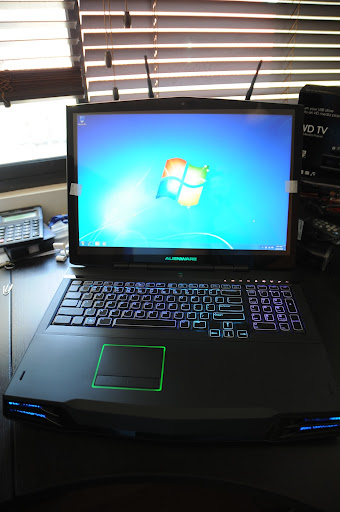
WHEE!!! Got my Alienware m17x yesterday!!
» Click to show Spoiler - click again to hide... «

Now it's just sitting on the table. Don't know where to begin...heheh...been using WinXP for so long, so now with Win 7 I got confused a bit.
*
Welcome to the Mothership, bro icon_rolleyes.gif icon_rolleyes.gif
lk_chin
post Aug 31 2010, 03:22 PM

Getting Started
**
Junior Member
211 posts

Joined: Jan 2007
anyone using screen protector on their m17x ?
awyongcarl
post Aug 31 2010, 03:24 PM

Regular
******
Senior Member
1,870 posts

Joined: Dec 2004


Weird, when I play SC2 in ultra setting, 1v1 A.I, i get 50-60 fps constantly.
But when I play 1v1 on battlenet, the FPS drops down to 30-40fps = =
what's the problem sad.gif

EDIT:

notice a strange slow down on Bnet gameplay..

Spec:
Win7 Ultimate 64bit
i7 740QM (2.9ghz)
8GB RAM
5850m (Overclocked from 625mhz to 790mhz)
128GB SSD

When I play 1v1 with A.I, I get 50-60 FPS constantly on Ultra.
But when I play 1v1 on Bnet, on the same map, I gets only 30-40fps :/
I mean, It's 55+fps at the beginning when I play with A.I, is there any reason I can only get 30-40+ FPS on bnet, under same settings?

This post has been edited by awyongcarl: Aug 31 2010, 03:31 PM
lk_chin
post Aug 31 2010, 03:52 PM

Getting Started
**
Junior Member
211 posts

Joined: Jan 2007
QUOTE(awyongcarl @ Aug 31 2010, 03:24 PM)
Weird, when I play SC2 in ultra setting, 1v1 A.I, i get 50-60 fps constantly.
But when I play 1v1 on battlenet, the FPS drops down to 30-40fps = =
what's the problem sad.gif

EDIT:

notice a strange slow down on Bnet gameplay..

Spec:
Win7 Ultimate 64bit
i7 740QM (2.9ghz)
8GB RAM
5850m (Overclocked from 625mhz to 790mhz)
128GB SSD

When I play 1v1 with A.I, I get 50-60 FPS constantly on Ultra.
But when I play 1v1 on Bnet, on the same map, I gets only 30-40fps :/
I mean, It's 55+fps at the beginning when I play with A.I, is there any reason I can only get 30-40+ FPS on bnet, under same settings?
*
how you overclock ? not scare if its burn out ur cpu? @@
julchin_09
post Aug 31 2010, 04:02 PM

"Complicated Nutter"
*******
Senior Member
7,485 posts

Joined: Jun 2005
From: Kuala Lumpur


Its a small overclock only. From 625 - 790. Won't burn the CPU. I have overclocked my 5870 from 700 to 950 smile.gif
awyongcarl
post Aug 31 2010, 04:05 PM

Regular
******
Senior Member
1,870 posts

Joined: Dec 2004


Kay guys wtf, I just perform a CPU stress, my clock speed is stucked at 1.8ghz (x14 multiplier) and could not go any further to say, 2.9ghz where it suppose to be.

I checked the bios, turbo boost is enabled. What gives?


This post has been edited by awyongcarl: Aug 31 2010, 04:12 PM
lee_what2004
post Aug 31 2010, 04:07 PM

*stare* ji--------
Group Icon
Elite
14,813 posts

Joined: Nov 2006


2.9GHz is only when its running 1 cores..
When it runs 4 cores, it will run 1.8ghz....
awyongcarl
post Aug 31 2010, 04:13 PM

Regular
******
Senior Member
1,870 posts

Joined: Dec 2004


QUOTE(lee_what2004 @ Aug 31 2010, 04:07 PM)
2.9GHz is only when its running 1 cores..
When it runs 4 cores, it will run 1.8ghz....
*
Are you sure about that? Absolutely?
hackcremo
post Aug 31 2010, 04:13 PM

Regular
******
Senior Member
1,299 posts

Joined: Dec 2007
From: Puchong Utama


QUOTE(awyongcarl @ Aug 31 2010, 03:24 PM)
Weird, when I play SC2 in ultra setting, 1v1 A.I, i get 50-60 fps constantly.
But when I play 1v1 on battlenet, the FPS drops down to 30-40fps = =
what's the problem sad.gif

EDIT:

notice a strange slow down on Bnet gameplay..

Spec:
Win7 Ultimate 64bit
i7 740QM (2.9ghz)
8GB RAM
5850m (Overclocked from 625mhz to 790mhz)
128GB SSD

When I play 1v1 with A.I, I get 50-60 FPS constantly on Ultra.
But when I play 1v1 on Bnet, on the same map, I gets only 30-40fps :/
I mean, It's 55+fps at the beginning when I play with A.I, is there any reason I can only get 30-40+ FPS on bnet, under same settings?
*
try run your SC 2 with GPU Z on background and make a log file..see whether the GPU load graph constantly high or fluctuate..do on both AI and Bnet..
ZeneticX
post Aug 31 2010, 04:16 PM

stars for what
********
All Stars
12,413 posts

Joined: Jan 2008
From: KL - Cardiff - Subang - Sydney


should i wait or just get M15X dis year?

coz jz read a news tht intel gonna release new mobile proc @ q1 next year

http://www.anandtech.com/show/3876/intels-...ridge-part-ii/2
lee_what2004
post Aug 31 2010, 04:17 PM

*stare* ji--------
Group Icon
Elite
14,813 posts

Joined: Nov 2006


QUOTE(awyongcarl @ Aug 31 2010, 04:13 PM)
Are you sure about that? Absolutely?
*
Well, that is what TurboBoost is about...

If you want 2.9GHz on 4 cores, get C2Q QX9300 and overclock it...

This post has been edited by lee_what2004: Aug 31 2010, 04:18 PM
Eugene91
post Aug 31 2010, 04:20 PM

Look at all my stars!!
*******
Senior Member
6,109 posts

Joined: Dec 2008
From: Mike India Romeo India


QUOTE(awyongcarl @ Aug 31 2010, 04:13 PM)
Are you sure about that? Absolutely?
*
Yeah absolutely.. when running on 4 cores you're only getting 1.73GHz.. if 1 core only then 2.93GHz.. Turbo Boost shuts the other 3 cores and put the power into 1 core only..

This post has been edited by Eugene91: Aug 31 2010, 04:21 PM
hackcremo
post Aug 31 2010, 04:21 PM

Regular
******
Senior Member
1,299 posts

Joined: Dec 2007
From: Puchong Utama


QUOTE(ZeneticX @ Aug 31 2010, 04:16 PM)
should i wait or just get M15X dis year?

coz jz read a news tht intel gonna release new mobile proc @ q1 next year

http://www.anandtech.com/show/3876/intels-...ridge-part-ii/2
*
it depends on you..if get now you enjoy earlier..if you wait enjoy later..however if you want to get it now, makes sure equip with ati 5850/5870..don't choose gtx260m..
ZeneticX
post Aug 31 2010, 04:25 PM

stars for what
********
All Stars
12,413 posts

Joined: Jan 2008
From: KL - Cardiff - Subang - Sydney


QUOTE(hackcremo @ Aug 31 2010, 04:21 PM)
it depends on you..if get now you enjoy earlier..if you wait enjoy later..however if you want to get it now, makes sure equip with ati 5850/5870..don't choose gtx260m..
*
ya i was goin for i7 740qm + 5850,earliest gonna get it by next month

but now this news come and im in dilemma again
hackcremo
post Aug 31 2010, 04:32 PM

Regular
******
Senior Member
1,299 posts

Joined: Dec 2007
From: Puchong Utama


QUOTE(ZeneticX @ Aug 31 2010, 04:25 PM)
ya i was goin for i7 740qm + 5850,earliest gonna get it by next month

but now this news come and im in dilemma again
*
is up to you to decide it...if you really need sandy bridge processor and like be up to dated..then you should wait till next year..maybe can equip with ati 6000 mobile..ha3..
awyongcarl
post Aug 31 2010, 05:24 PM

Regular
******
Senior Member
1,870 posts

Joined: Dec 2004


QUOTE(hackcremo @ Aug 31 2010, 04:13 PM)
try run your SC 2 with GPU Z on background and make a log file..see whether the GPU load graph constantly high or fluctuate..do on both AI and Bnet..
*
Hmm I just tried on local games.
But anyway I discovered something..funny.

So I clocked my GPU to 790 with MSI afterburner right?
And it shows 790Mhz in GPU-Z.

I ran SC2 for while. Then I open the GPU-Z log file.
It says:
GPU Core Clock : 405Mhz

What is this I don't even. How can an overclocked GPU runs even lower than it's default clock???
I default the clock back to 625, then the log shows 625.

And then there's the fan speed, why is it fixed at 30%? I think something is incompatible with GPU-Z or something? - -

What the hell? lolol

Anyway I've included the logfile here, please refer to it and let me know what's going on :/
Thanks.

EDIT:-
Okay I delve abit and found out I need to enable the "enableunofficaloverclocking - 1" in the cfg and now its showing 790mhz.

This post has been edited by awyongcarl: Aug 31 2010, 05:29 PM


Attached File(s)
Attached File  GPU_Z_Sensor_Log.txt ( 16.54k ) Number of downloads: 3

Pewufod
post Aug 31 2010, 06:45 PM

Regular
******
Senior Member
1,537 posts

Joined: Jul 2008


guys, anyone knows about their m17x's display shutting down suddenly ?
was using the comp and then the display go kapoof, all black
can still hear the parts moving but theres nothing onscreen
anyone knows about this ?
been getting it quite a lot of times this week
Eugene91
post Aug 31 2010, 06:46 PM

Look at all my stars!!
*******
Senior Member
6,109 posts

Joined: Dec 2008
From: Mike India Romeo India


could be driver issue, try to reinstall the graphic driver..
JustinLFJ
post Aug 31 2010, 07:06 PM

Now You See Me, Now You Don't
*****
Senior Member
875 posts

Joined: Jan 2010
From: KL


QUOTE(putochip123 @ Aug 31 2010, 11:04 AM)
planing to sell my M11x with Core i7, any taker? 3 days old only
*
Woah, smaller than A4 paper.. PM best price biggrin.gif
awyongcarl
post Aug 31 2010, 08:20 PM

Regular
******
Senior Member
1,870 posts

Joined: Dec 2004


QUOTE(Eugene91 @ Aug 31 2010, 06:46 PM)
could be driver issue, try to reinstall the graphic driver..
*
Tried, I'm using the latest 10.8 right now, the fan sped are still 30%.
I'm thinking something isn't compatible with GPU-Z or sort..Hmm..

Anyway, just a question. Say you are playing some games, your CPU will be at 1.7ghz right? If you are using 740QM.

128 Pages « < 110 111 112 113 114 > » Top
Topic ClosedOptions
 

Change to:
| Lo-Fi Version
0.0290sec    0.77    6 queries    GZIP Disabled
Time is now: 15th December 2025 - 06:10 PM