

Not stupid, they are trying to profit as much as possible. making you change mobo frequently.
Intel LGA1155 P67/Z68/Z77, Sandy/Ivy Bridge Architecture
Intel LGA1155 P67/Z68/Z77, Sandy/Ivy Bridge Architecture
|
|
 Jan 10 2011, 12:59 PM Jan 10 2011, 12:59 PM
|
 
Senior Member
1,177 posts Joined: Apr 2005 From: Sg petani Kedah  
|
Not stupid, they are trying to profit as much as possible. making you change mobo frequently.
|
|
|
|
|
|
Jan 10 2011, 01:35 PM
|

Senior Member
4,522 posts Joined: Apr 2006 
|
QUOTE(zzzz52 @ Jan 10 2011, 12:59 PM) Not stupid, they are trying to profit as much as possible. making you change mobo frequently. As far as I'm concern, it is stupid. Are you gonna change mobos frequently?  |
|
|
Jan 10 2011, 02:02 PM
|

Senior Member
3,304 posts Joined: Mar 2006 From: Chicago(Port25)
|
H67 is meant for ppl who don't do serious overclocking and won't be running Dual GPU configuration such as CF, SLi, will be either run on integrated graphic or single GPU. Save ur $$$ for other stuffs, like better casing for better ventilation, more ram or a better soundcard.
P67 will be recommended for Enthusiast who wants to squeeze the most power out of their K processor and benchmarking, multi-gpu solution. |
|
|
Jan 10 2011, 02:41 PM
|

Senior Member
4,667 posts Joined: Jan 2005 From: UniVeRSiTy Of MaLaYa 
|
QUOTE(riku2replica @ Jan 10 2011, 02:02 PM) H67 is meant for ppl who don't do serious overclocking and won't be running Dual GPU configuration such as CF, SLi, will be either run on integrated graphic or single GPU. Save ur $$$ for other stuffs, like better casing for better ventilation, more ram or a better soundcard. Ouh, thanks P67 will be recommended for Enthusiast who wants to squeeze the most power out of their K processor and benchmarking, multi-gpu solution.  |
|
|
Jan 10 2011, 03:22 PM
|

Senior Member
1,767 posts Joined: Jan 2003 From: Bandar Seri Putra
|
QUOTE(zzzz52 @ Jan 10 2011, 12:22 PM) Yes, if you use discrete graphic, the quick sync will be disable. Unless you also connect a display to the on board graphics. http://news.softpedia.com/news/Intel-Plans...68-176163.shtmlJust hate this limitation, have to wait for Z68. You quoted it right. It seems we must use discrete graphic to use (enjoy) overclocking. Hmmmmmmm Saddy Bridge |
|
|
Jan 10 2011, 03:44 PM
|

Junior Member
319 posts Joined: Jan 2008 
|
i want to ask the owner of i7 2600 & K. what your lower frequency of your processor when set to EIST & C1E? i get 1600MHz (100 x 16) which i think still "high" comparing to previous i7 860 which can go to 1200 (133 x 9). are anybody get below than mine, or it is the lowest?
|
|
|
|
|
|
Jan 10 2011, 04:27 PM
|

Junior Member
48 posts Joined: Aug 2010 From: Southern Hemisphere
|
Hi, just wanted to share info about Sandy Bridge.. There are some interesting things that must taken into consideration before buying these processors..
QUOTE We spent some time fiddling around with a couple of Sandy Bridge processors and several motherboards based on different chipsets, during which we found some crucial facts that could prove to be vital information for would-be-Sandy Bridge users (in particular, those who are tempted by the new features and the seemingly amazing degree of overclocklability offered by these processors). Here are some of the most important: Source: http://www.jagatreview.com/2011/01/the-top...ut-sandybridge/1. The new Sandy Bridge CPUs (in LGA 1155 packaging) are NOT backward compatible with LGA 1156 sockets 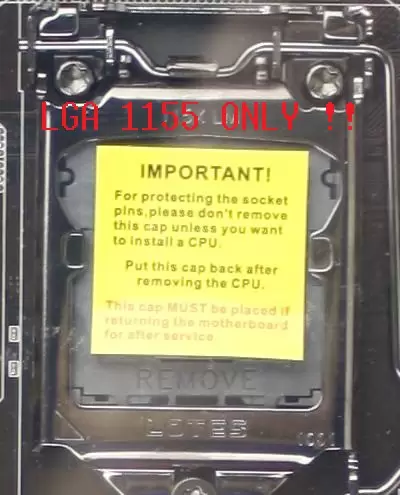 This one is simple and obvious, of course. If you want to use a Sandy Bridge, you’ll have to plug it on one of the new LGA 1155 motherboards. These processors are not compatible with older, LGA 1156-based motherboards. The only thing that remains similar between LGA 1156 and LGA 1155 platforms are their HSF cooler mountings. At least you get to install your trusty LGA 1156 cooler on the new motherboard, but don’t expect anything more than that. 2. K-Series and Non-K-Series are Not Created Equal No, it’s not like heaven and earth, really. The only difference between “Ks” and “Non-Ks” is the unlocked multiplier on the “K series” Sandy Bridges. Everything else, from clockspeed right down to each hardware feature, remains the same. As you have probably known, an unlocked multiplier allows for a far greater flexibility in overclocking attempts since the core frequency can be increased without affecting other parameters. The “K” designation as in the “Core i5-2500K”, therefore, serves to differentiate between processors with and without the unlocked multiplier. In the case of the Core i5-2500K, for example, it has a twin sibling that ships with a locked multiplier. This processor is simply called the Core i5-2500. 3. Sandy Bridge’s Bus Speed Overclocking is SEVERELY Limited This is the basic overclocking formula: CPU Clock = Bus Speed x CPU Multiplier. The bus speed, or commonly referred to as the “BCLK” or “Base Clock”, of previous Intel processors (Lynnfield, Bloomfield, Gulftown, and also Clarkdale) could be adjusted quite flexibly between 133 MHz to 220 MHz or even 250 MHz using extreme cooling. With a BCLK adjustment range of around 50%, you don’t need an unlocked multiplier to reach unbelievably high frequencies. This is not the case with Sandy Bridge processors, as their BCLK range is VERY limited. Sandy Bridges have a default BCLK frequency of 100Mhz, but one can only expect a 4-5% adjustment to that value. In average, our Sandy Bridge samples hit a BCLK limitation at 104-105 MHz. Even by resorting to extreme cooling methods, we could only get 110 MHz at maximum. It means that you will have to rely on multiplier adjustment to overclock a Sandy Bridge processor. Also, since unlocked multiplier can only be found in “K-series” Sandy Bridges, either you like it or not, you will have to buy one of those to get a significant overclocking margin. You can still apply some degree of overclocking on the “Non-K series” processors, but you will be limited to just 400 MHz above the maximum turbo frequency.Such limitation prevents users from overclocking a lower-end processor to match the performance of its higher-end variants, like what happens when you overclock a Core i7 920 to the same speed as Core i7 975 Extreme’s. That way, Intel keeps the sales of its high-end CPUs from being cannibalized by its own value series processors. By the time we finished writing this article, Intel has yet to confirm whether the BCLK limitation is “inadvertently” caused by the new architecture or if it is deliberately implemented. Either way, the Sandy Bridge is still limited when it comes to BCLK overclocking, and that could be disappointing to some types of users. 4. There are Actually Significant Differences Between H67 and P67-based Motherboards Surely you still remember how the H55 chipset is not so different compared to its sibling, the P55. The only thing that distinguishes them is H55’s ability to take advantage of on-CPU graphics chip in Clarkdale series processors (the Core i3, i5 5xx, and i5 6xx). This time, Intel saw it fitting to incorporate some major changes to set the H67 and P67 further apart. Take a look at the table below: 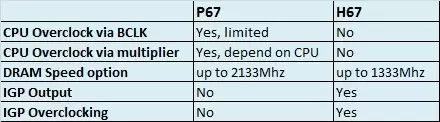 For some reason, the H67 seems to be limited in certain aspects. It appears that Intel doesn’t want H67 users to overclock their CPUs, either through multiplier adjustment or BCLK manipulation. They also prevent the DRAM speed on H67 from going beyond 1333 MHz. You can still overclock the IGP (Integrated Graphics Processor) though, but not the main CPU cores. So, for those of you who are drawn to “K” Sandy Bridges by its multiplier overclocking potential, (also, owners of high-frequency RAM modules) you’re better off with a P67 –based motherboard, at least for now. Remember that you cannot overclock the CPU on a H67 motherboard. However, it’s worth remembering that Intel did not include on-CPU graphics support when they designed the P67, so that part of your Sandy Bridge processor will pretty much be wasted should you decide to pair the processor with a motherboard based on this chipset. If you want to utilize Sandy Bridge’s IGP, you’ll have to resort to a H67 with all its overclocking restrictions. Pretty confusing isn’t it? 5. Sandy Bridge Chipsets Have Limited DRAM Speed Support Have you had enough with the “limitation” word already? We hope you haven’t, for we have one more to tell you about. As you have probably guessed, Sandy Bridge’s tiny BCLK adjustment range severely limits the frequency selection available for your RAM modules. H67 platforms are the worst in this case, supporting a maximum RAM speed only 1333 MHz. Fortunately, Intel was kind enough to provide P67 users with a bit more freedom by allowing them to select between more varied RAM frequency settings: 1333Mhz, 1600Mhz, 1866Mhz, and 2133Mhz. You will be able to run your memory at up to 2133 MHz on a P67 motherboard, but that’s it. If your RAM modules are rated at speeds other than those mentioned above, such as DDR3-1800, DDR3-2200, DDR3-2400, etc., you will likely have a hard time trying to adjust the BCLK to allow your RAM to run at its highest speed. Sandy Bridges use this formula to determine memory frequency: DRAM Speed = BCLK * DRAM Multiplier, which means that the range of Sandy Bridge’s RAM frequency setting is restricted by its limited BCLK adjustment. Take this, for example: To run his RAM at DDR3-2400, a user would have to set the DRAM speed at 2133 MHz, and then manually raising the BCLK to strong>112.5 Mhz. Since Sandy Bridges hit a BCLK limitation at 104-105 MHz on average, that will be very difficult –if not impossible- to achieve. It also means that the Sandy Bridge has different XMP (Xtreme Memory Profile) settings. On a Sandy Bridge platform, XMP modules will step down to run at the closest rated frequency (under its own rated speed) as specified by Intel: at 1333, 1600, 1866, or 2133Mhz). Suppose you have a DDR3-2200 MHz rating in your RAM’s XMP profile, you can only expect it to run at DDR3-2133 MHz on a Sandy Bridge motherboard. DDR3-1800 MHz XMP Modules will be similarly stepped down to DDR3-1600, as will the other modules with different rated speeds. |
|
|
Jan 10 2011, 08:47 PM
|

Senior Member
686 posts Joined: Jan 2003
|
Are there any mini-ITX mobos for the 1155 available in stores in LYP?
 This post has been edited by ravewar: Jan 10 2011, 08:50 PM |
|
|
Jan 10 2011, 08:52 PM
|
|
Senior Member
1,177 posts Joined: Apr 2005 From: Sg petani Kedah
|
they are not out yet
|
|
|
Jan 10 2011, 10:07 PM
|

Senior Member
580 posts Joined: Jun 2009 From: North Pole oF Msia
|
QUOTE(k!nex @ Jan 9 2011, 07:12 PM) i already checked their website. If you compare ud3p and ud3, it only stated that ud3p has 12 phase power design but did not mention anything about ud3 I`ve extra 1156 bolt kit. PM me if you want.Added on January 9, 2011, 7:13 pm Dont take the Asus LE version, not worth it, non LE only RM599 but 12 phase power vs LE is 4 phase power design. Refer here The Asus you listed there should be same cfx speed as gigabyte since the more expensive non LE version also 16x/4x |
|
|
Jan 10 2011, 10:20 PM
|
|
Junior Member
51 posts Joined: Dec 2010
|
QUOTE(ravewar @ Jan 10 2011, 08:47 PM) Are there any mini-ITX mobos for the 1155 available in stores in LYP? There are lots of 1155 Mini-Itx on the internet now.(But no point when it will be release)Intel Gigabyte Asus Asrock Zotac ECS Foxconn I am looking for the Zotac H67-ITX but asking around LYN no one is selling yet. But i found this in singapore forum. http://forums.hardwarezone.com.sg/showthre...=3022254&page=4 I wish i can know where did he buy tat board. |
|
|
Jan 11 2011, 12:33 AM
|

Senior Member
4,494 posts Joined: Feb 2009
|
guys ,
should i take the 1333 8gb ram dual channel or 1600 4gb dual channel ram? |
|
|
Jan 11 2011, 12:34 AM
|
|
Senior Member
4,667 posts Joined: Jan 2005 From: UniVeRSiTy Of MaLaYa
|
QUOTE(kahjye @ Jan 11 2011, 12:33 AM) guys , 1600 4gb dual channel ramshould i take the 1333 8gb ram dual channel or 1600 4gb dual channel ram? |
|
|
|
|
|
Jan 11 2011, 12:43 AM
|
|
Senior Member
4,494 posts Joined: Feb 2009
|
QUOTE(bulibulizaimon @ Jan 11 2011, 12:34 AM) 1600 4gb dual channel ram why ah bro? |
|
|
Jan 11 2011, 08:09 AM
|
|
Junior Member
319 posts Joined: Jan 2008
|
it depend on your usage. if 4GB is not enough for you, eg running too many virtual pc, virtual apps, then get 8GB. ram is so cheap for right now, grab it fast before it going up again
 |
|
|
 Jan 11 2011, 11:53 AM Jan 11 2011, 11:53 AM
|

All Stars
11,256 posts Joined: Jul 2005
|
lolz y ask ram question here pulak
 anyway i hope P67 will b out soon so that i can upgrade my 2nd pc later after chinese new year hopefully  |
|
|
Jan 11 2011, 12:17 PM
|
|
Senior Member
4,667 posts Joined: Jan 2005 From: UniVeRSiTy Of MaLaYa
|
QUOTE(skylinelover @ Jan 11 2011, 11:53 AM) lolz y ask ram question here pulak i tot its already out? anyway i hope P67 will b out soon so that i can upgrade my 2nd pc later after chinese new year hopefully |
|
|
Jan 11 2011, 12:48 PM
|
|
Senior Member
1,177 posts Joined: Apr 2005 From: Sg petani Kedah
|
it is already out lar
|
|
|
Jan 11 2011, 01:57 PM
|
|
Senior Member
4,522 posts Joined: Apr 2006
|
QUOTE(skylinelover @ Jan 11 2011, 11:53 AM) lolz y ask ram question here pulak lol. anyway i hope P67 will b out soon so that i can upgrade my 2nd pc later after chinese new year hopefully P67 motherboards were already being sold in LYP weeks before the official launch. |
|
|
Jan 12 2011, 12:25 AM
|
|
Senior Member
4,494 posts Joined: Feb 2009
|
wanna know whats the safe/suitable GHZ for 24/7?
for 2500kAdded on January 12, 2011, 12:25 ami mean when i oc it , 4ghz ? This post has been edited by kahjye: Jan 12 2011, 12:25 AM |
|
Topic ClosedOptions
|
| Change to: |  0.2794sec 0.2794sec
 0.25 0.25
 6 queries 6 queries
 GZIP Disabled GZIP Disabled
Time is now: 9th December 2025 - 12:59 AM |
 Quote
Quote