Welcome Guest ( Log In | Register )

89 Pages « < 50 51 52 53 54 > » Bottom

Outline · [ Standard ] · Linear+

 The Official HDPro Media Player Owner's Thread, All about the HDPro Media Player

views
     
DarkNite
post Jan 4 2011, 02:06 PM

ФĻĐ ИΞШB!Ξ
********
All Stars
11,058 posts

Joined: Jun 2008
QUOTE(sws @ Jan 4 2011, 01:19 AM)
And if I have a HDTV with Internet, which I can plug in my USB or stream movie from my pc to the tv, do I still need this player?
*
Depends on the features and support of your HDTV's media player. Is there a built-in media player in the first place, and is it more better than HDPro?
TSronaldkwok
post Jan 4 2011, 02:27 PM

On my way
****
Senior Member
656 posts

Joined: Feb 2009
QUOTE(xcen @ Jan 4 2011, 01:44 PM)
AVR amp as in  AV receiver right? So I will connect the HDPro to the AV Receiver, then connect it to the speakers?

How expensive usually are AV Receivers?
*
A basic branded 5.1 AVR will cost you maybe starting from RM1000 and if you want HD audio (DTS-HD Master Audio and Dolby TrueHD), probably RM1300 and above. Popular brands are Denon, Onkyo, Yamaha and Pioneer. You can check the AVR threads here in this forum to get some ideas. The high end models will cost RM10K and above.
PoorMan
post Jan 4 2011, 06:23 PM

Short of Fund and Spirit
*******
Senior Member
2,664 posts

Joined: Jan 2005
From: Puchong
QUOTE(sws @ Jan 4 2011, 01:19 AM)
Hi, I read a couple of pages of this thread. But I'm still confuse, wat else can it do apart from playing video file from a USB. Stream from pc? Surf web?

And if I have a HDTV with Internet, which I can plug in my USB or stream movie from my pc to the tv, do I still need this player?
*
If you are familiar with video formats from interweb, you'll know that there are many different kinds. Most of the time, you'll watch these on your PC where there is much support.

However, as far as I know, most HDTVs are very limited in terms of the video formats they can play.

That is why there is a industry for dedicated media players that can play these video files on your HDTV hassle free instead of watching it from your PC.
sws
post Jan 4 2011, 08:24 PM

Getting Started
**
Junior Member
120 posts

Joined: Mar 2009
Thanks for the explanation.

But still, isn't it that I could still plug in a HDMI cable into my laptop and HDTV and play the movie? Or these media player could make the video clearer and smoother compare to using a laptop connected to it.

Btw, does it play pps as well?
neb
post Jan 4 2011, 08:35 PM

Look at all my stars!!
*******
Senior Member
2,234 posts

Joined: Feb 2007
QUOTE(sws @ Jan 4 2011, 08:24 PM)
Thanks for the explanation.

But still, isn't it that I could still plug in a HDMI cable into my laptop and HDTV and play the movie? Or these media player could make the video clearer and smoother compare to using a laptop connected to it.

Btw, does it play pps as well?
compare to media player, laptop is more expensive, no remote control
PoorMan
post Jan 5 2011, 03:45 AM

Short of Fund and Spirit
*******
Senior Member
2,664 posts

Joined: Jan 2005
From: Puchong
QUOTE(sws @ Jan 4 2011, 08:24 PM)
Thanks for the explanation.

But still, isn't it that I could still plug in a HDMI cable into my laptop and HDTV and play the movie? Or these media player could make the video clearer and smoother compare to using a laptop connected to it.

Btw, does it play pps as well?
*
You're right with the smoother playing of videos. On top of neb's reasons:

- you'll probably need a high spec'ed laptop and video card to play HD videos properly
- HDTV can display only certain resolutions but not all PC screen resolutions correctly. There will be scaling issues.
- it's a hassle to carry and plug in your laptop to the HDTV (unless the laptop is like a HTPC which is, more or less, permanently placed close by the HDTV)
- you'll probably need some technical know-how to setup your laptop and software players to play the videos from internet properly

A media player is relatively cheap solution compared to all the above hassles. Plug and play is a very important feature for non-techs (like my other family members lol) without needing to know much technical stuff like starting up a laptop and running the correct software.
yangxi
post Jan 5 2011, 10:12 PM

Violinist ^.^ 囧 囧
*******
Senior Member
4,189 posts

Joined: Jan 2003
From: Age Quod Agis


Yangxi Hdpro R1283+ coming soon (ETA 20/1/2011 ..might delay or ealier)

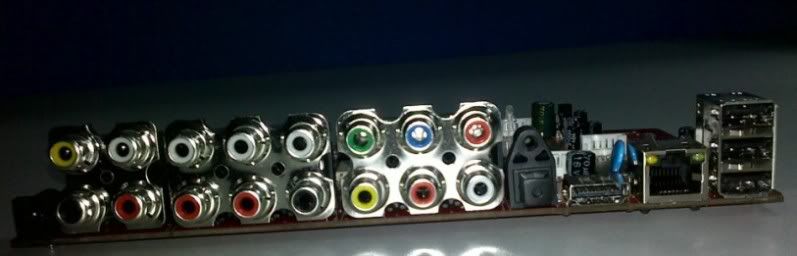
analog 5.1 out blush.gif

user posted image

user posted image user posted image

This post has been edited by yangxi: Jan 5 2011, 10:13 PM
ngboonaun
post Jan 5 2011, 11:19 PM

Getting Started
**
Junior Member
234 posts

Joined: Mar 2010
QUOTE(yangxi @ Jan 5 2011, 10:12 PM)
Yangxi Hdpro R1283+ coming soon  (ETA 20/1/2011 ..might delay or ealier)

analog 5.1 out  blush.gif

user posted image

user posted image user posted image
*
when i can get it? brows.gif
yangxi
post Jan 5 2011, 11:59 PM

Violinist ^.^ 囧 囧
*******
Senior Member
4,189 posts

Joined: Jan 2003
From: Age Quod Agis


might next week. 10unit for our dealer test first.

price not sure ?? .. will survey other seller first brows.gif
ngboonaun
post Jan 6 2011, 12:09 AM

Getting Started
**
Junior Member
234 posts

Joined: Mar 2010
i wanna take Yangxi HDPRO R1055 and Yangxi Hdpro R1283+,best price brows.gif
ayarx_oren
post Jan 6 2011, 06:19 AM

New Member
*
Newbie
4 posts

Joined: Jan 2003
From: bayan lepas, penang


wow..analog 5.1..can i plug my 5.1 pc speaker???
palmjack
post Jan 6 2011, 09:04 AM

Getting Started
**
Junior Member
84 posts

Joined: Feb 2005
Hi Yangxi. Thanks for the HDPro+
The unit overall works OK but with the stock firmware there are some issues with file copy (e.g. from USB or network) to the HD
I can copy or move a few files but after that the file transfer fails - I get a static grey bar at the bottom and nothing happens. I have to off and on the media player again before I can repeat the file transfer function.
Will the latest firmware fix this bug?

QUOTE
http://www.zshare.net/download/8458273084659f4b/


^^ PS could you please upload the firmware to another site? I find it impossible to d/l on Streamyx - very slow and keeps timing out. TQ


Added on January 6, 2011, 8:02 pmNow the HD Pro+ seems to have a problem detecting the 1.5TB Sata HD after working fine for a day.
I don't think the disk is at fault since if I plugin the player to a PC via USB, the PC can read and write to the drive fine.
It's when I turn on the player attached to the TV, the HD spins for a while then goes silent. After a long while the HD Pro+ still cannot detect the drive.
Sigh. Please advise, YangXi.

This post has been edited by palmjack: Jan 6 2011, 08:02 PM
dexter81
post Jan 6 2011, 09:18 PM

New Member
*
Junior Member
19 posts

Joined: Jan 2005


QUOTE(palmjack @ Jan 6 2011, 09:04 AM)
Hi Yangxi. Thanks for the HDPro+
The unit overall works OK but with the stock firmware there are some issues with file copy (e.g. from USB or network) to the HD
I can copy or move a few files but after that the file transfer fails - I get a static grey bar at the bottom and nothing happens. I have to off and on the media player again before I can repeat the file transfer function.
Will the latest firmware fix this bug?
^^ PS could you please upload the firmware to another site? I find it impossible to d/l on Streamyx - very slow and keeps timing out. TQ


Added on January 6, 2011, 8:02 pmNow the HD Pro+ seems to have a problem detecting the 1.5TB Sata HD after working fine for a day.
I don't think the disk is at fault since if I plugin the player to a PC via USB, the PC can read and write to the drive fine.
It's when I turn on the player attached to the TV, the HD spins for a while then goes silent. After a long while the HD Pro+ still cannot detect the drive.
Sigh. Please advise, YangXi.
*
i experience the copy problem also, it show up the status bar n just frezzz at there.....also got problem with delete file, it will show up delete fail.
but after i connect the player to pc/laptop n scan the hard disk for error then redo the copy n delete from remote control it work.....

so try to connect to pc/laptop n scan hard disk ( check Automatically fix file system errors is enuf, scan for and attempt recovery of bad sectors dun need)
hope this will help
sweat.gif
yangxi
post Jan 6 2011, 09:21 PM

Violinist ^.^ 囧 囧
*******
Senior Member
4,189 posts

Joined: Jan 2003
From: Age Quod Agis


if mount hdd inside. need reformat from player. Not in PC
PoorMan
post Jan 6 2011, 09:28 PM

Short of Fund and Spirit
*******
Senior Member
2,664 posts

Joined: Jan 2005
From: Puchong
QUOTE(palmjack @ Jan 6 2011, 09:04 AM)
Now the HD Pro+ seems to have a problem detecting the 1.5TB Sata HD after working fine for a day.
I don't think the disk is at fault since if I plugin the player to a PC via USB, the PC can read and write to the drive fine.
It's when I turn on the player attached to the TV, the HD spins for a while then goes silent. After a long while the HD Pro+ still cannot detect the drive.
Sigh. Please advise, YangXi.
*
1.5TB would be a 3.5" HDD? Usually those external HDD cannot just run by plugging into one USB port alone but will also require external power (AC/DC adapter or using an additional USB port for power) to operate properly. Do you have another power source for your 1.5TB HDD?
jinxiang
post Jan 7 2011, 12:12 PM

Getting Started
**
Junior Member
69 posts

Joined: Aug 2009
QUOTE(yangxi @ Jan 5 2011, 10:12 PM)
Yangxi Hdpro R1283+ coming soon  (ETA 20/1/2011 ..might delay or ealier)

analog 5.1 out  blush.gif

user posted image

user posted image user posted image
*
Can't wait to see.....can have more info about this player?

I thought 1283 is equivalent to / same processor as 1073DD+ of HDPro+?

Or is R1283 same processor with R1055?? What about R1185??

Sorry....too many model. Confused lah.

This post has been edited by jinxiang: Jan 7 2011, 12:25 PM
yangxi
post Jan 7 2011, 12:30 PM

Violinist ^.^ 囧 囧
*******
Senior Member
4,189 posts

Joined: Jan 2003
From: Age Quod Agis


1185 not yet (ETA march or april month). afraid software a lot bug.


Realtek 1283+ can record. Now price drop, decide import this model tongue.gif


CPU speed
1073C+ = 400mhz
1283+ = 400mhz
1055 = 500mhz

Chip Die package
1073C+ = QFP
1283+ = BGA
1055 = LQFP (50% smaller) less heat.

Flash
1073C+ = 256mb Nand
1283C+ = 512mb Nand
1055 = 16mb (Nor)

*less flash RAM is primarily used for network buffering (for bt, online tv, vod) . 1055 don't have network.
*1283+ , can record (AV in) and DVB-T receiver


RAM DDR2
1073C+ = 128mb ddr2
1283+ = 256mb ddr2
1055 = 128mb ddr2

1055 don't have
Network controller
Sata controller.

This post has been edited by yangxi: Jan 7 2011, 12:31 PM
thteong82
post Jan 7 2011, 07:47 PM

Poor Guy
******
Senior Member
1,528 posts

Joined: Jan 2003
From: Penang


Received R1055 this morning. Thanks YangXi.

Superb player after flash to new firmware. No bugs detected currently. Seem like the remote control not that sensitive enough. Anyway, this is small problem.

Managed to bitstream DTSMA to receiver - blue light on.
Managed to downmix DTSMA to stereo (room). But the sound seem too soft, my TV need to adjust volume until 50.

Overall, great player especially for the price. Thumbs up.

P/S : Oh yeah, forget about one thing. It can detect all 4 hardisk in my Hotway casing. And between, I am playing all BDMV using USB only, no lag.

This post has been edited by thteong82: Jan 7 2011, 09:36 PM
sam240
post Jan 7 2011, 10:26 PM

Look at all my stars!!
*******
Senior Member
3,657 posts

Joined: Jan 2003


yangxi,
I would like to check with you regarding the HDPro+

1) Can support more than 2TB HDD?
2) Which brand HDD that so far no issue detect with it?
3) Is using Realtek 1073DD+?
4) Realtek 1073DD+ vs AMLOGIC, which better performance/quality?
5) Can play smooth 1080p.mkv file like 22GB size with no problem with audio output? (digital output or stereo only)?
6) Can display subtitle which build-in with mkv video file? or only support external subtitle (srt...etc)?
7) If I put 3.5" SATA HDD inside, and then I plug USB pendrive/memory card, and then can I transfer files into 3.5" SATA HDD?
(use as a interface to transfer data from drive to any drive?)

Sorry to ask this coz I'm new to this, thanks.
yangxi
post Jan 7 2011, 10:31 PM

Violinist ^.^ 囧 囧
*******
Senior Member
4,189 posts

Joined: Jan 2003
From: Age Quod Agis


QUOTE(sam240 @ Jan 7 2011, 10:26 PM)
yangxi,
I would like to check with you regarding the HDPro+

1) Can support more than 2TB HDD?
2) Which brand HDD that so far no issue detect with it?
3) Is using Realtek 1073DD+?
4) Realtek 1073DD+  vs  AMLOGIC, which better performance/quality?
5) Can play smooth 1080p.mkv file like 22GB size with no problem with audio output? (digital output or stereo only)?
6) Can display subtitle which build-in with mkv video file? or only support external subtitle (srt...etc)?
7) If I put 3.5" SATA HDD inside, and then I plug USB pendrive/memory card, and then can I transfer files into 3.5" SATA HDD?
(use as a interface to transfer data from drive to any drive?)

Sorry to ask this coz I'm new to this, thanks.
*
1.) Sure can.
2.) Samsung . (my 3unit WD 1.5TB green spoil )
3.) yes. 1073DD+ (know as C+)
4.) more format support. Realtek price bit expensive
5.) yes..smooth. passtru or downmix 2 channel)
6.) Embedding MKV subtitles no problem.
6.) yes can transfer. (ntfs,fat32 only) not MAC (FAT) and exfat.

89 Pages « < 50 51 52 53 54 > » Top
 

Change to:
| Lo-Fi Version
0.0285sec    0.19    6 queries    GZIP Disabled
Time is now: 9th December 2025 - 01:35 AM