Outline ·
[ Standard ] ·
Linear+
DELL Studio XPS™ 13 & 16 Notebooks [V3], powered by Intel C2D, Core i5 n Core i7
|
-kytz-
|
 Feb 19 2010, 12:45 AM Feb 19 2010, 12:45 AM
|

|
QUOTE(defectivelasagna @ Feb 18 2010, 11:39 PM) hey guys my order's due on 25th February =( could dell miraculously deliver earlier than the estimated date? the current status says 'uplift' after 'transit' what does 'uplift' mean? Uplift probably means it's being handled into the cargo  Mine is already "cleared custom"  Expecting mine on the 23rd Feb  |
|
|
|
|
|
xKAIZERUx
|
Feb 19 2010, 10:19 AM
|
|
|
I can safely said the thermal paste I used cooled a lot. i remember that normal working temp , which is firefox open 3 windows, about 10 tab each, 4-5 MS word, winamp, usual task, before I fired up my Adobe suite. 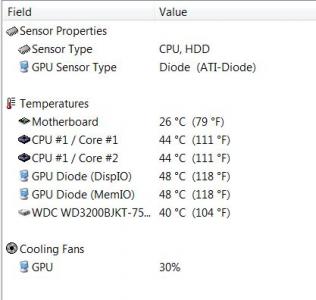
before the temp is at least 52C. so this cools the system a lot. |
|
|
|
|
|
Eugene91
|
Feb 19 2010, 10:29 AM
|
|
|
cool.. you give me the inspiration to change my 6935g's thermal paste too |
|
|
|
|
|
defectivelasagna
|
Feb 19 2010, 10:41 AM
|
|
|
would applying thermal paste void the warranty?
|
|
|
|
|
|
xKAIZERUx
|
Feb 19 2010, 10:43 AM
|
|
|
QUOTE(Eugene91 @ Feb 19 2010, 10:29 AM) cool.. you give me the inspiration to change my 6935g's thermal paste too well, I advise you to check first your laptop condition, see the screws and formulate the best way to do this without scratching anything, coz takut the Acer see and then viod your warranty. I used the Zalman coz after comparing the heat transfer rate. it cost almost the same as the highest Cooler Master offering but the performance is a lot more. good luck!  |
|
|
|
|
|
Unomi
|
Feb 19 2010, 11:38 AM
|
|
|
@ , @. Today XPS 16 price went up back to RM 3999? OMG!
|
|
|
|
|
|
TSoutlife11
|
Feb 19 2010, 11:48 AM
|
|
|
QUOTE(Fantasia @ Feb 18 2010, 11:28 PM) sure can lor, they even advise me to call technician if i want to open my laptop to clean my fan any charges if they come over n do it for u ? cleaning or apply the thermal grease |
|
|
|
|
|
Fantasia
|
Feb 19 2010, 02:42 PM
|
|
|
i dont think u will be charged if u r still under warranty period...
|
|
|
|
|
|
-kytz-
|
Feb 19 2010, 03:58 PM
|
|
|
QUOTE(Unomi @ Feb 19 2010, 11:38 AM) @ , @. Today XPS 16 price went up back to RM 3999? OMG! Now should apply themal paste for which heatsink  CPU or GPU or both  Btw, the temperature is kinda cool.... 
Added on February 19, 2010, 5:17 pmUpdate:Just got an sms from Dell stating mine is coming tomorrow  Can't wait.....Pictures will be uploaded shortly after  pssss....Unomi!Where are your pictures This post has been edited by -kytz-: Feb 19 2010, 05:19 PM |
|
|
|
|
|
Unomi
|
Feb 19 2010, 05:45 PM
|
|
|
Hey, i just got my laptop yesterday. and today i tested the sound, i could feel that my left speaker got abit Squicky sound like "bizzz" .Left side only... Hmm anyone face this problem?
|
|
|
|
|
|
Jeffrey1987
|
Feb 19 2010, 06:13 PM
|
|
|
Post some pictures, post some pictures, post some pictures ...
This post has been edited by Jeffrey1987: Feb 19 2010, 06:14 PM
|
|
|
|
|
|
defectivelasagna
|
Feb 19 2010, 06:24 PM
|
|
|
QUOTE(-kytz- @ Feb 19 2010, 03:58 PM) Now should apply themal paste for which heatsink CPU or GPU or both Btw, the temperature is kinda cool....
Added on February 19, 2010, 5:17 pmUpdate:Just got an sms from Dell stating mine is coming tomorrow Can't wait.....Pictures will be uploaded shortly after pssss....Unomi!Where are your pictures =O cool! that means mine might come earlier too. |
|
|
|
|
|
xKAIZERUx
|
Feb 19 2010, 07:30 PM
|
|
|
QUOTE(-kytz- @ Feb 19 2010, 03:58 PM) Now should apply themal paste for which heatsink CPU or GPU or both Btw, the temperature is kinda cool.... I applied to all that come in contact to the copper. both die at CPU chip (why the hell Dell disable the intel GMA although it clearly have this?), and also at the GPU. |
|
|
|
|
|
TSoutlife11
|
Feb 19 2010, 07:58 PM
|
|
|
getting more ppl become sxps family member, guy don forget PM me to update at 1st page thank you
|
|
|
|
|
|
Fantasia
|
Feb 19 2010, 09:18 PM
|
|
|
QUOTE(xKAIZERUx @ Feb 19 2010, 07:30 PM) I applied to all that come in contact to the copper. both die at CPU chip (why the hell Dell disable the intel GMA although it clearly have this?), and also at the GPU. it's because of the chipset it use |
|
|
|
|
|
Unomi
|
Feb 19 2010, 11:07 PM
|
|
|
hey, how do i upload the picture. @ ,@ im kinda blur here, anyone can help?
|
|
|
|
|
|
xKAIZERUx
|
Feb 19 2010, 11:13 PM
|
|
|
click the addreply button, then below the emoticon thing, got attachments place. browse for your pic there. I suggest you resize them first, I always used 1024 as the width. much better for web as it offers quite fast load while still legitable.
|
|
|
|
|
|
Jeffrey1987
|
Feb 19 2010, 11:13 PM
|
|
|
QUOTE(Unomi @ Feb 19 2010, 11:07 PM) hey, how do i upload the picture. @ ,@ im kinda blur here, anyone can help? You click "Add Reply" --> "Choose file" at the bottom --> " Add This Attachment" --> "Add Into Post" ... Finish!
Added on February 19, 2010, 11:15 pmQUOTE(xKAIZERUx @ Feb 19 2010, 11:13 PM) click the addreply button, then below the emoticon thing, got attachments place. browse for your pic there. I suggest you resize them first, I always used 1024 as the width. much better for web as it offers quite fast load while still legitable.  This post has been edited by Jeffrey1987: Feb 19 2010, 11:15 PM This post has been edited by Jeffrey1987: Feb 19 2010, 11:15 PM |
|
|
|
|
|
Jeffrey1987
|
Feb 19 2010, 11:23 PM
|
|
|
QUOTE(Unomi @ Feb 19 2010, 11:22 PM) More ...more ...more ...  |
|
|
|
|



 Quote
Quote







 0.0329sec
 0.68
0.68
 6 queries
 GZIP Disabled