Welcome Guest ( Log In | Register )

125 Pages « < 9 10 11 12 13 > » Bottom

Outline · [ Standard ] · Linear+

 HTC Hero

views
     
naTTan
post Sep 23 2009, 11:34 AM

Regular
******
Senior Member
1,138 posts

Joined: Sep 2005


QUOTE(LEVIATHAN @ Sep 23 2009, 01:01 AM)
Well, how to disable Market auto download? I downloaded several apps, and decided not to use them anymore.

However, the apps will download themselves automatically after I wipe my Hero. How to stop them/disable that?
*
It doesn't occur like that, if you download an app recently and then wipe, when you sync it back it will download back the app recently install. I am not sure what the definition of recently means, but usually within a one day span for me. Why do you wipe to remove the app? try uninstalling?
LEVIATHAN
post Sep 23 2009, 12:35 PM

Master Chief Carl M. Brashear
*******
Senior Member
2,281 posts

Joined: Oct 2006
From: Littleroot Town


I wipe because I have this Window's anal of reformating after do some mess (install, uninstall stuff, mod this and that) Haha.

Yar I think Market will auto-redownload recently installed apps. For that I think I shouldn't download apps before I do wipe.

I don't think it's 24 hrs though. In my case it's much more shorter than 1 day. And I think Market wil redownload up to certain no of apps only.
asdf8888
post Sep 23 2009, 06:11 PM

New Member
*
Junior Member
4 posts

Joined: Sep 2009
Yep. You need to setup the APN manually once you flash your Hero with WWE ROM. For Maxis user, checkout the link provided above :-)

If you want to access paid apps, use Market Enabler. But maek sure you have root access, else it won't work.


Bro Levi wat do u mean by "root Access"?
LEVIATHAN
post Sep 23 2009, 07:39 PM

Master Chief Carl M. Brashear
*******
Senior Member
2,281 posts

Joined: Oct 2006
From: Littleroot Town


Root access is admin privilege. You have full control of your system.

This post has been edited by LEVIATHAN: Sep 23 2009, 07:41 PM
ps360
post Sep 23 2009, 10:41 PM

Getting Started
**
Junior Member
137 posts

Joined: Jan 2006
From: The Other Side
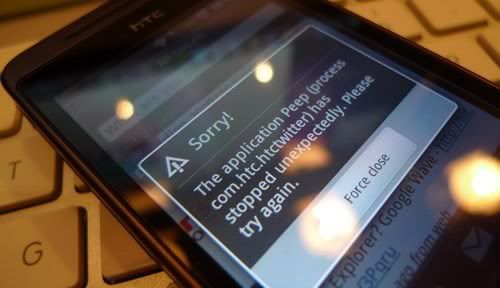
user posted image

Anyone facing similar problems? Or just users with rooted units?
Am on MoDaCo 2.2-update-hero-modacocustomrom-enhanced-signed

Weather widget also acting up, whole day, showing moon instead of sun during the day. sweat.gif


UPDATE 1: SOURCE

Twitter's phenomenal growth means that people are posting updates to the service faster than ever. Earlier in the year, the number of tweets posted to the service hit a wall: more specifically the number 2147483647 which was the maximum size of an integer in a fair few programming languages.

Tomorrow morning, however, Twitter will be forcing through Twitpocalypse II where the number of tweets pushes past the unsigned integer limit of 4294967296. And that may cause issues for unprepared Twitter applications.

In a mailing to the Twitter API developers list, the Twitter API team have reminded developers that their applications need to cope with numbers of this size - and if you're wondering why your favourite mashup isn't working after 11:30am Pacific Time tomorrow, this may well be the culprit.

UPDATE 2: SOURCE

It's great having lots of manufacturer provided applications in the ROM of your mobile device, but what happens if one of them breaks? It's not as easy as just contacting the developer for an updated version is it!

This is exactly the problem being faced by users of 'HTC Peep', the Twitter client on the HTC Hero.

Last night, the unique id number assigned to each Tweet exceeded 4,294,967,295, in an event we covered as 'Twitpocalyse II'. This is the highest number that can be stored in an unsigned 32 bit integer. If the developer of a Twitter client uses this method to store the Tweet ID, then unexpected things will happen. Hence, since this occured, Peep users have been unable to use the application, instead being greeted by the error message above (after which the application either closes or refuses to load new tweets).

We have contacted HTC to ask how long Hero users should expect to wait for a fix, but if you are affected, it might be time to try out Twidroid, Twitterride or perhaps Swift!


This post has been edited by ps360: Sep 23 2009, 11:24 PM

LEVIATHAN
post Sep 24 2009, 06:03 AM

Master Chief Carl M. Brashear
*******
Senior Member
2,281 posts

Joined: Oct 2006
From: Littleroot Town


Beautiful Hero :-)

Mine is so ugly with plastic wrapping :-(
ps360
post Sep 24 2009, 06:30 AM

Getting Started
**
Junior Member
137 posts

Joined: Jan 2006
From: The Other Side
user posted image

Official Tweet from HTC on it's Twitter Account
Let's see how long before a patch or server side solution comes along


@ Levi .... Plastic wraps? You're kidding right? Please tell me you're kidding .... sweat.gif
LEVIATHAN
post Sep 24 2009, 10:55 AM

Master Chief Carl M. Brashear
*******
Senior Member
2,281 posts

Joined: Oct 2006
From: Littleroot Town


I am not :-)

I use GLAD food wrap to temporarily protect my Hero. New phone indeed makes me nervous lol.

I wrap, unwrap and re-wrap on daily basis. Idk the effect of plastic wrapping on the phone. I think there is nothing to worry about. I can hear the rings and everything. Ok lah I guess. Only when recharge the battery then I need to open a bit to plug the charger.

Finger operations are ok too. Touch screen registers my commands well enough.

But yeah my Hero is gawd damn ugly with the wrapping.
hd2020
post Sep 24 2009, 12:13 PM

New Member
*
Junior Member
4 posts

Joined: Mar 2008


still under decide which color for me..is white will really get dirt easily even with teflon?? i don think so....
vexus
post Sep 24 2009, 01:08 PM

Master of Eatery & Sleeping
*******
Senior Member
6,660 posts

Joined: Jan 2003
From: Palace of sexology


QUOTE(hd2020 @ Sep 24 2009, 12:13 PM)
still under decide which color for me..is white will really get dirt easily even with teflon??  i don think so....
*
brown color nice.

will get it during mobile fair or pc fair.
waiting for best deal perhaps 16gb/32gb sd card foc
lek_e30
post Sep 24 2009, 01:48 PM

Hao hao sit
*******
Senior Member
2,388 posts

Joined: Jan 2005
From: kap thung fah yen


over here got how many colour to choose?
LEVIATHAN
post Sep 24 2009, 01:57 PM

Master Chief Carl M. Brashear
*******
Senior Member
2,281 posts

Joined: Oct 2006
From: Littleroot Town


I personally never like white, especially on things I fondle a lot.

I read from various sources, stating that white Hero picked color marking from it's casing. You slide into red casing, you get red marks on your Hero. If your casing is green, you get green on your Hero.

On the other note, I found out that every time I want to add contact, Hero will automatically direct the input to number box first, instead of name. I think that's a nice touch especially when you are in hurry, as the number is more important than the name.

Edit:

vexus, you want 16GB free of charge ah? 16GB is too much la to ask for free.

lek_e30, local for the time being only two colors. White and brown. Oversea you can get pink also if I'm not mistaken.

This post has been edited by LEVIATHAN: Sep 24 2009, 02:00 PM
lek_e30
post Sep 24 2009, 02:12 PM

Hao hao sit
*******
Senior Member
2,388 posts

Joined: Jan 2005
From: kap thung fah yen


i like the white one... but scare long run will turn yellowish...
vexus
post Sep 24 2009, 02:25 PM

Master of Eatery & Sleeping
*******
Senior Member
6,660 posts

Joined: Jan 2003
From: Palace of sexology


hopefully HTC will have better offer during mobile fair and pc fair. hehe.
I'm hoping PDA expert will throw out more freebies
LEVIATHAN
post Sep 24 2009, 02:42 PM

Master Chief Carl M. Brashear
*******
Senior Member
2,281 posts

Joined: Oct 2006
From: Littleroot Town


Good for you :-) Later don't forget to come here. We can always share anything regarding Hero :-)

Edit: And where is TS ha? He posted once, and never some back ah?

Anyway, I'd like to share a step-by-step guide flashing Hero (especially local set with no Market), taken from xda.

OK. I specifically picked this.

1. Install OI File Manager.

2. Put the flashrec into your sdcard.

3. Put this ROM into you sdcard. You may want to rename it to update.zip before you transfer it to sdcard.

4. Put this recovery image into your sdcard.

5. With the file manager, browse your sdcard and install flashrec.

6. If you haven't done it, rename update-hero-generic-2.73.405.5-rooted-signed.zip to update.zip with the file manager.

7. Open flashrec, click backup (the last button of the program). Wait.

8. At the box, type sdcard/Recovery-RA-HERO-v1.2.2.img, then click the button just below the box. Wait.

9. Now you flashed your Hero with recovery image. Turn off your Hero.

10. Hold POWER and HOME simultaneously. You will enter Android system recovery.

11. Choose Wipe data/factory reset. I ASSUME YOU ALREADY MADE YOUR BACKUP. Else, choose Reboot system now and do your backup.

12. After wipe, choose Apply sdcard:update.zip. Wait.

13. Choose Reboot system now.

14. Smile as your Hero is rooted. Watch it boots and gives you the Market :-)

This post has been edited by LEVIATHAN: Sep 24 2009, 02:51 PM
JayC75
post Sep 24 2009, 03:02 PM

Here We Go
******
Senior Member
1,404 posts

Joined: Jul 2006
From: Puchong


installed custom ROM will void local SIS warranty, is it possible that we re-install back ori ROM when we send in to claim warranty?

Em..but...custom ROM don hv chinese support..too bad...

Hope HTC will release new official ROM with Market.
LEVIATHAN
post Sep 24 2009, 03:13 PM

Master Chief Carl M. Brashear
*******
Senior Member
2,281 posts

Joined: Oct 2006
From: Littleroot Town


Hoho you miss THOUSANDS if you run Hero with no Market.
lek_e30
post Sep 24 2009, 03:29 PM

Hao hao sit
*******
Senior Member
2,388 posts

Joined: Jan 2005
From: kap thung fah yen


QUOTE(LEVIATHAN @ Sep 24 2009, 02:42 PM)
Good for you :-) Later don't forget to come here. We can always share anything regarding Hero :-)

Edit: And where is TS ha? He posted once, and never some back ah?

Anyway, I'd like to share a step-by-step guide flashing Hero (especially local set with no Market), taken from xda.

OK. I specifically picked this.

1. Install OI File Manager.

2. Put the flashrec into your sdcard.

3. Put this ROM into you sdcard. You may want to rename it to update.zip before you transfer it to sdcard.

4. Put this recovery image into your sdcard.

5. With the file manager, browse your sdcard and install flashrec.

6. If you haven't done it, rename update-hero-generic-2.73.405.5-rooted-signed.zip to update.zip with the file manager.

7. Open flashrec, click backup (the last button of the program). Wait.

8. At the box, type sdcard/Recovery-RA-HERO-v1.2.2.img, then click the button just below the box. Wait.

9. Now you flashed your Hero with recovery image. Turn off your Hero.

10. Hold POWER and HOME simultaneously. You will enter Android system recovery.

11. Choose Wipe data/factory reset. I ASSUME YOU ALREADY MADE YOUR BACKUP. Else, choose Reboot system now and do your backup.

12. After wipe, choose Apply sdcard:update.zip. Wait.

13. Choose Reboot system now.

14. Smile as your Hero is rooted. Watch it boots and gives you the Market :-)
*
perhaps you shud be the TS and ask mod to close this thread... since there will be more heros here
Vervain
post Sep 24 2009, 03:31 PM

Scathach
*******
Senior Member
5,464 posts

Joined: Mar 2005
Yup. Hope there will be someone whom can manage the 1st page with full configuration & help know how.
JayC75
post Sep 24 2009, 03:57 PM

Here We Go
******
Senior Member
1,404 posts

Joined: Jul 2006
From: Puchong


QUOTE(lek_e30 @ Sep 24 2009, 03:29 PM)
perhaps you shud be the TS and ask mod to close this thread... since there will be more heros here
*
yes, LEVIA be our TS and hero pls..he will guide us how to be a super hero..

125 Pages « < 9 10 11 12 13 > » Top
 

Change to:
| Lo-Fi Version
0.0183sec    0.26    6 queries    GZIP Disabled
Time is now: 5th December 2025 - 08:35 PM