Welcome Guest ( Log In | Register )

Outline · [ Standard ] · Linear+

 HTC Hero

views
     
ps360
post Sep 15 2009, 11:35 AM

Getting Started
**
Junior Member
137 posts

Joined: Jan 2006
From: The Other Side
Hi guys. Am a total noob to Android.
Would appreciate if anyone here can help
clarify the Android Market restriction.
If I get a UK set. Am I still restricted
in accessing the Android Market place?
When they say restriction, does it
include Free Apps or just Paid Apps?
Thanks ....
ps360
post Sep 16 2009, 02:56 AM

Getting Started
**
Junior Member
137 posts

Joined: Jan 2006
From: The Other Side
QUOTE(naTTan @ Sep 16 2009, 12:22 AM)
To whoever ask about the market, it doesn't matter where you get your hp from the mmarket will be a local one. However there is an app call market enabler for download which allows you to choose your market I have set mine to us market sinnce last fm can't be found in the local market. If you want to buy app get a google checkout account.
*
Will definitely download Market Enabler when I get my phone. Have also signed-up for Google Checkout Account. Thank you for the info. notworthy.gif
ps360
post Sep 16 2009, 07:29 AM

Getting Started
**
Junior Member
137 posts

Joined: Jan 2006
From: The Other Side
naTTan

The latest UK HTC Hero update is now available. http://tinyurl.com/kj98qt

I read that it will make rooting the phone difficult. Are you currently using the latest ROM? Would you be able to advice noobs like me on which is the best and simplest tutorial to root the Hero? This is all so new and exciting ... but a little guidance will be greatly appreciated. I've read up on Modaco, and then of coz, the TheUnlockr .... not sure which is the simplest.

I'll be getting my phone only in 1st week of Oct. So, doing a lot of reading now.


ps360
post Sep 16 2009, 07:40 PM

Getting Started
**
Junior Member
137 posts

Joined: Jan 2006
From: The Other Side
QUOTE(LEVIATHAN @ Sep 16 2009, 09:04 AM)
ps360,

What's the difference between leaked Nordic RUU update with the UK? Or between UK RUU with SEA RUU?

Are you sure the rooting is going to be more difficult after the latest RUU update? Any source on that?

Well, I'm on theunlokr side :-) The steps involved are fewer than the other, and come with video tutorial. You just tap the menus instead of typing the codes.
*
QUOTE

"The update does also flash a new bootloader which makes 'rooting' the phone for full unrestricted access slightly more difficult, but due to HTC failing to patch a vulnerability in the kernel, it can still be done! ....."

SOURCE


Hi, I am new to this. So I do not know what's the difference between the Nordic and UK other than language? Anyway, great to see some love for this phone. The iPhone is really becoming a tom-d***-and-harry phone. Too many people using it. And the current Maxis shortage is such a joke .... respect for all those who are patiently waiting in line ... notworthy.gif notworthy.gif

iPhone user since July 2007
(technically, it was just an iPod Touch back then ....)
ps360
post Sep 18 2009, 07:11 AM

Getting Started
**
Junior Member
137 posts

Joined: Jan 2006
From: The Other Side
QUOTE(LEVIATHAN @ Sep 18 2009, 07:46 AM)
Now, where to get the installer for Market?
*
naTTan shared this piece of info with me 1 page back .....

MARKET ENABLER
http://code.google.com/p/market-enabler/
ps360
post Sep 23 2009, 10:41 PM

Getting Started
**
Junior Member
137 posts

Joined: Jan 2006
From: The Other Side
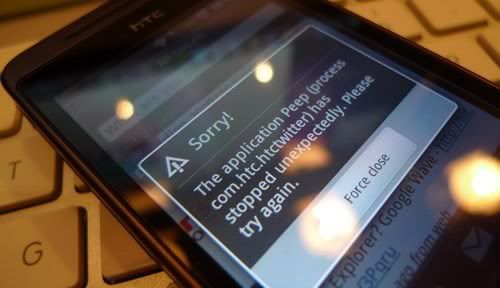
user posted image

Anyone facing similar problems? Or just users with rooted units?
Am on MoDaCo 2.2-update-hero-modacocustomrom-enhanced-signed

Weather widget also acting up, whole day, showing moon instead of sun during the day. sweat.gif


UPDATE 1: SOURCE

Twitter's phenomenal growth means that people are posting updates to the service faster than ever. Earlier in the year, the number of tweets posted to the service hit a wall: more specifically the number 2147483647 which was the maximum size of an integer in a fair few programming languages.

Tomorrow morning, however, Twitter will be forcing through Twitpocalypse II where the number of tweets pushes past the unsigned integer limit of 4294967296. And that may cause issues for unprepared Twitter applications.

In a mailing to the Twitter API developers list, the Twitter API team have reminded developers that their applications need to cope with numbers of this size - and if you're wondering why your favourite mashup isn't working after 11:30am Pacific Time tomorrow, this may well be the culprit.

UPDATE 2: SOURCE

It's great having lots of manufacturer provided applications in the ROM of your mobile device, but what happens if one of them breaks? It's not as easy as just contacting the developer for an updated version is it!

This is exactly the problem being faced by users of 'HTC Peep', the Twitter client on the HTC Hero.

Last night, the unique id number assigned to each Tweet exceeded 4,294,967,295, in an event we covered as 'Twitpocalyse II'. This is the highest number that can be stored in an unsigned 32 bit integer. If the developer of a Twitter client uses this method to store the Tweet ID, then unexpected things will happen. Hence, since this occured, Peep users have been unable to use the application, instead being greeted by the error message above (after which the application either closes or refuses to load new tweets).

We have contacted HTC to ask how long Hero users should expect to wait for a fix, but if you are affected, it might be time to try out Twidroid, Twitterride or perhaps Swift!


This post has been edited by ps360: Sep 23 2009, 11:24 PM

ps360
post Sep 24 2009, 06:30 AM

Getting Started
**
Junior Member
137 posts

Joined: Jan 2006
From: The Other Side
user posted image

Official Tweet from HTC on it's Twitter Account
Let's see how long before a patch or server side solution comes along


@ Levi .... Plastic wraps? You're kidding right? Please tell me you're kidding .... sweat.gif
ps360
post Sep 24 2009, 06:51 PM

Getting Started
**
Junior Member
137 posts

Joined: Jan 2006
From: The Other Side
For those who are using a rooted Hero, can any of you confirm if you are experiencing these 2 weird behavior?

1. During a call, you press the Volume Rocker on the side, but the call volume is still SUPER LOUD. Unlike the iPhone, when you're in a call, pressing the Volume button reduces or increases the call volume (not ringtone)

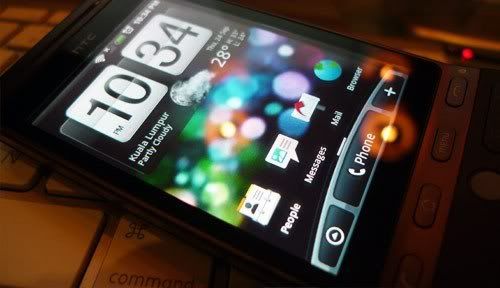
2. Using the retro clock with weather widget - the weather doesn't update. I have a Moon at 2pm in the afternoon. Bringing up the weather widget, everything seems fine. Weather and temp updates with a Sun instead of a Moon. Going back to the Homescreen again, the Moon is still there. Weather not updated.

Thanks


Added on September 24, 2009, 6:53 pmAnd can someone upload the ORIGINAL ROM that came with the phone?
Forgot to do a back-up before rooting my unit.
Now that Levi mentioned SIS's tight A** policy ...
Would be good if somehow, can roll back if anything happens
Thanks again ....


Added on September 24, 2009, 6:56 pmCome to think of it, am kinda pissed with SIS ...
We root our Hero because they failed to give us Android Market in the first place


This post has been edited by ps360: Sep 24 2009, 06:56 PM
ps360
post Sep 25 2009, 07:23 AM

Getting Started
**
Junior Member
137 posts

Joined: Jan 2006
From: The Other Side
For those interested in getting the Original Asian ROM mentioned by Levi, click
http://forum.xda-developers.com/showthread.php?t=561703

File:
(RUU_Hero_HTC_Asia_SEA_WWE_2.73.728.5_release_signed_NoDriver.exe)

Size: 105.3 MB

Downloaded, but any tips on how to UNROOT the unit?
I searched XDA but only found people asking that question and kena shot asking him to SEARCH before asking.
But can't find an actual thread with steps to Un-root.
Any help will be appreciated.


This post has been edited by ps360: Sep 25 2009, 07:27 AM
ps360
post Sep 26 2009, 10:00 AM

Getting Started
**
Junior Member
137 posts

Joined: Jan 2006
From: The Other Side
I asked if anyone having problems controlling the in-call volume during a call. I finally found the solution and what was causing it.

It wasn’t the ROM’s fault that I couldn’t control the call volume during a call. It was my own doing. Under Menu, Settings, Ringer Volume – if you select Use Incoming Call Volume For Notifications, you’ll be able to control the in-call volume by pressing the Volume Rocker on the phone.

So now, apart from Peep "force quit" problem - which HTC is working with Twitter for a solution, I've only got one more issue left to resolve on my Hero. The weather widget which doesn't update (on the homescreen, clock). Day time showing moon, night time showing sun. Sometimes it updates, most of the time it doesn't. Anyone else having this problem?

user posted image

Note: Mac user here too. Don't use HTC Sync either. Google all the way.

This post has been edited by ps360: Sep 26 2009, 10:12 AM
ps360
post Sep 26 2009, 01:02 PM

Getting Started
**
Junior Member
137 posts

Joined: Jan 2006
From: The Other Side
QUOTE(LEVIATHAN @ Sep 26 2009, 11:59 AM)
Any source for that wallpaper or wallpaper with the similar theme?
*
Here you go .... smile.gif

» Click to show Spoiler - click again to hide... «


QUOTE(stringfellow @ Sep 26 2009, 12:41 PM)
Probably due to its location. Go to Settings and under the "Location" drop down, make sure both entries("Use wireless network" and "Use GPS satellite") are checked. I also have the "Date & Time" setting, and under "Automatic" not checked, which in itself says it uses the network-provided values. To me ,this is network specific, and seeing how the massive problem with our telcos these days, I'd rather have the phone internals figure it out. I never had any problems from Day 1. In fact, I was pleasantly surprised that that weather widget changes even according to the specific area I am in. For example, it is now showing "Ampang" as "Intermittent Cloud" and while I was at work in KLIA 3 days back, it changes to "KLIA" by itself.

By the way, on that picture, that representation is correct. It shows "10:34pm" so it should be showing the moon.
*
Yeah, that photo was taken during those "sometimes it updates" moment. Lazy to snap another photo and upload showing the problematic screens. My location changes too, only the sun and moon visual stay unchanged at times. Sometimes, tapping it and going into the weather widget itself, clicking update, will do the trick. But success rate is only 2 out of 10 times. Anyway, its no big deal. Just bugs me not able to get the phone working in the way it should.

This post has been edited by ps360: Sep 26 2009, 01:03 PM
ps360
post Nov 28 2009, 03:40 PM

Getting Started
**
Junior Member
137 posts

Joined: Jan 2006
From: The Other Side
Hi everyone, am letting go a very good condition HTC Hero.
Check my siggy. RM1750. Price is firm.
Thanks for reading.


Change to:
| Lo-Fi Version
0.0405sec    0.54    7 queries    GZIP Disabled
Time is now: 5th December 2025 - 07:28 PM