QUOTE(ps360 @ Sep 26 2009, 10:00 AM)
I asked if anyone having problems controlling the in-call volume during a call. I finally found the solution and what was causing it.
It wasn’t the ROM’s fault that I couldn’t control the call volume during a call. It was my own doing. Under Menu, Settings, Ringer Volume – if you select Use Incoming Call Volume For Notifications, you’ll be able to control the in-call volume by pressing the Volume Rocker on the phone.
So now, apart from Peep "force quit" problem - which HTC is working with Twitter for a solution, I've only got one more issue left to resolve on my Hero. The weather widget which doesn't update (on the homescreen, clock). Day time showing moon, night time showing sun. Sometimes it updates, most of the time it doesn't.
Anyone else having this problem?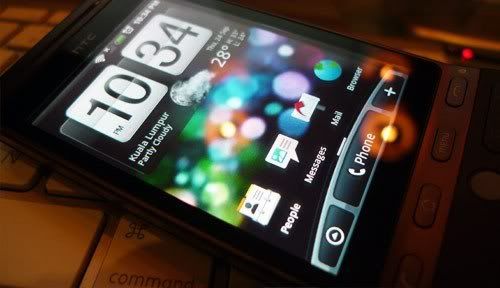
Note: Mac user here too. Don't use HTC Sync either. Google all the way.
Probably due to its location. Go to Settings and under the "Location" drop down, make sure both entries("Use wireless network" and "Use GPS satellite") are checked. I also have the "Date & Time" setting, and under "Automatic" not checked, which in itself says it uses the network-provided values. To me ,this is network specific, and seeing how the massive problem with our telcos these days, I'd rather have the phone internals figure it out. I never had any problems from Day 1. In fact, I was pleasantly surprised that that weather widget changes even according to the specific area I am in. For example, it is now showing "Ampang" as "Intermittent Cloud" and while I was at work in KLIA 3 days back, it changes to "KLIA" by itself.
By the way, on that picture, that representation is correct. It shows "10:34pm" so it should be showing the moon.
This post has been edited by stringfellow: Sep 26 2009, 11:44 AM 

 Sep 26 2009, 12:43 AM


 (will try to do it later tho)
 Quote
Quote






 0.1022sec
 0.46
0.46
 6 queries
 GZIP Disabled