QUOTE(yslysl @ Aug 29 2009, 07:27 PM)
thx for the info bro

however, the Graphic Card got other output maybe but i dunno wut is it(white color 1 with mini pin and another 1 similiar to svideo cable but it is not actually). As for the dvi, i think it has 1 slot only and currently using it to output to monitor. hope u can help me out. thx
The following pic compares the s-video, DVI and VGA port.

If you have the VGA port, I suggest you use it for your monitor,and use the DVI port for the TV becuase the TV only support FullHD from HDMI and not from VGA, whereas your monitor should be able to reach full resolution even from a VGA port (provided your monitor does have a VGA port for input).
If you have a a HDMI cable already (I got my free with the TV) then your could purchase this:
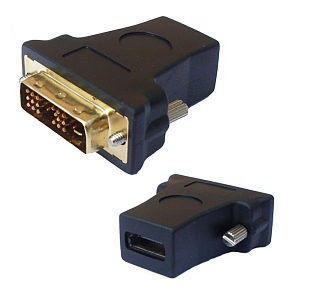
Then connect your HDMI cable between this and your TV.
But if you do not already have a HDMI cable, you could get one of this instead:

This connect's your DVI directly to HDMI port in your TV.
QUOTE
still dun understand why plasmas as a monitor replacement ...
As for why people wanna connect their TV to the computer, well for me that's because I do not have a Bluray player, and I can't afford Blurays discs (They don't even sell it at the place where I live). So my PC is the only thing that is able to output my 1080P *ahem* files downloaded from the internet to FullHD. That way I also save some money from buying a HT system as my creative sound card and creative speakers does a decent job in 5.1 surround sound as well.
edit: Typo
This post has been edited by Kain_Sicilian: Aug 29 2009, 10:08 PM 

 Aug 29 2009, 10:52 AM


 Quote
Quote




 With such a lousy colour for S10K still dare to sell at RM3,999 with cash and carry...
 What is the different...


 0.0329sec
 1.27
1.27
 6 queries
 GZIP Disabled