Welcome Guest ( Log In | Register )

72 Pages  1 2 3 > » Bottom

Outline · [ Standard ] · Linear+

Hardware [Guide]  Mac Purchase Guide , Mac Products Ownership

views
     
TSdavidgary73
post Mar 28 2009, 02:30 PM, updated 16y ago

Music Producer
Group Icon
VIP
4,903 posts

Joined: Jul 2008
Mac Purchase Guide

Attached Image

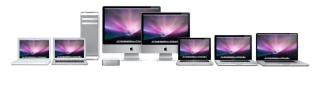
This thread is to facilitate the ease of choosing which mac that suits your budget and usage.

Here are the breakdown as follows:

Section A: MacPro
Section B: iMac
Section C: Mac Mini
Section D: Macbook
Section E: Macbook Pro
Section F: MacBook Air
Section G: Purchasing from Resellers and Online Store (Installment etc)
Section H: Warranty, AppleCare etc


For price comparison, please refer to Apple Price List.

New To Mac?

 Which Mac is Better: http://www.apple.com/getamac/
 Migrating over from Windows platform, here's the "Switch 101" guide to getting the most out of your Mac.
 New to Mac, here's the "Mac101" guide to using a Mac effectively and efficiently.
 Runs Windows Operating System on Mac : https://forum.lowyat.net/topic/979861
 Speed Tips n' Tricks: http://www.mactricksandtips.com/2008/08/99...rmance-mac.html

_______________


This thread will be updated as and when there's updates.

Thank you.

Cheers

This post has been edited by davidgary73: Sep 14 2010, 08:13 PM
TSdavidgary73
post Mar 28 2009, 02:32 PM

Music Producer
Group Icon
VIP
4,903 posts

Joined: Jul 2008
Section A: Mac Pro

Attached Image

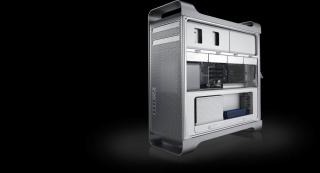
The fastest Mac ever.

The Mac Pro is a force to be reckoned with. With the Quad-Core Intel Xeon “Nehalem” processor and powerful AMD and NVIDIA graphics, it's nearly two times faster than the previous generation. Designed for easier expansion, every system supports up to two 30-inch Apple Cinema HD Displays, along with millions of configuration possibilities.

Tech Spec: http://www.apple.com/my/macpro/specs.html

Pros: The most powerful, customizable and upgradable Mac ever. 4 HDD tray, 4 PCI-E slots, 8x RAM slots (or 4 for single proc model), 2 optical drive bay. Sturdy build, trusted machine, a true work-horse.
Cons: Lack of choices for graphic cards. Big power consumption (electricity bill). Heavy and bulky. No Apple Remote support, Airport is not included.
(credit to wei)

Usage: Music Productions/Post Production/Recording Studios, Audio/Video/Graphic/3D Production House and more.

Budget: RM 9xxx above


This post has been edited by davidgary73: Aug 10 2010, 03:38 PM
TSdavidgary73
post Mar 28 2009, 02:34 PM

Music Producer
Group Icon
VIP
4,903 posts

Joined: Jul 2008
Section B: iMac

The New iMac

user posted image

21.5-inch and 27-inch displays.

The new iMac has come a long way from the first 15-inch iMac. Take one look and you’ll see just how far. A 21.5-inch or 27-inch display, quad-core Intel Core i5 or Core i7 with edge-to-edge glass covers nearly the entire front of the enclosure. When all you see is the display, nothing gets between you and what’s onscreen. Movies, TV shows, websites, photos — everything looks stunning on the new 16:9 widescreen iMac display.

Come with the new Wireless Keyboard and Mouse : http://www.apple.com/imac/features.html#mouse

Tech specs: http://www.apple.com/imac/specs.html

Budget: RM 4xxx above

--

This post has been edited by davidgary73: Aug 10 2010, 03:51 PM
TSdavidgary73
post Mar 28 2009, 03:12 PM

Music Producer
Group Icon
VIP
4,903 posts

Joined: Jul 2008
Section C: iMac

Attached Image

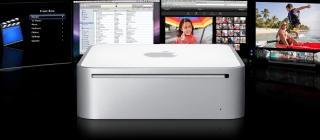
The smallest, most affordable Mac.

Because Mac mini is small, elegant, and unassuming, it fits in anywhere. From the living room to the car and beyond, adventurous Mac users have taken Mac mini to places even Apple may not have imagined. (One Mac mini owner even made his into a robot.) With Mac mini, inspiration runs tiny.

Tech Specs: http://www.apple.com/my/macmini/specs.html

Pros: Most affordable and portable desktop Mac ever.
Cons: Non of the internal parts are user upgradable, external power adapter (you can't use the mini if you miss-placed your adapter), doesn't come with keyboard, mouse & Apple Remote. Mini display port adapter not included. Slow hardware revision by Apple.
(credit to wei)

Usage: Web browsing, Word documents, Office/college/home work etc.

Budget: Rm 2xxx above

This post has been edited by davidgary73: Mar 30 2009, 01:49 PM
TSdavidgary73
post Mar 28 2009, 03:35 PM

Music Producer
Group Icon
VIP
4,903 posts

Joined: Jul 2008
Section D: Macbook

Attached Image

The next-generation MacBook.

The new MacBook has something for everyone. New Intel Core i5 and Core i7 processors. The 13, 15 and 17-inch MacBook Pro feature the fastest dual-core processors available, which boost performance up to 50 percent.

Less than an inch thin and 4.5 pounds, it fits your backpack (and your mobile lifestyle). It offers great integrated graphics performance for playing 3D games or creating photo books in iPhoto and making movies in iMovie.

Tech Specs: http://www.apple.com/macbook/specs.html

Pros: Unibody design. Multi-Touch glass trackpad. Standalone graphic processor. LCD display with LED backlit.
Cons: Shared graphic memory with main memory. Expensive battery replacement. No mini display port adapter & Apple Remote included. No firewire port.
(credit to wei)

Usage: Office/College/School work, games, make your own movies, web browsing, bloggers/copywriters and more.

Budget: RM 3xxx above

This post has been edited by davidgary73: Aug 10 2010, 03:46 PM
TSdavidgary73
post Mar 28 2009, 03:55 PM

Music Producer
Group Icon
VIP
4,903 posts

Joined: Jul 2008
Section E: Macbook Pro

Attached Image

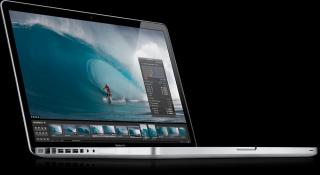
The ultimate mobile powerhouse.

It’s all about performance. If you want desktop-class graphics and a bigger display, you want the all-new MacBook Pro. With a double graphics punch — both integrated and discrete NVIDIA graphics processors — the 15- and 17-inch MacBook Pro models are fast enough to run the most graphics-intensive games and professional applications, but portable enough to come along for the ride.

New features:

- New Intel Core i5 and Core i7 processors. The 15- and 17-inch MacBook Pro feature the fastest dual-core processors available, which boost performance up to 50%.
- Next-generation NVIDIA graphics. With faster graphics than ever, MacBook Pro brings high performance to everything from photos and videos to 3D games.
- Up to 10 hours of battery life. The battery in the 13-inch MacBook Pro lasts up to 10 hours (8-9 hours on the 15- and 17-inch models) on a single charge

Tech Specs: http://www.apple.com/asia/macbookpro/specs-compare.html

15-inch Macbook Pro
New Intel Core i5 and Core i7 processors. Unibody design. Large LCD panel with LED backlit. Multi-Touch glass trackpad.

17-inch Macbook Pro
New Intel Core Core i5 processors. Thinness of it's kind. Huge LCD panel with LED backlit. Multi-Touch glass trackpad. Fastest Mac laptop ever.


Usage: Use music applications for live concerts/events, Video Presentation, Office/College Studies, Designers and mostly business or artistic oriented buyers.

Budget: RM 3xxx above

----

The New MacBookPro

13" Macbook Pro

13-inch: 2.4GHz: RM 3899
13-inch: 2.66GHz: RM 4899

http://www.apple.com/asia/macbookpro/specs-13inch.html

15" Macbook Pro

15-inch: 2.4GHz Intel Core i5: RM 5899
15-inch: 2.53GHz Intel Core i5: RM 6499
15-inch: 2.66GHz Intel Core i7: RM 7199

http://www.apple.com/asia/macbookpro/specs.html

17" Macbook Pro

17-inch: 2.53GHz Intel Core i5: RM 7499

http://www.apple.com/asia/macbookpro/specs-17inch.html


Link: Apple Malaysia [New Macbook Pro]

This post has been edited by davidgary73: Apr 14 2010, 12:16 PM
TSdavidgary73
post Mar 28 2009, 04:36 PM

Music Producer
Group Icon
VIP
4,903 posts

Joined: Jul 2008
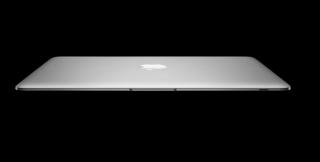
Section F: Macbook Air

Attached Image

The world’s thinnest notebook.

MacBook Air travels light. At just 3 pounds, it sets a new standard for mobile computing — without scrimping on features. With more power, advanced NVIDIA integrated graphics, a 13.3-inch screen, a full-size keyboard, and breakthrough wireless innovations, MacBook Air is engineered to take on the wireless world.

Tech Specs: http://www.apple.com/my/macbookair/specs.html

Pros: Lightest most portable Mac laptop ever. Full size keyboard. LCD panel with LED backlit.
Cons: Lack of ports & optical drive. No mini display port adapter & Apple Remote included. No user upgradable inner parts. Expensive battery replacement.
(credit to wei)

Usage: For users who travels alot, Bloggers/Copywriter, web browsing, email, entertainment on the go and more.

Budget: RM 6xxx above

This post has been edited by davidgary73: Mar 30 2009, 01:51 PM
TSdavidgary73
post Mar 28 2009, 04:41 PM

Music Producer
Group Icon
VIP
4,903 posts

Joined: Jul 2008
Section G: Purchasing from Resellers and Online Store

http://channelprograms.apple.com/channel/

http://www.apple.com/my/buy/reseller/

*Below is just a simple guideline to help understand the different Resellers.

Apple Authorized Reseller(AAR):

- Sells Apple computers.
- Send faulty hardware to Apple Authorized (Gold) Reseller for service or claim hardware parts.
- There are creditcard surcharges as they need to earn more as they are always giving out freebies.
- Less offerings in terms of product ranges
- Dont have an in-house service centre
- Dont sell iphones on behalf of maxis.
- No workshop provided

Apple Authorized (Gold) Reseller(AAR):

- Deals in Service/Diagnostic.
- Claim spare/faulty hardwares from Apple. Apple sends parts within 24hrs and dependant on stock availability.
- All Apple computers are taken from distributors like Servex, Avix Computer, Planet Technology etc.
- Meet the minimum annual purchase requirement.

Apple Premium Reseller(APR): [MacStudio, EpicCentre, Machines, Switch]

- Usually in shopping malls with high traffic crowd/audience.
- Apple will decide the structure/layout of the shop.
- Order direct from Apple Inc.
- Meet the annual purchase requirement ($100,000)
- Provide Services/Diagnostics/Waranty Claims.
- Gives you more financial assistance (installment) in terms of 0% interest free payment.
- More ranges of product and services
- Normally have their own service centre
- Sell iphones on behalf of Maxis
- Provides workshops

(credit to nimrod323)
---

A big thank you to ahblu3 for taking time in explaining the difference on Reseller and Online Store. Cheers

1. Reseller:

user posted image

Basically you get the following advantages from Apple Reseller:
» Click to show Spoiler - click again to hide... «


2. Online Store:

user posted image

Malaysia Apple Online Store. While there are a lot of critics regarding Reseller in Malaysia and the lack of official Apple Store in Malaysia, Apple breaks the ground and introduce the Apple Online Store in Malaysia.

The main advantages of getting your beloved Macs from the Online Store:
» Click to show Spoiler - click again to hide... «


3. Price Comparison:

Ok, actually things are simple here. The advantages of one, are the disadvantages of another.
Here I only discuss about everybody's main concern: PRICE.
Previously I had misunderstood the true meaning of education discount offered by the online store.
I thought that only the Mac itself is entitled to the discount.
But the real thing is, most of the products (exclude iPods and accessories) do have discount but with different rates! Including optional customizing parts!

For instance, I make 2 examples of the Education Discount:

» Click to show Spoiler - click again to hide... «


4. Personal Experience:

» Click to show Spoiler - click again to hide... «


More info @ http://store.apple.com/my/help

------------

Users review on buying thru Apple Online Store

http://forum.lowyat.net/topic/842060/

By nimrod323: i just purchased one thru edu pricing yesterday,my experience is never use bank transfer it'll be awfully slow,you cant use maybank debit card either cause its only meant for physical swipes not for online purchase. i used public bank debit card, it works normally the item should be arriving by 4-5 days make sure you purchase before 3 to allow for on the spot processing. Use CC also.

By boundaries: bought my 24" imac last month from apple store... was great on it. is like it know what it does for me. just like i can do everything with it except playing my games that is built for windows. *sigh* back to the experience i got from purchasing from the online store is that they use DHL (Dua Hari Lambat) and the funny thing is that the order is from malaysia to singapore but the item was delivered from shang hai and the expected delivery date was late for 2 days... sigh... DHL claims it got stuck in customs n bla bla. call up to apple store, they give me a RM65 refund due to it's late and the best part, i went to pickup my imac from DHL warehouse in Glenmarie at 3am! but i still love my mac now.. hahahha

By friends: I'm not sure about Mac products shipment. But lately I ordered iPod, it was came from SuZhou, China. When you check the DHL shipment Tracking (login your Apple account), you will know where your order is coming from.


--

This post has been edited by davidgary73: Jun 14 2009, 12:54 PM

TSdavidgary73
post Mar 29 2009, 01:51 AM

Music Producer
Group Icon
VIP
4,903 posts

Joined: Jul 2008
Section H: Warranty, AppleCare etc

1. Online Service Assistance Warranty Check

Apple offers International Warranty. To check if your Mac is under warranty, use the link below to check your warranty information and repair options for your product/location.

https://selfsolve.apple.com/GetWarranty.do

*Apple will honor the warranty of any new Mac purchased from Apple Authorized Reseller or Apple Premium Seller.

For those of you who are planning to buy Apple Computers or already bought from non Apple Resellers from Low Yat, Digital Mall etc outlets, you're eligible to claim warranty aswell.

More info: http://images.apple.com/legal/warranty/

Take Note: There's not international warranty for iPhone, Apple TV.


2. AppleCare
http://www.apple.com/nz/support/products/faqs.html

It has never been a policy of apple to sell ACPP to any distributor or reseller without the original packaging that contains the TechToolsDelux,Enrollment Number,Guide and the box. Even at Apple Stores,they too like resellers and online store sell you the ACPP with original packaging and ask you to use the enrollment number within to register either via web or telephone.

This practice of just selling the enrollment number or activation code stems from the usage of auto generator softwares that has been tuned to Apple's ACPP algorithm, this is to enable them to come up with codes that Apple typically ships inside their ACPP boxes.

How does it affects you? Well sellers tend to sell it at a cheaper price and you tend to think its a steal,however beware that once you activate the code and Apple think that theres something fishy about it,they'd ring you up and ask you for the box's serial number,every ACPP box comes with its serial number,this is to match inventory list on Apple's side. So since you are not given the box by the seller, Apple will nullify your applecare service and terminate it indefinitely.

If you are looking for a cheaper deal, you a free to do so but always remember to purchase the ACPP with its original packaging, though the price could a bit more than those sellers that sell activation code only. There are cases where the activation codes are successful, but what if suddenly someone bought a legitimate ACPP in Australia for example and they happen to have the same code as your mac is registered to? Apple will not give you any warning,termination is something to be expected.

The sellers of the activation code will always say, "oh i just sell the activation code,to conserve mother nature","Nevermind the boxla,i give you cheap price", these are just selling tactics never fall for them, be a smart buyer know your rights,theres always something fishy when things are too cheap. And by the way,apple's boxes are made of recyclable items,you are still conserving mother nature through purchasing it and dropping it in the paper bin. [credit: nimrod323]


3. Malaysia Service Provider

http://www.apple.com/asia/buy/locator/svcindex.html


4. Any advantage buying from Mac City or Machines?

http://forum.lowyat.net/topic/861168


5. Apple Service Centre in Malaysia

[http://forum.lowyat.net/topic/364508


6.  General Mac Upgrade Discussion 

http://forum.lowyat.net/topic/990177


7. Cleaning Macbook/Macbook Aluminium
http://forum.lowyat.net/topic/982117


8. Apple Merchandise
http://www.apple.com/companystore/


--

This post has been edited by davidgary73: Jul 21 2010, 02:38 PM
kanz1986
post Apr 19 2009, 04:49 PM

Getting Started
**
Junior Member
108 posts

Joined: Oct 2006


Aloha, Mac Users!

Need your opinion guys. Im currently working in the middle east and planned to buy myself a MBP. I travel back and forth to Msia twice every year and my next trip to malaysia is coming soon. The prices here is around RM750-1000 more than the ones sold in Malaysia. Quite tight on budget. Thus my dilemma comes in. Correct me if im wrong but if i buy a MBP in Msia, the warranty is only in Msia, rite? unless i buy the apple protection plan which covers worldwide. So, shud i

a) buy the cheaper ones in Msia but could only claim the warranty for any defects once im back in Msia every six month? ( able to do it only twice for a 1 year warranty )

b) pay higher for the warranty which covers the middle east?

Additionally, any idea what are the chances for a MBP to breakdown? thanks for the advice!


cool_alvin83
post Apr 19 2009, 05:38 PM

New Member
*
Junior Member
30 posts

Joined: Feb 2005


QUOTE(kanz1986 @ Apr 19 2009, 04:49 PM)
Aloha, Mac Users!

Need your opinion guys. Im currently working in the middle east and planned to buy myself a MBP. I travel back and forth to Msia twice every year and my next trip to malaysia is coming soon. The prices here is around RM750-1000 more than the ones sold in Malaysia. Quite tight on budget. Thus my dilemma comes in. Correct me if im wrong but if i buy a MBP in Msia, the warranty is only in Msia, rite? unless i buy the apple protection plan which covers worldwide. So, shud i

a) buy the cheaper ones in Msia but could only claim the warranty for any defects once im back in Msia every six month? ( able to do it only twice for a 1 year warranty )

b) pay higher for the warranty which covers the middle east?

Additionally, any idea what are the chances for a MBP to breakdown? thanks for the advice!
*
a) The warranty covers worldwide regardless in the first year and also with applecare. Applecare basically extends with for another extra 2 more years from the normal 1 year warranty with most mac products except iPhone.

b) Not to say pay for higher warranty, but u can scout around for cheaper applecare to be used on the Mac product u purchased.

Hope that answers your question. Once you buy Mac, you can basically claim the warranty anywhere from any Apple Store worldwide. MBP so far works great. Most of the common software problem, apple address it thru software updates. Hardware wise, is really reliable. flex.gif
kanz1986
post Apr 20 2009, 02:40 PM

Getting Started
**
Junior Member
108 posts

Joined: Oct 2006


i see. thank you v much cool_alwin83! ur guidance there really helps me alot. now i have lesser doubt to buy a MBP in msia : D

arigatou!
bruncit
post Apr 27 2009, 01:47 AM

New Member
*
Junior Member
5 posts

Joined: Apr 2009
erm..
i'm going to buy my 1st macbook.
i asked my friend about this and they told me that mac were not compatible.
is that true?
how about the sparepart?
they said it hard to search 4 it.
then, buy it or not??
icon_question.gif icon_question.gif
tinkerbel
post Apr 27 2009, 02:00 AM

Fanaddict!
Group Icon
VIP
13,495 posts

Joined: Dec 2006
From: KL, Malaysia


@bruncit,
Er.. Mac's not compatible with what?! And what spare parts are you referring to?! I doubt you'll have much problems; more and more people seem to be shifting over to Macs of late tongue.gif

I'll say go ahead and get urself a Mac; provided you're not planning to use it as a gaming rig biggrin.gif
orangejungle
post Apr 27 2009, 12:51 PM

New Member
*
Junior Member
27 posts

Joined: Mar 2008
Hey all~
Currenly I'm looking for a laptop.
and my friend suggested me to buy a MacBook~

Except Mac is more expensive....
what else?

Any diffenrence between MacBook with other brands of laptops?

My choices are Dell, Hp, Toshiba...and maybe Mac...

I need more opinions, since I really don't really know about all these.

Thanks...


longfang
post Apr 27 2009, 01:41 PM

APO
****
Senior Member
532 posts

Joined: Jan 2003
From: Kuching, Sarawak
Main difference is, the Macbook has OSX as its operating system, and has the ability to also use windows, linux if you so choose.
xaw5126
post Apr 27 2009, 02:09 PM

Look at all my stars!!
*******
Senior Member
3,488 posts

Joined: Dec 2004
From: Petaling Jaya


@orangejungle,
please read the pinned thread... lots of questions answered there
http://forum.lowyat.net/topic/979452


Violin!
post Apr 27 2009, 03:34 PM

Getting Started
**
Junior Member
91 posts

Joined: Feb 2009
Watch this too:
http://www.apple.com/getamac/ads/

BridgestoneRE711
post Apr 27 2009, 09:12 PM

♦ ♣ ♥ ♠
*******
Senior Member
3,429 posts

Joined: Nov 2004
From: alor star • selangor • skudai


toshiba sony compaq etc are like Japanese makes, they are like Toyota Honda etc . Easy to maintain , lots of softwares, many aftermarket stuff, and mouse etc are easily available for you guys.

macbook in the other hand, is more like french stuff. highly engineered, but maintainance wise is a little hard to be done. because even the screw has to be opened by using special spanar .
latworx
post Apr 29 2009, 09:14 AM

Getting Started
**
Junior Member
282 posts

Joined: Jan 2008
From: Ayer Keroh, Melaka


hi guys, i'll become the next Mac user icon_rolleyes.gif huu..be dreaming for thousand years cry.gif cry.gif
so, i really need guide from all the otai here notworthy.gif

I'll get my first Macbook by the end of this month.. saving smpai botak kepala sweat.gif so, i really need the best, or optimum guard for the MB. My plan is to get the Moshi ClearGuard as it is really cool. But for the palmrest, i dunno which guard to use...The Moshi Palmguard is quite nice, but i think we can see the diff between the guard sticker and the part that didn't covered, rite?

For the body, i plan to buy the Speck Hard Case. But dunno which one is the best, the Satin or the clear one..I love the satin as it is really cool (dun like the shining2 stuff), but scare that the satin can be easily terhakis and make it look worst.. Or, i doesn't need one? rolleyes.gif

For sleeve, i love the incase..hope that the machines had it. Is there any staff from Machines JB here as i have a lot of question to ask..about the promotion, cable and so on..Huu..not yet buying the MB but i already want this and that..daydreaming sweat.gif sweat.gif my english is bad sorry guys..


Added on May 5, 2009, 3:30 pmMachines promotion not as i expected...hmm.. anyway, already ordered by online..really need it..cant wait till WWDC

This post has been edited by latworx: May 5 2009, 03:30 PM

72 Pages  1 2 3 > » Top
 

Change to:
| Lo-Fi Version
0.0295sec    0.44    6 queries    GZIP Disabled
Time is now: 7th December 2025 - 02:04 AM