Outline ·
[ Standard ] ·
Linear+
iPhone Club v8, Post iPhone News/Queries/HowTo
|
davidgary73
|
 Mar 8 2009, 10:41 PM Mar 8 2009, 10:41 PM
|
Music Producer


|
QUOTE(MOMOchacha @ Mar 8 2009, 10:36 PM) Hi there,i plan to get an iphone this few day. may i know wat should i check with it? wat is different officer unlock, software unlock and hardware unlock? i am noob user in iphone here, if about nokia phone sure i dun hv any problem. Do read this thread below. http://forum.lowyat.net/topic/871684Cheers |
|
|
|
|
|
TeK_KeN
|
Mar 9 2009, 06:21 AM
|
|
|
QUOTE(nokia2003 @ Mar 6 2009, 10:48 PM) hmm is not like I've heard people talking. well thanks bro  arghh still no move to 2.2.1 yet  |
|
|
|
|
|
MOMOchacha
|
Mar 9 2009, 07:55 AM
|
|
|
QUOTE(davidgary73 @ Mar 8 2009, 10:41 PM) ok..thank you! |
|
|
|
|
|
P.I.M.P
|
Mar 9 2009, 09:55 AM
|
|
|
iPhone Generation : 3G
Current Firmware : 2.28
iTunes Version : 8.0.2
Computer Platform : Win XP
Jailbreaking software : YellowSnow
Problem Encountered : I was previously roaming with hotlink when I unlocked my iPhone 3G in U.S. I was on roaming for the whole month of February when I was in Europe tour. I just got back few days ago & I went to Maxis to subscribe for the RM50 postpaid plan. When I insert my new Maxis 3G simcard into my iPhone, the phone said "invalid sim". My new sim is already activated & is working fine with my V3i. Apparently it doesn't work with my yellowsnow unlocked iphone.
Steps Had Taken (list down) : I have no idea what to do
Problem Screenshot (if any) :
Other Info / Remark :
|
|
|
|
|
|
hihihehe
|
Mar 9 2009, 12:48 PM
|
|
|
how to set the email can use hotmail?i cant access the hotmail n tried many ways..any idea?
|
|
|
|
|
|
teikwing
|
Mar 9 2009, 01:01 PM
|
|
|
QUOTE(hihihehe @ Mar 9 2009, 12:48 PM) how to set the email can use hotmail?i cant access the hotmail n tried many ways..any idea? there's an issue with accessing Hotmail on iPhone on Mail due to incompability of Hotmail server. there's currently no other way in solving it than upgrade to Hotmail Plus account with POP3 server. find out more about it HERE |
|
|
|
|
|
harmeet15
|
Mar 9 2009, 01:33 PM
|
|
|
QUOTE(hihihehe @ Mar 9 2009, 12:48 PM) how to set the email can use hotmail?i cant access the hotmail n tried many ways..any idea? QUOTE(teikwing @ Mar 9 2009, 01:01 PM) there's an issue with accessing Hotmail on iPhone on Mail due to incompability of Hotmail server. there's currently no other way in solving it than upgrade to Hotmail Plus account with POP3 server. find out more about it HEREact, thr is a way u can get this app called m box mail...very nice app for those who use hotmail as their primary mail acc.... » Click to show Spoiler - click again to hide... « QUOTE
At last you can easily get your Hotmail on your iPhone. m•Box Mail® is designed to help you get your Hotmail as you are used to getting your Hotmail. It is like the “native” or built-in mail application on the iPhone – only it speaks the Windows Live Hotmail® protocol.
Finally, you can have your Hotmail messages and folders on your iPhone screen ready to use at a moment’s notice. No more trying to log onto a Web site and struggling through your email. Instead you can access your Hotmail, organize it, delete it and send it -- all from your iPhone, with the familiar iPhone user interface you’ve become so adept at using.
Our customers are iPhone users who prefer to use Windows Live Hotmail for their email. Here are the features that m•Box Mail gives you:
Easy Startup
Just enter your Windows Live Hotmail address and your password to start using m•Box Mail. You have the ability to choose how many email bodies are available on the device through easy-to-use m•Box Mail settings found in the iPhone settings. This means you can view 25 messages or 200 at a time.
Sync your Hotmail and Live Mail
Sync your Microsoft Hotmail or Live Mail to iPhone, including all the read and unread flags. All your folders also are available through m•Box Mail so you can stay organized even while on the go.
Hotmail Contacts
All your Hotmail contacts are available so addressing an email from your iPhone is now as easy as doing it from your computer.
Fast and Efficient
m•Box Mail is highly optimized for mobile platforms so access to your email is the best possible experience. For example, you will be amazed at how fast your email is synced onto your iPhone.
Send from Hotmail
m•Box Mail supports sending email from your Hotmail account. Your signature also can be customized on your iPhone for outgoing messages, and you can edit your sent messages folder – keep email for review or delete them as wanted.
Attachments
View emailed image attachments right on your iPhone.
Security
In today's world, your information is only as secure as your email account. There is no middle man with m•Box Mail. This application speaks directly to the Windows Live Hotmail servers so you do not have to worry about your confidential information getting stored elsewhere. Your email, user name and password are not stored outside your mobile device. Passwords are securely kept in iPhone’s key store so they do not get into the wrong hands.
|
|
|
|
|
|
rx330
|
Mar 9 2009, 01:37 PM
|
|
|
i got my hotmail working in the iphone, i change my country to UK
but cant send out from that acc though, can received nia
|
|
|
|
|
|
harmeet15
|
Mar 9 2009, 01:52 PM
|
|
|
QUOTE(rx330 @ Mar 9 2009, 01:37 PM) i got my hotmail working in the iphone, i change my country to UK but cant send out from that acc though, can received nia get this app bro... just like da mail app built in with da 13g... very nice... try it bro... |
|
|
|
|
|
hihihehe
|
Mar 9 2009, 01:55 PM
|
|
|
how bout this? http://mailcall.spaces.live.com/blog/cns&#...ry?sa=786360883i now at australia but still cant set my hotmail |
|
|
|
|
|
rx330
|
Mar 9 2009, 01:59 PM
|
|
|
harmeet thanks, but currently i still prefer to have a single mail aaplication to accomodate all my email accounts
|
|
|
|
|
|
harmeet15
|
Mar 9 2009, 04:33 PM
|
|
|
QUOTE(rx330 @ Mar 9 2009, 01:59 PM) harmeet thanks, but currently i still prefer to have a single mail aaplication to accomodate all my email accounts aah... then no choice lor...hv to upgrade 2 hotmail plus... they r working on making plus a free service one country at a time... wait for malaysia to be in da list lor... |
|
|
|
|
|
rx330
|
Mar 9 2009, 04:47 PM
|
|
|
as i say b4, cant upgrade, i dun mind paying for it, but i just can upgrade
|
|
|
|
|
|
maiself
|
Mar 9 2009, 04:57 PM
|
|
|
Hi, I would like to ask u guy.. why I cant transfer video to iphone using iTunes.. Lasttime i successfully transfered it using iphone suite. I already read here http://forum.lowyat.net/topic/868281QUOTE 12. Transferring Video Files To The iPhoneIn order for video files to be transferable and playable on the iPhone, it must be in the right file format which is namely the H.264/MPEG-4 format. Some conversion may need to be carried out especially for Windows users who tend to have video files in other types of formats. Windows users also have it easy with the use of Videora ( http://www.videora.com/en-us/Converter/iPhone/ ) which is an iPhone Video Converter. Once you've converted the video accordingly to the program instructions, simply drag it into the iTunes program window and sync as usual. Make sure your sync settings for video is set up properly. You can also do it the longer way and add the file through iTunes itself (File> Add File to Library) before syncing. This can also easily be done on the Mac using either Quicktime Pro or HandBrake ( http://www.handbrake.fr/ ) This is some screenshot.. My iPhone setting  Playlist:-  College & Flyboys are my video (Both are play-able on iPhone - lasttime i transfered using iPhone suite) Whenever i sync, the video wont show up in iPhone, only mp3s.  Any Idea? |
|
|
|
|
|
Kazachok
|
Mar 9 2009, 05:07 PM
|
|
|
u have to choose to sync it manually under Video.
it won't sync eventho u've put in in ur playlist
This post has been edited by Kazachok: Mar 9 2009, 05:07 PM
|
|
|
|
|
|
maiself
|
Mar 9 2009, 05:13 PM
|
|
|
QUOTE(Kazachok @ Mar 9 2009, 05:07 PM) u have to choose to sync it manually under Video. it won't sync eventho u've put in in ur playlist Thank you. ok got it.. not really familiar with iTunes, lasttime i only use 3rd party app. |
|
|
|
|
|
Shoki
|
Mar 9 2009, 09:19 PM
|
|
|
Anyone successfully running background apps (IM) using JB apps?
|
|
|
|
|
|
mafia_boyz
|
Mar 10 2009, 09:19 AM
|
New Member

|
Hey there guys.. Good morning.. I am not having problem in my beejive..
They require me to update the current version but in app does not show any updates..
Anyone know how to update it without using app?
Thanks
|
|
|
|
|
|
davidgary73
|
Mar 10 2009, 12:31 PM
|
Music Producer
|
RiP Dev Announces Desktop Installer for iPhone Apps Rip Dev has announced software for desktop computers that will install third-party packages on your iPhone. ----- Practically it is a desktop variant of our own Installer.app. It will allow you to view and install packages that are present in various Installer and Cydia repositories by downloading them to your computer and then synchronizing via the USB cable with your iPhone.
With InstallerApp you will be able to install many of the available third-party software packages, both requiring the system partition to be writable, and the ones that do not. Yes, there are less packages that don't require writable system partition, but it does keeps your iPhone more secure.
Once installed on the iPhone, the package will be stored on your computer's hard drive and InstallerApp will (just like iTunes) notify you of updates. You will also be able to quickly reinstall the packages you have after the restore, without having to select each of them individually.
We got plenty of plans on enhancing this solution - for starters lets mention that in the future you will be able to get trial versions of the installable commercial software... and much more.
InstallerApp is in beta testing now and we anticipate the 1.0 release soon. We'll keep you posted on the progress.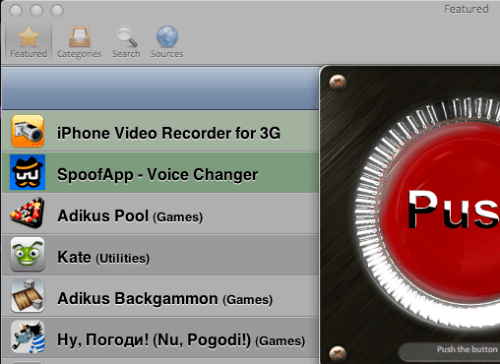 http://ripdev.org/2009/03/installerapp-details.html http://ripdev.org/2009/03/installerapp-details.html |
|
|
|
|



 Quote
Quote




 0.1536sec
 1.96
1.96
 6 queries
 GZIP Disabled