

when i check on the system, the result is:-
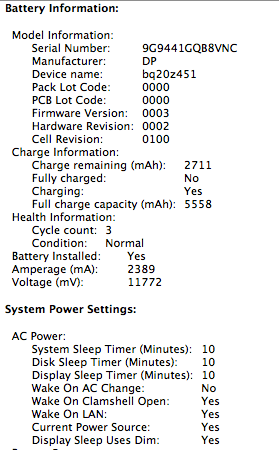
the CONDITION is NORMAL ONLY!!! I saw other people's battery condition is GOOD...
does it means my battery got problem?

Thanks
This post has been edited by jc79: Dec 9 2009, 12:38 AM
Your mb/mbp battery health/problem
|
|
 Dec 9 2009, 12:31 AM Dec 9 2009, 12:31 AM
|
 
Junior Member
90 posts Joined: Aug 2006  
|
my mbp 13" is jz 3-day old... but i found the battery drain very fast!!!
when i check on the system, the result is:- the CONDITION is NORMAL ONLY!!! I saw other people's battery condition is GOOD... does it means my battery got problem? Thanks This post has been edited by jc79: Dec 9 2009, 12:38 AM |
|
|
|
|
|
Dec 9 2009, 12:49 AM
|

Junior Member
157 posts Joined: Aug 2008 From: Petaling Jaya
|
QUOTE(jc79 @ Dec 9 2009, 12:31 AM) my mbp 13" is jz 3-day old... but i found the battery drain very fast!!! Mine also show Normal only ~ when i check on the system, the result is:- the CONDITION is NORMAL ONLY!!! I saw other people's battery condition is GOOD... does it means my battery got problem? Thanks  Cycle count : 28 ~ |
|
|
Dec 9 2009, 12:52 AM
|

Senior Member
7,916 posts Joined: Jul 2005 From: Kuala Lumpur
|
eh mine is GOOD... cycle count 154, charge remaining 4362 (out of 4385)
 bought january 2009 bought january 2009 |
|
|
Dec 10 2009, 11:01 PM
|

Junior Member
14 posts Joined: Dec 2009
|
hi everyone..i just bought a new macbook white
at first the battery health is 100% but after i calibrate the battery it became 97%  i thot the health shud increase..not decrease help?  |
|
|
Dec 10 2009, 11:20 PM
|
|
Senior Member
7,916 posts Joined: Jul 2005 From: Kuala Lumpur
|
QUOTE(qwertypolle @ Dec 10 2009, 11:01 PM) hi everyone..i just bought a new macbook white the health decrease lah..that's why it starts from 100% not 0%. battery loses charge over time.at first the battery health is 100% but after i calibrate the battery it became 97% i thot the health shud increase..not decrease help? |
|
|
Dec 10 2009, 11:27 PM
|
|
Junior Member
14 posts Joined: Dec 2009
|
QUOTE(dvlzplayground @ Dec 10 2009, 11:20 PM) the health decrease lah..that's why it starts from 100% not 0%. battery loses charge over time. but just bought it 2 days agobattery calibration shud maintain health right? my previous macbook..6 months old, battery health 96%  This post has been edited by qwertypolle: Dec 10 2009, 11:29 PM |
|
|
|
|
|
Dec 10 2009, 11:30 PM
|

Senior Member
1,217 posts Joined: Nov 2007 From: Penang
|
Did you follow the instruction from Apple to calibrate your battery for the first time use?
http://support.apple.com/kb/HT1490 |
|
|
Dec 10 2009, 11:33 PM
|
|
Junior Member
14 posts Joined: Dec 2009
|
QUOTE(chewlf @ Dec 10 2009, 11:30 PM) Did you follow the instruction from Apple to calibrate your battery for the first time use? yupp absolutely..didnt even miss one step..http://support.apple.com/kb/HT1490 the thing is..i used to hv a macbook which is 6 months old n the batt health is 97% n my new macbook is only 2 days old n after i did the battery calibration the battery health dropped  |
|
|
Dec 10 2009, 11:41 PM
|
|
Senior Member
7,916 posts Joined: Jul 2005 From: Kuala Lumpur
|
QUOTE(qwertypolle @ Dec 10 2009, 11:27 PM) but just bought it 2 days ago yeah calibration is to maintain health... not make the health increase... if increase then its defying physics already ;pbattery calibration shud maintain health right? my previous macbook..6 months old, battery health 96% sometimes this stuff not so accurate. how about u try check with other apps like Coconut. |
|
|
Dec 11 2009, 12:07 AM
|
|
Junior Member
14 posts Joined: Dec 2009
|
QUOTE(dvlzplayground @ Dec 10 2009, 11:41 PM) yeah calibration is to maintain health... not make the health increase... if increase then its defying physics already ;p haha..i have i stat pro n coconut battery..same percentage sometimes this stuff not so accurate. how about u try check with other apps like Coconut.  if every 2/3 days drop 3%..looks like i hv to buy a new laptop faster than i thot Added on December 11, 2009, 12:12 am QUOTE(dvlzplayground @ Dec 10 2009, 11:41 PM) yeah calibration is to maintain health... not make the health increase... if increase then its defying physics already ;p eh my macbook last time wen i calibrate the battery health increases..sometimes this stuff not so accurate. how about u try check with other apps like Coconut. This post has been edited by qwertypolle: Dec 11 2009, 12:12 AM |
|
|
Dec 11 2009, 03:15 AM
|

Senior Member
2,839 posts Joined: Jan 2003 From: KL
|
dvlzplayground,
i think i get it when qwertypolle said the health increases coz after calibration it will show the correct percentage of battery life. it can go up or down.. it has happened to me before.. sometimes after calibrating, it will go up from 95% to 99%, but this happened a while ago when i just got my macbook. |
|
|
Dec 11 2009, 10:57 AM
|
|
Senior Member
7,916 posts Joined: Jul 2005 From: Kuala Lumpur
|
QUOTE(preducer @ Dec 11 2009, 03:15 AM) dvlzplayground, oic, i thought he expected the health to increase above 100% i think i get it when qwertypolle said the health increases coz after calibration it will show the correct percentage of battery life. it can go up or down.. it has happened to me before.. sometimes after calibrating, it will go up from 95% to 99%, but this happened a while ago when i just got my macbook. my apologiesQUOTE(qwertypolle @ Dec 10 2009, 11:01 PM) hi everyone..i just bought a new macbook white at first the battery health is 100% but after i calibrate the battery it became 97% i thot the health shud increase..not decrease help? |
|
|
Dec 11 2009, 01:38 PM
|
|
Junior Member
324 posts Joined: Nov 2008
|
QUOTE(dvlzplayground @ Dec 4 2009, 03:22 PM) can u try to find some1 who has a macbook white as well? not the unibody model of course. borrow their battery n see if it works. also ask them to use ur battery too. I don't have a fren who has a white mb.. however, when I take my battery out and press the indicator light, there is no sign of life.. haha.. very sure it's dead.. anyway.. I searched for battery replacement on Apple site.. and OMG.. it costs like hell.. I think I have to stick with the adapter without portability dy..try to determine whether if ur battery is dead, or ur battery compartment got problem or not. |
|
|
|
|
|
Dec 11 2009, 02:08 PM
|
 
VIP
12,925 posts Joined: Mar 2005 From: Kuala Lumpur
|
Did you try to revive your battery by putting it in a fridge and reviving it. It may work , and try to run Coconut battery , it will tell you if its good to go or not. You can google or watch a video over at youtube on how to revive your dead battery. Generally it give you say 5-10 minutes of battery life
Take a look at its health and get the most accurate info from Coconut battery 
If you want to save few $$$ , then refill the battery cells. There is a shop in lowyat which does this. They'll take your battery and "refill" her up. The thing is that the mac has an EC which may not like if the battery is refilled. You'll have to google up on this to check if its good to go. I truly understand that not many of us could afford the battery as its overpriced. I'll ask around for you and let you know if there are other alternatives |
|
|
Dec 11 2009, 02:51 PM
|
|
Junior Member
324 posts Joined: Nov 2008
|
@prasys
Just tried with CoconutBattery.. it totally can't sense the presence of the battery.. @@.. seems like it's completely dead.. Anyway, if you have other alternatives pls do suggest.. thx in advanced.. |
|
|
Dec 11 2009, 04:41 PM
|
|
Junior Member
157 posts Joined: Aug 2008 From: Petaling Jaya
|
WAH ~
After I calibrate my macbook, 100% > 91% le.... Oh no ~ |
|
|
Dec 14 2009, 12:00 PM
|

Senior Member
719 posts Joined: Jan 2003 From: cyberjaya, ampang, malaysia
|
Houston kita ada masalah!

sigh. On last June I already replaced the battery and need to send mbp to. So it took 1 month. And after 6 month, this new battery looks like want to screw me >_< |
|
|
Dec 14 2009, 04:45 PM
|

Junior Member
92 posts Joined: Apr 2005
|
i have an article which i wrote about batteries, specifically for the iPhone/iPod touch, but it applies to macs as well. I use this on my mac and so far after about 8 months of use, my MBP's battery capacity is still around 97%...
http://www.onemoretap.com/2009/06/04/tips-...e-battery-life/ |
|
|
Dec 14 2009, 07:04 PM
|
|
Senior Member
7,916 posts Joined: Jul 2005 From: Kuala Lumpur
|
QUOTE(XCool @ Dec 14 2009, 04:45 PM) i have an article which i wrote about batteries, specifically for the iPhone/iPod touch, but it applies to macs as well. I use this on my mac and so far after about 8 months of use, my MBP's battery capacity is still around 97%... mine is 11 months old... 4422 mAH 96%. how come ur mAH lower but health higher?http://www.onemoretap.com/2009/06/04/tips-...e-battery-life/ *i dont know much about batteries* |
|
|
Dec 15 2009, 01:55 AM
|

Junior Member
6 posts Joined: May 2009 From: Petaling Jaya
|
QUOTE(dvlzplayground @ Dec 11 2009, 10:57 AM) oic, i thought he expected the health to increase above 100% haha dvlzplayground..logically battery health cant b over 100% riiightt lol my apologies qwertypolle..just calibrate the battery every 2 months.. the battery health will maintain..or worst come to worst it wont drop drastically  if u still feel worried, call applecare, they'll surely help u..no worries okay? |
| Change to: |  0.0177sec 0.0177sec
 0.63 0.63
 6 queries 6 queries
 GZIP Disabled GZIP Disabled
Time is now: 18th December 2025 - 02:05 AM |
 Quote
Quote