Welcome Guest ( Log In | Register )

Bump Topic Topic Closed RSS Feed
121 Pages « < 105 106 107 108 109 > » Bottom

Outline · [ Standard ] · Linear+

 Pwnagetool/Quickpwn & "yellowsn0w" 3G Unlock, »2G/3G Fw 2.2.1 Unlocking&Jailbreaking«

views
     
LP640
post May 28 2009, 06:57 PM

New Member
*
Junior Member
29 posts

Joined: Jul 2008
Hi guys just get a iphone 3G today, just want to confirm again before i update to firmware 2.2.1

Now the iphone is on firmware 2.2 baseband 02.28.00 jb and unlock by yellowsnow using cydia

To update to 2.2.1 i just need to download the firmware 2.2.1 ipsw from first page then install through itunes and jailbreak using quickprawn then unlock by using yellowsnow through cydia?

The step above izit correct?

Just want to make sure it was safe by using this way smile.gif
nokia2003
post May 28 2009, 07:00 PM

Look at all my stars!!
*******
Senior Member
5,786 posts

Joined: Nov 2007
From: VIC - The Place To Be


QUOTE(LP640 @ May 28 2009, 06:57 PM)
Hi guys just get a iphone 3G today, just want to confirm again before i update to firmware 2.2.1

Now the iphone is on firmware 2.2 baseband 02.28.00 jb and unlock by yellowsnow using cydia

To update to 2.2.1 i just need to download the firmware 2.2.1 ipsw from first page then install through itunes and jailbreak using quickprawn then unlock by using yellowsnow through cydia?

The step above izit correct?

Just want to make sure it was safe by using this way  smile.gif
*
personally, i will still stick to 2.2 (even if i know what i'm doing)

there isn't much enhancement on 2.2.1 and i don't know if the risk is worth taking (in my humble opinion)
LP640
post May 28 2009, 07:02 PM

New Member
*
Junior Member
29 posts

Joined: Jul 2008
OK by my steps to 2.2.1 izit correct by using this way?
TSdavidgary73
post May 28 2009, 07:17 PM

Music Producer
Group Icon
VIP
4,903 posts

Joined: Jul 2008
QUOTE(LP640 @ May 28 2009, 06:57 PM)
Hi guys just get a iphone 3G today, just want to confirm again before i update to firmware 2.2.1

Now the iphone is on firmware 2.2 baseband 02.28.00 jb and unlock by yellowsnow using cydia

To update to 2.2.1 i just need to download the firmware 2.2.1 ipsw from first page then install through itunes and jailbreak using quickprawn then unlock by using yellowsnow through cydia?

The step above izit correct?

Just want to make sure it was safe by using this way  smile.gif
*

QUOTE(LP640 @ May 28 2009, 07:02 PM)
OK by my steps to 2.2.1 izit correct by using this way?
*


If you upgrade to Fw 2.2.1 using quickpwn may it be Mac or Windows, your baseband will be updated and you will not be able to use yellowsnow. You can only upgrade the Fw 2.2.1 without upgrading the baseband using Pwnagetool (Mac only).

I would strongly advise you not to upgrade or you may end up with and expensive iPod Touch.


This post has been edited by davidgary73: May 28 2009, 07:18 PM
LP640
post May 28 2009, 07:19 PM

New Member
*
Junior Member
29 posts

Joined: Jul 2008
Means Only MAC can do it right, get it thanks for the reply guys =)


ROTiJOHN
post May 28 2009, 08:19 PM

www.malaysiamilitarytag.com
*****
Senior Member
937 posts

Joined: Mar 2005
From: malaka


Hi there, just wan to ask, after i jail break my phone can i restore back my phone?cause i am affraid after jail break cannot upgrade the filmware. Thanks.
malan
post May 30 2009, 10:23 PM

New Member
*
Junior Member
48 posts

Joined: Feb 2005
hi ...
just wanna ask, why after i jailbreak my iphone 3g , the phone hang at apple logo after restart....previously i done it , all working perfectly. mine unlocked set ..
nokia2003
post May 30 2009, 10:24 PM

Look at all my stars!!
*******
Senior Member
5,786 posts

Joined: Nov 2007
From: VIC - The Place To Be


QUOTE(malan @ May 30 2009, 10:23 PM)
hi ...
just wanna ask, why after i jailbreak my iphone 3g , the phone hang at apple logo after restart....previously i done it , all working perfectly. mine unlocked set ..
*
re-do again.
malan
post May 30 2009, 10:52 PM

New Member
*
Junior Member
48 posts

Joined: Feb 2005
i re-do 3times already...but still hang lor...previously working perfectly .....
nokia2003
post May 30 2009, 10:56 PM

Look at all my stars!!
*******
Senior Member
5,786 posts

Joined: Nov 2007
From: VIC - The Place To Be


QUOTE(malan @ May 30 2009, 10:52 PM)
i re-do 3times already...but still hang lor...previously working perfectly .....
*
weird. same PC/MAC?

actually i better reserve my comments as i'm not really an expert in jailbreaking.

but previously, i have failed a few times and i had to re-do the JB.
=Hanxz=
post May 30 2009, 11:05 PM

l33t!
******
Senior Member
1,903 posts

Joined: Feb 2005
From: ipohmali


muahahaha @malan
i will be back to KL tomorrow though laugh.gif
just drop me a pm if you need help
malan
post May 31 2009, 01:23 AM

New Member
*
Junior Member
48 posts

Joined: Feb 2005
tonite i'll try again.....if failed i'll contact u hanxz....heheheh


Added on May 31, 2009, 5:22 pmat last....i've made it....my iphone work fine after i jailbreak it......

This post has been edited by malan: May 31 2009, 05:22 PM
CPICH
post May 31 2009, 05:46 PM

New Member
*
Junior Member
14 posts

Joined: May 2009
QUOTE(LP640 @ May 28 2009, 07:19 PM)
Means Only MAC can do it right, get it thanks for the reply guys =)
*
You can also use xpwn tools on Windows PC if you are knowledgeable in computers.
ilyas_jamal
post Jun 1 2009, 11:28 PM

Getting Started
**
Junior Member
259 posts

Joined: Mar 2008
HI there...

i do need help here.. not sure either there's already a thread on this matter or not.. new here (in this thread la sweat.gif ).. so my question is ..

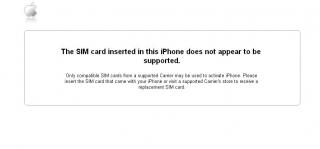
i was charging my phone via my laptop yesterday.. then it automatically syncs with the itunes.. so i went off to bed.. then in the morning when i woke up.. this is the error..


"THE SIM CARD INSERTED IN THIS IPHONE DOSE NOT APPEAR TO BE SUPPORTED"


error print screen attached

so how can i make my i phone working back as pernormal? rclxub.gif rclxub.gif please advice. biggrin.gif

iphone details :

2G / 8GB / Maxis


many thanks in advance


Attached thumbnail(s)
Attached Image
nokia2003
post Jun 1 2009, 11:34 PM

Look at all my stars!!
*******
Senior Member
5,786 posts

Joined: Nov 2007
From: VIC - The Place To Be


fill this up according to the first post
ilyas_jamal
post Jun 1 2009, 11:42 PM

Getting Started
**
Junior Member
259 posts

Joined: Mar 2008
hi there,

i am sorry due to i am a new user here.. no i have not yet explore the details on the iphone its self..


iPhone Generation : no idea

Unlocked? (or Part Number): MA712LL/A

Current Firmware : no idea

iTunes Version : 8.0.1.11

PC/MAC : PC Vista Home

Jailbreaking software : no idea

Problem Encountered : "THE SIM CARD INSERTED IN THIS IPHONE DOSE NOT APPEAR TO BE SUPPORTED" - error as based on iTunes / "Emergengy Calls Only" - on the device

Steps Taken So Far : tried to change using another sim (no go)

Screenshot of Problem(if applicable) : as below

Other Information/Remarks : n/a


many thanks

This post has been edited by ilyas_jamal: Jun 1 2009, 11:46 PM
=Hanxz=
post Jun 1 2009, 11:46 PM

l33t!
******
Senior Member
1,903 posts

Joined: Feb 2005
From: ipohmali


as you said,
its a 2G, try restoring + jailbreaking + unlock, it should be fine after that

being a novice, do read up before u attempt to do anything smile.gif
nokia2003
post Jun 1 2009, 11:46 PM

Look at all my stars!!
*******
Senior Member
5,786 posts

Joined: Nov 2007
From: VIC - The Place To Be


69001 isn't the part number. read the first post carefully again

if your back cover white, black or aluminium colour?
ilyas_jamal
post Jun 1 2009, 11:51 PM

Getting Started
**
Junior Member
259 posts

Joined: Mar 2008
nokia2003 - details edited..sorry..am a bit frustrated on this..lol.. silver colour

Hanxz - can u guide me how to jailbreak it? since i am not able to log at all to the phone its self.. theres nothing much that i can so.. not even restore..

TSdavidgary73
post Jun 1 2009, 11:51 PM

Music Producer
Group Icon
VIP
4,903 posts

Joined: Jul 2008
QUOTE(ilyas_jamal @ Jun 1 2009, 11:42 PM)
hi there,

i am sorry due to i am a new user here.. no i have not yet explore the details on the iphone its self..
iPhone Generation : no idea
Unlocked? (or Part Number): MA712LL/A
Current Firmware : no idea
iTunes Version : 8.0.1.11
PC/MAC : PC Vista Home
Jailbreaking software : no idea
Problem Encountered : "THE SIM CARD INSERTED IN THIS IPHONE DOSE NOT APPEAR TO BE SUPPORTED" - error as based on iTunes /  "Emergengy Calls Only" - on the device
Steps Taken So Far : tried to change using another sim (no go)
Screenshot of Problem(if applicable) : as below
Other Information/Remarks : n/a
many thanks
*
Thread Merged

Please refer to the first post of this thread to re-unlock your 2G iPhone again with the tutorial provided. Do read the guide provided carefully before you proceed. If you're not able or not confident to do it, you can ask Hanxz as he provides unlocking service.

Cheers

This post has been edited by davidgary73: Jun 1 2009, 11:53 PM

121 Pages « < 105 106 107 108 109 > » Top
Topic ClosedOptions
 

Change to:
| Lo-Fi Version
0.0339sec    0.64    6 queries    GZIP Disabled
Time is now: 11th December 2025 - 03:16 AM