

I noticed that the thread was started in July 2008. Does it work for iTunes9?
(Update)iPhone 3.1 OS MALAYSIA Telco Carrier Logos, ipcc file
(Update)iPhone 3.1 OS MALAYSIA Telco Carrier Logos, ipcc file
|
|
 Oct 11 2009, 10:01 PM Oct 11 2009, 10:01 PM
|
 
Junior Member
10 posts Joined: Oct 2009  
|
I noticed that the thread was started in July 2008. Does it work for iTunes9?
|
|
|
|
|
|
Oct 11 2009, 10:04 PM
|

Senior Member
1,357 posts Joined: Jul 2007 
|
Yes.. it does.. But, there is a bug in dev team on firmware 3.1.. Where the logo of telco is missing with signal bar only..
|
|
|
Oct 12 2009, 01:09 AM
|

Senior Member
849 posts Joined: Sep 2007
|
Hai there, just wanna update to carrier update using itunes 9 (Windows 7 64bits)
Just follow step one and paste this: C:\Program Files (x86)\iTunes\iTunes.exe" /setPrefInt carrier-testing 1 the other step just follow iclarified. Cheers.. |
|
|
Oct 12 2009, 09:01 AM
|
|
Junior Member
10 posts Joined: Oct 2009
|
Thanks guys! It works now.
|
|
|
Oct 13 2009, 12:32 AM
|

Senior Member
795 posts Joined: Jan 2003
|
with all the fuss i went through to get the icon working while i was on 3.1.... now i've updated to 3.1.2 and the ipcc files works by just updating... funny thing why it didnt worked for 3.1.
I confirm ipcc maxis 3.1 works with jailbreaked 3.1.2 3Gs Cheers This post has been edited by tycheah_7: Oct 13 2009, 12:33 AM |
|
|
Oct 13 2009, 10:25 PM
|

Junior Member
85 posts Joined: Aug 2009
|
i believe your 3.1.2 jb was with blackra1n? and the 3.1 was it with dev-team or black too?
|
|
|
|
|
|
Oct 13 2009, 10:33 PM
|

Junior Member
11 posts Joined: Jun 2009
|
After i updated to 3.1.2, I used the celcom 3.1.ipcc but the tethering does not work but MMS and Celcom logo were shown out. Isn't need a newer ipcc file for 3.1.2?
|
|
|
Oct 13 2009, 10:35 PM
|

Junior Member
144 posts Joined: Oct 2008 From: Golden Sand 
|
NEVER USE blackra1n if your iphone is not Maxis set! Got use Pwnagetool 3.1.4 instead or you will lose the signal.
|
|
|
Oct 13 2009, 10:39 PM
|
|
Junior Member
11 posts Joined: Jun 2009
|
i'm using celcom but no jailbreak needed... now my iphone could function properly with 3.1.2 just does not have the tethering function so i updated the celcom 3.1.ipcc the celcom logo show out but tethering does not shown out
|
|
|
Oct 13 2009, 11:52 PM
|
|
Senior Member
1,357 posts Joined: Jul 2007
|
I am using Singtel set.. JB using Blackra1n.. No problem at all.. And now problem to change the telco carrier logos too..Done in 2 seconds
QUOTE(bizkutrai @ Oct 13 2009, 10:35 PM) NEVER USE blackra1n if your iphone is not Maxis set! Got use Pwnagetool 3.1.4 instead or you will lose the signal.  |
|
|
Oct 15 2009, 05:53 PM
|

Junior Member
54 posts Joined: Apr 2009 From: Gombak
|
QUOTE(chongkkmy @ Oct 13 2009, 10:39 PM) i'm using celcom but no jailbreak needed... now my iphone could function properly with 3.1.2 just does not have the tethering function so i updated the celcom 3.1.ipcc the celcom logo show out but tethering does not shown out Do you have the tethering switch in Setting | General | Network? Is it on?My 3.1.2 cannot use tethering on celcom. the function is not avail This post has been edited by zulazhan: Oct 16 2009, 10:23 AM |
|
|
Oct 18 2009, 06:05 PM
|
|
Junior Member
38 posts Joined: Oct 2009
|
QUOTE(bizkutrai @ Oct 6 2009, 06:40 PM) which carrier? im using Celcom. currently the thathering option also gone. and it was made understand that the key need to be signed to enable it. anybody can make a new one ? |
|
|
Oct 19 2009, 03:56 AM
|
|
Junior Member
492 posts Joined: Jul 2009
|
cannot update using Itunes ?
|
|
|
|
|
|
Oct 19 2009, 09:03 AM
|
|
Junior Member
135 posts Joined: Jan 2003
|
QUOTE(sira5999 @ Oct 19 2009, 03:56 AM) cannot update using Itunes ? which one to update using iTunes ? tethering menu? i dont think so, because u need to create a new ipcc and signed it *i dont know how to or where to find that online currently*. |
|
|
Oct 19 2009, 12:36 PM
|
|
Junior Member
86 posts Joined: Sep 2006
|
QUOTE(ctzalifah @ Oct 18 2009, 06:05 PM) im using Celcom. currently the thathering option also gone. and it was made understand that the key need to be signed to enable it. anybody can make a new one ? if not mistaken,celcom does not provide internet tethering function. only maxis have.. |
|
|
Oct 19 2009, 12:58 PM
|
|
Junior Member
38 posts Joined: Oct 2009
|
I've added few services in the info.plist file. it will look like this in the service section
settings - phone - Celcom Services 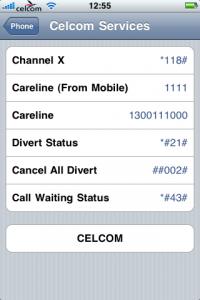
|
|
|
Oct 19 2009, 02:57 PM
|
|
Junior Member
144 posts Joined: Oct 2008 From: Golden Sand
|
QUOTE(sugen @ Oct 13 2009, 11:52 PM) I am using Singtel set.. JB using Blackra1n.. No problem at all.. And now problem to change the telco carrier logos too..Done in 2 seconds Maxis set = Singtel set = they are both FACTORY UNLOCKED iphone, no need to worry about unlocking and all. not like AT&T set.. |
|
|
Oct 19 2009, 04:00 PM
|

Senior Member
749 posts Joined: Oct 2006
|
i have a question here... i using Maxis set iPhone 3GS, OS 3.1.2... as many know that since OS 3.1 the carrier setting is using Maxis 5.0, and i discover that Maxis 5.0 need 3G to send / receive MMS...
so my question will be how should I re-enable the MMS send/ receive without using 3G? use the IPCC file? which should i use, for 3.0 or 3.1? |
|
|
Oct 19 2009, 04:08 PM
|
|
Junior Member
144 posts Joined: Oct 2008 From: Golden Sand
|
QUOTE(elico @ Oct 19 2009, 04:00 PM) i have a question here... i using Maxis set iPhone 3GS, OS 3.1.2... as many know that since OS 3.1 the carrier setting is using Maxis 5.0, and i discover that Maxis 5.0 need 3G to send / receive MMS... What do you mean without 3G, you mean GPRS? There are someplace in Malaysia which doesn't have 3G coverage and use GPRS. The MMS/APN setting is same. As long as you use a Maxis set with Maxis or Hotlink you should leave the default setting, don't touch anything and the settings will be ok so my question will be how should I re-enable the MMS send/ receive without using 3G? use the IPCC file? which should i use, for 3.0 or 3.1?  This post has been edited by bizkutrai: Oct 19 2009, 04:09 PM |
|
|
Oct 19 2009, 04:12 PM
|
|
Senior Member
749 posts Joined: Oct 2006
|
without 3G means when i on EDGE or GPRS...
when i tried to send MMS via EGDE or GPRS, when the "Sending" bar reaches like 90%.. then it stop there and took a long time to send out, and after awhile it will have a red "!" there stating it send unsuccessful the problem is not here when i send on 3G |
|
Topic ClosedOptions
|
| Change to: |  0.0338sec 0.0338sec
 0.36 0.36
 6 queries 6 queries
 GZIP Disabled GZIP Disabled
Time is now: 9th December 2025 - 03:47 AM |
 Quote
Quote