

why is my ios update saying that it’s gonna take 9hrs to dl bro LOL
Official TM UniFi High Speed Broadband Thread V43, READ 1ST PAGE FOR RELEVANT WIFI INFO!
Official TM UniFi High Speed Broadband Thread V43, READ 1ST PAGE FOR RELEVANT WIFI INFO!
|
|
 Dec 11 2025, 10:20 PM Dec 11 2025, 10:20 PM
|
 
Senior Member
1,280 posts Joined: Jul 2011 
|
why is my ios update saying that it’s gonna take 9hrs to dl bro LOL
|
|
|
|
|
|
Yesterday, 12:01 AM
|

Junior Member
448 posts Joined: Aug 2009 
|
QUOTE(cHiLdHo0drEaMz @ Dec 10 2025, 06:08 PM) I thought I'm the only one facing this. Drastic drop in upload for the past few days Now the upload still same? |
|
|
Yesterday, 08:44 AM
Show posts by this member only | IPv6 | Post
#5023
|

Senior Member
6,815 posts Joined: Oct 2008 From: Kuala Lumpur 
|
QUOTE(OlgaC4 @ Dec 11 2025, 09:06 PM) You don't understand performance respond speed. All you care how big is the Mbps. I myself have a Maxis fibre line. But when someone asked how to get Maxis offer in a Unifi thread, what else can I say? You port out to Unifi, surely Maxis gonna counter offer. |
|
|
Yesterday, 09:18 AM
|

Senior Member
2,919 posts Joined: Mar 2009 
|
QUOTE(clon12 @ Dec 3 2025, 04:35 PM) I will try to make a report before getting the mesh. Is the Skyworth router better in terms of wifi range? Just an update for my case. I had bought 2x TP Link Deco X50 and put the primary node at living room connected with cable to the router and another node in my study. So far signal has improved drastically and the download speed is hovering around 150-300mbps (previously 30-50mbps). Though it is not the full speed that I had hoped for, this is still an improvement from my previous situation. Thanks for your suggestions I did that after reading your reply, but seems to be the same after doing speedtest. I tried channels 1, 6 and 11 for 2.4ghz as what Google told me  My condo is still new and there's relatively low number of occupants now. Do you have any other suggestions that can help in my case? Thanks My condo is still new and there's relatively low number of occupants now. Do you have any other suggestions that can help in my case? Thanks  One thing to note though, my upload speeds testing from my PC is only around 5-10mbps while my iPhone doing the same speed test connected to the same node is getting full upload speed of 100mbps. Wondering is this a setting issue with my PC or the x50?  Edit: It does not matter whether the PC is connected wired or wirelessly to the mesh, its still the same upload speed. This post has been edited by clon12: Yesterday, 09:20 AM |
|
|
Yesterday, 10:30 AM
Show posts by this member only | IPv6 | Post
#5025
|
|
Senior Member
6,815 posts Joined: Oct 2008 From: Kuala Lumpur
|
QUOTE(clon12 @ Dec 12 2025, 09:18 AM) Just an update for my case. I had bought 2x TP Link Deco X50 and put the primary node at living room connected with cable to the router and another node in my study. So far signal has improved drastically and the download speed is hovering around 150-300mbps (previously 30-50mbps). Though it is not the full speed that I had hoped for, this is still an improvement from my previous situation. Maybe bottleneck from the Unifi router. Are you using separate router/modem or AIO device? If AIO device, configure the device as bridge mode, so it only function as ONU. then use one of your Deco X50 as router.One thing to note though, my upload speeds testing from my PC is only around 5-10mbps while my iPhone doing the same speed test connected to the same node is getting full upload speed of 100mbps. Wondering is this a setting issue with my PC or the x50? Edit: It does not matter whether the PC is connected wired or wirelessly to the mesh, its still the same upload speed. |
|
|
Yesterday, 01:14 PM
|

Senior Member
1,132 posts Joined: Nov 2015
|
Anyone facing extreme lagging on oversea site now?
|
|
|
|
|
|
Yesterday, 01:47 PM
|

Junior Member
266 posts Joined: Dec 2004 From: petaling jaya
|
yeap.. all slow loading
|
|
|
Yesterday, 02:40 PM
|

Junior Member
42 posts Joined: Jan 2022
|
I'm facing a billing issue with Unifi. Prior to SWU 5.0, I had SWU 3.0 and also add-on HBO Max streaming app. Now I wish to cancel the add-on, the billing support said that is not possible as it's bundled together with my SWU 5.0 and Disney+. Anyone had similar issue?
|
|
|
Yesterday, 03:40 PM
|
|
Senior Member
2,919 posts Joined: Mar 2009
|
QUOTE(YoungMan @ Dec 12 2025, 10:30 AM) Maybe bottleneck from the Unifi router. Are you using separate router/modem or AIO device? If AIO device, configure the device as bridge mode, so it only function as ONU. then use one of your Deco X50 as router. I am using an AIO Fiberhome AX3000 modem at the moment. I am seeing that it is in the Combo Mode under WAN Configuration now, and I am able to change it to bridge mode. Any idea then how to utilize the Deco X50 as a router? Does it automatically configure itself after changing the modem to bridge mode? |
|
|
Yesterday, 04:08 PM
Show posts by this member only | IPv6 | Post
#5030
|
|
Senior Member
6,815 posts Joined: Oct 2008 From: Kuala Lumpur
|
QUOTE(clon12 @ Dec 12 2025, 03:40 PM) I am using an AIO Fiberhome AX3000 modem at the moment. I am seeing that it is in the Combo Mode under WAN Configuration now, and I am able to change it to bridge mode. Any idea then how to utilize the Deco X50 as a router? Does it automatically configure itself after changing the modem to bridge mode? Before you change anything, please backup the Fiberhome config. If anything go wrong you can restore back. - You need to get the PPPoE ID (xxx@unifi) and password from the WAN config page. - Change to bridge mode. - Connect the Deco X50 to the Fiberhome lan 1 port. - Login to the Deco router, and configure the Deco X50 with the PPPoE ID and Password, set profile to Unifi, and setup your Wifi SSID and password. - If you successfully connect to the internet, means you have setup everything correctly. Try to search this forum, I think someone have shared on how to set the fiberhome as bridge mode. This post has been edited by YoungMan: Yesterday, 04:11 PM clon12 liked this post
|
|
|
Yesterday, 04:12 PM
Show posts by this member only | IPv6 | Post
#5031
|
|
Junior Member
62 posts Joined: May 2008
|
QUOTE(RallyNight @ Dec 12 2025, 01:14 PM) Anyone facing extreme lagging on oversea site now? Yeah, sites like Twitch, Amazon (certain pages) loading extremely slow on Unifi. However, if I use Maxis mobile hotspot it works fine. |
|
|
Yesterday, 04:15 PM
|
|
Senior Member
2,919 posts Joined: Mar 2009
|
QUOTE(YoungMan @ Dec 12 2025, 04:08 PM) Before you change anything, please backup the Fiberhome config. If anything go wrong you can restore back. Thank you bro for the detailed writeup. I'm gonna attempt this perhaps next week when I have the time to spare to troubleshoot in case anything go amiss. Appreciate it! - You need to get the PPPoE ID (xxx@unifi) and password from the WAN config page. - Change to bridge mode. - Connect the Deco X50 to the Fiberhome lan 1 port. - Login to the Deco router, and configure the Deco X50 with the PPPoE ID and Password, set profile to Unifi, and setup your Wifi SSID and password. - If you successfully connect to the internet, means you have setup everything correctly. Try to search this forum, I think someone have shared on how to set the fiberhome as bridge mode. This post has been edited by clon12: Yesterday, 04:15 PM |
|
|
Yesterday, 05:18 PM
Show posts by this member only | IPv6 | Post
#5033
|

All Stars
12,045 posts Joined: Oct 2017
|
Steam, discord, epic store also slow, epic download only 5MB/s
|
|
|
|
|
|
Yesterday, 08:35 PM
|
|
Junior Member
18 posts Joined: Jan 2021
|
haiz this tm... few months once mesti got routing issue to sg. now latency high as a kite keep on time out (100ms ++) while maxis 0% packet loss. routing issue since yesterday (11/12/2025 11AM)
DigitalOcean, SG <--> Telekom Malaysia 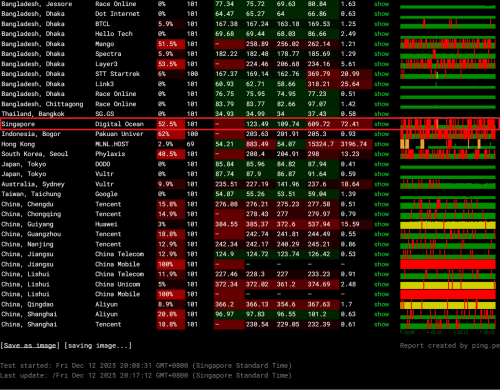 DigitalOcean, SG <--> Maxis 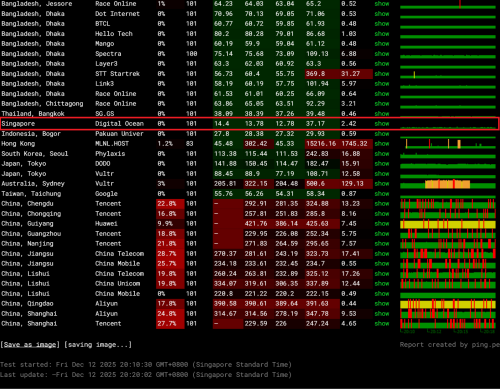 |
|
|
Yesterday, 08:38 PM
|

Junior Member
446 posts Joined: May 2010 From: THE FUTURE
|
QUOTE(clon12 @ Dec 12 2025, 03:40 PM) I am using an AIO Fiberhome AX3000 modem at the moment. I am seeing that it is in the Combo Mode under WAN Configuration now, and I am able to change it to bridge mode. Any idea then how to utilize the Deco X50 as a router? Does it automatically configure itself after changing the modem to bridge mode? In AIO fiberhome just changed to bridge mode, X50 connect to LAN1 and use deco app to setup, Internet Connection Type -> PPPOE, just remember to select VLAN profile " Malaysia-Unifi " then you are good to go. |
|
|
Yesterday, 09:47 PM
|
|
Junior Member
18 posts Joined: Jan 2021
|
QUOTE(Growtopia Jaw @ Dec 12 2025, 08:35 PM) haiz this tm... few months once mesti got routing issue to sg. now latency high as a kite keep on time out (100ms ++) while maxis 0% packet loss. routing issue since yesterday (11/12/2025 11AM) BGP routing finally updated its route advertising btw. from 100ms now straight down to 10ms lol. took almost a day to take affect. routing to SG finally normalized today (12/12/2025) at around 9:30PMDigitalOcean, SG <--> Telekom Malaysia DigitalOcean, SG <--> Maxis |
|
|
Yesterday, 10:55 PM
Show posts by this member only | IPv6 | Post
#5037
|

Junior Member
612 posts Joined: Apr 2005 From: http://127.0.0.1:80/announce 
|
QUOTE(Growtopia Jaw @ Dec 12 2025, 09:47 PM) BGP routing finally updated its route advertising btw. from 100ms now straight down to 10ms lol. took almost a day to take affect. routing to SG finally normalized today (12/12/2025) at around 9:30PM Thank you for the info   |
| Change to: |  0.0205sec 0.0205sec
 0.60 0.60
 6 queries 6 queries
 GZIP Disabled GZIP Disabled
Time is now: 13th December 2025 - 01:13 AM |
 Quote
Quote