Welcome Guest ( Log In | Register )

19 Pages « < 6 7 8 9 10 > » Bottom

Outline · [ Standard ] · Linear+

 Official TM UniFi High Speed Broadband Thread V43, READ 1ST PAGE FOR RELEVANT WIFI INFO!

views
     
kwss
post Jul 17 2025, 10:21 PM

Regular
******
Senior Member
1,208 posts

Joined: Aug 2018
QUOTE(hsbb @ Jul 17 2025, 10:20 PM)
kwss

He still not understand why I mentioned offline config using TeamViewer not skyworth app.
*
Nevermind la. He already said he just helping and start learning about PoE and stuff.
Is quite a learning curve if you are just starting from acronym.

He got IT guy flying over. Don't need to sweat for some MNC who can afford Meraki.
kwss
post Jul 17 2025, 11:25 PM

Regular
******
Senior Member
1,208 posts

Joined: Aug 2018
QUOTE(blacktubi @ Jul 17 2025, 10:48 PM)
I did quite a bit of comparison between Ruckus and Cisco when doing vendor selection back then, Ruckus wins hands down in RF performance.

Ruckus is the only vendor that can work reliably in a big lecture hall with over 2000 clients spread across 6 APs, their interference mitigation and BeamFlex tech is just a class above.

But for most scenario, HPE Aruba will do just fine while being much cheaper than Cisco.

As for Meraki, I find their RF performance to be mediocre. Fine for office but not great for high density deployment. Pavilion KL is using Meraki and you can test it there. laugh.gif
*
Thanks for the insight. I'm really a WiFi noob.
Mind me asking some question about Aruba?

I did like their Instant AP mode in ArubaOS 8. But since ArubaOS 10, it seems like this feature is gone and they went full cloud like Cisco Meraki and Juniper Mist AI.

I would like something that allow self hosting the controller without appliances, like Ruckus Unleashed or self hosting Cisco WLC9800 / eWLC.

My exact question:
Is it still possible to run ArubaOS 10 AP without cloud or hardware appliances? Preferably like IAP mode in their version 8.

Thanks yo
kwss
post Jul 17 2025, 11:30 PM

Regular
******
Senior Member
1,208 posts

Joined: Aug 2018
QUOTE(xproc @ Jul 17 2025, 10:47 PM)
for them it is reasonable cost but once converted to rm the price becomes distorted
*
Who is the cost center for all these thing? If it's your cost center I believe you can ask for a review and justification for using the Meraki.
I'm personally not a fan of Meraki. Why buy Meraki when you can buy Cisco?
What a Meraki can do that a Cisco cannot?
At least Cisco device will keep working until it dies even if you stop paying.
Meraki stop working the moment you stop paying.

However, do keep in mind you don't need skill to configure Meraki. Cisco is a very different story.
kwss
post Jul 17 2025, 11:52 PM

Regular
******
Senior Member
1,208 posts

Joined: Aug 2018
QUOTE(blacktubi @ Jul 17 2025, 11:48 PM)
Not really an Aruba specialist but IINM AOS10 requires Aruba Central as it's a fully cloud managed architecture

You can run Aruba Central on prem but it will still require the license anyways

So, I guess the answer is no, APs running AOS10 can't work independently without Aruba Central
*
Thanks a lot. It's a no go for me then.
kwss
post Jul 18 2025, 12:10 AM

Regular
******
Senior Member
1,208 posts

Joined: Aug 2018
QUOTE(xproc @ Jul 18 2025, 12:01 AM)
i also want to know why but sometimes they make weird decision i also no want to bother but hk sg and viet office also switch to meraki already we just follow their footsteps because previously we use checkpoint which is even cost more (i also duno why)... so switch to meraki they month burn fee is lesser so we switch to this....

only use meraki when they told us to... if after some years they decided to switch system again, the hw just take it out and probably throw put it aside... anyway i got 3 fancy cisco ap want to put aside soon (i duno the model name AIR-AP2802E-E-K9 but the monthly fee is very high, my friend tell me can flash it to other system and continue use it if want... )
*
There's no monthly licensing fee for Cisco. You either pay for DNA, SWSS, smartnet, and some other support option.
It sounds like you are paying for MSP instead of dealing directly with Cisco.

A lesser known thing about Cisco is this:
You don't need to pay them a cent to get security update. Call TAC and quote PSIRT. They will hand you a new version of IOS XE.

So sounds like someone is milking you.
kwss
post Jul 18 2025, 12:26 AM

Regular
******
Senior Member
1,208 posts

Joined: Aug 2018
QUOTE(xproc @ Jul 18 2025, 12:13 AM)
someone need to pay their salary.. anyway we r their subsidiary so in the end is same....
*
Remind me of this insurance company with a datacenter.
Everytime this guy want to do something, he either want a new phone or a new watch.

Another one:
Hardware has an excessive high failure rate for fans.
Turn out someone pocket the fans to sell them.
kwss
post Jul 18 2025, 01:59 AM

Regular
******
Senior Member
1,208 posts

Joined: Aug 2018
blacktubi
I went over Aruba portfolio and found the 735 to be the same spec and league as the Cisco and Ruckus I compared previously.

Even when you buy in bulk of 5, the per unit cost is still more expensive than Cisco

Their post ArubaOS 10 product is really... Expensive

https://www.cdw.com/product/hpe-aruba-ap735...ss-poin/7982210
kwss
post Jul 18 2025, 08:57 PM

Regular
******
Senior Member
1,208 posts

Joined: Aug 2018
QUOTE(BladeRider88 @ Jul 18 2025, 03:20 PM)
My company AP solutions are Aruba based

Based on the website that you provided

Aruba 505 they quoted USD $620.50
https://www.cdw.com/product/hpe-networking-...ooth-wi/5795028

On the meantime, my local vendor quoted me

user posted image

And this is the price that they quoted me on Aruba 535

user posted image

I would said local SI can get better price compared to those online retailer.
*
Hi there, thanks a lot for posting the quotation in Ringgit.
After doing the currency conversion, it's like USD 8 cheaper, which means the website pricing is accurate.

I'm not buying from them right now, I just want to know roughly who is cheaper, or rather more worthy between Cisco, Aruba and Ruckus.

By the way, is the 505 running ArubaOS 8 or 10?

EDIT:
Found the answer for this question:
Do HP charge extra for self hosting?

HP not only charge you licensing fees to do on-prem, the recommended server spec is 40 cores and 512GB of RAM.
Yes. 512 freaking gigabytes or RAM.

Seriously is Aruba that cheap or good? I never use them in the past but they sure sounds like a joke when big boy like Cisco allows you to download and run their Catalyst 9800-CL controller free of charge, just like Ubiquiti. Full features.

EDIT 2:
Answered this question too:
Do you know if you let Aruba Central license lapse, will it continues to function? As in the ability to configure the device and it will continue to pass traffic. It has to be legal of course, meaning it's not a license violation.

Once you stop paying, things stop working.
Starting with WiFi 7 AP, ArubaOS 10 is a must and Central is the only way to go.

This applies for all their gateway, switch and AP product as well.

Conclusion:
You pay through your nose, owns nothing and suppose to be happy about it.
Since I won't buy Meraki, I won't buy Aruba too.

This post has been edited by kwss: Jul 19 2025, 05:18 AM
kwss
post Jul 19 2025, 11:06 PM

Regular
******
Senior Member
1,208 posts

Joined: Aug 2018
QUOTE(wallance0113 @ Jul 19 2025, 12:53 PM)
I'm a long term customer and I want to terminate my TMunifi account but this telco keep telling methat I have a contract intact which I don't have anymore. First they said was my broadband which ended on 16th July 2025. But now they told me otherwise saying I have a tv box service until 2nd May 2026. They said I need to pay for the penalty in toder to cancel the service or they will appeal for me to wave it. 
There's no way to check the contract except for calling them or walkin to the centre.
Just called them TM again. They told me now they have to repeat the process, said Celcomdigi need to requeste again for transfer process.
TM will call me later again to confirm the transfer but ask for penalty pay (RM300).
After I agreed then only they will proceed next step approval.
Note that I didn't renew the tv box nor agree to do so. The tvbox just automatically renew. The tv box also not the same contract time with the fibre optic internet package. The only way to check the contract is by calling them or call them. They also won't inform you about your tv box contract if you never ask this.
*
QUOTE(xCryptik @ Jul 19 2025, 07:25 PM)
One of my account got this hidden renewal as well. They secretly change your unifi tv plan then the contract will renew 1 year.
*
Straight away complain to MCMC. This is the easiest to proof.
Check all your bill from the last 2 years and see what is stated as your TV package.
You can even downright accuse them of illegally preventing customer from switching provider.
Don't forget to also accuse them of scamming customer for penalty fees + deploying scare tactic.
kwss
post Jul 20 2025, 02:31 AM

Regular
******
Senior Member
1,208 posts

Joined: Aug 2018
QUOTE(Qash-M @ Jul 20 2025, 02:22 AM)
how about 800Mbps one?
*
Astro do have rm150 for 800mbps.
Just try the same method but with 800mbps instead of 500
kwss
post Jul 21 2025, 11:33 PM

Regular
******
Senior Member
1,208 posts

Joined: Aug 2018
QUOTE(cHiLdHo0drEaMz @ Jul 21 2025, 06:15 PM)
I'm currently on 1Gbps from 800M FSU but not under contract. Still paying 239 monthly. Thought of moving to SWU for 1Gbps but not keen on changing my existing Huawei ONU. Still going strong 💪. Can opt to retain ONU after SWU update ?
*
Just tell the technician to leave the new ONR at your door. I didn't change anything during my 2Gbps upgrade.

QUOTE(go626201 @ Jul 21 2025, 10:32 PM)
Looks like there are some issue between TM and specific Equinix SG Exchange tonight.
I have 2 vps(wireguard vpn server) keep having packet lost connection.(Both are using Equinix route)
*
Can you try traceroute from your VPS? Is it also using Equinix SG or SGIX or some other ASN?
kwss
post Jul 21 2025, 11:45 PM

Regular
******
Senior Member
1,208 posts

Joined: Aug 2018
QUOTE(xproc @ Jul 21 2025, 09:10 PM)
my fixed ip not yet solve even the tm technician come and acknowledge the issue

current progress
*
You gotta excuse me but I kind of lean towards skill issue on this one.
You cannot assign static IP directly on PPPoE interface. This is an issue specific to Malaysia telco for their insistence of using PPPoE.

To workaround it, the telco will add a route in their BNG to forward your static IP subnet to you. It is a very ugly hack.

On your side, you just need to dnat and snat the IP address and it should work.
I am not sure about Meraki but on Cisco you can assign it directly on your loopback interface if this is what you want.

Frankly I am not even sure if the Skyworth can do it. Maybe you post the instruction or the steps here?

Can you also give me a description on your invoice on what is the 30Mbps service for RM899?

Now come to the final horrible part. Did your Vietnam IT guy actually flew over? If he did and you got billed for it, ask for your money back!
In Meraki, everything is cloud managed and you do not need static IP at all. You don't even need public IP and it will still work.
He could have just setup everything and leave whatever services that requires the static IP to be configured later via the Meraki dashboard from Vietnam.
But in your picture, nothing is connected.
kwss
post Jul 22 2025, 12:54 AM

Regular
******
Senior Member
1,208 posts

Joined: Aug 2018
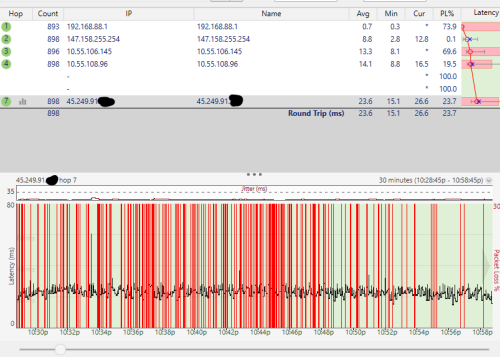
QUOTE(go626201 @ Jul 22 2025, 12:11 AM)
Recover normal already.

I only traceroute from one of my vps,but vps traceroute to tm gateway is normal.
Pingplotter is unifi home pc to vps, below is vps to unifi gateway.
The problem should be within TM network.
user posted image

traceroute to 147.158.255.254 (147.158.255.254), 30 hops max, 60 byte packets
1  160.30.4.225 (160.30.4.225)  0.942 ms  0.921 ms *
2  169.254.153.33 (169.254.153.33)  12.923 ms  12.990 ms  13.053 ms
3  de-cix.ase.tm.com.my (103.162.254.99)  10.383 ms  10.499 ms  10.516 ms
4  10.55.108.153 (10.55.108.153)  21.376 ms  22.406 ms  22.524 ms
5  147.158.255.254 (147.158.255.254)  19.946 ms  19.995 ms  20.048 ms

Oh wait looks like local route enable,not equinix route anymore. Not sure when did the switch.

VPS- Terabix(JHB Equinix DC),previously was on Equinix SG route,Looks like local route is enabled now.
*
That's DE-CIX ASEAN.

If it breaks again do trace from both end and compare if they are still the same.
kwss
post Jul 22 2025, 01:06 AM

Regular
******
Senior Member
1,208 posts

Joined: Aug 2018
QUOTE(BladeRider88 @ Jul 21 2025, 08:18 AM)
After doing the currency conversion, it's like USD 8 cheaper, which means the website pricing is accurate.  - Yes, my vendor informed me that the pricing are based on USD fluctuation, but since I am a long term loyal customer, they can do it slightly cheaper and give discount on other items/services. Hence the word, local SI pricing can be negotiable. 

By the way, is the 505 running ArubaOS 8 or 10? - Running on 10

So far my current setup is on prem setup, as my company is a medium size, now we have 30 Aruba APs running. But we are not using the Aruba Central license due to the "licensing" cost and that time I am pretty new to the company and we have limited budget to revamp the entire WiFi solution. So we opt for on prem instead of Aruba Central.

Yes for WiFi 7 AP, ArubaOS 10 & Aruba Central are mandatory.

My switches (core & managed switches) also using Aruba, but we don't have Aruba Central associated with it as well. Not sure what will happened in the future.
*
When time comes during a hardware refresh and they really mandate Central, just switch vendor.

It sucks to re-learn the CLI from start but it's what it's.
If you don't use the CLI then it's even easier.

Can even consider TP-Link Omada if you just use basic feature. Like very very very very basic feature. For that price I feel it's quite good.

At least they don't feed GPS, barometer reading and all the IoT sensor data back to Aruba. It's crazy the amount of data being collected. They claim accuracy to within 1 meter and their barometer sensor is so good it can know which floor it's on.

They also have something like Cisco Space where they track user movement by combining data from different radio, in the name of giving you insight for user behavior in retail outlet.

I do not want my vendor to know when I'm in office. Hell no.
kwss
post Jul 22 2025, 02:43 PM

Regular
******
Senior Member
1,208 posts

Joined: Aug 2018
QUOTE(xproc @ Jul 22 2025, 12:05 PM)
becoz my old router can set this... the technician come see and troubleshoot also cannot do it, he bring his own router also canot configure it i think its not solely the skyworth problem, maybe they need to route it as what you say..... maybe later when vietnam come he can set the mx67 and dial from there...

meanwhile the 2nd skyworth already connect to ux7 using bridge mode... wifi speed from 1300mbps drop to 500mbps, maybe not yet configure ux7 properly...later when the workstation finish assemble and people start moving in... i will add 2 more old ap (ubiquiti) along with 2 cisco ap (workstation)...

the rm899 is old biz 20 plan (10- 20 years ago) + 5 fixed ip + phone line is about 1k plus per month....

he come setup the meraki and decom my previous checkpoint that need to change ip and notify my france hq etc... previously i also push for cloud and remote configuration with my local IT sub help but rejected by HK it guy due to security 'con'-cern...

nothing is connected yet because the workstation still assembling and the 0.2m patch chord not yet bring by the contractor....
*
But Meraki is 100% cloud. There is no on-prem for Meraki at all.

Login to all your ONR, set them to bridge mode and disable the WiFi to reduce interference.

Login to your Unifi Express and scan for the quietest channel. Verify if it's running 80 or 160 or 320 MHz.

But I personally don't have good experience with Ubiquiti product. They have a lot of compatibility issues / bugssss and took almost 2 years to solve them.

QUOTE(hsbb @ Jul 22 2025, 02:00 PM)
kwss
Government clinic use Sangfor NSF-1050A-I for SDWAN
*
Never heard of them before but I'm surprised they have a product with 170Gbps firewall performance. Let's assume that's 1500 byte packet, you still have 56Gbps for 512 byte packet.
kwss
post Jul 23 2025, 12:12 AM

Regular
******
Senior Member
1,208 posts

Joined: Aug 2018
QUOTE(HayateAyakasi8 @ Jul 22 2025, 05:54 PM)
Just out of curiosity, is there any brands you recommend for home usage instead?
Currently looking for new router POE switch and AP and you seem pretty knowledgeable in this smile.gif
*
For home use maybe ask blacktubi
I don't know anything that's cheap enough for home use other than Mikrotik, TP-Link and Ubiquiti.

Mikrotik POE portfolio is almost non-existence. Configuration wise it can be a learning curve for people without networking concept. RouterOS is feature rich but you must be careful which feature you really need to use because many of them will kill performance.
Using QoS absolutely burns CPU and kill performance.
Using PPPoE will disable L3HW Offload.
Exporting NetFlow / IPFIX to your SIEM / network monitoring tool also disable hardware switching on top of disabling L3HW Offload.

It's also limited by the switch chip to CPU link. So your theoratical max speed is what you see in the block diagram.
It's great for learning network because you do get MPLS, BGP, VXLAN for all RouterOS licensing level. Although they are not as feature full as router used by telco, they still brings you quite far.
However, routing faster and faster internet speed makes me rethink them.
You also can use Nokia SR Linux as an alternative learning tool if you are focused on datacenter. But it cannot exactly do telco stuff.
Just a note: Mikrotik can actually act as a BNG with no additional cost. Feature wise don't expect Juniper level since you are not paying massive licensing fees.
Here I am comparing product that can actually route real traffic, not emulator.

Ubiquiti is buggy and you are basically their QA. You need to go full set or self host their controller if you only selectively use their Unifi series of product. Don't even try their EA product because they will have no problem discontinuing them as soon as they go to market.
They do sponsor a lot of YouTubers to give rave review which is overrated to me.
Basically they are OpenWRT with their controller binary in it, along with tracking.
They can do what OpenWRT can do, and vice versa.
The tracking is aggressive. All devices phone home, including the controller, even after you disable it in the dashboard. There's a special flag you must push to individual device via the controller to disable the phone home completely. On the controller side just perform DNS sinkhole.

I never use TP-Link before so I cannot comment. I only started looking at their Omada series while looking for WiFi 7 AP. Watching YouTube review only without any personal hands-on experience.
My opinion: Will get the job done.

For the record I used to run Cisco router + Cisco WiFi at home. Yep, the real Cisco with Smartnet.

Then I save money by going Mikrotik router + Ubiquiti WiFi. Still using this setup.

Actually a bit itchy to go Cisco again with their new 8300 Secure Router series released last month. Haha.

POE switch wise I really don't know who is best for home use. There aren't many mGig 60W POE switch even in the Enterprise space. It is a very niche market.

Unless you don't mind settling for 1gig POE switch, which I feel Mikrotik is great. Reason being they do L3 for real.

Ubiquiti, TP-Link and many other L3 switch isn't actually L3 in my book. They only do static route with very limited TCAM and buffer.
My definition of L3 is that it must run BGP. However, none of them can do BGP Flowspec.


Finally, I'm a networking guy. My evaluation don't necessary apply to you.

kwss
post Jul 23 2025, 12:45 PM

Regular
******
Senior Member
1,208 posts

Joined: Aug 2018
QUOTE(go626201 @ Jul 23 2025, 12:16 PM)
Sharing my experience with single ceiling AP at home:
I bought a China TPLink WiFi7 ceiling AP in early 2025 and place it on a table with around 45° angle on wall. (Home usage)
It is indeed that that signal is weaker than a consumer form router,especially if it is the only AP in that floor. (Even compared to China Wifi 6 router which also have the wireless power limit by CN)

So AP solution does really need multiple set and install on the top or ceiling to work well. If previously need 2 mid-grade consumer router to cover 99% area,while using ceiling AP it should be needed for 3 AP to fully cover and getting the best performance.

If the house haven't renovate, set a plan to setup PoE AP solution will be good enough or futureproof. (Just replace it with newer generation when it break,and AP is cheaper compare to router with similar spec)
Otherwise just buy Mesh wifi router and put at any place you want (Lan connected better)
Edited:
I was using Xiaomi AX3600(CN version) before bought this TPLink ceiling AP,but it break down before CNY 2025,so i just buy the ceiling AP for transitional use,i might be buy a new router in next few month and replace it.
And put the ceiling AP on 2rd floor to replace my old Xiaomi AC2100 router as AP.

Although i am going to use the new router as AP only. Anyone can give suggestion on this? or any brand or Wifi7 model is suitable for this? (Below or around RM500)
(I am not going to replace the whole Wifi equipment for the house,just for the ground floor only-AP usage)
*
Based on my very limited site survey experience, if you don't mount AP on the ceiling, you can get good coverage by placing them flat on the table. Maybe TV table or something. Just move them out from the wall and towards the center the house as much as possible.
It should be good enough to cover 2 floor with a single AP.

EDIT:
2 floor coverage need to be at the stairs. So if your house is those very long or wide type, the ceiling AP definitely won't work as good.

EDIT 2:
Maybe I should use the word coverage instead of performance, I mean usable data rate of at least 100 Mbps

This post has been edited by kwss: Jul 23 2025, 12:55 PM
kwss
post Jul 23 2025, 01:36 PM

Regular
******
Senior Member
1,208 posts

Joined: Aug 2018
QUOTE(go626201 @ Jul 23 2025, 01:28 PM)
The AP placed exactly on the center(table around 1m height) of the house. (Table is normal height for pc usage)

The AP signal is okay within the house,but weaker then before,that outside the wall of the house have weaker signal,
before that i can still use the wifi beside the autogate,now got very weak signal but almost not usable.
(Same spot-old router and this AP)

I mean the wifi signal wall penetration is weaker compare to my old Xiaomi AX3600.
Overall signal is weaker. (I think spec is also weaker,while Xiaomi AX3600 might having better FEM)

My old Xiaomi AX3600 now auto turn on and off periodically,something broken on the pcb board.(No power issue,power adapter swapped tested)
*
Oh then it is most optimal already. You won't get more coverage by mounting on the ceiling.
Mine also won't cover until outside the gate. I just treat it as a "security feature".

I only run my AP at 80mW EIRP. Having more power don't seems to give much improvement in usage performance but generate a lot of RF.
kwss
post Jul 23 2025, 03:44 PM

Regular
******
Senior Member
1,208 posts

Joined: Aug 2018
QUOTE(HayateAyakasi8 @ Jul 23 2025, 03:35 PM)
I've only seen Cisco routers and switches from Carousell which I assume are older enterprise units.
While they should be good enough for gigabit internet (I think) and the upfront cost is probably the cheapest I've seen for 24 port PoE+ switch, but worried about the cost of actually running it and noise rclxub.gif

So I guess gonna have to go Mikrotik + Omada/Ubiquiti AP then. PoE Switch I still gotta see whats available for gigabit. I saw Ubiquiti having some for 2.5G switches but it's like RM4000 and not looking to blow that much on a switch just yet. A lot to go through and learn once again smile.gif
Yes, was planning to go ceiling mount as to keep it a bit cleaner. Current setup is 2x ASUS routers and 2x Wifi 5 TP-Link deco.
While they do the job, but there are still Wi-Fi dead spots which ceiling mounted APs should solve.

Was going through some Omada and Ubiquiti APs. For some reason the Ubiquiti ones are cheaper (U6+ vs EAP610).
Regardless, still gotta look through each specsheet and decide later on.

Thanks to the both of you for your help happy.gif
*
Tell you one open secret. A lot of Cisco product operates on honor system.
It means you can enable features without actually paying for the license.
I don't think they will kick any home lab door for license violation.
Even if you play by the rules, all Cisco product has a perpetually licensed Network Essential / Network Advantage stack which you can use until the lifetime warranty expires, which literally means never.

So if you like any of them, just buy.
Register an account and you can download IOS XE even without contract.

Another advantage of Cisco switch is this: You can enable all features and they still do wirespeed. Mikrotik is a very very different story.

EDIT:
For noise, look up the model number and their datasheet. Cisco has the best documentation among all networking vendors in the world. Yes, best in the world in terms of documentation. Plus they are all open access!

Or buy Noctua fan and mod.
Or just turn down the fan. I don't think you actually pull that many watts off PoE for home use.

This post has been edited by kwss: Jul 23 2025, 03:51 PM
kwss
post Jul 23 2025, 07:35 PM

Regular
******
Senior Member
1,208 posts

Joined: Aug 2018
HayateAyakasi8
Forget to tell you...
If you do decide to get a used Cisco switch, try to buy AP that can fit within the POE power draw.

When I mean Cisco, I mean the OG Cisco, not Meraki or their Small Business branding. There is no way to use Meraki without licensing or subscription.

If you want to use SFP module with Cisco, you must either buy original Cisco, which is crazy expensive, or buy third party module that's Cisco coded.

Both FS and FiberMall allows you to choose which vendor coding you want during checkout.

In the event you really must use non-Cisco coded transceiver, you can find the command to disable the check but some people say it didn't work on all switch.

Alternatively, find someone with a programmer to recode it to Cisco.

If you are loaded, buy your own programmer.

19 Pages « < 6 7 8 9 10 > » Top
 

Change to:
| Lo-Fi Version
0.0284sec    0.58    7 queries    GZIP Disabled
Time is now: 11th December 2025 - 03:54 AM