Welcome Guest ( Log In | Register )

19 Pages « < 7 8 9 10 11 > » Bottom

Outline · [ Standard ] · Linear+

 Official TM UniFi High Speed Broadband Thread V43, READ 1ST PAGE FOR RELEVANT WIFI INFO!

views
     
kwss
post Jul 26 2025, 06:46 AM

Regular
******
Senior Member
1,208 posts

Joined: Aug 2018
QUOTE(go626201 @ Jul 26 2025, 12:23 AM)
147.158.X.X IP block being take down by TM?
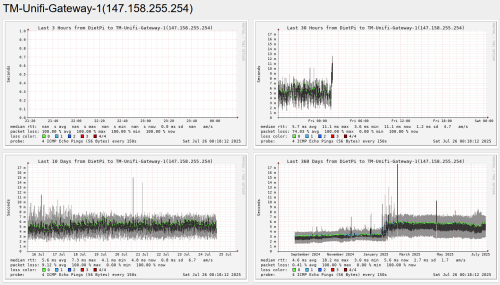
I saw my smokeping show that 147.158.255.254 Gateway is not ICMP pingable.
And now distribute 175.143.X.X for me after few year with 147.158 block.
My Mikrotik router log show that i have a disconnection at the exact same time at 25/07/2025 2AM.
user posted image

And also just now i have a sudden speed slow and latency spikes for few minutes between 12.09-12.14 AM. But now recover normal.
*
It is still being announced by TM.

BGP Output:
» Click to show Spoiler - click again to hide... «


They may be renumbering their IP address. Network operator do it all the time for various reason.
The latency you face might very well be due to convergence time.
TM have been doing renumbering for years now. Their old addressing scheme sucks and burn a lot of FIB / TCAM.
It is better today.

QUOTE(blackbox14 @ Jul 26 2025, 12:38 AM)
I wouldn't be surprised since it's probably a way to slash operating costs.

Also with how many people are moving onto 500Mbps package for such low prices, it will probably be hit by CGNAT next. 300Mbps all kena already.
*
All operators are moving to ditch IPv4, regardless of how many people sign up for 500Mbps.
It is just that the cheaper is the package (hence more subscriber), the more IPv4 address can be recovered.

Look at the APNIC Member Fee Schedule:
https://www.apnic.net/about-apnic/corporate...r-fee-schedule/

TM paid RM 1.5 billion to shareholder in dividend last year. The amount of money to pay for IPv4 address is tiny.
TM owns 3,221,248 IPv4 address today. Feel free to do the math yourself.

RIR has been encouraging members to return unused IPv4 address but guess what, people are hogging them instead.
There exist the cloud providers who buy up every single IPv4 address they can get.
Then there are the rent seeker trying to leech on dinosaur who refuse to learn IPv6.

RIR is now aggressively recovering whatever address they can get and assign them to CGNAT usage. ARIN go as far as forfeiting all your IPv4 address the moment you default membership payment.

As for network operator who already deploy IPv6, running dual stack is a chore. IPv4 is getting very fragmented and requires so much FIB / TCAM space which older router don't have.
There is proposal to fragment it even further by using longer than /24 subnet but thankfully the proposal has been shot down.
Then there is proposal to refarm the multicast range and thankfully that has been shot down too.
The amount of effort people are willing to go just to continue using some numbers that no longer scale is crazy.

Eventually all plan will not have IPv4 address anymore. The best time to learn IPv6 is yesterday. The second best time is now.
kwss
post Jul 28 2025, 12:53 PM

Regular
******
Senior Member
1,208 posts

Joined: Aug 2018
QUOTE(blackbox14 @ Jul 26 2025, 01:45 PM)
Oh hey. Thank you again for your wall climbing guide during the DNS fiasco last year.

It's good to know this isn't just some cost cutting measure by them. However, 500Mbps becoming one of the cheaper packages probably means that it will be put under CGNAT in the near future since as you said, there will be more subscribers on it (due to SWU offers and such). I suppose it just depends on when it passes the threshold based on that 3,221,248 number, since many people on 300Mbps will be moving up to 500 for sure.

I definitely agree with moving to IPv6 instead of dragging on with IPv4. Still, even as someone who doesn't know much about networking, I can see a lot of resistance to it. As a home user, my TP Link router from around 2019 randomly disconnects if IPv6 is turned on alongside IPv4, no matter what kind of setting I try. I'm trying to remedy that now by upgrading my router to something more modern that is capable of having IPv6 permanently enabled.
*
Oh hi, it is my great pleasure to help people defend against authoritarian behavior.

Regarding older network equipment having problem with IPv6, it is indeed true and the only way to solve the problem is unfortunately spending money to buy newer model if there is no more firmware upgrade.

For IPv6 transition, it is also true that there is absolutely zero advantage to be a first-mover. People who transition last will benefit from all the knowledge that became available, a strong ecosystem and not needing to maintain a dual-stack setup for a long time.

However, this is only true if you are currently holding sufficient IPv4 address and has no plan to scale your network. This applies mainly to small to medium businesses. If scaling is a concern, like cloud and telco, there is no way you can acquire more IPv4 address indefinitely.

For the average user, it is best to just migrate, especially if you do not own your own ASN and IPv4 address. IPv6 offers the following benefit:
- No need to NAT at all, not CGNAT, not on your router
- No need to perform hole punching when doing anything P2P like video call, games, etc
- No header checksum
- Ability to run native IPv6 on multiple subnet (if telco comply with RIPE BCOP-690)

Even for business who owns sufficient IPv4 address, transitioning to IPv6-only gives the following advantage:
- Much smaller routing table due to very little fragmentation and short network prefix during RIR assignment
- You can multi-home with more provider given the same hardware
- Do all the above with a default free zone (DFZ)
- With a DFZ, you can now deploy BGP optimization software like Noction IRP Lite which is free
- Separate LAN only access / WAN easily with the use of Global Unique Address and Unique Local Address
- Allows multiple addresses per interface, making network renumbering easier and in most case, with zero downtime
- If ULA is generated per RFC, no renumbering is needed during business merger / acquisition

Having said that, you do need to learn IPv6 to properly use them. Many people just directly apply their IPv4 knowledge and this gives sub-optimal result.

Then there are the people who think IPv4 should exist forever so they can make money out of it. Example:
IPv4 Optimization: Renumbering as the Key to Increased Efficiency and Monetization
https://wannahost.com/blog/2025/01/29/ipv4_...on_renumbering/

Don't get me wrong, continuous renumbering is now required due to CGNAT. If you assign too little address, CGNAT will hit address exhausting. If you assign too much, then it is a waste of precious number.
As Internet usage continues to grow, you will still come to a point where you need more IPv4 addresses for CGNAT if people don't migrate to IPv6.

Now those are all MBA talk, here is the technical perspective of the renumbering exercise:
RFC 4192 - Procedures for Renumbering an IPv6 Network without a Flag Day
https://datatracker.ietf.org/doc/rfc4192/

Although this is for IPv6, it is high level enough to be applicable to IPv4.

RFC 5887 - Renumbering Still Needs Work
https://datatracker.ietf.org/doc/rfc5887/

This describe the challenges faced during renumbering.

As you can see, there are various reason why people want to keep IPv4 alive from the business perspective, or simply because people just hope IPv4 will continue to exist until they retire so they don't have to learn IPv6.

On the technical perspective, maintaining dual-stack and the continuous renumbering is tedious and just kick the can down the road. There won't be additional IPv4 address and IPv6 is the only way to go.
kwss
post Jul 28 2025, 03:59 PM

Regular
******
Senior Member
1,208 posts

Joined: Aug 2018
QUOTE(blackbox14 @ Jul 28 2025, 03:32 PM)
Is it even possible to use P2P programs like games and torrent over IPv6 now? I thought the support for it is still limited since people on P2P are mostly on IPv4.

Right now I am doing my best to study RouterOS, since I plan to get a Mikrotik router (heard their stability + long term OS and firmware support is decent) to replace my TP-Link one. It is quite intimidating and I need to find some way to get to know it better before I set it up to the TM ONU. Got family members who WFH so we can't have any downtime.
I just think it's a bit absurd that of all things, this is the one that is facing so many issues even though it is absolutely necessary in the long term. Even people who prefer older Windows versions like 7 over newer ones like 10/11 are not as stubborn.

A future where everyone is behind CGNAT would be awful.
*
There is nothing in the networking stack preventing P2P from using IPv6. The current problem is game studio do not make their software works over IPv6 and game server do not even have IPv6 DNS record.

For RouterOS configuration, they are pretty low level. Think about "programming" for network.
In home router, you set a PPPoE username and password and it just works. The reason is because inside the firmware they already hardcoded a lot of things.
In RouterOS or any more advanced networking OS in general, you have to specify those things.
Example:
Specify the physical interface
Specify the VLAN profile
Attach the VLAN profile to the interface and specify their behavior (tagged, untagged, filtered, ethertype, MTU, etc)
Create a PPPoE profile.
Create a PPPoE client and attach the profile with it. This is where you put in your username and password.

After your PPPoE is successful, you then:
Specify which interface is inside or outside (can be via Interface List)
Create a NAT rule
Create fasttrack rule

For IPv6:
Create a DHCPv6 client and attach it to your PPPoE client
Assign the DHCPv6_PD to an address pool
Assign an address to your bridge / port / VLAN from the address pool
Create a Neighbor Discovery (ND) to perform the Router Advertisement (RA)
Create fasttrack rule

When learning networking OS, you need to think from lowest level to highest level.
Same goes for network troubleshooting, start from Layer 1 first, then Layer 2, Layer 3 and so on.

With this, it also means you need to at least understand what each layer does and their configuration.

Of course your mental model can also be top down provided you know what are the capability of each layer. This is useful for network architecture and design.

Same as many thing in tech, there are industry best practices. In networking, they are ITU, IEEE or IETF, etc.
Company like Cisco also provides Cisco Validated Design Zone:
https://www.cisco.com/c/en/us/solutions/design-zone.html

Juniper has something similar - Juniper Day One
https://www.juniper.net/documentation/jnboo...n/day-one-books

This is where they have design for some of the common setup. The implementation and CLI is vendor specific but the setup is not. You just have to understand them and convert it to other vendor's implementation.

Myself personally, I use a lot of Cisco and Juniper documentation. They are great resource and free.
kwss
post Jul 28 2025, 10:42 PM

Regular
******
Senior Member
1,208 posts

Joined: Aug 2018
QUOTE(blackbox14 @ Jul 28 2025, 10:03 PM)
The closest I have come to this is when I flashed an old router - I think the black TM Unifi TP-Link one if memory serves me right - with OpenWRT, which I then configured as an access point. Some of this seems similar to settings in OpenWRT but much more advanced.
Thanks. I will check out the links you provided. Hope you keep sharing your knowledge on this board because there are definitely people who will need it.
*
Well if you are not a fan of low level network configuration, maybe give Ubiquiti Unifi Express 7 a try?
It is 2x the price of Mikrotik ax2 but you do get 2.5Gbps and WiFi 7. Their UI is kind of like Apple which is very user friendly.
Dimension wise they are quite similar. You can consider it if you never intent to use any wired LAN port.

Can xproc give a review?
kwss
post Aug 1 2025, 11:28 AM

Regular
******
Senior Member
1,208 posts

Joined: Aug 2018
QUOTE(annoymous1234 @ Aug 1 2025, 11:14 AM)
Need help. Today TM change my router, to the white colour one. All my device need to reconnect wifi. Problem is, my old ipad 2 is unable to connect, it keeps saying unable to join network, I confirm the WiFi password is correct.

Is it coz if the new router settings? Or the ipad 2 so old that it can't support the connection to router, can't be right?
*
Change your 5Ghz channel to 36 and see if it works.
If don't, change security to WPA2.
If still don't, someone will come and suggest you throw the router away.
Or maybe throw the iPad away.
kwss
post Aug 1 2025, 06:14 PM

Regular
******
Senior Member
1,208 posts

Joined: Aug 2018
QUOTE(hsbb @ Aug 1 2025, 01:01 PM)
kwss tng55

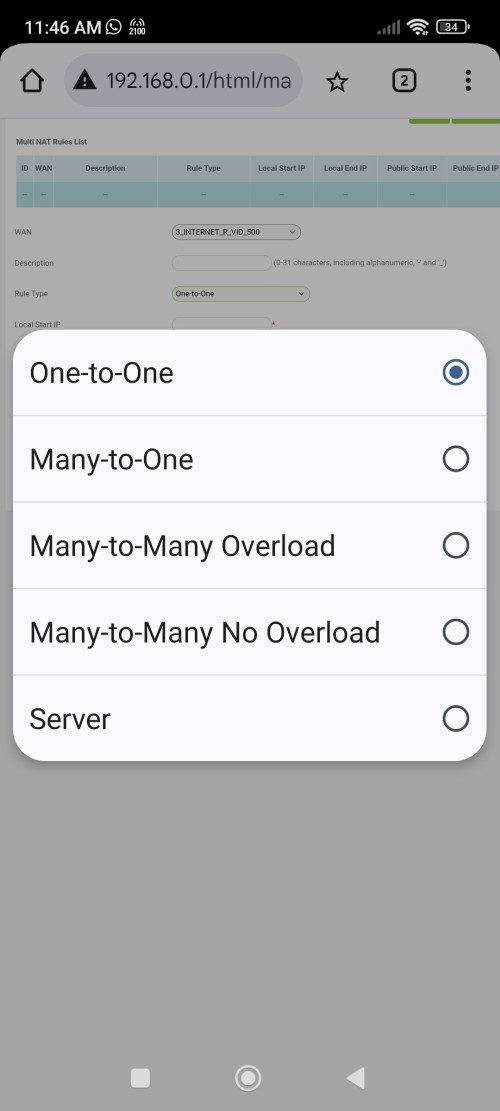
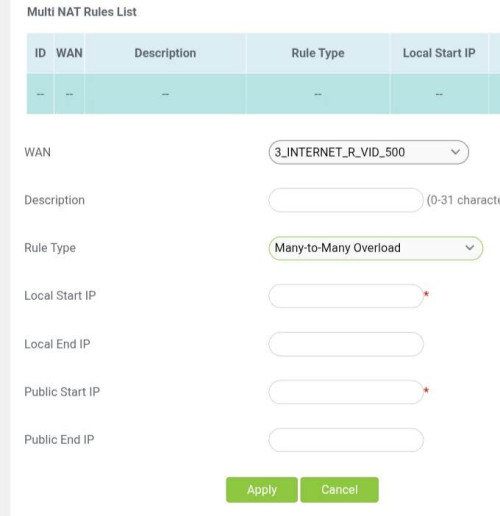
Instead of dlink fv3060v with NAPT support, I think unifi with 5 fixed IP also can used with Fiberhome HG6145F3 which support Multi-NAT. But not any skyworth..

user posted image
*
Looks like it.
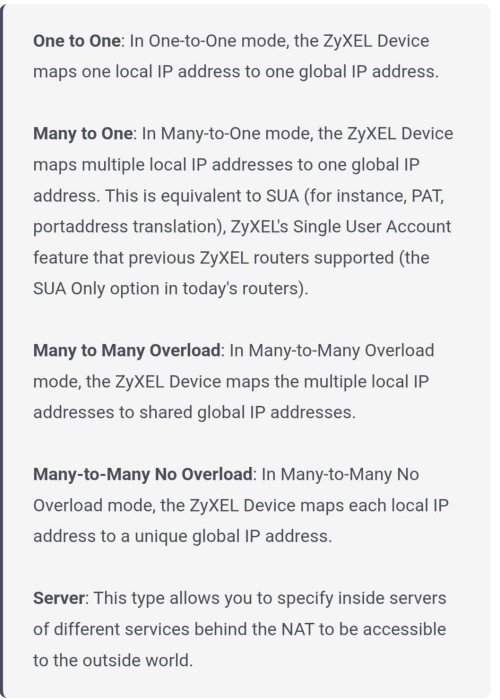
I try to look up their manual but they basically says nothing. Very typical of most network gear manufacturer.

I am also not sure why their Many to Many has an overload and non overload option but such option does not exist in Many to One.
Does that means if you have more than one public IP address then you can oversubscribe the port? But what if I don't have multiple public IP and still want to oversubscribe the port?

Say the company ran out of IPv4 and oversubscription is the way to go but unlucky for me I only have 1 public IP.
So my max NAT session is limited to 65,535 (assuming no port forwarding).
If I indeed can overload in Many to One, what is the ratio? 2? 4? Unlimited until memory exhaustion?

In Mikrotik there is an arbitrarily hardcoded 1 million session limit.
In old Cisco IOS, it was 20 million session limit. Not sure about new one as they no longer put this in spec.

The one big problem I have with all these China company is you can never find detailed spec or operation procedure.
Huawei, ZTE and some others even lock user manual behind a paywall like WTF.
To be fair Nokia also do the same shit.
kwss
post Aug 1 2025, 07:51 PM

Regular
******
Senior Member
1,208 posts

Joined: Aug 2018
QUOTE(annoymous1234 @ Aug 1 2025, 06:25 PM)
Hmm I found another issue.

Seems like this new router block DNS change on my devices, it doesn't recognise any dns change, specifically adguard 94.140.14.14. I confirm by checking dns leak website. Sigh! Must I really use the router they give?

Previously I have 2, one is the black nokia type, with another one TP link which is my own. The new one they give is firberhome AX3000
*
Remove the fiberhome. Put back the Nokia and TP-Link.
kwss
post Aug 1 2025, 08:03 PM

Regular
******
Senior Member
1,208 posts

Joined: Aug 2018
QUOTE(hsbb @ Aug 1 2025, 06:58 PM)
user posted image
HG6145F3 Simple config without description.

user posted image
* Found this from ADSL+ forum
*
Basically One to One is the same as Many to Many No Overload.
Many to Many Overload is the same as Many to One.
Difference is just with an address pool bigger than one.

I am kind of confused with Server. It sounds like the standard port forwarding or a static Many to Many No Overload.

What if I only want to do 1 server and the rest use it for Many to Many Overload?

From how primitive is their description, doesn't looks like they can do port oversubscription at all.

Actually really got people pay for static IP package but use this kind of router?
kwss
post Aug 1 2025, 08:08 PM

Regular
******
Senior Member
1,208 posts

Joined: Aug 2018
QUOTE(annoymous1234 @ Aug 1 2025, 07:54 PM)
Can I do it myself? Does it need any configuration or just plug back? Coz the technician was doing something when he change it, then he also ask if I got change the pppoe which I can't remember
*
Yes you can do it yourself. The fiber only goes one way in with a click.
Your TP-Link WAN port goes to port 1 on the Nokia.

If it didn't work, he might have reset your PPPoE password without your knowledge. Call 100 to ask for your new password and just set it back in your TP-Link.

Actually why do technician want to reset people password? Whenever they got your work order, they have this FORCE app or something that display customer information, including password.
kwss
post Aug 1 2025, 08:23 PM

Regular
******
Senior Member
1,208 posts

Joined: Aug 2018
QUOTE(nnannon24 @ Aug 1 2025, 08:19 PM)
one question, how to determine whether my ip is public or private ip?
*
Login to your router and see what IP address you get.
Compare it with IP address from https://whatismyipaddress.com/

Same address means public IP

This post has been edited by kwss: Aug 1 2025, 08:23 PM
kwss
post Aug 1 2025, 09:09 PM

Regular
******
Senior Member
1,208 posts

Joined: Aug 2018
QUOTE(annoymous1234 @ Aug 1 2025, 09:02 PM)
Alright. I'll give it a try. I just try LAN on my PC, even though I change the DNS to Google DNS in control panel, it still route back to TM DNS, so I'm definitely going to switch it back.
*
It should be just plug and play. Straightforward.
TM start jacking connection on router is really something new.

Do you change DNS for IPv6 too?
I don't use Windows but I think the Control Panel way is obsolete.

Try this method:
https://gist.github.com/krcm0209/2d8ceb00eb...d920b8120913c02

Using DoH also prevent big brother from messing with your DNS request.
kwss
post Aug 2 2025, 05:02 PM

Regular
******
Senior Member
1,208 posts

Joined: Aug 2018
QUOTE(victor_hoh @ Aug 2 2025, 04:58 PM)
I am actually using EdgerouterX router.

BTW, I have checked with my neighbors, Maxis / Unifi, they are also experiencing similar problem, where their connection drops intermittently throughout the day, at night especially. The connection will usually be up again within 30 - 60 seconds. Some shares the same distribution box behind the house with me, some are further down the street.

I checked the log from EdgerouterX. Sometimes nothing is shown, these are for shorter disconnection around 30 secs. But for longer disconnection of around 1 mins, PPPoE is disconnected due to this:

CODE
No response to 3 echo-requests
Serial link appears to be disconnected.
Connect time 964.5 minutes.
Sent 2133092807 bytes, received 360190164 bytes.
Script /etc/ppp/ip-down started (pid 27670)
sent [LCP TermReq id=0x1f "Peer not responding"]
sent [LCP TermReq id=0x20 "Peer not responding"]
rcvd [LCP TermAck id=0x20]
Connection terminated: no multilink.

*
Known issue with some BNG or problem at Layer 2.
Go and complain en-masse.
kwss
post Aug 2 2025, 06:54 PM

Regular
******
Senior Member
1,208 posts

Joined: Aug 2018
QUOTE(victor_hoh @ Aug 2 2025, 05:45 PM)
in my router log, it showed this:

CODE
Connected to 00:00:5e:00:01:a3 via interface eth0.500


Is this one of the BNG that causes problem?
*
It's hard to tell. That's the VRRP address of the BNG.
There's a lot of places where LCP-Echo packet can get lost. Without access to the physical infra, it's impossible to diagnose this issue.

At the physical layer, does the ONU lose its operational status? Generally you need to SNMP log this to be sure.

If not, then it become less clear what is the problem. TM will have to use divide and conquer to diagnose. How fast they root cause it comes down to skill.

Some high level example:
If log shows people on one OLT port have the problem but not the rest, then maybe swap the module or swap the whole ODN to another port, assuming they have a spare one.
If still happen, most likely somewhere in the ODN. But this will also shows all ONU on the ODN will have their operational status changed.

Repeat the process and see if it only affect one line card, or the whole chassis / shelf.

Then move on to BNG... You mentioned it affect other telco as well so this will rule out the whole L2TP or pseudowire setup, which really left... Nothing much.

Better pray it's the OLT module or the line card. It's the easiest to fix.
The ODN is the hardest to fix.
kwss
post Aug 2 2025, 10:53 PM

Regular
******
Senior Member
1,208 posts

Joined: Aug 2018
QUOTE(victor_hoh @ Aug 2 2025, 09:51 PM)
Pengsan. In this kind of case, which complain route will be most effective to get TM to move their asses?
*
You can use whatever complain channel you want because they will still send someone over to your house.

You have to be at home even though they cannot do anything immediately at your place.
It really depends on your luck who shows up and how they escalate it.

I guess you just have to repeat what you wrote here and hope they can pass them on.
kwss
post Aug 3 2025, 01:32 AM

Regular
******
Senior Member
1,208 posts

Joined: Aug 2018
victor_hoh
I am just wondering, when you said intermittent disconnect, is it everyone disconnect together (within 30 seconds timeframe) or each house disconnect randomly and independently?

If each house disconnect randomly, then it's highly likely a misconfigured HQoS along the path from ONU to BNG.

In networking, there's some class of packet that must never be dropped.

Cisco actually list them here:
https://www.cisco.com/c/en/us/td/docs/route...42A0B23EBE0435C

LCP Messages and PPP keep-alive is in the list. Not factoring these when configuring HQoS is a disaster, especially on telco network.

Not sure if their vendor's network OS handle these kind of edge cases automatically. TM really has too many vendors. Too damn many.
kwss
post Aug 3 2025, 07:45 PM

Regular
******
Senior Member
1,208 posts

Joined: Aug 2018
QUOTE(victor_hoh @ Aug 3 2025, 07:28 AM)
So far, one of the disconnection that my neighbor reported, I did not experience it at the same time.

One question. Will a misconfigured HQoS affect the neighbors? Meaning, if my neighbor started torrenting, will it somehow cause my connection to be disconnected?
*
One thing you can try is to disable keep-alive on your side.

From a pure HQoS point of view, the answer is no. It is applied per subscriber and what your neighbor does won't affect you.
In the real world where everything interact with each other, the answer is not so simple.

The flow example:
Your router sent LCP-Echo
Assuming you didn't max out your Internet and due to the TDM nature of PON, it will 100% get transmitted
Now your LCP-Echo is queuing at the OLT chassis / shelf upstream port, which is normally Ethernet.
Here QoS might be applied due to congestion and there is a chance it gets dropped.

Assuming now your packet reach the BNG.
I think almost every BNG have implemented Control / User Plane Separation (CUPS) by now.
This means the data plane will need to forward your LCP packet to the control plane via a separate link. This is a path where it can create additional point of failure as normal packet don't need to use this path. Normal internet packet go from the BNG Data Plane straight to other border gateway via MPLS.

Assuming the LCP packet did reached the control plane and the is on the way back, it will be queued in the BNG Data Plane. Here HQoS is in effect and your data will 100% be transmitted from the BNG to the OLT chassis / shelf due to the per-subscriber nature of HQoS.
Now that your packet is in the OLT, it must be queued on the port to reach your ONU. This is where Layer 2 QoS policy is in effect and behave differently. (this is actually the exact same as OLT upstream but I explain it here)
There is also a per port queue number limit. This is part of ASIC and cannot be changed.
If this port is congested, there is a chance that your packet get dropped due to hash collision (even if QoS has it included but not prioritized). This is of course vendor-implementation specific as well. Cisco is the only vendor I know that make sure this will never happen with the use of a default queue for control packet.
Lets say you deliberately misconfigure QoS to identify and drop control packet, Cisco IOS will not do it. It will include the packet count as part of the rule, but it will actually get sent to the default queue and transmitted.

As you can see, there is the OLT QoS and the BNG HQoS. There is also the BNG Control Plane / Data Plane.

So just try configuring your PPPoE to not do keep-alive or send LCP-Echo and hope the problem goes away. By not sending any control packet, it will never go missing.

However, if you are the one heavily uploading, your router might be at fault if it drop its own control packet. But if you don't, then your router is out of the picture.
kwss
post Aug 3 2025, 07:48 PM

Regular
******
Senior Member
1,208 posts

Joined: Aug 2018
QUOTE(nnannon24 @ Aug 3 2025, 05:24 PM)
Hey it's been two days after getting 500mbps SWU5.0. My only issue is that the speed test does not compromised as what has been promised. I never ever got any higher than 200mbps and I was on 300mbps plan beforehand and I surely got better speed than this. What should I do?

user posted image
*
Have you tried power cycling the ONU after the speed upgrade.
I know ZTE ONU will exhibit this behavior if the profile is changed without a reboot.

What router are you using? Did you have QoS enabled? Try to disable it.
Mikrotik router will also exhibit this behavior if throughput is too high for QoS to keep up.
It will basically peg one CPU core and throughput goes to shit.
kwss
post Aug 4 2025, 08:07 PM

Regular
******
Senior Member
1,208 posts

Joined: Aug 2018
QUOTE(MarcoFromTropoja @ Aug 4 2025, 05:46 PM)
Guys

Does anyone use ViewQwest ISP & How Was It Compare To Unifi ?

Just got a call from their representative offering RM159 for 1gbps and 6month free, 3 years contract

They just covered my area In Taman Ehsan, Kepong
*
No answer for you but just curious.

Are you on landed or high rise?
At your exact location, do they use someone else infra (from who) or own infra?
If using someone else infra, do they use L2 or L3 services?
kwss
post Aug 5 2025, 10:52 PM

Regular
******
Senior Member
1,208 posts

Joined: Aug 2018
QUOTE(Kadaj @ Aug 5 2025, 10:46 PM)
user posted image
How did you find the termination option using the same portal but on mobile browser?
My self care portal looks like this for more than a year since TM upgrade their system last time.

user posted image
After I select the Moving Home, it shows error like this.

Anyone terminate account through live chat and yet can get RM90 500Mbps successfully?
I can't take the risk they terminate my account directly without offering me the SWU 5.0 package...
*
Disable adblock or any DNS that has this functionality.
kwss
post Aug 7 2025, 06:38 PM

Regular
******
Senior Member
1,208 posts

Joined: Aug 2018
QUOTE(xproc @ Aug 7 2025, 05:52 PM)
use ux7 cannot get the max speed i dont know why...
*
Will performance increase if you disable IPS?
The thing with Ubiquiti is they quote favourable numbers in all their product.
With your model, the IPS performance is 2.3Gbps max. This is with 1500 bytes packet and probably by running speedtest on a laptop connected to 2.5gig port.

Since you are running speedtest on device, maybe disabling IPS will give you that additional headroom to get another 500M.

Once you can successfully get the speed, you can enable IPS again. You connect to your switch using 1gig or 2.5g adapter?

EDIT
Look up USW16 and its all 1gig only.

This post has been edited by kwss: Aug 7 2025, 06:59 PM

19 Pages « < 7 8 9 10 11 > » Top
 

Change to:
| Lo-Fi Version
0.0251sec    0.59    7 queries    GZIP Disabled
Time is now: 11th December 2025 - 01:23 AM