Welcome Guest ( Log In | Register )

19 Pages « < 4 5 6 7 8 > » Bottom

Outline · [ Standard ] · Linear+

 Official TM UniFi High Speed Broadband Thread V43, READ 1ST PAGE FOR RELEVANT WIFI INFO!

views
     
kwss
post Jul 11 2025, 11:51 PM

Regular
******
Senior Member
1,207 posts

Joined: Aug 2018
QUOTE(PowerSlide @ Jul 11 2025, 11:48 PM)
just done this, both show same ip

so mine already on public
*
Then your traceroute is the weirdest I seen. I suspect there's a misconfiguration somewhere in your BNG. Or TM have new BNG vendor with a different behavior.

BTW is the high latency still there? Seems to be gone now. Very likely to be congestion. If it's hardware failure it won't disappear like that.
kwss
post Jul 12 2025, 12:08 AM

Regular
******
Senior Member
1,207 posts

Joined: Aug 2018
QUOTE(heLL_bOy @ Jul 12 2025, 12:03 AM)
if base on what you said on the router issue it happen at most IP transit ingress traffic back to TM not only this, it cant be determine whether really congested or not or due to throttling at their back end causing loss packet.
*
I think you did the test too late. I did it earlier when it really is congested.
All packet after the router has high latency.
All packet egress from G-CORE to other ASN don't have problem.

Your screenshot shows only control plane throttling. If I get that output I will agree with your analysis.

I also specifically chose G-CORE because both TM and G-CORE have selective peering policy in SGIX and peer with each other.

BGP output from looking glass shows only one exit.

This post has been edited by kwss: Jul 12 2025, 12:10 AM
kwss
post Jul 12 2025, 12:21 AM

Regular
******
Senior Member
1,207 posts

Joined: Aug 2018
QUOTE(hsbb @ Jul 12 2025, 12:18 AM)
I don't see gateway ip either public.254 or private.254 between hop 1 & 2.
*
Weird right? I cannot believe this kind of setup actually end up in production.
kwss
post Jul 12 2025, 12:45 AM

Regular
******
Senior Member
1,207 posts

Joined: Aug 2018
QUOTE(heLL_bOy @ Jul 12 2025, 12:41 AM)
i do a test tomorrow at 9pm see how it goes,

most of the time we encounter the issue is ingress traffic back to TM and seldom have issue on egress traffic out from TM. that why i only see 1 output.

for now what i know this three traffic(Equinix SG, HE (SG,SJC) , SEABONE) back to TM are congested 90% at peak hours
*
Yes, now if you try again there's no more control plane throttling.

I kind of cheated by not testing Equinix SG because I have workload there with a symmetrical routing (meaning ingress and egress via Equinux SG).
So that itself tells me it's not Equinux SG. 😂
kwss
post Jul 12 2025, 12:58 AM

Regular
******
Senior Member
1,207 posts

Joined: Aug 2018
QUOTE(heLL_bOy @ Jul 12 2025, 12:55 AM)
i did a test a moment ago, still got loss packet under TM SGIX router but the speedtest show full speed.

you got a machine that using Equinix SG for both way traffic ?  last time i had 1 also but due to congestion issue and loss packet issue then i asked provider to adjust another upstream for ingress traffic to TM.
*
You will still hit packet loss due to control plane policy, but the latency should be very low now, for me it's only 0.6ms.

Yes I have machine there and it is fine now. I remember last year it was terrible.
kwss
post Jul 12 2025, 01:27 AM

Regular
******
Senior Member
1,207 posts

Joined: Aug 2018
QUOTE(heLL_bOy @ Jul 12 2025, 01:18 AM)
i guess we are under different ip block so the result are different  biggrin.gif

i just remember covid time really is nightmare.

Actually until now i still dont know how TM control their traffic flow to end users under each ip block or others way which i dont know and keep causing whole network congested, its seem so messy compare others ISP.
*
That could be the reason as well but so thankful I not only get full speed all the time, there's zero packet loss and also almost 0ms of jitter.

Maybe it's the local MPLS circuit that's congested for you? MPLS circuit is hard to diagnose as they are opaque.

TM has this behavior where they will add a 100Gbps port to DE-CIX ASEAN but will not upgrade known congestion path. They will go as far as to burn money with IP Transit link but still refuse to add another port to IX in Singapore.

You would think they hate Singapore right? But they absolutely route everything to Singapore instead of MyIX, sometimes to as far as HK and JP.

They really defy all sort of logical reasoning.
kwss
post Jul 12 2025, 02:51 AM

Regular
******
Senior Member
1,207 posts

Joined: Aug 2018
I have a proposal to solve this.
Since both AS4788 and AS199524 selectively peer with each other, and they both have presence in DE-CIX ASEAN, just remove the BGP session in SGIX and set them up in DE-CIX ASEAN.

I don't know why TM didn't proactively review their peering when they connect at DE-CIX ASEAN. These kind of thing really improve user experience.

They still need to fix their SGIX router, whether it's congestion or the router itself reaching it's limit but every step helps.
kwss
post Jul 12 2025, 09:06 PM

Regular
******
Senior Member
1,207 posts

Joined: Aug 2018
QUOTE(heLL_bOy @ Jul 12 2025, 02:34 PM)
you can ask AS199524 to change ingress route if you wanted  biggrin.gif

just sent them the info and explanation they would help out
*
Seems to be fixed by TM. If it didn't happen for another week then can confirm it's fixed for good. 😂

QUOTE(heLL_bOy @ Jul 12 2025, 02:36 PM)
user posted image

user posted image

see how disgusting TM managing their network, eventually this happen already more then 2 weeks.

as per checked is not HE ip transit fault.
*
Want to provide me endpoint information for diagnostic?
kwss
post Jul 12 2025, 09:59 PM

Regular
******
Senior Member
1,207 posts

Joined: Aug 2018
QUOTE(heLL_bOy @ Jul 12 2025, 09:26 PM)
i already know the issue and resolved by changing the route,  above screenshot just my sharing how TM manage their network  laugh.gif
*
Oh okay then.
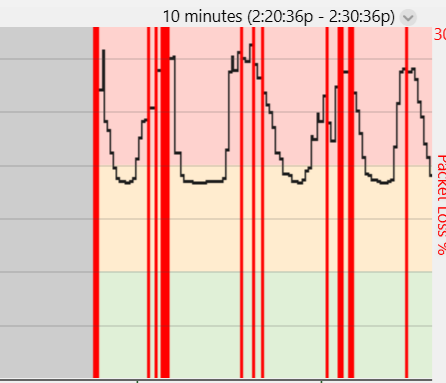
But if I want to take a guess based on the graph alone, it looks like Forward Error Correction is in action.

So the fiber cable or the module is falling apart but they didn't actually go dead. This won't trigger any monitoring system.
kwss
post Jul 12 2025, 10:51 PM

Regular
******
Senior Member
1,207 posts

Joined: Aug 2018
QUOTE(crkhoo @ Jul 12 2025, 10:36 PM)
This routing has been on since last month, bad packet loss starting from Osaka b2 to Amazon AWS, almost every evening, but fine during AM and usually during the day, just bad once 7pm onwards till late 1-2AM.

user posted image
*
Quite confident this is not a TM problem. It's between Arelion and someone else.

TM did the handoff at Equinix SG. Return route is actually cold potato routed back to Equinix SG
kwss
post Jul 12 2025, 11:14 PM

Regular
******
Senior Member
1,207 posts

Joined: Aug 2018
QUOTE(crkhoo @ Jul 12 2025, 11:01 PM)
I see. Is there a reason it has to be cold routed? which party should I raise the issue to then? Aside from using VPN, are there any guides to change the routing as an end user?
*
It's all ISP own preference. They might not want to pay other for transit so they cold potato route it.
If the link is settlement free peering then they will hot potato route it since it reduces their cost.

Google Cloud has their more expensive network which is basically cold potato routing over their own submarine and terrestrial fiber. They will put their own SLA and performance guarantee.

AWS always cold potato route if traffic is already inside their network and destinated to another AWS endpoint.

To answer your question, I identified 3 parties:
Arelion
TATA
Hurricane Electric

Salah siapa I don't know.

Since I am heavily involve in AWS stuff, I can give you some high level pointers but they do cost you extra money
1. Use AWS Global Accelerator
2. Use CloudFront.
3. Use Cloudflare CDN or Agro Tunnel
4. Create a jump host or proxy in AWS Malaysia / Singapore so AWS will cold potato route your traffic

You can use t4g.small in Singapore until year end for free. Storage and inter-region egress fee still apply

kwss
post Jul 12 2025, 11:53 PM

Regular
******
Senior Member
1,207 posts

Joined: Aug 2018
QUOTE(crkhoo @ Jul 12 2025, 11:41 PM)
I have no experience with the AWS stuff, just an end user so this is likely beyond my ability but it is interesting to know, thanks.

I will most likely switch ISP after contract is over, as I tried on Maxis network or TIME and there is no routing problems like this one, this only happens when using Unifi ISP.
*
I thought it's your AWS setup.

Well that's one way to go about it or just use VPN in the meantime.

Different ISP have different transit provider and they might choose different path so as long as you don't hit the problematic circuit then you won't see the problem.
kwss
post Jul 13 2025, 12:27 AM

Regular
******
Senior Member
1,207 posts

Joined: Aug 2018
QUOTE(heLL_bOy @ Jul 12 2025, 11:36 PM)
the problem is from ingress to TM not egress to destination. i dont think is due to FEC
*
Err... Equipment failure can happen anywhere on the network right? Especially if it's fiber optic.
The graph clearly show pattern of FEC.

Why the fiber can fail in egress but it cannot fail on ingress?
Plus you don't know if they use TX RX on a single fiber. Or TX one fiber, RX another fiber.

It's even more complicated when it comes to MPO connector. If only 1 strand has problem, you can get weird behavior.
kwss
post Jul 13 2025, 01:38 AM

Regular
******
Senior Member
1,207 posts

Joined: Aug 2018
QUOTE(heLL_bOy @ Jul 13 2025, 01:22 AM)
my conclusion is there is no issue from egress part, only ingress are the one.

i had observe on ingress traffic to TM for few upstream transit from my machine within few location.

1)HE (SG,SJC) APAC and US direction loss packet, good for EU
2)TELIA (SG) APAC direction loss packet, good for EU
3)SEABONE (SG) APAC direction show loss packet, good for EU

as long not using this three upstream for routing everything will be fine.
*
Actually when he reported the AWS problem I tested HE SG+SJO. No problem for me.
Arelion ingress no problem too.
TATA also okay ingress from SJO to SG to MY.

So mmm... I cannot reproduce the problem and cannot really tell what is the problem.

So it gotta have something to do with the BGP optimization software used by TM again.
Or some kind of MPLS circuit problem that affects some path.

What's your location anyway?
kwss
post Jul 13 2025, 07:05 AM

Regular
******
Senior Member
1,207 posts

Joined: Aug 2018
QUOTE(Anime4000 @ Jul 12 2025, 10:31 PM)
Mine still under contract, can ask to replace...

found out WiFi 7 without 6GHz, just crippled version of WiFi 7 MLO

I understand why 6GHz not exist:
1. 6GHz Radio SoC not cheap yet
2. 6GHz Tx too weak as per MCMC standard (200mW)

with weak 6GHz Tx Power, FTTR is solution to have 6GHz every area
*
Singtel is giving TP-Link BE11000 for their 3Gbps plan for SGD40.

TM cannot even give a proper WiFi 7 router for a 1Gbps plan that cost RM100+ more per month, every month, for 2 years.

If you sign up for 2Gbps, you are paying RM150+ more every month to get the same rubbish from Skyworth.

It's not like the router is Made in Malaysia or Made in Singapore, both telco just buy it from someone else.
kwss
post Jul 13 2025, 09:35 AM

Regular
******
Senior Member
1,207 posts

Joined: Aug 2018
QUOTE(Jjuggler @ Jul 11 2025, 02:19 PM)
TM starting to rolling out their all new Wi-Fi 7 for new subscribers.

user posted image
Source: TM Unifi Members [Facebook Group]
*
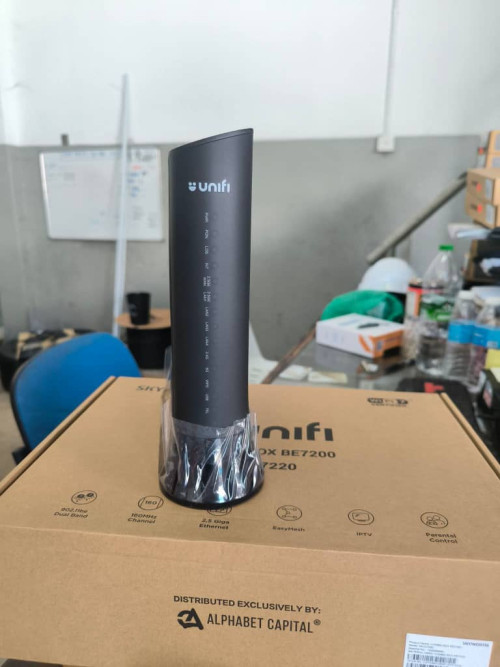
I zoom in the photo, it says 2.5GE WAN. 2.5GE LAN.
The official spec from Skyworth is 10G LAN port.
Can someone verify cos papa's eye is kind of old.

Maybe yenchenje is right all along, the casing looks like XGSPON but inside it's still GPON crap.
kwss
post Jul 13 2025, 09:11 PM

Regular
******
Senior Member
1,207 posts

Joined: Aug 2018
QUOTE(lotter92 @ Jul 13 2025, 08:04 PM)
Hi all. I'm new to the discussion. I'm currently using Time for my existing condo, but I'll be moving to landed residential next month, so no more Time for me. Planning to get Unifi, but those SWU sounds so tempting for us, however it only applicable to existing users, correct? Any possibility for new application to get similar deal?
*
I have a different suggestion for you.
If your condo have TM, bring your bill to TM and ask if they have any promo for jumping ship.

Since someone mentioned they are receiving calls from TM to jump ship, they might have a package for you.

After you move house, get TM to relocate your fiber. It should be free but please double check.

EDIT:
When I say TM, I am referring to those places run by TM, not authorized reseller.

This post has been edited by kwss: Jul 13 2025, 09:12 PM
kwss
post Jul 13 2025, 09:52 PM

Regular
******
Senior Member
1,207 posts

Joined: Aug 2018
QUOTE(heLL_bOy @ Jul 13 2025, 09:43 PM)
i am using 175.137 when i testing there is problem on loss packet on HE (AS6939) on ingress and tried 219.93 still the same also.
*
Ok I tested.
HE route all your packet to France then back to MY.

For my IP address, it goes straight to me.

Test location: Singapore
kwss
post Jul 14 2025, 02:25 AM

Regular
******
Senior Member
1,207 posts

Joined: Aug 2018
QUOTE(Anime4000 @ Jul 14 2025, 01:33 AM)
I ranting about "mahWiFi" on my gpon hacking group, there is debate between Ruckus installer bashing TP-Link and Asus that lead to Ruckus guy did Brand Defamation

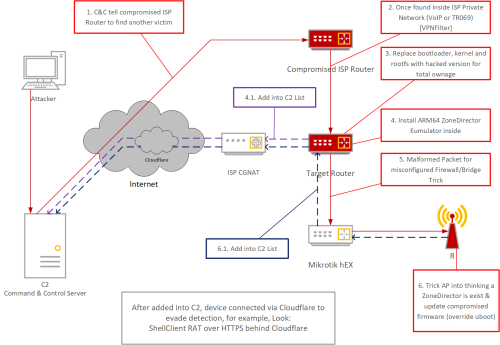
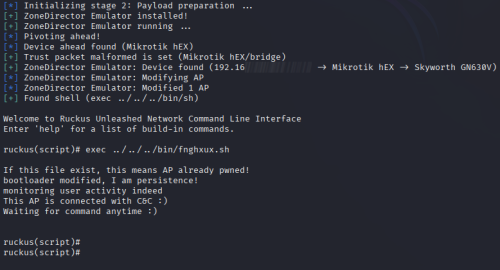
member inside has expand compromise GN630V to Ruckus AP's, installing ZoneDirector Emulator on GN630V
because building ARM64 app is easy

I tries to understand how it works, but I did this and show to them, he reply "correct" (not sure how % correct is, but appear to worked)

user posted image

user posted image

I ask, "What you do with a lot of compromised device?"
They reply "make money, like DDoS-as-a-Service"
*
This is made possible because Ruckus has multiple backdoors that was made public.
I consider hardcoded password, public/private key, JWT as backdoor.

https://www.bleepingcomputer.com/news/secur...gement-devices/
kwss
post Jul 14 2025, 07:17 PM

Regular
******
Senior Member
1,207 posts

Joined: Aug 2018
QUOTE(issac99289928 @ Jul 14 2025, 12:35 PM)
Model BE7200 (SK-G7220 Skyworth)
GPON ONT
[attachmentid=11516054]
*
This confirms it. Still GPON. No 6 GHz.
Better just stick to dumb ONU if you are 1Gbps and below.

19 Pages « < 4 5 6 7 8 > » Top
 

Change to:
| Lo-Fi Version
0.0217sec    0.34    7 queries    GZIP Disabled
Time is now: 8th December 2025 - 11:10 AM