Welcome Guest ( Log In | Register )

19 Pages « < 8 9 10 11 12 > » Bottom

Outline · [ Standard ] · Linear+

 Official TM UniFi High Speed Broadband Thread V43, READ 1ST PAGE FOR RELEVANT WIFI INFO!

views
     
kwss
post Aug 7 2025, 07:34 PM

Regular
******
Senior Member
1,208 posts

Joined: Aug 2018
QUOTE(xproc @ Aug 7 2025, 07:17 PM)
today only after change the usw16, i second thought maybe i should just get the promax version 😂

anyway i think my ips is off
*
If you double check your IPS is off, then perhaps try with a laptop using 2.5gig adapter, or a phone with 6GHz WiFi 7.
If still cannot, maybe time to try EA firmware.
kwss
post Aug 7 2025, 09:58 PM

Regular
******
Senior Member
1,208 posts

Joined: Aug 2018
QUOTE(xproc @ Aug 7 2025, 07:08 PM)
yes bridge mode skyworth

another line is dialing on dlink for fixed ip that connect to mx67 (not dialing), this one we get 300-400 only on our workstation
*
They list site to site VPN at 300Mbps only.
With full features Unified Threat Management enabled, it's also rated at 300 Mbps.

The problem with this MX is that the rated UTM performance is big packet.

So you are already getting everything out of it. Maybe just downgrade your speed when contract end.

Reference:
https://meraki.cisco.com/product-collateral...ile&ref=1a0sAbk
kwss
post Aug 8 2025, 12:20 AM

Regular
******
Senior Member
1,208 posts

Joined: Aug 2018
For people with slow internet problem, are you using Cloudflare DNS?
Try switching to Google DNS and see if it helps.

Also while you are having problem, try to speedtest with Kuala Lumpur - MyIX server and see if you are having problem.

Share your result here so we all can compare.

Edit:
Also do your speedtest here:
https://speed.cloudflare.com/

Note the location of server being used.
Preferably all test be done using wired connection.

This post has been edited by kwss: Aug 8 2025, 12:25 AM
kwss
post Aug 8 2025, 03:17 PM

Regular
******
Senior Member
1,208 posts

Joined: Aug 2018
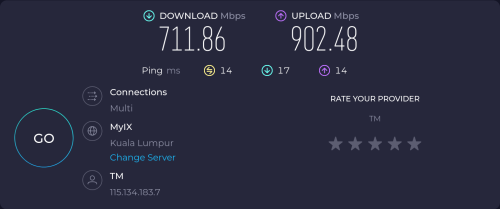
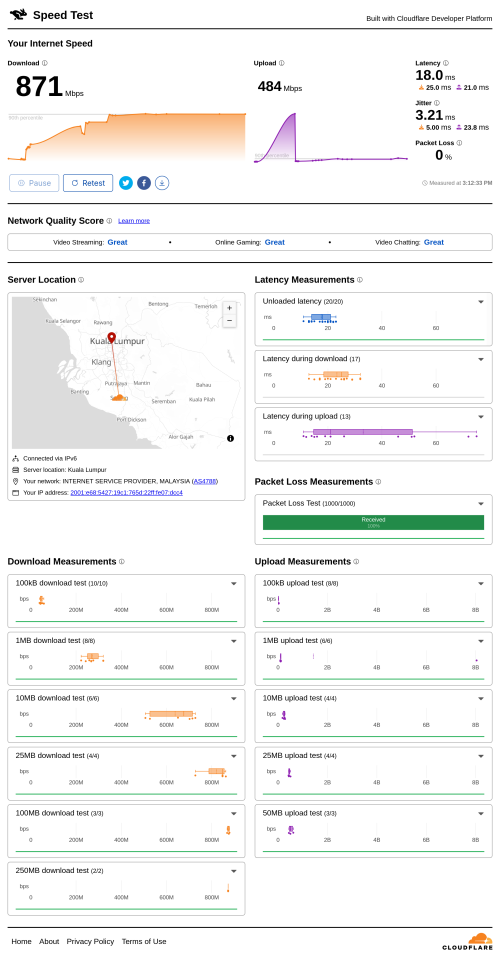
My current speedtest right now.
Using Google DNS (DNS over HTTPS)

To Kuala Lumpur - MyIX. Just click Change Server and type "myix"
user posted image

Cloudflare speedtest to KUL server

user posted image
kwss
post Aug 8 2025, 03:38 PM

Regular
******
Senior Member
1,208 posts

Joined: Aug 2018
PJng
Preferably yes. One for speedtest to MyIX, one for cloudflare speedtest. Also note which DNS server are you using.
You may refer to my screenshot. You can censor your IP address if you want.
Definitely test during slowdown. Also change to Google DNS, disconnect / reconnect to flush DNS cache and test if there is any different.

QuantumEdge
Can you post MyIX screenshot as well?
Can you temporary change to Google DNS and try?
I used ControlD previously too and changed to Google DNS.
My reason is that I noticed not all server returned by CDN providers are anycast. Some Cloudflare address are anycast, some are not. So if I hit a ControlD node in Singapore, I will get Singapore server. Sometimes I get Hong Kong server if I hit a HK node. Same story when it hits Japan node.

This is especially noticeable for AWS CloudFront. If I hit a HK / JP edge but my workload is in AWS Malaysia, the latency increase is substantial. With Google DNS, I am consistently hitting AWS Malaysia edge now.

Which server are you hitting in Cloudflare speedtest? The server location is not visible. This is the most important part of the test. You can just censor your IP address but the cloudflare edge must be visible. In Malaysia itself there is KUL, JHB. But lowyat forum always end up in Cloudflare SIN for some reason.

You can test it by appending "/cdn-cgi/trace" to the cloudflare fronted domain.

Vantage point example on TM:
» Click to show Spoiler - click again to hide... «


Vantage point example on AWS Singapore:
» Click to show Spoiler - click again to hide... «


Note the "colo" is different and the latency is obviously different. Anycast makes it difficult to test endpoint from different ISP.

EDIT:
Here is my BNG ping for comparison of deducting last mile latency
CODE

$ ping -A -c1000 2001:e68:402c:8001::6c
<snip>
--- 2001:e68:402c:8001::6c ping statistics ---
1000 packets transmitted, 1000 received, 0% packet loss, time 2139ms
rtt min/avg/max/mdev = 1.096/1.699/6.193/0.555 ms, ipg/ewma 2.140/1.647 ms


EDIT 2:
Using the smokeping:
https://smokeping.mywebping.com/smokeping/?...et=CloudflareST

The trend is clear that Cloudflare not only cough during the evening, they also cough in the afternoon. IPv6 is also the most affected.
However, I have tested both IPv4 and IPv6 address are peered directly between TM-Cloudflare (at least for KUL edge).
go626201 live in Johor so I am not sure which edge he is connected to and what his traceroute looks like.

This post has been edited by kwss: Aug 8 2025, 04:07 PM
kwss
post Aug 8 2025, 05:15 PM

Regular
******
Senior Member
1,208 posts

Joined: Aug 2018
I have a bit of time before I cabut.
Spin up an EC2 instance in AWS Malaysia.

Connected to KUL:
CODE

# curl http://[2803:f800:50:9e98:2075:67fe:a5cf:8f9]/cdn-cgi/trace
fl=56f175
h=[2803:f800:50:9e98:2075:67fe:a5cf:8f9]
ip=2406:da10:8a99:4e02:f177:e838:b519:3741
ts=1754643606.033
visit_scheme=http
uag=curl/8.11.1
colo=KUL
sliver=none
http=http/1.1
loc=MY
tls=off
sni=off
warp=off
gateway=off
rbi=off
kex=none


Latency is actually very good from AWS Malaysia:
CODE

ping -c5 2803:f800:50:9e98:2075:67fe:a5cf:8f9
PING 2803:f800:50:9e98:2075:67fe:a5cf:8f9(2803:f800:50:9e98:2075:67fe:a5cf:8f9) 56 data bytes
64 bytes from 2803:f800:50:9e98:2075:67fe:a5cf:8f9: icmp_seq=1 ttl=59 time=0.765 ms
64 bytes from 2803:f800:50:9e98:2075:67fe:a5cf:8f9: icmp_seq=2 ttl=59 time=0.867 ms
64 bytes from 2803:f800:50:9e98:2075:67fe:a5cf:8f9: icmp_seq=3 ttl=59 time=0.751 ms
64 bytes from 2803:f800:50:9e98:2075:67fe:a5cf:8f9: icmp_seq=4 ttl=59 time=0.731 ms
64 bytes from 2803:f800:50:9e98:2075:67fe:a5cf:8f9: icmp_seq=5 ttl=59 time=0.752 ms

--- 2803:f800:50:9e98:2075:67fe:a5cf:8f9 ping statistics ---
5 packets transmitted, 5 received, 0% packet loss, time 4188ms
rtt min/avg/max/mdev = 0.731/0.773/0.867/0.048 ms


Same endpoint on TM right now:
CODE

ping -c5 2803:f800:50:9e98:2075:67fe:a5cf:8f9
PING 2803:f800:50:9e98:2075:67fe:a5cf:8f9 (2803:f800:50:9e98:2075:67fe:a5cf:8f9) 56 data bytes
64 bytes from 2803:f800:50:9e98:2075:67fe:a5cf:8f9: icmp_seq=1 ttl=58 time=59.5 ms
64 bytes from 2803:f800:50:9e98:2075:67fe:a5cf:8f9: icmp_seq=2 ttl=58 time=48.9 ms
64 bytes from 2803:f800:50:9e98:2075:67fe:a5cf:8f9: icmp_seq=3 ttl=58 time=49.3 ms
64 bytes from 2803:f800:50:9e98:2075:67fe:a5cf:8f9: icmp_seq=4 ttl=58 time=53.5 ms
64 bytes from 2803:f800:50:9e98:2075:67fe:a5cf:8f9: icmp_seq=5 ttl=58 time=52.4 ms

--- 2803:f800:50:9e98:2075:67fe:a5cf:8f9 ping statistics ---
5 packets transmitted, 5 received, 0% packet loss, time 4004ms
rtt min/avg/max/mdev = 48.880/52.711/59.502/3.821 ms


From AWS Malaysia to Cloudflare KUL via MyIX:
CODE

# traceroute 2803:f800:50:9e98:2075:67fe:a5cf:8f9
traceroute to 2803:f800:50:9e98:2075:67fe:a5cf:8f9 (2803:f800:50:9e98:2075:67fe:a5cf:8f9), 30 hops max, 80 byte packets
1  2620:107:4000:2210:8000:0:f405:65 (2620:107:4000:2210:8000:0:f405:65)  5.249 ms  5.228 ms 2620:107:4000:2210:8000:0:f405:67 (2620:107:4000:2210:8000:0:f405:67)  8.356 ms
2  2620:107:4000:3910::f006:c804 (2620:107:4000:3910::f006:c804)  0.207 ms 2620:107:4000:3910::f006:c806 (2620:107:4000:3910::f006:c806)  0.224 ms 2620:107:4000:3910::f006:c805 (2620:107:4000:3910::f006:c805)  0.218 ms
3  2620:107:4000:cfff::f214:d383 (2620:107:4000:cfff::f214:d383)  1.269 ms 2620:107:4000:cfff::f214:d281 (2620:107:4000:cfff::f214:d281)  2.272 ms 2620:107:4000:cfff::f214:d283 (2620:107:4000:cfff::f214:d283)  1.709 ms
4  2620:107:4000:3850::f006:bc0f (2620:107:4000:3850::f006:bc0f)  0.582 ms 2620:107:4000:3810::f006:b80f (2620:107:4000:3810::f006:b80f)  1.052 ms 2620:107:4000:3811::f006:b822 (2620:107:4000:3811::f006:b822)  1.062 ms
5  2620:107:4000:cfff::f214:7d83 (2620:107:4000:cfff::f214:7d83)  1.015 ms 2620:107:4000:cfff::f214:7d81 (2620:107:4000:cfff::f214:7d81)  1.489 ms 2620:107:4000:cfff::f214:7d01 (2620:107:4000:cfff::f214:7d01)  1.497 ms
6  2001:de8:10::b4 (2001:de8:10::b4)  1.649 ms 2001:de8:10::55 (2001:de8:10::55)  1.545 ms  2.099 ms
7  2001:de8:10::86 (2001:de8:10::86)  1.814 ms  1.869 ms  1.427 ms
8  2400:cb00:56:1024::a29e:1908 (2400:cb00:56:1024::a29e:1908)  0.874 ms 2400:cb00:56:1024::a29e:1923 (2400:cb00:56:1024::a29e:1923)  0.914 ms 2400:cb00:56:1024::a29e:1919 (2400:cb00:56:1024::a29e:1919)  0.901 ms


From TM to Cloudflare via direct peering:
CODE

traceroute 2803:f800:50:9e98:2075:67fe:a5cf:8f9
traceroute to 2803:f800:50:9e98:2075:67fe:a5cf:8f9 (2803:f800:50:9e98:2075:67fe:a5cf:8f9), 30 hops max, 80 byte packets
1  2001:e68:5427:19c1::f (2001:e68:5427:19c1::f)  0.400 ms  0.459 ms  0.699 ms
2  2001:e68:402c:8001::6c (2001:e68:402c:8001::6c)  2.833 ms  3.400 ms  3.437 ms
3  2001:e68::b:4c (2001:e68::b:4c)  4.841 ms  4.765 ms  4.840 ms
4  2400:cb00:56:3::a29e:18fd (2400:cb00:56:3::a29e:18fd)  11.085 ms  11.125 ms  11.336 ms
5  2400:cb00:56:1024::a29e:196c (2400:cb00:56:1024::a29e:196c)  10.595 ms 2400:cb00:56:1024::a29e:193a (2400:cb00:56:1024::a29e:193a)  12.684 ms 2400:cb00:56:1024::a29e:1958 (2400:cb00:56:1024::a29e:1958)  12.619 ms


From the above you can notice something immediately. For some weird reason Cloudflare reply differently when doing ping or traceroute. For traceroute it seems to be done anycast. But ping seems to hit the exact endpoint?

Initially I thought it is just interface differences because some router / setup / server will reply via the ingress interface while other will just reply via egress interface. However the ping time is too much of a difference.
kwss
post Aug 8 2025, 05:52 PM

Regular
******
Senior Member
1,208 posts

Joined: Aug 2018
QUOTE(QuantumEdge @ Aug 8 2025, 05:38 PM)
Sorry, I'm not that tech savvy. May I know what you meant screenshot of MyIX?
Been comparing my DNS host to someone that is using controld as well
Turns out his traffic gets routed to xsp-h03 while mine get tossed to xssp-h05 consistently
Singapore host vs Tokyo host
At the moment cloudflare is normal for me, no high latency or packet loss
Going to test with cloudflare DNS in a moment, these are with controld

fl=56f175
h=speed.cloudflare.com
ip=2001:e68:5453:4bf1:7d7e:812d:19bf:86f7
ts=1754645744.24
visit_scheme=https
uag=Mozilla/5.0 (Windows NT 10.0; Win64; x64) AppleWebKit/537.36 (KHTML, like Gecko) Chrome/138.0.0.0 Safari/537.36
colo=KUL
sliver=none
http=http/1.1
loc=MY
tls=TLSv1.3
sni=plaintext
warp=off
gateway=off
rbi=off
kex=X25519MLKEM768

1    <1 ms    <1 ms    <1 ms  2001:e68:5453:4bf1::1
  2    5 ms    3 ms    3 ms  2001:e68:402c:8001::b3
  3    12 ms    12 ms    10 ms  2001:e68::b:4010
  4    44 ms    44 ms    42 ms  2400:8800:1f01:19::1
  5  108 ms    *        *    2400:8800:1f11:59::1
  6    98 ms  100 ms  100 ms  2400:8800:1f11:59::2
  7    *        *        *    Request timed out.
  8  100 ms  100 ms    99 ms  2403:2500:400::3
  9    97 ms    99 ms    98 ms  controld-edge1-tyo.anycast.net [2403:2500:400:20::ce5]
10  100 ms    98 ms  100 ms  freedns.controld.com [2606:1a40::22]
*
What I mean is speedtest to MyIX, like this:
user posted image

Looks like you are connected to KUL speed.cloudflare.com which is the same as mine but have no problem?
In your previous cloudflare speedtest screenshot which server you were connected to? It did have high latency and packet loss
kwss
post Aug 8 2025, 11:36 PM

Regular
******
Senior Member
1,208 posts

Joined: Aug 2018
QUOTE(Anime4000 @ Aug 8 2025, 11:34 PM)
my last pon project
user posted image

user posted image

user posted image
*
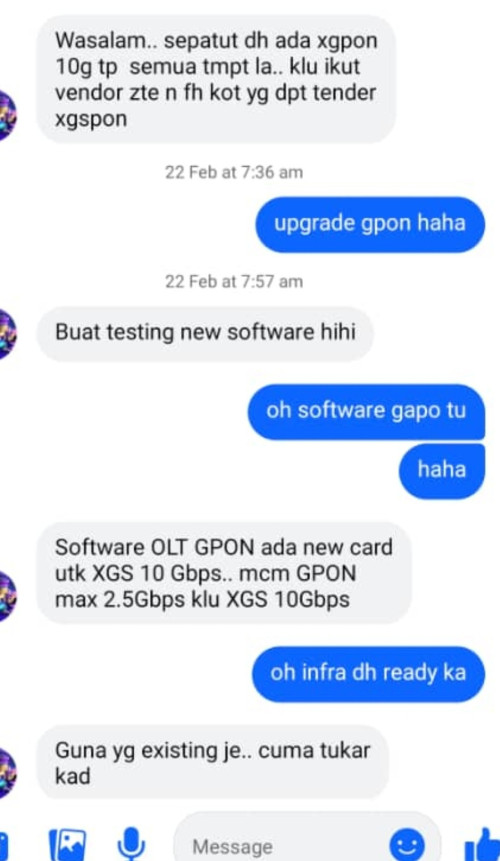
XGSPON?
What stick is it? WAS-110 or others?
kwss
post Aug 9 2025, 12:00 AM

Regular
******
Senior Member
1,208 posts

Joined: Aug 2018
QUOTE(tng55 @ Aug 8 2025, 11:49 PM)
no he use UNIFI+MAXIS i saw facebook his post
Still GPON
*
Quite a project wooooo....
Borrow whose Maxis cable from different tiang?
kwss
post Aug 9 2025, 08:13 PM

Regular
******
Senior Member
1,208 posts

Joined: Aug 2018
QUOTE(Anime4000 @ Aug 9 2025, 03:05 PM)
kwss

Maxis just under own infra, 1G plan max of that place, so, customer subs 2 maxis line

Unifi another one, 2G plan, having 4 fiber line.

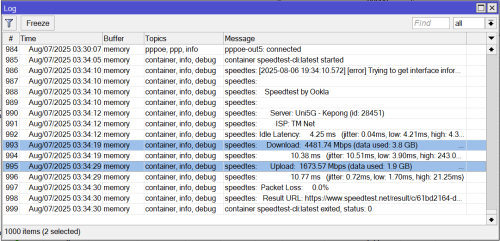
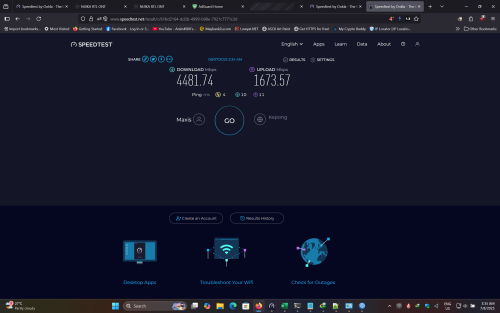
it appears, when load balance four Unifi, speed just 2.3Gbps, this clearly show thise four fiber came fron same splitter and same OLT Port.

that is why only max around 4.4Gbps download.

the client found me on China Fourms about NIJIKA Stick that I been fixing and improving, luckily he in Malaysia and invite to setup his network rack
*
People signing up for more than one PON service on one address will not get what they think they paid for.
It is just the reality of how PON works.
That's my initial thought how do you wire up your place from 2 tiang. haha
kwss
post Aug 9 2025, 08:23 PM

Regular
******
Senior Member
1,208 posts

Joined: Aug 2018
blacktubi

QUOTE(kwss @ Jan 28 2025, 04:39 AM)
Black D-Link ONR firmware v2.0.6.
Thanks to MarcoFromTropoja for the upload.

Download Link:
https://www.mediafire.com/file/9l9k0rqy5b60...dyndns.bin/file

SHA-256 sum:
d6a48264f303e2ffe9b51133b67744ea92d19e66cad7ed843109cc22c97e5106
*
kwss
post Aug 9 2025, 08:32 PM

Regular
******
Senior Member
1,208 posts

Joined: Aug 2018
QUOTE(Anime4000 @ Aug 9 2025, 08:29 PM)
That's what I been told the client,
well, as declining 2Gbps users, plan on upgrading XGSPON is far far away.

I need think another way for this issue
*
Any news on the upgrade? Heard they were testing it on live network since like last year?
kwss
post Aug 10 2025, 12:31 AM

Regular
******
Senior Member
1,208 posts

Joined: Aug 2018
QUOTE(Neptern @ Aug 10 2025, 12:07 AM)
While SG going for 10gbps for every home, we are finding excuses not to upgrade. Don't tell me costs too high.
*
Yea, Singapore has gone from GPON to XG-PON to XGS-PON while we are still at GPON
They have a mission to deploy 10G for every home starting year 2026.
Right now all telco has 10G plan under SGD100.
Viewqwest is the cheapest with 10G being the only plan they offer at SGD45 without discount. With discount is like SGD35.

All these telco talk about people don't want high speed is a propaganda so they can continue to milk you without spending extra.

Everyone want cheap and fast internet. But all these telco will have data do show that people don't need high speed internet.
kwss
post Aug 10 2025, 07:41 PM

Regular
******
Senior Member
1,208 posts

Joined: Aug 2018
QUOTE(tng55 @ Aug 10 2025, 12:27 PM)
yes overload demand 500Mbps RM90 oversales
*
QuantumEdge problem is specific to ControlD and not really have anything to do with 500Mbps, much less to do with 500Mbps at RM90.

His problem is using IPv6, TM will route him to Japan consistently while using IPv4, he get routed to Singapore.
You can confirm this with traceroute -6 and traceroute -4 to force IPv6 / IPv4.

Many server will reply with regional based IP, even though they are CDN which has anycast address range. In his case, Google will reply with a Japan youtube CDN address. Unless he watch Japanese content, those are most likely not cached and youtube is known to sucks when streaming uncached content.

So he suddenly face many issue all due to using one DNS server:
1. Far away DNS server lead to high latency in resolving IP address
2. Get an IP address from far away server that introduces the Bandwidth-Delay-Product (BDP) problem
3. Gets hit with uncached content problem due to the region predominantly consuming Japanese content.

So is this really TM problem? Yes it is.
ControlD outsource all their network to transit provider. In Singapore, it is served by AS36236 NetActuate and they peer in Equinix SG.

So using Equinix Looking Glass:
https://lg.equinixmetal.com/

IPv4:
» Click to show Spoiler - click again to hide... «


IPv6:
» Click to show Spoiler - click again to hide... «


You can clearly see that they advertise both IPv4 and IPv6 correctly. But what about their peering policy?
Looking at PeeringDB: https://www.peeringdb.com/net/4549

You can see that in Equinix SG, they peer with Route Server. TM also peer with Route Server for one of their Equinix SG link.
With this, we can confidently say that TM's BGP Optimization software steer ControlD IPv6 traffic deliberately to Japan.

However, I did not discount your saying that more people signing up for 500Mbps at RM90 affect speed. That one is at OLT port level due to TM's specific method to offer Unifi Ultra without investing in a single cent.
I think I just explain that in a follow up post.
But this specific problem ain't due to it.

kwss
post Aug 11 2025, 03:21 AM

Regular
******
Senior Member
1,208 posts

Joined: Aug 2018
QUOTE(Anime4000 @ Aug 11 2025, 02:51 AM)
Thing is, TM has planned to upgrade to 10G/XGSPON.
TM following other ISP, roll out 2Gbps plan on GPON, once enough subscribers, OLT PON Card will upgraded.

My team in Italy did this during PON Stick research, many people subscribed 2Gbps, within a year 2Gbps subscriber has reached and their ISP start upgrading and now using XGSPON.

GPON never designed to support over 1Gbps, ME 5 and 6 specifically query ONT ANI just 2488/1244 and UNI just 1GbE

However, updated GPON Standard as per CTC request, the ANI now supporting 2488/2488 symmetrical and UNI supporting 2.5GbE, this to assist ISP capital moving next PON Standard.

user posted image

Only problem in Malaysia is, TM employees told me the 2Gbps customer are in declining, shrinking... Even Government tried to support TM by giving school 2Gbps Unifi, still not enough...

there is one dude selling WiFi AP actively downgrading customer Unifi plan back to 100Mbps, this what I mad, instead solving WiFi, downgrading to 100Mbps

This very reason Malaysia going backwards when my team heard of, shame...

my client waiting XGSPON instead of using 10x Unifi, he planned to close Malaysia branch.

welp, going backwards
*
Actually your TM friend already said it very clearly, just change the line card and ONU only.
This is the most cost effective method and least amount of work.

It's the exact same method Singapore use. The difference being Singapore telco continuously upgrade their infra. I think TM still using 10G for their ring network, maybe some place still using 1G in ring network.

Total spending SGD100 million. Official press release here:
https://www.sgpc.gov.sg/api/file/getfile/Me...d%20Network.pdf

TM paid RM1.5 billion just in dividend last year, they can definitely afford this even if they roll out slowly over 3 years.

TM problem is they price their Unifi Ultra out of reach for majority of the household. People will ask a lot of questions for spending RM300 on fiber. If they are in the RM100+ range I am sure there will be taker.

It's like saying very few people buy Ferrari, hence people don't want fast car. The logic is flawed.

EDIT:
Thinking deeper, maybe TM is just waiting for government to fund the upgrade. If Singapore government fund their upgrade, why not us right?

Might as well ask for money to upgrade everything. The OLT, ring network, border router, BNG...

So in the meantime, wayang first. For the past few election, free speed upgrade and pocket money is standard. I think next election won't be different.

This post has been edited by kwss: Aug 11 2025, 04:11 AM
kwss
post Aug 11 2025, 04:12 PM

Regular
******
Senior Member
1,208 posts

Joined: Aug 2018
QUOTE(PJng @ Aug 11 2025, 03:16 PM)
kwss dns need set both IPV4 and 6?
Or just 4 enough? I try set both 4 and 6 windows 11 give error
*
By right you should set both. I don't use Windows but the following guide looks okay to me:
https://pureinfotech.com/enable-dns-over-https-windows-11/

However Windows by default only have DoH template for Google, Cloudflare and Quad9. If you want to use other DNS server as DoH, you must add the template manually.

Refer to:
https://learn.microsoft.com/en-us/windows-s...f-known-servers

After you do that in PowerShell, it should appear in the UI.

EDIT:
I think you can use "On (manual template)" instead of using the PowerShell method.

EDIT 2:
Calling all Windows user to come help with this question.

This post has been edited by kwss: Aug 11 2025, 04:21 PM
kwss
post Aug 11 2025, 04:15 PM

Regular
******
Senior Member
1,208 posts

Joined: Aug 2018
QUOTE(hsbb @ Aug 11 2025, 10:21 AM)
Can u define the screenshot the part of..
Oh software gapo tu
*
He was asking what OLT Manager software they are using.
His friend didn't exactly answer this question.
kwss
post Aug 11 2025, 05:23 PM

Regular
******
Senior Member
1,208 posts

Joined: Aug 2018
QUOTE(hsbb @ Aug 11 2025, 05:12 PM)
I mean his +606 (ISO 3166-MY05) vs gapo 😅

* or his friend maybe
*
Haiya. That one is PON thread lei... This is Unifi thread. I went and look where did you get that +606.
That one is his special privilege. He had TM tag VLAN400 for him. So I think he just tag it over his own OLT.
kwss
post Aug 11 2025, 05:57 PM

Regular
******
Senior Member
1,208 posts

Joined: Aug 2018
QUOTE(hsbb @ Aug 11 2025, 05:43 PM)
+606 is landline area code for N9/Melaka/part of johor, specifically Seremban for my reply.

Btw youtube server from my unifi.

IPv4:
172.217.25.78

IPv6:
2404:6800:4001:814::200e
*
He memang live in Seremban.
kwss
post Aug 11 2025, 08:56 PM

Regular
******
Senior Member
1,208 posts

Joined: Aug 2018
QUOTE(hsbb @ Aug 11 2025, 06:06 PM)
I know already..

Can u diagnose the routing of given ip?
*
Both IP seems to be around KL with 5ms ping time.
Direct peering with TM.

But for youtube in particular, the playback experience is not affected by the youtube.com domain.
Open your developer console, play a video, and look for googlevideo.com domain.

Example:
https://rr6---sn-uh-30aly.googlevideo.com/videoplayback? ... ... ...

This domain resolves to:
2001:e68:20db:2::11

The CDN is right inside TM network. Google has CDN inside TM and most Google traffic never leave TM's network.
As long as you are using TM or Google DNS, your experience with Google services should be top notch

19 Pages « < 8 9 10 11 12 > » Top
 

Change to:
| Lo-Fi Version
0.0250sec    0.66    7 queries    GZIP Disabled
Time is now: 11th December 2025 - 05:18 AM