Welcome Guest ( Log In | Register )

19 Pages « < 5 6 7 8 9 > » Bottom

Outline · [ Standard ] · Linear+

 Official TM UniFi High Speed Broadband Thread V43, READ 1ST PAGE FOR RELEVANT WIFI INFO!

views
     
kwss
post Jul 15 2025, 12:34 AM

Regular
******
Senior Member
1,208 posts

Joined: Aug 2018
QUOTE(heLL_bOy @ Jul 14 2025, 07:57 PM)
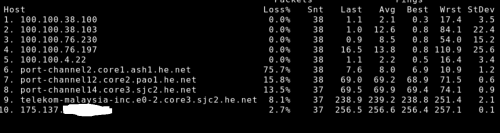
HE ingress to TM
user posted image

user posted image

user posted image
TELIA ingress to TM
user posted image

just did the test not long ago, here you go smile.gif
*
You wrote TELIA but your screenshot shows ARELION.
Here is mine from Arelion:
CODE

Router: ash-b2 / Ashburn (Equinix)
Command: traceroute ipv4 115.134.x.x timeout 1 source Loopback0

Tracing the route to 115.134.x.x

1   *
   ash-bb2-link.ip.twelve99.net (62.115.141.51) 2 msec  1 msec
2   *  *
   ewr-bb2-link.ip.twelve99.net (62.115.136.200) 6 msec
3  chi-bb2-link.ip.twelve99.net (62.115.132.135) 70 msec  *  *
4   *  *  *
5  den-bb2-link.ip.twelve99.net (62.115.140.185) 43 msec
   den-bb2-link.ip.twelve99.net (62.115.137.114) 297 msec
   den-bb2-link.ip.twelve99.net (62.115.140.185) 43 msec
6   *  *  *
7   *  *  *
8   *  *  *
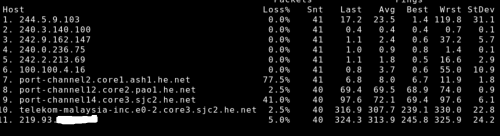
9  telekom-malaysia-inc.e0-2.core3.sjc2.he.net (64.71.148.166) 238 msec  238 msec  238 msec
10  *  *  *
11 115.134.179.x.x msec  278 msec  247 msec


Notice Arelion dump my traffic to HE as well on the exact same router. Latency okay.
Everything else is blinded from MPLS circuit, shortcut straight to the BNG.

But this is a different problem from your Singapore egress. That one is because it route to France.
Mine:
CODE

core2.sin1.he.net> traceroute 115.134.x.x source 216.218.252.9
 traceroute to 115.134.x.x (115.134.x.x), 30 hops max, 60 byte packets
1  * * *
2  10.55.108.155 (10.55.108.155)  43.783 ms  47.473 ms  44.243 ms
3  10.55.108.98 (10.55.108.98)  45.484 ms  44.574 ms  45.222 ms
4  10.55.52.27 (10.55.52.27)  39.889 ms  39.836 ms  50.679 ms
5  * * *
6  115.134.x.x (115.134.x.x)  45.348 ms  45.702 ms  52.435 ms


Yours:
CODE

core2.sin1.he.net> traceroute 175.136.0.0  source 216.218.252.9
 traceroute to 175.136.0.0 (175.136.0.0), 30 hops max, 60 byte packets
1  * * *
2  216.66.89.226 (216.66.89.226)  170.901 ms  170.793 ms  170.944 ms <- telekom-malaysia-inc.e0-33.switch1.mrs1.he.net
3  * * *
4  * * *

MRS = ICAO airport code

BGP Output:
CODE

core2.sin1.he.net> show ip bgp routes detail 175.136.0.0
 Number of BGP Routes matching display condition : 4
Status A:AGGREGATE B:BEST b:NOT-INSTALLED-BEST C:CONFED_EBGP D:DAMPED
      E:EBGP H:HISTORY I:IBGP L:LOCAL M:MULTIPATH m:NOT-INSTALLED-MULTIPATH
      S:SUPPRESSED F:FILTERED s:STALE x:BEST-EXTERNAL
RPKI State V: Valid I: Invalid N: Not found ?: Undefined
1         Prefix: 175.136.0.0/18, Rx path-id:0x00000000, Tx path-id:0x039e0001, rank:0x00000001,  Status: BI,  Age: 4d10h23m33s
        NEXT_HOP: 216.66.89.226, Metric: 1364, Learned from Peer: 216.218.253.52 (6939)
         LOCAL_PREF: 140,  MED: 0,  ORIGIN: igp,  Weight: 0,  RPKI State: N, GROUP_BEST: 1
        AS_PATH: 4788
           COMMUNITIES: 6939:1000 6939:1111 6939:7384 6939:8250 6939:9002
2         Prefix: 175.136.0.0/18, Rx path-id:0x00000000, Tx path-id:0x039a0001, rank:0x00000002,  Status: I,  Age: 4d10h48m22s
        NEXT_HOP: 64.71.148.166, Metric: 1765, Learned from Peer: 216.218.252.199 (6939)
         LOCAL_PREF: 140,  MED: 0,  ORIGIN: igp,  Weight: 0,  RPKI State: N, GROUP_BEST: 0
        AS_PATH: 4788
           COMMUNITIES: 6939:1000 6939:1111 6939:7309 6939:8840 6939:9001
3         Prefix: 175.136.0.0/18, Rx path-id:0x00000000, Tx path-id:0x039f0001, rank:0x00000003,  Status: I,  Age: 4d10h45m23s
        NEXT_HOP: 64.71.148.166, Metric: 1765, Learned from Peer: 216.218.253.63 (6939)
         LOCAL_PREF: 140,  MED: 0,  ORIGIN: igp,  Weight: 0,  RPKI State: N, GROUP_BEST: 0
        AS_PATH: 4788
           COMMUNITIES: 6939:1000 6939:1111 6939:7309 6939:8840 6939:9001
4         Prefix: 175.136.0.0/18, Rx path-id:0x00000000, Tx path-id:0x03210001, rank:0x00000004,  Status: Ex,  Age: 4d12h5m7s
        NEXT_HOP: 74.82.46.50, Metric: 0, Learned from Peer: 74.82.46.50 (4788)
         LOCAL_PREF: 140,  MED: 0,  ORIGIN: igp,  Weight: 0,  RPKI State: N, GROUP_BEST: 1
        AS_PATH: 4788 4788
           COMMUNITIES: 6939:1000 6939:7282 6939:8702 6939:9003
      Last update to IP routing table: 4d10h23m33s


From here, you can see path 1 is chosen BUT the optimal path is actually path 4!
So bring this up to HE.

Finally, I want to stress that you must separate your problem down to individual endpoint. You see HE, you lump them all into one problem. In reality they are distinct problem with a different root cause.
kwss
post Jul 15 2025, 12:39 AM

Regular
******
Senior Member
1,208 posts

Joined: Aug 2018
QUOTE(go626201 @ Jul 14 2025, 09:25 PM)
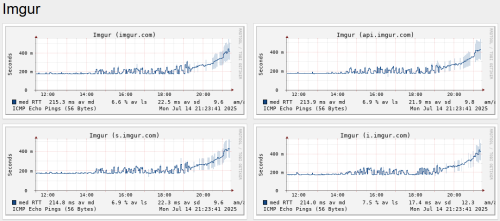
Unifi to Imgur with 70+% packet loss.
user posted image

Does anyone know which submarine cable down causing the issue? (Looks like TM switch the routing on 9 June 2025)
*
Unable to diagnose due to no known Looking Glass along the path:
CODE

traceroute to imgur.com (199.232.192.193), 30 hops max, 60 byte packets
1  _gateway (192.168.88.1)  0.443 ms  0.513 ms  0.375 ms
2  115.134.191.254 (115.134.191.254)  2.719 ms  4.448 ms  2.749 ms
3  * * *
4  * * *
5  * * *
6  * * *
7  199.232.192.193 (199.232.192.193)  168.060 ms  167.876 ms  167.852 ms

But seems fine to me??? At least for my IP address.
Excuse all the stars because I implement RFC6890 filtering on my routing table with strict Reverse Path Filtering.
kwss
post Jul 15 2025, 12:43 AM

Regular
******
Senior Member
1,208 posts

Joined: Aug 2018
QUOTE(HayateAyakasi8 @ Jul 14 2025, 08:16 PM)
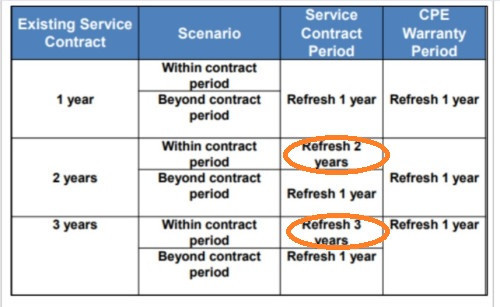
lol so now i gotta pay to fix tm's shitty hardware problem?
Unless TM allow us to use our own devices, how is this fair?  blink.gif
*
QUOTE(issac99289928 @ Jul 14 2025, 11:14 PM)
user posted image

seems unfair if the combo is dead near the end of service period.
*
Their tactic is they don't want to sell you any ONR. They want you to keep renewing contract.
I think there is certain KPI that they set internally about subscriber base and they are doing everything they can to game the number.
kwss
post Jul 15 2025, 01:40 AM

Regular
******
Senior Member
1,208 posts

Joined: Aug 2018
QUOTE(hsbb @ Jul 15 2025, 01:05 AM)
If already out of contract & can downgrade to let say 100mbps with renew 24mth BUT still no new cpe. Better terminate the account & register new 100mbps. Same 24mth contract but new installation with new cpe.

Can see how many who successfully 500mbps@RM90 get new cpe. Whoever get it because not getting replacement for a long time.
*
That's exactly the point!
They want you to renew contract at your current price, not cheaper price.
When your ONR died, you are suddenly in a network emergency and probably won't go shopping.
Then there are the majority who don't know networking. You cannot exactly buy an ONU brand new, it has to be used market. So this is something the majority won't get when walking into a computer shop.
After acquiring a used ONU, you still need to deal with the PLOAM password.

See where I am going? TM is happy if you just call them up, they send someone for free diagnostic, you get a new hardware, just 2 years contract again. Same price. You lose nothing.

How many people can differentiate an ONU with ONR? Most people never even heard of those 3 letter words. They are not FBI CIA

Go on the street and ask how many are aware of SWU. This term is very specific to this thread and TM.

Don't forget from the customer's perspective, they are getting a free on-site service without any additional headache.

Even I don't layan all the problem people post here. Teaching non-tech people to diagnose stuff is a headache itself

This post has been edited by kwss: Jul 15 2025, 01:44 AM
kwss
post Jul 15 2025, 01:47 AM

Regular
******
Senior Member
1,208 posts

Joined: Aug 2018
QUOTE(heLL_bOy @ Jul 15 2025, 01:42 AM)
my screenshot test all is using AWS EAST region itself, not any third party ip transit result. Because each provider will have different router host and different BGP community connecting it cannot be same.

And above tested ip TM egress is using AS1299 not even using AS6939.
*
Yo man you cannot be serious. It clearly shows they traverse the exact same router with exact same IP.

I even drill down the problem to be specific enough for you to report to NOC, both TM and HE.

I don't know what you want. I'm giving free diagnostic to you and but keep spinning and spinning with different thing.
kwss
post Jul 15 2025, 01:57 AM

Regular
******
Senior Member
1,208 posts

Joined: Aug 2018
QUOTE(go626201 @ Jul 15 2025, 01:53 AM)
From the smokeping showing it will occurs at 6pm-11.30pm every night.
And the latency get higher after 9 June 2025.
*
If I remember it tomorrow I check again.
But seems like TM have direct peering with Fastly.
So congestion is likely to be the cause.
Given the date, it could be they changed some of their MPLS circuit.
The time of day that it happens align with peak evening usage aka high traffic.
kwss
post Jul 15 2025, 02:34 AM

Regular
******
Senior Member
1,208 posts

Joined: Aug 2018
QUOTE(heLL_bOy @ Jul 15 2025, 02:00 AM)
i just provide what i see as a proof, not any third party result as proof and showing different things.

thanks for your free diagnostic, maybe we are on different views on this matter.
*
#roflol
What a clown. As if I make shit up when everyone can query HE and Arelion Looking Glass to reproduce the exact diagnostic.

You only know how to spew AS number and screenshot MTR.
See HE, salah TM.
Like the old gang, see ipv6, salah ipv6.
Keyword mesti ada.
kwss
post Jul 15 2025, 05:24 AM

Regular
******
Senior Member
1,208 posts

Joined: Aug 2018
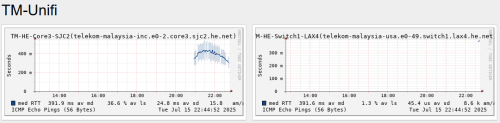
go626201
Can request you to add another endpoint to your smokeping?

IP: 64.71.148.166
Internal DNS: telekom-malaysia-inc.e0-2.core3.sjc2.he.net

I did 1000 pings and...
CODE

--- 64.71.148.166 ping statistics ---
1000 packets transmitted, 1000 received, 0% packet loss, time 181207ms
rtt min/avg/max/mdev = 179.551/181.318/209.262/2.334 ms, pipe 2, ipg/ewma 181.388/182.484 ms

kwss
post Jul 15 2025, 10:58 PM

Regular
******
Senior Member
1,208 posts

Joined: Aug 2018
QUOTE(go626201 @ Jul 15 2025, 10:45 PM)
Thanks.
I confirmed all traffic traversing Equinix SV1 is congested, including imgur.
TM only have 40Gbps for this link, definitely not gonna cut it.

Also SGIX ingress is congested. Same problem as last week.
kwss
post Jul 16 2025, 01:52 AM

Regular
******
Senior Member
1,208 posts

Joined: Aug 2018
QUOTE(Anime4000 @ Jul 16 2025, 01:44 AM)
kwss blacktubi
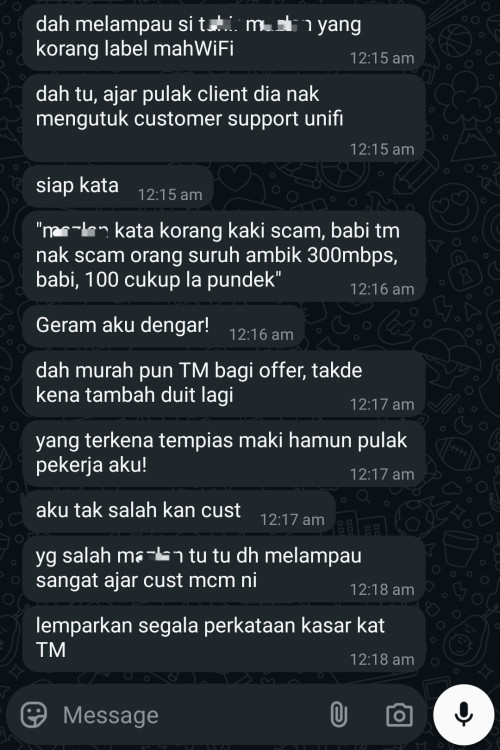
This mahWiFi already out of bound? telling 300Mbps is a scam? plus teach their client like this

user posted image

I become proxy who hate mahWiFi now... what... hahaha...
*
Says the guy who sell expensive AP.
There are so many cheaper brand to buy, why must buy his expensive brand? Macam scam also.
Did he actually sell the Director? Ruckus One or tell his customer Unleashed is enough?

Wait... So they are reseller for which ISP? I can roughly see the trick here.

EDIT:
Even 802.11ac can support way more than 100mbps.
Drop a bit to 802.11n barely can do it but should still be workable.

This post has been edited by kwss: Jul 16 2025, 01:55 AM
kwss
post Jul 16 2025, 02:25 AM

Regular
******
Senior Member
1,208 posts

Joined: Aug 2018
QUOTE(Anime4000 @ Jul 16 2025, 02:11 AM)
There is full discuss about this in Discord server.

I just don't want TM irritated,

currently I am at Indonesia, experimenting NIJIKA with various ISP

mostly their ISP full ONU Lockdown, Admin login just user level, hack via UART, enter su_wap, ask for token access

only can change is WiFi settings, everything else is lock.

If TM gets irritated by mahWiFi marketing like this, TM will remove our freedom and follow Indonesia ISP:
1. Block Admin login
2. Block ONU change
3. Block Bridge mode
4. Withheld PPPoE Password
5. 100% OMCI Control
6. 100% TR069 Control
7. Fuck Freedom: No custom DNS for you
8. Fuck Freedom: Blackhole known DNS IP

seeing TM giving out ONR now, it's something...
*
What's your relationship with them them? Business partner? Reseller of your product?

It is true TM still has the most freedom when it comes to equipment but I won't really worry the freedom will be totally gone.
Reason being they are still built on ITU standard. How many proprietary OMCI you can use right?
Once the set of proprietary OMCI went live, it is almost impossible to change without breaking every existing ONU / ONR. It will then be just a matter of time to fully reverse engineer all of them.

Every new generation of PON is more well-defined, meaning eventually they will reach the ubiquity of Ethernet + 802.1x.
GPON is really first gen stuff. A few more generations later no telco will want proprietary stuff anymore.

When GPON first came to market, cross-vendor compatibility was not a thing. Today it's so different.
I have a suspicion Indo is still using those very old stuff.

Worst case scenario I pay Elon Musk for Starlink.

EDIT:
Oh ya, I have a suspicion Indo government is spying on their citizen as well. What's the best way to spy on them online?

Chinese TV maker Skyworth under fire for excessive data collection that users call spying
https://www.scmp.com/tech/policy/article/31...ollection-users

The same Skyworth is now making ONR.

This post has been edited by kwss: Jul 16 2025, 02:38 AM
kwss
post Jul 16 2025, 11:59 AM

Regular
******
Senior Member
1,208 posts

Joined: Aug 2018
QUOTE(xproc @ Jul 16 2025, 09:09 AM)
old office using old plan is paying more... (old plan 20mbps rm899)

regarding my static ip setting, should i setting like this?
*
I don't have direct answer regarding how to setup static IP for your device. You can stop reading right now to save your time if this is what you must do.

If not, I suggest you just cancel your static IP and save the money as you don't need it. People who need it should already know exactly what they need it for and how to set it up.

Case 1: Increase NAT session
If you have like 500 staff and they are all using the internet heavily, there's a chance the NAT will run out of port to map and have to drop session.
It's not the static IP that help you in this case, rather the ability to assign more than 1 IP address for the NAT session.
To my knowledge only Enterprise grade router allows this setup.
BUT... You already have 2 account for your company, so assuming you spread the usage evenly, you are looking at 1000 staff to even start worrying.

Case 2: You host your own authoritative DNS server.
If this is the case, you need 2 ISP accounts, both with the so called static IP package.
One address from each ISP will then point to 2 different DNS server.
For this setup, it's preferably you have 2 physically separated location as well. In case of flood, power outage, etc, it will only bring down one server.
Keyword here is Authoritative. If you never heard of this term before, this is not your use case.

Case 3: You run your own MX
Sorry, getting lazy to explain. Never heard of this term? Not your use case.

Case 4: You host stuff
It's year 2025 already, Cloudflare tunnel or dynamic DNS is the way to go, not some expensive number.
You can use Caddy as reverse proxy to serve multiple sub-domain, even wildcard domain.

I'm sure there are other use cases but they get progressively niche.

EDIT:
You can say I look down on that Skyworth router.
I think it will die before you hit 60k NAT session. Meaning the router will go before it can fully utilize all the available ports in a single IP address.

This post has been edited by kwss: Jul 16 2025, 12:08 PM
kwss
post Jul 16 2025, 12:14 PM

Regular
******
Senior Member
1,208 posts

Joined: Aug 2018
QUOTE(Anime4000 @ Jul 16 2025, 12:00 PM)
with mahWiFi? now as enemies
with TM and others? partner, TM like what I do with NIJIKA GPON

people see me high regards as I always chase high speed with SFP oppose to low speed.
*
LMAO.
Then just laugh them off.
Seriously what are the odds people have the cash for Ruckus but don't know shit.
Not saying Ruckus is bad but I don't think this brand is that popular in Malaysia.

Also they only shine if you don't perform proper site survey, meaning there are a lot of blindspot in the deployment.

For a properly done survey and deployment, I dare say almost every brand perform equally, barring any compatibility issue.
kwss
post Jul 16 2025, 07:54 PM

Regular
******
Senior Member
1,208 posts

Joined: Aug 2018
QUOTE(xproc @ Jul 16 2025, 01:09 PM)
i just the middleman try help around because we dont have dedicated IT personnel and my office is mnc but small setup in msia (less than 50 workstation)

my IT will come from vietnam to setup the mx but still using the skyworth to dial, my fren ask me dial from mx also but i want to use the skyworth to dial because i have another device want to connect outside mx

have second line because in case the first is not working and not configurable from local end, we still got the second line that dont have the fw setting that we do not have control in local office

for the monthly commitment we paid, the isp fee is the lowest (compared to others fees)

in current office 20mbps it is connected using the static ip method that dialed using rgx4400 modem, i know that the mx is more suitable to dial but later we wont have admin access locally if anything is down

for these IT stuff it is not my trades i just learn and smoothen the migration process (from checkpoint to sdwan)
*
MX = Mail Exchanger.
If you don't have IT team here, you won't have a mail server here. Plus I think TM block port 25 by default.

Sure it's the cheapest expenditure. If you don't use it, you don't even need the human capital expenses but up to you.

This is the first time I heard people get 2 physical line from the exact same ISP as backup. I won't even consider this backup.

For proper backup, it must be from 2 different ISP that don't share infrastructure, or at least dont share the same physical infrastructure. In your case the backup should be using 5G mobile or another ISP that don't use TM infra.

Also if you can get Time, Maxis or Allo fiber, you must make sure the fiber enter from different side of the building and don't share the same man hole / cable run along the path.

This is to prevent construction from cutting both fiber at the same time.

Just get 5G as backup if you cannot make sure of that.

EDIT:
What appliances you are using for SD-WAN? That should be the router and everything should be configured there.
This Skyworth should just run in bridge mode.

EDIT 2:
If your primary link is down, all your workload dependent on that static IP is dead as well. Doesn't exactly sounds useful or desirable. If you host stuff, I still insist Cloudflare Tunnel is a better way to do things. At least it works across multiple link without running your own ASN.
Even dynamic DNS updater running on your server can redirect to your backup link if your primary is dead.

This post has been edited by kwss: Jul 16 2025, 08:21 PM
kwss
post Jul 16 2025, 09:58 PM

Regular
******
Senior Member
1,208 posts

Joined: Aug 2018
xproc
Since you are here with static IP package, I wonder if you can test for all of us if static IP package also includes static IPv6 prefix, or is it just IPv4.

Steps:
Connect directly to the Skyworth with static IP package.
Go to https://whatismyipaddress.com/
Note down the IPv6 address.
Power off the router and turn it on again.
Wait like 2 minutes for RA to do its work
Visit the website again.

Compare the before and after IPv6 address and check if the first 4 octets is is the same.

Example
A : B : C : D : E : F : G : H
Numbers in the group A to D must be exactly the same.
kwss
post Jul 16 2025, 10:59 PM

Regular
******
Senior Member
1,208 posts

Joined: Aug 2018
QUOTE(hsbb @ Jul 16 2025, 10:49 PM)
I forget to ask him about it since he started with how to config. With default config (without manual ip config) he should get randomly 1 of 5 subnet pool ip reserved for him everytime pppoe session reboot.
*
Actually configuration wise it's simple but I cannot give a step by step guide for individual device.

The first address is always the default gateway which you cannot use since it's used by TM.
The final address is the broadcast which is a total waste of address space. IPv6 no longer have this design pitfall.

So you can configure the remaining address as you like, normally just statically configure them in the router for addresses that need to be part of NAT pool.

For the remainders, you just use snat and dnat to translate then between external and internal IP.

You can also just use dnat and this gives you a lot of granularity since you are working at port forwarding.

In other country that don't use PPPoE, there's more elegant way to do it but just focus on the Unifi way for now
kwss
post Jul 16 2025, 11:17 PM

Regular
******
Senior Member
1,208 posts

Joined: Aug 2018
QUOTE(hsbb @ Jul 16 2025, 11:06 PM)
The reason I like leased line than pppoe for static ip configuration.
*
The modern day leased line is Metro Ethernet.
No sharing of last mile. Your neighbor cannot kill the whole taman by just plugging in a rogue ONU. No BNG. No HQoS.

TM can also run you 2 different fiber for redundancy, from 2 different POP and entry point. Not need to deal with multiple carrier and IP address from 2 different service.

I suspect his old RM899 for 30Mbps is this kind of service. But I don't know for sure.
kwss
post Jul 17 2025, 10:06 PM

Regular
******
Senior Member
1,208 posts

Joined: Aug 2018
QUOTE(xproc @ Jul 17 2025, 09:49 PM)
the static ip i think for ip4 only, for ip6 the settings is auto, no fixed ip is given
*
Once you are on static IP package, you will get static IP regardless of your setting.
The only different is by using manual setting you can configure which IP do what.

If you are using Meraki, then set the Skyworth to bridge mode and do everything on the Meraki, including all the static IP configuration.
Since you already committed to 2 years for 2 lines, might as well let half the office use the other line instead of configuring it as backup.
kwss
post Jul 17 2025, 10:10 PM

Regular
******
Senior Member
1,208 posts

Joined: Aug 2018
QUOTE(xproc @ Jul 17 2025, 10:05 PM)
my first line is 2gbps connect to mx67 then connect to ms130-48 and ms130-24p then connect to 2 nos cw91641-mr, all the meraki follow the spec by my group IT guide and still need to pay monthly fees for the license which is way more expensive than the unifi fees

the second line is also 2gbps connect to ux7 later and then connect to existing 2 nos uap-ac-lr later

our office is open office around 5000 sqf
*
The MX67 is only rated for 700Mbps bro.
You should have just taken 500Mbps Unifi instead.
- or -
Buy a better Meraki
kwss
post Jul 17 2025, 10:19 PM

Regular
******
Senior Member
1,208 posts

Joined: Aug 2018
Anime4000
Since I am thinking about WiFi 7, I went and compare Cisco 9172I and Ruckus R670.
Spec wise both are same and on the same league. R670 has a 5Gbps port vs Cisco 2.5Gbps. That's about it. Nothing earth shattering.

The price however... Ruckus is more than 2x.
Cisco:
https://www.cdw.com/product/cisco-wireless-...7-bluet/8263718

Ruckus:
https://www.cdw.com/product/ruckus-r670-wi-...s-point/7753728

19 Pages « < 5 6 7 8 9 > » Top
 

Change to:
| Lo-Fi Version
0.0258sec    0.92    7 queries    GZIP Disabled
Time is now: 10th December 2025 - 02:53 PM