hi traveller, both of ur displays are aredi HD capable, its a waste to play DVD contents on them
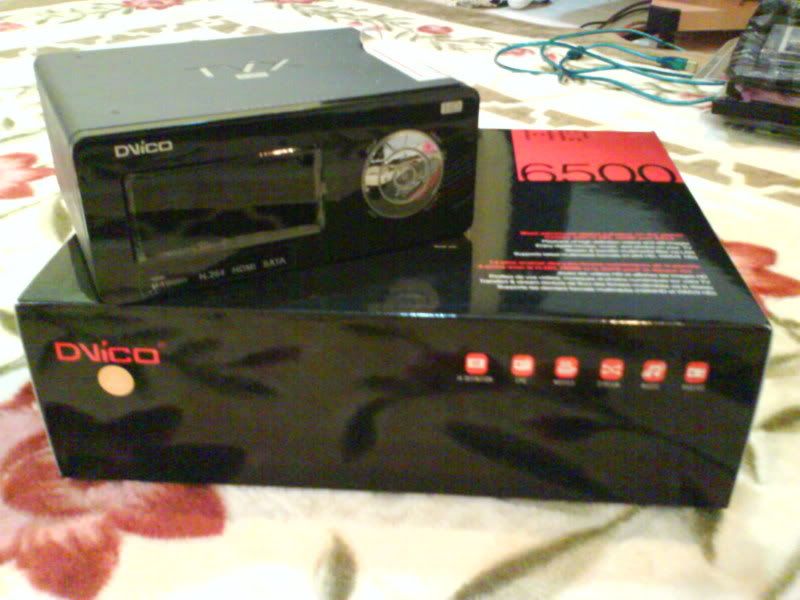
Dvico TViX media player owner, pls come in
Dvico TViX media player owner, pls come in
|
|
 Mar 28 2009, 10:44 AM Mar 28 2009, 10:44 AM
|
 
All Stars
11,811 posts Joined: Jun 2006 
|
hi traveller, both of ur displays are aredi HD capable, its a waste to play DVD contents on them
|
|
|
|
|
|
Mar 28 2009, 05:45 PM
|
 
Elite
811 posts Joined: Jan 2003 From: Aemon's Field 
|
QUOTE(rx330 @ Mar 28 2009, 10:44 AM) hi traveller, both of ur displays are aredi HD capable, its a waste to play DVD contents on them Ah, I meant my displays aren't HD 1080p capable. I don't have HD 720p content, as most of my DVDs are 720x480. I would like HD content, but I prefer to skip straight to 1080 (and downscale to 720 for any older displays if needed) but that entails upgrading my projector and LCD TV which is low on my priority list at the moment. So I've decided to upgrade my equipment on a phased basis, the speed of which depends on my bank account balance which will be suffering a lot this year due to poor economic conditions worldwide.   |
|
|
Mar 29 2009, 10:54 AM
|

Senior Member
1,733 posts Joined: Jan 2003 From: Penang 
|
anyone using dvico with Aztech homeplug and stream video via homeplug from a pc ?
I also bought Vantec hardisk docking station with esata, and plan to use it with dvico? Will both option facing problem (before I buy dvico)? |
|
|
Mar 29 2009, 12:04 PM
|
|
Elite
811 posts Joined: Jan 2003 From: Aemon's Field
|
QUOTE(dopp @ Mar 29 2009, 10:54 AM) anyone using dvico with Aztech homeplug and stream video via homeplug from a pc ? Not sure about the homeplug bandwidth as I have seen many different speeds advertised for homeplugs (I think fastest I saw was 200Mbps). I have however successfully tested 3 simultaneous video streams on my gigabit network:I also bought Vantec hardisk docking station with esata, and plan to use it with dvico? Will both option facing problem (before I buy dvico)? 1. DVD rip from Synology DS408 NAS to Dvico 6500a 2. AVI from the same DS408 NAS to PC#1 3. AVI from D-Link DNS-323 NAS to PC#2 For your 2nd question. DVico 6500a does not have eSATA port, and you will need to use the USB connection on your Vantec. I haven't tried the USB option on the DVico as I am using a HDD installed in the DVico as well as streaming via LAN. There are other DVico models however, which I am not familiar with (Tried to go to their website to find details but streamyx is acting up today and can't seem to access the site). |
|
|
Mar 29 2009, 02:37 PM
|

Senior Member
503 posts Joined: Jan 2003 From: P.J.
|
yes u can use the vantec harddisk docking station, but with usb to the dvico..(as dvico no esata)
a lot of my customers do that... and love it..(easier to pass media to them by buying cheap harddrives) just like the old days with 8 track cassettes tapes.. QUOTE(dopp @ Mar 29 2009, 10:54 AM) anyone using dvico with Aztech homeplug and stream video via homeplug from a pc ? I also bought Vantec hardisk docking station with esata, and plan to use it with dvico? Will both option facing problem (before I buy dvico)? Added on March 29, 2009, 7:07 pmNew beta firmware out for dvico.. v1.3.110 seems can do chapter search on mkv.. » Click to show Spoiler - click again to hide... « This post has been edited by andyz: Mar 29 2009, 07:07 PM |
|
|
Mar 30 2009, 09:56 AM
|
|
Junior Member
104 posts Joined: Oct 2007
|
hey guys, sorry to interrupt the ongoing discussion but i've been facing this weird problem with my TVIX.
I've been using the M7000 for about a month now and have been facing this particular problem. I am not sure if it is a setting which I did not turn on/off or my unit is faulty. Whenever I play HD content, for example 720p/1080p BD x264 mkv files...the audio works perfectly fine through my receiver. However, whenever I play normal content(non HD), for example..the TV series I downloaded or those movies by Axxo, Klaxxon etc., the audio will suddenly just pop, crackle and hiss after a certain period of playback time. The only way to get back the normal audio from the content I'm watching is by switching the source on my receiver to something else(eg tuner or aux), then quickly switch back to digital in, which is where the tvix connected. I actually timed it and this occurs roughly every 5 minutes or so of clear playback before the audio goes to hell and I've to do the source switching thing. I'm running the latest firmware 1.3.74F, HDMI cable from the tvix to my LCD TV for video, and digital coax for audio. Hope you guys could give me some advice on this. It's no fun watching a movie/series with one hand clutching the receiver's remote, finger ready to switch to another audio source whenever the audio pops and crackles without warning. thanks in advance. |
|
|
|
|
|
Mar 30 2009, 10:04 AM
|

Senior Member
1,314 posts Joined: Dec 2008 From: Kuching, Sarawak
|
mavric:
does your amp able to recieve HDMI input? i had my friends Dvico6500 hooked up to my Onkyo amp via HDMI cable for video and sound, and was able to get clean sound from 1080/720p mkvs, mp3s and "crap" mpgs and avis |
|
|
Mar 30 2009, 10:09 AM
|
|
Junior Member
199 posts Joined: Sep 2005
|
QUOTE(dopp @ Mar 29 2009, 10:54 AM) anyone using dvico with Aztech homeplug and stream video via homeplug from a pc ? Home plug is not stable and most user experied frequent DC. Better option would be getting a DD-WRT compatible router to make it work as wireless client.I also bought Vantec hardisk docking station with esata, and plan to use it with dvico? Will both option facing problem (before I buy dvico)? |
|
|
Mar 30 2009, 10:14 AM
|
|
Senior Member
1,314 posts Joined: Dec 2008 From: Kuching, Sarawak
|
Good morning fellas,
Pardon my newbieness in all of this... Am contemplating getting a Dvico 6500 for the old man. Thing is I have a couple of TB of movies and such on my Desktop PC. My room is on the other side of the house. Currently using some D-Link wireless for Wi-Fi, but that has crap range so i'm looking to upgrade to a n-router (if that helps) Would I somehow be able to share my files with the Dvico via some sort of wireless connection? Saves me lots of $$$ on purchasing seperate Hard Drives for the Dvico just to have my Desktop's content on the player... |
|
|
Mar 30 2009, 10:18 AM
|
|
Senior Member
503 posts Joined: Jan 2003 From: P.J.
|
don't know whether this helps but dvico firmware update did mention this :
** If you play files with HD audio tracks like Dolby TrueHD, , Dolby Digital Plus, DTS-HD MA or LPCM, you better turn on HD Audio pass through on the setup even though you don't have a receiver that supports decoding of these formats. Otherwise, you will hear strange noise with some repetitive popping noise. Currently, we don¡¯t support core decoding, if you don't have a HD audio decoder receiver, you need to select other then these HD audio tracks audio track for now. QUOTE(mavric @ Mar 30 2009, 09:56 AM) hey guys, sorry to interrupt the ongoing discussion but i've been facing this weird problem with my TVIX. I've been using the M7000 for about a month now and have been facing this particular problem. I am not sure if it is a setting which I did not turn on/off or my unit is faulty. Whenever I play HD content, for example 720p/1080p BD x264 mkv files...the audio works perfectly fine through my receiver. However, whenever I play normal content(non HD), for example..the TV series I downloaded or those movies by Axxo, Klaxxon etc., the audio will suddenly just pop, crackle and hiss after a certain period of playback time. The only way to get back the normal audio from the content I'm watching is by switching the source on my receiver to something else(eg tuner or aux), then quickly switch back to digital in, which is where the tvix connected. I actually timed it and this occurs roughly every 5 minutes or so of clear playback before the audio goes to hell and I've to do the source switching thing. I'm running the latest firmware 1.3.74F, HDMI cable from the tvix to my LCD TV for video, and digital coax for audio. Hope you guys could give me some advice on this. It's no fun watching a movie/series with one hand clutching the receiver's remote, finger ready to switch to another audio source whenever the audio pops and crackles without warning. thanks in advance. |
|
|
Mar 30 2009, 10:18 AM
|
|
Junior Member
104 posts Joined: Oct 2007
|
QUOTE(yonggoh @ Mar 30 2009, 11:04 AM) mavric: nope. amp does not have hdmi port. does your amp able to recieve HDMI input? i had my friends Dvico6500 hooked up to my Onkyo amp via HDMI cable for video and sound, and was able to get clean sound from 1080/720p mkvs, mp3s and "crap" mpgs and avis for audio, i'm using digital coax to my amp. for video, hdmi to lcd. the thing which puzzles me is...both audio+video is perfect when running HD content, but for non-HD content, including MP3s...the audio cracks and pops after 5 mins or so of playback. Added on March 30, 2009, 10:22 am QUOTE(andyz @ Mar 30 2009, 11:18 AM) don't know whether this helps but dvico firmware update did mention this : thanks for pointing that out. i have seen that statement too.** If you play files with HD audio tracks like Dolby TrueHD, , Dolby Digital Plus, DTS-HD MA or LPCM, you better turn on HD Audio pass through on the setup even though you don't have a receiver that supports decoding of these formats. Otherwise, you will hear strange noise with some repetitive popping noise. Currently, we don¡¯t support core decoding, if you don't have a HD audio decoder receiver, you need to select other then these HD audio tracks audio track for now. i tried various combinations of the settings mentioned above. the statement above suggest i should turn on HD audio pass through when playing HD content. i am not facing any issues playing HD content. the hair tearing is with non-HD content. sigh. This post has been edited by mavric: Mar 30 2009, 10:22 AM |
|
|
Mar 30 2009, 10:25 AM
|
|
Senior Member
503 posts Joined: Jan 2003 From: P.J.
|
does it pop when you using normal composite cables.. (red and white)
QUOTE(mavric @ Mar 30 2009, 10:18 AM) nope. amp does not have hdmi port. for audio, i'm using digital coax to my amp. for video, hdmi to lcd. the thing which puzzles me is...both audio+video is perfect when running HD content, but for non-HD content, including MP3s...the audio cracks and pops after 5 mins or so of playback. Added on March 30, 2009, 10:22 am thanks for pointing that out. i have seen that statement too. i tried various combinations of the settings mentioned above. the statement above suggest i should turn on HD audio pass through when playing HD content. i am not facing any issues playing HD content. the hair tearing is with non-HD content. sigh. |
|
|
Mar 30 2009, 10:51 AM
|
|
Senior Member
1,314 posts Joined: Dec 2008 From: Kuching, Sarawak
|
mavric,
Maybe if you have a Coaxial instead of Optical you could give that a shot? |
|
|
|
|
|
Mar 30 2009, 12:26 PM
|
|
Junior Member
104 posts Joined: Oct 2007
|
QUOTE(andyz @ Mar 30 2009, 11:25 AM) does it pop when you using normal composite cables.. (red and white) yea good suggestion. i think i'll try connecting composites through my amp and see how. just to be safe i'll let the hdmi handle both audio and video directly to my lcd. will post the updates later once i get round to doing it. thanks.Added on March 30, 2009, 12:27 pm QUOTE(yonggoh @ Mar 30 2009, 11:51 AM) mavric, err..not quite sure what you meant. i am using coaxial all the while. never optical as amp does not have it.Maybe if you have a Coaxial instead of Optical you could give that a shot? This post has been edited by mavric: Mar 30 2009, 12:27 PM |
|
|
Mar 30 2009, 12:29 PM
|
|
Elite
811 posts Joined: Jan 2003 From: Aemon's Field
|
QUOTE(yonggoh @ Mar 30 2009, 10:14 AM) Good morning fellas, Well according to the spec sheet, you can get 802.11g wireless but it's optional. In the FAQ it says:Pardon my newbieness in all of this... Am contemplating getting a Dvico 6500 for the old man. Thing is I have a couple of TB of movies and such on my Desktop PC. My room is on the other side of the house. Currently using some D-Link wireless for Wi-Fi, but that has crap range so i'm looking to upgrade to a n-router (if that helps) Would I somehow be able to share my files with the Dvico via some sort of wireless connection? Saves me lots of $$$ on purchasing seperate Hard Drives for the Dvico just to have my Desktop's content on the player... QUOTE Wifi support You can attache USB Wifi adapters for Wifi connection. However, the compatible adapters are limited. Please check the exact model. a. You can choose the default network between Wired and Wireless. b. The list of compatible list i. D-Link DWL-G122 (HW ver. C1) ii. Linksys WUSB54GC For the detail, please check the manual. [ PDF / AVI ] We are checking more module to support, but not sure about thre result. Due to the HW limit, TVIX only support 64bit WEP or non encryption. So it looks like you can use this method to get 802.11g (54Mbps) connection. |
|
|
Mar 30 2009, 01:16 PM
|
|
Senior Member
503 posts Joined: Jan 2003 From: P.J.
|
u can actually get two n series - wireless routers... one router will be wds wirelessly back to the the main router ...the wds router also will be plug with a cat 6 cable to the dvico 6500a/7000....
so u can enjoy n series speed.... QUOTE(yonggoh @ Mar 30 2009, 10:14 AM) Good morning fellas, Pardon my newbieness in all of this... Am contemplating getting a Dvico 6500 for the old man. Thing is I have a couple of TB of movies and such on my Desktop PC. My room is on the other side of the house. Currently using some D-Link wireless for Wi-Fi, but that has crap range so i'm looking to upgrade to a n-router (if that helps) Would I somehow be able to share my files with the Dvico via some sort of wireless connection? Saves me lots of $$$ on purchasing seperate Hard Drives for the Dvico just to have my Desktop's content on the player... |
|
|
Apr 1 2009, 08:36 AM
|

Senior Member
14,193 posts Joined: May 2005 From: Sbn / KL 
|
QUOTE(rx330 @ Mar 28 2009, 10:44 AM) hi traveller, both of ur displays are aredi HD capable, its a waste to play DVD contents on them YB, I sapu Dvico 6500 liao yesterday. Time to do the 'trade' |
|
|
Apr 1 2009, 11:54 AM
|

Senior Member
1,487 posts Joined: Dec 2006 From: Ja Bee
|
htkaki, how much u sapu the Dvico 6500? mind to share with us
 |
|
|
Apr 1 2009, 02:59 PM
|
|
All Stars
11,811 posts Joined: Jun 2006
|
htkaki, cungrats
but how much is the trading gonna cost me ar?  |
|
|
Apr 1 2009, 04:28 PM
|
|
Senior Member
14,193 posts Joined: May 2005 From: Sbn / KL
|
QUOTE(rx330 @ Apr 1 2009, 02:59 PM) htkaki, cungrats Aiya... small toys only (for YB)but how much is the trading gonna cost me ar? » Click to show Spoiler - click again to hide... « YB, we tk tis offline  |
|
Topic ClosedOptions
|
| Change to: |  0.0279sec 0.0279sec
 0.53 0.53
 6 queries 6 queries
 GZIP Disabled GZIP Disabled
Time is now: 16th December 2025 - 02:56 PM |
 Quote
Quote