Welcome Guest ( Log In | Register )

120 Pages « < 30 31 32 33 34 > » Bottom

Outline · [ Standard ] · Linear+

 U Home 5G

views
     
harmeet15
post Nov 17 2023, 08:29 PM

Winners don't make excuses
*******
Senior Member
2,729 posts

Joined: Oct 2005
From: Gotham City


QUOTE(petpenyubobo @ Nov 17 2023, 07:19 PM)
Yes it's disguised as 4G as said. Choose B28 ONLY in 4G you're actually connecting to a 5G network.

Save and Reboot you will be connected to DNB 5G network but with a LTE network indicator.
*
thank you. will try that and report.


QUOTE(JLA @ Nov 17 2023, 07:50 PM)
olax wifi5, yeacomm or gteniq
the band setting is
5G only / 5G SA / 5G NSA
The setting not exist mean modem not able to lock 5G only network mode

somebody ask and no answer
https://community.tp-link.com/en/home/forum/topic/631756

tplink selling point is  5G whole home Mesh WiFi 6 ecosystem

So what to do ?
put modem near windows and point to the 5G tower direction
*
will give a go
thank you
countdracula
post Nov 18 2023, 12:33 AM

Casual
***
Junior Member
480 posts

Joined: Apr 2007
From: Cheras


QUOTE(JLA @ Nov 17 2023, 07:50 PM)

put modem near windows and point to the 5G tower direction
*
How do you check the tower direction and how to determine the modem frontal?

cloudwan
post Nov 18 2023, 10:30 AM

- Knob -
*******
Senior Member
8,525 posts

Joined: Jan 2003
From: The Jungle Of Pahang


QUOTE(countdracula @ Nov 18 2023, 12:33 AM)
How do you check the tower direction and how to determine the modem frontal?
*
Maybe can check your nearest cell tower using this i think..

https://www.cellmapper.net/map?MCC=502&MNC=...69818667588366
netken
post Nov 18 2023, 10:44 AM

Regular
******
Senior Member
1,298 posts

Joined: May 2005
From: HamuHamu Chan DeKukuMalu
QUOTE(harmeet15 @ Nov 16 2023, 01:58 PM)
The solution is to lock band to a strong 5g signal?
So if I'm unable to lock, is it a tplink issue?
What can I do to solve this moving forward?
Will changing to NR5103e help?
*
i am using NR5103e and started off with Yes home fibre and now U Home 5G - both can lock b28 and n78.

however there are reports of some units of NR5103e unable to lock on 5G but only 4G. seems unit problem.

harmeet15
post Nov 18 2023, 12:21 PM

Winners don't make excuses
*******
Senior Member
2,729 posts

Joined: Oct 2005
From: Gotham City


QUOTE(petpenyubobo @ Nov 17 2023, 07:19 PM)
Yes it's disguised as 4G as said. Choose B28 ONLY in 4G you're actually connecting to a 5G network.

Save and Reboot you will be connected to DNB 5G network but with a LTE network indicator.
*
Thank you. This helped.
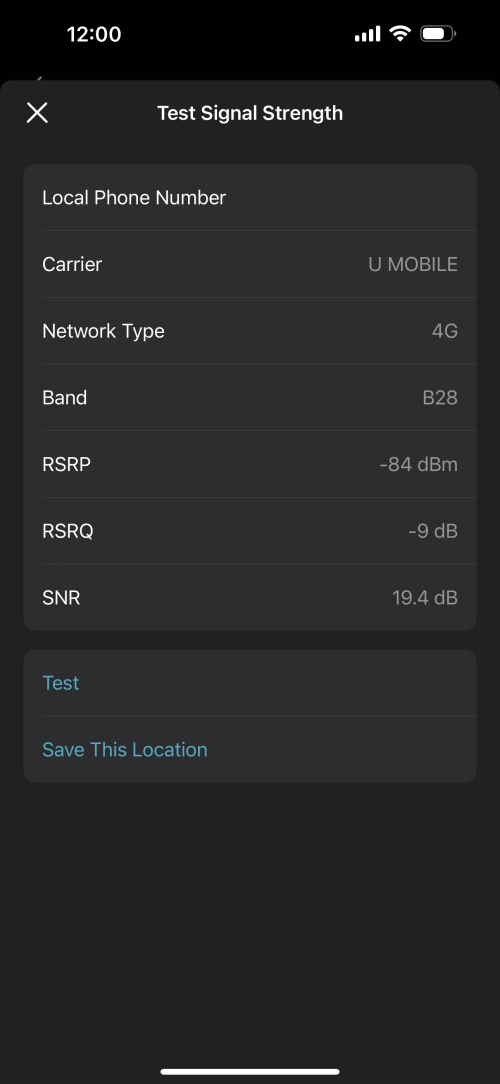
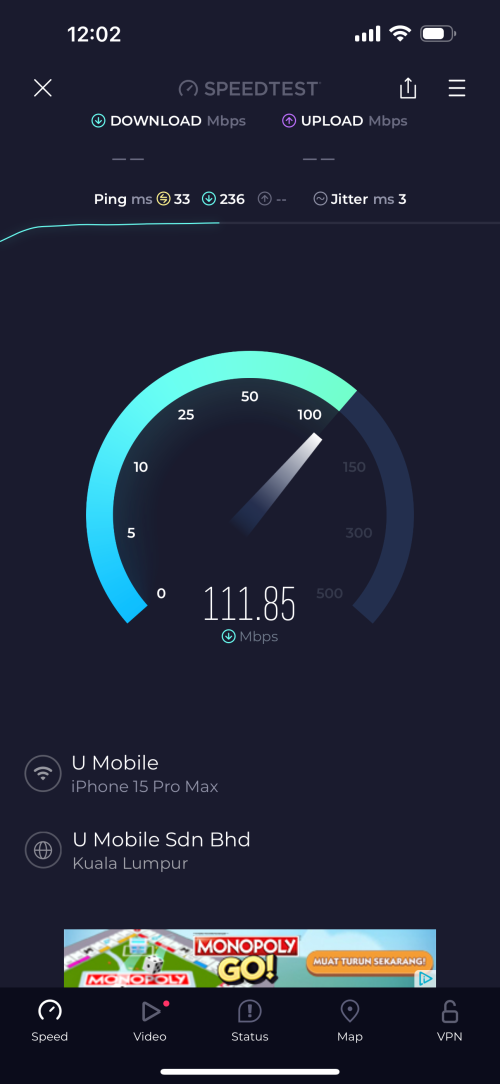
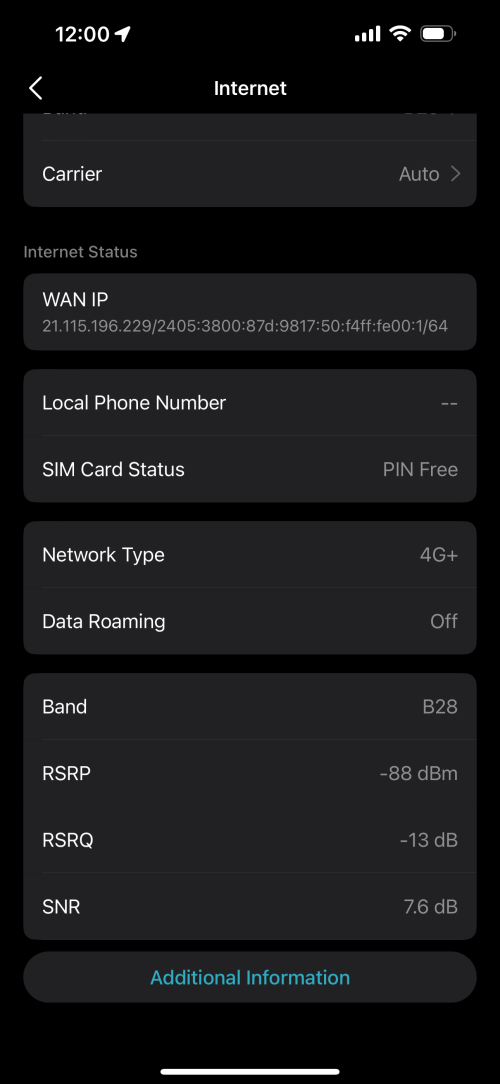
Any idea on how to read the signal strength info?
I am trying a few places to see best place for the signal.

user posted image

» Click to show Spoiler - click again to hide... «

countdracula
post Nov 18 2023, 03:11 PM

Casual
***
Junior Member
480 posts

Joined: Apr 2007
From: Cheras


QUOTE(cloudwan @ Nov 18 2023, 10:30 AM)
Maybe can check your nearest cell tower using this i think..

https://www.cellmapper.net/map?MCC=502&MNC=...69818667588366
*
Will check it out. Tq
westlife
post Nov 18 2023, 11:06 PM

10k Club
********
All Stars
14,291 posts

Joined: Jan 2011
looking thru this thread.

i guess i will go for time fibre broadband (no contract) instead.

rm99 for 100Mbps plan (rm400 one-time charge) is still cheaper than going for 5G plan with better guaranteed of speed and user experience.

dun think i need to go for 300Mbps/500Mbps plan though.

at one time, i only have less than 5 connected devices that utilise more bandwidth only. total connected also about 10 to 12 maybe...

5G plans have all the disadvantages
1) uncertain speed (both download and upload)
2) uncertain coverage
3) FUP
4) expensive 5G wifi router/modem


This post has been edited by westlife: Nov 18 2023, 11:10 PM
endG
post Nov 19 2023, 10:41 AM

Getting Started
**
Junior Member
205 posts

Joined: Feb 2006
From: you@$$J


QUOTE(westlife @ Nov 18 2023, 11:06 PM)
looking thru this thread.

i guess i will go for time fibre broadband (no contract) instead.

rm99 for 100Mbps plan (rm400 one-time charge) is still cheaper than going for 5G plan with better guaranteed of speed and user experience.

dun think i need to go for 300Mbps/500Mbps plan though.

at one time, i only have less than 5 connected devices that utilise more bandwidth only. total connected also about 10 to 12 maybe...

5G plans have all the disadvantages
1) uncertain speed (both download and upload)
2) uncertain coverage
3) FUP
4) expensive 5G wifi router/modem
*
Time also not all good ya .. my apartment always have user complain downtime during working hour, those WFH all complaining.
At least for telco, downtime should be lesser, i dont think they will shut down a tower for maintenance let all user nearby lose connection.

For the disadvantages u mentioned, u just need to get a sim to test out the connection speed and coverage.
If u dont get 5G with your hp, yes u should go with fiber.

Actually for 5G wifi router they are not really expensive, the typical NR5103E from shopee cost around RM500 and u get decent wifi6 connection (even better speed then average rm200-300 tplink wifi router)

westlife
post Nov 19 2023, 11:10 AM

10k Club
********
All Stars
14,291 posts

Joined: Jan 2011
QUOTE(endG @ Nov 19 2023, 10:41 AM)
Time also not all good ya .. my apartment always have user complain downtime during working hour, those WFH all complaining.
At least for telco, downtime should be lesser, i dont think they will shut down a tower for maintenance let all user nearby lose connection.

For the disadvantages u mentioned, u just need to get a sim to test out the connection speed and coverage.
If u dont get 5G with your hp, yes u should go with fiber.

Actually for 5G wifi router they are not really expensive, the typical NR5103E from shopee cost around RM500 and u get decent wifi6 connection (even better speed then average rm200-300 tplink wifi router)
*
I doubt the fibre is that bad rite? but at least no contract, worst case scenario can just switch. Just the initial rm400 will be hard to swallow if sign without contract. but for time, one can keep the equipment rite? I wonder if next time I go somewhere else with the same modem can be used for a new connection with cheaper initial cost or not.
cloudwan
post Nov 19 2023, 11:32 AM

- Knob -
*******
Senior Member
8,525 posts

Joined: Jan 2003
From: The Jungle Of Pahang


QUOTE(westlife @ Nov 18 2023, 11:06 PM)
looking thru this thread.

i guess i will go for time fibre broadband (no contract) instead.

rm99 for 100Mbps plan (rm400 one-time charge) is still cheaper than going for 5G plan with better guaranteed of speed and user experience.

dun think i need to go for 300Mbps/500Mbps plan though.

at one time, i only have less than 5 connected devices that utilise more bandwidth only. total connected also about 10 to 12 maybe...

5G plans have all the disadvantages
1) uncertain speed (both download and upload)
2) uncertain coverage
3) FUP
4) expensive 5G wifi router/modem
*
Both sides got their pro and con's lah, go with whichever suits u. Tho not all people are in the same boat as u.

In my case i went with the U Home 5G due to:

1. I have 2 fiber plans already on my name, Maxis at my family business premise, unifi at my mum's place. Hell no am i gonna get tied down on another fiber contract again.
2. I may or may not move from my current living premise in the near future, so the easiness of just packing up and go would be a boon.

Regarding ur point on these:
1) uncertain speed (both download and upload) - inconsistent speed upload/dload i think even fiber do have those problems too from what i experience with unifi/maxis
2) uncertain coverage - this u have to do ur homework 1st, like before going for U home 5G i tested their line at my area 1st before committing, fiber also u need to be sure there is port for u to subscribe too
3) FUP - From my 5-6 years experience of using 4G digi/maxis as my main internet connection at my living premises, the FUP of 1TB is more than enough, my usage doesn't reach even half of that monthly
4) expensive 5G wifi router/modem - this part i kinda agree with you, but i could say it's the same as when 4G modems first released too, they start expensive but as time goes by they drop in price, but still for around RM500 u can get a 5G modem with wifi6 AX3000 i don't really say its that much expensive when a non 5G modem AX3000 router is selling for rm350 in the market. hmm.gif hmm.gif
eddie2020
post Nov 20 2023, 04:18 PM

Trusted
*******
Senior Member
3,125 posts

Joined: Jun 2008
From: Mars


Pissed with yes. Jz bought this umobile to try.. I wonder how many days to get this sim? Do I need to sign or they just put it into our mailbox?
countdracula
post Nov 20 2023, 06:38 PM

Casual
***
Junior Member
480 posts

Joined: Apr 2007
From: Cheras


QUOTE(eddie2020 @ Nov 20 2023, 04:18 PM)
Pissed with yes. Jz bought this umobile to try.. I wonder how many days to get this sim? Do I need to sign or they just put it into our mailbox?
*
Get from u mobile dealer. Activate on the spot
Assholer
post Nov 20 2023, 07:50 PM

Getting Started
**
Junior Member
280 posts

Joined: Oct 2005
QUOTE(eddie2020 @ Nov 20 2023, 04:18 PM)
Pissed with yes. Jz bought this umobile to try.. I wonder how many days to get this sim? Do I need to sign or they just put it into our mailbox?
*
i ordered my sim on 25 Oct night and received the sim on 27 Oct, they mentioned delivery takes 3 working days (for Klang Valey).
eddie2020
post Nov 22 2023, 01:39 PM

Trusted
*******
Senior Member
3,125 posts

Joined: Jun 2008
From: Mars


QUOTE(countdracula @ Nov 20 2023, 06:38 PM)
Get from u mobile dealer. Activate on the spot
*
QUOTE(Assholer @ Nov 20 2023, 07:50 PM)
i ordered my sim on 25 Oct night and received the sim on 27 Oct, they mentioned delivery takes 3 working days (for Klang Valey).
*
I order on Monday, yesterday received.. Then I thought want activate today.. Jimat 1 day..manatau they activated yesterday 5pm. I receive at 2pm I using other line so plan activate on midnight..
harmeet15
post Nov 23 2023, 09:12 AM

Winners don't make excuses
*******
Senior Member
2,729 posts

Joined: Oct 2005
From: Gotham City


QUOTE(harmeet15 @ Nov 15 2023, 02:29 PM)
hi all,
I am facing some issues with my UHome 5g using deco X50.
On 4g connection is stable and no drops in data.
On 5g connections seems to be dropping and unstable.

Any idea on what troubleshooting can be done?

Trying to lock band but unable to do so
Apparently this was a device issue and tplink asked to do a rma.
So now with new unit, the issue is not there anymore.

BOTAK_WAI
post Nov 23 2023, 12:43 PM

Blow Water First Class
*******
Senior Member
4,157 posts

Joined: Jan 2003
From: Cheras, KL


QUOTE(harmeet15 @ Nov 23 2023, 09:12 AM)
Apparently this was a device issue and tplink asked to do a rma.
So now with new unit, the issue is not there anymore.
*
so both x50-5g and nr5103e have the chance of can't get stable 5g connection.

and tplink with official warranty eligible for rma while nr5103e seller might ask u go fly kite.
ad2000
post Nov 23 2023, 01:26 PM

Casual
***
Junior Member
405 posts

Joined: Jul 2005


QUOTE(BOTAK_WAI @ Nov 23 2023, 12:43 PM)
so both x50-5g and nr5103e have the chance of can't get stable 5g connection.

and tplink with official warranty eligible for rma while nr5103e seller might ask u go fly kite.
*
My x50-5g no issues, works flawlessly can maintain average DL speed 500Mbps UL 60 Mbps with 4 bar 5G signal. The only setback I have with TP LInk is the x50-POE , I have three of them installed as Wi-Fi mesh at living room, 2nd floor hall and kitchen. two of them just cannot update firmware no matter what method I tried, other than that, I am happy with the connection stability and signal strength
harmeet15
post Nov 23 2023, 11:48 PM

Winners don't make excuses
*******
Senior Member
2,729 posts

Joined: Oct 2005
From: Gotham City


QUOTE(ad2000 @ Nov 23 2023, 01:26 PM)
My x50-5g no issues, works flawlessly can maintain average DL speed 500Mbps UL 60 Mbps with 4 bar 5G signal. The only setback I have with TP LInk is the x50-POE , I have three of them installed as Wi-Fi mesh at living room, 2nd floor hall and kitchen. two of them just cannot update firmware no matter what method I tried, other than that, I am happy with the connection stability and signal strength
*
I was using for 1.5 months with similar speeds as you mentioned.
No idea what triggered the situation I faced.
For POE, maybe try connecting them to main deco via ethernet? Would that help?
ad2000
post Nov 24 2023, 08:18 AM

Casual
***
Junior Member
405 posts

Joined: Jul 2005


QUOTE(harmeet15 @ Nov 23 2023, 11:48 PM)
I was using for 1.5 months with similar speeds as you mentioned.
No idea what triggered the situation I faced.
For POE, maybe try connecting them to main deco via ethernet? Would that help?
*
I've tried all including hard reset and connect via lan with direct power without POE switch.. nada. Notice one thing with U home 5G, during heavy rain/thunderstorm it will sometime switch to 4G, have to switch back to 5G manually or wait until rain stop it will revert back to 5G... Had experienced same scenario once when using N103e. Maybe because of tower issue?

This post has been edited by ad2000: Nov 24 2023, 08:20 AM
harmeet15
post Nov 24 2023, 09:40 AM

Winners don't make excuses
*******
Senior Member
2,729 posts

Joined: Oct 2005
From: Gotham City


QUOTE(ad2000 @ Nov 24 2023, 08:18 AM)
I've tried all including hard reset and connect via lan with direct power without POE switch.. nada. Notice  one thing with U home 5G, during heavy rain/thunderstorm it will sometime switch to 4G, have to switch back to 5G manually or wait until rain stop it will revert back to 5G... Had experienced same scenario once when using N103e. Maybe because of tower issue?
*
I think is common and known for that to happen during rain.


120 Pages « < 30 31 32 33 34 > » Top
 

Change to:
| Lo-Fi Version
0.0163sec    0.94    6 queries    GZIP Disabled
Time is now: 13th December 2025 - 09:48 PM