

QUOTE(ocz @ Nov 18 2007, 05:05 PM)
Then,after i find the sweet point,do i need to use div 800 back or just stay with 667 or 533 or even 400 div..?

hard to say.. if u use 400, wut speed u get?if 533, wut speed?
and so on..
use the higher one la
AMDŽ Socket-AM2/AM2+ Overclocking thread (V3), Phenom... Here AMD goes
|
|
 Nov 18 2007, 05:07 PM Nov 18 2007, 05:07 PM
|
 
Senior Member
7,318 posts Joined: Nov 2006 From: Pulau Sipadan  
|
QUOTE(ocz @ Nov 18 2007, 05:05 PM) Then,after i find the sweet point,do i need to use div 800 back or just stay with 667 or 533 or even 400 div..? hard to say.. if u use 400, wut speed u get?if 533, wut speed? and so on.. use the higher one la |
|
|
|
|
|
Nov 18 2007, 05:50 PM
|

Senior Member
2,827 posts Joined: Mar 2007 From: MALAYSIA 
|
I dont know whats happening to my super PI,when i used 2.2Ghz,it run 33secs for 1MB,then when i clocked my proc to 2.6Ghz,it runs 38secs super PI 1MB.
Really blur on whats happening.  |
|
|
Nov 18 2007, 06:21 PM
|

Senior Member
2,751 posts Joined: Jan 2003 From: Taiping
|
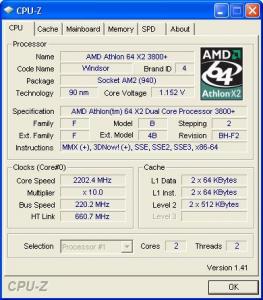
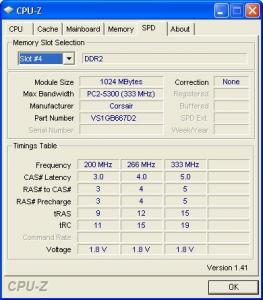
thank you rainingzero..can u b my teacher?well xixo-12 willing to show sum guide which i really appreaciate..now my pc at 2200mhz, ddr2 400, 5-5-5-18-2 timings
|
|
|
Nov 18 2007, 06:37 PM
|

Senior Member
1,413 posts Joined: Jun 2006 From: Shah Alam
|
QUOTE(ocz @ Nov 18 2007, 05:50 PM) I dont know whats happening to my super PI,when i used 2.2Ghz,it run 33secs for 1MB,then when i clocked my proc to 2.6Ghz,it runs 38secs super PI 1MB. you're using 667 ram div? try to run it again in 2.6GHz. sometimes got delay. but then 2.2GHz for 33 secs really fast. mine need to reach 2.8GHzReally blur on whats happening. QUOTE(seanlimys @ Nov 18 2007, 06:21 PM) thank you rainingzero..can u b my teacher?well xixo-12 willing to show sum guide which i really appreaciate..now my pc at 2200mhz, ddr2 400, 5-5-5-18-2 timings how about showing some screenshots of what you got already. post 2 cpuz, 1 cpu tab and 1 memory tab in one shot is enough. no need to put everything |
|
|
Nov 18 2007, 06:52 PM
|
|
Senior Member
2,827 posts Joined: Mar 2007 From: MALAYSIA
|
QUOTE(afosz @ Nov 18 2007, 06:37 PM) you're using 667 ram div? try to run it again in 2.6GHz. sometimes got delay. but then 2.2GHz for 33 secs really fast. mine need to reach 2.8GHz Im using 800 Div and it runs 1040Mhz with 2.35v. After 3 test of superPI,it show the result of 35secs. |
|
|
Nov 18 2007, 07:05 PM
|

Senior Member
1,406 posts Joined: Jun 2007
|
QUOTE(ocz @ Nov 18 2007, 06:52 PM) Im using 800 Div and it runs 1040Mhz with 2.35v. ur cpu speed?mine can achieve 30.xxscnds with 2.9ghz and ram @970mhzAfter 3 test of superPI,it show the result of 35secs. play with ur timing...u can use memset in windows, play wif the timing and do super pi 1m..u can c different result...obviously  This post has been edited by alive88: Nov 18 2007, 07:07 PM |
|
|
|
|
|
Nov 18 2007, 07:32 PM
|

Senior Member
2,497 posts Joined: Jan 2006 From: Selangor
|
now my temp idle around 38-40'c. is it normal? coz b4 this, i oc my proc to 2.4ghz, need 1.36V for Vcore. now oc to 2.7ghz, 1.40 Vcore fail super PI. so i increse it to 1.45v...seems like the temp abit higher than usuall..
but thats normal right, coz i increasing my Vcore anyway... @seanlimys yeah, u can pm me regarding ur ocing issue..there are a lot of sifus here also can help u..  This post has been edited by rainingzero: Nov 18 2007, 07:33 PM |
|
|
Nov 18 2007, 07:33 PM
|
|
Senior Member
1,413 posts Joined: Jun 2006 From: Shah Alam
|
QUOTE(alive88 @ Nov 18 2007, 07:05 PM) ur cpu speed?mine can achieve 30.xxscnds with 2.9ghz and ram @970mhz i don't understand how to play ram timing part. the tightest timing i get to use is 4-4-4-12 for 2.8GHz and i don't understand the trfc part on how to tweak and so on. they say tighter ram timings give quicker response eh?play with ur timing...u can use memset in windows, play wif the timing and do super pi 1m..u can c different result...obviously |
|
|
Nov 18 2007, 07:51 PM
|
|
Senior Member
2,827 posts Joined: Mar 2007 From: MALAYSIA
|
QUOTE(alive88 @ Nov 18 2007, 07:05 PM) ur cpu speed?mine can achieve 30.xxscnds with 2.9ghz and ram @970mhz Thanx Alive88,ill try it later.Which 1 is better,change timing in BIOS or MEMSET?play with ur timing...u can use memset in windows, play wif the timing and do super pi 1m..u can c different result...obviously Does increasing vDIMM and vCORE effect the temperature of the GPU temp..? Sorry noobie. All i realize is,after i clocked to 2.6GHZ,my GPU temp increased when i run 3D mark 06. When i downclock to default 2.01,the temp of my GPU also go down to normal like load 41C |
|
|
Nov 18 2007, 07:58 PM
|
|
Senior Member
2,497 posts Joined: Jan 2006 From: Selangor
|
QUOTE(ocz @ Nov 18 2007, 07:51 PM) Thanx Alive88,ill try it later.Which 1 is better,change timing in BIOS or MEMSET? of course by increasing Vcore and Vdimm, ur procs and rams will be hotter...thats depends on the increament u made...Does increasing vDIMM and vCORE effect the temperature of the GPU temp..? Sorry noobie. All i realize is,after i clocked to 2.6GHZ,my GPU temp increased when i run 3D mark 06. When i downclock to default 2.01,the temp of my GPU also go down to normal like load 41C for Rams, anythings beyond 2.2v, may need proper cooling. maybe good airflow between those rams also enough to cool the rams.. |
|
|
Nov 18 2007, 08:03 PM
|
|
Senior Member
1,406 posts Joined: Jun 2007
|
QUOTE(afosz @ Nov 18 2007, 07:33 PM) i don't understand how to play ram timing part. the tightest timing i get to use is 4-4-4-12 for 2.8GHz and i don't understand the trfc part on how to tweak and so on. they say tighter ram timings give quicker response eh? yup..the tighter it gets, the better u gain..smbdy said that without high mhz, u cant run ur ram in tight timing..it should be well synchronized, u can c using memset n super pi 1m...correct me if im wrong...  QUOTE(ocz @ Nov 18 2007, 07:51 PM) Thanx Alive88,ill try it later.Which 1 is better,change timing in BIOS or MEMSET? ur welcome.. i was noobier than u b4..haha Does increasing vDIMM and vCORE effect the temperature of the GPU temp..? Sorry noobie. All i realize is,after i clocked to 2.6GHZ,my GPU temp increased when i run 3D mark 06. When i downclock to default 2.01,the temp of my GPU also go down to normal like load 41C  vdimm and vcore will not effect gpu temp..of coz when u run 3d mark 06, u will strained ur gpu n the temp will increase.  play the timing in windows, and check it using memtest and super pi 1m.. when u get the most stble timing, change it in the bios..coz mine will auto reset when reboot,,i think others too..u have to set it in bios |
|
|
Nov 18 2007, 08:17 PM
|
|
Senior Member
7,318 posts Joined: Nov 2006 From: Pulau Sipadan
|
tight timing for me, usually i will use only for bechmarking, 4 sure it need a lot of vdimm..
when turn to 24/7 rig, i always use loosen timing and low vdimm feed.. for sure this loosen n timing eventhough at same speed hv different SPI result Added on November 18, 2007, 8:19 pm QUOTE(rainingzero @ Nov 18 2007, 07:32 PM) now my temp idle around 38-40'c. is it normal? coz b4 this, i oc my proc to 2.4ghz, need 1.36V for Vcore. now oc to 2.7ghz, 1.40 Vcore fail super PI. so i increse it to 1.45v...seems like the temp abit higher than usuall.. dont just look at idle temp, look at the load temp, it will help ubut thats normal right, coz i increasing my Vcore anyway... @seanlimys yeah, u can pm me regarding ur ocing issue..there are a lot of sifus here also can help u.. This post has been edited by xixo_12: Nov 18 2007, 08:19 PM |
|
|
Nov 18 2007, 08:19 PM
|

Senior Member
3,544 posts Joined: Jan 2003 From: United States of Cybertron 
|
anyone know what's the highest vdimm for T550?in BIOS the highest i can go only 2.1v
|
|
|
|
|
|
Nov 18 2007, 08:36 PM
|
|
Senior Member
1,406 posts Joined: Jun 2007
|
QUOTE(xixo_12 @ Nov 18 2007, 08:17 PM) tight timing for me, usually i will use only for bechmarking, 4 sure it need a lot of vdimm.. just tight it a lil bit..then its ok la bro..rugi je nant ram tu,jom tukar nak.when turn to 24/7 rig, i always use loosen timing and low vdimm feed.. for sure this loosen n timing eventhough at same speed hv different SPI result Added on November 18, 2007, 8:19 pm dont just look at idle temp, look at the load temp, it will help u yupp...at 2.9ghz, my pc wif stock hsf and stand alone kipas berdiri will idle at 30~38..but when load it reach 55~56..full load orthos over 63..  sjn hassan..i dont think so..coz my board vdimm limit also at 2.1v...but then still can achieve 2.9 This post has been edited by alive88: Nov 18 2007, 08:37 PM |
|
|
Nov 18 2007, 08:39 PM
|
|
Senior Member
7,318 posts Joined: Nov 2006 From: Pulau Sipadan
|
QUOTE(alive88 @ Nov 18 2007, 08:36 PM) just tight it a lil bit..then its ok la bro..rugi je nant ram tu,jom tukar nak. haha.. aku suka jer.. no need to spend a lot of vdimm.. its ok with that.. yupp...at 2.9ghz, my pc wif stock hsf and stand alone kipas berdiri will idle at 30~38..but when load it reach 55~56..full load orthos over 63.. sjn hassan..i dont think so..coz my board vdimm limit also at 2.1v...but then still can achieve 2.9 nak tukar per lagi?? duit tarak.. if limited in vdimm, just use loose timing, n u still can achive high clock speed, no worries |
|
|
Nov 18 2007, 10:28 PM
|

Senior Member
1,051 posts Joined: Feb 2005 From: Somewhere Out There 
|
Heres some simple refference vdimm
1.8-2.1 = totally safe 2.2-2.3 = safe for 24/7 with proper cooling (ram coolers/ram heat spreaders) 2.4-2.6 = make sure u know what you're doing, eitherway, not recommended for long term usage. 2.6 above = be prepared for damage Vcore (note, applies to Windsor and Brisbane only) 1.2-1.4 = perfectly safe 1.4-1.6 = temps will rise, make sure adequate cooling is applied. 1.7 > = get prepared for sudden death, dont go over 1.6 if you dont know what you're doing. And something to add to RAM timings, on my own experience, some chips doesnt like voltage to get good timings. Overall on ram tweaking, high mhz is pointless if you have to sacrifice timings too much, generally speaking look at refference below. 333mhz (DDR667) = recommended ( cl3-4) 400mhz (DDR800) = try getting within cl4-5 below 2.1v or max cl5 500mhz (DDR1000) = CL5 works good here, if you need to loosen your timing up to cl6, its better to stick to 400mhz. CL4 is recommended for best performance, usually doesnt required more than 2.3v Generally speaking, RAM performance does give a big boost to AMD systems. It is wise to invest in a good ram as it give noticeable performance boost given that you know how to tweak it. Plus, performance rams are cheap these days, go grab any D9 microns, do keep in mind one thing, lower ram density provides greater overclockability. For example, 512x2 modules will perform better than 1GBx2 in non-intensive memory applications(superPI). Still, it is generally recommended 1GBx2 for overall system performance. I still remember those that that i bought HyperX 256MBx2 for RM600 perkit back to those S478 days conclusion, find the perfect spot between mhz and timing. and look out for the heat as well. Added on November 18, 2007, 10:45 pmJust to add some reference temps for newbies Brisbane core is know to be much cooler than of windsor, therefore temps will vary accordingly. Take note, regardless of windsor or brisbane, the safe limit is the same. Do not go past 65c on full load. Even 65c on full load is not a very good temp, a healthy 24/7 usage would be below 40 on idle and 60 on full load. Of course, the lower the better. It is wise to invest in a proper cooling, and make sure its a multi-platform compatible HSF as it will be usefull across different platforms and is re-useable in a long term. For newbie, avoid water cooling, it is not adviseable even with those all in 1 kit. It may look good but it far from proper high end water cooling, and maintance is not an easy chore. Recommended at the moment would be Xigmatek 90mm or if you can stretch your budget, try to go for xigmatek S1283, its one of the best performance/price as of now. And do take note, some am2 motherboards are known to have issue with heat sensors therefore, giving inaccurate results. Keep 1 thing in mind, temps of any components in your computer can never be lower than ambient temps(beside extreme cooling like DI,phase change and in some case, high end water cooling), therefore if your temp readings are way too low, or way too high, the best way to find out is to gently touch the heatsink itself. For X2 users, you will notice temps difference between the 2 cores, this is normal because each core handles load separately. One may be more active than the other, always take the one with the higher temps as refference. This post has been edited by AoiNatsume: Nov 18 2007, 11:57 PM |
|
|
Nov 18 2007, 10:47 PM
|
|
Senior Member
2,751 posts Joined: Jan 2003 From: Taiping
|
ok..there u go rainingzero..mind to pm me ur msn if can?many thgs to ask..

|
|
|
Nov 18 2007, 10:50 PM
|

Senior Member
1,701 posts Joined: Jul 2006 From: Malaysia
|
QUOTE(AoiNatsume @ Nov 18 2007, 10:28 PM) Heres some simple refference vdimm wow...great info there bro....maybe can add into first post1.8-2.1 = totally safe 2.2-2.3 = safe for 24/7 with proper cooling (ram coolers/ram heat spreaders) 2.4-2.6 = make sure u know what you're doing, eitherway, not recommended for long term usage. 2.6 above = be prepared for damage Vcore (note, applies to Windsor and Brisbane only) 1.2-1.4 = perfectly safe 1.4-1.6 = temps will rise, make sure adequate cooling is applied. 1.7 > = get prepared for sudden death, dont go over 1.6 if you dont know what you're doing. And something to add to RAM timings, on my own experience, some chips doesnt like voltage go get good timings. Overall on ram tweaking, high mhz is pointless if you have to sacrifice timings too much, generally speaking look at refference below. 333mhz (DDR667) = recommended (maximum cl4) 400mhz (DDR800) = try getting cl4 below 2.1v or max cl5 500mhz (DDR1000) = CL5 works good here, if you need to loosen your timing up to cl6, its better to stick to 400mhz. CL4 is recommended for best performance, usually doesnt required more than 2.3v Generally speaking, RAM performance does give a big boost to AMD systems. It is wise to invest in a good ram as it give noticeable performance boost given that you know how to tweak it. Plus, performance rams are cheap these days, i still remember those that that i bought HyperX 256MBx2 for RM600 perkit back to those S478 days conclusion, find the perfect spot between mhz and timing. and look out for the heat as well. Added on November 18, 2007, 10:45 pmJust to add some reference temps for newbies Brisbane core is know to be much cooler than of windsor, therefore temps will vary accordingly. Take note, regardless of windsor or brisbane, the safe limit is the same. Do not go past 65c on full load. Even 65c on full load is not a very good temp, a healthy 24/7 usage would be below 40 on idle and 60 on full load. Of course, the lower the better. It is wise to invest in a proper cooling, and make sure its a multi-platform compatible HSF as it will be usefull across different platforms and is re-useable in a long term. For newbie, avoid water cooling, it is not adviseable even with those all in 1 kit. It may look good but it far from proper high end water cooling, and maintance is not an easy chore. Recommended at the moment would be Xigmatek 90mm or if you can stretch your budget, try to go for xigmatek S1283, its one of the best performance/price as of now. And do take note, some am2 motherboards are known to have issue with heat sensors therefore, giving inaccurate results. Keep 1 thing in mind, temps of any components in your computer can never be lower than ambient temps(beside extreme cooling like DI,phase change and in some case, high end water cooling), therefore if your temp readings are way too low, or way too high, the best way to find out is to gently touch the heatsink itself. For X2 users, you will notice temps difference between the 2 cores, this is normal because each core handles load separately. One may be more active than the other, always take the one with the higher temps as refference. |
|
|
Nov 19 2007, 12:07 AM
|

Senior Member
732 posts Joined: Nov 2004 From: where to where...
|
QUOTE(sjn hassan @ Nov 18 2007, 08:19 PM) anyone know what's the highest vdimm for T550?in BIOS the highest i can go only 2.1v mine also tforce 550...max vdimm is 2.1v  This post has been edited by ryudox: Nov 19 2007, 12:07 AM |
|
|
Nov 19 2007, 12:08 AM
|
 
Elite
8,545 posts Joined: Aug 2006 From: 224.0.0.6
|
Phenom GP-9600 is almost on par w Intel Kentfield QX6700 (2.3GHz Underclocked) except Multimedia Applicationi which Intel wins by a lot
-pWs- |
|
Topic ClosedOptions
|
| Change to: |  0.0184sec 0.0184sec
 0.56 0.56
 6 queries 6 queries
 GZIP Disabled GZIP Disabled
Time is now: 4th December 2025 - 10:57 AM |
 Quote
Quote