Welcome Guest ( Log In | Register )

Bump Topic Topic Closed RSS Feed
87 Pages « < 50 51 52 53 54 > » Bottom

Outline · [ Standard ] · Linear+

Maxis The Official Maxis Wireless Broadband Thread, OMG PORT FORWARDING KRACKED !

views
     
TSprasys
post Dec 30 2007, 10:17 AM

Heros Never Die
Group Icon
VIP
12,925 posts

Joined: Mar 2005
From: Kuala Lumpur
First of all , how did you get rid your maxisbb. I am thinking of changing it to I2G. My phone shows that i could get 1.3Mbps (after doing a speed test). This seems to be promising
wedjohn57
post Dec 30 2007, 11:13 AM

Getting Started
**
Junior Member
99 posts

Joined: Jul 2006
QUOTE(prasys @ Dec 30 2007, 10:17 AM)
First of all , how did you get rid your maxisbb. I am thinking of changing it to I2G. My phone shows that i could get 1.3Mbps (after doing a speed test). This seems to be promising
*
he apply new I2GO and his old package 138 transfer to his frd.
i also thinking of change to I2GO, but i thk thr is no way beside of transfer account.
JWCheah
post Dec 30 2007, 02:49 PM

Getting Started
**
Junior Member
251 posts

Joined: Sep 2007


QUOTE(wedjohn57 @ Dec 30 2007, 11:13 AM)
he apply new I2GO and his old package 138 transfer to his frd.
i also thinking of change to I2GO, but i thk thr is no way beside of transfer account.
*
right on....
But I must say, the usb was actually better for gaming performance and it was still improving... the I2G latency is somehow not stable. I was on 80ms to HK server when I started but after an hour it jumped to 300ms... then kena "kicked" for high ping.... vmad.gif
Download speed was excellent during the morning.... 2mbps!!!


wedjohn57
post Dec 30 2007, 06:44 PM

Getting Started
**
Junior Member
99 posts

Joined: Jul 2006
QUOTE(JWCheah @ Dec 30 2007, 02:49 PM)
right on....
But I must say, the usb was actually better for gaming performance and it was still improving... the I2G latency is somehow not stable. I was on 80ms to HK server when I started but after an hour it jumped to 300ms... then kena "kicked" for high ping.... vmad.gif
Download speed was excellent during the morning.... 2mbps!!!
*
oh man~2mbps?? drool.gif
our maxis BB stable latency also 200ms +- , your is better a lot man. now u make me feel like to change. sweat.gif
anyway, averagely i could get only 500kbps+- ~although my RSSI is around 65dBm
TSprasys
post Dec 30 2007, 06:55 PM

Heros Never Die
Group Icon
VIP
12,925 posts

Joined: Mar 2005
From: Kuala Lumpur
I am feeling like dumping it.

My RSSI will hover around ~70-69dBm..After tweaking I could get around 300+- Kbps constant which is good enough !
wedjohn57
post Dec 30 2007, 09:26 PM

Getting Started
**
Junior Member
99 posts

Joined: Jul 2006
what tweaking u doing? u using what package?
JWCheah
post Dec 30 2007, 10:32 PM

Getting Started
**
Junior Member
251 posts

Joined: Sep 2007


Let see....
Sierra Aircard 875=RM370.00
Mthly fees = RM99/mth
Usage for 18mths = RM1782
Total = RM2152 (equivalent to RM119.55/mth)

Cheaper than the USB package but not the ZTE.....
GeneJin
post Dec 30 2007, 11:03 PM

Getting Started
**
Junior Member
279 posts

Joined: Nov 2007


Would really like to check again as my previous post wasnt answered. I'm currently using a ZTE modem, would an USB modem be able to get a better signal reception? Please disregards the package used and currently my RSI hovers around 80+ up to 90, which is very very bad from wat i read in this thread.
JWCheah
post Dec 30 2007, 11:35 PM

Getting Started
**
Junior Member
251 posts

Joined: Sep 2007


QUOTE(GeneJin @ Dec 30 2007, 11:03 PM)
Would really like to check again as my previous post wasnt answered. I'm currently using a ZTE modem, would an USB modem be able to get a better signal reception? Please disregards the package used and currently my RSI hovers around 80+ up to 90, which is very very bad from wat i read in this thread.
*
My best bet for you is to see if there is opportunity to further improve the signal strength. I personally do not think that the usb E220 possess any advantage in terms of signal reception as the internal antenna is weak as compared to the ZTE. In Korea/SA where the ZTE is used, they somehow connect the antenna with a different model which carries a huge dB gain but you must make sure that it matches the impedances. If all fail, all you can do is to continue to make complaints until the boost the signal in your location...... good luck........ icon_rolleyes.gif

(you should take your ZTE with charged batteries to nearby area to further capture the average speedreading. This should determine the direction of your base station; just my tots smile.gif )
GeneJin
post Dec 30 2007, 11:41 PM

Getting Started
**
Junior Member
279 posts

Joined: Nov 2007


Unfortunately that is not possible as i'm using a PC, no notebook yet.. Will continue to call them up. CAnt even get my speed or 384, where dare to upgrade to 3.6? -.-" waste of money..
MX510
post Dec 30 2007, 11:45 PM

Love Me Sin Hate Me Sinner
*******
Senior Member
4,038 posts

Joined: Aug 2005
From: Earth


user posted image

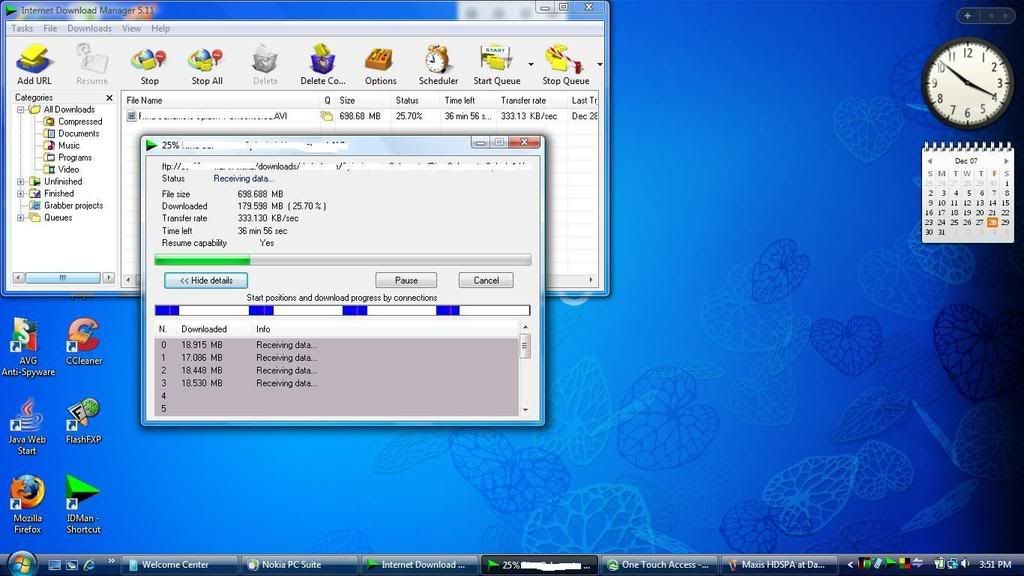
Maxis HSPDA Package RM 120 per month

Settings N95 Conneceted to cable to Sony Vaio

Location Damansara Height

3 Mbit ftp download from torrentflux servers smile.gif
ivade
post Dec 31 2007, 12:45 AM

New Member
*
Junior Member
18 posts

Joined: Oct 2007
im new here.izit maxis wireless bb available in ipoh?? speed fast? LOL that location finder in maxis website is nt exact.swt..
GeneJin
post Dec 31 2007, 01:11 AM

Getting Started
**
Junior Member
279 posts

Joined: Nov 2007


QUOTE(MX510 @ Dec 30 2007, 11:45 PM)
user posted image

Maxis HSPDA Package RM 120 per month

Settings N95 Conneceted to cable to  Sony Vaio

Location Damansara Height

3 Mbit ftp download from torrentflux servers smile.gif
*
So it is possible to get more then 300KBps connection ?
JWCheah
post Dec 31 2007, 08:03 AM

Getting Started
**
Junior Member
251 posts

Joined: Sep 2007


QUOTE(ivade @ Dec 31 2007, 12:45 AM)
im new here.izit maxis wireless bb available in ipoh?? speed fast? LOL that location finder in maxis website is nt exact.swt..
*
Averagely, you can only achieve GPRS (<20kbps) and EDGE (<120kbps). I go back there often and there are some location which claims that they can get UTMS but somehow I can connect to UTMS but no data transfer.... not sure if they are in the midst of upgrade or what.... I think you should wait or use Celcom as 3G is definitely available in Ipoh....
bulibulizaimon
post Dec 31 2007, 11:12 AM

PSN : bulibulizaimon
*******
Senior Member
4,667 posts

Joined: Jan 2005
From: UniVeRSiTy Of MaLaYa


MX510, thats an insane speed!! drool.gif
ivade
post Dec 31 2007, 04:19 PM

New Member
*
Junior Member
18 posts

Joined: Oct 2007
so u mean celcom is better coverage in IPOH than maxis? btw celcom got 3.6mbps package rite?
doinkz_gaara
post Dec 31 2007, 04:32 PM

Too fast to live, too young to die
*******
Senior Member
2,381 posts

Joined: May 2005
From: Narnia
Im having frequent disconnections today.
Rar!

Not even half an hour I'm surfing, and disconnected again.

MSN could not even sign in. dry.gif
panda80
post Dec 31 2007, 09:00 PM

New Member
*
Newbie
4 posts

Joined: Jul 2006


hi all,

I'm using maxisbb for more than 3 months, it is stable for me, but the only issue I'm not satisfy is sometimes it will hang.

For example, suddenly it like no data flow in, but I check http://192.168.0.1, it shows it is connected. Then I need to off the ZTE modem and wait for half minutes, then on it back, wait another 2 to 3 mins, then only i can use again. AFter rebooted the modem, it seems the speed is back to normal. And it is working fine. I found out that Maxisbb website did post out the bulletin and advised users to reboot the modem while this issue happen.

Is there any brothers have a better solution for this issue? I tried to call to Helpdesk and ask them to change the ZTE modem, but they said need to send technician to my place and check the modem lah and this lah that lah, feel a bit dissappointed about this.

But overall I feel it is still better than Streamyx rclxms.gif ...hahahaha..

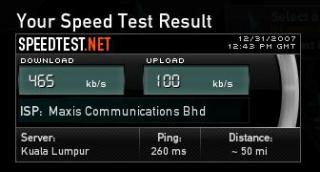
I attached the speed test on this reply. Please have a look.


Attached thumbnail(s)

Attached Image
wedjohn57
post Jan 1 2008, 04:15 AM

Getting Started
**
Junior Member
99 posts

Joined: Jul 2006
QUOTE(MX510 @ Dec 30 2007, 11:45 PM)
user posted image

Maxis HSPDA Package RM 120 per month

Settings N95 Conneceted to cable to  Sony Vaio

Location Damansara Height

3 Mbit ftp download from torrentflux servers smile.gif
*
maxis got rm120 package?
JWCheah
post Jan 1 2008, 09:57 AM

Getting Started
**
Junior Member
251 posts

Joined: Sep 2007


QUOTE(panda80 @ Dec 31 2007, 09:00 PM)
hi all,

I'm using maxisbb for more than 3 months, it is stable for me, but the only issue I'm not satisfy is sometimes it will hang.

For example, suddenly it like no data flow in, but I check http://192.168.0.1, it shows it is connected. Then I need to off the ZTE modem and wait for half minutes, then on it back, wait another 2 to 3 mins, then only i can use again. AFter rebooted the modem, it seems the speed is back to normal. And it is working fine. I found out that Maxisbb website did post out the bulletin and advised users to reboot the modem while this issue happen.

Is there any brothers have a better solution for this issue? I tried to call to Helpdesk and ask them to change the ZTE modem, but they said need to send technician to my place and check the modem lah and this lah that lah, feel a bit dissappointed about this.

But overall I feel it is still better than Streamyx  rclxms.gif ...hahahaha..

I attached the speed test on this reply. Please have a look.
*
Get your whole modem and go to MAxis KLCC and request for a change... tell them your issue and add a bit more saying that the modem is a bit coo-koo and they will change a new one for you.... make sure you make a scene if they dun. Happens all the time.....


87 Pages « < 50 51 52 53 54 > » Top
Topic ClosedOptions
 

Change to:
| Lo-Fi Version
0.0198sec    0.56    6 queries    GZIP Disabled
Time is now: 4th December 2025 - 01:34 AM