

 Dec 31 2007, 09:00 PM


I'm using maxisbb for more than 3 months, it is stable for me, but the only issue I'm not satisfy is sometimes it will hang.
For example, suddenly it like no data flow in, but I check http://192.168.0.1, it shows it is connected. Then I need to off the ZTE modem and wait for half minutes, then on it back, wait another 2 to 3 mins, then only i can use again. AFter rebooted the modem, it seems the speed is back to normal. And it is working fine. I found out that Maxisbb website did post out the bulletin and advised users to reboot the modem while this issue happen.
Is there any brothers have a better solution for this issue? I tried to call to Helpdesk and ask them to change the ZTE modem, but they said need to send technician to my place and check the modem lah and this lah that lah, feel a bit dissappointed about this.
But overall I feel it is still better than Streamyx
 ...hahahaha..
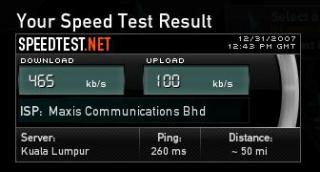
I attached the speed test on this reply. Please have a look.
Attached thumbnail(s)
 Quote
Quote
 0.0350sec
 0.45
0.45
 7 queries
 GZIP Disabled