Welcome Guest ( Log In | Register )

Bump Topic Topic Closed RSS Feed
453 Pages « < 32 33 34 35 36 > » Bottom

Outline · [ Standard ] · Linear+

Unifi Official TM UniFi High Speed Broadband Thread V40, READ 1ST PAGE FOR RELEVANT WIFI INFO

views
     
HumanExtinction
post Apr 29 2022, 08:14 PM

Casual
***
Junior Member
364 posts

Joined: Jan 2018
From: Tim Apple
Halo friends, want to ask for your all opinions. Now im using tp link ax archer ax90 as my main router, and the 2 mesh m9+ provided by TM. However, my room at the end of the house can only receive 200 - 300mbps [i have 800mbps].

So my question is, if i buy another single wifi 6 deco mesh and use it as my main mesh and the two m9+ as my side mesh, any hope to increase the speed to my room? My main router is hardwire to my first m9+, so im planning to = Main router hardwire to new wifi 6 deco main mesh and hardwire again to my second m9+, but the third mesh wouldn't able to hardwire since its too far away and not convenient to do so.

This post has been edited by HumanExtinction: Apr 29 2022, 08:15 PM
andrekua2
post Apr 29 2022, 08:36 PM

10k Club
********
All Stars
13,476 posts

Joined: Jan 2012


QUOTE(HumanExtinction @ Apr 29 2022, 08:14 PM)
Halo friends, want to ask for your all opinions. Now im using tp link ax archer ax90 as my main router, and the 2 mesh m9+ provided by TM. However, my room at the end of the house can only receive 200 - 300mbps [i have 800mbps].

So my question is, if i buy another single wifi 6 deco mesh and use it as my main mesh and the two m9+ as my side mesh, any hope to increase the speed to my room? My main router is hardwire to my first m9+, so im planning to = Main router hardwire to new wifi 6 deco main mesh and hardwire again to my second m9+, but the third mesh wouldn't able to hardwire since its too far away and not convenient to do so.
*
Edited. My bad. I thought you connecting wirelessly.

This post has been edited by andrekua2: Apr 29 2022, 08:43 PM
SUSMyProLife
post Apr 29 2022, 09:17 PM

I bully wumao & MPKL
*******
Senior Member
2,075 posts

Joined: Sep 2021
From: nowhere

QUOTE(HumanExtinction @ Apr 29 2022, 08:14 PM)
Halo friends, want to ask for your all opinions. Now im using tp link ax archer ax90 as my main router, and the 2 mesh m9+ provided by TM. However, my room at the end of the house can only receive 200 - 300mbps [i have 800mbps].

So my question is, if i buy another single wifi 6 deco mesh and use it as my main mesh and the two m9+ as my side mesh, any hope to increase the speed to my room? My main router is hardwire to my first m9+, so im planning to = Main router hardwire to new wifi 6 deco main mesh and hardwire again to my second m9+, but the third mesh wouldn't able to hardwire since its too far away and not convenient to do so.
*
for the mesh that cannot be hardwire, use m9 plus or upgrade to x68

The second mesh that hardwire can get the wifi 6 together with main

So you will has 4 router (including deco) units should you go with original plan (buy just one wifi 6 deco)
2 wifi 6 for hardwire

2 m9 plus for which hard to reach by wire, the third band can help release the burden that will otherwise reduce the speed

However m9 plus will never reach the speed you want because is wifi5, you may need to upgrade to x68


Tldr: get 2 x68 kit, the hard to wire one use x68 replace the m9 plus, the main one that hardwire to main router also use x68.

M9 plus can stay as additional node, either do hardwire or wirelessly

For this plan, is better because can overcome wifi 5 limit, but you will have total 5 router + deco units

This post has been edited by MyProLife: Apr 29 2022, 09:34 PM
HumanExtinction
post Apr 29 2022, 09:32 PM

Casual
***
Junior Member
364 posts

Joined: Jan 2018
From: Tim Apple
QUOTE(andrekua2 @ Apr 29 2022, 08:36 PM)
Edited. My bad. I thought you connecting wirelessly.
*
No prob, the second to third mesh is connecting wirelessly also.

QUOTE(MyProLife @ Apr 29 2022, 09:17 PM)
for the mesh that cannot be hardwire, use m9 plus or upgrade to x68

The second mesh that hardwire can get the wifi 6 together with main

So you will has 4 router (including deco) units
2 wifi 6 for hardwire

2 m9 plus for which hard to reach by wire, the third band can help release the burden that will otherwise reduce the speed

However m9 plus will never reach the speed you want because is wifi5, you may need to upgrade to x68
*
I see. So it would be main router hardwire to main mesh, main mesh hardwire to second mesh, while second mesh is connecting wirelessly to third mesh. So the main mesh will be using x68 right? The second and third mesh would be the m9+. Not really hoping to get full 800mbps, but if can increase to 400 - 500 mbps then it would be worth it. I check the deco app and the signal strength only show two bars for my current setup, so would like to get full 3 bars.

Other than x68, another other wifi 6 mesh? Will x20 suffice?
SUSMyProLife
post Apr 29 2022, 09:39 PM

I bully wumao & MPKL
*******
Senior Member
2,075 posts

Joined: Sep 2021
From: nowhere

QUOTE(HumanExtinction @ Apr 29 2022, 09:32 PM)
No prob, the second to third mesh is connecting wirelessly also.
I see. So it would be main router hardwire to main mesh, main mesh hardwire to second mesh, while second mesh is connecting wirelessly to third mesh. So the main mesh will be using x68 right? The second and third mesh would be the m9+. Not really hoping to get full 800mbps, but if can increase to 400 - 500 mbps then it would be worth it. I check the deco app and the signal strength only show two bars for my current setup, so would like to get full 3 bars.

Other than x68, another other wifi 6 mesh? Will x20 suffice?
*
From previous edit, this is better but more expensive solution:
get 2 x68 kit, the hard to wire one use x68 replace the m9 plus, the main one that hardwire to main router also use x68.

M9 plus can stay as additional node, either do hardwire or wirelessly

For this plan, is better because can overcome wifi 5 limit, but you will have total 5 router + deco units


If you want the cheaper solution, you will need additional measures

Get x20 as hardwire between main router and 1st m9 plus
Then 1st m9 plus need to be closer to 2nd m9 plus

But if you can try to move 1st m9 plus closer to 2nd m9 plus without x20 in between, is better because you don't need buy x20

The problem you get 200-300 m is because wifi 5 technology limited

Your house is apartment or multi story?
HumanExtinction
post Apr 29 2022, 10:21 PM

Casual
***
Junior Member
364 posts

Joined: Jan 2018
From: Tim Apple
QUOTE(MyProLife @ Apr 29 2022, 09:39 PM)
From previous edit, this is better but more expensive solution:
get 2 x68 kit, the hard to wire one use x68 replace the m9 plus, the main one that hardwire to main router also use x68.

M9 plus can stay as additional node, either do hardwire or wirelessly

For this plan, is better because can overcome wifi 5 limit, but you will have total 5 router + deco units
If you want the cheaper solution, you will need additional measures

Get x20 as hardwire between main router and 1st m9 plus
Then 1st m9 plus need to be closer to 2nd m9 plus

But if you can try to move 1st m9 plus closer to 2nd m9 plus without x20 in between, is better because you don't need buy x20

The problem you get 200-300 m is because wifi 5 technology limited

Your house is apartment or multi story?
*
Thanks for the suggestion. It's an apartment, but the walls are quite thick.

So main router (hardwire) - X68 (hardwire) - M9+ (wireless) - X68. < like this right? But won't the m9+ wireless speed bottleneck the x68 in my room?
SUSMyProLife
post Apr 29 2022, 10:25 PM

I bully wumao & MPKL
*******
Senior Member
2,075 posts

Joined: Sep 2021
From: nowhere

QUOTE(HumanExtinction @ Apr 29 2022, 10:21 PM)
Thanks for the suggestion. It's an apartment, but the walls are quite thick.

So main router (hardwire) - X68 (hardwire) - M9+ (wireless) - X68. < like this right?  But won't the m9+ wireless speed bottleneck the x68 in my room?
*
Don't mind draw something like your house layout so i can suggest you better?
HumanExtinction
post Apr 29 2022, 10:49 PM

Casual
***
Junior Member
364 posts

Joined: Jan 2018
From: Tim Apple
QUOTE(MyProLife @ Apr 29 2022, 10:25 PM)
Don't mind draw something like your house layout so i can suggest you better?
*
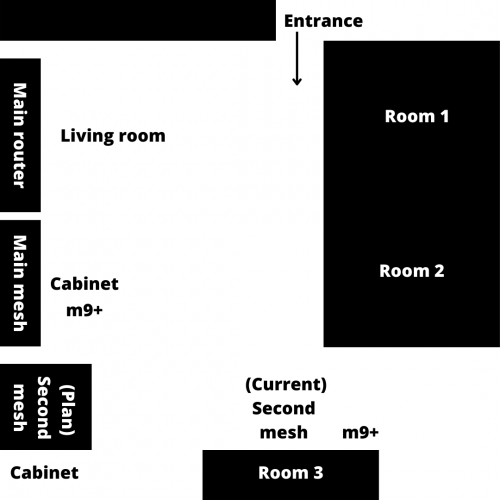
Sorry for my bad drawing haha but basically something like this. Room 3 is quite far away from the main mesh right now and there's things like door, kitchen, bathroom, thick walls is blocking the signals albeit my house is only around 800sqft.

So yeah, hence my plan to buy another mesh to put on the cabinet there. My house is long rather than rectangle.

user posted image
SUSMyProLife
post Apr 29 2022, 11:18 PM

I bully wumao & MPKL
*******
Senior Member
2,075 posts

Joined: Sep 2021
From: nowhere

user posted image

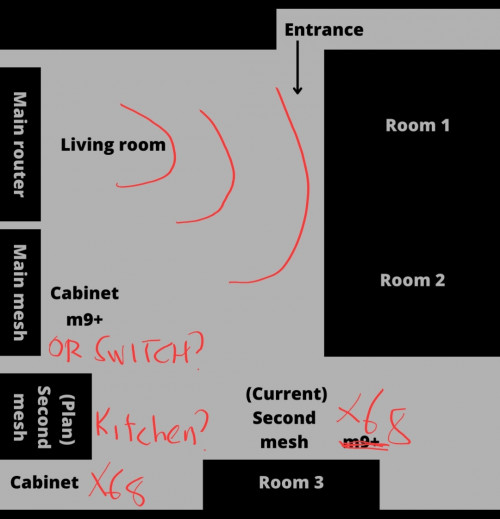
The main router (archer ax90) keep on the wireless, for living room and room #1,#2

The cabinet besides the living room, can consider replaced with a gigabit switch since you will hardwire between ax90 and x68 anyway?

The cabinet in the kitchen (?) This going to be the first x68

Second x68 put besides The room #3
sadlyfalways
post Apr 30 2022, 02:03 AM

Regular
******
Senior Member
1,185 posts

Joined: Nov 2020
QUOTE(go626201 @ Apr 29 2022, 08:08 PM)
TM had recover from the submarine cable break for few days already. Most connection from my end is quite acceptable now.
*
Omg oops 😭😭

Ok la at least got free for a while 😂😂

Alpha_Tay
post Apr 30 2022, 04:05 AM

Beware The Spammer Star!
******
Senior Member
1,725 posts

Joined: Jan 2003
Unifi TV FreeMovies at Catch Up Section are Free, Movies at On Demand Section are not Free, just inform other, not a Complain.

https://forum.lowyat.net/index.php?showtopi...ost&p=104265092

https://forum.lowyat.net/index.php?showtopi...ost&p=104253512
andrekua2
post Apr 30 2022, 07:15 AM

10k Club
********
All Stars
13,476 posts

Joined: Jan 2012


QUOTE(HumanExtinction @ Apr 29 2022, 10:49 PM)
Sorry for my bad drawing haha but basically something like this. Room 3 is quite far away from the main mesh right now and there's things like door, kitchen, bathroom, thick walls is blocking the signals albeit my house is only around 800sqft.

So yeah, hence my plan to buy another mesh to put on the cabinet there. My house is long rather than rectangle.

user posted image
*
800sqft and you need all these? That's too much.

Personally I don't think you are using them optimally. When you place them on the edge, you are basically cutting half of the coverage off. Why not placed them on the outer wall of 1st and 2nd room?

This post has been edited by andrekua2: Apr 30 2022, 07:15 AM
5p3ak
post Apr 30 2022, 08:34 AM

CPE, FIG Certified Gymnastics Coach
*******
Senior Member
5,648 posts

Joined: Mar 2011
From: Jalan Tijani
If the internet sometimes disconnects randomly and PON light on the modem is blinking instead of solid green it is TM's side fault?
HumanExtinction
post Apr 30 2022, 12:09 PM

Casual
***
Junior Member
364 posts

Joined: Jan 2018
From: Tim Apple
QUOTE(andrekua2 @ Apr 30 2022, 07:15 AM)
800sqft and you need all these? That's too much.

Personally I don't think you are using them optimally. When you place them on the edge, you are basically cutting half of the coverage off. Why not placed them on the outer wall of 1st and 2nd room?
*
The outer wall of the 1st room has sofa, the 2nd room outer wall has chair and table for dining, not to mention all the outer walls there don’t have wall plug. So no choice, I have to put my router and main mesh at my living room since the fibre is there and back to the wall plug problem also.

Hence I want to put another near the dining table there to increase the signal strength to the third room. I agree with the optimisation, but again no choice since my house doesn’t have a lot of wall plug.
yongtjunkit
post Apr 30 2022, 12:38 PM

Look at all my stars!!
*******
Senior Member
2,516 posts

Joined: Mar 2016
Just wondering, if I were to use fiber wall socket will there be a reading drop?

According to the installer, there would be a reading drop
fookhing
post Apr 30 2022, 01:52 PM

Getting Started
**
Junior Member
186 posts

Joined: Aug 2018
QUOTE(coolguy_0925 @ Apr 29 2022, 01:33 PM)
Just done Live Chat less than 30 mins ago
*
You mean the DigitalMe authentication won't throw error messages now? I had a problem with that Digital Me thing, some time ago.
coolguy_0925
post Apr 30 2022, 01:57 PM

Look at all my stars!!
*******
Senior Member
4,550 posts

Joined: Jan 2003
QUOTE(yongtjunkit @ Apr 30 2022, 12:38 PM)
Just wondering, if I were to use fiber wall socket will there be a reading drop?

According to the installer, there would be a reading drop
*
That was the 'reason' given by installer when I relocated my modem from 1st floor to ground floor for unifi tv purpose

When I installed unifi for the 1st time I did it on my 1st floor and that as with the FWS

Few months later after I took up promo to upgrade speed with unifi tv I decided to relocate modem near my tv and this time they pulled the black cable from pole and plucked it directly to the modem

QUOTE(fookhing @ Apr 30 2022, 01:52 PM)
You mean the DigitalMe authentication won't throw error messages now? I had a problem with that Digital Me thing, some time ago.
*
Ya no issue for me

Been getting the 6 digits OTP in my e-mail and managed to login without issue
fookhing
post Apr 30 2022, 02:24 PM

Getting Started
**
Junior Member
186 posts

Joined: Aug 2018
QUOTE(coolguy_0925 @ Apr 30 2022, 01:57 PM)
That was the 'reason' given by installer when I relocated my modem from 1st floor to ground floor for unifi tv purpose

When I installed unifi for the 1st time I did it on my 1st floor and that as with the FWS

Few months later after I took up promo to upgrade speed with unifi tv I decided to relocate modem near my tv and this time they pulled the black cable from pole and plucked it directly to the modem
Ya no issue for me

Been getting the 6 digits OTP in my e-mail and managed to login without issue
*
After enter OTP my DigitalMe will say Unable To Proceed. I wonder why. Now still the same.
coolguy_0925
post Apr 30 2022, 02:28 PM

Look at all my stars!!
*******
Senior Member
4,550 posts

Joined: Jan 2003
QUOTE(fookhing @ Apr 30 2022, 02:24 PM)
After enter OTP my DigitalMe will say Unable To Proceed. I wonder why. Now still the same.
*
I hate to say this but you might want to try clearing your browser cache and cookies, and try again
fookhing
post Apr 30 2022, 02:36 PM

Getting Started
**
Junior Member
186 posts

Joined: Aug 2018
QUOTE(coolguy_0925 @ Apr 30 2022, 02:28 PM)
I hate to say this but you might want to try clearing your browser cache and cookies, and try again
*
Actually I made another account with some dummy IC but I can login.

The one which I can't login, is the account made with an IC which has another Unifi Portal account attached to that IC.

Because I no longer own the email account attached with the earlier Account, I abandon that and create another Unifi Portal account with the same IC, that may cause this problem? Previously, the Unifi Chat staff said one IC ok to make multiple accounts.

453 Pages « < 32 33 34 35 36 > » Top
Topic ClosedOptions
 

Change to:
| Lo-Fi Version
0.0223sec    0.51    6 queries    GZIP Disabled
Time is now: 14th December 2025 - 07:47 AM