Welcome Guest ( Log In | Register )

Bump Topic Topic Closed RSS Feed

Outline · [ Standard ] · Linear+

Unifi Official TM UniFi High Speed Broadband Thread V40, READ 1ST PAGE FOR RELEVANT WIFI INFO

views
     
HumanExtinction
post Apr 29 2022, 08:14 PM

Casual
***
Junior Member
364 posts

Joined: Jan 2018
From: Tim Apple
Halo friends, want to ask for your all opinions. Now im using tp link ax archer ax90 as my main router, and the 2 mesh m9+ provided by TM. However, my room at the end of the house can only receive 200 - 300mbps [i have 800mbps].

So my question is, if i buy another single wifi 6 deco mesh and use it as my main mesh and the two m9+ as my side mesh, any hope to increase the speed to my room? My main router is hardwire to my first m9+, so im planning to = Main router hardwire to new wifi 6 deco main mesh and hardwire again to my second m9+, but the third mesh wouldn't able to hardwire since its too far away and not convenient to do so.

This post has been edited by HumanExtinction: Apr 29 2022, 08:15 PM
HumanExtinction
post Apr 29 2022, 09:32 PM

Casual
***
Junior Member
364 posts

Joined: Jan 2018
From: Tim Apple
QUOTE(andrekua2 @ Apr 29 2022, 08:36 PM)
Edited. My bad. I thought you connecting wirelessly.
*
No prob, the second to third mesh is connecting wirelessly also.

QUOTE(MyProLife @ Apr 29 2022, 09:17 PM)
for the mesh that cannot be hardwire, use m9 plus or upgrade to x68

The second mesh that hardwire can get the wifi 6 together with main

So you will has 4 router (including deco) units
2 wifi 6 for hardwire

2 m9 plus for which hard to reach by wire, the third band can help release the burden that will otherwise reduce the speed

However m9 plus will never reach the speed you want because is wifi5, you may need to upgrade to x68
*
I see. So it would be main router hardwire to main mesh, main mesh hardwire to second mesh, while second mesh is connecting wirelessly to third mesh. So the main mesh will be using x68 right? The second and third mesh would be the m9+. Not really hoping to get full 800mbps, but if can increase to 400 - 500 mbps then it would be worth it. I check the deco app and the signal strength only show two bars for my current setup, so would like to get full 3 bars.

Other than x68, another other wifi 6 mesh? Will x20 suffice?
HumanExtinction
post Apr 29 2022, 10:21 PM

Casual
***
Junior Member
364 posts

Joined: Jan 2018
From: Tim Apple
QUOTE(MyProLife @ Apr 29 2022, 09:39 PM)
From previous edit, this is better but more expensive solution:
get 2 x68 kit, the hard to wire one use x68 replace the m9 plus, the main one that hardwire to main router also use x68.

M9 plus can stay as additional node, either do hardwire or wirelessly

For this plan, is better because can overcome wifi 5 limit, but you will have total 5 router + deco units
If you want the cheaper solution, you will need additional measures

Get x20 as hardwire between main router and 1st m9 plus
Then 1st m9 plus need to be closer to 2nd m9 plus

But if you can try to move 1st m9 plus closer to 2nd m9 plus without x20 in between, is better because you don't need buy x20

The problem you get 200-300 m is because wifi 5 technology limited

Your house is apartment or multi story?
*
Thanks for the suggestion. It's an apartment, but the walls are quite thick.

So main router (hardwire) - X68 (hardwire) - M9+ (wireless) - X68. < like this right? But won't the m9+ wireless speed bottleneck the x68 in my room?
HumanExtinction
post Apr 29 2022, 10:49 PM

Casual
***
Junior Member
364 posts

Joined: Jan 2018
From: Tim Apple
QUOTE(MyProLife @ Apr 29 2022, 10:25 PM)
Don't mind draw something like your house layout so i can suggest you better?
*
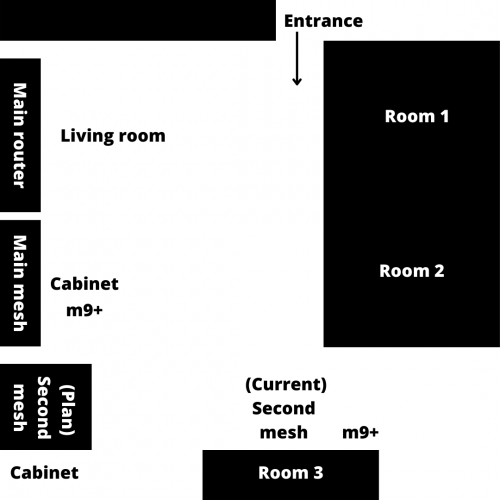
Sorry for my bad drawing haha but basically something like this. Room 3 is quite far away from the main mesh right now and there's things like door, kitchen, bathroom, thick walls is blocking the signals albeit my house is only around 800sqft.

So yeah, hence my plan to buy another mesh to put on the cabinet there. My house is long rather than rectangle.

user posted image
HumanExtinction
post Apr 30 2022, 12:09 PM

Casual
***
Junior Member
364 posts

Joined: Jan 2018
From: Tim Apple
QUOTE(andrekua2 @ Apr 30 2022, 07:15 AM)
800sqft and you need all these? That's too much.

Personally I don't think you are using them optimally. When you place them on the edge, you are basically cutting half of the coverage off. Why not placed them on the outer wall of 1st and 2nd room?
*
The outer wall of the 1st room has sofa, the 2nd room outer wall has chair and table for dining, not to mention all the outer walls there don’t have wall plug. So no choice, I have to put my router and main mesh at my living room since the fibre is there and back to the wall plug problem also.

Hence I want to put another near the dining table there to increase the signal strength to the third room. I agree with the optimisation, but again no choice since my house doesn’t have a lot of wall plug.
HumanExtinction
post May 1 2022, 02:22 PM

Casual
***
Junior Member
364 posts

Joined: Jan 2018
From: Tim Apple
Can we sell the m9+ given by TM? or need to give back when cancel our contract?
HumanExtinction
post May 1 2022, 02:44 PM

Casual
***
Junior Member
364 posts

Joined: Jan 2018
From: Tim Apple
QUOTE(sHawTY @ May 1 2022, 02:30 PM)
If your UniFi subscription is no longer under contract, then yes you can sell them
If your UniFi subscription is still under contract, then no you can't sell them
*
Alright thanks, I plan to stick until my contract finish anyway and wanted to upgrade to deco x90. Plan to sell the m9+ and add on a bit money to buy x90.
HumanExtinction
post May 1 2022, 03:24 PM

Casual
***
Junior Member
364 posts

Joined: Jan 2018
From: Tim Apple
QUOTE(YoungMan @ May 1 2022, 03:01 PM)
Yes can sell. You will use it until finish contract anyway, not wanting to pay heavy penalty for termination before contract right?
*
Ya, doesnt matter if cancel or continue use, the fees are still the same anyway biggrin.gif Might as well use until contract finish and see whats the next step. Always wanted to use digi fibre as it has rebates with my digi postpaid.
HumanExtinction
post May 3 2022, 09:46 PM

Casual
***
Junior Member
364 posts

Joined: Jan 2018
From: Tim Apple
user posted image

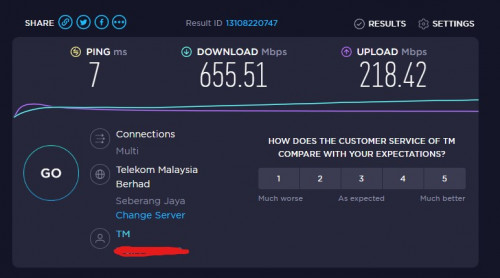
My speed tripling after changing from deco m9+ to x90. Can even get around 700 - 800mbps. No regrets biggrin.gif

This post has been edited by HumanExtinction: May 3 2022, 09:46 PM
HumanExtinction
post May 4 2022, 07:56 PM

Casual
***
Junior Member
364 posts

Joined: Jan 2018
From: Tim Apple
QUOTE(NooBiE888 @ May 4 2022, 06:01 PM)
Hope you dont mind answering.

Are you using wired backhaul or wireless backhaul ?

How many nodes? 2 pack or 3 pack?

Thanks!
*
Wired backhaul from main router to main mesh, then main mesh wireless backhaul to second mesh. I bought 2 pack.
HumanExtinction
post May 4 2022, 09:08 PM

Casual
***
Junior Member
364 posts

Joined: Jan 2018
From: Tim Apple
QUOTE(NooBiE888 @ May 4 2022, 08:19 PM)
When you screenshot the speed test

Were you connected to the main mesh or the second mesh?

Via Lan or WiFi?

****

Edit

Why didn't you use the main mesh directly as the main router?

I believe it is able to do so
*
Second mesh. The distance between the first mesh and second mesh not very far and i use a 10m cat 6 cable to link between the main router and the main mesh. Since i ard bought the ax90 last year, might as well just use it. Another thing is my house has a lot of wifi devices and i got 3 other family members all very tech heavy use. So my other family members will use the ax90 while i will use the x90.

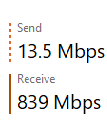
Edit: this is the speed im able to get through second mesh

user posted image

QUOTE(MyProLife @ May 4 2022, 08:22 PM)
Not easily to tell unless check from deco app

He already has one strong router archer ax90

So he can only wire the main router to mesh, mesh put in ap mode

I glad he go for something the best from tp link, must be cost so much
*
ya, whole setup cost me around 2.2k. I bought the ax90 last year at around 829 and the x90 i bought yesterday for 1349 at harvey norman cause got do promotion. If bought online then a bit cheaper but dont want to wait since raya sure package will delay. Spend a bit more also ok since internet very important for me and will be more than enough for years to come.

This post has been edited by HumanExtinction: May 4 2022, 09:11 PM
HumanExtinction
post May 4 2022, 09:24 PM

Casual
***
Junior Member
364 posts

Joined: Jan 2018
From: Tim Apple
QUOTE(NooBiE888 @ May 4 2022, 09:13 PM)
Thanks for reply

Was considering the deco x50

But tp link now limited features available for the deco series and they lock it behind the subscription service

I assume you just basic usage?

Means you ask all other users to connect to only ax90 wifi ?

Means ax90 its own 5ghz and deco have 2 x 5ghz?
*
Depend on your use case, range and wall thickness. For me since i download a lot so i need to have a bit high end mesh to help me achieve the speed that i paid for, my house walls also quite thick so there's that.

In AP mode, TP link app and LAN IP website to configure your internet settings is very limited. If through router mode all the internet settings are good enough for normal users. No need to subscribe the service, quite useless IMO.

Both the AX90 and X90 has 5ghz and 5ghz - 2. I close the 2.4ghz on X90 since i dont need it. My family members room is nearer to the ax90 hence i ask them to connect it and the speed is more than suffice for them. Since my pc is at the very back of my house, hence i need the mesh to achieve the download speed that i want. Forget to mention that the second mesh has a cat 6 lan cable connect directly to my pc.

This post has been edited by HumanExtinction: May 4 2022, 09:26 PM
HumanExtinction
post May 4 2022, 09:46 PM

Casual
***
Junior Member
364 posts

Joined: Jan 2018
From: Tim Apple
QUOTE(NooBiE888 @ May 4 2022, 09:31 PM)
Thanks for reply.

Yes I hate that they force users to subscribe to a service.

Have to pay additional every month after we already invested in the hardware.

But coming future , even Apple also sell you subscription Iphone , cannot outright buy it.

Anyways , I'm planning to test 2 x Xiaomi AX3200 .

I got wired cable ready, so just test cheap mesh.
*
Agree i feel after paying such a high price for your product yet you want ppl to subscribe something that is very basic and essential is outright stupid.

I saw at the xiaomi store last few days this ax3000 mesh like not bad. The price is rm499 for 2 mesh which is very cheap.

ax3000

This post has been edited by HumanExtinction: May 4 2022, 09:47 PM
HumanExtinction
post May 14 2022, 07:48 PM

Casual
***
Junior Member
364 posts

Joined: Jan 2018
From: Tim Apple
QUOTE(aniq8676 @ May 13 2022, 04:05 PM)
TM is now release a second model of WIFI6 router for new users 500mbps and 800mbps.
Currently available for new users in Kuala Lumpur only.

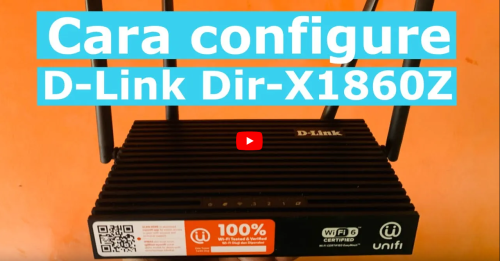
D-LINK DIR X1860Z with EASYMESH support

Youtube

user posted image
*
Definitely more usable than the one they gave last year which is complete garbage.
HumanExtinction
post Apr 12 2023, 01:26 PM

Casual
***
Junior Member
364 posts

Joined: Jan 2018
From: Tim Apple
Fahmi oh fahmi

400 for 2gbps internet

I can pay for axia instalment ard

Haizzzz
HumanExtinction
post May 7 2023, 05:17 PM

Casual
***
Junior Member
364 posts

Joined: Jan 2018
From: Tim Apple
tm really failure

last week i want to downgrade my plan through the unifi app from 800 to 300 cause money is a bit tight for me atm.

one week ltr no phone calls, email or any response from them. ask thrugh unifi chat and assure me will contact me within a few days. guess what, no response again. now chat with the support again and say will open a report for me. lets see how it goes this time. really dont understand, why cant support just do it and we as a customer have to go through so many hoops and loops just to downgrade the plan?

This post has been edited by HumanExtinction: May 7 2023, 05:18 PM
HumanExtinction
post May 9 2023, 02:53 PM

Casual
***
Junior Member
364 posts

Joined: Jan 2018
From: Tim Apple
QUOTE(Oltromen Ripot @ May 7 2023, 07:15 PM)
I filled up form to upgrade since 18th April.
What date is today?

Tomorrow I will call them to cancel altogether.
They themselves promised next-day installation.
I expected this to finish in the week after Aidilfitri as I did took quite some time off work. Now no more time to spend on thise supposed appointment.
*
QUOTE(blacktubi @ May 7 2023, 09:17 PM)
IMO, their most reliable touch point is still physically going to an actual TM point but they are closed during weekends.

All other channel is hit and miss  doh.gif
*
after still no response from the report, just now i directly call 100 and its done within 10 mins...

request downgrade from 800 to 300 with normal unifi tv since im still in contract dont want to bear any penalty, but no speed upgrade promo

the only thing i found weird is that the cs told me there may be some installation required? i tot from system there can straight downgrade?
HumanExtinction
post May 10 2023, 01:36 PM

Casual
***
Junior Member
364 posts

Joined: Jan 2018
From: Tim Apple
Tm just called me

Since I’m still in contract, if I want to downgrade I will need to pay the penalty of my remaining months, and not only that, they ask me to go tm point to do it myself since 100 cannot do it. Lmao, then what’s the point of 100? Everything have to go service centre do, what a waste of time.

Also, being forced to pay the remaining month is just scummy.
HumanExtinction
post May 10 2023, 02:57 PM

Casual
***
Junior Member
364 posts

Joined: Jan 2018
From: Tim Apple
QUOTE(GameSky @ May 10 2023, 01:53 PM)
weird, my office colleague downgraded his speed but doesn't got such issues last month, just contract extended back.
*
im really annoyed right now, ask 3 times livechat support, all 3 gives different answers. One said need to pay 300 penalty, one said need to pay 200 penalty, one said no need.

Yesterday I called 100, ask again no need pay penalty but will renew contract 2 years. Today get called from them again, say sorry 100 cannot do downgrade, need to go tmpoint and do it youself, further more need to pay the remaining months before you can downgrade.

DAFUQ?! bangwall.gif

EDIT: can anyone confirm with me if downgrade speed still in contract need to pay the remaining month?

This post has been edited by HumanExtinction: May 10 2023, 02:58 PM
HumanExtinction
post May 10 2023, 04:40 PM

Casual
***
Junior Member
364 posts

Joined: Jan 2018
From: Tim Apple
QUOTE(countingcrows @ May 10 2023, 04:02 PM)
How many months are you still under contract?

If I were TM and if someone only had 2 or 3 months left, it would make sense to just allow a downgrade and recontract them for 24 months vs annoy them by denying downgrade unless penalty is paid and have them go to a competitor in 2/3 months time.
*
4 months, furthermore my place only have tm infrastructure and no time here so im stuck with tm anyway

the reason why im annoyed is because all of them gave different answers, if the first time i ask and they provide a clear and concise answer, i wouldn't be so fed up at all.

2 Pages  1 2 >Top
Topic ClosedOptions
 

Change to:
| Lo-Fi Version
0.2767sec    1.10    7 queries    GZIP Disabled
Time is now: 17th December 2025 - 09:33 PM