Outline ·
[ Standard ] ·
Linear+
Unifi Official TM UniFi High Speed Broadband Thread V40, READ 1ST PAGE FOR RELEVANT WIFI INFO
|
EDD-ed
|
 Apr 23 2022, 11:26 PM Apr 23 2022, 11:26 PM
|
New Member


|
QUOTE(sHawTY @ Apr 23 2022, 02:17 PM) No. Go to TM point and request for termination. Yes you have to wait for 30 days and pay the outstanding bill No ISP in Malaysia offers auto-termination for postpaid packages. That's only for prepaid And yes, you will be blacklisted. Not just by TM, but other ISP will blacklist you as well Have they start charging you for the TV? If not, then maybe you can ask for cancellation and switch to this TV instead  I've already requested the termination via Twitter and the 30days countdown has started. Will the owner still need to visit TM Point and do I need to return a landline ? Thanks |
|
|
|
|
|
andrekua2
|
Apr 23 2022, 11:35 PM
|
|
|
So unifi behaving like ahlong nowadays? I had couple of calls which was identified as spams and I didn't pickup. Now unifi sending me email to warn me to pay my first bill. Moreover I already paid the full amount 2 days ago after I received the TV.
Not to mention due date on 1st May.
This post has been edited by andrekua2: Apr 23 2022, 11:36 PM
|
|
|
|
|
|
sgpdsmss
|
Apr 24 2022, 09:36 AM
|
|
|
QUOTE(sHawTY @ Apr 23 2022, 12:22 AM) hurricane21 UniFi now offers a Sharp 60" 4K Android TV for RM119 per month (RM119 x 24 Months = RM2856). Cheaper than most shops in Shopee / Lazada The model is 4TC60CK1XThank god I didn't take the previous LG 55" offer Didn't take the LG TV because it's not an Android TV 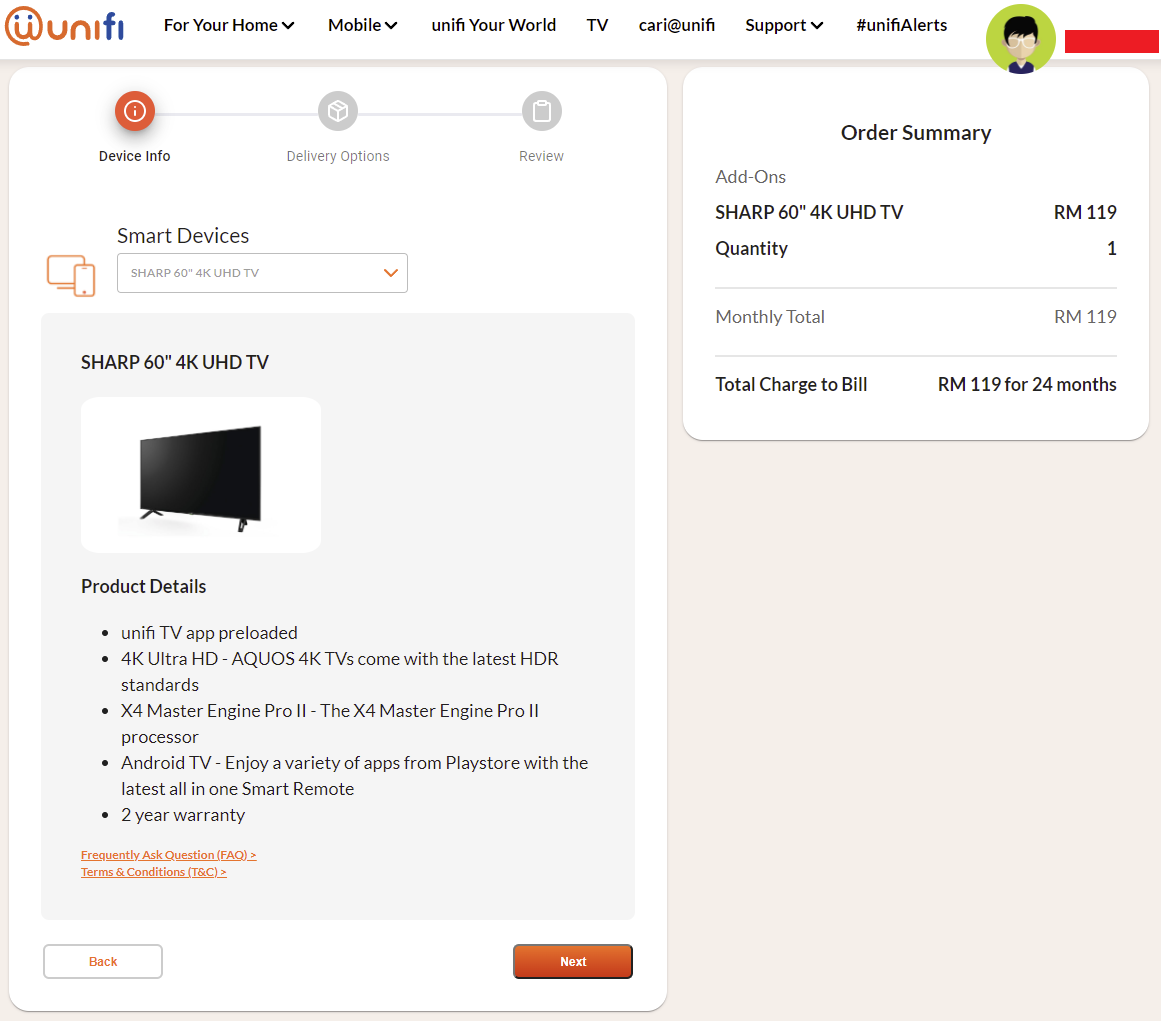 hi... how to getthis tv with installment plan ? and which speed plan to subscribe ? thanks .. |
|
|
|
|
|
YoungMan
|
Apr 24 2022, 10:27 AM
|
|
|
QUOTE(EDD-ed @ Apr 24 2022, 12:26 AM) I've already requested the termination via Twitter and the 30days countdown has started. Will the owner still need to visit TM Point and do I need to return a landline ? Thanks Definitely nothing to return. But you may try calling 100 to check just to make sure that you do not need to go to Tmpoint to verify and thumbprint for the termination. I personally think their social media personnel is not as reliable sometimes. |
|
|
|
|
|
Iceman74
|
Apr 24 2022, 10:36 AM
|
|
|
QUOTE(sgpdsmss @ Apr 24 2022, 09:36 AM) hi... how to getthis tv with installment plan ? and which speed plan to subscribe ? thanks .. |
|
|
|
|
|
jhleo1
|
Apr 24 2022, 12:43 PM
|
|
|
For TV, will be worth only if you subscribe to 500mbps. QUOTE(Iceman74 @ Apr 24 2022, 10:36 AM) |
|
|
|
|
|
Iceman74
|
Apr 24 2022, 12:47 PM
|
|
|
QUOTE(jhleo1 @ Apr 24 2022, 12:43 PM) For TV, will be worth only if you subscribe to 500mbps. Frankly speaking, don't think worth it. It not heavily subsidy. But if the TV needs replacement and don't have CC instalments, this is better than none. https://s.lazada.com.my/s.V3vQ9This post has been edited by Iceman74: Apr 24 2022, 01:18 PM |
|
|
|
|
|
sgpdsmss
|
Apr 24 2022, 01:24 PM
|
|
|
QUOTE(Iceman74 @ Apr 24 2022, 10:36 AM) thanks ... QUOTE(jhleo1 @ Apr 24 2022, 12:43 PM) For TV, will be worth only if you subscribe to 500mbps. need subscribe 500mb.... i tot all plan are eligible.....haha.. |
|
|
|
|
|
Sherman Kong
|
Apr 24 2022, 09:18 PM
|
Getting Started
|
Hi guys, idk if this is the correct thread. Just wanna ask if someone occur certain Netflix show that can't be played and it shows this message "You seem to using an adblocker or proxy". My dad is chasing this show called "The Last Kingdom", he watches it on his Smart TV connected to our home UNIFI. It had no issues for the past few months, till last 2 days it came up with that error message. We even tried to search manually and it could not be found. Not only this show but certain shows or movie is also experiencing the same issue. We did not configure the router as we don't know how to configure nor install VPN on the Smart TV. I have contacted Netflix customer support and asked if the show is available in Malaysia. they said it is available. I don't know if it's just me or you guys are facing this issue too.
Thanks a lot!
This post has been edited by Sherman Kong: Apr 24 2022, 09:22 PM
|
|
|
|
|
|
GameSky
|
Apr 24 2022, 09:56 PM
|
|
|
international line slow af again? tried to update a linux distro via mirror slowed like 4Mbps ..
using vpn full speed
This post has been edited by GameSky: Apr 24 2022, 09:56 PM
|
|
|
|
|
|
TSSilentVampire
|
Apr 24 2022, 10:27 PM
|
|
|
QUOTE(Sherman Kong @ Apr 24 2022, 09:18 PM) Hi guys, idk if this is the correct thread. Just wanna ask if someone occur certain Netflix show that can't be played and it shows this message "You seem to using an adblocker or proxy". My dad is chasing this show called "The Last Kingdom", he watches it on his Smart TV connected to our home UNIFI. It had no issues for the past few months, till last 2 days it came up with that error message. We even tried to search manually and it could not be found. Not only this show but certain shows or movie is also experiencing the same issue. We did not configure the router as we don't know how to configure nor install VPN on the Smart TV. I have contacted Netflix customer support and asked if the show is available in Malaysia. they said it is available. I don't know if it's just me or you guys are facing this issue too. Thanks a lot! Try to restart the router. Log into the router and see if you are assigned a TM Unifi IP. |
|
|
|
|
|
frontierzone
|
Apr 25 2022, 07:40 AM
|
|
|
Tracert to your IP, if the results show 1 line means you're on Public IP. Multi lines means you're on CGNAT, this true?
|
|
|
|
|
|
Sherman Kong
|
Apr 25 2022, 11:56 AM
|
Getting Started
|
QUOTE(SilentVampire @ Apr 24 2022, 10:27 PM) Try to restart the router. Log into the router and see if you are assigned a TM Unifi IP. How to check if it's TM IP? |
|
|
|
|
|
JasonTheGreat
|
Apr 25 2022, 12:20 PM
|
|
|
Just changed from 100mbps RM129 with Ruby to 300mbps Stay With Unifi without Ruby.
Abit contemp if this is better than 300mbps with Ultimate and free Mesh for RM159. Since this package will have free Disney+ as well
This post has been edited by JasonTheGreat: Apr 25 2022, 12:25 PM
|
|
|
|
|
|
jhleo1
|
Apr 25 2022, 01:17 PM
|
|
|
300mbps with Ultimate and free Mesh for RM159? I'm interested too if got. 😆 QUOTE(JasonTheGreat @ Apr 25 2022, 12:20 PM) Just changed from 100mbps RM129 with Ruby to 300mbps Stay With Unifi without Ruby. Abit contemp if this is better than 300mbps with Ultimate and free Mesh for RM159. Since this package will have free Disney+ as well |
|
|
|
|
|
frontierzone
|
Apr 25 2022, 02:24 PM
|
|
|
Unifi Live Chat cannot login DigitalMe, Unable To Proceed. Anyone similar?
|
|
|
|
|
|
ericpires
|
Apr 25 2022, 03:19 PM
|
|
|
QUOTE(frontierzone @ Apr 25 2022, 02:24 PM) Unifi Live Chat cannot login DigitalMe, Unable To Proceed. Anyone similar? Yes same problem here also. Is there Unifi TV app for Webos for LG TV year 2020 onwards? I cannot find it  |
|
|
|
|
|
TSSilentVampire
|
Apr 25 2022, 07:11 PM
|
|
|
QUOTE(frontierzone @ Apr 25 2022, 07:40 AM) Tracert to your IP, if the results show 1 line means you're on Public IP. Multi lines means you're on CGNAT, this true? Not true. Tracert trace the path of a packet from a source IP to a particular destination IP address. It has nothing to do with CGNAT IP. You could be on Public IP but your packet can still travel through multiple paths. To know if you are on CGNAT, check if your WAN IP begin with 100.x.x.x. in your router. You may need to log into your router to check. QUOTE(Sherman Kong @ Apr 25 2022, 11:56 AM) How to check if it's TM IP? Enter your router, check the IP address on WAN page, and go to whatsmyip and see if it assigned to TM. |
|
|
|
|
|
hurricane21
|
Apr 25 2022, 07:43 PM
|
|
|
QUOTE(sHawTY @ Apr 23 2022, 12:22 AM) hurricane21 UniFi now offers a Sharp 60" 4K Android TV for RM119 per month (RM119 x 24 Months = RM2856). Cheaper than most shops in Shopee / Lazada The model is 4TC60CK1XThank god I didn't take the previous LG 55" offer Didn't take the LG TV because it's not an Android TV Just found out this model no apple airplay, I need it very much. |
|
|
|
|
|
Sherman Kong
|
Apr 25 2022, 09:09 PM
|
Getting Started
|
QUOTE(SilentVampire @ Apr 25 2022, 07:11 PM) Not true. Tracert trace the path of a packet from a source IP to a particular destination IP address. It has nothing to do with CGNAT IP. You could be on Public IP but your packet can still travel through multiple paths. To know if you are on CGNAT, check if your WAN IP begin with 100.x.x.x. in your router. You may need to log into your router to check. Enter your router, check the IP address on WAN page, and go to whatsmyip and see if it assigned to TM. Idk the password to the router lol, the password is : (blank), but can't login into it |
|
|
|
|



 Quote
Quote


 0.0263sec
 0.59
0.59
 6 queries
 GZIP Disabled