

QUOTE(xCryptik @ Aug 25 2022, 08:23 PM)
Anyone know current plan/promo that is lower than RM139 for 300Mbps?

RM129Unifi Official TM UniFi High Speed Broadband Thread V40, READ 1ST PAGE FOR RELEVANT WIFI INFO
|
|
 Aug 25 2022, 08:24 PM Aug 25 2022, 08:24 PM
Show posts by this member only | IPv6 | Post
#2121
|
 
Senior Member
1,704 posts Joined: Jan 2005 
|
QUOTE(xCryptik @ Aug 25 2022, 08:23 PM) Anyone know current plan/promo that is lower than RM139 for 300Mbps? RM129 |
|
|
|
|
|
Aug 25 2022, 08:32 PM
|

Senior Member
634 posts Joined: Dec 2009 From: Beaufort, Sabah  
|
Hello guys, I just want to confirm with other Unifi Fibre users. Can you access websites using ipv6? My Unifi fibre connection can't access ipv6 now, previously can so configuration isn't the problem. I called TM and they have no idea what ipv6 is, proceeds to reset the port and nothing changed. Then they call me and claim that ipv6 is not supported and giving me option to charge me RM53 for the technician to come over to my house. 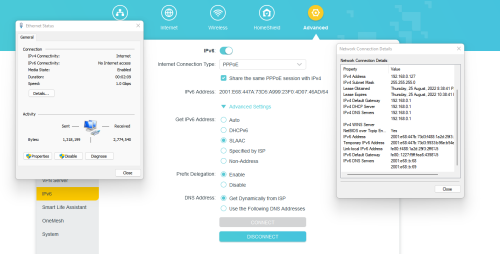 This post has been edited by azrin_kiko: Aug 25 2022, 08:41 PM kamil129 liked this post
|
|
|
Aug 25 2022, 08:40 PM
Show posts by this member only | IPv6 | Post
#2123
|

Senior Member
1,524 posts Joined: Dec 2020 From: Perak
|
QUOTE(xCryptik @ Aug 25 2022, 08:23 PM) Anyone know current plan/promo that is lower than RM139 for 300Mbps? Stay With Unifi - RM129 |
|
|
Aug 25 2022, 08:43 PM
Show posts by this member only | IPv6 | Post
#2124
|
|
Senior Member
1,524 posts Joined: Dec 2020 From: Perak
|
QUOTE(azrin_kiko @ Aug 25 2022, 08:32 PM) Hello guys, I just want to confirm with other Unifi Fibre users. Can you access websites using ipv6? My Unifi fibre connection can't access ipv6 now, previously can so configuration isn't the problem. I called TM and they have no idea what ipv6 is, proceeds to reset the port and nothing changed. Then they call me and claim that ipv6 is not supported and giving me option to charge me RM53 for the technician to come over to my house. look like your router can detect ipv6, but your PC can't |
|
|
Aug 25 2022, 08:50 PM
|

All Stars
11,459 posts Joined: Oct 2007 From: KL
|
QUOTE(azrin_kiko @ Aug 25 2022, 08:32 PM) Hello guys, I just want to confirm with other Unifi Fibre users. Can you access websites using ipv6? My Unifi fibre connection can't access ipv6 now, previously can so configuration isn't the problem. I called TM and they have no idea what ipv6 is, proceeds to reset the port and nothing changed. Then they call me and claim that ipv6 is not supported and giving me option to charge me RM53 for the technician to come over to my house. IPv6 here ok. Restart PC can or not? The prefix shown on your router ::447A:73D5 is different from the PC ::447B:73D3 This post has been edited by soonwai: Aug 25 2022, 08:57 PM kamil129 liked this post
|
|
|
Aug 25 2022, 09:06 PM
|
|
Senior Member
634 posts Joined: Dec 2009 From: Beaufort, Sabah
|
QUOTE(soonwai @ Aug 25 2022, 08:50 PM) IPv6 here ok. Restart PC can or not? The prefix shown on your router ::447A:73D5 is different from the PC ::447B:73D3 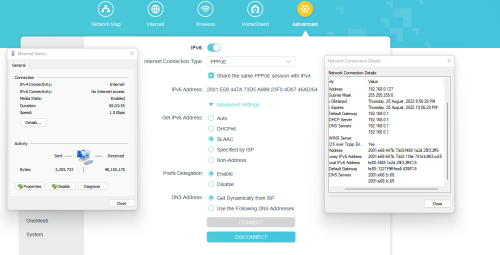 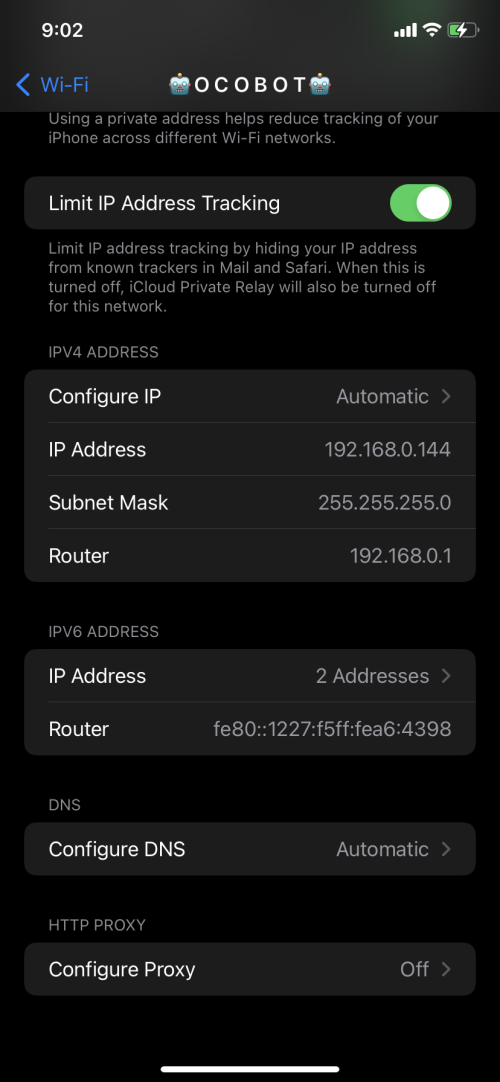 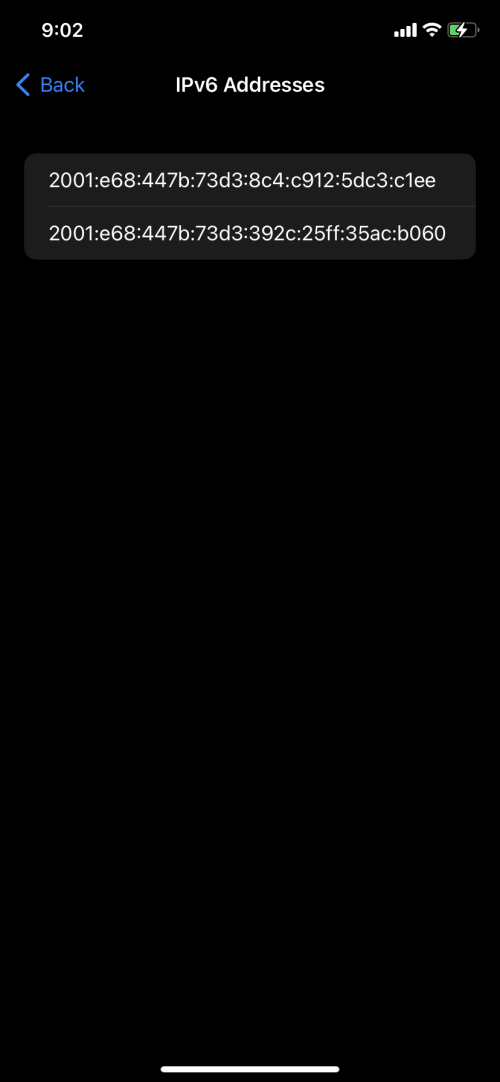  After restart still the same. Test using iphone also cannot, test using neighbour's unifi line (with permission) also cannot. |
|
|
|
|
|
Aug 25 2022, 09:08 PM
Show posts by this member only | IPv6 | Post
#2127
|
|
Junior Member
109 posts Joined: Apr 2020
|
QUOTE(azrin_kiko @ Aug 25 2022, 09:06 PM) After restart still the same. Test using iphone also cannot, test using neighbour's unifi line (with permission) also cannot. This post has been edited by twice1020: Aug 25 2022, 09:09 PM |
|
|
Aug 25 2022, 09:25 PM
Show posts by this member only | IPv6 | Post
#2128
|
|
All Stars
11,459 posts Joined: Oct 2007 From: KL
|
QUOTE(azrin_kiko @ Aug 25 2022, 09:06 PM) ... So weird, macam your router not advertising its 2001:E68:447A:73D5:: prefix.After restart still the same. Test using iphone also cannot, test using neighbour's unifi line (with permission) also cannot. Turn off router, turn off iPhone wifi, on router and connect back iPhone wifi, see what you get. Most important the prefix in your router must be the same as the prefix that your iPhone gets. Then only will you have connectivity. *the prefix is the first 4 groups of numbers. eg: from your router screenshot: 2001:E68:447A:73D5:: This will change when you restart the router. Your router is TPLink? Any TPLink sifus here? Is Prefix Delegation supposed to on or off? I feel that it should be off since the router isn't delegating prefixes. Or maybe it means something else in a TPLink. Maybe you can try disabling this. This post has been edited by soonwai: Aug 25 2022, 09:50 PM kamil129 liked this post
|
|
|
Aug 25 2022, 10:00 PM
Show posts by this member only | IPv6 | Post
#2129
|
|
Junior Member
288 posts Joined: Sep 2020
|
QUOTE(twice1020 @ Aug 25 2022, 09:08 PM) If neighbor's unifi also the same, it might be area local exchange issue. wired, my unifi can support ipv6 ,but it show so many error but no issue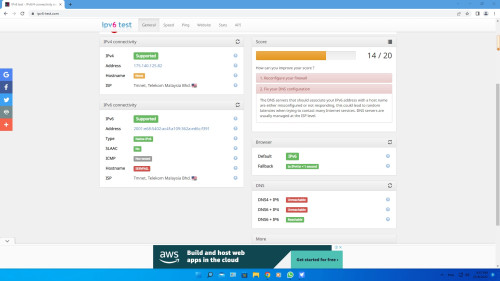 |
|
|
Aug 25 2022, 10:06 PM
|
|
Senior Member
634 posts Joined: Dec 2009 From: Beaufort, Sabah
|
QUOTE(soonwai @ Aug 25 2022, 09:25 PM) So weird, macam your router not advertising its 2001:E68:447A:73D5:: prefix. Still same ipv6 address.Turn off router, turn off iPhone wifi, on router and connect back iPhone wifi, see what you get. Most important the prefix in your router must be the same as the prefix that your iPhone gets. Then only will you have connectivity. *the prefix is the first 4 groups of numbers. eg: from your router screenshot: 2001:E68:447A:73D5:: This will change when you restart the router. Your router is TPLink? Any TPLink sifus here? Is Prefix Delegation supposed to on or off? I feel that it should be off since the router isn't delegating prefixes. Or maybe it means something else in a TPLink. Maybe you can try disabling this. |
|
|
Aug 25 2022, 10:07 PM
Show posts by this member only | IPv6 | Post
#2131
|
|
Junior Member
288 posts Joined: Sep 2020
|
QUOTE(aniq8676 @ Aug 25 2022, 08:40 PM) Stay With Unifi - RM129 package name: |
|
|
Aug 25 2022, 10:31 PM
Show posts by this member only | IPv6 | Post
#2132
|
|
All Stars
11,459 posts Joined: Oct 2007 From: KL
|
QUOTE(azrin_kiko @ Aug 25 2022, 10:06 PM) Still same ipv6 address. Still same on your phone or still same on your router? |
|
|
Aug 25 2022, 10:50 PM
Show posts by this member only | IPv6 | Post
#2133
|
|
All Stars
11,459 posts Joined: Oct 2007 From: KL
|
QUOTE(kcl2006ch @ Aug 25 2022, 10:00 PM) wired, my unifi can support ipv6 ,but it show so many error but no issue This website seems not too reliable. First time I tried it, fail all the ipv4 test.  Try refreshing the page. I get 18/20 with the 2 hostname tests failing. |
|
|
|
|
|
Aug 25 2022, 10:53 PM
Show posts by this member only | IPv6 | Post
#2134
|

Senior Member
4,034 posts Joined: Dec 2019
|
what does https://1.1.1.1/help say of your IPv6 test?
or this? https://test-ipv6.com/ This post has been edited by Oltromen Ripot: Aug 25 2022, 10:55 PM |
|
|
Aug 26 2022, 12:44 AM
Show posts by this member only | IPv6 | Post
#2135
|

Junior Member
183 posts Joined: Jan 2007 From: Kepong
|
My internet suddenly not working.
IP is now 172.21.xx.xx Formerly 40.xx.xx.xx Something went wrong with Unifi It now says "your login id is invalid and will not be able to access your internet service at the moment" This post has been edited by reddevils500: Aug 26 2022, 12:47 AM |
|
|
Aug 26 2022, 12:55 AM
Show posts by this member only | IPv6 | Post
#2136
|
|
All Stars
11,459 posts Joined: Oct 2007 From: KL
|
QUOTE(reddevils500 @ Aug 26 2022, 12:44 AM) My internet suddenly not working. 172.21.x.x is TM's walled garden. You get this when your username/password can't be authenticated. Can be caused by:IP is now 172.21.xx.xx Formerly 40.xx.xx.xx Something went wrong with Unifi It now says "your login id is invalid and will not be able to access your internet service at the moment" 1. Suspended account 2. Wrong username/password 3. Problem with TM's authentication server Also one will only get the Walled Garden page if one is using TM's DNS. Seems like you're not the only person facing this. There's another person in /k with the same problem. https://forum.lowyat.net/topic/5303731 This post has been edited by soonwai: Aug 26 2022, 01:34 AM kamil129 liked this post
|
|
|
Aug 26 2022, 01:02 AM
Show posts by this member only | IPv6 | Post
#2137
|
|
Junior Member
183 posts Joined: Jan 2007 From: Kepong
|
QUOTE(soonwai @ Aug 26 2022, 12:55 AM) 172.21.x.x is TM's walled garden. You get this when your username/password can't be authenticated. Can be caused by: My username/password is authenticated. But no internet coverage.1. Suspended account 2. Wrong username/password 3. Problem with TM's authentication server Seems like you're not the only person facing this. There's another person in /k with the same problem. https://forum.lowyat.net/topic/5303731 |
|
|
Aug 26 2022, 01:19 AM
Show posts by this member only | IPv6 | Post
#2138
|
|
All Stars
11,459 posts Joined: Oct 2007 From: KL
|
QUOTE(reddevils500 @ Aug 26 2022, 01:02 AM) My username/password is authenticated. But no internet coverage. Try changing one character in your username and/or password to make them wrong. Do you get the same result?This post has been edited by soonwai: Aug 26 2022, 01:19 AM |
|
|
Aug 26 2022, 01:26 AM
|

Senior Member
2,281 posts Joined: Feb 2012
|
QUOTE(reddevils500 @ Aug 26 2022, 12:44 AM) My internet suddenly not working. got same issue. turns out my acc was suspended. straight away make payment. all back to normal.IP is now 172.21.xx.xx Formerly 40.xx.xx.xx Something went wrong with Unifi It now says "your login id is invalid and will not be able to access your internet service at the moment" |
|
|
Aug 26 2022, 01:39 AM
Show posts by this member only | IPv6 | Post
#2140
|
|
All Stars
11,459 posts Joined: Oct 2007 From: KL
|
QUOTE(firdausbhari @ Aug 26 2022, 01:26 AM) got same issue. turns out my acc was suspended. straight away make payment. all back to normal. Just curious, how long from due date was your acc suspended? I think TM's automated all that now so reinstatement is also very fast. kamil129 liked this post
|
|
Topic ClosedOptions
|
| Change to: |  0.0435sec 0.0435sec
 0.83 0.83
 6 queries 6 queries
 GZIP Disabled GZIP Disabled
Time is now: 20th December 2025 - 01:27 PM |
 Quote
Quote