Welcome Guest ( Log In | Register )

Bump Topic Topic Closed RSS Feed
125 Pages « < 75 76 77 78 79 > » Bottom

Outline · [ Standard ] · Linear+

 Play B3yond Community | V4, Burnout Paradise Demo Next Week

views
     
adreanalyn
post Nov 8 2007, 05:13 PM

New Member
*
Junior Member
44 posts

Joined: Aug 2006
QUOTE(VashTheStampede @ Nov 8 2007, 04:59 PM)
Umm..okay, i'm d/l through my ps3 which is taking ages. If say i d/l from here, how do I install/transfer it to my ps3 specifically?

Also.. the two links given for the updates are different? Are there different firmware updates for different regions? ^_-
*
It's been a while since I last posted .. rclxms.gif

Well, all you need is to follow the instructions provided at SCE firmware download page.
Create a specific folder in the USB root, and you're good to go.

But this doesn't apply to demos downloaded using the PC, though.
You've to go through a more complicated way for that brows.gif
VashTheStampede
post Nov 8 2007, 05:23 PM

I am the Darkness
*****
Senior Member
994 posts

Joined: Mar 2007
From: Anywhere the dark lurks


I see! Thanks people! biggrin.gif
Synco
post Nov 8 2007, 05:23 PM

CCB
****
Senior Member
667 posts

Joined: Jan 2007


QUOTE(Ninja @ Nov 8 2007, 04:10 PM)
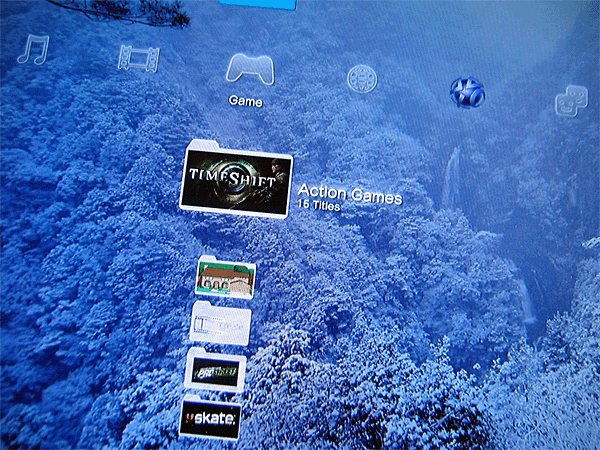
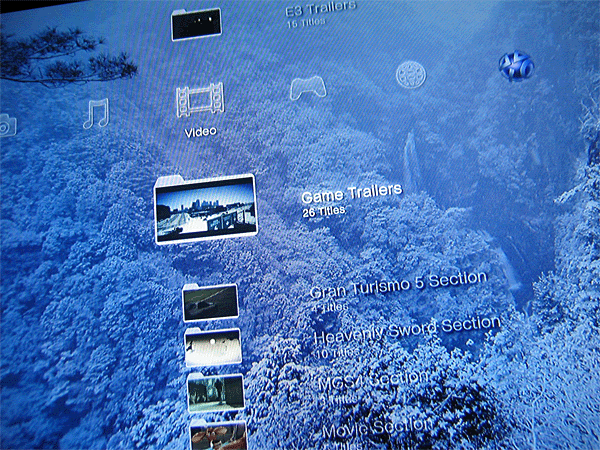
icon_idea.gif  rclxms.gif I found the way to create folder to organize your videos.

Go to Video and press 'Triangle' on any of your videos, and select 'Information'.

Here you will see 'Album' field can be enter. So, just put for example 'Movie Trailer' or 'Game Trailer'. Then, your videos will be sorted and listed in their respective folders.

thumbup.gif

EDIT: You can do the same steps for Photos and Games as well. Don't forget to press 'Square' to toggle the group content (By Month, By Year or By Album). So, just toggle to 'By Album' to organize your files in folders.
*
hehe ninja memang hebat thumbup.gif thumbup.gif
just need to rename those files now icon_idea.gif
Muchi
post Nov 8 2007, 05:24 PM

New Member
*
Junior Member
18 posts

Joined: Sep 2005


Can't seem to execute the ps3tcompiler hmm.gif

Anyone tried it yet?
ruztynail
post Nov 8 2007, 05:39 PM

Acrimonious Young Man
******
Senior Member
1,886 posts

Joined: Jan 2005
From: world above you


yea jus download it frm the web. its much faster too..
VashTheStampede
post Nov 8 2007, 05:49 PM

I am the Darkness
*****
Senior Member
994 posts

Joined: Mar 2007
From: Anywhere the dark lurks


Damn right it is! i'm at 121kb!! rclxms.gif update here i come!
TSNinja
post Nov 8 2007, 07:48 PM

[PBMY]™ Supreme Commander
Group Icon
VIP
1,764 posts

Joined: Jan 2003
From: Helghan
Just finished restructuring my XMB files into folders. thumbup.gif I like the new 'Nature' XMB theme. 'Cool'!

user posted image

user posted image
Gahleon
post Nov 8 2007, 08:40 PM

Getting Started
**
Junior Member
230 posts

Joined: Mar 2005
From: Hokkien University


Good now i can seperate my porn,gametrailer and movie trailer.
verced
post Nov 8 2007, 08:43 PM

Getting Started
**
Junior Member
168 posts

Joined: Jan 2003
QUOTE(VashTheStampede @ Nov 8 2007, 04:59 PM)
Umm..okay, i'm d/l through my ps3 which is taking ages. If say i d/l from here, how do I install/transfer it to my ps3 specifically?

Also.. the two links given for the updates are different? Are there different firmware updates for different regions? ^_-
*
The are 'supposed' to be different, but so far, they've been exactly the same. To be on the safe side, just download the correct region for your ps3.

Once you've downloaded the firmware, you can put it on a thumbdrive and update from there.

//-----

Ninja,

That's the only way to do it eh? I managed to it that way earlier, but I thought I'm doing it wrong because it's so counter intuitive. I'm expecting something like the playlist organization, which is really nice by the way.

One thing I noticed though, your movie icons won't animate once they're grouped. Games seems to animate just fine though.
andy_lhc
post Nov 8 2007, 08:47 PM

On my way
****
Senior Member
542 posts

Joined: Mar 2006


If you guys are interested in the PS3 custom theme maker which is in English..

http://au.playstation.com/support/ps3/faqs...heme_v101-E.zip
verced
post Nov 8 2007, 08:54 PM

Getting Started
**
Junior Member
168 posts

Joined: Jan 2003
Found another theme in the Theme Creation Tool.

I love the XMB icons from this theme. The video and audio files icons & the notification looks terrible though. Wow, customizing the theme is way easier than I thought. biggrin.gif

You can download the sample ps3 theme here: http://public.box.net/verced

This post has been edited by verced: Nov 8 2007, 09:03 PM


Attached thumbnail(s)
Attached Image
TSNinja
post Nov 8 2007, 09:22 PM

[PBMY]™ Supreme Commander
Group Icon
VIP
1,764 posts

Joined: Jan 2003
From: Helghan
QUOTE(verced @ Nov 8 2007, 08:43 PM)
Ninja,

That's the only way to do it eh? I managed to it that way earlier, but I thought I'm doing it wrong because it's so counter intuitive. I'm expecting something like the playlist organization, which is really nice by the way.

One thing I noticed though, your movie icons won't animate once they're grouped. Games seems to animate just fine though.
*
I guess that's the only way. Was hoping there's a selection to create new folder, and then later can just move all the files inside. That would be easier. laugh.gif
vorchiel
post Nov 8 2007, 09:24 PM

ლ(ಠ_ಠ ლ)
****
Senior Member
666 posts

Joined: Jan 2003
From: Left Hand Society, West London
1 more thing.. The folder organisation is for the current user only.. If only they affect all user accounts sad.gif
Muchi
post Nov 8 2007, 09:25 PM

New Member
*
Junior Member
18 posts

Joined: Sep 2005


QUOTE(vorchiel @ Nov 8 2007, 09:24 PM)
1 more thing.. The folder organisation is for the current user only.. If only they affect all user accounts sad.gif
*
Theme as well
verced
post Nov 8 2007, 09:35 PM

Getting Started
**
Junior Member
168 posts

Joined: Jan 2003
QUOTE(vorchiel @ Nov 8 2007, 09:24 PM)
1 more thing.. The folder organisation is for the current user only.. If only they affect all user accounts sad.gif
*
It applies to all user on my machine. You just have press square to change the organization. The folder name remain the same. smile.gif
TSNinja
post Nov 8 2007, 09:36 PM

[PBMY]™ Supreme Commander
Group Icon
VIP
1,764 posts

Joined: Jan 2003
From: Helghan
QUOTE(vorchiel @ Nov 8 2007, 09:24 PM)
1 more thing.. The folder organisation is for the current user only.. If only they affect all user accounts sad.gif
*
You can login other user accounts, and straight away press Square to toogle to 'By Album'. And your files will be sorted as well according to the main user account.

EDIT: verced, we posted same thing at the same time. tongue.gif laugh.gif

This post has been edited by Ninja: Nov 8 2007, 09:37 PM
vorchiel
post Nov 8 2007, 09:42 PM

ლ(ಠ_ಠ ლ)
****
Senior Member
666 posts

Joined: Jan 2003
From: Left Hand Society, West London
Okay.. I'm sorry for my noobness cry.gif
verced
post Nov 8 2007, 09:46 PM

Getting Started
**
Junior Member
168 posts

Joined: Jan 2003
QUOTE(Ninja @ Nov 8 2007, 09:36 PM)
You can login other user accounts, and straight away press Square to toogle to 'By Album'. And your files will be sorted as well according to the main user account.

EDIT: verced, we posted same thing at the same time. tongue.gif  laugh.gif
*
Now, that's scary. biggrin.gif

It's odd to see that videos doesn't animate anymore when they're grouped while games looks to be just fine.

//----

Vorchiel,

We're all noobies here. Still playing around with the new dashboard. smile.gif
TSNinja
post Nov 8 2007, 09:49 PM

[PBMY]™ Supreme Commander
Group Icon
VIP
1,764 posts

Joined: Jan 2003
From: Helghan
Yeah, I noticed that too. Try to re-create the thumbnails, but still not animated. cry.gif Hopefully, Sony will fix this in future updates.
stringfellow
post Nov 8 2007, 10:53 PM

Ultrawide | 4K | VR
********
Senior Member
11,305 posts

Joined: Jan 2003
Tried the Remote Play feature via PS3, to turn on and off the PS3 remotely via the net, looks like it requires two logins into Remote Play before you can do anything within the dashboard. First Remote Play login to turn the PS3 on, and the second login to get the display onto your PSP. Got a timeout notice too after the first login, maybe the connection is slow here.

This is useful when you're out at work or not at home, and a demo is being added on PSN, and you need to initiate a download ASAP so that the demo is ready for play once you get home.

Turning the PS3 off with the PSP via Remote Play also results in a timeout notice, but the PS3 got turned off anyway.

125 Pages « < 75 76 77 78 79 > » Top
Topic ClosedOptions
 

Change to:
| Lo-Fi Version
0.0274sec    0.48    6 queries    GZIP Disabled
Time is now: 13th December 2025 - 11:06 AM