Outline ·
[ Standard ] ·
Linear+
Official TM UniFi High Speed Broadband Thread V39, READ 1ST PAGE FOR RELEVANT WIFI INFO
|
syahpian
|
 Jul 10 2021, 07:52 PM Jul 10 2021, 07:52 PM
|

|
QUOTE(YoungMan @ Jul 10 2021, 07:43 PM) The TP-Link should be able to handle 300mbps on wired connection. Do you have any other PC or laptop to test? Or try turn off antivirus and test again just to make sure it is not the culprid. What about the speed if test using smartphone? Also I would like to quote this post for your reference once you receive the mesh. i try configure m4 as router, but the speed very slow thorugh lan cable not sure why. i ended up configure it as AP 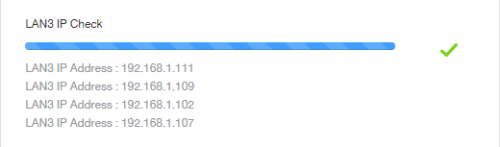 also, anyone using UPB, are you connection it through wifi or lan cable?  This post has been edited by syahpian: Jul 10 2021, 07:57 PM This post has been edited by syahpian: Jul 10 2021, 07:57 PM |
|
|
|
|
|
ck0403my
|
Jul 10 2021, 08:24 PM
|
|
|
QUOTE(YoungMan @ Jul 10 2021, 07:43 PM) The TP-Link should be able to handle 300mbps on wired connection. Do you have any other PC or laptop to test? Or try turn off antivirus and test again just to make sure it is not the culprid. What about the speed if test using smartphone? Also I would like to quote this post for your reference once you receive the mesh. i try with another laptop and it is the same, 160-170Mbps off eset internet security also get the same speed, below 200Mbps if i use my phone and connect to 5Ghz wifi, it only get up to 100Mbps, but my phone can support Wi-Fi 802.11 a/b/g/n/ac/6 could it be the tp link c1200 setting? This post has been edited by ck0403my: Jul 10 2021, 08:27 PM |
|
|
|
|
|
aniq8676
|
Jul 10 2021, 09:02 PM
|
|
|
QUOTE(ck0403my @ Jul 10 2021, 08:24 PM) i try with another laptop and it is the same, 160-170Mbps off eset internet security also get the same speed, below 200Mbps if i use my phone and connect to 5Ghz wifi, it only get up to 100Mbps, but my phone can support Wi-Fi 802.11 a/b/g/n/ac/6 could it be the tp link c1200 setting? There may be a problem with the Archer C1200. Do you have any router other than the Archer C1200? |
|
|
|
|
|
ck0403my
|
Jul 10 2021, 09:16 PM
|
|
|
QUOTE(aniq8676 @ Jul 10 2021, 09:02 PM) There may be a problem with the Archer C1200. Do you have any router other than the Archer C1200? no, i guess i have to wait for tm to post the m4 to me to test out |
|
|
|
|
|
sadlyfalways
|
Jul 10 2021, 09:26 PM
|
|
|
QUOTE(bukulima @ Jul 10 2021, 05:29 PM) anyone having packet lose to NA server? im getting heavy packet loss here on Unifi 500mbps When I play gta, I don’t know what region but if I can hear Americans speaking, the lag and ping is so very high |
|
|
|
|
|
ck0403my
|
Jul 11 2021, 04:27 AM
|
|
|
QUOTE(YoungMan @ Jul 10 2021, 07:43 PM) The TP-Link should be able to handle 300mbps on wired connection. Do you have any other PC or laptop to test? Or try turn off antivirus and test again just to make sure it is not the culprid. What about the speed if test using smartphone? Also I would like to quote this post for your reference once you receive the mesh. after hours of google, finally i found this -> https://linustechtips.com/topic/1122122-tp-...-slow-ethernet/solved the problem, just need to enable NAT Boost  This post has been edited by ck0403my: Jul 11 2021, 04:30 AM This post has been edited by ck0403my: Jul 11 2021, 04:30 AM |
|
|
|
|
|
PJng
|
Jul 11 2021, 09:00 AM
|
|
|
QUOTE(YoungMan @ Jul 10 2021, 03:54 PM) Possibly Unifi agents there. And yes you can change plan, do it while port available. I just click that link and submit my info Wait for TM call back Not sure will get special price or not |
|
|
|
|
|
YoungMan
|
Jul 11 2021, 11:08 AM
|
|
|
QUOTE(ck0403my @ Jul 11 2021, 05:27 AM) after hours of google, finally i found this -> https://linustechtips.com/topic/1122122-tp-...-slow-ethernet/solved the problem, just need to enable NAT Boost Glad you manage to solve the problem. |
|
|
|
|
|
aryz
|
Jul 11 2021, 11:30 AM
|
New Member

|
Hi .. My package is is Unifi Lite 100mbps
RM99 (after perpetual RM30 Discount) + RM30 unifi TV STB (Full channel) + RM10 (UPB).
My question is .. planned to upgrade 300 mbps , previously get offer RM179 with Mesh Wifi , Its worth to get ita (Actually no need mesh wifi) .
Or any other friend with similar package get better offer ?
|
|
|
|
|
|
YoungMan
|
Jul 11 2021, 11:50 AM
|
|
|
QUOTE(aryz @ Jul 11 2021, 12:30 PM) Hi .. My package is is Unifi Lite 100mbps RM99 (after perpetual RM30 Discount) + RM30 unifi TV STB (Full channel) + RM10 (UPB). My question is .. planned to upgrade 300 mbps , previously get offer RM179 with Mesh Wifi , Its worth to get ita (Actually no need mesh wifi) . Or any other friend with similar package get better offer ? If you are out of contract and do not need the PlayTv, can try to request to RM159 300mbps. The mesh is given free regardless. This post has been edited by YoungMan: Jul 11 2021, 11:50 AM |
|
|
|
|
|
aniq8676
|
Jul 11 2021, 12:13 PM
|
|
|
QUOTE(aryz @ Jul 11 2021, 11:30 AM) Hi .. My package is is Unifi Lite 100mbps RM99 (after perpetual RM30 Discount) + RM30 unifi TV STB (Full channel) + RM10 (UPB). My question is .. planned to upgrade 300 mbps , previously get offer RM179 with Mesh Wifi , Its worth to get ita (Actually no need mesh wifi) . Or any other friend with similar package get better offer ? - 300mbps + Mesh , No Unifi TV RM 169 - 300mbps + Mesh + UnifiPlayTV ID only Do you still want to use/maintain Unifi TV? |
|
|
|
|
|
ck0403my
|
Jul 11 2021, 12:21 PM
|
|
|
QUOTE(aryz @ Jul 11 2021, 11:30 AM) Hi .. My package is is Unifi Lite 100mbps RM99 (after perpetual RM30 Discount) + RM30 unifi TV STB (Full channel) + RM10 (UPB). My question is .. planned to upgrade 300 mbps , previously get offer RM179 with Mesh Wifi , Its worth to get ita (Actually no need mesh wifi) . Or any other friend with similar package get better offer ? i took this offer too, but i dont want the hypp tv because i never watch it, it is 159, 300mbps + fresh mesh wifi m4, i think still can watch the basic channel in hypp tv but who cares  |
|
|
|
|
|
dannielshazmeer
|
Jul 11 2021, 09:56 PM
|
|
|
This probably due to congestion issue in your area when many users utilize their connection.
|
|
|
|
|
|
JasonTheGreat
|
Jul 12 2021, 04:16 PM
|
|
|
Hi all.
Want to ask. My MODEM malfunctioned and UNIFI just replaced it but I was not informed of there is any charges. Anyone know? Thanks
|
|
|
|
|
|
aniq8676
|
Jul 12 2021, 04:27 PM
|
|
|
QUOTE(JasonTheGreat @ Jul 12 2021, 04:16 PM) Hi all. Want to ask. My MODEM malfunctioned and UNIFI just replaced it but I was not informed of there is any charges. Anyone know? Thanks Usually there will be a charge of RM53 on next month bill. charge for their visit to your premises. While the Modem is a lifetime warranty |
|
|
|
|
|
enduser
|
Jul 12 2021, 04:37 PM
|
|
|
QUOTE(JasonTheGreat @ Jul 12 2021, 04:16 PM) Hi all. Want to ask. My MODEM malfunctioned and UNIFI just replaced it but I was not informed of there is any charges. Anyone know? Thanks try live chat and ask for waived., tell them its BTU problem . |
|
|
|
|
|
JasonTheGreat
|
Jul 12 2021, 04:57 PM
|
|
|
QUOTE(aniq8676 @ Jul 12 2021, 04:27 PM) Usually there will be a charge of RM53 on next month bill. charge for their visit to your premises. While the Modem is a lifetime warranty Understood. Thanks. I’m okay with rm53. Just don’t extend my contract  |
|
|
|
|
|
syahpian
|
Jul 12 2021, 05:09 PM
|
|
|
QUOTE(JasonTheGreat @ Jul 12 2021, 04:57 PM) Understood. Thanks. I’m okay with rm53. Just don’t extend my contract 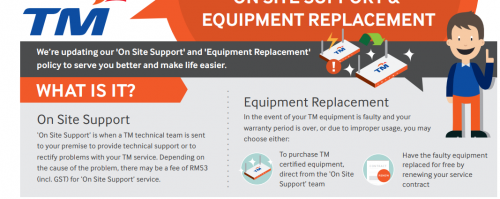 on unifi website This post has been edited by syahpian: Jul 12 2021, 05:10 PM |
|
|
|
|
|
kiritoffx
|
Jul 12 2021, 05:38 PM
|
|
|
QUOTE(aniq8676 @ Jul 12 2021, 04:27 PM) Usually there will be a charge of RM53 on next month bill. charge for their visit to your premises. While the Modem is a lifetime warranty what usually cause modem too be malfunction? |
|
|
|
|
|
JasonTheGreat
|
Jul 12 2021, 05:50 PM
|
|
|
QUOTE(syahpian @ Jul 12 2021, 05:09 PM) on unifi website Uh oh. I better call to ask. I prefer to pay than to extend contract. QUOTE(kiritoffx @ Jul 12 2021, 05:38 PM) what usually cause modem too be malfunction? The technician said the modem seldom spoil. Not sure what’s the caused. Been using for 5 years. It has intermittent disconnection since last week and each time it last between 1 to 2 hrs and back to normal after that. But today seemed not recovering after 3 hrs so technician replaced it. |
|
|
|
|



 Quote
Quote


 0.0312sec
 1.12
1.12
 6 queries
 GZIP Disabled