Welcome Guest ( Log In | Register )

Outline · [ Standard ] · Linear+

 DIR-868L to ASUS RT-AC66U with AiMesh, Latest DIR-868L Migration Options

views
     
TSmisk94
post Dec 29 2020, 11:12 PM, updated 5y ago

Getting Started
**
Junior Member
72 posts

Joined: May 2014


My next Guide Project for 2021.

Previous Options - DD-WRT, Tomato and Advance Tomato.

Now Asus AiMesh.

I will share my experience here.

Be Safe and Be Well.

Covid-19 is still out there.

This post has been edited by misk94: Feb 17 2021, 06:54 PM
TSmisk94
post Jan 1 2021, 08:03 PM

Getting Started
**
Junior Member
72 posts

Joined: May 2014


Good news.

I managed to migrate two units of DLink DIR-868L to Asus AiMesh firmware. rclxm9.gif

Configured as one main and one node.

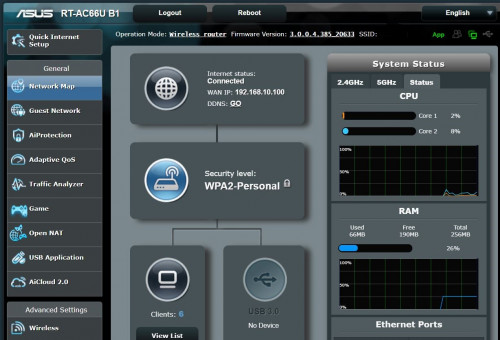
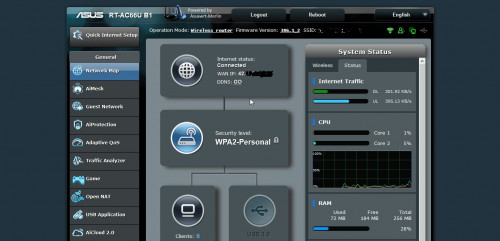
I am using RT-AC66U B1 firmware. Release 3.0.0.4_385_20633.

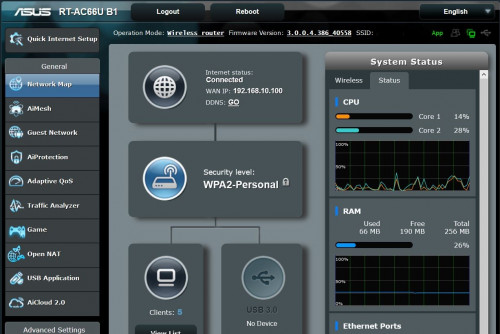
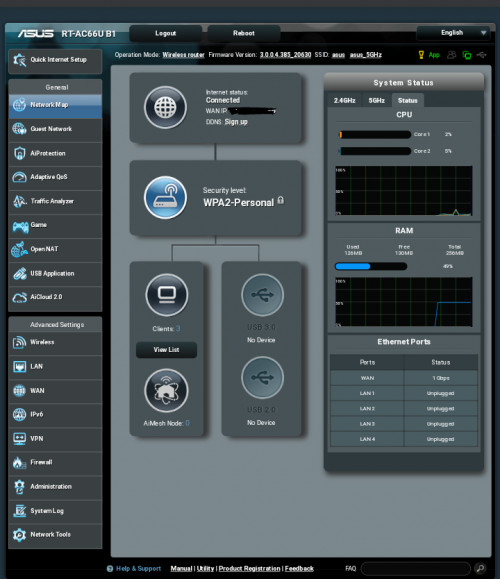
Top webpage of main router

user posted image

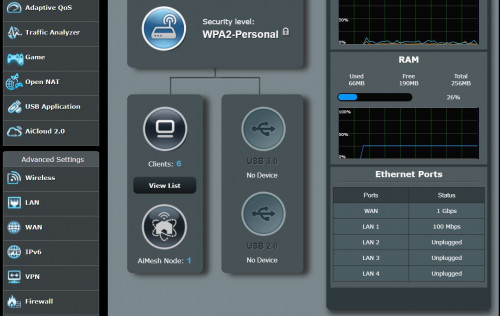
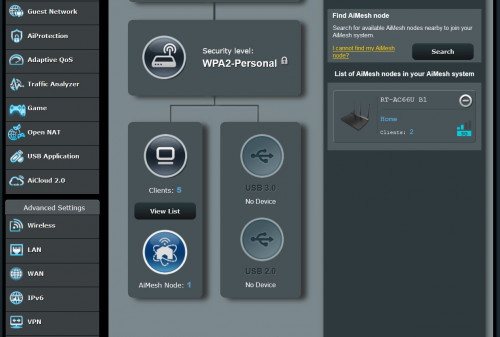
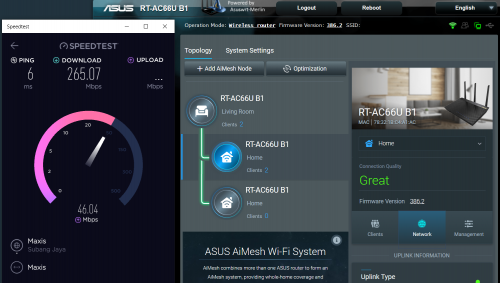
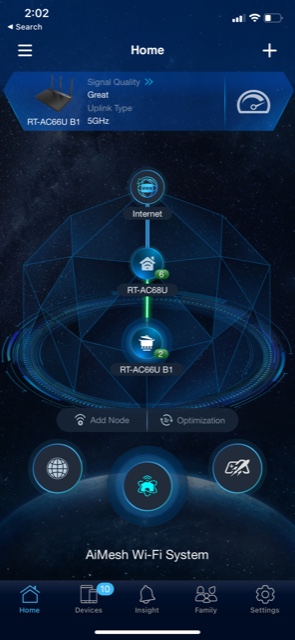
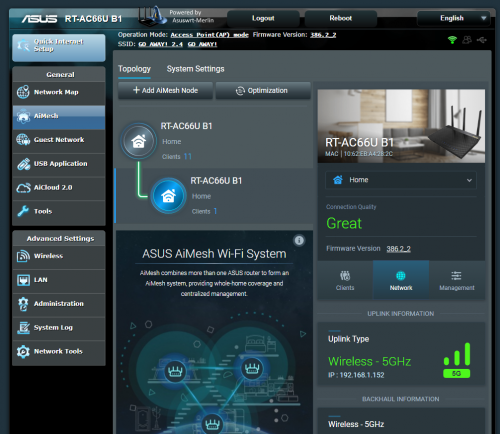
Middle part of webpage of main router. You can see 1 AiMesh node.

user posted image

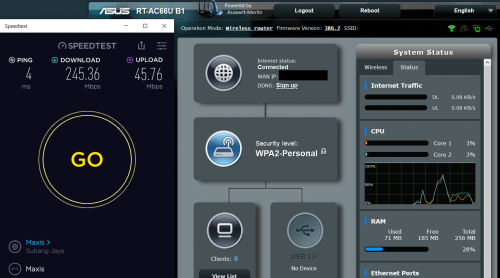
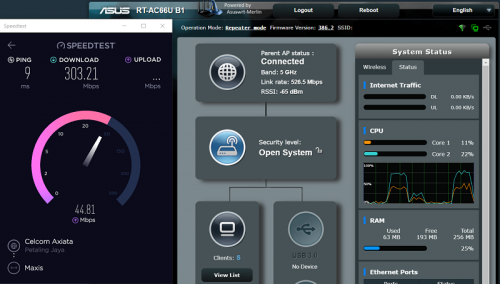
So far satisfied with performance. Only a few days of running the AiMesh.

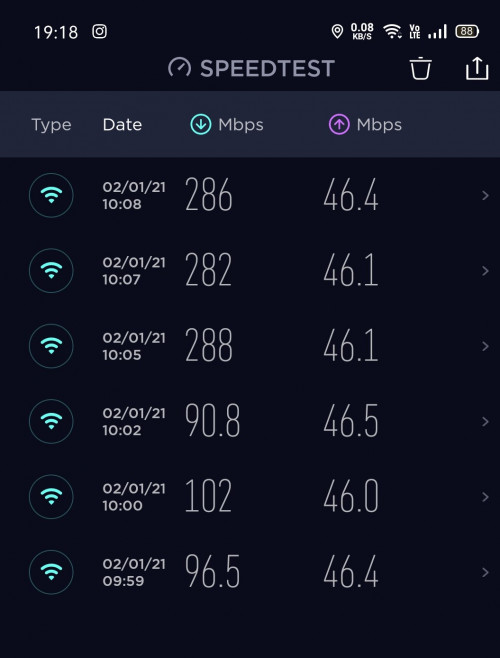
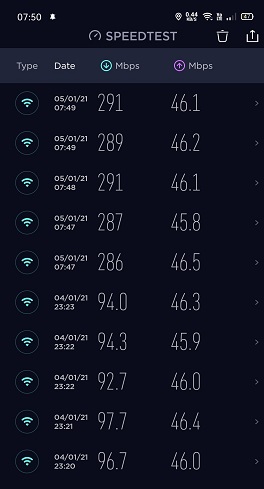
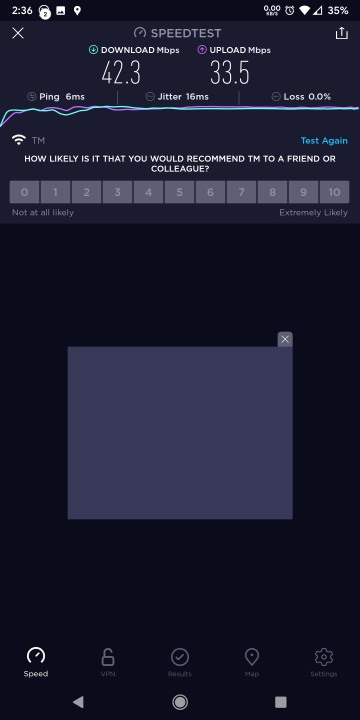
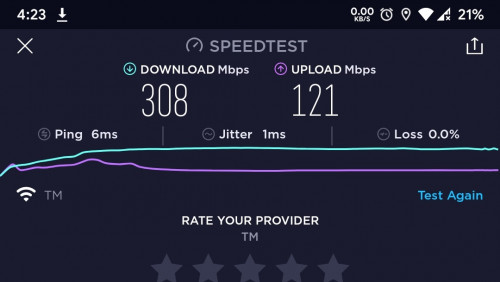
I could get 250 - 290 Mbps if I sit near main router. On the second floor I am getting 70-90 Mbps. Both from my phone. I am having a 300/50 Mbps fiber internet in my home.

user posted image

I need to find some time to work on a guide how to convert a DLink DIR-868L to an ASUS AiMesh capable router.

I did encountered some difficulties but managed to overcome them. rclxub.gif

I will revise the steps and make improvements for better clarity in the final guide.

Stay tune.

Happy New Year and Stay Safe. thumbup.gif


This post has been edited by misk94: Jan 22 2021, 08:51 PM
TSmisk94
post Jan 2 2021, 10:26 PM

Getting Started
**
Junior Member
72 posts

Joined: May 2014


There are 7 steps for the whole migration process.

Warnings and Irregularities:

1. LAN 1 will turn to WAN and WAN is be LAN 4. (Funny but true) biggrin.gif
2. Power and Internet LED light are now opposite. Internet LED is now Power. Power LED is now Internet.
3. After router is switched on, power LED will light-up. Now it is now green (instead of orange in DLink factory firmware)
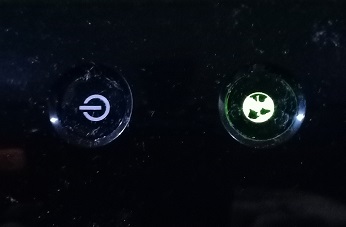
user posted image

4. Next, WiFi LED light-up. Now it is orange (instead of green in DLink factory firmware)

user posted image

Funny but true. biggrin.gif biggrin.gif biggrin.gif

Credits:

• This guide was developed from various online resources and my personal experience on D-Link DIR-868L A1 routers.
• Credits are due to all contributions.
• My contributions are adding improvements and clarity for the whole process.

• A kind individual with online name Ah_Cleo from https://forums.hardwarezone.com.sg shared the following files:

a. DIR868LA1_FW104b01.bin No need if you have FW1.03SHC firmware
b. 25974factory-to-ddwrt.bin
c. CFE_868L_melin384.bin
d. FW_RT_AC66U_B1_300438410007.trx !!!Please do not use. Caused problems!!!
e. RT-AC66U_B1_3.0.0.4_385_20630-ged5e4c3.trx Use this instead
f. mtd-write
g. Putty
h. WinSCP
i. CFEedit

• Please download from the following Google drive link (Hopefully the link is active indefinitely):

https://drive.google.com/file/d/1NYeLnFZjLQ...iew?usp=sharing

Step 1: Downgrade DIR-868L factory firmware to FW1.03SHC

• First, you need to downgrade from your existing firmware (e.g. FW1.22SHC) to FW1.03SHC.
• Second you need to download files listed in Credits section above.
• Download FW1.03SHC firmware from D-Link Singapore website https://www.dlink.com.sg/dir-868l/#firmware.
• Unplug all cables (incl. power cable) from the router.
• Connect the router to the PC using one of the 4 switch ports. Best to use port 2 or 3.
• Set computer IP address to 192.168.0.3 and use 255.255.255.0 as the Subnet mask.
• Power-on the router while pushing a paperclip to the hidden reset button located at the bottom of the device for a few seconds.
• When the Power LED starts blinking, release the reset button.
• Use Mozilla FireFox browser and navigate to http://192.168.0.1.
• The following web page will be displayed.
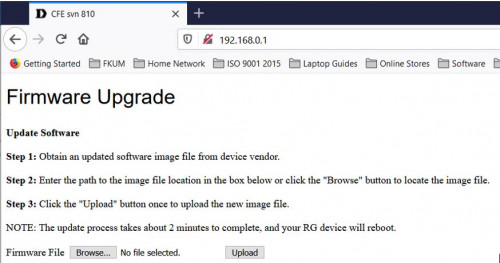
user posted image

• Next browse for the FW1.03SHC firmware
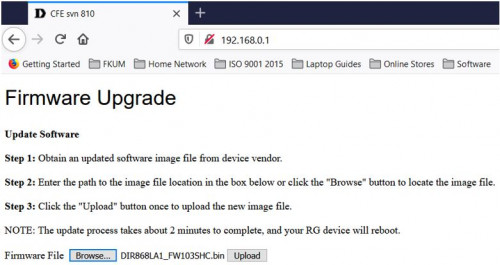
user posted image

• Click Upload button to upload the FW1.03SHC firmware.
• When completed the router should continue to reboot.
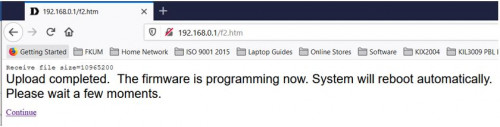
user posted image

• The router should now be running FW1.03SHC firmware and accessible on the default address. (http://192.168.0.1). Default user is admin and no password i.e. blank
• Next, click to Tools menu, then system menu and click on Restore Factory Defaults button
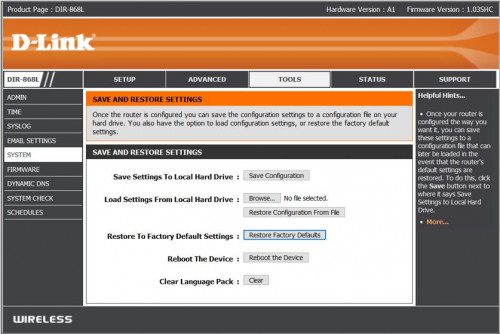
user posted image

• The router will reboot again.
• After the reboot, the router is ready to be migrated to DD-WRT firmware.

Step 2: Migrate to DD-WRT firmware and enabling SSHd

• Login to router again.
• Next, click to Tools menu then Firmware menu and click on Browse button
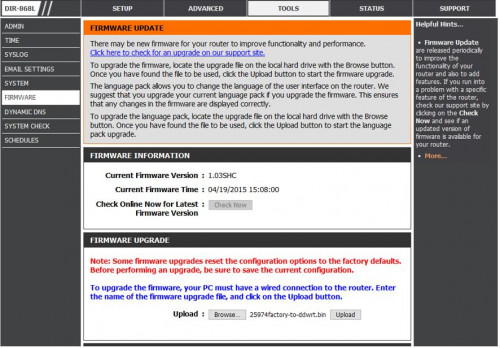
user posted image

• Use browse button to find 25974 factory-to-ddwrt.bin file and click Upload button to flash the firmware
• This will take about 3 - 5 minutes for the router to be stable.
• Router should be running DD-WRT firmware.
• By default the router IP address should be 192.168.1.1.
• However, if you cannot access the DD-WRT router page, it is likely that the IP address is still at 192.168.0.1.
• You should be able to access it using previous IP address and go to Administration tab.
• Reset Factory Defaults - Yes
• Click Apply Settings button
• Reboot router
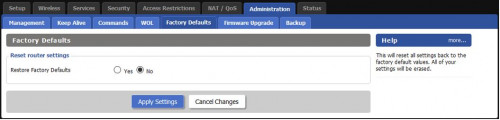
user posted image

• Change PC IP address to 192.168.1.3 and leave sub netmask as 255.255.255.0 still.
• On the Firefox browser, change to 192.168.1.1 and you will be asked to change username and password.
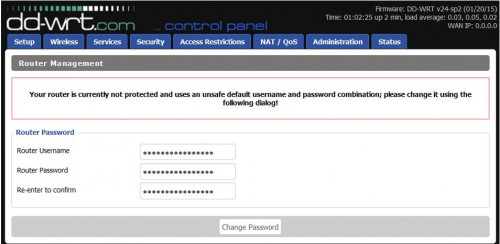
user posted image

• Enter username: root and password as admin. Please do not change the username. You can change the password if you like.
• Next go to Services tab
• Click Enable button for SSHd
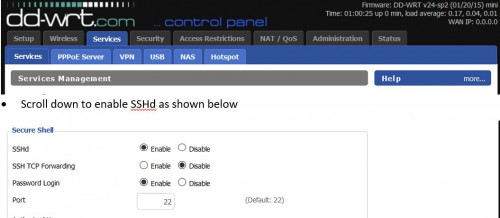
user posted image

• Click on Save Button and Reboot the router
• Now the router is ready for Step 3.

This post has been edited by misk94: Feb 1 2021, 12:18 PM

TSmisk94
post Jan 3 2021, 04:08 PM

Getting Started
**
Junior Member
72 posts

Joined: May 2014


Step 3: Party on with Putty

• Open the Tools folder

user posted image

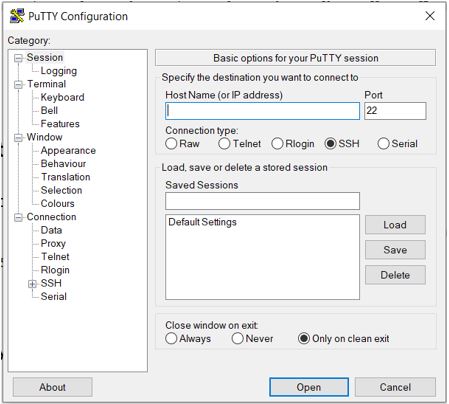
• Click on putty file to launch it and you will see the following screen.
user posted image

• Key in 192.168.1.1 inside Host Name box and click Open button.
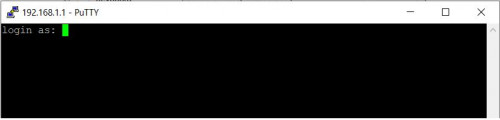
• A login command prompt will appear.

user posted image

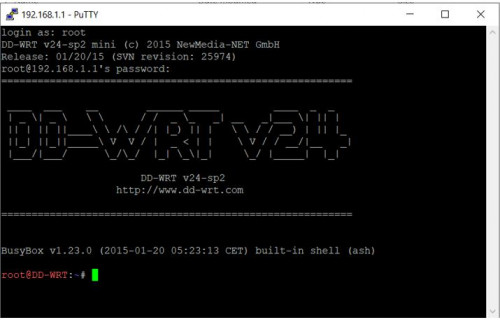
• Log in via the router login=root and password=admin. Please use root only as username.
• Once successfully log in, the following page will appear.

user posted image

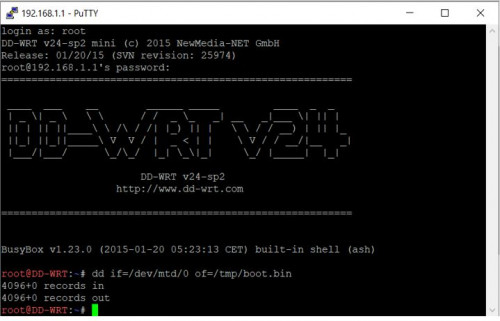
• Enter the following command to backup your CFE
dd if=/dev/mtd/0 of=/tmp/boot.bin
• An update page will appear. Confirm that there are records in and out

user posted image

• Close Putty session.
• Now the router is ready for Step 4.

This post has been edited by misk94: Jan 4 2021, 04:28 PM
TSmisk94
post Jan 3 2021, 04:19 PM

Getting Started
**
Junior Member
72 posts

Joined: May 2014


Step 4: Adding router MAC address to bin file using CFEedit

• From the Tools folder click on the CFEedit icon to lauch it.
• In CFEedit, click File menu --> open CFE and choose CFE_868L_melin384.bin
• Click to Advance Tab and you will see the CFE file
• Look for the following 3 lines and change accordingly.

1. et0macaddr --> change to router MAC Address - LAN

user posted image

2. 0:macaddr --> change to router MAC Address - 2.4 GHz WiFi (same as LAN)

user posted image

3. 1:macaddr --> change to router own MAC Address - 5 GHz WiFi

user posted image

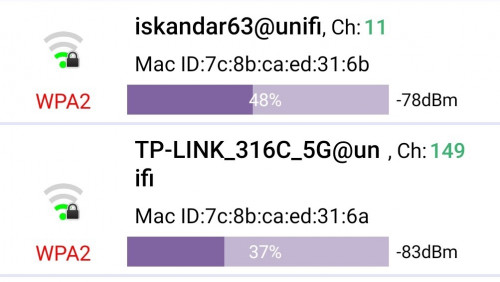
• Best if you get your router MAC Addresses for 2.4 GHz and 5 GHz WiFi before you migrate by using a WiFi app in your phone.
• Examples MAC Addresses scanned from WiFi App.

user posted image

• Once completed, save the edited CFE file as mycfe.bin (any new name you like) and close it.
• Now the router is ready for Step 5.


This post has been edited by misk94: Jan 6 2021, 09:25 PM
TSmisk94
post Jan 3 2021, 04:26 PM

Getting Started
**
Junior Member
72 posts

Joined: May 2014


Good news.

The good thing of using a factory ASUS firmware, you could get new updates automatically from their website.

Both of my routers were running RT-AC66U B1 firmware. Release 3.0.0.4_385_20633 before this.

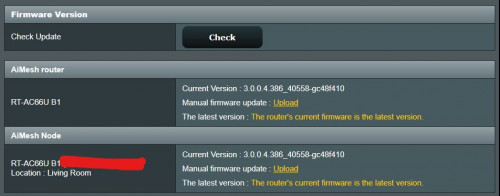
Now, they are running RT-AC66U B1 firmware. Release 3.0.0.4_386_40588. Latest firmware.

user posted image

Well better than DLink DIR-868L FW-1.22SHC firmware which was dated 08/02/2018. No update since.

user posted image

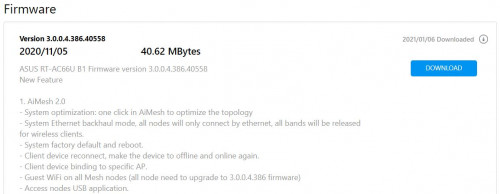
I'll take the Asus firmware anytime as it was released 5th Nov 2020. It is using the new AiMesh V2.0

user posted image

user posted image

First impressions:

1. Nicer and cleaner interface.
2. Consumes a bit more memory. 70 MB+ vs 60 MB+. Still plenty memory left from the 256 MB installed onboard.
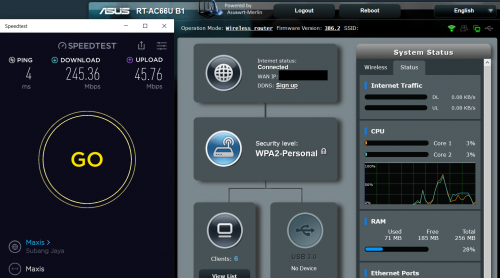
3. Comparable speed.

user posted image

4. More stable. This is important.
5. Could turn-off the irritating Captcha when you want login to your router.

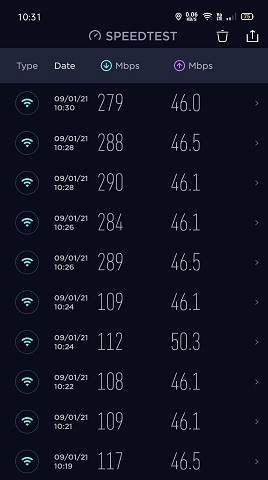
Another Internet Speed Test

user posted image

Updated 24th Jan 2021

This post has been edited by misk94: Jan 24 2021, 08:46 PM
TSmisk94
post Jan 5 2021, 10:35 AM

Getting Started
**
Junior Member
72 posts

Joined: May 2014


Step 5: Using WinSCP to transfer mycfe.bin file

• Find WinSCP folder in Tools folder.
• Open the folder and click WinSCP icon to launch it.
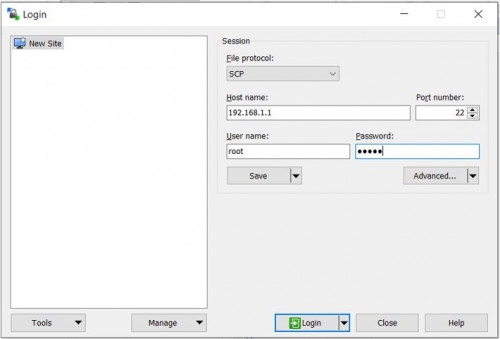
• Use the following to log in.

1. file protocol : "SCP"
2. host name : 192.168.1.1
3. username : root
4. password : admin

user posted image

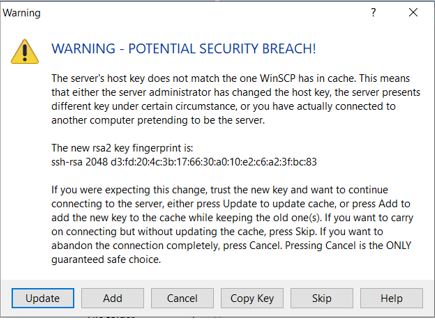
• Warning will appear. No worries. You are the one doing it . Just click update.

user posted image

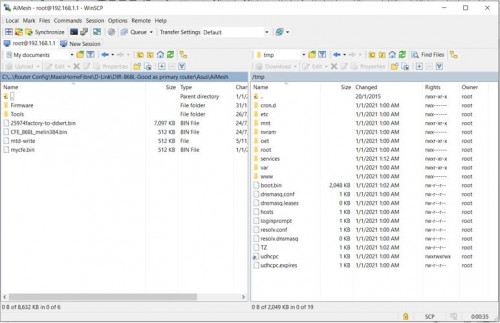
• Once updated, a new window appears as shown below

user posted image

• left side = folders on your PC and right side = router root folder.
• Click to /tmp directory in Router
• Drag /tmp/boot.bin to your local folder (drag to left) and drag mycfe.bin to /tmp of your router (drag to right)
• This is to backup existing CFE file and also upload mycfe.bin file to the router.
• Close session

This post has been edited by misk94: Jan 6 2021, 09:20 PM
TSmisk94
post Jan 5 2021, 06:31 PM

Getting Started
**
Junior Member
72 posts

Joined: May 2014


Step 6: Writing mycfe.bin to router flash memory using Putty

• Login back to Putty
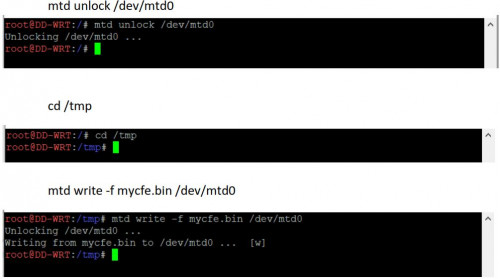
• Enter the commands below to flash mycfe.bin file.
• Enter the commands one at a time, in the sequence given below.

user posted image

• Once all done, type reboot while pushing a paperclip to the hidden reset button located at the bottom of the device for a few seconds.
• When the Internet LED starts blinking on and off, release the reset button.
• This should trigger Asus CFE Miniweb Server.

This post has been edited by misk94: Jan 8 2021, 07:58 PM
TSmisk94
post Jan 5 2021, 06:40 PM

Getting Started
**
Junior Member
72 posts

Joined: May 2014


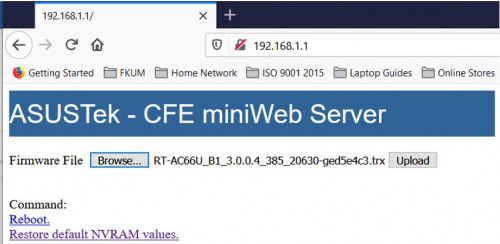
Step 7: Upload RT-AC66U firmware using Asus CFE Miniweb Server

• After booting, the router IP address is changed back to 192.168.0.1.
• I can only assumed that the router default IP address was inherited from DLink CFE Miniweb Server.
• Change PC IP address back to 192.168.0.3
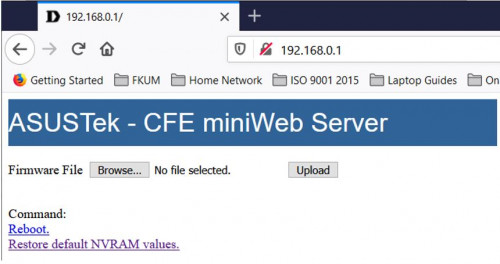
• On your browser, type 192.168.0.1 and you should see the web page below.

user posted image

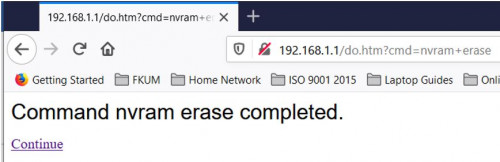
• Next, click on "Restore default NVRAM values" to erase nvram contents.

user posted image

• Browse for RT-AC66U_B1_3.0.0.4_385_20630-ged5e4c3.trx firware file

user posted image

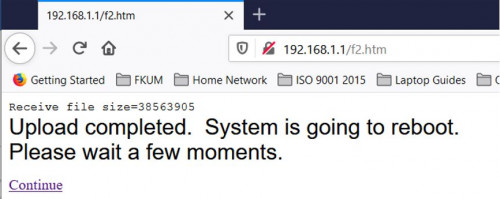
• Click Upload button and let the RT-AC66U firmware be loaded to the router. Please be patient, it will take some time (maybe about 3-5 minutes).
• Finally, you will see the following message. Click Continue link to reboot the router.

user posted image

• Congratulations you succeeded in migrating your DIR-868L router to Asus AiMesh firmware.
• Don’t forget to set your PC IP address back to automatic.
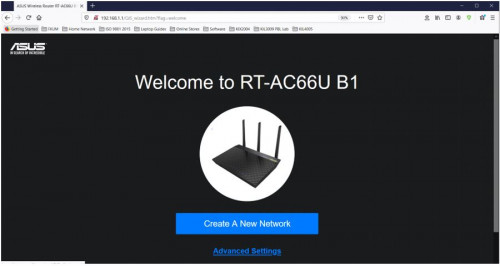
• You should see welcome page of RT-AC66U B1.

user posted image

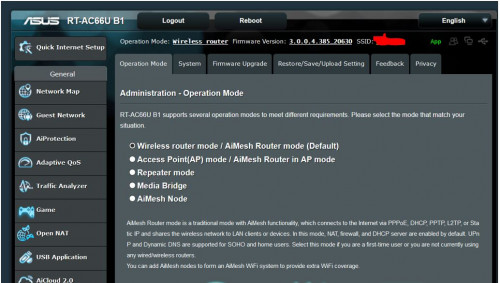
• Now you should be able to do the necessary router configurations. See sample below.

user posted image

• Good luck with migration to Asus AiMesh. thumbsup.gif

• My work is done. rclxm9.gif

ASUS Router App:

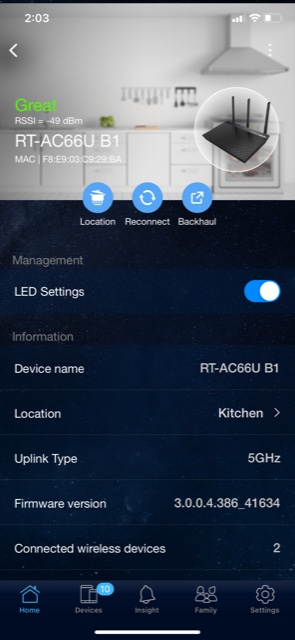
• Recently, I installed the ASUS Router app in my android phone. The app is awesome.
• Similar in comparison to other routers brand such as TP-Link or DLink in terms of functionality but definitely more features and better looking.
• The app will think the converted DIR-868L is a genuine RT-AC66U B1 router. biggrin.gif
• A recommended download. thumbup.gif

user posted image

user posted image

user posted image

user posted image

P/S:
• I saw in the internet people migrating to AsusWrt-Merlin firmware.
• Technically it could be done.
• I don't have any spare DIR-868L router anymore to try this.
• Maybe someone with a spare DIR-868L could have a try and let us know the outcome?

Updated 16th January 2021

This post has been edited by misk94: Jan 17 2021, 08:47 PM
TSmisk94
post Jan 8 2021, 09:22 AM

Getting Started
**
Junior Member
72 posts

Joined: May 2014


You are welcome. smile.gif


TSmisk94
post Jan 22 2021, 01:11 PM

Getting Started
**
Junior Member
72 posts

Joined: May 2014


Latest ASUS RT-66U B1 firware updates from ASUS.

https://www.asus.com/us/Networking/RT-AC66U.../HelpDesk_BIOS/

18 Jan 2021 firmware.

user posted image

The new firmware seems to consume more memory. Increase from 70+ MB to 140+ MB. Wow! Double increase memory usage.

1. Normal load

user posted image

2. Loaded with Speedtest running

user posted image


This post has been edited by misk94: Jan 24 2021, 08:54 PM
gary_cheah85
post Feb 6 2021, 09:37 PM

**Gary**
****
Senior Member
529 posts

Joined: Aug 2005
Great sharing to maximise the full potential of this router.
It was selling for Rm100 not too long ago
https://www.ookas.my/review/d-link-dir-868l...-router-review/

Performance wise, is it as good as Ac66u?
kaka[22]
post Feb 6 2021, 11:52 PM

Getting Started
**
Junior Member
156 posts

Joined: Feb 2005
RT AC-66U B1....same with AC-66U?
gary_cheah85
post Feb 7 2021, 02:06 PM

**Gary**
****
Senior Member
529 posts

Joined: Aug 2005
QUOTE(kaka22 @ Feb 6 2021, 11:52 PM)
RT AC-66U B1....same with AC-66U?
*
I read somewhere that says rt-AC66U B1 is having same hardware as rt-ac68u, just the orientation is flat Vs standing vertical

The original Rt-ac66u was released few years back having different processor

A1 =CPU1: Broadcom BCM4706 (600 MHz) cpu
B1 =CPU1: Broadcom BCM4708C0 (800 MHz, 2 cores)
TSmisk94
post Feb 7 2021, 02:13 PM

Getting Started
**
Junior Member
72 posts

Joined: May 2014


QUOTE(gary_cheah85 @ Feb 6 2021, 09:37 PM)
Great sharing to maximise the full potential of this router.
It was selling for Rm100 not too long ago
https://www.ookas.my/review/d-link-dir-868l...-router-review/

Performance wise, is it as good as Ac66u?
*
Yes. DIR-868L is relatively inexpensive late 2019/early 2020. But recently, the price went up back if you check Lazada or Shopee.

I do not have an Asus AC66U to make any performance comparison.

Nevertheless, I am satisfied the performance of my AiMesh network running since early Jan 2021.

However, my AiMesh node do need to be manually rebooted once awhile. I think it's due to heat since it is located in a place with minimal air flow.

My main AiMesh router doing fine so far.

Sorry. I could not be any much help.

Regards.

This post has been edited by misk94: Feb 10 2021, 08:10 AM
TSmisk94
post Feb 7 2021, 02:17 PM

Getting Started
**
Junior Member
72 posts

Joined: May 2014


QUOTE(gary_cheah85 @ Feb 7 2021, 02:06 PM)
I read somewhere that says rt-AC66U B1 is having same hardware as rt-ac68u, just the orientation is flat Vs standing vertical

The original Rt-ac66u was released few years back having different processor

A1 =CPU1: Broadcom BCM4706 (600 MHz) cpu
B1 =CPU1: Broadcom BCM4708C0 (800 MHz, 2 cores)
*
Yes. Usually the trend is like that. Later releases of same router brand comes with improved or better hardware.

DIR-868L is having a dual core Broadcom processor. Only DLink firmware is more conservative compared to ASUS firmware. Maybe good enough for average home user.

This post has been edited by misk94: Feb 7 2021, 02:18 PM
gary_cheah85
post Feb 7 2021, 02:41 PM

**Gary**
****
Senior Member
529 posts

Joined: Aug 2005
QUOTE(misk94 @ Feb 7 2021, 02:13 PM)
Yes. DIR-868L is relatively inexpensive late 2019/early 2020. But recently, the price went up back if you check Lazada or Shopee.

I do not have an Asus AC66U to make any performance comparison.

Nevertheless, I am satisfied the performance of my AiMesh network running since early Jan 2021. My AiMesh node do need to be manually rebooted once awhile. Due to heat since it is located in a place with minimal air flow. My main AiMest router doing fine.

Sorry. I could not be any much help.

Regards.
*
Dir-868L is the stock router for Singtel and Starhub for our lovely neighbour in Singapore few years back. You can get a second hand unit for dirt cheap on Carousell, SGD 10-15 easily.

AiMesh node using wireless backhaul or LAN Ethernet backhaul?
Sounds bit problematic to manual restart, since you cannot control AiMesh node at Web UI
TSmisk94
post Feb 10 2021, 08:06 AM

Getting Started
**
Junior Member
72 posts

Joined: May 2014


QUOTE(gary_cheah85 @ Feb 7 2021, 02:41 PM)
Dir-868L is the stock router for Singtel and Starhub for our lovely neighbour in Singapore few years back. You can get a second hand unit for dirt cheap on Carousell, SGD 10-15 easily.

AiMesh node using wireless backhaul or LAN Ethernet backhaul?
Sounds bit problematic to manual restart, since you cannot control AiMesh node at Web UI
*
Yes. Second hand DIR-868L is the way to go if you want inexpensive AiMesh setup. But then, it just the same like buying a second hand car. Lucky or Unlucky. biggrin.gif

By the way, I think you can you use the Optimise function in AiMesh settings or Reboot in System settings.

Both can be done in the ASUS App from your phone.

Either way should give what you want. Though, Reboot will reboot AiMesh main router and nodes.

Regards

This post has been edited by misk94: Feb 10 2021, 08:11 AM
sgpdsmss
post Feb 15 2021, 05:07 PM

Regular
******
Senior Member
1,704 posts

Joined: Jan 2005
QUOTE(misk94 @ Feb 10 2021, 08:06 AM)
Yes. Second hand DIR-868L is the way to go if you want inexpensive AiMesh setup. But then, it just the same like buying a second hand car. Lucky or Unlucky.  biggrin.gif

By the way, I think you can you use the Optimise function in AiMesh settings or Reboot in System settings.

Both can be done in the ASUS App from your phone.

Either way should give what you want. Though, Reboot will reboot AiMesh main router and nodes.

Regards
*
i follow your step to migrate to asus 66 firmware ..but after done ...the lan connection max 100mbps and 2.4g wifi at 30mbps ...
TSmisk94
post Feb 16 2021, 03:00 PM

Getting Started
**
Junior Member
72 posts

Joined: May 2014


QUOTE(sgpdsmss @ Feb 15 2021, 05:07 PM)
i follow your step to migrate to asus 66 firmware ..but after done ...the lan connection max 100mbps and 2.4g wifi at 30mbps ...
*
Glad to hear that you managed to migrate your DIR-868L successfully.

Based on what you said, it is a bit difficult to determine causes of the problem since it could be due to software or hardware or both.

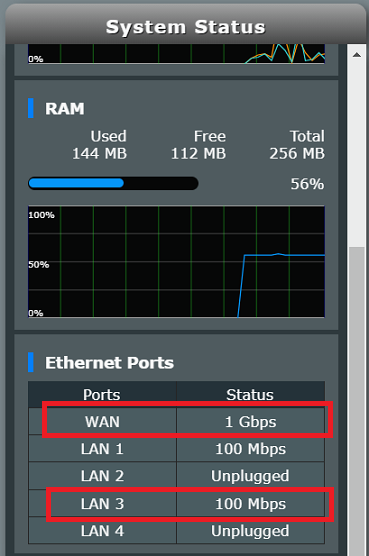
Point 1: 100 Mbps vs 1000 Mbps LAN/WAN

You can only get 1000 Mbps only if LAN cable is short. Maybe 1-2 metres. I can get this from my WAN port because my cable is less than 1 metre.

The other ports, I get 100 Mbps because the cables a lot longer (> 5metres).

user posted image

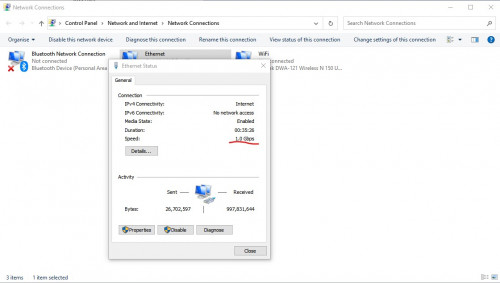
Although the LAN/WAN ports are rated to be 1000 Mbps, the physical limitation of copper wire will limit you to 100 Mbps when using long LAN cables.

That's why home internet like Unifi, Maxis or Time are using fibre-optics. No more copper lines.

Point 2: 2.4G WiFi.

I can get around 30+ Mbps from 2.4GHz. Yours might differ.

You need to use channel having less interference. A WiFi scanning app could help here.

The client side WiFI also important. Most clients are either 1x1 or 2x2 MiMo. Unless you are using expensive adapters you may get 3x3 MiMo. I think DIR-868L supports upto 3x3 MiMo. Big difference in WiFi speed.

Bottom line is migrating to ASUS firmware only the first part.

You still need to do a bit of tuning to suit your home and surroundings in order to take advantage of rich features available from the ASUS firmware.

With a bit of patience and tuning, you will get the improved WiFi performance that your are looking for.

The following websites may help in your quest.

https://www.lookingpoint.com/blog/wifi-opti...ireless-network

https://www.netspotapp.com/top-10-ways-to-boost-wifi.html

Regards.

This post has been edited by misk94: Mar 3 2021, 10:53 PM
fisherman10
post Feb 19 2021, 01:02 PM

Regular
******
Senior Member
1,372 posts

Joined: Dec 2007


Managed to convert to using AC68U merlin firmware.

Connected as Access Point but funny thing now is that every time after reboot or power loss, it will startup with WiFi Disabled. Have to manually toggle it on and then it works until next reboot.

Any ideas why?
jackal1950
post Feb 19 2021, 01:08 PM

On my way
****
Senior Member
572 posts

Joined: Nov 2004


Thank you very much for the guide. I have successfully convert my DLINK DIR-868L into Asus RT-AC66U B1.

Now I am looking for any TP-Link or D-Link WiFi 6 Router that can convert to AsusWRT too. Do you have any recommendation?
gary_cheah85
post Feb 20 2021, 07:14 PM

**Gary**
****
Senior Member
529 posts

Joined: Aug 2005
QUOTE(misk94 @ Jan 5 2021, 06:40 PM)
Step 7: Upload RT-AC66U firmware using Asus CFE Miniweb Server

• After booting, the router IP address is changed back to 192.168.0.1.
• I can only assumed that the router default IP address was inherited from DLink CFE Miniweb Server.
• Change PC IP address back to 192.168.0.3
• On your browser, type 192.168.0.1 and you should see the web page below.

user posted image

• Next, click on "Restore default NVRAM values" to erase nvram contents.

user posted image

• Browse for  RT-AC66U_B1_3.0.0.4_385_20630-ged5e4c3.trx firware file

user posted image

• Click Upload button and let the RT-AC66U firmware be loaded to the router. Please be patient, it will take some time (maybe about 3-5 minutes).
• Finally, you will see the following message. Click Continue link to reboot the router.

user posted image

• Congratulations you succeeded in migrating your DIR-868L router to Asus AiMesh firmware.
• Don’t forget to set your PC IP address back to automatic.
• You should see welcome page of RT-AC66U B1.

user posted image

• Now you should be able to do the necessary router configurations. See sample below.

user posted image

• Good luck with migration to Asus AiMesh. :thumbsup:

• My work is done. rclxm9.gif

ASUS Router App:

• Recently, I installed the ASUS Router app in my android phone. The app is awesome.
• Similar in comparison to other routers brand such as TP-Link or DLink in terms of functionality but definitely more features and better looking.
• The app will think the converted DIR-868L is a genuine RT-AC66U B1 router. biggrin.gif
• A recommended download.  thumbup.gif

user posted image

user posted image

user posted image

user posted image

P/S:
• I saw in the internet people migrating to AsusWrt-Merlin firmware.
• Technically it could be done.
• I don't have any spare DIR-868L router anymore to try this.
• Maybe someone with a spare DIR-868L could have a try and let us know the outcome?

Updated 16th January 2021
*
I flashed to Merlin firmware, few advanced features available
Can see real time temperature, CPU is idling at 77C
Reboot schedule is great too, set to reboot router once a week to flush the RAM
gary_cheah85
post Feb 20 2021, 07:16 PM

**Gary**
****
Senior Member
529 posts

Joined: Aug 2005
QUOTE(jackal1950 @ Feb 19 2021, 01:08 PM)
Thank you very much for the guide. I have successfully convert my DLINK DIR-868L into Asus RT-AC66U B1.

Now I am looking for any TP-Link or D-Link WiFi 6 Router that can convert to AsusWRT too. Do you have any recommendation?
*
Some people have tried Tenda Ac18 and Huawei ws880, flashed to xwrt.
However those can only run on legacy firmware 380.xx
Flash at your own risk


gary_cheah85
post Feb 20 2021, 07:18 PM

**Gary**
****
Senior Member
529 posts

Joined: Aug 2005
QUOTE(fisherman10 @ Feb 19 2021, 01:02 PM)
Managed to convert to using AC68U merlin firmware.

Connected as Access Point but funny thing now is that every time after reboot or power loss, it will startup with WiFi Disabled. Have to manually toggle it on and then it works until next reboot.

Any ideas why?
*
Did you flash to Asuswrt then only flash to Merlin?
Try the process again.
fisherman10
post Feb 20 2021, 09:41 PM

Regular
******
Senior Member
1,372 posts

Joined: Dec 2007


QUOTE(gary_cheah85 @ Feb 20 2021, 07:18 PM)
Did you flash to Asuswrt then only flash to Merlin?
Try the process again.
*
Having the same problem on both latest stock Asus AC68u and Merlin AC68u firmware too.
TSmisk94
post Feb 21 2021, 11:03 PM

Getting Started
**
Junior Member
72 posts

Joined: May 2014


QUOTE(gary_cheah85 @ Feb 20 2021, 07:14 PM)
I flashed to Merlin firmware, few advanced features available
Can see real time temperature, CPU is idling at 77C
Reboot schedule is great too, set to reboot router once a week to flush the RAM
*
Thank you gary_cheah85 for sharing your experience with the Merlin firmware.

Yes. The CPU temperature reading is a useful bonus.

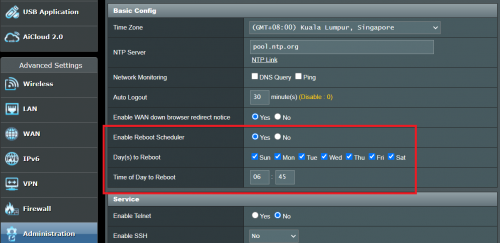
BTW. There is a reboot schedule function in the ASUS RT-AC66U B1 firmware too.

It's under Administration menu. Below is a shapshot for my main router. I set it to reboot at 6:45 AM everyday.

user posted image

Regards.

This post has been edited by misk94: Feb 21 2021, 11:30 PM
TSmisk94
post Feb 21 2021, 11:21 PM

Getting Started
**
Junior Member
72 posts

Joined: May 2014


QUOTE(gary_cheah85 @ Feb 20 2021, 07:16 PM)
Some people have tried Tenda Ac18 and Huawei ws880, flashed to xwrt.
However those can only run on legacy firmware 380.xx
Flash at your own risk
*
Yes. I did migrated a Tenda AC18 sometime in 2019. Which I sold later. This is before I played with DIR-868L.

Gary_cheah85 is right. The Tenda AC18 is limited to 380.XX series firmware. You will brick it if you flash to a higher series firmware. Some poor souls found that out the hard way.

Latest Tenda flagship router is Tenda AC23. You can get it for less than RM200 from Shopee or Lazada.

Anyone tried this Tenda router? Interested to know how well it perform compare to major brands for consumers like DLink or TP-Link.

Tenda no longer using Broadcom chipsets. I think Tenda AC18 was their last model using Broadcom.

Tenda is currently using Realtek RTL8197 series CPU for their routers. Not as powerful (i.e. expensive) as Broadcom CPUs, but it seems to do the job well enough based on some reviews.

Hopefully, better value for consumers.

Regards.

This post has been edited by misk94: Feb 23 2021, 09:35 AM
gary_cheah85
post Feb 22 2021, 08:52 PM

**Gary**
****
Senior Member
529 posts

Joined: Aug 2005
QUOTE(fisherman10 @ Feb 20 2021, 09:41 PM)
Having the same problem on both latest stock Asus AC68u and Merlin AC68u firmware too.
*
You probably got a lemon unit then. Quickly sell it for cheap and get another unit
gary_cheah85
post Feb 22 2021, 09:02 PM

**Gary**
****
Senior Member
529 posts

Joined: Aug 2005
QUOTE(misk94 @ Feb 21 2021, 11:03 PM)
Thank you gary_cheah85 for sharing your experience with the Merlin firmware.

Yes. The CPU temperature reading is a useful bonus.

BTW. There is a reboot schedule function in the ASUS RT-AC66U B1 firmware too.

It's under Administration menu. Below is a shapshot for my main router. I set it to reboot at 6:45 AM everyday.

user posted image

Regards.
*
Oh really, did not really explore much on the Asus Rt-AC66u B1 firmware especially on the reboot schedule.
Previously I was using Huawei WS880(flashed with Xwrt), rock solid uptime for few months. The only time need to reboot was when power outage or power trip.
TSmisk94
post Mar 3 2021, 07:34 AM

Getting Started
**
Junior Member
72 posts

Joined: May 2014


Dear All,

Just would like to share my successful firmware migration from Asus to Merlin firmware last night. rclxm9.gif

I manually updated the AiMesh node first. Followed by main router. It is best to manually reboot both once you completed your migration.

user posted image

It's ASUSwrt-Merlin RT-AC68U 386.1_2 firmware. Release date 12 Feb 2021. I think it is similar to current ASUS firmware.

You can download it here. https://sourceforge.net/projects/asuswrt-me...-AC68U/Release/

By the way. The router is still identified as ASUS RT-AC66U B1 although it is running a RT-AC68U firmware.

user posted image

Bonus. Temperature readings inside the Administration menu.

user posted image

So far, performance wise comparable to stock ASUS firmware, maybe a bit better.

Let's see how stable it is compared to stock ASUS firmware.

Regards,

Updated 3 March 2021.

This post has been edited by misk94: Mar 4 2021, 10:29 AM
jonsalam P
post Mar 3 2021, 02:45 PM

New Member
*
Probation
11 posts

Joined: Feb 2021
QUOTE(misk94 @ Mar 3 2021, 07:34 AM)
Dear All,

Just would like to share my successful firmware migration from Asus to Merlin firmware last night.  :hyper:

I manually updated the AiMesh node first. Followed by main router. It is best to manually reboot both once you completed your migration.

user posted image

It's Asuswrt-Merlin RT-AC68U 386.1_2 firmware. Release date 12 Feb 2021. I think it is similar to current ASUS firmware.

You can download it here. https://sourceforge.net/projects/asuswrt-me...-AC68U/Release/

user posted image

Bonus. Temperature readings inside the Administration menu.

user posted image

So far, performance wise comparable to stock ASUS firmware, maybe a bit better.

Let's see how stable it is compared to stock ASUS firmware.

Regards,

Updated 3 March 2021.
*
Tq for firmware and guide. Been looking for long time. I managed to convert to Asus firmware and the results its awesome. Far better from stock firmware. Im looking forward the result from you using Merlin firmware. TQ

user posted image
TSmisk94
post Mar 3 2021, 10:58 PM

Getting Started
**
Junior Member
72 posts

Joined: May 2014


Welcome. Jonsalam.

Enjoy the improved DIR-868L running ASUS firmware.
jonsalam P
post Mar 4 2021, 06:40 AM

New Member
*
Probation
11 posts

Joined: Feb 2021
QUOTE(sgpdsmss @ Feb 15 2021, 05:07 PM)
i follow your step to migrate to asus 66 firmware ..but after done ...the lan connection max 100mbps and 2.4g wifi at 30mbps ...
*
Same situation here and i did some digging and found the solution.2.4GHz wifi Channel bandwidth 20MHz and Control Channel 6. If not working try change to channel 1 or 11 depends on wifi interference around you.
sgpdsmss
post Mar 4 2021, 08:06 AM

Regular
******
Senior Member
1,704 posts

Joined: Jan 2005
QUOTE(jonsalam @ Mar 4 2021, 06:40 AM)
Same situation here and i did some digging and found the solution.2.4GHz wifi Channel bandwidth 20MHz and Control Channel 6. If not working try change to channel 1 or 11 depends on wifi interference around you.
*
thanks ...will try to set it see can improve or not ..

TSmisk94
post Mar 4 2021, 10:13 AM

Getting Started
**
Junior Member
72 posts

Joined: May 2014


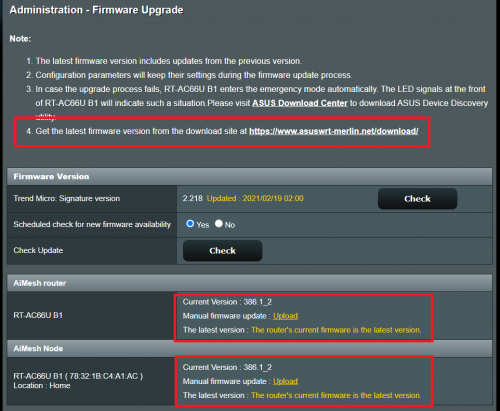
The Firmware upgrade page was changed after migration.

This make sense. Indicating current ASUSwrt-Merlin firmware running.

user posted image

This post has been edited by misk94: Mar 4 2021, 10:25 AM
TSmisk94
post Mar 4 2021, 10:22 AM

Getting Started
**
Junior Member
72 posts

Joined: May 2014


QUOTE(jonsalam @ Mar 4 2021, 06:40 AM)
Same situation here and i did some digging and found the solution.2.4GHz wifi Channel bandwidth 20MHz and Control Channel 6. If not working try change to channel 1 or 11 depends on wifi interference around you.
*
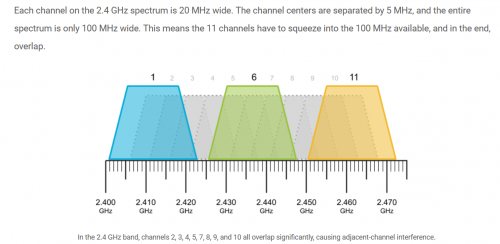
Yes. Correct recommendations.

user posted image

Refer to the following link https://www.metageek.com/training/resources...els-1-6-11.html

Regards

This post has been edited by misk94: Mar 4 2021, 10:23 AM
TSmisk94
post Mar 4 2021, 10:45 AM

Getting Started
**
Junior Member
72 posts

Joined: May 2014


Good morning All,

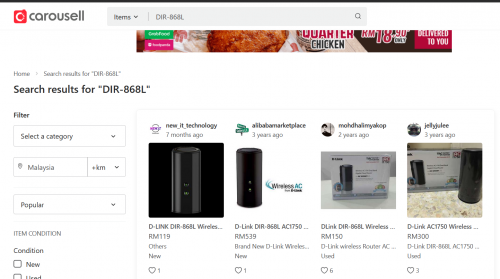
Anyone looking to buy DIR-868L router can try at Carousell Malaysia. ( No. I am not getting any commission from Carousell ).

https://www.carousell.com.my/search/DIR-868L?

user posted image

DIR-868L is currently a bit expensive at Lazada or Shopee.

Maybe they know people are looking for DIR-868L to create an inexpensive AiMesh cluster using ASUS firmware. nod.gif

More choices in Carousell Singapore https://www.carousell.sg/q/electronics-7/dlink-router-868l/?

But then need to cross border and shipping cost. doh.gif

Regards

This post has been edited by misk94: Mar 4 2021, 10:56 AM
jonsalam P
post Mar 5 2021, 12:14 PM

New Member
*
Probation
11 posts

Joined: Feb 2021
QUOTE(misk94 @ Mar 4 2021, 10:45 AM)
Good morning All,

Anyone looking to buy DIR-868L router can try at Carousell Malaysia. ( No. I am not getting any commission from Carousell ).

https://www.carousell.com.my/search/DIR-868L?

user posted image

DIR-868L is currently a bit expensive at Lazada or Shopee.

Maybe they know people are looking for DIR-868L to create an inexpensive AiMesh cluster using ASUS firmware.  nod.gif

More choices in Carousell Singapore https://www.carousell.sg/q/electronics-7/dlink-router-868l/?

But then need to cross border and shipping cost. doh.gif

Regards
*
user posted image

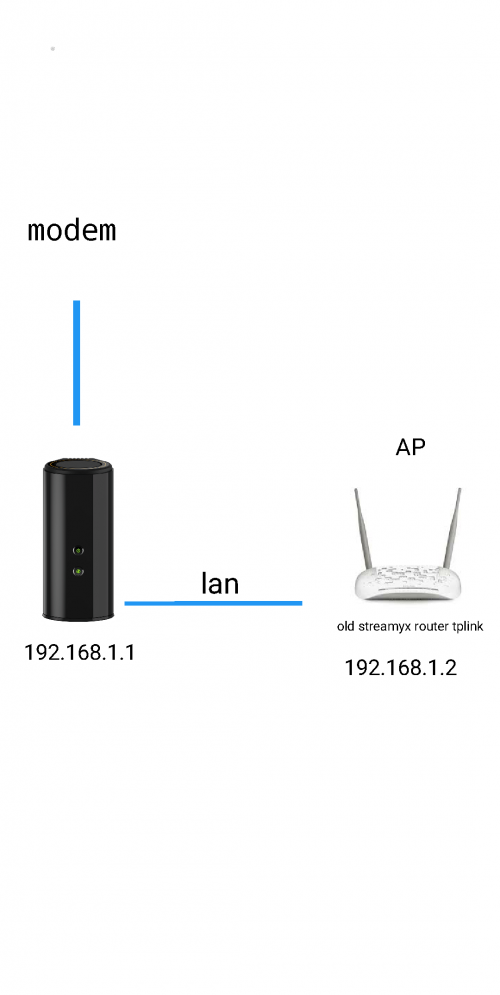
This is my current setup. I plan to replace my AP. Since DIR-868L hard to find can i use with any asus router or asus router with aimesh featured?
Jjuggler
post Mar 5 2021, 12:42 PM

Narcissistic Genius
******
Senior Member
1,341 posts

Joined: Dec 2016
ASUS GT-AX11000 is now supported by Asus-Merlin. Currently only alpha build available. So far so good. Currently testing this firmware. The only thing you lose is the ROG feature and ROG UI.

https://pictr.com/image/7XY69r
gary_cheah85
post Mar 5 2021, 01:53 PM

**Gary**
****
Senior Member
529 posts

Joined: Aug 2005
QUOTE(jonsalam @ Mar 5 2021, 12:14 PM)
user posted image

This is my current setup. I plan to replace my AP. Since DIR-868L hard to find can i use with any asus router or asus router with aimesh featured?
*
Just make sure the AiMesh router and AiMesh node is running on latest firmware. AiMesh ver2.0 on latest firmware for better compatibility
jonsalam P
post Mar 5 2021, 03:15 PM

New Member
*
Probation
11 posts

Joined: Feb 2021
QUOTE(gary_cheah85 @ Mar 5 2021, 01:53 PM)
Just make sure the AiMesh router and AiMesh node is running on latest firmware. AiMesh ver2.0 on latest firmware for better compatibility
*
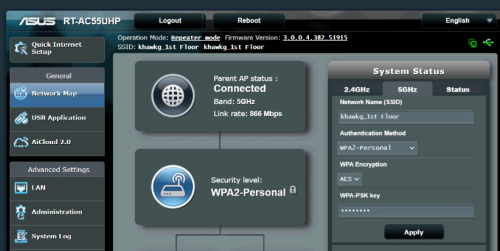
So they need to be features with Aimesh right? Almost buy used RT-AC55UHP. Thanks
TSmisk94
post Mar 5 2021, 06:56 PM

Getting Started
**
Junior Member
72 posts

Joined: May 2014


QUOTE(jonsalam @ Mar 5 2021, 12:14 PM)
user posted image

This is my current setup. I plan to replace my AP. Since DIR-868L hard to find can i use with any asus router or asus router with aimesh featured?
*
Dear jonsalam,

I have a suggestion to make.

Considering you already have a DIR-868L migrated to ASUSwrt, why not invest in new or used ASUS router?

Use it as AiMesh router and DIR-868L as AiMesh node.

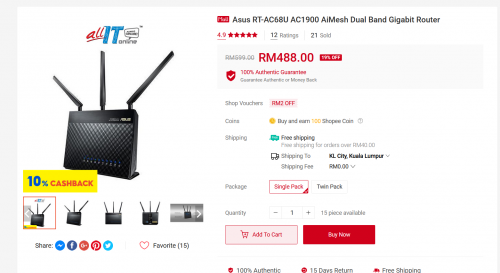
ASUS RT-AC55X AX1800. Entry into WiFi 6. Cost RM329.

user posted image

ASUS RT-AC68U RM488.

user posted image

Yes. I must admit both of them a bit on expensive side. New ASUS routers are not cheap!

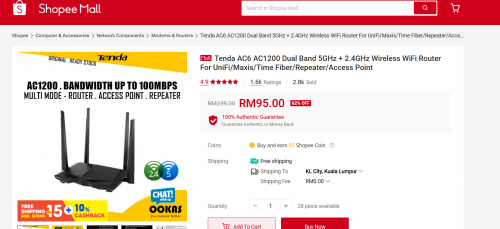
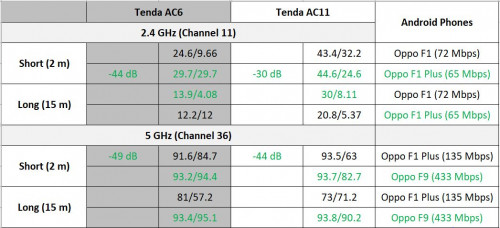
Alternatively, you can try Tenda AC23 or Dlink DIR-2150 as repeater. You get get either of them less than RM170 in Shopee.

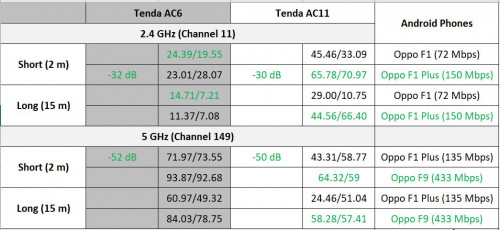
Also you can use AC1200 class routers such as Tenda AC6 if your budget is around RM100.

user posted image

Any of them should be better than your old Streamyx repeater.

Which one? Subject to your budget. biggrin.gif.

If you managed to get a used ASUS router in good condition (with AiMesh), perhaps better than the above suggestions.

Regards

P/S: My apologies if I offended anyone, especially the Seniors and Sifus here.
I just wanted to help a fellow member to see different options available.

This post has been edited by misk94: Mar 6 2021, 12:13 AM
TSmisk94
post Mar 6 2021, 04:14 PM

Getting Started
**
Junior Member
72 posts

Joined: May 2014


DIR-868L with Asuswrt-Merlin firmware update:

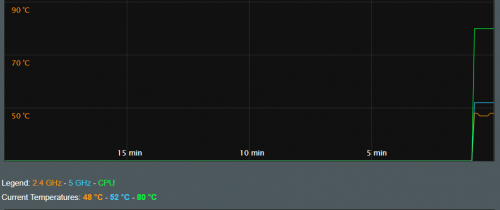
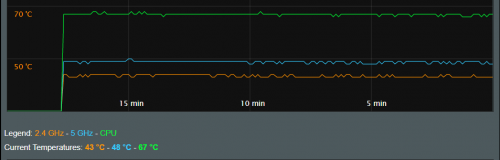
Through the new firmware, I discovered my AiMesh Router is running a bit hot. CPU is 80 C.

user posted image

48 - 52 - 80 C

After I installed a USB cooling fan the temperature dropped to below 70 C. Also, the 2.4G and 5G WiFi radios temperatures dropped too.

user posted image

43 - 48 - 67 C

Regards,

Updated 6 March 2021.

This post has been edited by misk94: Mar 6 2021, 04:21 PM
fisherman10
post Mar 6 2021, 05:23 PM

Regular
******
Senior Member
1,372 posts

Joined: Dec 2007


QUOTE(misk94 @ Mar 6 2021, 04:14 PM)
DIR-868L with Asuswrt-Merlin firmware update:

Through the new firmware, I discovered my AiMesh Router is running a bit hot. CPU is 80 C.

user posted image

48 - 52 - 80 C

After I installed a USB cooling fan the temperature dropped to below 70 C. Also, the 2.4G and 5G WiFi radios temperatures dropped too.

user posted image

43 - 48 - 67 C

Regards,

Updated 6 March 2021.
*
Wow yours is cool!! I've seen mine going up to 95C.

Can you share some photos of your cooling fan design?
TSmisk94
post Mar 6 2021, 07:00 PM

Getting Started
**
Junior Member
72 posts

Joined: May 2014


QUOTE(fisherman10 @ Mar 6 2021, 05:23 PM)
Wow yours is cool!! I've seen mine going up to 95C.

Can you share some photos of your cooling fan design?
*
Thank you fisherman10.

Actually, I did not expect the temperature to go that low because I am using low tech and cheap USB cooling fan. Cost less than RM10.

I don't know how long it will last but at least not expensive to replace after a few months.

After whole night and day running the temperature remains steady. Changed only by 1 or 2 C in the afternoon when it was hot. The temperature went back down later in the day.

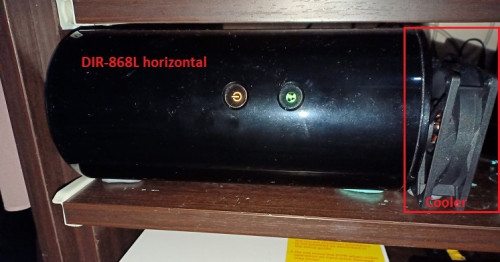
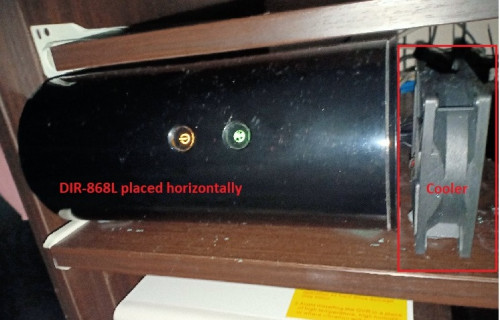
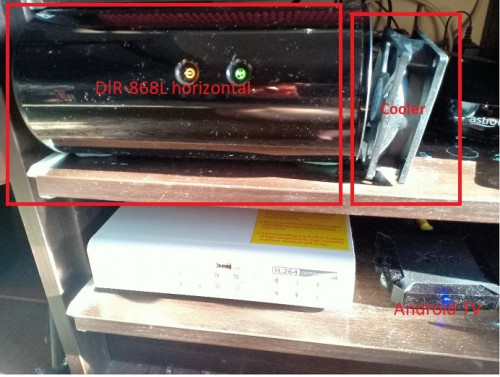
I think you guys going to laugh when you see my cooler setup. biggrin.gif.

The setup not pretty but does the job well. Cooler can be secured using Blu-Tak or Tack-It. No need screws.

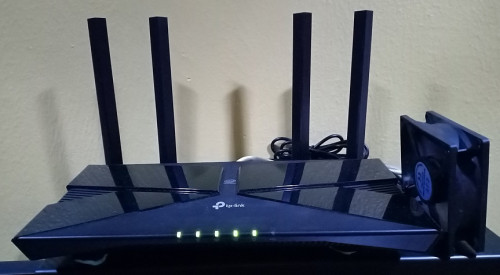
user posted image

user posted image

Since my DIR-868L is placed horizontally to fit the cupboard, I need to put the cooler at the bottom end of the router where the label is.

I bought the cooler from Shopee. Size 80x80x25 mm USB. The cooler is surprisingly quite.

https://shopee.com.my/DC-5V-USB-12V-2-Pin-4...1591.1796940602

I think this model is better and safer because have cover on both sides. I missed this one when I made the purchase earlier.

I will buy this model later when my current cooler going to fail.

https://shopee.com.my/%E3%80%90BEST%E3%80%9...1591.1448311562

For those having their DIR-868L placed vertically, I think the following standing model will serve you well.

Just put the cooler at the bottom of the router. The 8 cm or 9 cm model should be OK.

https://shopee.com.my/USB-Router-Fan-TV-Box...1901.5158026107

Stay cool guys. cool2.gif

Regards,

This post has been edited by misk94: Mar 7 2021, 07:10 PM
fisherman10
post Mar 6 2021, 08:37 PM

Regular
******
Senior Member
1,372 posts

Joined: Dec 2007


QUOTE(misk94 @ Mar 6 2021, 07:00 PM)
Thank you fisherman10.

Actually, I did not expect the temperature to go that low because I am using low tech and cheap usb cooling fan. Cost less than RM10.

I don't know how long it will last but at that price,  replacing the cooler after a few months is OK.

After whole night and whole day running the temperature is steady. Changed only by 1 or 2 C in the afternoon when it is hot. Now the temperature went back down again.

I think you guys going to laugh when you see my cooler setup.  biggrin.gif. The setup not pretty but works well.

» Click to show Spoiler - click again to hide... «


Since my DIR-868L is placed horizontally to fit the cupboard, I need to put the cooler at the bottom end of the router where the label is.

I bought the cooler from Shopee. Size 80x80x25 mm USB. The cooler is surprisingly quite.

https://shopee.com.my/DC-5V-USB-12V-2-Pin-4...1591.1796940602

Maybe this one better because have cover for both sides. I missed this one when I made the purchase earlier. Maybe I buy this model when after my current cooler failed.

https://shopee.com.my/%E3%80%90BEST%E3%80%9...1591.1448311562

For those having their DIR-868L placed vertically, I think the following model will serve you well. Just put the cooler at the bottom of the router. The 8 cm or 9 cm model should be OK.

https://shopee.com.my/USB-Router-Fan-TV-Box...1901.5158026107

Stay cool guys. cool2.gif

Regards,
*
Is the 5V usb fan from shopee spinning fast? Is 5V capable of spinning full speed?

So far I joined 80mm PC fan to USB cable. 12V PC fan powered with 5V USB from usb port. It spins but slow.

TSmisk94
post Mar 6 2021, 10:20 PM

Getting Started
**
Junior Member
72 posts

Joined: May 2014


Yes. The 5V USB fan spins fast.

Same size 80 mm fan.

The seller claimed 2000 rpm.

I could feel the cold air when I put my finger near the gap between router and fan.

I think that's why I am getting good cooling from the fan.

BTW. I replaced posts with better pictures just now.

This post has been edited by misk94: Mar 25 2021, 12:06 PM
fisherman10
post Mar 6 2021, 11:03 PM

Regular
******
Senior Member
1,372 posts

Joined: Dec 2007


QUOTE(misk94 @ Mar 6 2021, 10:20 PM)
Yes. The 5V USB fan spin fast.

Same size 80 mm fan.

The seller claimed 2000 - 3000 rpm.

I could feel the cold air when I put my finger near the gap between router and fan.

I think that's why I am getting good cooling from the fan.

BTW. I replaced posts with better pictures just now.
*
Thanks
jonsalam P
post Mar 7 2021, 05:10 PM

New Member
*
Probation
11 posts

Joined: Feb 2021
QUOTE(misk94 @ Mar 5 2021, 06:56 PM)
Dear jonsalam,

I have a suggestion to make.

Considering you already have a DIR-868L migrated to ASUSwrt, why not invest in new or used ASUS router?

Use it as AiMesh router and DIR-868L as AiMesh node.

ASUS RT-AC55X AX1800. Entry into WiFi 6. Cost RM329. 

user posted image

ASUS RT-AC68U RM488.

user posted image

Yes. I must admit both of them a bit on expensive side. New ASUS routers are not cheap!

Alternatively, you can try Tenda AC23 or Dlink DIR-2150 as repeater. You get get either of them less than RM170 in Shopee.

Also you can use AC1200 class routers such as Tenda AC6 if your budget is around RM100.

user posted image

Any of them should be better than your old Streamyx repeater.

Which one? Subject to your budget. biggrin.gif.

If you managed to get a used ASUS router in good condition (with AiMesh), perhaps better than the above suggestions.

Regards

P/S: My apologies if I offended anyone, especially the Seniors and Sifus here.
      I just wanted to help a fellow member to see different options available.
*
Exactly. That what I'm trying to do. And you just answer my question with edited post. Tq. Sorry for late reply due to acc probation. 😂
hdd-corrupted
post Mar 7 2021, 08:54 PM

Getting Started
**
Junior Member
279 posts

Joined: Aug 2009
From: KL


QUOTE(misk94 @ Mar 6 2021, 04:14 PM)
DIR-868L with Asuswrt-Merlin firmware update:

Through the new firmware, I discovered my AiMesh Router is running a bit hot. CPU is 80 C.

user posted image

48 - 52 - 80 C

After I installed a USB cooling fan the temperature dropped to below 70 C. Also, the 2.4G and 5G WiFi radios temperatures dropped too.

user posted image

43 - 48 - 67 C

Regards,

Updated 6 March 2021.
*
how to check temperature?
jonsalam P
post Mar 7 2021, 09:04 PM

New Member
*
Probation
11 posts

Joined: Feb 2021
QUOTE(hdd-corrupted @ Mar 7 2021, 08:54 PM)
how to check temperature?
*
Scroll up. He already state from previous post. Temp reading under administration menu.
TSmisk94
post Mar 9 2021, 10:37 PM

Getting Started
**
Junior Member
72 posts

Joined: May 2014


DIR-868L with Asuswrt-Merlin firmware update:

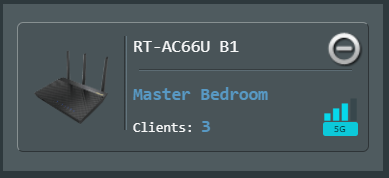
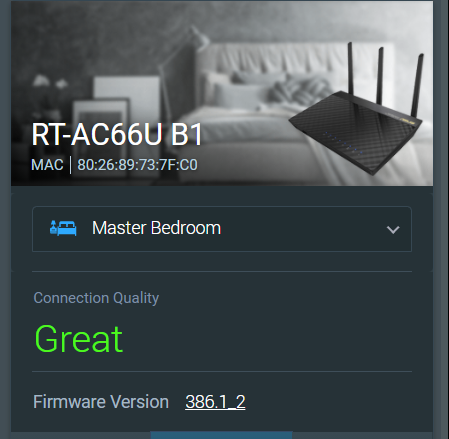
Improvements on WiFi connection performance between AiMesh router and node after installed USB cooler on both of them.

1. Before only two bars. Now three bars. This the same so far.

user posted image

2. Before connection quality rating is Good or OK. Now it is Great. Same here.

user posted image

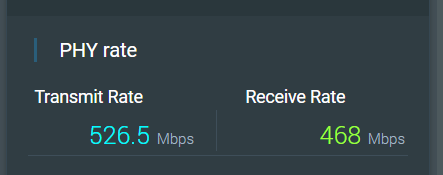
3. Physical connection rate improved. Before I was getting 234 - 351 Mbps.

This changes over time. Sometimes 351 Mbps, 468 Mbps and higher. Still an improvement than without any cooling.

user posted image

So, adding the USB coolers does improve WiFi performance too.

Maybe the 2.4G and 5G radios are operating better because of the cooling.

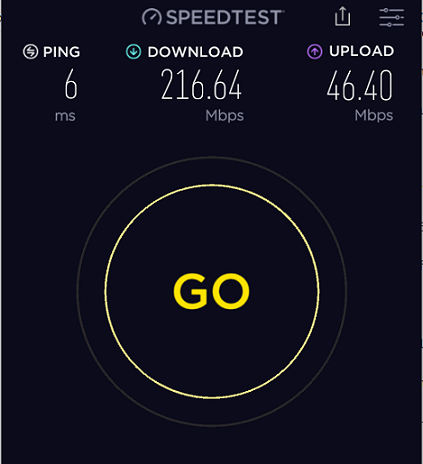
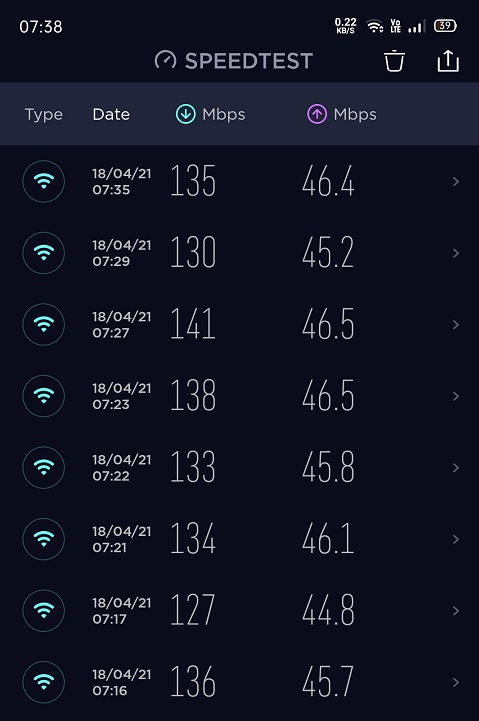
4. OKLA Speedtest from upstairs PC connected via LAN cable to AiMesh node. Before downloads getting 90 plus Mbps. Now doubled. rclxm9.gif

user posted image

This make sense as AiMesh node is still a repeater. DL speed is usually 40-60% of PHY connection rate because of repeater mode. However, UL speed did not reduced by much.

FYI, I am having a 300Mbps DL/50 Mbps DL fiber connection to the modem.

We are using Maxis because my wife likes Astro. Astro is giving a rebate when bundle fiber internet and Astro together.

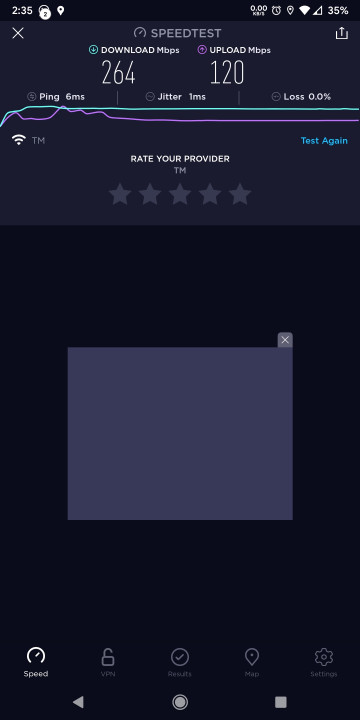
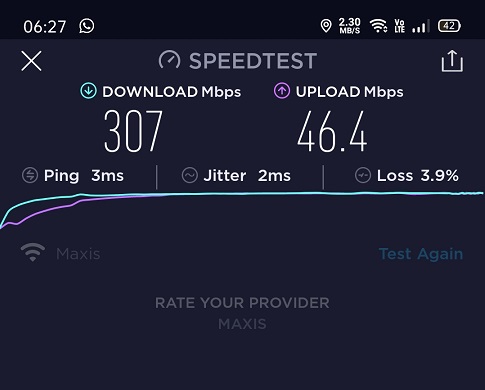
AiMesh router is connected to the modem. I am getting 290+ Mbps/46+ Mbps from the AiMesh router when tested with OKLA Speedtest on my phone.

5. Recently, I am getting random disconnection from the AiMesh node to the AiMesh router.

My wife told me this when she was using her computer. The node will reconnect again after a few minutes.

There is no problem with the AiMesh router.

I recalled having this problem when using DLink firmware last time at the repeater node too.

I did not recalled having this with the ASUS RT-AC66U B1 firmware.

Maybe I did not noticed because I was running this firmware only for a few weeks before I moved to Asuswrt-Merlin firmware.

Anyone having similar random disconnections from the AiMesh node?

Just wondering whether it is a hardware thing for DLink DIR-868L router to behave this way? It seems that changing the firmware did not resolve the issue.

Other than that, I am quite satisfied with the AiMesh system in my home. Performing better and more stable when compared to DLink's factory firmware.

I think gary_cheah85 is right in saying that Asuswrt-Merlin firmware is quite solid and stable.

So far so good. biggrin.gif

Regards,

Updated 14 March 2021

This post has been edited by misk94: Mar 14 2021, 08:27 PM
TSmisk94
post Mar 16 2021, 03:03 PM

Getting Started
**
Junior Member
72 posts

Joined: May 2014


Latest ASUSwrt firmware for RT-AC66U B1

user posted image

https://www.asus.com/us/Networking-IoT-Serv.../HelpDesk_BIOS/

Latest ASUSwrt-Merlin firmware for RT-AC66U B1 or RT-AC68U

user posted image

https://sourceforge.net/projects/asuswrt-me...-AC68U/Release/

Updated 16 March 2021

This post has been edited by misk94: Mar 16 2021, 03:11 PM
geep
post Mar 20 2021, 11:18 AM

New Member
*
Junior Member
45 posts

Joined: Jun 2011
QUOTE(jonsalam @ Mar 4 2021, 06:40 AM)
Same situation here and i did some digging and found the solution.2.4GHz wifi Channel bandwidth 20MHz and Control Channel 6. If not working try change to channel 1 or 11 depends on wifi interference around you.
*
QUOTE(misk94 @ Mar 4 2021, 10:22 AM)
Yes. Correct recommendations.

user posted image

Refer to the following link https://www.metageek.com/training/resources...els-1-6-11.html

Regards
*
Is there any improvement on 2.4G speed? any speedtest on sole 2.4G main router. I followed both thread in lowyat and hwz.sg, but hesitate a bit since I only own 1 unit of DIR868L blush.gif
TSmisk94
post Mar 21 2021, 07:39 PM

Getting Started
**
Junior Member
72 posts

Joined: May 2014


Dear geep.

Current interests are 5 GHz (WiFi 5) and the latest WiFi 6.

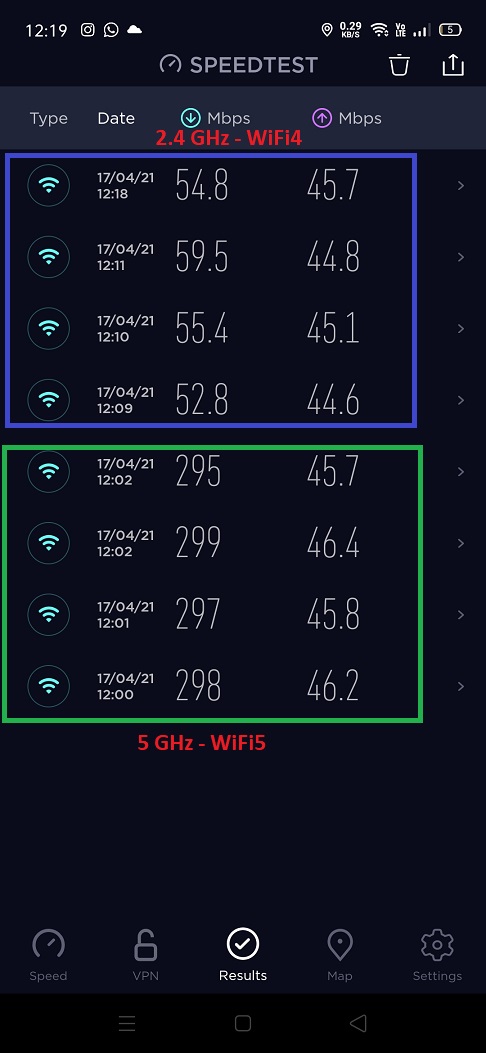
2.4 GHz is legacy. Actually good for distance but not speed in comparison to WiFi 5 and WiFi 6.

Of course you need the proper router and client side to support WiFi 5 and WiFi 6.

Nevertheless, 2.4 GHz still offers reasonable performance for daily use.

I think DIR-868L is giving comparable 2.4 GHz WiFi performance to other routers.

The Asuswrt-Merlin firmware may give a bit more performance based on experience from performance at 5 GHz WiFi.

And the cooling does help too. Keep the radios at top performance.

Sorry could not be much help on this.

Regards,

This post has been edited by misk94: Mar 21 2021, 07:39 PM
geep
post Mar 21 2021, 09:32 PM

New Member
*
Junior Member
45 posts

Joined: Jun 2011
QUOTE(misk94 @ Mar 21 2021, 07:39 PM)
Dear geep.

Current interests are 5 GHz (WiFi 5) and the latest WiFi 6.

2.4 GHz is legacy. Actually good for distance but not speed in comparison to WiFi 5 and WiFi 6.

Of course you need the proper router and client side to support WiFi 5 and WiFi 6.

Nevertheless, 2.4 GHz still offers reasonable performance for daily use.

I think DIR-868L is giving comparable 2.4 GHz WiFi performance to other routers.

The Asuswrt-Merlin firmware may give a bit more performance based on experience from performance at 5 GHz WiFi.

And the cooling does help too. Keep the radios at top performance.

Sorry could not be much help on this.

Regards,
*
Thanks for the head up. I will surely try this 1 day cuz im planning to buy another Aimesh router in the future.
For now, 2.4G still my concern cuz i still have some old device like ipcam which rely on it.
Anyhow thanks for the guide, will surely save more $$$$$ thumbup.gif
fisherman10
post Mar 21 2021, 09:37 PM

Regular
******
Senior Member
1,372 posts

Joined: Dec 2007


QUOTE(geep @ Mar 21 2021, 09:32 PM)
Thanks for the head up. I will surely try this 1 day cuz im planning to buy another Aimesh router in the future.
For now, 2.4G still my concern cuz i still have some old device like ipcam which rely on it.
Anyhow thanks for the guide, will surely save more $$$$$  thumbup.gif
*
2.4G working fine for me with 2 units DIR-868L running latest Asus Merlin 386.1_2 with aimesh.
TSmisk94
post Mar 23 2021, 11:05 PM

Getting Started
**
Junior Member
72 posts

Joined: May 2014


Dear members,

For your information, I am trying out an interesting and useful feature of Asuswrt-Merlin firmware the Roaming Assistant.

The idea is that your devices will be connected to AiMesh router or node transparently when you move around in your home.

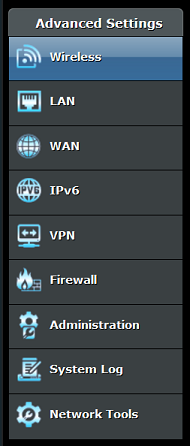
You can access the Roaming Assistant by clicking Wireless menu under Advanced Settings.

user posted image

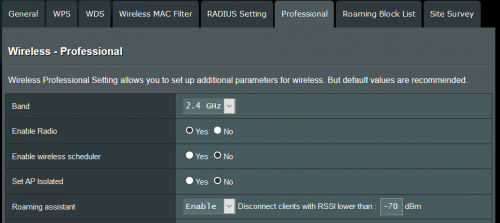
Next click on the Professional tab.

user posted image

Scroll down until you see Roaming Assistant. It should be Enabled by default. Enable it, if it is not.

user posted image

You should check the settings for 2.4GHz and 5GHz. By default the value is set at -70 dB for both.

user posted image

I found that the default -70 dB setting is not suitable in a home environment, at least my home hmm.gif .

Currently, I am using -50 dB for 2.4 GHz and -55 dB for 5 GHz.

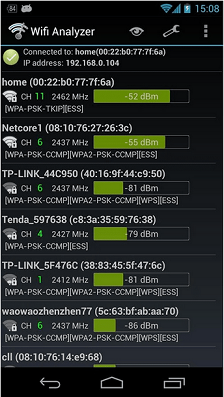
I selected the values after checking the 2.4 GHz and 5 GHz WiFi strengths using a WiFi Analyser app in my phone.

An example is shown below. The values are not from my home. biggrin.gif

user posted image

In the above example, if you look at first entry, home router reading is -52dB. So you need to put -55 dB to replace the -70 dB default value.

Please do not put less than -52 dB such as -50 dB or -45 dB.

Link to some good WiFi analyser Android apps https://www.netspotapp.com/wifi-analyzer-apps-android.html

Please use the app to get good values suitable for your home. Definitely it should be better than the default -70 dB.

A good range to consider are from -40 to -60 dB.

Please do not use very low values else you may have trouble connecting to your WiFi.

I think this is important if you have other devices using WiFi such as CCTV, smart devices, etc which operate at 2.4 GHz.

In such cases, you should reduce dB setting for 2.4GHz by increments of -5dB and see what happens until you reach a good value for your home.

Distance of your AiMesh router and node from each other could be use as a guide to choose good dB values.

You want such that when you move from the router to the node, your WiFi will be changed by the Roaming Assistant smoothly.

So a bit of trial and error in finding the right dB values for your home.

P/S: Good news. This morning my phone could roam successfully when I moved from second floor to ground floor. The roaming worked better now rclxm9.gif

Regards,

Updated 24 March 2021.

This post has been edited by misk94: Mar 25 2021, 12:04 PM
geep
post Mar 25 2021, 04:34 PM

New Member
*
Junior Member
45 posts

Joined: Jun 2011
Thank you guys, so I finally made my mind and flashed the modded CFE and Asus/Merlin firmware on my DIR-868L. Its working fine and really stable, but then the low throughput speed on 2.4G is still there. Its minor issue TBH because 30mbps on lecacy devices is still reliable with no hiccup.

Since im on non-Aimesh/single router setup, I also try Tomato firmware and the good news is the 2.4G speed on Tomato is much better, roughly I can get 60-70mbps on it. Also I use the full features AIO .trx images, the CFE seems solved the issue with 32kb NVRAM limit.

Flashed Merlin straight from Asus CFE Bootloader
user posted image

Flashed Freshtomato (R6400 AIO image) with Asus Firmware Restoration Tool
user posted image
TSmisk94
post Mar 25 2021, 09:18 PM

Getting Started
**
Junior Member
72 posts

Joined: May 2014


QUOTE(geep @ Mar 25 2021, 04:34 PM)
Thank you guys, so I finally made my mind and flashed the modded CFE and Asus/Merlin firmware on my DIR-868L. Its working fine and really stable, but then the low throughput speed on 2.4G is still there. Its minor issue TBH because 30mbps on lecacy devices is still reliable with no hiccup.

Since im on non-Aimesh/single router setup, I also try Tomato firmware and the good news is the 2.4G speed on Tomato is much better, roughly I can get 60-70mbps on it. Also I use the full features AIO .trx images, the CFE seems solved the issue with 32kb NVRAM limit.

Flashed Merlin straight from Asus CFE Bootloader
user posted image

Flashed Freshtomato (R6400 AIO image) with Asus Firmware Restoration Tool
user posted image
*
Dear geep,

Good way to go back to Tomato from Asuswrt-Merlin. thumbsup.gif

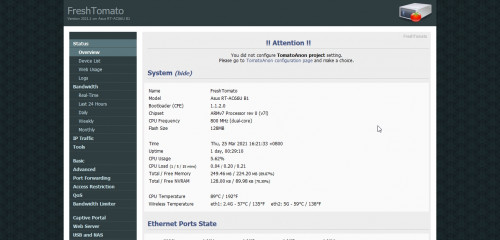
Interestingly, Tomato recognized the router as an Asus RT-AC66U B1 and not DLink DIR-868L. shocking.gif

I suppose the firmware could only read the motherboard firmware/hardware but not the shell of the router. biggrin.gif

Nevertheless, it is a good option for those still restricted to 2.4 GHz and wanted more performance.

BTW, did you get the firmware from freshtomato.org website?

https://freshtomato.org/

I noticed the firmware version is 2021.1.

It seems that both is using the same firmware K26ARM, which explains a lot why it worked. rclxms.gif

Nevertheless, the 32K NVRAM limit is still an issue if your flash straight from DIR-868L.

Unless you follow the earlier part of my original post how to overcome that or if your already flashed your DIR-868L to Asuswrt-Merlin firmware can follow like you did.

Regards,

This post has been edited by misk94: Mar 25 2021, 09:38 PM
geep
post Mar 25 2021, 11:02 PM

New Member
*
Junior Member
45 posts

Joined: Jun 2011
QUOTE(misk94 @ Mar 25 2021, 09:18 PM)
Dear geep,

Good way to go back to Tomato from Asuswrt-Merlin.  thumbsup.gif 

Interestingly, Tomato recognized the router as an Asus RT-AC66U B1 and not DLink DIR-868L.  shocking.gif

I suppose the firmware could only read the motherboard firmware/hardware but not the shell of the router. biggrin.gif

Nevertheless, it is a good option for those still restricted to 2.4 GHz and wanted more performance.

BTW, did you get the firmware from freshtomato.org website?

https://freshtomato.org/

I noticed the firmware version is 2021.1.

It seems that both is using the same firmware K26ARM, which explains a lot why it worked.  rclxms.gif

Nevertheless, the 32K NVRAM limit is still an issue if your flash straight from DIR-868L.

Unless you follow the earlier part of my original post how to overcome that or if your already flashed your DIR-868L to Asuswrt-Merlin firmware can follow like you did.

Regards,
*
Yes, im using the official .trx image from Freshtomato.org. It doesnt matter what .trx image i flash on it, it will boot as RT-AC66U B1.
It seems Tomato will read the pre-config data from the CFE and load the profile for RT-AC66U B1 instead.
If i have more time and courage, will definitely try to reedit the CFE for further test and observation. sweat.gif
user posted image

fisherman10
post Mar 25 2021, 11:22 PM

Regular
******
Senior Member
1,372 posts

Joined: Dec 2007


QUOTE(geep @ Mar 25 2021, 11:02 PM)
Yes, im using the official .trx image from Freshtomato.org. It doesnt matter what .trx image i flash on it, it will boot as RT-AC66U B1.
It seems Tomato will read the pre-config data from the CFE and load the profile for RT-AC66U B1 instead.
If i have more time and courage, will definitely try to reedit the CFE for further test and observation.  sweat.gif
user posted image
*
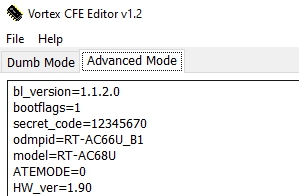
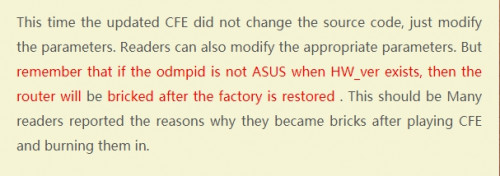
Please don't. I tried to change the odmpid to RT-AC68U and it will brick.

Then need to unbrick through the serial pins.

This post has been edited by fisherman10: Mar 25 2021, 11:22 PM
geep
post Mar 26 2021, 02:42 AM

New Member
*
Junior Member
45 posts

Joined: Jun 2011
QUOTE(fisherman10 @ Mar 25 2021, 11:22 PM)
Please don't. I tried to change the odmpid to RT-AC68U and it will brick.

Then need to unbrick through the serial pins.
*
Thank you for alerting me, you just save my precious time. thumbsup.gif
Also glad to know that there is someone on here succeed with the serial method.
fisherman10
post Mar 26 2021, 03:07 PM

Regular
******
Senior Member
1,372 posts

Joined: Dec 2007


QUOTE(geep @ Mar 26 2021, 02:42 AM)
Thank you for alerting me, you just save my precious time. thumbsup.gif
Also glad to know that there is someone on here succeed with the serial method.
*
Yes there's a weird bug. Even if I change the odmpid through NVRAM (not flashing the CFE with modified values), it will brick straight away. So you can't even clear NVRAM using the WPS button.
geep
post Mar 26 2021, 09:34 PM

New Member
*
Junior Member
45 posts

Joined: Jun 2011
QUOTE(fisherman10 @ Mar 26 2021, 03:07 PM)
Yes there's a weird bug. Even if I change the odmpid through NVRAM (not flashing the CFE with modified values), it will brick straight away. So you can't even clear NVRAM using the WPS button.
*
Interesting hmm.gif modifying a single string will corrupt the whole bootloader.
Btw have you tried a tips from Bigxd the time you edit the odmpid?
Cuz I saw his mod CFE version and also Linksys mod version with native string.

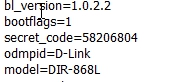
To Remove HW_ver ?
user posted image

D-link with native odmpid
user posted image

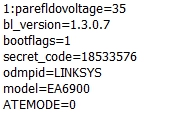
Linksys version
user posted image
fisherman10
post Mar 26 2021, 09:37 PM

Regular
******
Senior Member
1,372 posts

Joined: Dec 2007


QUOTE(geep @ Mar 26 2021, 09:34 PM)
Interesting hmm.gif modifying a single string will corrupt the whole bootloader.
Btw have you tried a tips from Bigxd the time you edit the odmpid?
Cuz I saw his mod CFE version and also Linksys mod version with native string.

To Remove HW_ver ?
user posted image

D-link with native odmpid
user posted image

Linksys version
user posted image
*
Can you link me the tips? I don't really understand the photos

geep
post Mar 26 2021, 09:40 PM

New Member
*
Junior Member
45 posts

Joined: Jun 2011
QUOTE(fisherman10 @ Mar 26 2021, 09:37 PM)
Can you link me the tips? I don't really understand the photos
*
Its in chinese, I use google translate sweat.gif
https://www.bigxd.com/2020/10/802.html
TSmisk94
post Mar 27 2021, 10:43 AM

Getting Started
**
Junior Member
72 posts

Joined: May 2014


QUOTE(misk94 @ Mar 9 2021, 10:37 PM)
DIR-868L with Asuswrt-Merlin firmware update:

Improvements on WiFi connection performance between AiMesh router and node after installed USB cooler on both of them.

1. Before only two bars. Now three bars. This the same so far.

user posted image

2. Before connection quality rating is Good or OK. Now it is Great. Same  here.

user posted image

3. Physical connection rate improved. Before I was getting 234 - 351 Mbps.

This changes over time. Sometimes 351 Mbps, 468 Mbps and higher. Still an improvement than without any cooling.

user posted image

So, adding the USB coolers does improve WiFi performance too.

Maybe the 2.4G and 5G radios are operating better because of the cooling.

4. OKLA Speedtest from upstairs PC connected via LAN cable to AiMesh node. Before downloads getting 90 plus Mbps. Now doubled.  rclxm9.gif

user posted image

This make sense as AiMesh node is still a repeater. DL speed is usually 40-60% of PHY connection rate because of repeater mode. However, UL speed did not reduced by much.

FYI, I am having a 300Mbps DL/50 Mbps DL fiber connection to the modem.

We are using Maxis because my wife likes Astro. Astro is giving a rebate when bundle fiber internet and Astro together.

AiMesh router is connected to the modem. I am getting 290+ Mbps/46+ Mbps from the AiMesh router when tested with OKLA Speedtest on my phone. 

5. Recently, I am getting random disconnection from the AiMesh node to the AiMesh router.

My wife told me this when she was using her computer. The node will reconnect again after a few minutes.

There is no problem with the AiMesh router.

I recalled having this problem when using DLink firmware last time at the repeater node too.

I did not recalled having this with the ASUS RT-AC66U B1 firmware.

Maybe I did not noticed because I was running this firmware only for a few weeks before I moved to Asuswrt-Merlin firmware.

Anyone having similar random disconnections from the AiMesh node?

Just wondering whether it is a hardware thing for DLink DIR-868L router to behave this way? It seems that changing the firmware did not resolve the issue.

Other than that, I am quite satisfied with the AiMesh system in my home. Performing better and more stable when compared to DLink's factory firmware.

I think gary_cheah85 is right in saying that Asuswrt-Merlin firmware is quite solid and stable.

So far so good. biggrin.gif

Regards,

Updated 14 March 2021
*
Latest update in Roaming Assistant testing.

Final dB value for my home 2.4 GHz -40 dB and 5 GHz -50 dB.

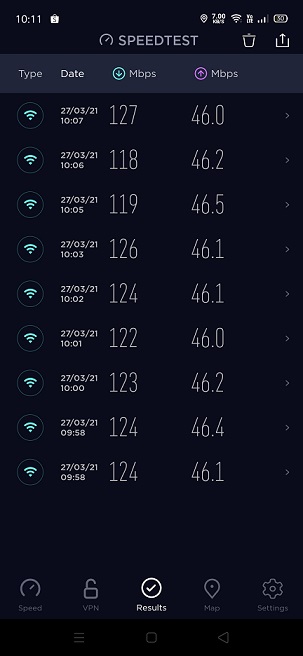
Speedtest from AiMesh node @ WiFi 5 GHz, second floor, after the revised settings.

user posted image

Before, I was getting 90+ Mbps, never reached 100 Mbps for downloads.

Now gained about 20 to 30 Mbps more. rclxm9.gif

Uploads speed already reached maximum possible since cannot get any higher.

Roaming between ground and second floor smoother too,

Regards,

Updated 27 March 2021

This post has been edited by misk94: Mar 27 2021, 10:51 AM
takumaki67
post Mar 29 2021, 12:53 AM

New Member
*
Newbie
13 posts

Joined: Feb 2011
Thank you misk94 for all the effort and preparation! And yes I manage to turn into Asus router biggrin.gif
Unfortunately, I wanted try to rollback original DLINK firmware by flashing 'RT-AC68U-ddwrt' (thinking to have the 'mtd' to write the boot.bin) and now stucked at recovery loop.

Wondering what is the correct process incase I want to roll back to original DLINK firmware?

takumaki67
post Mar 29 2021, 12:56 AM

New Member
*
Newbie
13 posts

Joined: Feb 2011
QUOTE(fisherman10 @ Mar 25 2021, 11:22 PM)
Please don't. I tried to change the odmpid to RT-AC68U and it will brick.

Then need to unbrick through the serial pins.
*
Thank you for actively suggestion fisherman!

Wondering how can I use the serial pins? ( I googled like having different type of USB -TTL adapter)

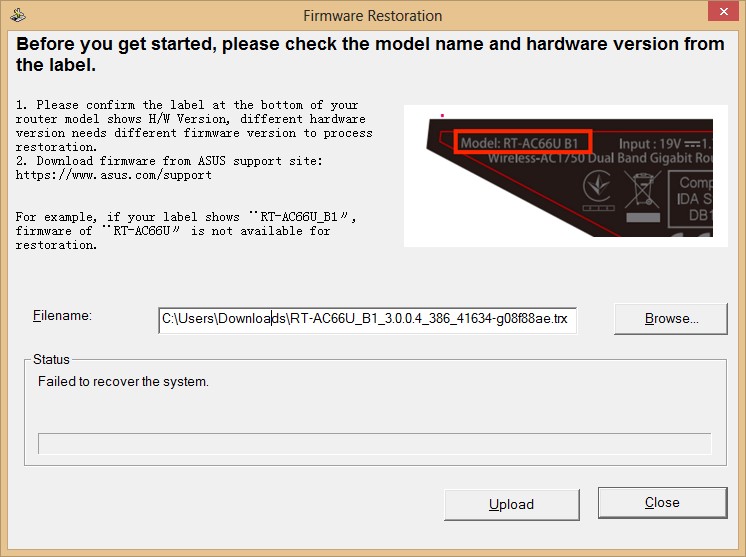
And after I got the adapter, could you advice how I can proceed ya? (Currently I am stuck at recovery loop of my dir868l and also failed using Asus Firmware Restoration too)

This post has been edited by takumaki67: Mar 29 2021, 01:07 AM
fisherman10
post Mar 29 2021, 03:07 AM

Regular
******
Senior Member
1,372 posts

Joined: Dec 2007


QUOTE(takumaki67 @ Mar 29 2021, 12:56 AM)
Thank you for actively suggestion fisherman!

Wondering how can I use the serial pins? ( I googled like having different type of USB -TTL adapter)

And after I got the adapter, could you advice how I can proceed ya? (Currently I am stuck at recovery loop of my dir868l and also failed using Asus Firmware Restoration too)
*
Is it the 2 lights flashing one after another repeatedly?

If so, have a look at this

https://koolshare.cn/forum.php?mod=viewthre...ghlight=dir868l

Because now it's bricked and can't flash a new correct CFE, what you need to do is to stop the boot process immediately before it even tries to boot into bootloop. Then "nvram set" all the correct CFE values. Then it will boot and then you can enable SSH and flash the correct CFE again and do a nvram erase.

This post has been edited by fisherman10: Mar 29 2021, 03:10 AM
BTS1501
post Mar 29 2021, 09:46 AM

Getting Started
**
Junior Member
250 posts

Joined: May 2019
QUOTE(takumaki67 @ Mar 29 2021, 12:53 AM)
Thank you misk94 for all the effort and preparation! And yes I manage to turn into Asus router biggrin.gif
Unfortunately, I wanted try to rollback original DLINK firmware by flashing 'RT-AC68U-ddwrt' (thinking to have the 'mtd' to write the boot.bin) and now stucked at recovery loop.

Wondering what is the correct process incase I want to roll back to original DLINK firmware?
*
You need to specify clearly 2 things, what do you mean by recovery loop, and why need to flash back to dlink firmware ?

I have never seen stucked at recovery loop for asus or ddwrt firmware flashing. You will always be in either dlink recovery firmware page (see post #3 on page 1) or asus recovery firmware page (post #9 on page 1), and this is called the miniweb screen. You need to press reset (hold) and power on, until power led flashes for 5-10 secs, then release reset, and you will be in miniweb. Repeat this if you can not get to this.

An easier/simpler way is to use asus recovery.

If you want to change to ac68u in asus, you just need to reflash cfe, there is no need to go back to dlink firmware

This post has been edited by BTS1501: Mar 29 2021, 09:47 AM
takumaki67
post Mar 29 2021, 10:35 AM

New Member
*
Newbie
13 posts

Joined: Feb 2011
QUOTE(fisherman10 @ Mar 29 2021, 03:07 AM)
Is it the 2 lights flashing one after another repeatedly?

If so, have a look at this

https://koolshare.cn/forum.php?mod=viewthre...ghlight=dir868l

Because now it's bricked and can't flash a new correct CFE, what you need to do is to stop the boot process immediately before it even tries to boot into bootloop. Then "nvram set" all the correct CFE values. Then it will boot and then you can enable SSH and flash the correct CFE again and do a nvram erase.
*
Thank you fisherman10 advice!
Yes, 2 lights flashing one after another repeatedly after I switch on DIR868L
(without and with hold RESET 15 seconds).

e.g.: INTERNET LED light up (GREEN) ~3 seconds then off and continuously
until 10 minutes later POWER LED light up (AMBER) ~3 seconds then off another 10 minutes or no light up anymore.
takumaki67
post Mar 29 2021, 10:52 AM

New Member
*
Newbie
13 posts

Joined: Feb 2011
QUOTE(BTS1501 @ Mar 29 2021, 09:46 AM)
You need to specify clearly 2 things, what do you mean by recovery loop, and why need to flash back to dlink firmware ?

I have never seen stucked at recovery loop for asus or ddwrt firmware flashing. You will always be in either dlink recovery firmware page (see post #3 on page 1) or asus recovery firmware page (post #9 on page 1), and this is called the miniweb screen. You need to press reset (hold) and power on, until power led flashes for 5-10 secs, then release reset, and you will be in miniweb. Repeat this if you can not get to this.

An easier/simpler way is to use asus recovery.

If you want to change to ac68u in asus, you just need to reflash cfe, there is no need to go back to dlink firmware
*
Thank you for reply BTS1501!
Sure, lemme specify clearly.

recovery loop
Switch on DIR868L router with and without holding RESET,
the INTERNET LED (GREEN) will light up ~3 seconds on and off.

Then switch off and on router again, its still having same light behavior.
Next, I directly use the Asus Firmware Restoration (AC66U_B1/ DDWRT/ FreshTomato and etc...) and it able to flash,
yet it will be failed with an status something like "Failed update/ recover firmware".

flash back to dlink firmware
Just incase wanted back original DLINK for stable purpose.
So thinking to have a rollback to the original state.

Ok, I will try advice above to reach the miniWeb (because I tried 1 or 2 times still not able to get the miniWeb shown)
fisherman10
post Mar 29 2021, 11:58 AM

Regular
******
Senior Member
1,372 posts

Joined: Dec 2007


QUOTE(takumaki67 @ Mar 29 2021, 10:35 AM)
Thank you fisherman10 advice!
Yes, 2 lights flashing one after another repeatedly after I switch on DIR868L
(without and with hold RESET 15 seconds).

e.g.: INTERNET LED light up (GREEN) ~3 seconds then off and continuously
        until 10 minutes later POWER LED light up (AMBER) ~3 seconds then off another 10 minutes or no light up anymore.
*
It's supposed to be like this.

Immediately after turning on, Top LED flash once bottom LED flash once then stop. After 30 seconds then top LED flash once bottom LED flash once. And it keeps repeating.

It doesn't sound like your example. Perhaps yours isn't a hard brick yet. Maybe take a video to show?
takumaki67
post Mar 29 2021, 02:20 PM

New Member
*
Newbie
13 posts

Joined: Feb 2011
QUOTE(fisherman10 @ Mar 29 2021, 11:58 AM)
It's supposed to be like this.

Immediately after turning on, Top LED flash once bottom LED flash once then stop. After 30 seconds then top LED flash once bottom LED flash once. And it keeps repeating.

It doesn't sound like your example. Perhaps yours isn't a hard brick yet. Maybe take a video to show?
*
Sure fisherman10
I think I might need change my statements to 30 seconds instead of 3 seconds light blinking...

Here is my video switch on with hold reset (30 seconds)
https://youtu.be/mZPENORbJpA

So I'm above 2 minutes video the INTERNET LED just blink about 3 times only while POWER LED just blink once at initial.

Appreciate your effort 1st!

This post has been edited by takumaki67: Mar 29 2021, 02:28 PM
BTS1501
post Mar 29 2021, 02:24 PM

Getting Started
**
Junior Member
250 posts

Joined: May 2019
QUOTE(takumaki67 @ Mar 29 2021, 10:52 AM)
Thank you for reply BTS1501!
Sure, lemme specify clearly.

recovery loop
Switch on DIR868L router with and without holding RESET,
the INTERNET LED (GREEN) will light up ~3 seconds on and off.

Then switch off and on router again, its still having same light behavior.
Next, I directly use the Asus Firmware Restoration (AC66U_B1/ DDWRT/ FreshTomato and etc...) and it able to flash,
yet it will be failed with an status something like "Failed update/ recover firmware".

flash back to dlink firmware
Just incase wanted back original DLINK for stable purpose.
So thinking to have a rollback to the original state.

Ok, I will try advice above to reach the miniWeb (because I tried 1 or 2 times still not able to get the miniWeb shown)
*
One question, where did you get this file from "RT-AC68U-ddwrt" (from your previous post) ?
ddwrt is either webflash or factory-to-ddwrt, while asus firmware is RT-AC66U_B1_3.0.0.4 etc, like below :
b. 25974factory-to-ddwrt.bin
e. RT-AC66U_B1_3.0.0.4_385_20630-ged5e4c3.trx

I think you try to use asus firmware restoration tool, easier (in case you are still in asus CFE), just remember to set a static IP in your PC before running the restore :
https://www.asus.com/sg/support/FAQ/1000814/

If restore can not work, maybe it is already in dlink CFE, which in this case you need to use reset (hold) + power on, until power led flashes. Your pc must be in static IP as well. before reset + power on, you can also open a command prompt and type "ping 192.168.1.1 -t", you should see messages like timed out or unreachable, then TTL=100 (if TTL=64 then can not). once TTL=100, you can release the reset button.
BTS1501
post Mar 29 2021, 02:29 PM

Getting Started
**
Junior Member
250 posts

Joined: May 2019
QUOTE(takumaki67 @ Mar 29 2021, 02:20 PM)
Sure fisherman10
I think I might need change my statements (3 seconds) instead of 30 seconds...

Here is my video start up with hold reset (30 seconds)
https://youtu.be/mZPENORbJpA

Appreciate your effort 1st!
*
saw the video, you still in asus cfe, not dlink. In this case just use the asus restore method. you can also use the reset+ power on if you want. remember PC must be in static IP.

Also, asus firmware is most updated/stable + mesh (stable for ethernet), I don't see the point of going back to dlink firmware again.
takumaki67
post Mar 29 2021, 03:14 PM

New Member
*
Newbie
13 posts

Joined: Feb 2011
QUOTE(BTS1501 @ Mar 29 2021, 02:29 PM)
saw the video, you still in asus cfe, not dlink. In this case just use the asus restore method. you can also use the reset+ power on if you want. remember PC must be in static IP.

Also, asus firmware is most updated/stable + mesh (stable for ethernet), I don't see the point of going back to dlink firmware again.
*
Thank you BTS1501 for the advice.
Ok, so we will focus to ASUS Firmware restoration.

I re-download the firmware restoration and latest RT-AC66U B1 firmware Version 3.0.0.4.386.41634 from ASUS website.

1. Set to static IP 192.168.0.10 (255.255.255.0) and turn off Firewall
2. Plug in LAN (No. 3) at DIR868L
3. Switch on + hold RESET button (15 seconds)
4. Launch Firmware restoration with browse downloaded new firmware
5. Firmware uploading in progress
6. Then after 100% flash but it shown 'Failed to recover the system'
user posted image
7. After that, only the INTERNET LED light up
8. Wait for 20 mins, and still only INTERNET LED light up (like no response)
9. Restart by switch power off then on, then it looks like the video shown before (INTERNET LED blinking)
https://youtu.be/mZPENORbJpA

Eventually still unable startup the router...
TSmisk94
post Mar 29 2021, 03:30 PM

Getting Started
**
Junior Member
72 posts

Joined: May 2014


OpenWRT - 802.11s Mesh WiFi Network

user posted image

Anyone with plenty of free time and available router hardware suitable for OpenWRT firmware to play around with this open-source Mesh system?

https://youtu.be/1yaodn1BpSw

https://youtu.be/cw8ykKgVKbM

Just sharing what I found by accident.

It seems you could mix and match different brand of routers as long the routers are supported by OpenWRT firmware.

Regards,

This post has been edited by misk94: Mar 29 2021, 04:10 PM
fisherman10
post Mar 29 2021, 03:39 PM

Regular
******
Senior Member
1,372 posts

Joined: Dec 2007


QUOTE(takumaki67 @ Mar 29 2021, 03:14 PM)
Thank you BTS1501 for the advice.
Ok, so we will focus to ASUS Firmware restoration.

I re-download the firmware restoration and latest RT-AC66U B1 firmware Version 3.0.0.4.386.41634 from ASUS website.

1. Set to static IP 192.168.0.10 (255.255.255.0) and turn off Firewall
2. Plug in LAN (No. 3) at DIR868L
3. Switch on + hold RESET button (15 seconds)
4. Launch Firmware restoration with browse downloaded new firmware
5. Firmware uploading in progress
6. Then after 100% flash but it shown 'Failed to recover the system'
user posted image
7. After that, only the INTERNET LED light up
8. Wait for 20 mins, and still only INTERNET LED light up (like no response)
9. Restart by switch power off then on, then it looks like the video shown before (INTERNET LED blinking)
https://youtu.be/mZPENORbJpA

Eventually still unable startup the router...
*
Saw the video. It's not bricked. No need serial method.

I think IP is wrong. Set this in PC.
ip address 192.168.1.123
Subnet 255.255.255.0
Gateway 192.168.1.1

Hold reset and power on. Then try the firmware restoring again.

BTS1501
post Mar 29 2021, 04:59 PM

Getting Started
**
Junior Member
250 posts

Joined: May 2019
Yes, ip address in your pc should be set 192.168.1.10, subnet 255.255.255.0, no need gateway. You type 192.168.0.10

Dlink uses 192.168.0.x
asus uses 192.168.1.x (for older routers)

If still can not (don't know what firmware you flashed previously), then
1. WPS button + power on, ping 192.168.1.1 -t until ttl=100, then release wps button
2. reset button + power on, ping 192.168.1.1 -t until ttl=100, then release reset button

try 1 and/or 2 repeatedly

This post has been edited by BTS1501: Mar 29 2021, 05:03 PM
takumaki67
post Mar 29 2021, 05:37 PM

New Member
*
Newbie
13 posts

Joined: Feb 2011
QUOTE(BTS1501 @ Mar 29 2021, 04:59 PM)
Yes, ip address in your pc should be set 192.168.1.10, subnet 255.255.255.0, no need gateway. You type 192.168.0.10

Dlink uses 192.168.0.x
asus uses 192.168.1.x (for older routers)

If still can not (don't know what firmware you flashed previously), then
1. WPS button + power on, ping 192.168.1.1 -t until ttl=100, then release wps button
2. reset button + power on, ping 192.168.1.1 -t until ttl=100, then release reset button

try 1 and/or 2 repeatedly
*
Thank you BTS1501!
By the option 1... pressing the WPS button is work!
It is back online now!

Again thank you BTS1501 and fisherman10 for the great guide!
BTS1501
post Mar 29 2021, 08:38 PM

Getting Started
**
Junior Member
250 posts

Joined: May 2019
QUOTE(takumaki67 @ Mar 29 2021, 05:37 PM)
Thank you BTS1501!
By the option 1... pressing the WPS button is work!
It is back online now!

Again thank you BTS1501 and fisherman10 for the great guide!
*
That's great. Enjoy smile.gif

The wps + power on is to clear nvram, you will need to use this when reflash cfe. So most likely you did not clear nvram after flashing the asus cfe.

The reset + power on is to go into the miniweb screen, for flashing firmware.

When you do 2 868l together in aimesh, you also need to use wps + power on.
takumaki67
post Mar 29 2021, 08:58 PM

New Member
*
Newbie
13 posts

Joined: Feb 2011
QUOTE(BTS1501 @ Mar 29 2021, 08:38 PM)
That's great. Enjoy smile.gif

The wps + power on is to clear nvram, you will need to use this when reflash cfe. So most likely you did not clear nvram after flashing the asus cfe.

The reset + power on is to go into the miniweb screen, for flashing firmware.

When you do 2 868l together in aimesh, you also need to use wps + power on.
*
Appreciate BTS1510!
I see... So you mean need to clear two 868l nvram when I want setup Aimesh ya?
Then I will need to reconfigure the WAN and Wireless?

fisherman10
post Mar 29 2021, 09:25 PM

Regular
******
Senior Member
1,372 posts

Joined: Dec 2007


QUOTE(takumaki67 @ Mar 29 2021, 08:58 PM)
Appreciate BTS1510!
I see... So you mean need to clear two 868l nvram when I want setup Aimesh ya?
Then I will need to reconfigure the WAN and Wireless?
*
I think he mistaken.

If everything is working in Asus firmware already, you don't need to hold any button and power on.

To set up a node, let the device start-up as usual, press and hold reset button until light blinks then let go. This will factory reset that device.

Go to your main router, press AI Mesh, search for nodes, add the device that it found. It should work unless you messed up the MAC address/WPS pin when converting.
takumaki67
post Mar 29 2021, 09:38 PM

New Member
*
Newbie
13 posts

Joined: Feb 2011
QUOTE(fisherman10 @ Mar 29 2021, 09:25 PM)
I think he mistaken.

If everything is working in Asus firmware already, you don't need to hold any button and power on.

To set up a node, let the device start-up as usual, press and hold reset button until light blinks then let go. This will factory reset that device.

Go to your main router, press AI Mesh, search for nodes, add the device that it found. It should work unless you messed up the MAC address/WPS pin when converting.
*
Thank you fisherman10!
Brilliant! Understand clearly now!

TSmisk94
post Mar 31 2021, 03:31 PM

Getting Started
**
Junior Member
72 posts

Joined: May 2014


Dear members,

I am thinking of selling my DIR-868L AiMesh router and node.

Both are already migrated to Asuswrt-Merlin firmware.

These are the units that I have been showing you the guide and performance benchmark.

So they are tested and having reasonably good performance.

The units are still having balance of the three year D-Link warranty. i.e. until mid Nov. 2022.

I am asking RM300 for the set (one router and one node) - AC1750 AiMesh system. Complete with original box and power supply.

I think it is a reasonable price and comes with more than 1 year and 6 months remaining warranty.

Other sellers are selling used DIR-868L around the same price with no warranty at all.

Anyone interested please let me know.

Thank you.

Regards,

This post has been edited by misk94: Mar 31 2021, 05:39 PM
fisherman10
post Mar 31 2021, 04:50 PM

Regular
******
Senior Member
1,372 posts

Joined: Dec 2007


QUOTE(misk94 @ Mar 31 2021, 03:31 PM)
Dear members,

I am thinking of selling my DIR-868L AiMesh router and node.

Both are already migrated to Asuswrt-Merlin firmware.

These are the units that I have been showing you the guide and performance benchmark.

So they are tested and having reasonably good performance.

The units are still having balance of the three year D-Link warranty. i.e. until mid Nov. 2022.

I am asking RM300 for the set (one router and one node). Complete with original box and power supply.

I think it is a reasonable price and comes with more than 1 year and 6 months remaining warranty.

Other sellers are selling used DIR-868L around the same price with no warranty at all.

Anyone interested please let me know.

Thank you.

Regards,
*
Upgrading to AX?
TSmisk94
post Mar 31 2021, 05:28 PM

Getting Started
**
Junior Member
72 posts

Joined: May 2014


QUOTE(fisherman10 @ Mar 31 2021, 04:50 PM)
Upgrading to AX?
*
Thinking in that direction. Faster WiFi5 or WiFi6?

Wife and children urging for upgrades.

I am fine with current setup but obviously I will be out voted by them. biggrin.gif

Happy Wife Happy Life. cool2.gif

Regards,

This post has been edited by misk94: Mar 31 2021, 05:34 PM
fisherman10
post Mar 31 2021, 08:01 PM

Regular
******
Senior Member
1,372 posts

Joined: Dec 2007


QUOTE(misk94 @ Mar 31 2021, 05:28 PM)
Thinking in that direction. Faster WiFi5 or WiFi6?

Wife and children urging for upgrades.

I am fine with current setup but obviously I will be out voted by them.  biggrin.gif

Happy Wife Happy Life.  cool2.gif 

Regards,
*
I think go straight for WiFi6 better. Because single or dual antenna Wifi6 alone will be better than 3x3 or 4x4 Wifi5. That also very rare to see mobile devices with more than 2x2 antenna.
TSmisk94
post Mar 31 2021, 10:23 PM

Getting Started
**
Junior Member
72 posts

Joined: May 2014


QUOTE(fisherman10 @ Mar 31 2021, 08:01 PM)
I think go straight for WiFi6 better. Because single or dual antenna Wifi6 alone will be better than 3x3 or 4x4 Wifi5. That also very rare to see mobile devices with more than 2x2 antenna.
*
Yes. I think you are right. thumbsup.gif

Regards,
takumaki67
post Apr 2 2021, 02:23 AM

New Member
*
Newbie
13 posts

Joined: Feb 2011
Lately I saw someone fix the 2.4ghz weak problem in koolshare website.
He has attached the CFE file named 'CFE_868L_2.4Gfix_5GPRO.bin' in Baidu (aw7b)

I am not able download the file to test.
Maybe anyone can help download the CFE?

This post has been edited by takumaki67: Apr 2 2021, 02:24 AM
fisherman10
post Apr 2 2021, 08:49 AM

Regular
******
Senior Member
1,372 posts

Joined: Dec 2007


QUOTE(takumaki67 @ Apr 2 2021, 02:23 AM)
Lately I saw someone fix the 2.4ghz weak problem in koolshare website.
He has attached the CFE file named 'CFE_868L_2.4Gfix_5GPRO.bin' in Baidu (aw7b)

I am not able download the file to test.
Maybe anyone can help download the CFE?
*
Yes it works. Now it's finally stable and have been running it for a few days. But can't directly use the one from koolshare website. Initially I had some annoying problems.

Give me some time. I'll post up a guide and OP can add to the guide.
takumaki67
post Apr 2 2021, 09:57 AM

New Member
*
Newbie
13 posts

Joined: Feb 2011
Cool fisherman10! I am ready to help you test out. Looking forward!
TSmisk94
post Apr 2 2021, 04:32 PM

Getting Started
**
Junior Member
72 posts

Joined: May 2014


QUOTE(takumaki67 @ Apr 2 2021, 02:23 AM)
Lately I saw someone fix the 2.4ghz weak problem in koolshare website.
He has attached the CFE file named 'CFE_868L_2.4Gfix_5GPRO.bin' in Baidu (aw7b)

I am not able download the file to test.
Maybe anyone can help download the CFE?
*
Dear Fisherman 10,

Found the Chinese website.

Interesting. A way to improve 2.4GHz.

I hope it will not stress the 2.4GHz radio too much.

If I have free time I might have ago and try.

Maybe come out without another guide too. biggrin.gif

Regards,

This post has been edited by misk94: Apr 2 2021, 04:33 PM
fisherman10
post Apr 2 2021, 08:12 PM

Regular
******
Senior Member
1,372 posts

Joined: Dec 2007


At present, DIR-868L can only be converted to RT-AC66U_B1 or to RT-AC68U.

Besides the problems mentioned in the opening post such as LAN/WAN ports rearranged and LED not working normally,
1) If converted to RT-AC66U_B1, everything works fine except 2.4G WiFi very slow
2) If converted to RT-AC68U, everything works fine except 2.4G WiFi very slow and WiFi is disabled/off after every restart.


Here's the guide to fix both 2.4G WiFi speed and WiFi disabled after restart. It will be converted to AC68U. AC68U has slightly more info when viewing connected clients list compared to AC66U_B1.

Only do this after you're already fully converted and running Asus firmware.

1) Download attached file. newcfe68u.bin and newcfe66ub1.bin and mtd-write and CFEEdit
https://drive.google.com/file/d/1s6ooa6M8ZF...iew?usp=sharing

2) Use CFEEdit and change 3 macaddresses and WPS Pin according to your own router in the CFE file.

3) Turn on the SSH from router page. Administration > System > Enable SSH > Apply

4) Open WINSCP. Choose SCP protocol, enter router IP address, username and password

5) Now decide if you want your router to be Asus AC68U or AC66U_B1. Drag and drop both newcfe68u.bin OR newcfe66ub1.bin together with mtd-write file to the right side of WINSCP

6) Use Putty and connect to router. Enter username and password

7) Enter these commands in Putty to flash new CFE

CODE
chmod u+x mtd-write

./mtd-write newcfe68u.bin boot

OR

./mtd-write newcfe66ub1.bin boot


8) Enter this command into Putty to clear NVRAM and reboot

CODE
nvram erase

reboot


And it should startup as AC68U or AC66U_B1.

This post has been edited by fisherman10: Apr 4 2021, 09:45 PM
BTS1501
post Apr 2 2021, 08:47 PM

Getting Started
**
Junior Member
250 posts

Joined: May 2019
Yes, the steps are correct. Will not brick the router. Just some redundant steps.

Step 5, rename the cfe 2.4fix to just cfe.bin so that when you flash easier,no need to check so many characters.

Step 7,8 ,9 not needed. Mtd write has 3 versions,one version need -i ,and one version no need (like step 10).

Step 11 optional. You can just power off, then wps + power on until internet led flashes.

Using hp you should get around 50mbps (unless yours is high end hp. Using another 868l as repeater will be higher.
fisherman10
post Apr 2 2021, 09:09 PM

Regular
******
Senior Member
1,372 posts

Joined: Dec 2007


QUOTE(BTS1501 @ Apr 2 2021, 08:47 PM)
Yes, the steps are correct. Will not brick the router.  Just some redundant steps. 

Step 5, rename the cfe 2.4fix to just cfe.bin so that when you flash easier,no need to check so many characters.

Step 7,8 ,9 not needed. Mtd write has 3 versions,one version need -i ,and one version no need (like step 10).

Step 11 optional.  You can just power off, then wps + power on until internet led flashes.

Using hp you should get around 50mbps (unless yours is high end hp. Using another 868l as repeater will be higher.
*
Good tips. Lemme edit. Can you tell which version is my mtd-write? Should use step 9 or step 10?
takumaki67
post Apr 2 2021, 10:03 PM

New Member
*
Newbie
13 posts

Joined: Feb 2011
QUOTE(fisherman10 @ Apr 2 2021, 08:12 PM)
At present, DIR-868L can only be converted to RT-AC66U_B1 or to RT-AC68U.

Besides the problems mentioned in the opening post such as LAN/WAN ports rearranged and LED not working normally,
1) If converted to RT-AC66U_B1, everything works fine except 2.4G WiFi very slow
2) If converted to RT-AC68U, everything works fine except 2.4G WiFi very slow and WiFi is disabled/off after every restart.
Here's the guide to fix both 2.4G WiFi speed and WiFi disabled after restart. It will be converted to AC68U. AC68U has slightly more info when viewing connected clients list compared to AC66U_B1.

Only do this after you're already fully converted and running Asus firmware.

1) Download attached file. CFE_868L_2.4Gfix_68u.bin and mtd-write and CFEEdit
https://drive.google.com/file/d/14uUNxKWLzb...iew?usp=sharing

2) Use CFEEdit and change 3 macaddresses and WPS Pin according to your own router.

3) Turn on the SSH from router page. Administration > System > Enable SSH > Apply

4) Open WINSCP. Choose SCP protocol, enter router IP address, username and password

5) Drag and drop both CFE_868L_2.4Gfix_68u.bin and mtd-write files to the right side of WINSCP

6) Use Putty and connect to router. Enter username and password

7) Enter this common into Putty to backup current CFE

CODE
dd if=/dev/mtd0 of=/tmp/home/root/cfe_bac.bin


8) Drag cfe_bac.bin file from right window of WINSCP to left window.

9) Enter these commands in Putty to flash new CFE

CODE
chmod 755 mtd-write

./mtd-write -i CFE_868L_2.4Gfix_68u.bin -d boot


10) Just to be safe, enter this additional commands into Putty also

CODE
chmod u+x mtd-write

./mtd-write  CFE_868L_2.4Gfix_68u.bin boot


11) Enter this command into Putty to clear NVRAM and reboot

CODE
nvram erase

reboot


And it should startup as AC68U. Please don't blame me if anything goes wrong. It worked for 3 of my units.
*
Awesome! It works! Thank you fisherman10!
A cosmetic question, so the INTERNET LED and POWER LED no light after connected to Internet?

fisherman10
post Apr 2 2021, 10:11 PM

Regular
******
Senior Member
1,372 posts

Joined: Dec 2007


QUOTE(takumaki67 @ Apr 2 2021, 10:03 PM)
Awesome! It works! Thank you fisherman10!
A cosmetic question, so the INTERNET LED and POWER LED no light after connected to Internet?
*
I notice that on my 868L acting as wireless access point, both LED no light.

On my other 868L acting as mesh node, the bottom light lights up green. Top light is Off.
takumaki67
post Apr 2 2021, 10:18 PM

New Member
*
Newbie
13 posts

Joined: Feb 2011
QUOTE(fisherman10 @ Apr 2 2021, 10:11 PM)
I notice that on my 868L acting as wireless access point, both LED no light.

On my other 868L acting as mesh node, the bottom light lights up green. Top light is Off.
*
Coool!
Again appreciate your effort and the details steps fisherman10!
BTS1501
post Apr 3 2021, 02:24 PM

Getting Started
**
Junior Member
250 posts

Joined: May 2019
QUOTE(fisherman10 @ Apr 2 2021, 09:09 PM)
Good tips. Lemme edit. Can you tell which version is my mtd-write? Should use step 9 or step 10?
*
Yours is v2, as its 717kb, so must use step 9. Step 10 is for v1 and v3.

https://www.snbforums.com/threads/how-to-fl...-cfe-abc.20641/

Since you are using 68u in the cfe, that is why only 1 led will light up. If you want both leds to light up, then you need to change it to ac66u b1, and also bl_version.

The 2 lines below are also redundant, as there is no line in the cfe that specify pci/1/1 or pci/2/1 (these 2 are for older cfe generation/routers), but you can just leave it there if you want.

devpath0=pci/1/1
devpath1=pci/2/1
fisherman10
post Apr 3 2021, 02:34 PM

Regular
******
Senior Member
1,372 posts

Joined: Dec 2007


QUOTE(takumaki67 @ Apr 2 2021, 10:18 PM)
Coool!
Again appreciate your effort and the details steps fisherman10!
*
At first both LED is off but after a few days, yesterday I went to look at it, bottom LED lights up green. Anyway I can't be bothered about the LED.
fisherman10
post Apr 3 2021, 02:35 PM

Regular
******
Senior Member
1,372 posts

Joined: Dec 2007


QUOTE(BTS1501 @ Apr 3 2021, 02:24 PM)
Yours is v2, as its 717kb, so must use step 9. Step 10 is for v1 and v3.

https://www.snbforums.com/threads/how-to-fl...-cfe-abc.20641/

Since you are using 68u in the cfe, that is why only 1 led will light up. If you want both leds to light up, then you need to change it to ac66u b1, and also bl_version.

The 2 lines below are also redundant, as there is no line in the cfe that specify pci/1/1 or pci/2/1 (these 2 are for older cfe generation/routers), but you can just leave it there if you want.

devpath0=pci/1/1
devpath1=pci/2/1
*
Okay I will edit it later when I get back home.

When I was doing on my side here, I must've use a different MTD-Write from different guides. Either Step 9 or 10 which I tried didn't work. So I just used both to be sure.
TSmisk94
post Apr 3 2021, 10:05 PM

Getting Started
**
Junior Member
72 posts

Joined: May 2014


QUOTE(fisherman10 @ Apr 2 2021, 08:12 PM)
At present, DIR-868L can only be converted to RT-AC66U_B1 or to RT-AC68U.

Besides the problems mentioned in the opening post such as LAN/WAN ports rearranged and LED not working normally,
1) If converted to RT-AC66U_B1, everything works fine except 2.4G WiFi very slow
2) If converted to RT-AC68U, everything works fine except 2.4G WiFi very slow and WiFi is disabled/off after every restart.
Here's the guide to fix both 2.4G WiFi speed and WiFi disabled after restart. It will be converted to AC68U. AC68U has slightly more info when viewing connected clients list compared to AC66U_B1.

Only do this after you're already fully converted and running Asus firmware.

1) Download attached file. CFE_868L_2.4Gfix_68u.bin and mtd-write and CFEEdit
https://drive.google.com/file/d/14uUNxKWLzb...iew?usp=sharing

2) Use CFEEdit and change 3 macaddresses and WPS Pin according to your own router.

3) Turn on the SSH from router page. Administration > System > Enable SSH > Apply

4) Open WINSCP. Choose SCP protocol, enter router IP address, username and password

5) Drag and drop both CFE_868L_2.4Gfix_68u.bin and mtd-write files to the right side of WINSCP

6) Use Putty and connect to router. Enter username and password

7) Enter this common into Putty to backup current CFE

CODE
dd if=/dev/mtd0 of=/tmp/home/root/cfe_bac.bin


8) Drag cfe_bac.bin file from right window of WINSCP to left window.

9) Enter these commands in Putty to flash new CFE

CODE
chmod 755 mtd-write

./mtd-write -i CFE_868L_2.4Gfix_68u.bin -d boot


10) Just to be safe, enter this additional commands into Putty also

CODE
chmod u+x mtd-write

./mtd-write  CFE_868L_2.4Gfix_68u.bin boot


11) Enter this command into Putty to clear NVRAM and reboot

CODE
nvram erase

reboot


And it should startup as AC68U. Please don't blame me if anything goes wrong. It worked for 3 of my units.
*
Dear fisherman10,

Stumble on the following error message.

user posted image

Still cannot figure out yet the cause of the problem.

Any ideas what's wrong?

Regards,
TSmisk94
post Apr 3 2021, 10:13 PM

Getting Started
**
Junior Member
72 posts

Joined: May 2014


QUOTE(misk94 @ Mar 31 2021, 03:31 PM)
Dear members,

I am thinking of selling my DIR-868L AiMesh router and node.

Both are already migrated to Asuswrt-Merlin firmware.

These are the units that I have been showing you the guide and performance benchmark.

So they are tested and having reasonably good performance.

The units are still having balance of the three year D-Link warranty. i.e. until mid Nov. 2022.

I am asking RM300 for the set (one router and one node) - AC1750 AiMesh system. Complete with original box and power supply.

I think it is a reasonable price and comes with more than 1 year and 6 months remaining warranty.

Other sellers are selling used DIR-868L around the same price with no warranty at all.

Anyone interested please let me know.

Thank you.

Regards,
*
OOKla speedtest from PC on second floor. Testing a 3-node AiMesh. Internet is 300Mbps DL/50Mbps UL.

Running latest Asuswrt-Merlin firmware 386.2.

user posted image

user posted image

This post has been edited by misk94: Apr 4 2021, 08:46 AM
TSmisk94
post Apr 4 2021, 08:29 AM

Getting Started
**
Junior Member
72 posts

Joined: May 2014


AiMesh versus Repeater Performance: A quick comparison

Although AiMesh is generally giving good performance seems that having WiFi4 and WiFi5 together may limit overall performance.

At least in the case of DIR-868L, which is having a weak WiFi4 performance.

I am bit surprise with the outcome. blink.gif

It seems I can reach higher performance using Repeater mode.

I am connecting from PC at second floor. Main router is in ground floor.

Setting:

1. WiFI4 disabled. I don't need it on the second floor.
2. Roaming assistant on for 5 GHz at -60 dB.
3. Latest Asuswrt-Merlin firmware 386.2

Note: For 1 and 2, need to set after node remove from AiMesh and before change to Repeater mode.

Test conducted in Sunday morning. Less traffic and interference in house.

user posted image

user posted image

user posted image

Wow. I can actually hit 300 Mbps from the second floor rclxm9.gif

I could only reach max 265 Mbps with AiMesh setup before.

user posted image

user posted image

Additional bonus Administration function could be used.

For example, I could check my repeater temperature.

user posted image

5 GHz 47 C and CPU 62 C. 2.4 GHz is off.

I will let you know how this setting work in comparison to AiMesh setup.

I would expect that the AiMesh setup would be better in roaming but we shall see.

Regards,

This post has been edited by misk94: Apr 4 2021, 02:41 PM
BTS1501
post Apr 4 2021, 02:35 PM

Getting Started
**
Junior Member
250 posts

Joined: May 2019
QUOTE(misk94 @ Apr 4 2021, 08:29 AM)
AiMesh versus Repeater Performance: A quick comparison

Although AiMesh is generally giving good performance seems that having WiFi4 and WiFi5 together may limit overall performance.

At least in the case of DIR-868L, which is having a weak WiFi4 performance.

I am bit surprise with the outcome.  blink.gif

It seems I can reach higher performance using Repeater mode.


*
Ye, repeater mode the speedtest results are a lot better, around 10-20% higher when compared to mesh mode. Most likely some bandwidth of the cpu is reserved for mesh purpose, hence lower results.

If you want to reflash, you can download the mtd write from below. I tried it and it can work (using ./mtd-write cfe.bin boot)

https://github.com/RMerl/asuswrt-merlin.ng/...m/cfe/mtd-write

Also, two cons after flashing to ac68u :
1. no led
2. mesh node 2.4ghz speedtest is half of the main router when backhaul is wireless, ie, when test at main router, speedtest is 50/50 Mbps, while at node its 20/40Mbps. defeat the purpose of fixing the 2.4ghz. Set as repeater mode (using 5ghz as backhaul) might be better.

I also notice that the cpu utilisation is higher when doing speed test, maybe will monitor the stability of this for a few days and then flash back to ac66u and see the utilisation again.


fisherman10
post Apr 4 2021, 08:12 PM

Regular
******
Senior Member
1,372 posts

Joined: Dec 2007


QUOTE(misk94 @ Apr 3 2021, 10:05 PM)
Dear fisherman10,

Stumble on the following error message.

user posted image

Still cannot figure out yet the cause of the problem.

Any ideas what's wrong?

Regards,
*
I've edited my post with new links and instructions. Please try again.

QUOTE(BTS1501 @ Apr 4 2021, 02:35 PM)
Ye, repeater mode the speedtest results are a lot better, around 10-20% higher when compared to mesh mode. Most likely some bandwidth of the cpu is reserved for mesh purpose, hence lower results.

If you want to reflash, you can download the mtd write from below. I tried it and it can work (using ./mtd-write cfe.bin boot)

https://github.com/RMerl/asuswrt-merlin.ng/...m/cfe/mtd-write

Also, two cons after flashing to ac68u :
1. no led
2. mesh node 2.4ghz speedtest is half of the main router when backhaul is wireless, ie, when test at main router, speedtest is 50/50 Mbps, while at node its 20/40Mbps. defeat the purpose of fixing the 2.4ghz. Set as repeater mode (using 5ghz as backhaul) might be better.

I also notice that the cpu utilisation is higher when doing speed test, maybe will monitor the stability of this for a few days and then flash back to ac66u and see the utilisation again.
*
Weirdly enough, now my Internet LED lights up green eventhough it's on AC68u. Seems to have fixed itself.
geep
post Apr 4 2021, 08:42 PM

New Member
*
Junior Member
45 posts

Joined: Jun 2011
QUOTE(fisherman10 @ Apr 4 2021, 08:12 PM)
I've edited my post with new links and instructions. Please try again.
Weirdly enough, now my Internet LED lights up green eventhough it's on AC68u. Seems to have fixed itself.
*
After like more than a week moving back and forth from 68U to 66U, Here some glitch and instability i've notice on 68U.
-The LED will on and off randomly (it will light up when i make a change on setting/nvram)
-2.4G throughput remain high but inconsistent
-Temperature 5-10% high (Maybe cause by 68U vs 66U wattage)
-Some stats are missing, like my clients connected to guest network not shown.
fisherman10
post Apr 4 2021, 09:40 PM

Regular
******
Senior Member
1,372 posts

Joined: Dec 2007


New firmware update for Asus Merlin. Now version 386.2.

https://sourceforge.net/projects/asuswrt-me...-AC68U/Release/
fisherman10
post Apr 4 2021, 09:47 PM

Regular
******
Senior Member
1,372 posts

Joined: Dec 2007


I've updated my guide to include both CFEs for 2.4g WiFi fix. OP, please test and you may add a link to it at the front page.

1 file for converting to AC68U, 1 file for remaining on AC66U_B1.

As for my usage, I don't find any much real life difference between both models.

https://forum.lowyat.net/index.php?act=ST&f...=5079525&st=80#
TSmisk94
post Apr 5 2021, 01:28 PM

Getting Started
**
Junior Member
72 posts

Joined: May 2014


2.4 GHz WiFi performance Tenda 6 and Tenda 11.

In the past, I did not pay much attention to 2.4 GHz WiFi performance because I will always choose 5 GHz in my phone.

Based on what DIR-868L users saying about the 2.4 GHz mediocre performance, I decide to check other brand routers at my disposal in my workplace.

The results could be use as comparison with DIR-868L 2.4 GHz performance.

We are having Tenda AC6 and AC11. Both are AC1200 class budget routers. biggrin.gif

Internet connection is capped to 100 Mbps DL/100 Mbps UL.

Attached performance table of my short testing.

user posted image

First value is DL and second value is UL in Mbps. dB is signal strength from 2 m from Oppo F1 Plus phone.

2 m reading is inside same room. 15 m reading from outside room with 2 gypsum board walls.

Interestingly, Tenda AC11 are delivering better 2.4 GHz speeds at 2 m and 15 m.

Tenda AC6 2.4 GHz performance almost same like DIR-868L.

However, Tenda AC6 is better at 5 GHz.

DIR-868L 2.4 Ghz performance definitely mediocre. sad.gif

Regards,

This post has been edited by misk94: Apr 19 2021, 02:41 PM
fisherman10
post Apr 5 2021, 02:45 PM

Regular
******
Senior Member
1,372 posts

Joined: Dec 2007


QUOTE(misk94 @ Apr 5 2021, 01:28 PM)
2.4 GHz WiFi performance Tenda 6 and Tenda 11.

In the past, I did not pay much attention to 2.4 GHz WiFi performance because I will always choose 5 GHz in my phone.

Based on what DIR-868L users saying about the 2.4 GHz mediocre performance, I decide to check other brand routers at my disposal in my workplace.

The results could be use as comparison with DIR-868L 2.4 GHz performance.

» Click to show Spoiler - click again to hide... «


Interestingly, Tenda AC11 are delivering better 2.4 GHz speeds at 2 m and 15 m.

Tenda AC6 2.4 GHz performance almost same like DIR-868L.

However, Tenda AC6 is better at 5 GHz.

DIR-868L 2.4 Ghz performance definitely mediocre.  sad.gif

Regards,
*
Seems like DIR-868L after the 2.4ghz fix is on par with the Tenda units. On the other hand, something is really wrong with the Tenda AC11 5ghz. It's like you're getting 2.4ghz speeds.


Here's my speedtests. I'm on Unifi 500down / 100 up. Test done 5m away from router. Direct line of sight.

» Click to show Spoiler - click again to hide... «


This post has been edited by fisherman10: Apr 5 2021, 02:46 PM
TSmisk94
post Apr 5 2021, 03:15 PM

Getting Started
**
Junior Member
72 posts

Joined: May 2014


QUOTE(fisherman10 @ Apr 5 2021, 02:45 PM)
Seems like DIR-868L after the 2.4ghz fix is on par with the Tenda units. On the other hand, something is really wrong with the Tenda AC11 5ghz. It's like you're getting 2.4ghz speeds.
Here's my speedtests. I'm on Unifi 500down / 100 up. Test done 5m away from router. Direct line of sight.

» Click to show Spoiler - click again to hide... «

*
Thank you for the feedback.

Please disregard my earlier comments.

Just realized I was using the wrong speed test. The servers are in India. So the speed not reflective of Malaysian traffic.

I will update the results with OOKLA Speedtest.

Monday blues. doh.gif

Regards,

This post has been edited by misk94: Apr 5 2021, 03:33 PM
fisherman10
post Apr 5 2021, 05:02 PM

Regular
******
Senior Member
1,372 posts

Joined: Dec 2007


QUOTE(misk94 @ Apr 5 2021, 03:15 PM)
Thank you for the feedback.

Please disregard my earlier comments.

Just realized I was using the wrong speed test. The servers are in India. So the speed not reflective of Malaysian traffic.

I will update the results with OOKLA Speedtest.

Monday blues. doh.gif

Regards,
*
This is the best I can get using DIR-868L converted to AC68U on 5ghz. My phone is 1x1 antenna. So link rate is 433mbps.

Unifi 500 down | 100 up. Distance about 3m with 1 brick wall in between. Going nearer doesn't make much difference.

user posted image
TSmisk94
post Apr 6 2021, 11:33 AM

Getting Started
**
Junior Member
72 posts

Joined: May 2014


QUOTE(fisherman10 @ Apr 5 2021, 05:02 PM)
This is the best I can get using DIR-868L converted to AC68U on 5ghz. My phone is 1x1 antenna. So link rate is 433mbps.

Unifi 500 down | 100 up. Distance about 3m with 1 brick wall in between. Going nearer doesn't make much difference.

user posted image
*
Dear fisherman10,

Looks like DIR-868L could support maximum 300 DL/50 DL Mbps plan. Higher plans require better router.

Alternatively, you can get a higher plans but use the limitation as traffic bandwidth limiter from each node.

Basically, DIR-868L is good for 100 Mbps and 300 Mbps internet plans. Suitable for typical Malaysian families (4-6 people).

Regards,
fisherman10
post Apr 6 2021, 11:41 AM

Regular
******
Senior Member
1,372 posts

Joined: Dec 2007


QUOTE(misk94 @ Apr 6 2021, 11:33 AM)
Dear fisherman10,

Looks like DIR-868L could support maximum 300 DL/50 DL Mbps plan. Higher plans require better router.

Alternatively, you can get a higher plans but use the limitation as traffic bandwidth limiter from each node.

Basically, DIR-868L is good for 100 Mbps and 300 Mbps internet plans. Suitable for typical Malaysian families (4-6 people).

Regards,
*
I think the limitation is my phone. My phone is only 1x1 antenna. DIR-868L is 3x3 5g antenna. Max link rate of 1300mbps. Real life best speeds usually around 50% of 1300.

So technically it can max out my Unifi 500mbps if my phone/laptop/wifi adapter has 3x3 antenna config.
TSmisk94
post Apr 6 2021, 02:05 PM

Getting Started
**
Junior Member
72 posts

Joined: May 2014


QUOTE(fisherman10 @ Apr 6 2021, 11:41 AM)
I think the limitation is my phone. My phone is only 1x1 antenna. DIR-868L is 3x3 5g antenna. Max link rate of 1300mbps. Real life best speeds usually around 50% of 1300.

So technically it can max out my Unifi 500mbps if my phone/laptop/wifi adapter has 3x3 antenna config.
*
That is true too.

I remembered that AiMesh router and node is connected at close to 600 Mbps regardless AiMesh or Repeater mode.

user posted image

They are connected 3x3 @ 5 GHz channel 36.

But most everyday people are having 1x1 antenna phones.

Those can afford expensive phones surely will not even consider DIR-868L as their router. biggrin.gif

We are here in this forum to share our internet hardware experience, good and bad.

Just helping everyday people to get the most performance from their home internet hardware without spending too much money.

Regards,

This post has been edited by misk94: Apr 6 2021, 02:17 PM
alucard89
post Apr 6 2021, 04:29 PM

Look at all my stars!!
*******
Senior Member
4,454 posts

Joined: Apr 2006
QUOTE(misk94 @ Apr 5 2021, 01:28 PM)
2.4 GHz WiFi performance Tenda 6 and Tenda 11.

In the past, I did not pay much attention to 2.4 GHz WiFi performance because I will always choose 5 GHz in my phone.

Based on what DIR-868L users saying about the 2.4 GHz mediocre performance, I decide to check other brand routers at my disposal in my workplace.

The results could be use as comparison with DIR-868L 2.4 GHz performance.

We are having Tenda AC6 and AC11. Both are AC1200 class budget routers.  biggrin.gif

Internet connection is capped to 100 Mbps DL/100 Mbps UL.

Attached performance table of my short testing.

user posted image

First value is UL and second value is DL in Mbps. dB is signal strength from 2 m from Oppo F1 Plus phone.

2 m reading is inside same room. 15 m reading from outside room with 2 gypsum board walls.

Interestingly, Tenda AC11 are delivering better 2.4 GHz speeds at 2 m and 15 m.

Tenda AC6 2.4 GHz performance almost same like DIR-868L.

However, Tenda AC6 is better at 5 GHz.

DIR-868L 2.4 Ghz performance definitely mediocre.  sad.gif

Regards,
*
Just to clarify, those speed test on ac6 & ac11 are only for stock firmware correct?
Not flashed with ac66u (if available)

fisherman10
post Apr 6 2021, 07:33 PM

Regular
******
Senior Member
1,372 posts

Joined: Dec 2007


QUOTE(misk94 @ Apr 6 2021, 02:05 PM)
That is true too.

I remembered that AiMesh router and node is connected at close to 600 Mbps regardless AiMesh or Repeater mode.

user posted image

They are connected 3x3 @ 5 GHz channel 36.

But most everyday people are having 1x1 antenna phones.

Those can afford expensive phones surely will not even consider DIR-868L as their router. biggrin.gif

We are here in this forum to share our internet hardware experience, good and bad.

Just helping everyday people to get the most performance from their home internet hardware without spending too much money.

Regards,
*
Looks like your repeater/node is placed a bit too far from the main router. My 2x2 repeater placed upstairs can maintain at the best theoretical rate 867mbps.


For my DIR-868L with 3x3, can't get max of 1300mbps. Can get 1000+ or around 900
user posted image


This is my previous setup. Asus AC55UHP as repeater. Since it's a 2x2 antenna WiFi, 867mbps is the best link rate.
user posted image

This post has been edited by fisherman10: Apr 6 2021, 08:58 PM
TSmisk94
post Apr 6 2021, 10:47 PM

Getting Started
**
Junior Member
72 posts

Joined: May 2014


QUOTE(fisherman10 @ Apr 6 2021, 07:33 PM)
Looks like your repeater/node is placed a bit too far from the main router. My 2x2 repeater placed upstairs can maintain at the best theoretical rate 867mbps.
For my DIR-868L with 3x3, can't get max of 1300mbps. Can get 1000+ or around 900
user posted image
This is my previous setup. Asus AC55UHP as repeater. Since it's a 2x2 antenna WiFi, 867mbps is the best link rate.
user posted image
*
Yes. Unfortunately furniture and other stuff get in the way of getting best WiFi signal. No two homes are equal. biggrin.gif

Regards,
TSmisk94
post Apr 7 2021, 01:32 PM

Getting Started
**
Junior Member
72 posts

Joined: May 2014


QUOTE(alucard89 @ Apr 6 2021, 04:29 PM)
Just to clarify, those speed test on ac6 & ac11 are only for stock firmware correct?
Not flashed with ac66u (if available)
*
Yes. Stock or factory firmware. Tenda did not release any new firmware for AC6 and AC11 for quite awhile.

Regards,
TSmisk94
post Apr 7 2021, 01:35 PM

Getting Started
**
Junior Member
72 posts

Joined: May 2014


QUOTE(alucard89 @ Apr 6 2021, 04:29 PM)
Just to clarify, those speed test on ac6 & ac11 are only for stock firmware correct?
Not flashed with ac66u (if available)
*
Revised tests based on OOKLA Speedtest. Internet 100 Mbps DL/100 Mbps UL.

user posted image

This post has been edited by misk94: Apr 7 2021, 01:37 PM
TSmisk94
post Apr 10 2021, 08:25 AM

Getting Started
**
Junior Member
72 posts

Joined: May 2014


Dear members,

I finally managed to purchase a WiFI6 router during the Shopee 4.4 Megasale.

A TP-Link AX50 for less than RM250 after seller discounts (Regular price is RM299).

Initially I was thinking to get TP-Link AX20 (On sale for RM229) but during the sale the difference between them is not much, so AX50 it is.

TP-Link AP73 was also available at RM359. This model is overkill for my house.

However, I do not have any WiFI6 devices yet so only WiFi4 and WIFi5 testing for now.

WiFi5 only marginal improvements. You really need WiFi6 devices to see a big difference.

WiFi4 is another story.

I can actually getting at least double (almost triple) on the second floor in comparison to DIR-868L(Asuswrt-Merlin firmware).

Now this is what you call progress!

BTW, it is true that AX50 is a little hot but not as hot as DIR-868L. So my AX50 is being cooled using my simple cooling setup.

Regards,
fisherman10
post Apr 11 2021, 11:39 PM

Regular
******
Senior Member
1,372 posts

Joined: Dec 2007


QUOTE(misk94 @ Apr 10 2021, 08:25 AM)
Dear members,

I finally managed to purchase a WiFI6 router during the Shopee 4.4 Megasale.

A TP-Link AX50 for less than RM250 after seller discounts (Regular price is RM299).

Initially I was thinking to get TP-Link AX20 (On sale for RM229) but during the sale the difference between them is not much, so AX50 it is.

TP-Link AP73 was also available at RM359. This model is overkill for my house.

However, I do not have any WiFI6 devices yet so only WiFi4 and WIFi5 testing for now.

WiFi5 only marginal improvements. You really need WiFi6 devices to see a big difference.

WiFi4 is another story.

I can actually getting at least double (almost triple) on the second floor in comparison to DIR-868L(Asuswrt-Merlin firmware).

Now this is what you call progress!

BTW, it is true that AX50 is a little hot but not as hot as DIR-868L. So my AX50 is being cooled using my simple cooling setup.

Regards,
*
Can you see what's the link rate for WiFi4 on your device? Based on specs, AX50 is 2x2 antenna for WiFi4 whereas DIR-868L is 3x3 antenna for WiFi4.

And are you comparing with fixed DIR-868L or before the 2.4g fix?
TSmisk94
post Apr 12 2021, 09:58 AM

Getting Started
**
Junior Member
72 posts

Joined: May 2014


QUOTE(fisherman10 @ Apr 11 2021, 11:39 PM)
Can you see what's the link rate for WiFi4 on your device? Based on specs, AX50 is 2x2 antenna for WiFi4 whereas DIR-868L is 3x3 antenna for WiFi4.

And are you comparing with fixed DIR-868L or before the 2.4g fix?
*
Dear fisherman10,

I am still at early stages of using AX50.

Perhaps, later when I have more free time, I will definitely share my experience.

Currently busy with work. Lots of work!

My apologies.

Regards,

This post has been edited by misk94: Apr 12 2021, 11:22 AM
TSmisk94
post Apr 17 2021, 06:23 PM

Getting Started
**
Junior Member
72 posts

Joined: May 2014


TP-Link AX50 Updates:

I managed to do some quick tests with my Oppo HP (1x1 radio). My internet is 300Mbps DL/ and 50Mbps UL.

Measurement taken from my kitchen blocked by one brick wall and partially blocked by a fridge. Distance about 5 metres.

The fastest speed so far. At least better then what I got from DIR-868L.

user posted image

Mixed reading for 2.4GHz and 5GHz. Link connection @ 5GHz = 433Mbps and Link connection @ 2.4GHz = 72Mbps.

OOKLA Speedtest. Each from different server - best average readings.

user posted image

I must admit, a bit disappointed with the 5 GHz performance.

I guest I have to wait when we upgrade to WiFi6 devices or to 500 Mbps DL/100 UL plan (overkill for our needs).

On the other hand, 2.4 GHz performance, improved a lot compared to DIR-868L. Can stream FHD at 2.4GHz.

BTW. The simple cooling setup (80x80mm USB cooler) worked well for the TP-Link AX50. No overheating.

user posted image

Regards,

Updated 17 April 2021

This post has been edited by misk94: Apr 18 2021, 11:03 AM
fisherman10
post Apr 17 2021, 08:14 PM

Regular
******
Senior Member
1,372 posts

Joined: Dec 2007


QUOTE(misk94 @ Apr 17 2021, 06:23 PM)
TP-Link AX50 Updates:

I managed to do some quick tests with my Oppo HP (1x1 radio). My internet is 300Mbps DL/ and 50Mbps UL.

Measurement taken from my kitchen blocked by one brick wall and partially blocked by a fridge. Distance about 5 metres.

The fastest speed so far. At least better then what I got from DIR-868L.

» Click to show Spoiler - click again to hide... «


Mixed reading for 2.4GHz and 5GHz. Link connection @ 5GHz = 433Mbps and Link connection @ 2.4GHz = 72Mbps.

OOKla Speedtest. Each from different server.

» Click to show Spoiler - click again to hide... «


I must admit, a bit disappointed with the 5 GHz performance.

I guest I have to wait when we upgrade to WiFi6 devices or to 500 Mbps DL/100 UL plan (overkill for our needs).

On the other hand, 2.4 GHz performance, improved a lot compared to DIR-868L. Can stream FHD at 2.4GHz.

BTW. The simple cooling setup (80x80mm USB cooler) worked well for the TP-Link AX50. No overheating.

» Click to show Spoiler - click again to hide... «


Regards,

Updated 17 April 2021
*
Comparing to my DIR868L after the 2.4g WiFi fix, I'm getting similar performance with yours on 2.4g WiFi.

However, seems like 5G on the AX50 is performing better than the DIR868L.

Tested on my Xiaomi Redmi Note 5 (1x1 antenna, 5g @ 433mbps, 2.4g @ 72mbps)
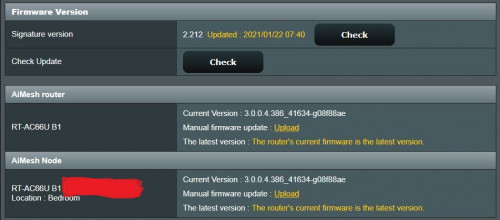
2.4g I'm getting same results as yours.
5g I'm getting at best 270mbps. Only reach 300 with line of sight of router. Your screenshot shows that you're maxing out your connection's 300mbps repeatedly on 5g 1x1.

Unfortunately I don't have other 1x1 433mbps devices to test whether the router is the limiting factor or perhaps my phone is old?

I know wireless device performance differs eventhough they may have the same antenna configuration. My TP-Link archer T4U WiFi adapter specs is 2x2 @ 866.7mbps but it can never get above 250mbps no matter what I try. On the other hand, my gaming laptop with 2x2 @ 866.7mbps WiFi, can reach up to 400mbps.


This post has been edited by fisherman10: Apr 17 2021, 08:19 PM
TSmisk94
post Apr 18 2021, 10:49 AM

Getting Started
**
Junior Member
72 posts

Joined: May 2014


TP-Link AX50 Updates:

Measurements from second floor of my house:

Link connection @ 5GHz = 86Mbps. Signal 2 bars.

OOKLA Speedtest. Each from different server - best average reading

user posted image

A good improvement. I need a repeater or a mesh node to get this kind of speed before.

Not bad considering the signal is only 2 bars. So the AX50 proved it's worth @5 GHz after all.


Link connection @ 2.4GHz = 54Mbps. Signal 2 bars.

user posted image

OOKLA Speedtest. Each from different server - best average reading

Regards,

Updated 18 April 2021

This post has been edited by misk94: Apr 18 2021, 11:13 PM
alucard89
post Apr 20 2021, 02:56 AM

Look at all my stars!!
*******
Senior Member
4,454 posts

Joined: Apr 2006
misk94
I’ve successfully flashed my 1st unit, but I’m having some trouble with 2nd one.
I’m on the last step to upload firmware on asustek cfe page, but i would either get timeout issues (within 1 minute) or just page unresponsive before firmware fully uploaded. I can see the upload progress going to 50-60% before timeout

Any solution for this?

I figured i would just keep uploading the firmware till it’s fully uploaded (similar problem on ws880 router) but I’m still stuck there

Since the firmware quite big (35mb) and limited time before timeout, could i try something like this?
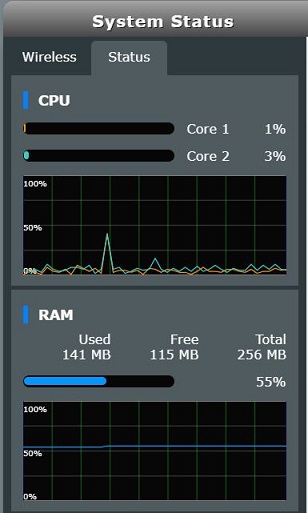
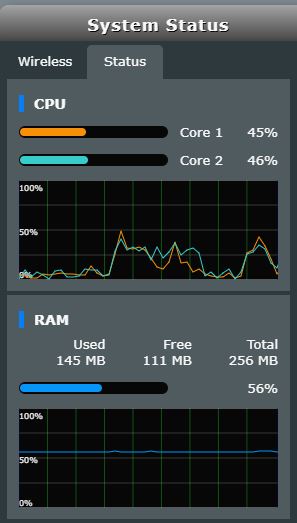
Use cfe to install smaller firmware (like freshtomato at 12mb) then install asus firmware when I’m on freshtomato

This post has been edited by alucard89: Apr 20 2021, 06:25 AM
BTS1501
post Apr 20 2021, 09:00 AM

Getting Started
**
Junior Member
250 posts

Joined: May 2019
QUOTE(alucard89 @ Apr 20 2021, 02:56 AM)
misk94
I’ve successfully flashed my 1st unit, but I’m having some trouble with 2nd one.
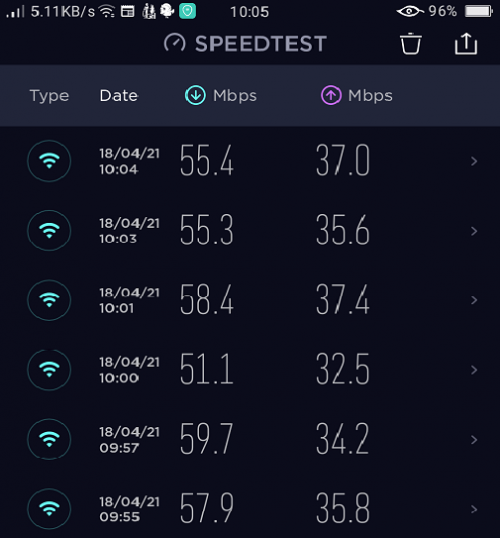
I’m on the last step to upload firmware on asustek cfe page, but i would either get timeout issues (within 1 minute) or just page unresponsive before firmware fully uploaded. I can see the upload progress going to 50-60% before timeout

Any solution for this?

*
Last step ip should be 192.168.1.1, not 192.168.0.1. If its 192.168.0 1, that means you have not clear nvram properly. Need to use wps + power on, after internet led blinks for 10 secs, release the wps button.

If you still can not get in done in miniweb screen, easiest is to to asus firmware restore, download from ac68u firmware page, fast and easy. Just make sure your pc is set to static ip like 192.168.1.3 etc
alucard89
post Apr 20 2021, 11:25 AM

Look at all my stars!!
*******
Senior Member
4,454 posts

Joined: Apr 2006
QUOTE(BTS1501 @ Apr 20 2021, 09:00 AM)
Last step ip should be 192.168.1.1,  not 192.168.0.1. If its 192.168.0 1, that means you have not clear nvram properly.  Need to use wps + power on, after internet led blinks for 10 secs,  release the wps button.

If you still can not get in done in miniweb screen,  easiest is to to asus firmware restore,  download from ac68u firmware page,  fast and  easy.  Just make sure your pc is set to static ip like 192.168.1.3 etc
*
I cleared a few times on the nvram (on the miniweb page)
Seems like timeout too soon before complete upload

Followed your second step with using asus firmware restore with ac68u first, later flashed with ac66u which worked for me.
If i use the ac66u firmware directly it just resets at 87% 😅

Another issue found

Nvm, physical nvram fixed the wifi issue

This post has been edited by alucard89: Apr 20 2021, 12:02 PM
fisherman10
post Apr 20 2021, 12:10 PM

Regular
******
Senior Member
1,372 posts

Joined: Dec 2007


QUOTE(alucard89 @ Apr 20 2021, 11:25 AM)
I cleared a few times on the nvram (on the miniweb page)
Seems like timeout too soon before complete upload

Followed your second step with using asus firmware restore with ac68u first, later flashed with ac66u which worked for me.
If i use the ac66u firmware directly it just resets at 87% 😅

Another issue found

Nvm, physical nvram fixed the wifi issue
*
Next follow my guide at post #98 to fix 2.4G wifi. Choose the AC66U_B1 version

https://forum.lowyat.net/topic/5079525/+80#
alucard89
post Apr 20 2021, 12:51 PM

Look at all my stars!!
*******
Senior Member
4,454 posts

Joined: Apr 2006
QUOTE(fisherman10 @ Apr 20 2021, 12:10 PM)
Next follow my guide at post #98 to fix 2.4G wifi. Choose the AC66U_B1 version

https://forum.lowyat.net/topic/5079525/+80#
*
Thanks, gonna try each one for both routers
Which do you recommend more? Other than 68u able to see more client info
fisherman10
post Apr 20 2021, 01:35 PM

Regular
******
Senior Member
1,372 posts

Joined: Dec 2007


QUOTE(alucard89 @ Apr 20 2021, 12:51 PM)
Thanks, gonna try each one for both routers
Which do you recommend more? Other than 68u able to see more client info
*
Both is fine. But just stick with AC66U_B1 so that LED works.
BTS1501
post Apr 20 2021, 01:40 PM

Getting Started
**
Junior Member
250 posts

Joined: May 2019
QUOTE(alucard89 @ Apr 20 2021, 11:25 AM)
I cleared a few times on the nvram (on the miniweb page)
Seems like timeout too soon before complete upload

Followed your second step with using asus firmware restore with ac68u first, later flashed with ac66u which worked for me.
If i use the ac66u firmware directly it just resets at 87% 😅

*
WPS + power on, then asus firmware restore is the best method for fresh install 868l, it will not fail. If you use the clear nvram in miniweb, sometimes it will fail, even if you click it a few times.

AC68U and AC66U_B1 are using the same firmware, so there is no need for you to flash ac68u firmware and then ac66u_b1 firmware, the only thing you need to change is the cfe, either the ac68u cfe or the ac66u_b1 cfe. ac68u cfe no lights, ac66u_b1 got lights, its your choice.

ac68u cfe load more things than ac66u_b1 cfe, for example, in aimesh pairing, ac68u will need to go to 80% then can pair, while ac66u_b1 only need to go to 60% only to pair.
alucard89
post Apr 20 2021, 01:46 PM

Look at all my stars!!
*******
Senior Member
4,454 posts

Joined: Apr 2006
QUOTE(BTS1501 @ Apr 20 2021, 01:40 PM)
WPS + power on, then asus firmware restore is the best method for fresh install 868l, it will not fail. If you use the clear nvram in miniweb, sometimes it will fail, even if you click it a few times.

AC68U and AC66U_B1 are using the same firmware, so there is no need for you to flash ac68u firmware and then ac66u_b1 firmware, the only thing you need to change is the cfe, either the ac68u cfe or the ac66u_b1 cfe. ac68u cfe no lights, ac66u_b1 got lights, its your choice.

ac68u cfe load  more things than ac66u_b1 cfe, for example, in aimesh pairing, ac68u will need to go to 80% then can pair, while ac66u_b1 only need to go to 60% only to pair.
*
I'm using ac66u_b1 for both routers now, still can't get aimesh to work sweat.gif
Once it reaches 100% it just give me this error, already 3 times and the router just next to each other

user posted image

This post has been edited by alucard89: Apr 20 2021, 01:49 PM
alucard89
post Apr 20 2021, 01:48 PM

Look at all my stars!!
*******
Senior Member
4,454 posts

Joined: Apr 2006
QUOTE(fisherman10 @ Apr 20 2021, 01:35 PM)
Both is fine. But just stick with AC66U_B1 so that LED works.
*
I see, if I use ac68u cfe, the firmware will just change to ac68u and no extra steps to install firmware afterwards?
BTS1501
post Apr 20 2021, 01:54 PM

Getting Started
**
Junior Member
250 posts

Joined: May 2019
QUOTE(alucard89 @ Apr 20 2021, 01:46 PM)
I'm using ac66u_b1 for both routers now, still can't get aimesh to work  sweat.gif
Once it reaches 100% it just give me this error, already 3 times and the router just next to each other
*
For aimesh to pair,
1) power up the node, wait 3 mins, then press the reset button on the bottom until power led flashes for 10 secs, wait another 3 mins
2) at the main router, MUST turn on WPS in wireless tab
3) go to aimesh menu, and add node
that is about it.

If you flash to ac68u stock firmware, you can't get the led working for router, but for node, you can turn off and then turn on the led, and the internet led will on. If you power cycle the node, the led will be gone, need to off/on led in aimesh -> node management menu

If you flash to ac68u merlin firmware, you can put a script in the jffs folder when startup and the led will be on automatically for main router. You need to search snb forum for the script. I remembered if no script, you can turn on the stealth mode and led will also work, but not so sure after power cycle the led will turn on or not.

This post has been edited by BTS1501: Apr 20 2021, 01:58 PM
BTS1501
post Apr 20 2021, 01:54 PM

Getting Started
**
Junior Member
250 posts

Joined: May 2019
QUOTE(alucard89 @ Apr 20 2021, 01:48 PM)
I see, if I use ac68u cfe, the firmware will just change to ac68u and no extra steps to install firmware afterwards?
*
yes
jonsalam P
post Apr 20 2021, 02:15 PM

New Member
*
Probation
11 posts

Joined: Feb 2021
So after fix 2.4ghz wifi how fast or max speed you guys reach?
alucard89
post Apr 20 2021, 02:25 PM

Look at all my stars!!
*******
Senior Member
4,454 posts

Joined: Apr 2006
QUOTE(BTS1501 @ Apr 20 2021, 01:54 PM)
For aimesh to pair,
1) power up the node, wait 3 mins, then press the reset button on the bottom until power led flashes for 10 secs, wait another 3 mins
2) at the main router, MUST turn on WPS in wireless tab
3) go to aimesh menu, and add node
that is about it.

If you flash to ac68u stock firmware, you can't get the led working for router, but for node, you can turn off and then turn on the led, and the internet led will on. If you power cycle the node, the led will be gone, need to off/on led in aimesh -> node management menu

If you flash to ac68u merlin firmware, you can put a script in the jffs folder when startup and the led will be on automatically for main router. You need to search snb forum for the script. I remembered if no script, you can turn on the stealth mode and led will also work, but not so sure after power cycle the led will turn on or not.
*
Already done as listed but it's still failing for some reason sad.gif
Could it be i need to update latest firmware first?
Selecting update on the firmware page doesn't seem to do anything so I'll just have to manually upload the firmware

This post has been edited by alucard89: Apr 20 2021, 02:27 PM
fisherman10
post Apr 20 2021, 02:55 PM

Regular
******
Senior Member
1,372 posts

Joined: Dec 2007


QUOTE(alucard89 @ Apr 20 2021, 01:46 PM)
I'm using ac66u_b1 for both routers now, still can't get aimesh to work  sweat.gif
Once it reaches 100% it just give me this error, already 3 times and the router just next to each other

user posted image
*
Did you change all 3 mac addresses and Secret code in the CFE?
fisherman10
post Apr 20 2021, 02:56 PM

Regular
******
Senior Member
1,372 posts

Joined: Dec 2007


QUOTE(jonsalam @ Apr 20 2021, 02:15 PM)
So after fix 2.4ghz wifi how fast or max speed you guys reach?
*
Will be back to full speed as per before conversion.
alucard89
post Apr 20 2021, 03:14 PM

Look at all my stars!!
*******
Senior Member
4,454 posts

Joined: Apr 2006
QUOTE(fisherman10 @ Apr 20 2021, 02:55 PM)
Did you change all 3 mac addresses and Secret code in the CFE?
*
Yes, I have changed all 3 mac address,
Secret code is the WPS code correct?
I'm just using the default one from your instructions
I've updated both to latest firmware but doesn't look it's still working sad.gif


This post has been edited by alucard89: Apr 20 2021, 03:18 PM
fisherman10
post Apr 20 2021, 03:27 PM

Regular
******
Senior Member
1,372 posts

Joined: Dec 2007


QUOTE(alucard89 @ Apr 20 2021, 03:14 PM)
Yes, I have changed all 3 mac address,
Secret code is the WPS code correct?
I'm just using the default one from your instructions
I've updated both to latest firmware but doesn't look it's still working  sad.gif
*
You can't use the default one. Default one is 123456789. You must use back the WPS code written on the sticker under your unit. Then only AiMesh can work.
TSmisk94
post Apr 20 2021, 06:46 PM

Getting Started
**
Junior Member
72 posts

Joined: May 2014


QUOTE(alucard89 @ Apr 20 2021, 02:56 AM)
misk94
I’ve successfully flashed my 1st unit, but I’m having some trouble with 2nd one.
I’m on the last step to upload firmware on asustek cfe page, but i would either get timeout issues (within 1 minute) or just page unresponsive before firmware fully uploaded. I can see the upload progress going to 50-60% before timeout

Any solution for this?

I figured i would just keep uploading the firmware till it’s fully uploaded (similar problem on ws880 router) but I’m still stuck there

Since the firmware quite big (35mb) and limited time before timeout, could i try something like this?
Use cfe to install smaller firmware (like freshtomato at 12mb) then install asus firmware when I’m on freshtomato
*
Dear alucard89,

My apologies for late response. Busy with work lately.

I noticed BTS1501 and fisherman10 helped to get your issue sorted out. thumbsup.gif rclxms.gif

Regards,

alucard89
post Apr 20 2021, 06:56 PM

Look at all my stars!!
*******
Senior Member
4,454 posts

Joined: Apr 2006
QUOTE(fisherman10 @ Apr 20 2021, 03:27 PM)
You can't use the default one. Default one is 123456789. You must use back the WPS code written on the sticker under your unit. Then only AiMesh can work.
*
Noted, i reupload cfe again with the secret code to the routers
But it's still the same problem error adding aimesh
Maybe have a look in the logs?

https://pastebin.com/HjwvsKzc


fisherman10
post Apr 20 2021, 07:13 PM

Regular
******
Senior Member
1,372 posts

Joined: Dec 2007


QUOTE(alucard89 @ Apr 20 2021, 06:56 PM)
Noted, i reupload cfe again with the secret code to the routers
But it's still the same problem error adding aimesh
Maybe have a look in the logs?

https://pastebin.com/HjwvsKzc
*
Are both routers using the correct mac address and WPS PIN as shown on their respective stickers?

For the 3 mac addresses, did you use the same address for all 3?
1:macaddr is supposed to be a bit different than 0:macaddr and et0macaddr.
BTS1501
post Apr 21 2021, 08:41 AM

Getting Started
**
Junior Member
250 posts

Joined: May 2019
QUOTE(alucard89 @ Apr 20 2021, 06:56 PM)
Noted, i reupload cfe again with the secret code to the routers
But it's still the same problem error adding aimesh
Maybe have a look in the logs?

https://pastebin.com/HjwvsKzc
*
after re-flashing cfe,
1. you need to clear nvram using wps +power on until internet led flashes 10 secs, wait 3 mins, then try aimesh pairing.
2. if still can not, then reset button until power led flashes for 10 secs, wait 3 mins then try pairing again.

alucard89
post Apr 21 2021, 09:50 AM

Look at all my stars!!
*******
Senior Member
4,454 posts

Joined: Apr 2006
QUOTE(fisherman10 @ Apr 20 2021, 07:13 PM)
Are both routers using the correct mac address and WPS PIN as shown on their respective stickers?

For the 3 mac addresses, did you use the same address for all 3?
1:macaddr is supposed to be a bit different than 0:macaddr and et0macaddr.
*
For the 3 mac addresses
I used the same mac address for all 3, after I verify using wifi app with the stock dlink firmware running (5ghz & 2.4ghz had the same mac address)
For example this one:

» Click to show Spoiler - click again to hide... «


Also, I finally got it working by just connecting lan cable from WAN port to LAN for the main router.
Once I disconnect the cable, it setups wifi connection to maintain the mesh


alucard89
post Apr 21 2021, 09:51 AM

Look at all my stars!!
*******
Senior Member
4,454 posts

Joined: Apr 2006
QUOTE(BTS1501 @ Apr 21 2021, 08:41 AM)
after re-flashing cfe,
1. you need to clear nvram using wps +power on until internet led flashes 10 secs, wait 3 mins, then try aimesh pairing.
2. if still can not, then reset button until power led flashes for 10 secs, wait 3 mins then try pairing again.
*
Yeah, i did that, but wireless setup doesn't seem to work for me, I ended just connecting LAN cable between 2 routers and success
fisherman10
post Apr 21 2021, 01:57 PM

Regular
******
Senior Member
1,372 posts

Joined: Dec 2007


QUOTE(alucard89 @ Apr 21 2021, 09:50 AM)
For the 3 mac addresses
I used the same mac address for all 3, after I verify using wifi app with the stock dlink firmware running (5ghz & 2.4ghz had the same mac address)
For example this one:

» Click to show Spoiler - click again to hide... «


Also, I finally got it working by just connecting lan cable from WAN port to LAN for the main router.
Once I disconnect the cable, it setups wifi connection to maintain the mesh
*
Cannot cannot. The MAC address has to be different.

Follow the initial guide in the first page when you're doing the conversion.

2 of the MAC address is same number. The 3rd one need to +4.

1:macaddr needs to plus 4 on the last number.

Otherwise your aimesh might not be using 5g backbone. Makes sense why LAN works because LAN is the correct macaddr.
BTS1501
post Apr 21 2021, 02:21 PM

Getting Started
**
Junior Member
250 posts

Joined: May 2019
1:macaddr change to ..................29BC (original was ...........29B8)
alucard89
post Apr 21 2021, 02:28 PM

Look at all my stars!!
*******
Senior Member
4,454 posts

Joined: Apr 2006
QUOTE(fisherman10 @ Apr 21 2021, 01:57 PM)
Cannot cannot. The MAC address has to be different.

Follow the initial guide in the first page when you're doing the conversion.

2 of the MAC address is same number. The 3rd one need to +4.

1:macaddr needs to plus 4 on the last number.

Otherwise your aimesh might not be using 5g backbone. Makes sense why LAN works because LAN is the correct macaddr.
*
That’s the odd thing, when i use wifi scanning app. It shows the same mac address for both 2.4ghz and 5ghz for the router back when it was still on stock d-link

Should i use the mac address on sticker or the one scanned on wifi app?

Current node status so far
» Click to show Spoiler - click again to hide... «

alucard89
post Apr 21 2021, 02:30 PM

Look at all my stars!!
*******
Senior Member
4,454 posts

Joined: Apr 2006
QUOTE(BTS1501 @ Apr 21 2021, 02:21 PM)
1:macaddr  change to ..................29BC (original was ...........29B8)
*
Router Sticker
x.x.x:29:B8

Wifi scanner app
x.x.x:29:BA (i use this one)

Did i even input the correct mac the first time?
fisherman10
post Apr 21 2021, 02:44 PM

Regular
******
Senior Member
1,372 posts

Joined: Dec 2007


QUOTE(alucard89 @ Apr 21 2021, 02:30 PM)
Router Sticker
x.x.x:29:B8

Wifi scanner app
x.x.x:29:BA (i use this one)

Did i even input the correct mac the first time?
*
0:macaddr change to x.x.x:29:B8
et0macaddr change to x.x.x:29:B8
1:macaddr change to x.x.x:29:BC

This post has been edited by fisherman10: Apr 21 2021, 02:45 PM
BTS1501
post Apr 21 2021, 04:41 PM

Getting Started
**
Junior Member
250 posts

Joined: May 2019
QUOTE(alucard89 @ Apr 21 2021, 02:30 PM)
Router Sticker
x.x.x:29:B8

Wifi scanner app
x.x.x:29:BA (i use this one)

Did i even input the correct mac the first time?
*
Asus firmware will change the 5Ghz mac address for you if you specify same mac address in your cfe. that's why .....29BA, not the correct ....29BC.
alucard89
post Apr 22 2021, 12:53 PM

Look at all my stars!!
*******
Senior Member
4,454 posts

Joined: Apr 2006
QUOTE(fisherman10 @ Apr 21 2021, 02:44 PM)
0:macaddr change to x.x.x:29:B8
et0macaddr change to x.x.x:29:B8
1:macaddr change to x.x.x:29:BC
*
Ok, I’ll try input this
Is there like naming rule for last digit?
And if i mess up the last digit it could brick the router?
alucard89
post Apr 22 2021, 12:55 PM

Look at all my stars!!
*******
Senior Member
4,454 posts

Joined: Apr 2006
QUOTE(BTS1501 @ Apr 21 2021, 04:41 PM)
Asus firmware will change the 5Ghz mac address for you if you specify same mac address in your cfe. that's why .....29BA, not the correct ....29BC.
*
Noted, so i shouldn’t rely on the wifi app?
Better to just check mac in the router settings or refer to sticker mac address
fisherman10
post Apr 22 2021, 03:33 PM

Regular
******
Senior Member
1,372 posts

Joined: Dec 2007


QUOTE(alucard89 @ Apr 22 2021, 12:53 PM)
Ok, I’ll try input this
Is there like naming rule for last digit?
And if i mess up the last digit it could brick the router?
*
The rule is follow your router's sticker but plus 4 numbers.
Convert the HEX number to decimal and then +4. Then convert back to hex number.

Yours is B8 is hex number. Convert to decimal is 184. Now we add 4 and it becomes 188. Convert 188 back to hex and it becomes BC.

0:macaddr change to x.x.x:29:B8 (Follow router sticker)
et0macaddr change to x.x.x:29:B8 (Follow router sticker)
1:macaddr change to x.x.x:29:BC (Convert to Decimal, +4, convert back to Hex)
alucard89
post Apr 25 2021, 10:45 AM

Look at all my stars!!
*******
Senior Member
4,454 posts

Joined: Apr 2006
QUOTE(fisherman10 @ Apr 22 2021, 03:33 PM)
The rule is follow your router's sticker but plus 4 numbers.
Convert the HEX number to decimal and then +4. Then convert back to hex number.

Yours is B8 is hex number. Convert to decimal is 184. Now we add 4 and it becomes 188. Convert 188 back to hex and it becomes BC.

0:macaddr change to x.x.x:29:B8 (Follow router sticker)
et0macaddr change to x.x.x:29:B8 (Follow router sticker)
1:macaddr change to x.x.x:29:BC (Convert to Decimal, +4, convert back to Hex)
*
Thanks, now all can pair with aimesh wirelessly with no issues rclxm9.gif
Ended up buying a few more, our sg neighbors sure are selling them cheap
4g usb modem seems to work better as WAN compared to using it on ws880 (assuwrt)
I do wonder how long we can continue getting OTA updates? Is it as long as long as asus continuously support the router model firmware we're using?
fisherman10
post Apr 25 2021, 10:54 AM

Regular
******
Senior Member
1,372 posts

Joined: Dec 2007


QUOTE(alucard89 @ Apr 25 2021, 10:45 AM)
Thanks, now all can pair with aimesh wirelessly with no issues  rclxm9.gif
Ended up buying a few more, our sg neighbors sure are selling them cheap
4g usb modem seems to work better as WAN compared to using it on ws880 (assuwrt)
I do wonder how long we can continue getting OTA updates? Is it as long as long as asus continuously  support the router model firmware we're using?
*
Where are you buying yours from? Are you from Johor? I actually have 1 extra unit to let go. Still under D-Link warranty.


Since AC66U_B1 and AC68U using same firmware, as long as they keep supporting AC68U, we should be fine. Asus Merlin will also keep supporting as long as Asus supports.
alucard89
post Apr 26 2021, 09:18 AM

Look at all my stars!!
*******
Senior Member
4,454 posts

Joined: Apr 2006
QUOTE(fisherman10 @ Apr 25 2021, 10:54 AM)
Where are you buying yours from? Are you from Johor? I actually have 1 extra unit to let go. Still under D-Link warranty.
Since AC66U_B1 and AC68U using same firmware, as long as they keep supporting AC68U, we should be fine. Asus Merlin will also keep supporting as long as Asus supports.
*
Yes, at jb, i think i have enough units now
Still does dlink still cover warranty with the router already flashed to 3rd party firmware?
Never really bothered with warranty before since i just replace them 😅
fisherman10
post Apr 26 2021, 07:56 PM

Regular
******
Senior Member
1,372 posts

Joined: Dec 2007


QUOTE(alucard89 @ Apr 26 2021, 09:18 AM)
Yes, at jb, i think i have enough units now
Still does dlink still cover warranty with the router already flashed to 3rd party firmware?
Never really bothered with warranty before since i just replace them 😅
*
Just like Malaysia gov now, anything can U-Turn. Can try U-Turn back to Dlink firmware.
alucard89
post May 1 2021, 06:27 PM

Look at all my stars!!
*******
Senior Member
4,454 posts

Joined: Apr 2006
Hey guys, just wondering if there’s a way to run duckdns on asus stock firmware?
Been using asus wrt for so long before this i forgot it’s not included in stock firmware
fisherman10
post May 1 2021, 06:43 PM

Regular
******
Senior Member
1,372 posts

Joined: Dec 2007


Hi guys, I have decided to let go 1 of my DIR-868L.

It is still under D-Link Malaysia warranty. Fully converted to Asus firmware with 2.4g WiFi fix and MAXIMUM 5g and 2.4g signal strength.

If anyone is interested, please PM me. Thank you!

user posted image
user posted image
user posted image

This post has been edited by fisherman10: May 1 2021, 06:44 PM
alucard89
post May 15 2021, 11:01 AM

Look at all my stars!!
*******
Senior Member
4,454 posts

Joined: Apr 2006
fisherman10

Once the router is flashed with ac68u firmware for example
Can we flash asuswrt merlin on top of that?
fisherman10
post May 15 2021, 11:15 AM

Regular
******
Senior Member
1,372 posts

Joined: Dec 2007


QUOTE(alucard89 @ May 15 2021, 11:01 AM)
fisherman10

Once the router is flashed with ac68u firmware for example
Can we flash asuswrt merlin on top of that?
*
Yes it's interchangeable. AC66U_B1 and AC68U uses the same firmware. Both ASUSWRT and ASUSMerlin also can.
alucard89
post May 15 2021, 12:56 PM

Look at all my stars!!
*******
Senior Member
4,454 posts

Joined: Apr 2006
QUOTE(fisherman10 @ May 15 2021, 11:15 AM)
Yes it's interchangeable. AC66U_B1 and AC68U uses the same firmware. Both ASUSWRT and ASUSMerlin also can.
*
Thanks for the confirmation, just wanna avoid bricked unit
hello8985
post May 17 2021, 02:15 PM

New Member
*
Newbie
3 posts

Joined: Dec 2006


anyone can reshare the file to fix the 2.4ghz?

the file in google drive is dead...

thumbup.gif thumbup.gif
fisherman10
post May 17 2021, 03:10 PM

Regular
******
Senior Member
1,372 posts

Joined: Dec 2007


QUOTE(hello8985 @ May 17 2021, 02:15 PM)
anyone can reshare the file to fix the 2.4ghz?

the file in google drive is dead...

thumbup.gif  thumbup.gif
*
I just tried. The link is still working.
hello8985
post May 17 2021, 03:31 PM

New Member
*
Newbie
3 posts

Joined: Dec 2006


1) Download attached file. CFE_868L_2.4Gfix_68u.bin and mtd-write and CFEEdit

https://drive.google.com/file/d/14uUNxKWLzb...iew?usp=sharing
fisherman10
post May 17 2021, 03:53 PM

Regular
******
Senior Member
1,372 posts

Joined: Dec 2007


QUOTE(hello8985 @ May 17 2021, 03:31 PM)
1) Download attached file. CFE_868L_2.4Gfix_68u.bin and mtd-write and CFEEdit

https://drive.google.com/file/d/14uUNxKWLzb...iew?usp=sharing
*
Go to the original post #98. Don't use the one from other people's quote.
hello8985
post May 18 2021, 08:40 AM

New Member
*
Newbie
3 posts

Joined: Dec 2006


thanks so much... got it up running with 2.4ghz fixed.
TSmisk94
post May 19 2021, 03:55 PM

Getting Started
**
Junior Member
72 posts

Joined: May 2014


Latest updates - Asuswrt-Merlin firmware

https://sourceforge.net/projects/asuswrt-me...-AC68U/Release/

user posted image

This post has been edited by misk94: May 19 2021, 03:57 PM
BTS1501
post May 23 2021, 02:14 PM

Getting Started
**
Junior Member
250 posts

Joined: May 2019
Attached Image
alucard89
post Jun 1 2021, 11:14 AM

Look at all my stars!!
*******
Senior Member
4,454 posts

Joined: Apr 2006
QUOTE(BTS1501 @ May 23 2021, 02:14 PM)
Attached Image
*
Does this mean ac68u led can be adjusted now with asuswrt?
ABuNeNe
post Jun 23 2021, 09:29 AM

New Member
*
Junior Member
37 posts

Joined: Jan 2003
I'm on a 500mbps plan and my this is my laptop connected to this 868l as Aimesh node in the same room.

Below is my laptop WIFI connected properties and the Internet speed. Should I be getting higher download speed?

» Click to show Spoiler - click again to hide... «

fisherman10
post Jun 23 2021, 10:07 AM

Regular
******
Senior Member
1,372 posts

Joined: Dec 2007


QUOTE(ABuNeNe @ Jun 23 2021, 09:29 AM)
I'm on a 500mbps plan and my this is my laptop connected to this 868l as Aimesh node in the same room.

Below is my laptop WIFI connected properties and the Internet speed. Should I be getting higher download speed?

» Click to show Spoiler - click again to hide... «

*
How's the signal from main to node?
ABuNeNe
post Jun 24 2021, 01:43 PM

New Member
*
Junior Member
37 posts

Joined: Jan 2003
QUOTE(fisherman10 @ Jun 23 2021, 10:07 AM)
How's the signal from main to node?
*
aimesh node is connected via 1gbps lan and able to get ~300mbps on my laptop connected to this node using a cat5e cable

just restarted my router and able to get ~200mbps now with wifi 5ghz connection

wondering if I can get more out on my speed on my wifi
fisherman10
post Jun 24 2021, 02:01 PM

Regular
******
Senior Member
1,372 posts

Joined: Dec 2007


QUOTE(ABuNeNe @ Jun 24 2021, 01:43 PM)
aimesh node is connected via 1gbps lan and able to get ~300mbps on my laptop connected to this node using a cat5e cable

just restarted my router and able to get ~200mbps now with wifi 5ghz connection

wondering if I can get more out on my speed on my wifi
*
300mbps through wired is also not fast enough. I suspect something with your laptop. Can you try plug wired to the main router and see what speed you're getting?

Next, connect back to 5g wifi of node. Sit in front of the node. Go to Start > View Network Connections > Double click on the wifi. Screenshot here and see.
And then do a speedtest to see what speed are you getting.
ABuNeNe
post Jul 6 2021, 10:09 AM

New Member
*
Junior Member
37 posts

Joined: Jan 2003
QUOTE(fisherman10 @ Jun 24 2021, 02:01 PM)
300mbps through wired is also not fast enough. I suspect something with your laptop. Can you try plug wired to the main router and see what speed you're getting?

Next, connect back to 5g wifi of node. Sit in front of the node. Go to Start > View Network Connections > Double click on the wifi. Screenshot here and see.
And then do a speedtest to see what speed are you getting.
*
Below is my wifi speed on my laptop connected to dir-868l aimesh node in the same room which is connected 1gbps wired to my rt-ac68u router. Wondering if it not possible to get at least 400mbps on my 500mbps line?

Will find time to find out the speed when plug wired to the main router but the last time I tried is around 400mbps.

user posted image

user posted image
fisherman10
post Jul 6 2021, 10:19 AM

Regular
******
Senior Member
1,372 posts

Joined: Dec 2007


QUOTE(ABuNeNe @ Jul 6 2021, 10:09 AM)
Below is my wifi speed on my laptop connected to dir-868l aimesh node in the same room which is connected 1gbps wired to my rt-ac68u router. Wondering if it not possible to get at least 400mbps on my 500mbps line?

Will find time to find out the speed when plug wired to the main router but the last time I tried is around 400mbps.

» Click to show Spoiler - click again to hide... «

*
Test with wired to the DIR-969L AiMesh node. Are you getting 500mbps? I think you should be.


Anyway, Intel AC 9560 specs is 2x2 streams, 5ghz up to 160mhz.

DIR-868L and AC68U is 3x3 streams, 5ghz up to 80mhz. So theoretical max link rate is 867mbps. If you go to your WiFi status through the steps I mentioned before, you should see 866.7mbps.

user posted image

Usually real life best speeds is 60% of link rate. Lower if there's interference. I would say the speeds you're getting now is expected.


What speeds are you getting if WiFi to AC68U main router?

This post has been edited by fisherman10: Jul 6 2021, 10:19 AM
alucard89
post Jul 13 2021, 07:50 AM

Look at all my stars!!
*******
Senior Member
4,454 posts

Joined: Apr 2006
Hi guys, what’s the best way to run wireguard?
Openvpn - since the router is configured as ac68u, no wifi it seems

Freshtomato - don’t see much on running wireguard with this firmware.

- also, is there mesh feature for freshtomato?

This post has been edited by alucard89: Jul 16 2021, 07:41 PM
alucard89
post Jul 16 2021, 07:37 PM

Look at all my stars!!
*******
Senior Member
4,454 posts

Joined: Apr 2006
fisherman10misk94
If I need to flash to freshtomato
Since router already configured to ac68u or ac66u
Should I just go for the DIR 868L firmware or just the one for ac68u/ac66u?

https://freshtomato.org/downloads/freshtoma.../2021.3/K26ARM/
fisherman10
post Jul 16 2021, 10:34 PM

Regular
******
Senior Member
1,372 posts

Joined: Dec 2007


QUOTE(alucard89 @ Jul 16 2021, 07:37 PM)
fisherman10misk94
If I need to flash to freshtomato
Since router already configured to ac68u or ac66u
Should I just go for the DIR 868L firmware or just the one for ac68u/ac66u?

https://freshtomato.org/downloads/freshtoma.../2021.3/K26ARM/
*
Sorry, I'm not sure. But I think you should go for Asus. Really no idea.
TSmisk94
post Jul 21 2021, 08:03 AM

Getting Started
**
Junior Member
72 posts

Joined: May 2014


QUOTE(alucard89 @ Jul 16 2021, 07:37 PM)
fisherman10misk94
If I need to flash to freshtomato
Since router already configured to ac68u or ac66u
Should I just go for the DIR 868L firmware or just the one for ac68u/ac66u?

https://freshtomato.org/downloads/freshtoma.../2021.3/K26ARM/
*
Dear alucard89,

If you are interested to flash your migrated DIR-868L to freshtomato, you can find my post when I migrated a DIR-868L (Asus firmware) last April 2021.

Here is the link https://forum.lowyat.net/topic/4882964

You need to scroll down and find the last post. I hope this will help.

I think it is best to flash the firmware using the paper clip method i.e. using a paper clip to press the hidden reset button and power-up to bring up the ASUS mini-web server.

I suggest to clear the rom first before flashing the freshtomato firmware.

Relevant links are available in the post.

Good luck.

Regards,

P/S: Share your experience if you find anything interesting in freshtomato.

This post has been edited by misk94: Jul 21 2021, 08:23 AM
alucard89
post Jul 23 2021, 11:17 PM

Look at all my stars!!
*******
Senior Member
4,454 posts

Joined: Apr 2006
QUOTE(misk94 @ Jul 21 2021, 08:03 AM)
Dear alucard89,

If you are interested to flash your migrated DIR-868L to freshtomato, you can find my post when I migrated a DIR-868L (Asus firmware) last April 2021.

Here is the link https://forum.lowyat.net/topic/4882964

You need to scroll down and find the last post. I hope this will help.

I think it is best to flash the firmware using the paper clip method i.e. using a paper clip to press the hidden reset button and power-up to bring up the ASUS mini-web server.

I suggest to clear the rom first before flashing the freshtomato firmware.

Relevant links are available in the post.

Good luck.

Regards,

P/S: Share your experience if you find anything interesting in freshtomato.
*
Still can’t quite get wireguard to work
I mean it’s connected, but i’m still seeing our isp ip address

Also, not really related to tomato
Generally, how do i setup wps on asus firmware? Trying to setup printer to connect the router (only wps & wifi direct available and no lcd display)

Do i just press wps button on the router for a few seconds and start led orange blinking? When that happens, how to cancel that if no other device is pairing?

alucard89
post Nov 25 2021, 08:54 PM

Look at all my stars!!
*******
Senior Member
4,454 posts

Joined: Apr 2006
Hi misk94 i just upgraded to 300mbps but I’m only getting like 100mbps on 5ghz (speedtest right next to router)

Is there something i need to configure since you were able to reach +250mbps nearby the router
Lajkzy P
post Dec 20 2021, 04:40 AM

New Member
*
Probation
1 posts

Joined: Feb 2021
Hello could you share the stock cfe of dir868l rev a?
fisherman10
post Dec 20 2021, 02:10 PM

Regular
******
Senior Member
1,372 posts

Joined: Dec 2007


QUOTE(alucard89 @ Nov 25 2021, 08:54 PM)
Hi misk94 i just upgraded to 300mbps but I’m only getting like 100mbps on 5ghz (speedtest right next to router)

Is there something i need to configure since you were able to reach +250mbps nearby the router
*
Check whether your cable is Cat5 or Cat5e. Check which model is your modem. Sounds like you're limited to 100mbps.
asusdd P
post Sep 17 2022, 02:21 PM

New Member
*
Probation
2 posts

Joined: Sep 2022
The link is no more valid. Can anyone help upload? Thanks
asusdd P
post Sep 17 2022, 02:22 PM

New Member
*
Probation
2 posts

Joined: Sep 2022
QUOTE(asusdd @ Sep 17 2022, 02:21 PM)
The link is no more valid. Can anyone help upload? Thanks
*
The google drive link to the tools
iduncheckmail P
post Nov 1 2022, 05:30 PM

New Member
*
Probation
1 posts

Joined: Nov 2022
QUOTE(fisherman10 @ Apr 2 2021, 08:12 PM)
At present, DIR-868L can only be converted to RT-AC66U_B1 or to RT-AC68U.

Besides the problems mentioned in the opening post such as LAN/WAN ports rearranged and LED not working normally,
1) If converted to RT-AC66U_B1, everything works fine except 2.4G WiFi very slow
2) If converted to RT-AC68U, everything works fine except 2.4G WiFi very slow and WiFi is disabled/off after every restart.
Here's the guide to fix both 2.4G WiFi speed and WiFi disabled after restart. It will be converted to AC68U. AC68U has slightly more info when viewing connected clients list compared to AC66U_B1.

Only do this after you're already fully converted and running Asus firmware.

1) Download attached file. newcfe68u.bin and newcfe66ub1.bin and mtd-write and CFEEdit

2) Use CFEEdit and change 3 macaddresses and WPS Pin according to your own router in the CFE file.

3) Turn on the SSH from router page. Administration > System > Enable SSH > Apply

4) Open WINSCP. Choose SCP protocol, enter router IP address, username and password

5) Now decide if you want your router to be Asus AC68U or AC66U_B1. Drag and drop both newcfe68u.bin OR newcfe66ub1.bin together with mtd-write file to the right side of WINSCP

6) Use Putty and connect to router. Enter username and password

7) Enter these commands in Putty to flash new CFE

CODE
chmod u+x mtd-write

./mtd-write newcfe68u.bin boot

OR

./mtd-write newcfe66ub1.bin boot


8) Enter this command into Putty to clear NVRAM and reboot

CODE
nvram erase

reboot


And it should startup as AC68U or AC66U_B1.
*
Hi, sorry to revive and old thread.
does anyone have instructions on how to reverse this 2.4Ghz-fix ?
i.e what lines of code to change on the cfe.bin file so that i can flash the cfe to as it was before the fix

after i applied the 2.4ghz-fix , my 5ghz slowed down some 100mbps, so i rather stick with the slow 2.4ghz.

TIA !

kk131
post Dec 2 2023, 08:18 AM

On my way
****
Junior Member
566 posts

Joined: Jun 2005
From: Somewhere over the rainbow


If anyone has the cfe file referenced in the guide - CFE_868L_melin384.bin could you upload it somewhere? All links I can find are dead.


Change to:
| Lo-Fi Version
0.1618sec    0.71    6 queries    GZIP Disabled
Time is now: 13th December 2025 - 05:03 AM