Welcome Guest ( Log In | Register )

10 Pages « < 2 3 4 5 > » Bottom

Outline · [ Standard ] · Linear+

 DIR-868L to ASUS RT-AC66U with AiMesh, Latest DIR-868L Migration Options

views
     
fisherman10
post Mar 21 2021, 09:37 PM

Regular
******
Senior Member
1,372 posts

Joined: Dec 2007


QUOTE(geep @ Mar 21 2021, 09:32 PM)
Thanks for the head up. I will surely try this 1 day cuz im planning to buy another Aimesh router in the future.
For now, 2.4G still my concern cuz i still have some old device like ipcam which rely on it.
Anyhow thanks for the guide, will surely save more $$$$$  thumbup.gif
*
2.4G working fine for me with 2 units DIR-868L running latest Asus Merlin 386.1_2 with aimesh.
TSmisk94
post Mar 23 2021, 11:05 PM

Getting Started
**
Junior Member
72 posts

Joined: May 2014


Dear members,

For your information, I am trying out an interesting and useful feature of Asuswrt-Merlin firmware the Roaming Assistant.

The idea is that your devices will be connected to AiMesh router or node transparently when you move around in your home.

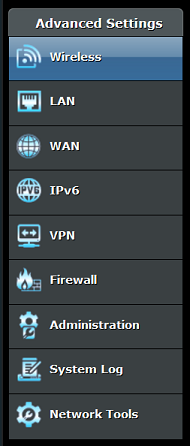
You can access the Roaming Assistant by clicking Wireless menu under Advanced Settings.

user posted image

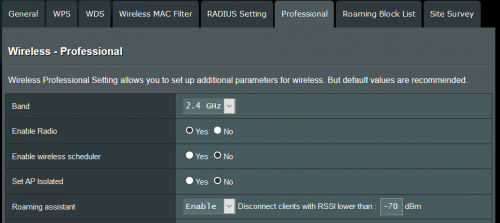
Next click on the Professional tab.

user posted image

Scroll down until you see Roaming Assistant. It should be Enabled by default. Enable it, if it is not.

user posted image

You should check the settings for 2.4GHz and 5GHz. By default the value is set at -70 dB for both.

user posted image

I found that the default -70 dB setting is not suitable in a home environment, at least my home hmm.gif .

Currently, I am using -50 dB for 2.4 GHz and -55 dB for 5 GHz.

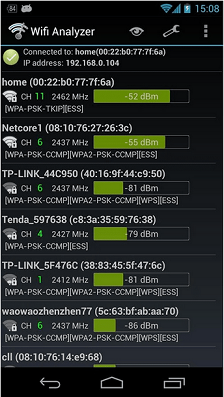
I selected the values after checking the 2.4 GHz and 5 GHz WiFi strengths using a WiFi Analyser app in my phone.

An example is shown below. The values are not from my home. biggrin.gif

user posted image

In the above example, if you look at first entry, home router reading is -52dB. So you need to put -55 dB to replace the -70 dB default value.

Please do not put less than -52 dB such as -50 dB or -45 dB.

Link to some good WiFi analyser Android apps https://www.netspotapp.com/wifi-analyzer-apps-android.html

Please use the app to get good values suitable for your home. Definitely it should be better than the default -70 dB.

A good range to consider are from -40 to -60 dB.

Please do not use very low values else you may have trouble connecting to your WiFi.

I think this is important if you have other devices using WiFi such as CCTV, smart devices, etc which operate at 2.4 GHz.

In such cases, you should reduce dB setting for 2.4GHz by increments of -5dB and see what happens until you reach a good value for your home.

Distance of your AiMesh router and node from each other could be use as a guide to choose good dB values.

You want such that when you move from the router to the node, your WiFi will be changed by the Roaming Assistant smoothly.

So a bit of trial and error in finding the right dB values for your home.

P/S: Good news. This morning my phone could roam successfully when I moved from second floor to ground floor. The roaming worked better now rclxm9.gif

Regards,

Updated 24 March 2021.

This post has been edited by misk94: Mar 25 2021, 12:04 PM
geep
post Mar 25 2021, 04:34 PM

New Member
*
Junior Member
45 posts

Joined: Jun 2011
Thank you guys, so I finally made my mind and flashed the modded CFE and Asus/Merlin firmware on my DIR-868L. Its working fine and really stable, but then the low throughput speed on 2.4G is still there. Its minor issue TBH because 30mbps on lecacy devices is still reliable with no hiccup.

Since im on non-Aimesh/single router setup, I also try Tomato firmware and the good news is the 2.4G speed on Tomato is much better, roughly I can get 60-70mbps on it. Also I use the full features AIO .trx images, the CFE seems solved the issue with 32kb NVRAM limit.

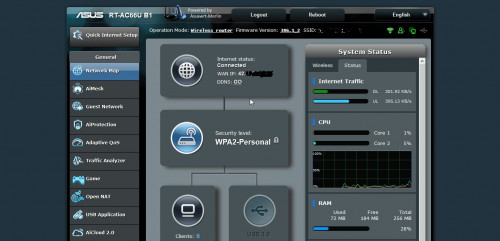
Flashed Merlin straight from Asus CFE Bootloader
user posted image

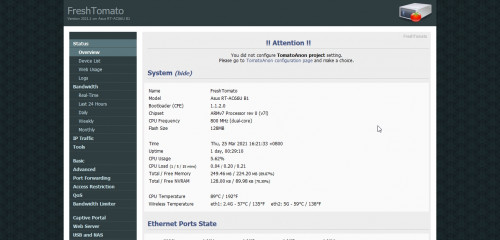
Flashed Freshtomato (R6400 AIO image) with Asus Firmware Restoration Tool
user posted image
TSmisk94
post Mar 25 2021, 09:18 PM

Getting Started
**
Junior Member
72 posts

Joined: May 2014


QUOTE(geep @ Mar 25 2021, 04:34 PM)
Thank you guys, so I finally made my mind and flashed the modded CFE and Asus/Merlin firmware on my DIR-868L. Its working fine and really stable, but then the low throughput speed on 2.4G is still there. Its minor issue TBH because 30mbps on lecacy devices is still reliable with no hiccup.

Since im on non-Aimesh/single router setup, I also try Tomato firmware and the good news is the 2.4G speed on Tomato is much better, roughly I can get 60-70mbps on it. Also I use the full features AIO .trx images, the CFE seems solved the issue with 32kb NVRAM limit.

Flashed Merlin straight from Asus CFE Bootloader
user posted image

Flashed Freshtomato (R6400 AIO image) with Asus Firmware Restoration Tool
user posted image
*
Dear geep,

Good way to go back to Tomato from Asuswrt-Merlin. thumbsup.gif

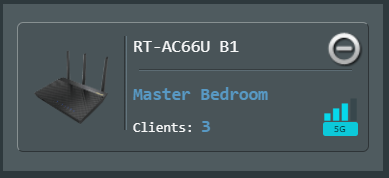
Interestingly, Tomato recognized the router as an Asus RT-AC66U B1 and not DLink DIR-868L. shocking.gif

I suppose the firmware could only read the motherboard firmware/hardware but not the shell of the router. biggrin.gif

Nevertheless, it is a good option for those still restricted to 2.4 GHz and wanted more performance.

BTW, did you get the firmware from freshtomato.org website?

https://freshtomato.org/

I noticed the firmware version is 2021.1.

It seems that both is using the same firmware K26ARM, which explains a lot why it worked. rclxms.gif

Nevertheless, the 32K NVRAM limit is still an issue if your flash straight from DIR-868L.

Unless you follow the earlier part of my original post how to overcome that or if your already flashed your DIR-868L to Asuswrt-Merlin firmware can follow like you did.

Regards,

This post has been edited by misk94: Mar 25 2021, 09:38 PM
geep
post Mar 25 2021, 11:02 PM

New Member
*
Junior Member
45 posts

Joined: Jun 2011
QUOTE(misk94 @ Mar 25 2021, 09:18 PM)
Dear geep,

Good way to go back to Tomato from Asuswrt-Merlin.  thumbsup.gif 

Interestingly, Tomato recognized the router as an Asus RT-AC66U B1 and not DLink DIR-868L.  shocking.gif

I suppose the firmware could only read the motherboard firmware/hardware but not the shell of the router. biggrin.gif

Nevertheless, it is a good option for those still restricted to 2.4 GHz and wanted more performance.

BTW, did you get the firmware from freshtomato.org website?

https://freshtomato.org/

I noticed the firmware version is 2021.1.

It seems that both is using the same firmware K26ARM, which explains a lot why it worked.  rclxms.gif

Nevertheless, the 32K NVRAM limit is still an issue if your flash straight from DIR-868L.

Unless you follow the earlier part of my original post how to overcome that or if your already flashed your DIR-868L to Asuswrt-Merlin firmware can follow like you did.

Regards,
*
Yes, im using the official .trx image from Freshtomato.org. It doesnt matter what .trx image i flash on it, it will boot as RT-AC66U B1.
It seems Tomato will read the pre-config data from the CFE and load the profile for RT-AC66U B1 instead.
If i have more time and courage, will definitely try to reedit the CFE for further test and observation. sweat.gif
user posted image

fisherman10
post Mar 25 2021, 11:22 PM

Regular
******
Senior Member
1,372 posts

Joined: Dec 2007


QUOTE(geep @ Mar 25 2021, 11:02 PM)
Yes, im using the official .trx image from Freshtomato.org. It doesnt matter what .trx image i flash on it, it will boot as RT-AC66U B1.
It seems Tomato will read the pre-config data from the CFE and load the profile for RT-AC66U B1 instead.
If i have more time and courage, will definitely try to reedit the CFE for further test and observation.  sweat.gif
user posted image
*
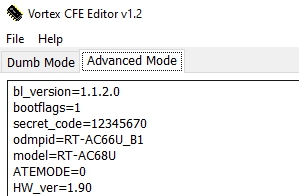
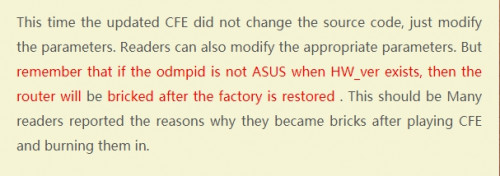
Please don't. I tried to change the odmpid to RT-AC68U and it will brick.

Then need to unbrick through the serial pins.

This post has been edited by fisherman10: Mar 25 2021, 11:22 PM
geep
post Mar 26 2021, 02:42 AM

New Member
*
Junior Member
45 posts

Joined: Jun 2011
QUOTE(fisherman10 @ Mar 25 2021, 11:22 PM)
Please don't. I tried to change the odmpid to RT-AC68U and it will brick.

Then need to unbrick through the serial pins.
*
Thank you for alerting me, you just save my precious time. thumbsup.gif
Also glad to know that there is someone on here succeed with the serial method.
fisherman10
post Mar 26 2021, 03:07 PM

Regular
******
Senior Member
1,372 posts

Joined: Dec 2007


QUOTE(geep @ Mar 26 2021, 02:42 AM)
Thank you for alerting me, you just save my precious time. thumbsup.gif
Also glad to know that there is someone on here succeed with the serial method.
*
Yes there's a weird bug. Even if I change the odmpid through NVRAM (not flashing the CFE with modified values), it will brick straight away. So you can't even clear NVRAM using the WPS button.
geep
post Mar 26 2021, 09:34 PM

New Member
*
Junior Member
45 posts

Joined: Jun 2011
QUOTE(fisherman10 @ Mar 26 2021, 03:07 PM)
Yes there's a weird bug. Even if I change the odmpid through NVRAM (not flashing the CFE with modified values), it will brick straight away. So you can't even clear NVRAM using the WPS button.
*
Interesting hmm.gif modifying a single string will corrupt the whole bootloader.
Btw have you tried a tips from Bigxd the time you edit the odmpid?
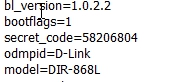
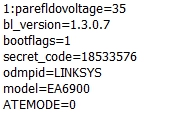
Cuz I saw his mod CFE version and also Linksys mod version with native string.

To Remove HW_ver ?
user posted image

D-link with native odmpid
user posted image

Linksys version
user posted image
fisherman10
post Mar 26 2021, 09:37 PM

Regular
******
Senior Member
1,372 posts

Joined: Dec 2007


QUOTE(geep @ Mar 26 2021, 09:34 PM)
Interesting hmm.gif modifying a single string will corrupt the whole bootloader.
Btw have you tried a tips from Bigxd the time you edit the odmpid?
Cuz I saw his mod CFE version and also Linksys mod version with native string.

To Remove HW_ver ?
user posted image

D-link with native odmpid
user posted image

Linksys version
user posted image
*
Can you link me the tips? I don't really understand the photos

geep
post Mar 26 2021, 09:40 PM

New Member
*
Junior Member
45 posts

Joined: Jun 2011
QUOTE(fisherman10 @ Mar 26 2021, 09:37 PM)
Can you link me the tips? I don't really understand the photos
*
Its in chinese, I use google translate sweat.gif
https://www.bigxd.com/2020/10/802.html
TSmisk94
post Mar 27 2021, 10:43 AM

Getting Started
**
Junior Member
72 posts

Joined: May 2014


QUOTE(misk94 @ Mar 9 2021, 10:37 PM)
DIR-868L with Asuswrt-Merlin firmware update:

Improvements on WiFi connection performance between AiMesh router and node after installed USB cooler on both of them.

1. Before only two bars. Now three bars. This the same so far.
user posted image

2. Before connection quality rating is Good or OK. Now it is Great. Same  here.
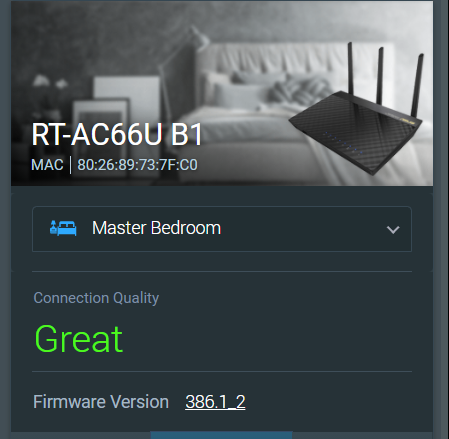
user posted image

3. Physical connection rate improved. Before I was getting 234 - 351 Mbps.

This changes over time. Sometimes 351 Mbps, 468 Mbps and higher. Still an improvement than without any cooling.
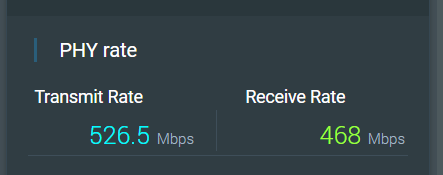
user posted image

So, adding the USB coolers does improve WiFi performance too.

Maybe the 2.4G and 5G radios are operating better because of the cooling.

4. OKLA Speedtest from upstairs PC connected via LAN cable to AiMesh node. Before downloads getting 90 plus Mbps. Now doubled.  rclxm9.gif

user posted image

This make sense as AiMesh node is still a repeater. DL speed is usually 40-60% of PHY connection rate because of repeater mode. However, UL speed did not reduced by much.

FYI, I am having a 300Mbps DL/50 Mbps DL fiber connection to the modem.

We are using Maxis because my wife likes Astro. Astro is giving a rebate when bundle fiber internet and Astro together.

AiMesh router is connected to the modem. I am getting 290+ Mbps/46+ Mbps from the AiMesh router when tested with OKLA Speedtest on my phone. 

5. Recently, I am getting random disconnection from the AiMesh node to the AiMesh router.

My wife told me this when she was using her computer. The node will reconnect again after a few minutes.

There is no problem with the AiMesh router.

I recalled having this problem when using DLink firmware last time at the repeater node too.

I did not recalled having this with the ASUS RT-AC66U B1 firmware.

Maybe I did not noticed because I was running this firmware only for a few weeks before I moved to Asuswrt-Merlin firmware.

Anyone having similar random disconnections from the AiMesh node?

Just wondering whether it is a hardware thing for DLink DIR-868L router to behave this way? It seems that changing the firmware did not resolve the issue.

Other than that, I am quite satisfied with the AiMesh system in my home. Performing better and more stable when compared to DLink's factory firmware.

I think gary_cheah85 is right in saying that Asuswrt-Merlin firmware is quite solid and stable.

So far so good. biggrin.gif

Regards,

Updated 14 March 2021
*
Latest update in Roaming Assistant testing.

Final dB value for my home 2.4 GHz -40 dB and 5 GHz -50 dB.

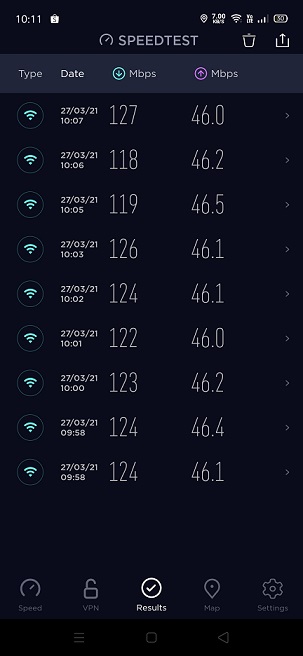
Speedtest from AiMesh node @ WiFi 5 GHz, second floor, after the revised settings.

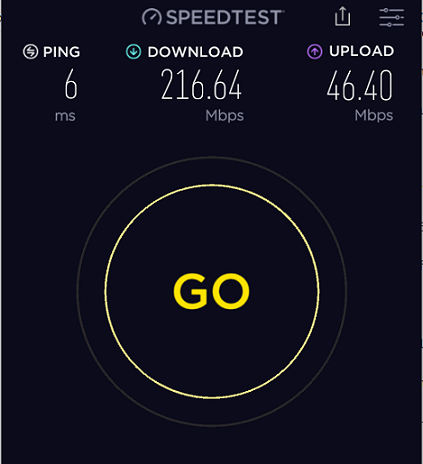
user posted image

Before, I was getting 90+ Mbps, never reached 100 Mbps for downloads.

Now gained about 20 to 30 Mbps more. rclxm9.gif

Uploads speed already reached maximum possible since cannot get any higher.

Roaming between ground and second floor smoother too,

Regards,

Updated 27 March 2021

This post has been edited by misk94: Mar 27 2021, 10:51 AM
takumaki67
post Mar 29 2021, 12:53 AM

New Member
*
Newbie
13 posts

Joined: Feb 2011
Thank you misk94 for all the effort and preparation! And yes I manage to turn into Asus router biggrin.gif
Unfortunately, I wanted try to rollback original DLINK firmware by flashing 'RT-AC68U-ddwrt' (thinking to have the 'mtd' to write the boot.bin) and now stucked at recovery loop.

Wondering what is the correct process incase I want to roll back to original DLINK firmware?

takumaki67
post Mar 29 2021, 12:56 AM

New Member
*
Newbie
13 posts

Joined: Feb 2011
QUOTE(fisherman10 @ Mar 25 2021, 11:22 PM)
Please don't. I tried to change the odmpid to RT-AC68U and it will brick.

Then need to unbrick through the serial pins.
*
Thank you for actively suggestion fisherman!

Wondering how can I use the serial pins? ( I googled like having different type of USB -TTL adapter)

And after I got the adapter, could you advice how I can proceed ya? (Currently I am stuck at recovery loop of my dir868l and also failed using Asus Firmware Restoration too)

This post has been edited by takumaki67: Mar 29 2021, 01:07 AM
fisherman10
post Mar 29 2021, 03:07 AM

Regular
******
Senior Member
1,372 posts

Joined: Dec 2007


QUOTE(takumaki67 @ Mar 29 2021, 12:56 AM)
Thank you for actively suggestion fisherman!

Wondering how can I use the serial pins? ( I googled like having different type of USB -TTL adapter)

And after I got the adapter, could you advice how I can proceed ya? (Currently I am stuck at recovery loop of my dir868l and also failed using Asus Firmware Restoration too)
*
Is it the 2 lights flashing one after another repeatedly?

If so, have a look at this

https://koolshare.cn/forum.php?mod=viewthre...ghlight=dir868l

Because now it's bricked and can't flash a new correct CFE, what you need to do is to stop the boot process immediately before it even tries to boot into bootloop. Then "nvram set" all the correct CFE values. Then it will boot and then you can enable SSH and flash the correct CFE again and do a nvram erase.

This post has been edited by fisherman10: Mar 29 2021, 03:10 AM
BTS1501
post Mar 29 2021, 09:46 AM

Getting Started
**
Junior Member
250 posts

Joined: May 2019
QUOTE(takumaki67 @ Mar 29 2021, 12:53 AM)
Thank you misk94 for all the effort and preparation! And yes I manage to turn into Asus router biggrin.gif
Unfortunately, I wanted try to rollback original DLINK firmware by flashing 'RT-AC68U-ddwrt' (thinking to have the 'mtd' to write the boot.bin) and now stucked at recovery loop.

Wondering what is the correct process incase I want to roll back to original DLINK firmware?
*
You need to specify clearly 2 things, what do you mean by recovery loop, and why need to flash back to dlink firmware ?

I have never seen stucked at recovery loop for asus or ddwrt firmware flashing. You will always be in either dlink recovery firmware page (see post #3 on page 1) or asus recovery firmware page (post #9 on page 1), and this is called the miniweb screen. You need to press reset (hold) and power on, until power led flashes for 5-10 secs, then release reset, and you will be in miniweb. Repeat this if you can not get to this.

An easier/simpler way is to use asus recovery.

If you want to change to ac68u in asus, you just need to reflash cfe, there is no need to go back to dlink firmware

This post has been edited by BTS1501: Mar 29 2021, 09:47 AM
takumaki67
post Mar 29 2021, 10:35 AM

New Member
*
Newbie
13 posts

Joined: Feb 2011
QUOTE(fisherman10 @ Mar 29 2021, 03:07 AM)
Is it the 2 lights flashing one after another repeatedly?

If so, have a look at this

https://koolshare.cn/forum.php?mod=viewthre...ghlight=dir868l

Because now it's bricked and can't flash a new correct CFE, what you need to do is to stop the boot process immediately before it even tries to boot into bootloop. Then "nvram set" all the correct CFE values. Then it will boot and then you can enable SSH and flash the correct CFE again and do a nvram erase.
*
Thank you fisherman10 advice!
Yes, 2 lights flashing one after another repeatedly after I switch on DIR868L
(without and with hold RESET 15 seconds).

e.g.: INTERNET LED light up (GREEN) ~3 seconds then off and continuously
until 10 minutes later POWER LED light up (AMBER) ~3 seconds then off another 10 minutes or no light up anymore.
takumaki67
post Mar 29 2021, 10:52 AM

New Member
*
Newbie
13 posts

Joined: Feb 2011
QUOTE(BTS1501 @ Mar 29 2021, 09:46 AM)
You need to specify clearly 2 things, what do you mean by recovery loop, and why need to flash back to dlink firmware ?

I have never seen stucked at recovery loop for asus or ddwrt firmware flashing. You will always be in either dlink recovery firmware page (see post #3 on page 1) or asus recovery firmware page (post #9 on page 1), and this is called the miniweb screen. You need to press reset (hold) and power on, until power led flashes for 5-10 secs, then release reset, and you will be in miniweb. Repeat this if you can not get to this.

An easier/simpler way is to use asus recovery.

If you want to change to ac68u in asus, you just need to reflash cfe, there is no need to go back to dlink firmware
*
Thank you for reply BTS1501!
Sure, lemme specify clearly.

recovery loop
Switch on DIR868L router with and without holding RESET,
the INTERNET LED (GREEN) will light up ~3 seconds on and off.

Then switch off and on router again, its still having same light behavior.
Next, I directly use the Asus Firmware Restoration (AC66U_B1/ DDWRT/ FreshTomato and etc...) and it able to flash,
yet it will be failed with an status something like "Failed update/ recover firmware".

flash back to dlink firmware
Just incase wanted back original DLINK for stable purpose.
So thinking to have a rollback to the original state.

Ok, I will try advice above to reach the miniWeb (because I tried 1 or 2 times still not able to get the miniWeb shown)
fisherman10
post Mar 29 2021, 11:58 AM

Regular
******
Senior Member
1,372 posts

Joined: Dec 2007


QUOTE(takumaki67 @ Mar 29 2021, 10:35 AM)
Thank you fisherman10 advice!
Yes, 2 lights flashing one after another repeatedly after I switch on DIR868L
(without and with hold RESET 15 seconds).

e.g.: INTERNET LED light up (GREEN) ~3 seconds then off and continuously
        until 10 minutes later POWER LED light up (AMBER) ~3 seconds then off another 10 minutes or no light up anymore.
*
It's supposed to be like this.

Immediately after turning on, Top LED flash once bottom LED flash once then stop. After 30 seconds then top LED flash once bottom LED flash once. And it keeps repeating.

It doesn't sound like your example. Perhaps yours isn't a hard brick yet. Maybe take a video to show?
takumaki67
post Mar 29 2021, 02:20 PM

New Member
*
Newbie
13 posts

Joined: Feb 2011
QUOTE(fisherman10 @ Mar 29 2021, 11:58 AM)
It's supposed to be like this.

Immediately after turning on, Top LED flash once bottom LED flash once then stop. After 30 seconds then top LED flash once bottom LED flash once. And it keeps repeating.

It doesn't sound like your example. Perhaps yours isn't a hard brick yet. Maybe take a video to show?
*
Sure fisherman10
I think I might need change my statements to 30 seconds instead of 3 seconds light blinking...

Here is my video switch on with hold reset (30 seconds)
https://youtu.be/mZPENORbJpA

So I'm above 2 minutes video the INTERNET LED just blink about 3 times only while POWER LED just blink once at initial.

Appreciate your effort 1st!

This post has been edited by takumaki67: Mar 29 2021, 02:28 PM

10 Pages « < 2 3 4 5 > » Top
 

Change to:
| Lo-Fi Version
0.0412sec    0.67    6 queries    GZIP Disabled
Time is now: 15th December 2025 - 08:16 AM