Outline ·
[ Standard ] ·
Linear+
Tcl C716 QLED 4k tv
|
yokeizan
|
 Sep 8 2021, 06:45 PM Sep 8 2021, 06:45 PM
|
New Member


|
QUOTE(Packer @ Sep 8 2021, 09:53 AM) Is the technician call Zul? How many days it take to resolve the issue? Good for you! I think so. It took me roughly 10 days from the report date until replacement. Customer Service apologies for the delay as there's some backlog due to Covid and difficulties in travel restriction for their staff. |
|
|
|
|
|
yokeizan
|
Sep 9 2021, 12:10 AM
|
New Member
|
I just realize that my replacement TV doesn't have picture preset menu (inside TV settings menu) that can enable me to either choosechoose Movie, Dynamic, Standard. As shown on the picture attached.  This is my Picture Preset menu (inside TV settings) from before replacement TV. 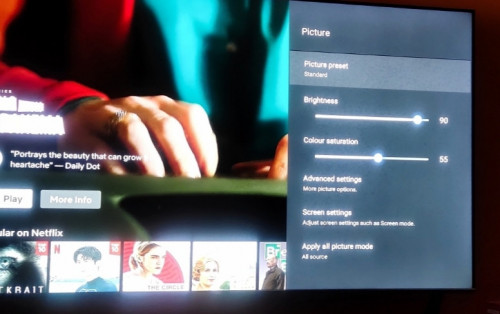 Am I missing something here?? Where did the Picture Preset Menu go? This post has been edited by yokeizan: Sep 9 2021, 12:11 AM |
|
|
|
|
|
stasio
|
Sep 9 2021, 04:46 PM
|
|
|
QUOTE(yokeizan @ Sep 9 2021, 12:10 AM) I just realize that my replacement TV doesn't have picture preset menu (inside TV settings menu) that can enable me to either choosechoose Movie, Dynamic, Standard. As shown on the picture attached. This is my Picture Preset menu (inside TV settings) from before replacement TV. Am I missing something here?? Where did the Picture Preset Menu go? Firmware before and after TV replacement ? Has been update with rearrange setting, but options still exsist. This post has been edited by stasio: Sep 9 2021, 09:36 PM |
|
|
|
|
|
yokeizan
|
Sep 9 2021, 11:23 PM
|
New Member
|
QUOTE(stasio @ Sep 9 2021, 04:46 PM) Firmware before and after TV replacement ? Has been update with rearrange setting, but options still exsist. Before is 63+ something, then I updated to 650. Not sure about firmware. Where to check firmware? Ask TCL about this differences through WhatsApp. Got reply that "Picture Preset" where you can select Movie, Standar etc is "system lama, sekarang system Android updated". Does that make sense. |
|
|
|
|
|
stasio
|
Sep 10 2021, 10:47 AM
|
|
|
QUOTE(yokeizan @ Sep 9 2021, 11:23 PM) Before is 63+ something, then I updated to 650. Not sure about firmware. Where to check firmware? Ask TCL about this differences through WhatsApp. Got reply that "Picture Preset" where you can select Movie, Standar etc is "system lama, sekarang system Android updated". Does that make sense. How you updated firmware, when you don't know where to check? I suggest you to look properly in setting or maybe found some reviews on YouTube or web pages. For sure setting is OK. |
|
|
|
|
|
yokeizan
|
Sep 10 2021, 02:16 PM
|
New Member
|
QUOTE(stasio @ Sep 10 2021, 10:47 AM) How you updated firmware, when you don't know where to check? I suggest you to look properly in setting or maybe found some reviews on YouTube or web pages. For sure setting is OK. The replacement TV came with V63+, I updated to V650 using USB |
|
|
|
|
|
smaelz83
|
Sep 10 2021, 04:53 PM
|
|
|
QUOTE(yokeizan @ Sep 10 2021, 02:16 PM) The replacement TV came with V63+, I updated to V650 using USB Try downgrade back to official release V645. I'm using this version. It still has Presets setting. |
|
|
|
|
|
stasio
|
Sep 10 2021, 06:36 PM
|
|
|
QUOTE(smaelz83 @ Sep 10 2021, 04:53 PM) Try downgrade back to official release V645. I'm using this version. It still has Presets setting. Instead of "Picture preset", is "Picture mode"..... V653  @yokeizan, what you watching when "Picture preset/mode " is not visible ? This post has been edited by stasio: Sep 10 2021, 06:46 PM |
|
|
|
|
|
yokeizan
|
Sep 11 2021, 12:01 AM
|
New Member
|
QUOTE(stasio @ Sep 10 2021, 06:36 PM) Instead of "Picture preset", is "Picture mode"..... V653 @yokeizan, what you watching when "Picture preset/mode " is not visible ? Everything...from normal Astro channel to Netflix |
|
|
|
|
|
yokeizan
|
Sep 11 2021, 12:03 AM
|
New Member
|
QUOTE(smaelz83 @ Sep 10 2021, 04:53 PM) Try downgrade back to official release V645. I'm using this version. It still has Presets setting. How to downgrade? |
|
|
|
|
|
stasio
|
Sep 11 2021, 01:59 AM
|
|
|
QUOTE(yokeizan @ Sep 10 2021, 02:16 PM) The replacement TV came with V63+, I updated to V650 using USB QUOTE(yokeizan @ Sep 11 2021, 12:03 AM) So, download V645 and do same using USB in local update. |
|
|
|
|
|
stasio
|
Sep 11 2021, 04:46 PM
|
|
|
New IMG (Recovery) file V650......(must unzip till "Update.img") http://celesw.tcl.com/Test/software/V8-R851T02-LF1V650.zip |
|
|
|
|
|
yokeizan
|
Sep 11 2021, 11:13 PM
|
New Member
|
QUOTE(stasio @ Sep 11 2021, 04:46 PM) New IMG (Recovery) file V650......(must unzip till "Update.img") http://celesw.tcl.com/Test/software/V8-R851T02-LF1V650.zipDone. Still the same. No "Picture Mode" or "Picture Preset"  |
|
|
|
|
|
stasio
|
Sep 11 2021, 11:21 PM
|
|
|
QUOTE(yokeizan @ Sep 11 2021, 11:13 PM) Done. Still the same. No "Picture Mode" or "Picture Preset"
I expected,you do something is setting. Try Picture reset at the bottom, or any setting reset. Also...reset "Apply all picture mode"...current source. Edit: In System setting, be sure that Game or Sport Mode is disabled.Either mode.if enabled, there is no "Picture Mode" or "Picture Preset" in Picture setting. This post has been edited by stasio: Sep 12 2021, 11:38 AM |
|
|
|
|
|
yokeizan
|
Sep 12 2021, 10:57 PM
|
New Member
|
QUOTE(stasio @ Sep 11 2021, 11:21 PM) I expected,you do something is setting. Try Picture reset at the bottom, or any setting reset. Also...reset "Apply all picture mode"...current source. Edit: In System setting, be sure that Game or Sport Mode is disabled.Either mode.if enabled, there is no "Picture Mode" or "Picture Preset" in Picture setting. Thanks Bro Stasio...your last para suggestion works 👍. Sports mode was on, after turning it off "Picture Preset" appeared and I can proceed to do the respective Picture mode 🤗😁 |
|
|
|
|
|
mohdshahrilfauzi
|
Sep 13 2021, 10:01 AM
|
New Member
|
|
|
|
|
|
|
iSh4Dow.
|
Sep 13 2021, 04:45 PM
|
Getting Started
|
Hi sifus,
Just received my TV today. anything I need to know prior to set up?
Any cool set up / configuration for better picture quality?
|
|
|
|
|
|
stasio
|
Sep 13 2021, 06:19 PM
|
|
|
QUOTE(iSh4Dow. @ Sep 13 2021, 04:45 PM) Hi sifus, Just received my TV today. anything I need to know prior to set up? Any cool set up / configuration for better picture quality? Whatever is important, already posted in previous posts, so just need to read. |
|
|
|
|
|
@r3|4^2
|
Sep 14 2021, 03:11 PM
|
Getting Started
|
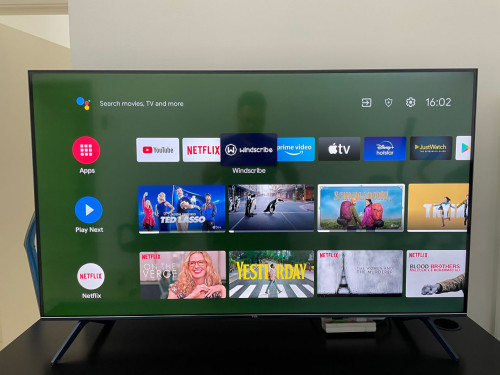
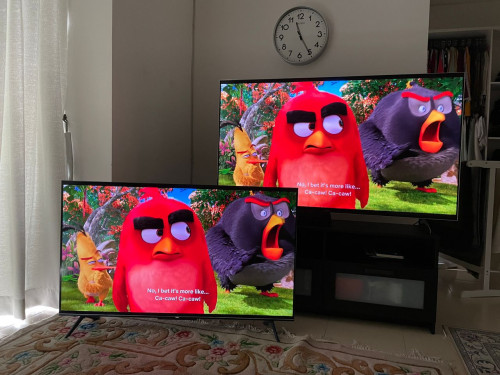
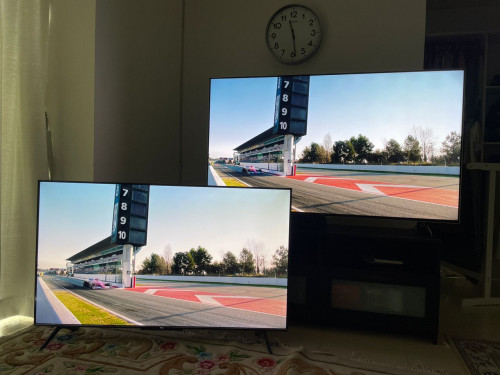
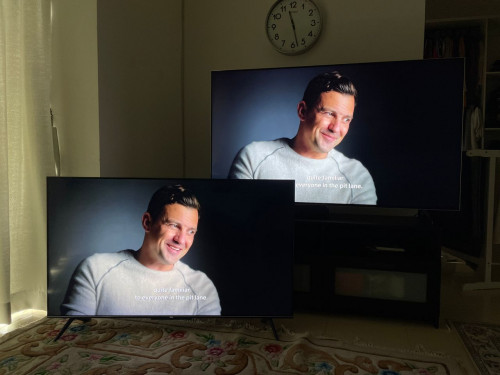
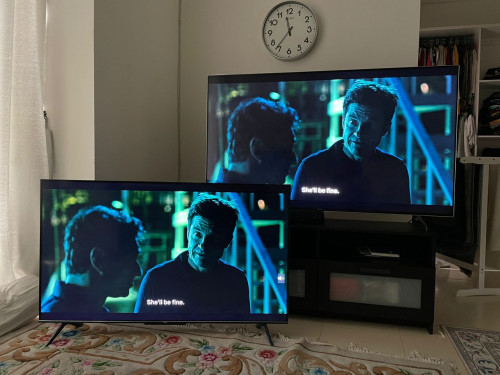
QUOTE(mohdshahrilfauzi @ Sep 13 2021, 10:01 AM) Wow. Nice comparison bro! Good to know how this tv fares with others, esp hot model like the x90h  |
|
|
|
|
|
mohdshahrilfauzi
|
Sep 14 2021, 07:16 PM
|
New Member
|
QUOTE(@r3|4^2 @ Sep 14 2021, 03:11 PM) Wow. Nice comparison bro! Good to know how this tv fares with others, esp hot model like the x90h Yup I was so surprised how the differences were so minimal. For Netflix, Youtube, Prime Videos & Apple TV - I give 9.5/10. But for ASTRO, the upscaling is mediocre, so I just can give 7/10. Watching live football 4K on Astro is better on X9000H - maybe because of the motion engine in Sony is much much powerful. Overall, the TCL is awesome TV with the price and spec it deliver. My wish is TCL can provide firmware update that can improve on motion handling. |
|
|
|
|



 Quote
Quote





 0.0404sec
 0.37
0.37
 6 queries
 GZIP Disabled