Outline ·
[ Standard ] ·
Linear+
Digi Fibre 50Mbps RM90/m. seems like on TM infra, read #1
|
SUSCandy12
|
 Nov 9 2020, 09:10 PM Nov 9 2020, 09:10 PM
|

|
QUOTE(Wan @ Nov 9 2020, 04:44 PM) Are you paid to write bullshit about TM? Maxis home fiber on TM infra.. 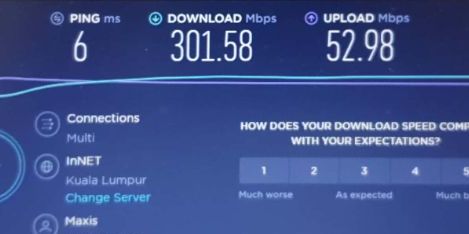 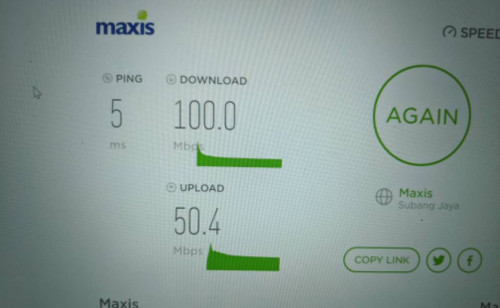 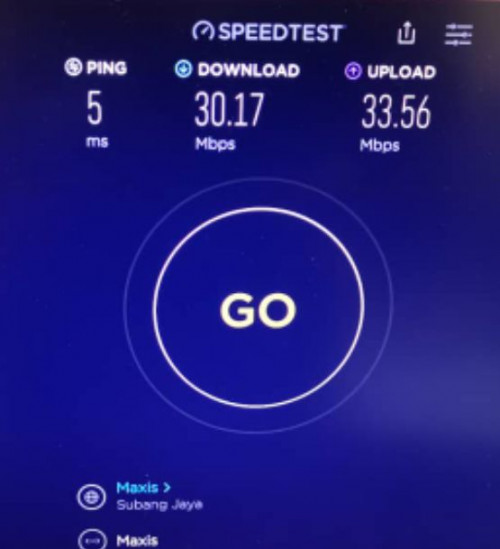 Nope my download can never reach 30M, perhaps your Maxis Fibre has ASTRO IPTV subscription where they open up your download higher than regular plans for ASTRO VLAN? Ask the other Maxis users on TM HSBB they know what I'm talking about.You can go to Maxis's section to ask. |
|
|
|
|
|
TSpikacu
|
Nov 9 2020, 09:19 PM
|
|
|
QUOTE(farayeth @ Nov 9 2020, 06:30 PM) then no issue to torrent? i wish someone could advise before i call them. my area is available for their service, but Unifi and Maxis still haven't appear  if digi fibre is the only one available at your area, not TM nor Maxis, maybe its on TNB Allo infra? just subsribe lo..without it or not u still dont have fibre yet. subscribe for science! |
|
|
|
|
|
TSpikacu
|
Nov 9 2020, 09:20 PM
|
|
|
QUOTE(Candy12 @ Nov 9 2020, 09:10 PM) Nope my download can never reach 30M, perhaps your Maxis Fibre has ASTRO IPTV subscription where they open up your download higher than regular plans for ASTRO VLAN? Ask the other Maxis users on TM HSBB they know what I'm talking about.You can go to Maxis's section to ask. previous im on Maxis 30Mbps, and now Unifi 30Mbps during Maxis time, can i get solid 30Mbps DL/30Mbps UL after change by wifi router and using wifi6 |
|
|
|
|
|
SUSCandy12
|
Nov 9 2020, 10:19 PM
|
|
|
QUOTE(dreaming @ Oct 29 2020, 07:46 PM) Just got DIF90 installed few days ago, tm guys came to installed fibre follow by digi guy installed router, so it is using tm infra. The router brand is zte and surprisingly wifi signal strength is quite good, no problem covering both lower and upper floor. Speed test show 48mbps dl and 18mbps ul only unable to hit full 50/20. Anyway it is suffice for my usage now. 2 persons using it to work from home , no problem using company vpn connect for works, MS Team meeting is smooth, phone, youtube, and some lite pc games also no problem. So far encountered one time no network but it resolved after restart the modem. I don't use p2p, torrent, and tvbox, so can't comment much on this area. Overall it is quite a value package for sub 100. [attachmentid=10658317] There you go. Even mine can't reach FULL 30Mbps or with some extra slight leaks. |
|
|
|
|
|
LoNeLyKiRa
|
Nov 10 2020, 12:17 AM
|
Getting Started

|
anyone know what the admin login for the digi fibre router (H198A)?
|
|
|
|
|
|
billysiah
|
Nov 11 2020, 03:58 PM
|
Getting Started
|
Anyone using digi 500mbps fibre? how is it? i am considering swtiching to digi or maxis..
|
|
|
|
|
|
joeyrm
|
Nov 12 2020, 12:30 PM
|
Getting Started
|
QUOTE(billysiah @ Nov 11 2020, 03:58 PM) Anyone using digi 500mbps fibre? how is it? i am considering switching to digi or maxis.. I'm currently using the digi 500Mbps plan on TM infra, but with own Asus AX router instead of the ZTE router since day 1. At the same time, I'm maintaining my current Unifi 100Mbps plan using different Asus routers until contract finish sometime early next year Few things to take note: 1) Digi fiber uses dual stack IPs, with dynamic private IPv4. Not possible to access the router/own network from outside. 2) Upload speed is capped at 100Mbps since its running on TM infra. Average download speed achieved was about 480~490Mbps via Speedtest CLI command. 3) Streaming performance (such as TiVimate on android box) seems to be better when using digi. Both routers are set to google DNS IP. 4) I'm using TWO separate routers but SINGLE TM modem. This happen coz supposedly there's no more fiber port available to support separate TM Modem. |
|
|
|
|
|
TSpikacu
|
Nov 12 2020, 12:32 PM
|
|
|
QUOTE(joeyrm @ Nov 12 2020, 12:30 PM) I'm currently using the digi 500Mbps plan on TM infra, but with own Asus AX router instead of the ZTE router since day 1. At the same time, I'm maintaining my current Unifi 100Mbps plan using different Asus routers until contract finish sometime early next year Few things to take note: 1) Digi fiber uses dual stack IPs, with dynamic private IPv4. Not possible to access the router/own network from outside. 2) Upload speed is capped at 100Mbps since its running on TM infra. Average download speed achieved was about 480~490Mbps via Speedtest CLI command. 3) Streaming performance (such as TiVimate on android box) seems to be better when using digi. Both routers are set to google DNS IP. 4) I'm using TWO separate routers but SINGLE TM modem. This happen coz supposedly there's no more fiber port available to support separate TM Modem. how about torrent? |
|
|
|
|
|
joeyrm
|
Nov 12 2020, 04:42 PM
|
Getting Started
|
QUOTE(pikacu @ Nov 12 2020, 12:32 PM) AFAIK, no issue on torrent. At times, i can get about 2~3MB/s download based on the torrent app, which roughly translate to 16~24Mbps. |
|
|
|
|
|
YoungMan
|
Nov 12 2020, 04:53 PM
|
|
|
QUOTE(joeyrm @ Nov 12 2020, 05:42 PM) AFAIK, no issue on torrent. At times, i can get about 2~3MB/s download based on the torrent app, which roughly translate to 16~24Mbps. This piece of info is what quite a number of people are waiting for. But I am curious how do you get Digi to install and still maintain Unifi? Because as I know, need to get transfer ID and switch provider. |
|
|
|
|
|
SUSCandy12
|
Nov 12 2020, 06:17 PM
|
|
|
QUOTE(joeyrm @ Nov 12 2020, 04:42 PM) AFAIK, no issue on torrent. At times, i can get about 2~3MB/s download based on the torrent app, which roughly translate to 16~24Mbps. 2~3MB/s is awfully slow for a 500Mbps which suggest heavy throttling? |
|
|
|
|
|
TSpikacu
|
Nov 12 2020, 07:49 PM
|
|
|
QUOTE(Candy12 @ Nov 12 2020, 06:17 PM) 2~3MB/s is awfully slow for a 500Mbps which suggest heavy throttling? nope, indicate seeders not much or outside malaysia. if throttled, u will not get anything at all..like throttling at telco network |
|
|
|
|
|
TSpikacu
|
Nov 12 2020, 07:50 PM
|
|
|
QUOTE(YoungMan @ Nov 12 2020, 04:53 PM) This piece of info is what quite a number of people are waiting for. But I am curious how do you get Digi to install and still maintain Unifi? Because as I know, need to get transfer ID and switch provider. yes..Transfer Request please do not cancel, but instead utilize TR (similar to MNP at mobile) |
|
|
|
|
|
YoungMan
|
Nov 12 2020, 08:06 PM
|
|
|
QUOTE(pikacu @ Nov 12 2020, 08:50 PM) yes..Transfer Request please do not cancel, but instead utilize TR (similar to MNP at mobile) I was not asking that, but how he maintain having both ISP. Usually once transfered Unifi will be terminated. |
|
|
|
|
|
TSpikacu
|
Nov 12 2020, 08:08 PM
|
|
|
QUOTE(YoungMan @ Nov 12 2020, 08:06 PM) I was not asking that, but how he maintain having both ISP. Usually once transfered Unifi will be terminated. oh that. simple..just request normal internet at different isp like usual  u can have both unifi and maxis (or more as long as btu have ports) without issue This post has been edited by pikacu: Nov 12 2020, 08:09 PM |
|
|
|
|
|
cba5566
|
Nov 12 2020, 11:16 PM
|
|
|
QUOTE(joeyrm @ Nov 12 2020, 04:42 PM) AFAIK, no issue on torrent. At times, i can get about 2~3MB/s download based on the torrent app, which roughly translate to 16~24Mbps. A bit slow on download speed...but still better than none. If a lot of seeders , unifi 30M plan can reach 3.5M per second. This is good consider such slow speed 30M plan. |
|
|
|
|
|
joeyrm
|
Nov 12 2020, 11:49 PM
|
Getting Started
|
QUOTE(Candy12 @ Nov 12 2020, 06:17 PM) 2~3MB/s is awfully slow for a 500Mbps which suggest heavy throttling? It all depends on number of seeders and number of devices connected at the same time. I typically have multiple devices connected to the internet at the same time (2 android boxes, multiple laptops (my self, wifeys & sis inlaw), kids smartphones, PS4). Seems like most devices are connected to the new digi internet rather than Unifi link. I think getting 2~3MB/s with other things running should be good enough already. I think with heavy throttling, i would not be able to get more than 16kB/s at all, |
|
|
|
|
|
joeyrm
|
Nov 12 2020, 11:52 PM
|
Getting Started
|
QUOTE(pikacu @ Nov 12 2020, 08:08 PM) oh that. simple..just request normal internet at different isp like usual u can have both unifi and maxis (or more as long as btu have ports) without issue Correct. I told Digi store rep that i wanted to maintain the current Unifi link, supposedly for backup purposes, which they did not believe in the 1st place. |
|
|
|
|
|
scion
|
Nov 13 2020, 06:39 AM
|
Getting Started
|
QUOTE(joeyrm @ Nov 12 2020, 12:30 PM) I'm currently using the digi 500Mbps plan on TM infra, but with own Asus AX router instead of the ZTE router since day 1. At the same time, I'm maintaining my current Unifi 100Mbps plan using different Asus routers until contract finish sometime early next year Few things to take note: 1) Digi fiber uses dual stack IPs, with dynamic private IPv4. Not possible to access the router/own network from outside. 2) Upload speed is capped at 100Mbps since its running on TM infra. Average download speed achieved was about 480~490Mbps via Speedtest CLI command. 3) Streaming performance (such as TiVimate on android box) seems to be better when using digi. Both routers are set to google DNS IP. 4) I'm using TWO separate routers but SINGLE TM modem. This happen coz supposedly there's no more fiber port available to support separate TM Modem. Can request public IP for CCTV? |
|
|
|
|
|
man
|
Nov 13 2020, 10:34 AM
|
Getting Started
|
QUOTE(pikacu @ Nov 12 2020, 07:50 PM) yes..Transfer Request please do not cancel, but instead utilize TR (similar to MNP at mobile) I made request to transfer from unifi since last week, keep getting rejected after several times going back and forth between digi & unifi. If still failed after this maybe I'll try another provider. |
|
|
|
|



 Quote
Quote


 0.0385sec
 0.30
0.30
 6 queries
 GZIP Disabled