Welcome Guest ( Log In | Register )

22 Pages « < 14 15 16 17 18 > » Bottom

Outline · [ Standard ] · Linear+

 XiaoMi AX3600 AX1800 AX5 Vlan tagging

views
     
akfoo
post Feb 21 2021, 10:47 PM

New Member
*
Newbie
10 posts

Joined: Dec 2006
QUOTE(go626201 @ Feb 17 2021, 10:42 PM)
Use a Vlan Switch confirm 100% can works with unifi.
But I will suggest u to get a better router(soft router or Any Advanced level router) as Main router and setup all AX6000 as Mesh AP. Should be getting better performance.
AX6000 CPU so-so only,since u getting 3 units for your usage means that your may need higher router performance to maximize your internet experience and stability.
*
Thank you for the information. I will consider it~
flubear
post Feb 22 2021, 01:32 PM

Getting Started
**
Junior Member
211 posts

Joined: Jan 2003
From: Seri Kembangan


QUOTE(skyklg @ Feb 21 2021, 11:34 AM)
Anyone has any idea if we can use the unifi original router as main router and then use the AX6000 as AP??

SIFU help greatly needed
*
why do you need the AX6000? using snapdragon 888 ? WIFI6E phone?
Might as well get AX3600 which is cheaper and u can directly update it to global rom to use for unifi..

Using another router = waste energy and another hop required.
go626201
post Feb 22 2021, 06:43 PM

Regular
******
Senior Member
1,882 posts

Joined: Sep 2017
QUOTE(flubear @ Feb 22 2021, 01:32 PM)
why do you need the AX6000? using snapdragon 888 ? WIFI6E phone?
Might as well get AX3600 which is cheaper and u can directly update it to global rom to use for unifi..

Using another router = waste energy and another hop required.
*
AX6000 better wifi performance and coverage for AP usage,if use as router better with ax3600 for better CPU/NPU.
Just a few watts only not a big issue in malaysia but getting big improvement for wifi, Worth It.

And singapore users said that global rom wifi coverage smaller.

This post has been edited by go626201: Feb 22 2021, 06:44 PM
TSheidarren
post Feb 22 2021, 08:23 PM

Getting Started
**
Junior Member
248 posts

Joined: Aug 2018
QUOTE(go626201 @ Feb 22 2021, 06:43 PM)
AX6000 better wifi performance and coverage for AP usage,if use as router better with ax3600 for better CPU/NPU.
Just a few watts only not a big issue in malaysia but getting big improvement for wifi, Worth It.

And singapore users said that global rom wifi coverage smaller.
*
Unless u have 4x4 160MHz client (which I can’t seems to find any Wi-Fi adaptors or smartphone/laptop supported in the market), or else u can’t tell any diff between this 2 models for Wi-Fi, but AX6000 has some obvious downside 1. CPU is much weaker, 2. beside of the 2.5G LAN port, the rest of those 3 LAN ports shared 1gbps to CPU which will seriously limit ur speed, unless u only need 1 LAN port only.

For me, AX6000 looks good on paper, but AX3600 is much practical in real life.
go626201
post Feb 22 2021, 08:39 PM

Regular
******
Senior Member
1,882 posts

Joined: Sep 2017
QUOTE(heidarren @ Feb 22 2021, 08:23 PM)
Unless u have 4x4 160MHz client (which I can’t seems to find any Wi-Fi adaptors or smartphone/laptop supported in the market), or else u can’t tell any diff between this 2 models for Wi-Fi, but AX6000 has some obvious downside 1. CPU is much weaker, 2. beside of the 2.5G LAN port, the rest of those 3 LAN ports shared 1gbps to CPU which will seriously limit ur speed, unless u only need 1 LAN port only.

For me, AX6000 looks good on paper, but AX3600 is much practical in real life.
*
Ya but if money not a problem and only want to use it as a AP, then AX6000 is better choice then AX3600.
AX3600 wifi range got little downside compare to AX6000.(Reviewer said)
For the shared 1.25Gbps LAN bandwidth, seriously 90% of normal user didn't have local network high speed usage.

This post has been edited by go626201: Feb 22 2021, 08:40 PM
SUSnonamer
post Feb 22 2021, 09:38 PM

Getting Started
**
Junior Member
224 posts

Joined: Apr 2019
processor speed other than determine the response speed is the most important thing to determine how the 3d game graphics will look

that is why archer c1200 despite the strong signal is still not good enough for 3d gaming

tp deco with 700mhz processor (even quad core is useless because code runs on single thread) is also a kind of joke with slow processor but strong wireless chipset still many jokers paying hundreds for it

ax6000 is at least better than deco but compare with the choices available for that price in china only clueless people will go for it for home usage
Alpha_Tay
post Feb 23 2021, 04:45 AM

Beware The Spammer Star!
******
Senior Member
1,725 posts

Joined: Jan 2003
QUOTE(nonamer @ Feb 22 2021, 09:38 PM)
processor speed other than determine the response speed is the most important thing to determine how the 3d game graphics will look

that is why archer c1200 despite the strong signal is still not good enough for 3d gaming

tp deco with 700mhz processor (even quad core is useless because code runs on single thread) is also a kind of joke with slow processor but strong wireless chipset still many jokers paying hundreds for it

ax6000 is at least better than deco but compare with the choices available for that price in china only clueless people will go for it for home usage
*
router cpu and even npu speed is for high speed connection processing, multiple user usage and high usage single or multiple user, and QoS and router VPN processing, etc. gaming use very little bandwidth, gaming is more latency than bandwidth based, unless updating games. higher speed router cpu/npu doesn't really improve gaming latency unless that router has heavy usage, or change isp provider that provide better 1st hop and destination latency.

some router provide cpu usage, user can check it out during their multiple application usage.

multiple cpu core fast or slow would higher latency alittle bit around 1ms or few ms, same for desktop cpu, but higher speed single core cpu has limitation due to temperature, etc, multiple core is the way of the future.

modern cpu would downclock cpu speed during low usage, that would also higher latency alittle bit.

This post has been edited by Alpha_Tay: Feb 23 2021, 04:47 AM
zero721
post Feb 23 2021, 10:11 PM

Enthusiast
*****
Senior Member
705 posts

Joined: Sep 2010


QUOTE(amirsubhi @ Dec 31 2020, 09:53 PM)
Do u guys know, international firmware got additional setting for VLAN, which u can set and dial (Without need to go to SSH/Telnet)

First update your firmware to 3.0.22 https://bit.ly/MiAX3600INT

and then factory reset and after reboot enter 192.168.31.1

Then you notice as below, click at additional setting, put your vlan

[attachmentid=10744283]
*
international firmware? means just flash this international firmware then can already? any difference between chinese firmware and international firmware?
go626201
post Feb 23 2021, 10:55 PM

Regular
******
Senior Member
1,882 posts

Joined: Sep 2017
QUOTE(zero721 @ Feb 23 2021, 10:11 PM)
international firmware? means just flash this international firmware then can already? any difference between chinese firmware and international firmware?
*
singapore users from HardwareZone SG said international firmware's wifi coverage will be smaller compare to Chinese firmware.
But international firmware had include the vlan function. so no need vlan switch for unifi or maxis.
zero721
post Feb 24 2021, 12:04 AM

Enthusiast
*****
Senior Member
705 posts

Joined: Sep 2010


QUOTE(go626201 @ Feb 23 2021, 10:55 PM)
singapore users from HardwareZone SG said international firmware's wifi coverage will be smaller compare to Chinese firmware.
But international firmware had include the vlan function. so no need vlan switch for unifi or maxis.
*
i see. hard to choose between two
ajaxcbcb
post Feb 24 2021, 01:35 AM

Casual
***
Junior Member
421 posts

Joined: Apr 2011
From: Kuala Lumpur Malaysia


QUOTE(zero721 @ Feb 24 2021, 12:04 AM)
i see. hard to choose between two
*
I managed to do ssh persistent currently using ax3200 with unifi. Did a manual vlan config
SUSnonamer
post Feb 24 2021, 10:37 AM

Getting Started
**
Junior Member
224 posts

Joined: Apr 2019
QUOTE(Alpha_Tay @ Feb 23 2021, 04:45 AM)
router cpu and even npu speed is for high speed connection processing, multiple user usage and high usage single or multiple user, and QoS and router VPN processing, etc. gaming use very little bandwidth, gaming is more latency than bandwidth based, unless updating games. higher speed router cpu/npu doesn't really improve gaming latency unless that router has heavy usage, or change isp provider that provide better 1st hop and destination latency.

some router provide cpu usage, user can check it out during their multiple application usage.

multiple cpu core fast or slow would higher latency alittle bit around 1ms or few ms, same for desktop cpu, but higher speed single core cpu has limitation due to temperature, etc, multiple core is the way of the future.

modern cpu would downclock cpu speed during low usage, that would also higher latency alittle bit.
*
just to clarify

last time i use a 1.6ghz x86 softrouter with C1200 as AP, now i use a 1.2ghz single board computer softrouter, the visual quality in CSGO remain the same in both, so the visual quality depend on the AP speed than router speed

i have since changed to tenda-realtek ac1200 (1ghz) and now settle with tp1900 (1.2ghz) and each time the visual quality is noticeably improved in CSGO

my setup is one tenda ac23 as general purpose AP covering whole house placed at middle staircase, together with another adhoc (turn on when needed) AP dedicated for gaming placed at upper floor
Alpha_Tay
post Feb 24 2021, 03:52 PM

Beware The Spammer Star!
******
Senior Member
1,725 posts

Joined: Jan 2003
QUOTE(nonamer @ Feb 24 2021, 10:37 AM)
just to clarify

last time i use a 1.6ghz x86 softrouter with C1200 as AP, now i use a 1.2ghz single board computer softrouter, the visual quality in CSGO remain the same in both, so the visual quality depend on the AP speed than router speed

i have since changed to tenda-realtek ac1200 (1ghz) and now settle with tp1900 (1.2ghz) and each time the visual quality is noticeably improved in CSGO

my setup is one tenda ac23 as general purpose AP covering whole house placed at middle staircase, together with another adhoc (turn on when needed) AP dedicated for gaming placed at upper floor
*
if the CPU has same speed, a RISC CPU can process more network throughput than ARM than X86, RISC>ARM>X86.

what do you mean by visual quality?

also, each router has different or same Generation of CPU, Nanometre, Router Firmware, Setting, MIMO Antenna, etc, that could make your gaming feel alittle bit different.
zero721
post Feb 24 2021, 09:29 PM

Enthusiast
*****
Senior Member
705 posts

Joined: Sep 2010


QUOTE(ajaxcbcb @ Feb 24 2021, 01:35 AM)
I managed to do ssh persistent currently using ax3200 with unifi. Did a manual vlan config
*
mind to teach how to do so?
Mushi.Nv
post Feb 25 2021, 05:16 PM

New Member
*
Newbie
8 posts

Joined: Feb 2013
Using Ax3600 now as AP.
Anyone know for ipv6, we should use Native or NAT6? Both can't enable ipv6 for me.
Directly connected to Archer c5v will give me ipv6
ajaxcbcb
post Feb 26 2021, 07:00 PM

Casual
***
Junior Member
421 posts

Joined: Apr 2011
From: Kuala Lumpur Malaysia


QUOTE(zero721 @ Feb 24 2021, 09:29 PM)
mind to teach how to do so?
*
first u need to revert the firmware to 1.0.17. turn on the ssh access

2. change the region to CN
3. after that you can do a nvram commit to ensure that the change Is committed on the firmware.
4. need to write a long guide. i will revert to you when i have time.
toytoy
post Feb 26 2021, 07:02 PM

Enthusiast
*****
Senior Member
875 posts

Joined: Jan 2003


QUOTE(ajaxcbcb @ Feb 26 2021, 07:00 PM)
first u need to revert the firmware to 1.0.17. turn on the ssh access

2. change the region to CN
3. after that you can do a nvram commit to ensure that the change Is committed on the firmware.
4. need to write a long guide. i will revert to you when i have time.
*
See the YouTube video posted by TS on first page?
TSheidarren
post Feb 26 2021, 07:06 PM

Getting Started
**
Junior Member
248 posts

Joined: Aug 2018
QUOTE(Mushi.Nv @ Feb 25 2021, 05:16 PM)
Using Ax3600 now as AP.
Anyone know for ipv6, we should use Native or NAT6? Both can't enable ipv6 for me.
Directly connected to Archer c5v will give me ipv6
*
It seems can be done by using WinSCP, in network there change IPv6 to “relay”, but I’m not really sure exactly steps for it, u may dig in openwrt forum to see how ppl use IPv6 relay.
ajaxcbcb
post Feb 26 2021, 07:32 PM

Casual
***
Junior Member
421 posts

Joined: Apr 2011
From: Kuala Lumpur Malaysia


QUOTE(toytoy @ Feb 26 2021, 07:02 PM)
See the YouTube video posted by TS on first page?
*
yes that is the first step. but the following step can be quite tedious as u need to change the region
cle900706
post Feb 26 2021, 09:38 PM

Enthusiast
*****
Senior Member
845 posts

Joined: Nov 2010
From: Puchong/Cyberjaya


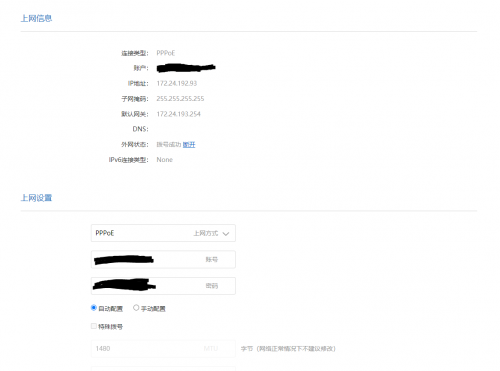
hi sifus, was using old router and retired the first page process again and still the DNS not appear.
but it shows that the connection is there.

may i know if u add a vlan switch, will solve this problem?

user posted image

22 Pages « < 14 15 16 17 18 > » Top
 

Change to:
| Lo-Fi Version
0.0270sec    0.39    6 queries    GZIP Disabled
Time is now: 24th December 2025 - 01:05 AM