Welcome Guest ( Log In | Register )

22 Pages « < 12 13 14 15 16 > » Bottom

Outline · [ Standard ] · Linear+

 XiaoMi AX3600 AX1800 AX5 Vlan tagging

views
     
kenny79
post Jan 18 2021, 09:00 PM

Look at all my stars!!
*******
Senior Member
3,200 posts

Joined: Jan 2003
From: IPOH


QUOTE(toytoy @ Jan 18 2021, 08:07 PM)
I understand your plight. I have been using HomePlug since the first generation AV200 then upgrade to AV600 until now using AV1300 also get less than 200Mbps.

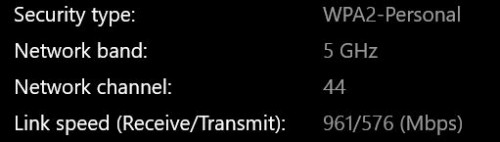
AX5 - 5Ghz can go up to 1200 Mbps, mesh will cut that in half coz don't have dedicated backhaul. Left 600Mbps then WiFi strength will further cut it down.
Better get another AX3600 or AX6.

To put that into perspective, I currently have  2 x AX3600 with theoretical 5Ghz speed of 2402 Mbps.
Main router ground floor and child router upstairs. Straight line distance around 6-7meters.
Upstairs laptop distance to child router around 6-7meters.

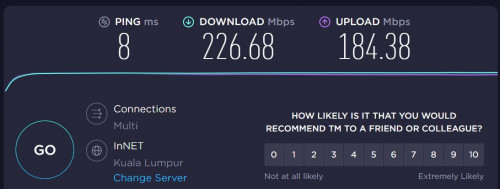
I get this speed on a good day with Unifi 800Mbps.
user posted image
user posted image

I was quite disappointed with the result. I was hoping I can get around 600Mpbs download upstairs as that's where i spend most of my time in home office.
If really want best speed need to get MESH router with dedicated Haul but that also I don't think can get 800Mbps.

Sometimes think back, spent so much money after all these years. might as well just pull one Ethernet Cable lagi cheap.  ranting.gif  sweat.gif
*
Try to pull Ethernet cable to connect both of the ax3600... will it be better ?
jericho
post Jan 18 2021, 09:07 PM

Getting Started
**
Junior Member
57 posts

Joined: Feb 2006


AX6000 selling for RM489, worth?

https://www.lazada.com.my//products/i189141...0L&urlFlag=true


kenny79
post Jan 18 2021, 09:11 PM

Look at all my stars!!
*******
Senior Member
3,200 posts

Joined: Jan 2003
From: IPOH


QUOTE(jericho @ Jan 18 2021, 09:07 PM)
U need Qualcomm 888 chipset to maximum the speed... previous thread got mention a3600 and ax6000 u may read back
toytoy
post Jan 18 2021, 10:32 PM

Enthusiast
*****
Senior Member
875 posts

Joined: Jan 2003


QUOTE(kenny79 @ Jan 18 2021, 09:00 PM)
Try to pull Ethernet cable to connect both of the ax3600... will it be better ?
*
Yes definitely better. But the reason I wanted to use MESH was I didn't want to pull a cable.
But the MESH works best if you can pull a cable in between. You can get the best speed and best coverage.
kenny79
post Jan 18 2021, 11:19 PM

Look at all my stars!!
*******
Senior Member
3,200 posts

Joined: Jan 2003
From: IPOH


QUOTE(toytoy @ Jan 18 2021, 10:32 PM)
Yes definitely better. But the reason I wanted to use MESH was I didn't want to pull a cable.
But the MESH works best if you can pull a cable in between. You can get the best speed and best coverage.
*
Since the xiaomi doesn’t provide extra range of WiFi 5 backhole so it will take some bandwidth of the both router .. it’s the main reason the slow speed
toytoy
post Jan 18 2021, 11:21 PM

Enthusiast
*****
Senior Member
875 posts

Joined: Jan 2003


QUOTE(kenny79 @ Jan 18 2021, 11:19 PM)
Since the xiaomi doesn’t provide extra range of WiFi 5 backhole so it will take some bandwidth of the both router .. it’s the main reason the slow speed
*
Yes that's right. I didn't know until i bought 2 of them sweat.gif

kenny79
post Jan 19 2021, 12:56 AM

Look at all my stars!!
*******
Senior Member
3,200 posts

Joined: Jan 2003
From: IPOH


QUOTE(toytoy @ Jan 18 2021, 11:21 PM)
Yes that's right. I didn't know until i bought 2 of them  sweat.gif
*
Reseller back for one unit lol
jchong
post Jan 23 2021, 04:20 PM

****************
*******
Senior Member
5,989 posts

Joined: Nov 2005
QUOTE(heidarren @ Dec 5 2020, 06:46 PM)
Check via SSH command, China AX3600 has 31dBm/29dBm/27dBm for txpower high/mid/low, int firmware might have much lower txpower in order to match worldwide regulations.
*
Say, any idea what is txpower for Xiaomi AX1800?
jchong
post Jan 23 2021, 04:34 PM

****************
*******
Senior Member
5,989 posts

Joined: Nov 2005
Another question, how to connect my AX1800 to the Mi Wi-Fi app on my phone?

After launching the app, I come to this screen and tap "+Add Mi Router"
Attached Image

Then the app shows searching...
Attached Image

Then it jumps to this screen...
Attached Image

Basically I'm stuck here. The app can't seem to find any devices to connect to.
TSheidarren
post Jan 23 2021, 06:26 PM

Getting Started
**
Junior Member
248 posts

Joined: Aug 2018
QUOTE(jchong @ Jan 23 2021, 04:34 PM)
Another question, how to connect my AX1800 to the Mi Wi-Fi app on my phone?

After launching the app, I come to this screen and tap "+Add Mi Router"
Attached Image

Then the app shows searching...
Attached Image

Then it jumps to this screen...
Attached Image

Basically I'm stuck here. The app can't seem to find any devices to connect to.
*
Change app region to mainland China
jchong
post Jan 23 2021, 08:27 PM

****************
*******
Senior Member
5,989 posts

Joined: Nov 2005
QUOTE(heidarren @ Jan 23 2021, 06:26 PM)
Change app region to mainland China
*
Thanks. It worked.
kenny79
post Jan 24 2021, 12:58 AM

Look at all my stars!!
*******
Senior Member
3,200 posts

Joined: Jan 2003
From: IPOH


QUOTE(heidarren @ Jan 23 2021, 06:26 PM)
Change app region to mainland China
*
Hello bro any idea the redmi ax6 manage to tag vlan using the same way?
evanttc
post Jan 24 2021, 02:40 PM

Enthusiast
*****
Senior Member
858 posts

Joined: May 2005
From: MARS


Sorry, im noob in this game.
May i know is the global version can use on unifi?
Thx
kenny79
post Jan 24 2021, 05:53 PM

Look at all my stars!!
*******
Senior Member
3,200 posts

Joined: Jan 2003
From: IPOH


QUOTE(evanttc @ Jan 24 2021, 02:40 PM)
Sorry, im noob in this game.
May i know is the global version can use on unifi?
Thx
*
As mention by a member here the global firmware have the vlan tagging setting so doesn’t to make hard work to make it support unifi
jchong
post Jan 25 2021, 03:46 PM

****************
*******
Senior Member
5,989 posts

Joined: Nov 2005
Got another question on the AX1800, in the app I'm using English language. But then I saw one new option (under Wifi settings) which is written in Chinese:

Attached Image

Any idea what this is about? Should I leave it on or off?
go626201
post Jan 25 2021, 10:49 PM

Regular
******
Senior Member
1,882 posts

Joined: Sep 2017
QUOTE(jchong @ Jan 25 2021, 03:46 PM)
Got another question on the AX1800, in the app I'm using English language. But then I saw one new option (under Wifi settings) which is written in Chinese:

Attached Image

Any idea what this is about? Should I leave it on or off?
*
This is enabled for automatic pair New Mi-Home hardware that haven't connect to the network.
jchong
post Jan 25 2021, 11:09 PM

****************
*******
Senior Member
5,989 posts

Joined: Nov 2005
QUOTE(go626201 @ Jan 25 2021, 10:49 PM)
This is enabled for automatic pair New Mi-Home hardware that haven't connect to the network.
*
Thanks
chrisnasah P
post Jan 30 2021, 07:03 PM

New Member
*
Probation
1 posts

Joined: Jan 2021
Hello,

I am new to forums hoping someone can help answer some questions i have please.

I am looking to purchase 3-4 Xiaomi AX1800 routers to run as mesh but needed to confirm few things.

1. I have my own router/firewall so can i run this in AP mode only?
2. Can i create two SIID's one for guest access with VLAN Tagging so i can control what they can access using my firewall?
3. Does it work as Mesh wired or wireless?

Thanks
go626201
post Jan 30 2021, 09:33 PM

Regular
******
Senior Member
1,882 posts

Joined: Sep 2017
QUOTE(chrisnasah @ Jan 30 2021, 07:03 PM)
Hello,

I am new to forums hoping someone can help answer some questions i have please.

I am looking to purchase 3-4 Xiaomi AX1800 routers to run as mesh but needed to confirm few things.

1.  I have my own router/firewall so can i run this in AP mode only?
2.  Can i create two SIID's one for guest access with VLAN Tagging so i can control what they can access using my firewall?
3.  Does it work as Mesh wired or wireless?

Thanks
*
1.AP mode can be enabled. But now need some trick to make to run as Mesh AP mode.(Official AP Mesh mode for older series should be getting AP Mesh Mode in months-since Xiaomi AX6000 has the mode already)
2.Guest Wifi seems like not working on AP mode. (Maybe router mode-NAT better for your usage)
3.Both can works. Better with wired. Wireless should not good enough since it does not have enough bandwidth for bridging. (but if you do not need very high speed then it should be acceptable)

And for the 1st question ,u cant change the ip of the router manually. It can only use the DHCP distributed IP only.

This post has been edited by go626201: Jan 30 2021, 09:34 PM
jianwei87
post Feb 15 2021, 01:18 AM

Casual
***
Junior Member
481 posts

Joined: Jan 2007
Possible using mikrotik as router and ax3600 as AP with Mesh?

22 Pages « < 12 13 14 15 16 > » Top
 

Change to:
| Lo-Fi Version
0.0256sec    0.57    6 queries    GZIP Disabled
Time is now: 21st December 2025 - 06:27 PM