

QUOTE(Anime4000 @ May 1 2023, 10:22 AM)
if this AIO ONU allow change OMCI Info, why not, you can use it

I still using 800mbps plan ,and i having I-240G-T which unable to extract the information...Home Networking Ditch ONU, use GPON SFP on Business Grade Router, 2.5G ONU for Unifi & Maxis, NO NEED VLAN
|
|
 May 1 2023, 10:47 AM May 1 2023, 10:47 AM
|
 
Senior Member
1,882 posts Joined: Sep 2017 
|
QUOTE(Anime4000 @ May 1 2023, 10:22 AM) if this AIO ONU allow change OMCI Info, why not, you can use it I still using 800mbps plan ,and i having I-240G-T which unable to extract the information... |
|
|
|
|
|
May 1 2023, 11:24 AM
Show posts by this member only | IPv6 | Post
#622
|

Senior Member
2,399 posts Joined: Jul 2009 From: /dev/null 
|
QUOTE(go626201 @ May 1 2023, 10:47 AM) I still using 800mbps plan ,and i having I-240G-T which unable to extract the information... Just use Huawei HG8240H Information, it works everywhere, just need SLID/PLOAM Password |
|
|
May 1 2023, 02:54 PM
|
|
Senior Member
6,818 posts Joined: Oct 2008 From: Kuala Lumpur 
|
QUOTE(liquid.D @ May 1 2023, 01:23 AM) Hi @anime4000, thanks for your info, i just manage to watch some youtube and able to get in my onu and screenshot all that needed, kind of funny the ploam using very basic numbers and passwords, even the voip (400) manage to get the info, i tot using account number, now I’m became keen to try this with 2.5gbps sfp+, you done this using sfp router right bro? Which method you use to extract the ploam password from ZTE 620?Am thinking using the sfp xonu with media converters since I’ve already have x86 openwrt router with couple of 2.5Gbps port, Hope using this pon stick inside media converter in bridge mode will be flowless and unlock extra speed 🙂 Btw If anyone here have try 2gbps unifi that have aggregated 1gbps x 2 can confirm if using 2.5Gbps pon stick will get 2gbps single rather then split 2 using unifi supplied gpon… hehe |
|
|
May 1 2023, 08:52 PM
Show posts by this member only | IPv6 | Post
#624
|
|
Senior Member
2,399 posts Joined: Jul 2009 From: /dev/null
|
QUOTE(YoungMan @ May 1 2023, 02:54 PM) Which method you use to extract the ploam password from ZTE 620? 1. turn off ZTE ONU2. unplug fiber 3. turn on ZTE ONU 4. set pc ip 192.168.1.2/24 5. login 192.168.1.1 with tmadamin, Adm@XXXX (last 4 hex mac address) 6. profit |
|
|
May 1 2023, 09:47 PM
|
|
Senior Member
6,818 posts Joined: Oct 2008 From: Kuala Lumpur
|
QUOTE(Anime4000 @ May 1 2023, 08:52 PM) 1. turn off ZTE ONU My ZTE 620 can login without disconnect fibre. Except the password section, i cannot find it even though using the developer option.2. unplug fiber 3. turn on ZTE ONU 4. set pc ip 192.168.1.2/24 5. login 192.168.1.1 with tmadamin, Adm@XXXX (last 4 hex mac address) 6. profit |
|
|
May 1 2023, 11:35 PM
|
|
Senior Member
1,882 posts Joined: Sep 2017
|
Hi Anime4000,i had confirmed that VSOL HG3110AX does not support GPON,so no need to check about this model anymore.
This model only support EPON only. |
|
|
|
|
|
May 2 2023, 02:54 AM
Show posts by this member only | IPv6 | Post
#627
|
|
Senior Member
2,399 posts Joined: Jul 2009 From: /dev/null
|
QUOTE(YoungMan @ May 1 2023, 09:47 PM) My ZTE 620 can login without disconnect fibre. Except the password section, i cannot find it even though using the developer option. can get SLID/PLOAM Password?QUOTE(go626201 @ May 1 2023, 11:35 PM) Hi Anime4000,i had confirmed that VSOL HG3110AX does not support GPON,so no need to check about this model anymore. EPON (Ethernet PON) just 1Gbps symmetrical, seem very useless to have 2.5GbE portThis model only support EPON only. and EPON is L2 connection and MAC Address locked, so, need clone MAC Address too! see what SoC that router use, if using RTL960x variant, with supported Kernel, can switch mode (flash set PON_MODE 0) to GPON This post has been edited by Anime4000: May 2 2023, 02:57 AM |
|
|
May 3 2023, 09:19 AM
|

Senior Member
944 posts Joined: Sep 2007
|
QUOTE(go626201 @ Apr 29 2023, 02:42 PM) I saw from somewhere before(few years ago), I tested and successfully extract the SLID from I-240G-T.Said that this model webui or telnet will only be accessible after BTU reset,and access right will be disable in very short time after booting. (Correct me if i am wrong) Steps as below. 1. Unplug fiber 2. Connect OLT Lan 1 to your laptop/desktop Lan port 3. Press and hold reset button on I-240G-L for 20-30 seconds 4. While waiting for the OLT to done reset enter below information into your Network Adapter IP: 192.168.1.10 ( can be any except 192.168.1.251) subnet: 255.255.255.0 gateway: 192.168.1.251 5. wait for 1 or 2 minutes, then open CMD type telnet 192.168.1.251 6. Enter username : CRAFTSPERSON, password: ALC#FGU 7. enter 1 to retrieve SLID. 8. Profit This post has been edited by hanny562: May 3 2023, 09:40 AM |
|
|
May 3 2023, 05:22 PM
|
|
Senior Member
1,882 posts Joined: Sep 2017
|
QUOTE(hanny562 @ May 3 2023, 09:19 AM) I tested and successfully extract the SLID from I-240G-T. Reset will not affect unifi configuration settings?Steps as below. 1. Unplug fiber 2. Connect OLT Lan 1 to your laptop/desktop Lan port 3. Press and hold reset button on I-240G-L for 20-30 seconds 4. While waiting for the OLT to done reset enter below information into your Network Adapter IP: 192.168.1.10 ( can be any except 192.168.1.251) subnet: 255.255.255.0 gateway: 192.168.1.251 5. wait for 1 or 2 minutes, then open CMD type telnet 192.168.1.251 6. Enter username : CRAFTSPERSON, password: ALC#FGU 7. enter 1 to retrieve SLID. 8. Profit |
|
|
May 3 2023, 05:41 PM
|
|
Senior Member
944 posts Joined: Sep 2007
|
QUOTE(go626201 @ May 3 2023, 05:22 PM) Reset will not affect unifi configuration settings? Yup, I reset mine, and the setting still there |
|
|
May 4 2023, 02:19 PM
Show posts by this member only | IPv6 | Post
#631
|
|
Senior Member
2,399 posts Joined: Jul 2009 From: /dev/null
|
QUOTE(hanny562 @ May 3 2023, 05:41 PM) Yup, I reset mine, and the setting still there I also tried to reset my Huawei ONU, it still keep PLOAM Password intact, which is great! |
|
|
May 6 2023, 11:07 PM
Show posts by this member only | IPv6 | Post
#632
|
|
Senior Member
2,399 posts Joined: Jul 2009 From: /dev/null
|
Currently I trying D-LINK AIO ONU OMCI Information on my GPON ONU SFP,
at first time of using new information, Nokia OLT take time to register of new Info, what to do with TM-Maxis with D-Link AIO ONU 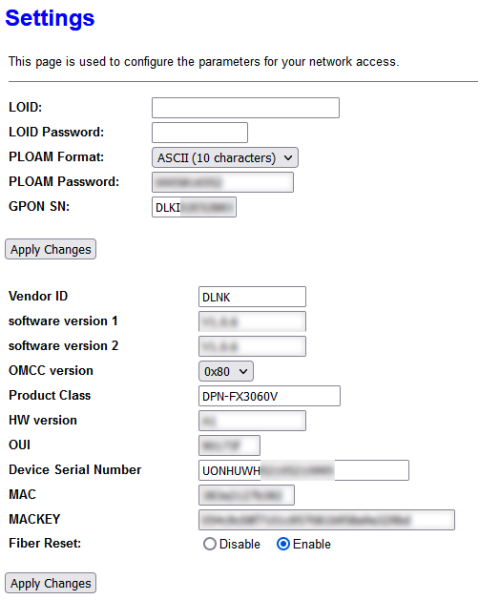 I found out that, user on LAN 2, no matter what ONU is, it will disable D-Link WebGUI once OMCI kick in and automatically bridge nas0 to eth1 (LAN 2) |
|
|
May 8 2023, 09:00 PM
Show posts by this member only | IPv6 | Post
#633
|

Junior Member
117 posts Joined: Feb 2008 From: Ampang
|
QUOTE(YoungMan @ May 1 2023, 02:54 PM) Which method you use to extract the ploam password from ZTE 620? Edit this on 14May2023.. after checking on few youtube channel on configuring Tm-ONU, i found out that PLOAM password are equivalent with SN Password stored in ZTE 620, So u basically can extract this from the onu and use in ONU stick.. hope this help.. i’ll try this passwd on my ODi maybe today, hopefully this will work flawlessly replacing F620  This post has been edited by liquid.D: May 14 2023, 04:52 AM YoungMan liked this post
|
|
|
|
|
|
May 9 2023, 12:24 PM
|
|
Newbie
41 posts Joined: Jan 2017
|
Jz finished reading from 1st page until the last one, thanks @Anime4000 for giving very detailed information. Thinking of setting a proper home lab using TP-Link Omada but still having doubts. Supposedly the stick will work with the Omada ER7212PC right?
|
|
|
May 10 2023, 05:44 PM
|
 
Elite
8,416 posts Joined: Jul 2008 
|
Just to share cloning SN might not be required depending on the OLT, but it's a good idea to do it anyways
 Use the following command to backup current SN CODE cfgmib get GPON_SN This post has been edited by blacktubi: May 10 2023, 05:45 PM |
|
|
May 10 2023, 06:26 PM
|
|
Elite
8,416 posts Joined: Jul 2008
|
PINK Fibre 1Gbps plan
 Tested on a 2Gbps supported location For those planning to their change the modem thinking it can unlock more speed, don't bother On the bright side, I get sub 1ms ping now More info: Huawei OLT, VLAN 499 This post has been edited by blacktubi: May 10 2023, 06:28 PM |
|
|
May 10 2023, 08:51 PM
Show posts by this member only | IPv6 | Post
#637
|
|
Senior Member
2,399 posts Joined: Jul 2009 From: /dev/null
|
QUOTE(blacktubi @ May 10 2023, 06:26 PM) PINK Fibre 1Gbps plan so PINK Fiber VLAN is 499, is almost everywhere? I give my RTL9601CI to friend who in PINK coverage. looking into VLAN map found VLAN 499 thereTested on a 2Gbps supported location For those planning to their change the modem thinking it can unlock more speed, don't bother On the bright side, I get sub 1ms ping now More info: Huawei OLT, VLAN 499 |
|
|
May 10 2023, 08:58 PM
|
|
Elite
8,416 posts Joined: Jul 2008
|
QUOTE(Anime4000 @ May 10 2023, 08:51 PM) so PINK Fiber VLAN is 499, is almost everywhere? I give my RTL9601CI to friend who in PINK coverage. looking into VLAN map found VLAN 499 there Yup, they should be using 499 almost everywhereVLAN 140 is used for VOIP, I am not using it so didn't bother to reverse engineer the configuration. |
|
|
May 10 2023, 09:04 PM
Show posts by this member only | IPv6 | Post
#639
|
|
Senior Member
2,399 posts Joined: Jul 2009 From: /dev/null
|
QUOTE(blacktubi @ May 10 2023, 08:58 PM) Yup, they should be using 499 almost everywhere another pressing issue, newer ODI stick "V06" is having issue with limited upload speed when on 2.5Gb (HSGMII PHY),VLAN 140 is used for VOIP, I am not using it so didn't bother to reverse engineer the configuration. I am on "V05" and I can't test either on 2Gbps plan  in bright side, Intel PON Stick seem to work, waiting that guy feedback |
|
|
May 13 2023, 01:43 PM
|
|
Senior Member
944 posts Joined: Sep 2007
|
Hi @Anime4000,
I received my MA5671A, first time start up I'm able to log into 192.168.1.10 (PON IP address). I restart it after setting up PLOAM password, SN, hardware ID and etc. But after that I won't able to log in/ping 192.168.1.10 anymore. I restart and replug again many times but still failed. It shows “No link” status below Can you advice any way to troubleshoot or any workaround for this? Mikrotik able to detect the SFP and showing all information of SFP. This post has been edited by hanny562: May 14 2023, 12:31 AM |
| Change to: |  0.0189sec 0.0189sec
 0.55 0.55
 6 queries 6 queries
 GZIP Disabled GZIP Disabled
Time is now: 15th December 2025 - 12:20 AM |
 Quote
Quote