Welcome Guest ( Log In | Register )

83 Pages « < 31 32 33 34 35 > » Bottom

Outline · [ Standard ] · Linear+

Home Networking Ditch ONU, use GPON SFP on Business Grade Router, 2.5G ONU for Unifi & Maxis, NO NEED VLAN

views
     
liquid.D
post May 13 2023, 11:24 PM

Getting Started
**
Junior Member
117 posts

Joined: Feb 2008
From: Ampang


QUOTE(Anime4000 @ May 10 2023, 09:04 PM)
another pressing issue, newer ODI stick "V06" is having issue with limited upload speed when on 2.5Gb (HSGMII PHY),
I am on "V05" and I can't test either on 2Gbps plan sad.gif

in bright side, Intel PON Stick seem to work, waiting that guy feedback
*
Edit This:

I’ve just got mine from lazada together with 2.5G media converter,
Updated : Mine seems to have this (i think v1)
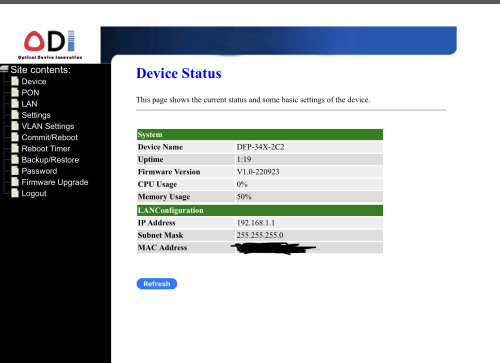
Firmware Version V1.0-220923

Btw the version means it’s not compatible with same firmware as what yea all using?

I want to upload the image from my ipad but seems loyat said it’s too large haha

Below are the information on the ODi
DFP-34X-2C2
1.25/2.5G 1310nm 20km
XPON 23……87 (i guess this is the serial number)

Another Question…
Any of you sifu use viewqwest in the home area where Unifi infra is? ..
Any Of you sifu2 use 2 fibre subscription per house number?… success or not? Not sure 1 house / 1 fibre or can multi subscribe.. smile.gif

This post has been edited by liquid.D: May 14 2023, 06:53 AM
liquid.D
post May 14 2023, 03:48 AM

Getting Started
**
Junior Member
117 posts

Joined: Feb 2008
From: Ampang


QUOTE(Ouru @ Aug 14 2022, 09:29 PM)
Hi Team,

recently i tested again plug-in the same sfp v2801F as before in FGT 500D but with few changes based on TM provided new gpon modem (ZTE ZHXN F620) but not working any more. pppoe connected (after waiting little longer time) but connected with very slow speed (ard 30mbps) only, subscribed 500mbps TM Unifi . the only changes i did was using new modem mac add, model , software version etc...others remain same if im not mistaken. I follow our cikgu @Anime4000 thumbsup.gif guide in github.com as usual. below are the config :

flash set GPON_PLOAM_PASSWD 1234567890
flash set GPON_SN ZTExxxxxxx
flash set GPON_ONU_MODEL F620
flash set OMCI_TM_OPT 0
flash set VLAN_CFG_TYPE 1
flash set PON_VENDOR_ID ZTEG 
flash set OMCI_SW_VER1 V9.0.10P4N2
flash set OMCI_SW_VER2 V9.0.10P4N2
flash set CUSTOM_OMCI_SW_VER1 V9.0.10P4N2
flash set CUSTOM_OMCI_SW_VER2 V9.0.10P4N2
flash set HW_HWVER V7.0
flash set ELAN_MAC_ADDR f864b8bf8a74
flash set VS_AUTH_KEY DD4D14B4773F74DF18F742E1A0E3673D
flash set OMCI_FAKE_OK 1
flash set OMCI_OLT_MODE 1

not sure where i did mistake....need some help thanks team
*
Hye Ouru, you use ploam password 1234567890 working yea at your place yea?

Actually kan.. after watching on yt on some tm configuration for multiple onu brand, my understanding is seems that
ploam = SN passwd (ZTE) = SLID (Nokia) = ONU Passwd (homefibre /huawei).. same things different name to represent it .. hehe…

Also need help from sifu2 here if anyone can confirm this is the auth paswd credential that need to be set/map ploam pswd successfully on the ODi Stick?

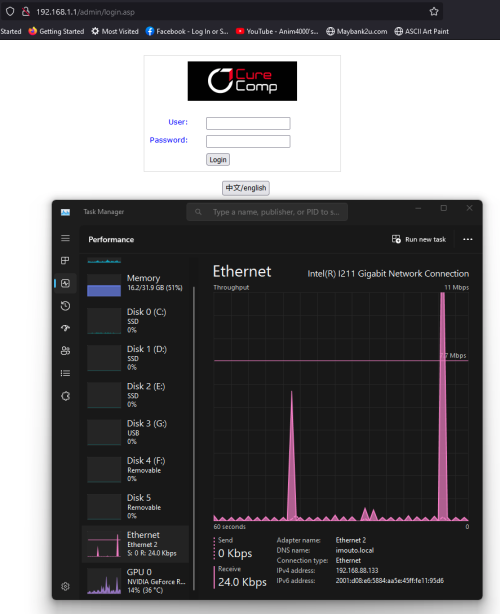
By the way just wondering if any of you guy change the ip from 192.168.1.1 to other like 162.168.11.11 ?
Will this work? Or will break / have issue the ODi? I just want to set this to other to avoid confusion if can.. hehe
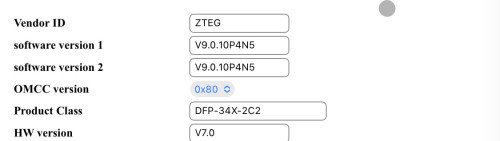
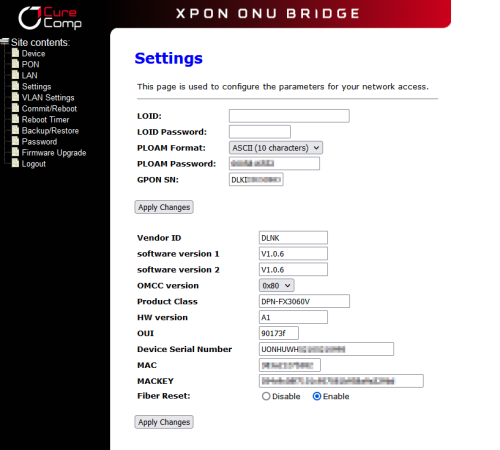
user posted image

What can we put in Product Class ? … can put ZXHN F620? Am using the ODi - WEBUI

user posted image

For the mac and mac key how you all convert yea the mac and key? Safe to leave default? … Currently Fibre Reset i leave enabled (default)
user posted image

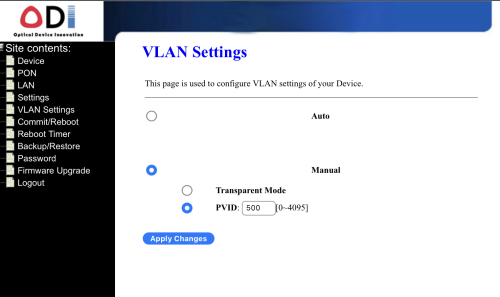
OK this 1.. i’m confused … i can set only 1 VLAN i put 500 but seems not the same with bro “Thankyou” ….. i guess i got the version of no emulate LAN port? Or i’ve done wrong setting?
user posted image

That’s My ODi XPON info, not sure where are other menu setting .. i login as admin / admin

This post has been edited by liquid.D: May 14 2023, 08:09 AM

TSAnime4000
post May 14 2023, 01:24 PM

Look at all my stars!!
*******
Senior Member
2,399 posts

Joined: Jul 2009
From: /dev/null


QUOTE(liquid.D @ May 14 2023, 03:48 AM)
Hye Ouru, you use ploam password 1234567890 working yea at your place yea?

Actually kan.. after watching on yt on some tm configuration for multiple onu brand, my understanding is seems that
ploam = SN passwd (ZTE) = SLID (Nokia) = ONU Passwd (homefibre /huawei).. same things different name to represent it .. hehe…

Also need help from sifu2 here if anyone can confirm this is the auth paswd credential that need to be set/map ploam pswd successfully on the ODi Stick?

By the way just wondering if any of you guy change the ip from 192.168.1.1 to other like 162.168.11.11 ?
Will this work? Or will break / have issue the ODi? I just want to set this to other to avoid confusion if can.. hehe

user posted image

What can we put in Product Class ? … can put ZXHN F620? Am using the ODi - WEBUI

user posted image

For the mac and mac key how you all convert yea the mac and key? Safe to leave default? … Currently Fibre Reset i leave enabled (default)

user posted image

OK this 1.. i’m confused … i can set only 1 VLAN i put 500 but seems not the same with bro “Thankyou” ….. i guess i got the version of no emulate LAN port? Or i’ve done wrong setting?

user posted image

That’s My ODi XPON info, not sure where are other menu setting .. i login as admin / admin
*
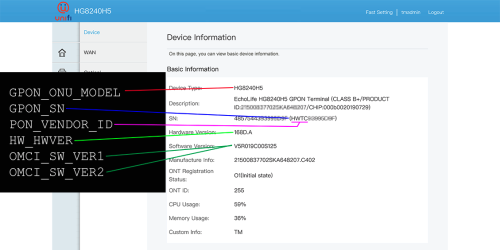
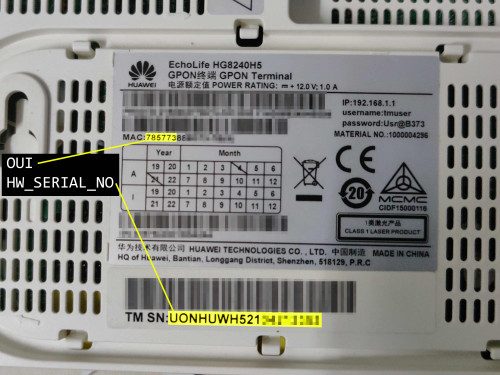
Like this, 2Gbps AIO ONU, so far no issue, can share OMCI Info that 2Gbps ONU AIO use:
user posted image

Taken from here
user posted image
user posted image

leave MAC Address and MAC Key alone, that for EPON who auth via MAC Address

we use GPON, Layer 3 transport, 2000 bytes MTU, no need change MAC Address

This post has been edited by Anime4000: May 14 2023, 01:26 PM
liquid.D
post May 14 2023, 03:57 PM

Getting Started
**
Junior Member
117 posts

Joined: Feb 2008
From: Ampang


QUOTE(Anime4000 @ May 14 2023, 01:24 PM)
Like this, 2Gbps AIO ONU, so far no issue, can share OMCI Info that 2Gbps ONU AIO use:
user posted image

Taken from here
user posted image
user posted image

leave MAC Address and MAC Key alone, that for EPON who auth via MAC Address

we use GPON, Layer 3 transport, 2000 bytes MTU, no need change MAC Address
*
I see.. thanks.. i think all the needed things already entered.. hopefully able to plug and my router will auto dial it at vlan 500,
I put this as an auto for VLAN, hopefully everything work.. hehee…

Edited : It’s working… look like same speed as original ONU ZTE F620.. hahaa.. nothing extra ….
My ODi Web page seems not so many things to adjust.. i try using root / PON521 on web login cannot proceed.. haha…
think my version are ZTE version of ODi very simple setting in the webpage setting list

Does using telnet will unlock additional config / tweak for ODi ZTE? Or it’s because of ZTE chip .. not so configurable?

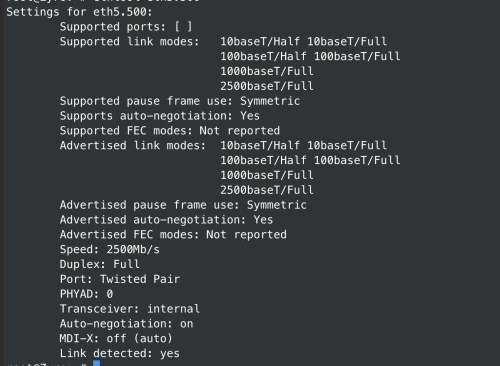
Btw based on openwrt connection i can see my connection speed now seems like 2500 already for the XPON

user posted image

This post has been edited by liquid.D: May 14 2023, 04:42 PM
hanny562
post May 14 2023, 04:02 PM

Enthusiast
*****
Senior Member
944 posts

Joined: Sep 2007
Hi guys,

Do we need to reset mikrotik to default setting before proceed to do setting for SFP module?

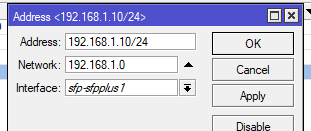
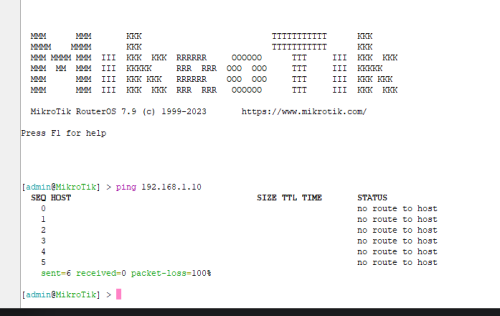
I kept my current setting and insert my SFP module, for the first time after restart, I'm able to access webgui of sfp module, but after configured and restart, I'm not able to access anymore. Not even able to ping the SFP module.

When I type 192.168.1.10 - it redirect me to Mikrotik WebGUI

Huawei MA5671A pon IP - 192.168.1.10
Router address - 192.168.0.1

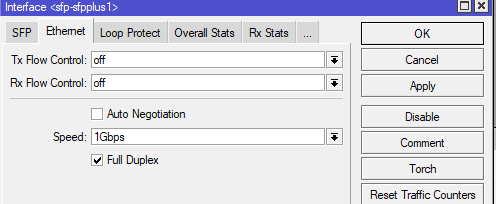
This is my current SFP setting.
user posted image

Addresses
user posted image

Interface force 1gb full duplex
user posted image

Not able to ping
user posted image

Thanks in advance

This post has been edited by hanny562: May 14 2023, 04:09 PM
TSAnime4000
post May 14 2023, 05:01 PM

Look at all my stars!!
*******
Senior Member
2,399 posts

Joined: Jul 2009
From: /dev/null


QUOTE(liquid.D @ May 14 2023, 03:57 PM)
I see.. thanks.. i think all the needed things already entered.. hopefully able to plug and my router will auto dial it at vlan 500,
I put this as an auto for VLAN, hopefully everything work.. hehee…

Edited : It’s working… look like same speed as original ONU ZTE F620.. hahaa.. nothing extra ….
My ODi Web page seems not so many things to adjust.. i try using root / PON521 on web login cannot proceed.. haha…
think my version are ZTE version of ODi very simple setting in the webpage setting list

Does using telnet will unlock additional config / tweak for ODi ZTE? Or it’s because of ZTE chip .. not so configurable?

Btw based on openwrt connection i can see my connection speed now seems like 2500 already for the XPON

user posted image
*
it's time to subscribe 2Gbps xD

QUOTE(hanny562 @ May 14 2023, 04:02 PM)
Hi guys,

Do we need to reset mikrotik to default setting before proceed to do setting for SFP module?

I kept my current setting and insert my SFP module, for the first time after restart, I'm able to access webgui of sfp module, but after configured and restart, I'm not able to access anymore. Not even able to ping the SFP module.

When I type 192.168.1.10 - it redirect me to Mikrotik WebGUI

Huawei MA5671A pon IP - 192.168.1.10
Router address - 192.168.0.1

This is my current SFP setting.
user posted image

Addresses
user posted image

Interface force 1gb full duplex
user posted image

Not able to ping
user posted image

Thanks in advance
*
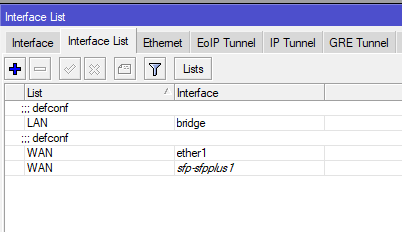
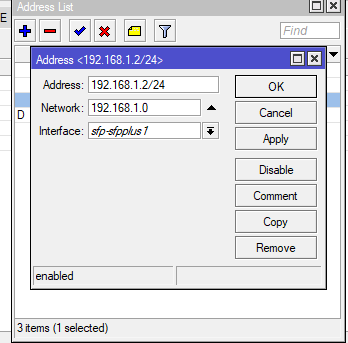
1. sfp address 192.168.1.2/24
2. add sfp to WAN interface list

this will NAT to your SFP for management
hanny562
post May 15 2023, 01:23 AM

Enthusiast
*****
Senior Member
944 posts

Joined: Sep 2007
QUOTE(Anime4000 @ May 14 2023, 05:01 PM)
it's time to subscribe 2Gbps xD
1. sfp address 192.168.1.2/24
2. add sfp to WAN interface list

this will NAT to your SFP for management
*
Thank you for the reply. I did configure SFP to WAN interface list, and actually I tried to set other SFP address as well. Still no luck accessing WebGUI. Error message when ping = "No Route to host".
Checked my firewall and nothing is blocking it.
user posted image
user posted image

I noticed that my PON stick seems like not clipping the fiber header firmly, not sure is it normal or it is a faulty unit.
https://youtube.com/shorts/1tYSY3iAGeY?feature=share

This post has been edited by hanny562: May 15 2023, 10:32 AM
AdmiralG
post May 15 2023, 01:36 AM

Getting Started
**
Junior Member
130 posts

Joined: Dec 2014


Hi. Would like to know what's the benefit of doing this?
PRSXFENG
post May 15 2023, 09:52 AM

Look at all my stars!!
*******
Senior Member
2,608 posts

Joined: Nov 2020


QUOTE(AdmiralG @ May 15 2023, 01:36 AM)
Hi. Would like to know what's the benefit of doing this?
*
1. Allows true speed without being limited by 1Gbe ports (such as on Unifi Ultra 2Gbps plans)
2. save 1 box and power outlet, easier to power with UPS
3. nice and neat everything inside a rack mounted router
4. maybe you dont trust Cina brand like Huawei tongue.gif
5. learning experience too
TSAnime4000
post May 15 2023, 11:55 AM

Look at all my stars!!
*******
Senior Member
2,399 posts

Joined: Jul 2009
From: /dev/null


QUOTE(hanny562 @ May 15 2023, 01:23 AM)
Thank you for the reply. I did configure SFP to WAN interface list, and actually I tried to set other SFP address as well. Still no luck accessing WebGUI. Error message when ping = "No Route to host".
Checked my firewall and nothing is blocking it.
user posted image
user posted image

I noticed that my PON stick seems like not clipping the fiber header firmly, not sure is it normal or it is a faulty unit.
https://youtube.com/shorts/1tYSY3iAGeY?feature=share
*
Oh, you are using MA6571a, OpenWRT Webpage is 192.168.1.10 by default
some router need fiber to be plug-in in order to work, like RB4011
hanny562
post May 15 2023, 12:25 PM

Enthusiast
*****
Senior Member
944 posts

Joined: Sep 2007
QUOTE(Anime4000 @ May 15 2023, 11:55 AM)
Oh, you are using MA6571a, OpenWRT Webpage is 192.168.1.10 by default
some router need fiber to be plug-in in order to work, like RB4011
*
Yes I'm using MA5671A, and I have plugged in my fiber, check on Monitor SFP/SFPPLUS1 and it there is not tx/rx losses. I wonder if I need to set my"Network" to in Addresses to 192.168.1.10 instead of 192.168.1.0.

Will try again when no one use internet.
AdmiralG
post May 15 2023, 02:07 PM

Getting Started
**
Junior Member
130 posts

Joined: Dec 2014


QUOTE(PRSXFENG @ May 15 2023, 09:52 AM)
1. Allows true speed without being limited by 1Gbe ports (such as on Unifi Ultra 2Gbps plans)
2. save 1 box and power outlet, easier to power with UPS
3. nice and neat everything inside a rack mounted router
4. maybe you dont trust Cina brand like Huawei  tongue.gif
5. learning experience too
*
Thank you.

I have an Asus RT-AX86U router. The PON stick / SFP will not work directly and i will need to use another device or change to a compatible router for this to work right?
hanny562
post May 15 2023, 02:50 PM

Enthusiast
*****
Senior Member
944 posts

Joined: Sep 2007
QUOTE(hanny562 @ May 15 2023, 12:25 PM)
Yes I'm using MA5671A, and I have plugged in my fiber, check on Monitor SFP/SFPPLUS1 and it there is not tx/rx losses. I wonder if I need to set my"Network" to in Addresses to 192.168.1.10 instead of 192.168.1.0.

Will try again when no one use internet.
*
Tested with what I know, still no luck.

I checked IP-> Routes, the status is unreachable.

Not really sure whats going on already, bought a SFP converter with TTL..will check the PON stick / reflash it after arrive.
TSAnime4000
post May 16 2023, 03:54 PM

Look at all my stars!!
*******
Senior Member
2,399 posts

Joined: Jul 2009
From: /dev/null


QUOTE(AdmiralG @ May 15 2023, 02:07 PM)
Thank you.

I have an Asus RT-AX86U router. The PON stick / SFP will not work directly and i will need to use another device or change to a compatible router for this to work right?
*
Yes, you need SFP Media Converter that runs on 2.5G and connect to 2.5G LAN Port
hanny562
post May 22 2023, 05:36 PM

Enthusiast
*****
Senior Member
944 posts

Joined: Sep 2007
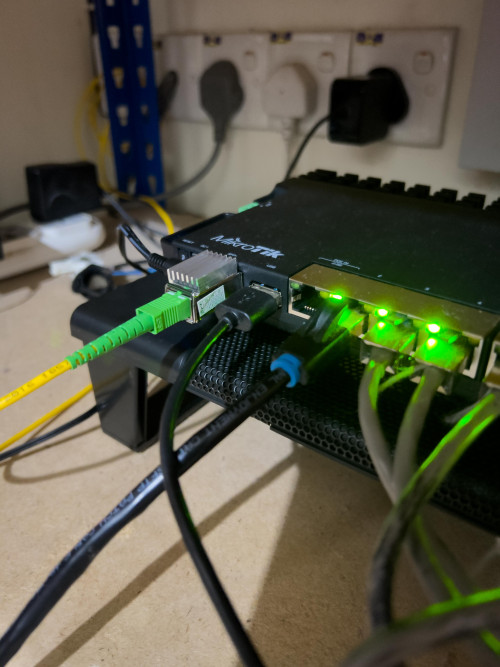
Finally done ttl firmware reflash and configuration. Now able to direct plug in fiber to my rb5009 (only populate GPON SB and PLAOM password, restart and get status 05)
Thanks to@Anime4000 for the guide on the first page.

user posted image

This post has been edited by hanny562: May 22 2023, 05:38 PM
ejery
post May 22 2023, 07:37 PM

New Member
*
Newbie
10 posts

Joined: Jan 2012
QUOTE(PRSXFENG @ May 15 2023, 09:52 AM)
1. Allows true speed without being limited by 1Gbe ports (such as on Unifi Ultra 2Gbps plans)
2. save 1 box and power outlet, easier to power with UPS
3. nice and neat everything inside a rack mounted router
4. maybe you dont trust Cina brand like Huawei  tongue.gif
5. learning experience too
*
Hello everyone here, just landed in this thread (and also a newbie). Just upgraded from 800/200 to 2000/1000, just like everyone else feel about the "not true 2gbps", i think im in the same boat as everyone here. After sometimes of reading, to achieve true 2Gbps required (1) Mikrotik RB5009 and (2) GPON SFP+

Anyone here sell the hardware? Or a link "untuk beli" the hardware required.

Im also about to buy this but afraid i wont work/compatible.

Thanks

- Jerry

mamakap
post May 22 2023, 08:17 PM

Casual
***
Junior Member
403 posts

Joined: Jan 2005
QUOTE(hanny562 @ May 22 2023, 05:36 PM)
Finally done ttl firmware reflash and configuration. Now able to direct plug in fiber to my rb5009 (only populate GPON SB and PLAOM password, restart and get status 05)
Thanks to@Anime4000 for the guide on the first page.

user posted image
*
Did you do factory reset the RB5009 configuration in order to access the webgui of the Huawei GPON?
TSAnime4000
post May 22 2023, 11:05 PM

Look at all my stars!!
*******
Senior Member
2,399 posts

Joined: Jul 2009
From: /dev/null


QUOTE(ejery @ May 22 2023, 07:37 PM)
Hello everyone here, just landed in this thread (and also a newbie). Just upgraded from 800/200 to 2000/1000, just like everyone else feel about the "not true 2gbps", i think im in the same boat as everyone here. After sometimes of reading, to achieve true 2Gbps required (1) Mikrotik RB5009 and (2) GPON SFP+

Anyone here sell the hardware? Or a link "untuk beli" the hardware required.

Im also about to buy this but afraid i wont work/compatible.

Thanks

- Jerry
*
Playing with xPON SFP is like play with fire, SFP device has no way to factory reset like usual, one wrong setting = brick!
TM OLT has strict "halal" device that can be connected to.
I would recommended buy that already configured, just enter PLOAM (or set PLOAM Password before shipping, just plug and play)


QUOTE(mamakap @ May 22 2023, 08:17 PM)
Did you do factory reset the RB5009 configuration in order to access the webgui of the Huawei GPON?
*
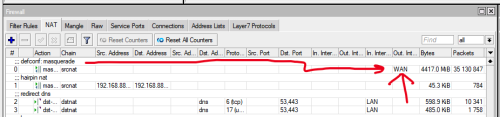
No need, I do this, just NAT it
user posted image
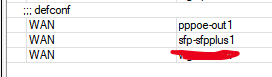
user posted image
user posted image
user posted image

access PON anywhere in LAN or in routable
user posted image


This post has been edited by Anime4000: May 22 2023, 11:08 PM
hanny562
post May 23 2023, 01:04 AM

Enthusiast
*****
Senior Member
944 posts

Joined: Sep 2007
QUOTE(mamakap @ May 22 2023, 08:17 PM)
Did you do factory reset the RB5009 configuration in order to access the webgui of the Huawei GPON?
*
Nope, just configure like @Anime4000 mention will do.
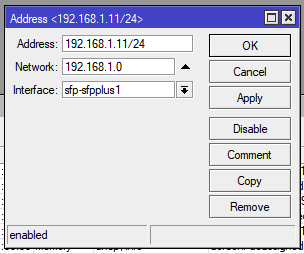
1. Set SFP address - 192.168.1.11/24
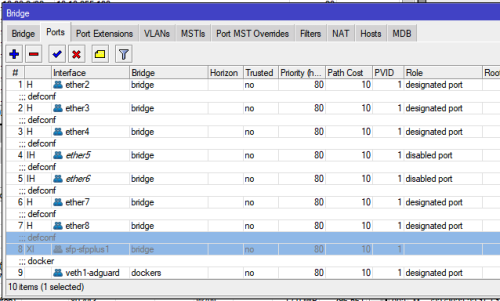
2. Remove SFP from bridge
2. Add SFP to WAN interface group
3. NAT (masquerade) WAN interface group

This post has been edited by hanny562: May 23 2023, 01:06 AM
darkearth
post May 28 2023, 03:43 PM

Getting Started
**
Junior Member
258 posts

Joined: Jan 2003
From: PJ


Hi Fellow Sifus,

I recently upgraded to the unifi 2gbps line and understand due to the hardware limitation we cannot get the full speed under 1 connection. I came across this post and wonder if anyone can teach me or sell any preconfigured devices to support the 2gbps line?

my current setup
D-LINK DPN-FX3060V x 2
ASUS AX-88U

This post has been edited by darkearth: May 28 2023, 03:44 PM

83 Pages « < 31 32 33 34 35 > » Top
 

Change to:
| Lo-Fi Version
0.0243sec    0.57    6 queries    GZIP Disabled
Time is now: 12th December 2025 - 09:40 AM