Welcome Guest ( Log In | Register )

Outline · [ Standard ] · Linear+

Home Networking Ditch ONU, use GPON SFP on Business Grade Router, 2.5G ONU for Unifi & Maxis, NO NEED VLAN

views
     
liquid.D
post Apr 30 2023, 08:35 PM

Getting Started
**
Junior Member
117 posts

Joined: Feb 2008
From: Ampang


Hi All,

I’ve installed unifi package 500mbps free upgrade 800mbps / 6 month after using 4g / 5g internet for sometimes, Since now already jump to unifi I’m interested to explore the usage of gpon / xgpon stick after i saw some posted on youtube using gpon sfp stick with fibre media converter 2.5gbps lan, this is quite interesting, but am very new to this fibre.

I would also like to know if any sifu here successfully convert Their setup from zte onu to gpon/xgpon stick, perhaps can suggest any stick & technique on converting this?

P/s : Am thinking to get 2gbps version after free 6 month upgrade to 800 after terminating all my yes 5g fibre 😅, since still have this yes 5g in my contract (not worth to terminate.. i remember have to pay full? 😶‍🌫️)

Btw:
Below are my unifi onu that i get from tm
UONU ZTE
Date 2022
Product: GPON ONU
Model : ZXHN F620
Material Description : Universal ONU

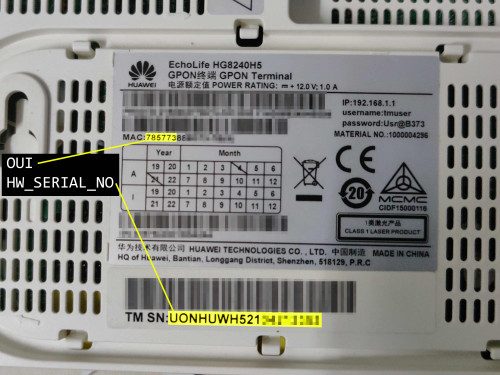
I have GPON SN , Mac Address & TM SN (behind onu)
I also manage to get my ppoe username and password
And now use this on my x86 openwrt.

Sorry to ask, have anyone have any idea on how to successfully extracted other info in this type of onu such as the voip password.. and any other password being set in this onu? And what are the default ip/pass for this onu yea?


liquid.D
post May 1 2023, 01:23 AM

Getting Started
**
Junior Member
117 posts

Joined: Feb 2008
From: Ampang


QUOTE(Anime4000 @ May 1 2023, 12:04 AM)
You also need SLID/PLOAM Password (10 ASCII Character)

Can use Huawei HG8240H or HG8240H5 ONU Info, this ONU are widely used and universal.

Also I updated the first page, add info about 4-port ONU Emulation, VLAN, VoIP and IPTV
*
Hi @anime4000, thanks for your info, i just manage to watch some youtube and able to get in my onu and screenshot all that needed, kind of funny the ploam using very basic numbers and passwords, even the voip (400) manage to get the info, i tot using account number, now I’m became keen to try this with 2.5gbps sfp+, you done this using sfp router right bro?

Am thinking using the sfp xonu with media converters since I’ve already have x86 openwrt router with couple of 2.5Gbps port, Hope using this pon stick inside media converter in bridge mode will be flowless and unlock extra speed 🙂

Btw If anyone here have try 2gbps unifi that have aggregated 1gbps x 2 can confirm if using 2.5Gbps pon stick will get 2gbps single rather then split 2 using unifi supplied gpon… hehe
liquid.D
post May 1 2023, 01:27 AM

Getting Started
**
Junior Member
117 posts

Joined: Feb 2008
From: Ampang


QUOTE(go626201 @ May 1 2023, 12:55 AM)
Hi Anime4000,would u buy VSOL HG3110AX for testing when it sale release?
(Got 1x 2.5G port ,3x 1G port and pots port)
I am interested for this model for the pots port for unifi home phone usage.
*
Not sure this is feasible or not, but in theory if onu are in bridge mode maybe inside router can forward the vlan? Or u can use smartswitch to untag the vlan on destination ? I do the vlan previously when load balancing few 4g modem using only single ethernet, maybe this technique can be use from pon to smartswitch? Have to try this if have the unit
liquid.D
post May 1 2023, 01:32 AM

Getting Started
**
Junior Member
117 posts

Joined: Feb 2008
From: Ampang


QUOTE(lwk523 @ Sep 3 2022, 07:35 PM)
I can source that device for you and let Anime4000 to guide on configuration rclxm9.gif
*
Haaa seems like local seller, may i know what kind of pon stick / xpon stick model you have in hand? Hehee already have itchy hand to try with 2.5G media converter.. all this pon stick can work with media converter as bridge flawlessly right? Hehe
liquid.D
post May 1 2023, 02:34 AM

Getting Started
**
Junior Member
117 posts

Joined: Feb 2008
From: Ampang


QUOTE(ITLearner @ Oct 21 2022, 07:46 PM)
OP, i want to ask is this MYR 206.65  19%OFF | PON STICK EPON GPON XPON SFP ONU Stick With MAC PPPoE IPoE HGU SC Connector DDM pon module 1490/1330nm 1.25Gbps 802.3ah
https://a.aliexpress.com/_mKqwMy0
compatible with my TP-LINK SX3008F?. TQ
*
Am thinking the same.. either using media converter as bridge or using this 10Gbps jetstream sfp+, but not sure which sfp compatible with this

liquid.D
post May 8 2023, 09:00 PM

Getting Started
**
Junior Member
117 posts

Joined: Feb 2008
From: Ampang


QUOTE(YoungMan @ May 1 2023, 02:54 PM)
Which method you use to extract the ploam password from ZTE 620?
*
Edit this on 14May2023..

after checking on few youtube channel on configuring Tm-ONU, i found out that PLOAM password are equivalent with SN Password stored in ZTE 620,
So u basically can extract this from the onu and use in ONU stick.. hope this help..

i’ll try this passwd on my ODi maybe today, hopefully this will work flawlessly replacing F620 smile.gif

This post has been edited by liquid.D: May 14 2023, 04:52 AM
liquid.D
post May 13 2023, 11:24 PM

Getting Started
**
Junior Member
117 posts

Joined: Feb 2008
From: Ampang


QUOTE(Anime4000 @ May 10 2023, 09:04 PM)
another pressing issue, newer ODI stick "V06" is having issue with limited upload speed when on 2.5Gb (HSGMII PHY),
I am on "V05" and I can't test either on 2Gbps plan sad.gif

in bright side, Intel PON Stick seem to work, waiting that guy feedback
*
Edit This:

I’ve just got mine from lazada together with 2.5G media converter,
Updated : Mine seems to have this (i think v1)
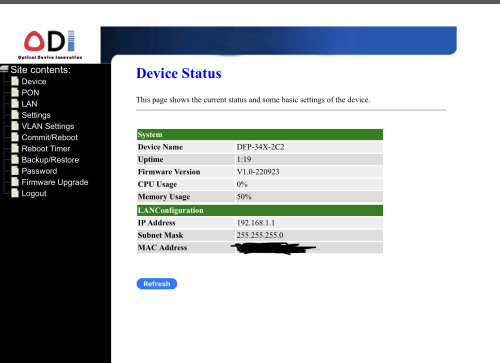
Firmware Version V1.0-220923

Btw the version means it’s not compatible with same firmware as what yea all using?

I want to upload the image from my ipad but seems loyat said it’s too large haha

Below are the information on the ODi
DFP-34X-2C2
1.25/2.5G 1310nm 20km
XPON 23……87 (i guess this is the serial number)

Another Question…
Any of you sifu use viewqwest in the home area where Unifi infra is? ..
Any Of you sifu2 use 2 fibre subscription per house number?… success or not? Not sure 1 house / 1 fibre or can multi subscribe.. smile.gif

This post has been edited by liquid.D: May 14 2023, 06:53 AM
liquid.D
post May 14 2023, 03:48 AM

Getting Started
**
Junior Member
117 posts

Joined: Feb 2008
From: Ampang


QUOTE(Ouru @ Aug 14 2022, 09:29 PM)
Hi Team,

recently i tested again plug-in the same sfp v2801F as before in FGT 500D but with few changes based on TM provided new gpon modem (ZTE ZHXN F620) but not working any more. pppoe connected (after waiting little longer time) but connected with very slow speed (ard 30mbps) only, subscribed 500mbps TM Unifi . the only changes i did was using new modem mac add, model , software version etc...others remain same if im not mistaken. I follow our cikgu @Anime4000 thumbsup.gif guide in github.com as usual. below are the config :
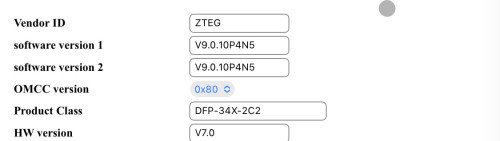

flash set GPON_PLOAM_PASSWD 1234567890
flash set GPON_SN ZTExxxxxxx
flash set GPON_ONU_MODEL F620
flash set OMCI_TM_OPT 0
flash set VLAN_CFG_TYPE 1
flash set PON_VENDOR_ID ZTEG 
flash set OMCI_SW_VER1 V9.0.10P4N2
flash set OMCI_SW_VER2 V9.0.10P4N2
flash set CUSTOM_OMCI_SW_VER1 V9.0.10P4N2
flash set CUSTOM_OMCI_SW_VER2 V9.0.10P4N2
flash set HW_HWVER V7.0
flash set ELAN_MAC_ADDR f864b8bf8a74
flash set VS_AUTH_KEY DD4D14B4773F74DF18F742E1A0E3673D
flash set OMCI_FAKE_OK 1
flash set OMCI_OLT_MODE 1

not sure where i did mistake....need some help thanks team
*
Hye Ouru, you use ploam password 1234567890 working yea at your place yea?

Actually kan.. after watching on yt on some tm configuration for multiple onu brand, my understanding is seems that
ploam = SN passwd (ZTE) = SLID (Nokia) = ONU Passwd (homefibre /huawei).. same things different name to represent it .. hehe…

Also need help from sifu2 here if anyone can confirm this is the auth paswd credential that need to be set/map ploam pswd successfully on the ODi Stick?

By the way just wondering if any of you guy change the ip from 192.168.1.1 to other like 162.168.11.11 ?
Will this work? Or will break / have issue the ODi? I just want to set this to other to avoid confusion if can.. hehe

user posted image

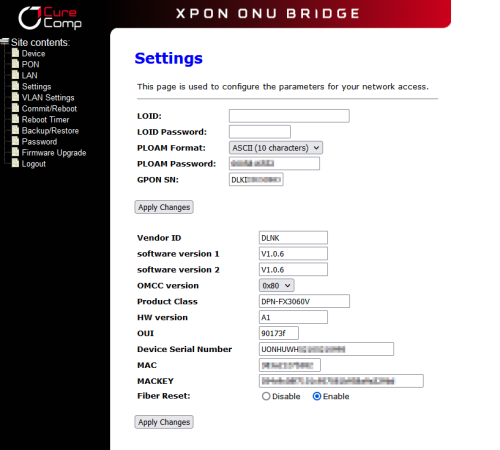
What can we put in Product Class ? … can put ZXHN F620? Am using the ODi - WEBUI

user posted image

For the mac and mac key how you all convert yea the mac and key? Safe to leave default? … Currently Fibre Reset i leave enabled (default)

user posted image

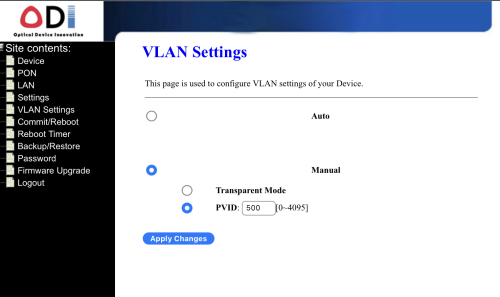
OK this 1.. i’m confused … i can set only 1 VLAN i put 500 but seems not the same with bro “Thankyou” ….. i guess i got the version of no emulate LAN port? Or i’ve done wrong setting?

user posted image

That’s My ODi XPON info, not sure where are other menu setting .. i login as admin / admin

This post has been edited by liquid.D: May 14 2023, 08:09 AM
liquid.D
post May 14 2023, 03:57 PM

Getting Started
**
Junior Member
117 posts

Joined: Feb 2008
From: Ampang


QUOTE(Anime4000 @ May 14 2023, 01:24 PM)
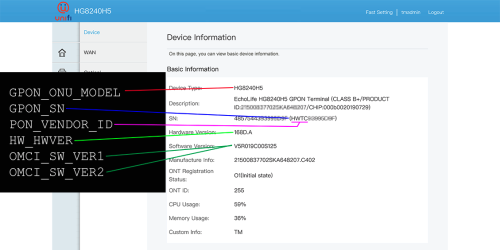
Like this, 2Gbps AIO ONU, so far no issue, can share OMCI Info that 2Gbps ONU AIO use:
user posted image

Taken from here
user posted image
user posted image

leave MAC Address and MAC Key alone, that for EPON who auth via MAC Address

we use GPON, Layer 3 transport, 2000 bytes MTU, no need change MAC Address
*
I see.. thanks.. i think all the needed things already entered.. hopefully able to plug and my router will auto dial it at vlan 500,
I put this as an auto for VLAN, hopefully everything work.. hehee…

Edited : It’s working… look like same speed as original ONU ZTE F620.. hahaa.. nothing extra ….
My ODi Web page seems not so many things to adjust.. i try using root / PON521 on web login cannot proceed.. haha…
think my version are ZTE version of ODi very simple setting in the webpage setting list

Does using telnet will unlock additional config / tweak for ODi ZTE? Or it’s because of ZTE chip .. not so configurable?

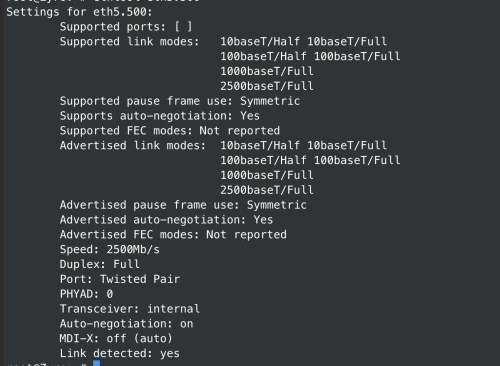
Btw based on openwrt connection i can see my connection speed now seems like 2500 already for the XPON

user posted image

This post has been edited by liquid.D: May 14 2023, 04:42 PM
liquid.D
post Nov 9 2023, 06:39 AM

Getting Started
**
Junior Member
117 posts

Joined: Feb 2008
From: Ampang


Hi all sifu out there,

Am currently using xdi zte xpon (with media converter) so far after free upgrade get around 8xx / 2xx, when doing load balance (with yes5g and umobile 5g) using openwrt x86 .. can get 1.4~gbps while not yet able to do proper load balance with mikrotik router os 7 (x86 version 😅… kind of hard to setup pcc when using dynamic ip).

Now thinking to upgrade to unifi 1Gbps (rm289) or 2Gbps (rm 319) (without unifi tv / uni5g package)
Currently still awaiting for tm reply email since am currently on contract (500Mbps ~ rm2xx).

The thing is i would want to invest with Tp-Link ER8411 which have sfp+ 10G port.

Anybody / sifu out there have try this?
If any.. which multi gigabit xpon can be use directly with this model?. 😄
Not sure will my xdi zte can work directly witj er8411 or not.. 😂

This post has been edited by liquid.D: Nov 9 2023, 06:48 AM
liquid.D
post Nov 9 2023, 11:54 AM

Getting Started
**
Junior Member
117 posts

Joined: Feb 2008
From: Ampang


QUOTE(cyberic @ Nov 9 2023, 10:07 AM)
Why use these instead of Mikrotik which much low profile? What are the pro of using these?
*
I guess some people like x86 due to the horse power and more customisation.. i’m also the one using x86 as router for nearly 5 yr, but now thinking to change to vpn premaid router, perhaps want to try avoid any extra overhead layer.

Mikrotik is nice.. but after buying license level 4 for my x86, i found it’s troublesome for multiwan pcc setup with multiple isp that give public ip / dynamic ip.. try to write scripts and end up just using back openwrt x86.. haha

I saw in internet tplink omada vpn router setup seems straightforward, that why looking for any sfp gpon that might compatible with fibre direct connection ..
Btw i also use omada ap wifi 6 already.

But still not sure how to set 1st port (xpon) unifi fibre ..2nd sfp as 2.5gb ethernet (LAN) and 3rd / 4th gigabit port as the 2nd isp and 3rd isp, hard to judge from youtube tutorials for tp-link routers setup.

Maybe Anybody have exp setup multiwan on tp-link vpn router also can give some advice to me 😄

This post has been edited by liquid.D: Nov 9 2023, 11:58 AM
liquid.D
post Nov 9 2023, 08:32 PM

Getting Started
**
Junior Member
117 posts

Joined: Feb 2008
From: Ampang


QUOTE(Oltromen Ripot @ Nov 9 2023, 03:09 PM)
those lazada/shopee mini pc with multiple (claimed) 2.5Gbps. running on intel celeron etc.

are they powerful and stable to be turned into ultra router?

i'm waiting to see what "token of appreciation" is first. if really getting 2.5Gbps BTU, then this will be sweet.
*
Yes i do have a coupled, using this mini pc for load balance since 2018, i have celeron j3160 (4x gb lan).. 4series celeron with (6x gb lan) and now 6 x 2.5gbps lan for 5 series celeron with 32Gb ram (running proxmox / exsi 8) .. it’s indeed powerful, have been using with mikrotik router os.. openwrt .. pfsense.. opnsense ..vyos.. ubuntu .. ads block, pihole.. unify controller, omada controller .. etc in vm or direct..

Now Using with xdi zte with media converter 2.5Gbps for my unifi for few month already, thinking to try tp-link with sfp (ER8411), but vefore that need to be sure … which direct sfp xpon (unifi compatible) can be use.. in this router

If you like to explore this x86 box i think it a good learning curve.. plenty of documentation on configuration
liquid.D
post Jan 21 2024, 12:06 AM

Getting Started
**
Junior Member
117 posts

Joined: Feb 2008
From: Ampang


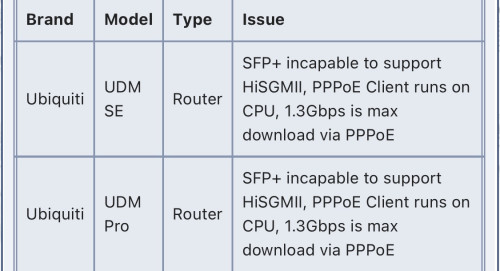
user posted image

Hi All Sifus,

I have 1 UDM PRO, may i know the above statement means that onu have problem cucuk direct the sfp? need to use media converter? … hehe so sayang if cannot because thinking to upgrade 2G from TM
liquid.D
post Feb 2 2024, 07:02 PM

Getting Started
**
Junior Member
117 posts

Joined: Feb 2008
From: Ampang


QUOTE(Anime4000 @ Jan 21 2024, 11:19 PM)
as I remember, got people mention that UDM hardware is capable, but UDM firmware are not.

Ubiquiti said to me (and other community) they never support HiSGMII (2.5G SFP)

Also never support PPP Acceleration even hardware they use support.

as yenchenje said before. You need deal with Dual NAT if insist to use UDM SE/Pro.

The first NAT is just NAT 1:1/DMZ (redirect all incoming) and need to use 100.64.0.0/10 for between first NAT and UDM, this added security and tell UDM use External DDNS solver
*
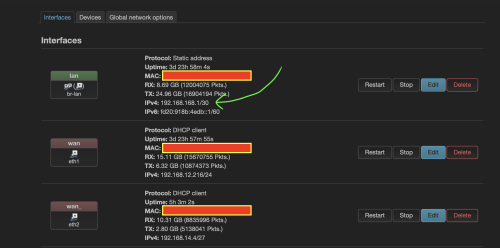
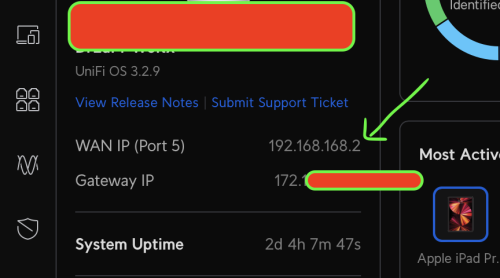
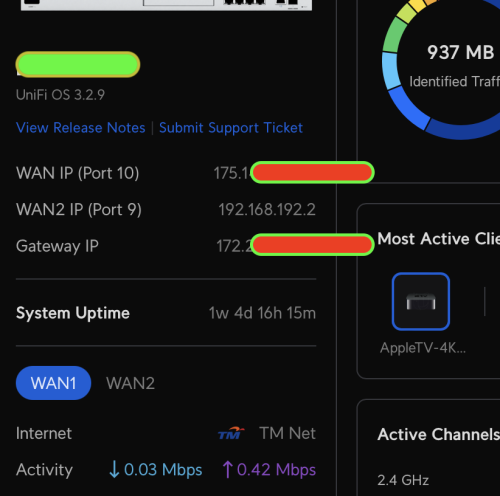
I see, ok new thing I learn today (CGNAT) .. may I know the 100.64.0.0/10 I have to set in the lan before go to UDM ?

user posted image

(The one 192.168.168.1 should be 100.64.0.1/30 ?)

currently I set like this, using openwrt as the 1st nat and load balancer (for UDR since UDR no dual wan)

user posted image

for UDM currently use PPoE (since not yet upgrade my 800Mbps plan), since now I know that 2GBPS I need to have capable router on top as 1st nat,
need to learn more of this CG-NAT setup biggrin.gif

user posted image

===============================================================================

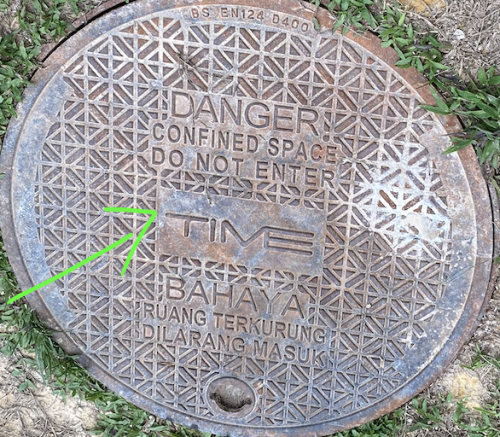
Perhaps waiting for TiMe on my landed area...

BtW kan.... (I wonder if any of you SiFu know if Ampang area have Time Fibre expansion) ?
because mid of this month there are activity infront main road near my house, very noisy at night.. and I saw this

user posted image

just hoping to get alternative fibre at my area .. maybe no need to invest heavily on dual nat setup etc smile.gif


Change to:
| Lo-Fi Version
0.0917sec    0.49    7 queries    GZIP Disabled
Time is now: 4th December 2025 - 03:35 AM